mirror CHEVROLET SILVERADO 2015 3.G User Guide
[x] Cancel search | Manufacturer: CHEVROLET, Model Year: 2015, Model line: SILVERADO, Model: CHEVROLET SILVERADO 2015 3.GPages: 543, PDF Size: 7.01 MB
Page 52 of 543
Black plate (15,1)Chevrolet 2015i Silverado Owner Manual (GMNA-Localizing-U.S./Canada/
Mexico-8425172) - 2015 - crc - 2/6/15
Keys, Doors, and Windows 2-15
seat. The convex mirror can be
adjusted manually to the driver
preferred position for better vision.
The mirror may have a turn signal
arrow that flashes in the direction of
the turn or lane change.
If equipped, the mirror housing may
have auxiliary cargo and clearance
lamps. SeeCargo Lamp on
page 6-7 andExterior Lamp
Controls on page 6-1.Power Mirrors
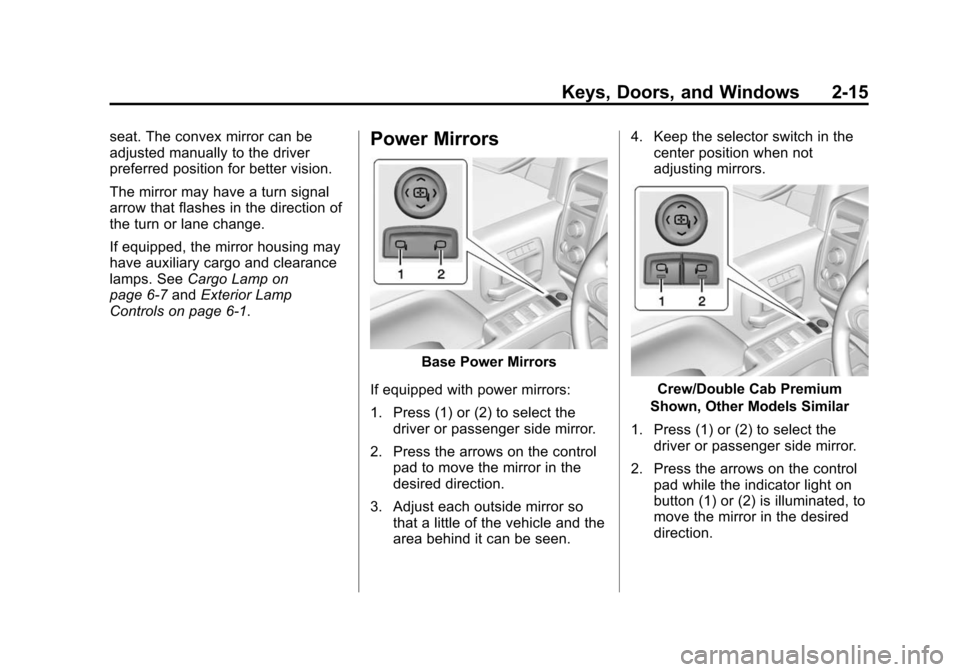
Base Power Mirrors
If equipped with power mirrors:
1. Press (1) or (2) to select the driver or passenger side mirror.
2. Press the arrows on the control pad to move the mirror in the
desired direction.
3. Adjust each outside mirror so that a little of the vehicle and the
area behind it can be seen. 4. Keep the selector switch in the
center position when not
adjusting mirrors.
Crew/Double Cab Premium
Shown, Other Models Similar
1. Press (1) or (2) to select the driver or passenger side mirror.
2. Press the arrows on the control pad while the indicator light on
button (1) or (2) is illuminated, to
move the mirror in the desired
direction.
Page 53 of 543
Black plate (16,1)Chevrolet 2015i Silverado Owner Manual (GMNA-Localizing-U.S./Canada/
Mexico-8425172) - 2015 - crc - 2/6/15
2-16 Keys, Doors, and Windows
3. Adjust each outside mirror sothat a little of the vehicle and the
area behind it can be seen.
4. Press either (1) or (2) again to deselect the mirror.
If you do not deselect the mirror, the
feature will turn off after about
one minute.
If equipped, the mirrors may include
a memory function that works with
the memory seats. See Memory
Seats on page 3-6.Folding Mirrors
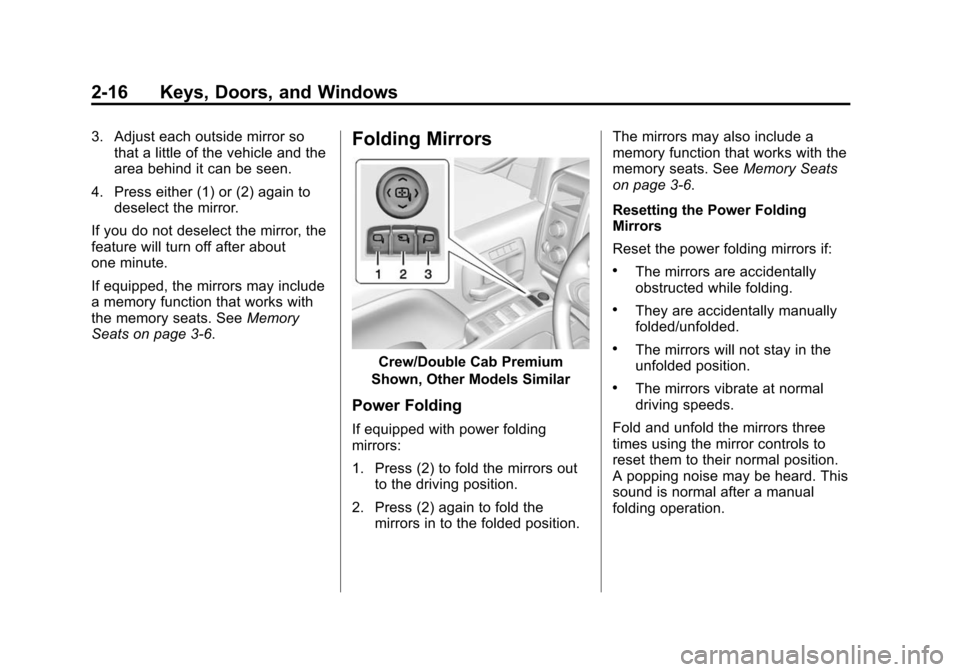
Crew/Double Cab Premium
Shown, Other Models Similar
Power Folding
If equipped with power folding
mirrors:
1. Press (2) to fold the mirrors out to the driving position.
2. Press (2) again to fold the mirrors in to the folded position. The mirrors may also include a
memory function that works with the
memory seats. See
Memory Seats
on page 3-6.
Resetting the Power Folding
Mirrors
Reset the power folding mirrors if:
.The mirrors are accidentally
obstructed while folding.
.They are accidentally manually
folded/unfolded.
.The mirrors will not stay in the
unfolded position.
.The mirrors vibrate at normal
driving speeds.
Fold and unfold the mirrors three
times using the mirror controls to
reset them to their normal position.
A popping noise may be heard. This
sound is normal after a manual
folding operation.
Page 54 of 543
Black plate (17,1)Chevrolet 2015i Silverado Owner Manual (GMNA-Localizing-U.S./Canada/
Mexico-8425172) - 2015 - crc - 2/6/15
Keys, Doors, and Windows 2-17
Manual Folding
If equipped, push the mirror toward
the vehicle to fold. Push the mirror
outward to return to its original
position.
Manually fold the mirrors inward to
prevent damage when going
through an automatic car wash.
Auto Mirror Folding
If equipped, with the ignition off,
press and hold
Qon the RKE
transmitter for approximately
one second to automatically fold the
exterior mirrors. Press and hold
K
on the RKE transmitter for
approximately one second to unfold.
See Remote Keyless Entry (RKE)
System Operation on page 2-4.
This feature is turned on or off
through vehicle personalization. See
Vehicle Personalization on
page 5-45.
Turn Signal Indicator
If equipped, indicator lights on the
mirror flash in the direction of the
turn or lane change.
Heated Mirrors
1
(Rear Window Defogger):
If equipped, the rear window
defogger also heats the side
mirrors.
W(Heated Side Mirrors):
If equipped, press to turn the heated
mirrors on or off.
If the vehicle has trailer-tow mirrors,
only the upper glass of the mirror is
heated. The lower convex part of
the towing mirrors is not heated.
See “Rear Window Defogger” under
Climate Control Systems (with
Heater Only) on page 8-1 orClimate
Control Systems (with Air
Conditioning) on page 8-3 orDual
Automatic Climate Control System
on page 8-5.
Automatic Dimming
Mirror
If equipped, the driver outside mirror
automatically adjusts for the glare of
the headlamps from behind. This
feature comes on when the vehicle
is started.
Blind Spot Mirrors
If equipped, there is a small convex
mirror built into the upper and outer
corner of the driver outside rearview
mirror. It can show objects that may
be in the vehicle's blind zone.
Page 55 of 543
Black plate (18,1)Chevrolet 2015i Silverado Owner Manual (GMNA-Localizing-U.S./Canada/
Mexico-8425172) - 2015 - crc - 2/6/15
2-18 Keys, Doors, and Windows
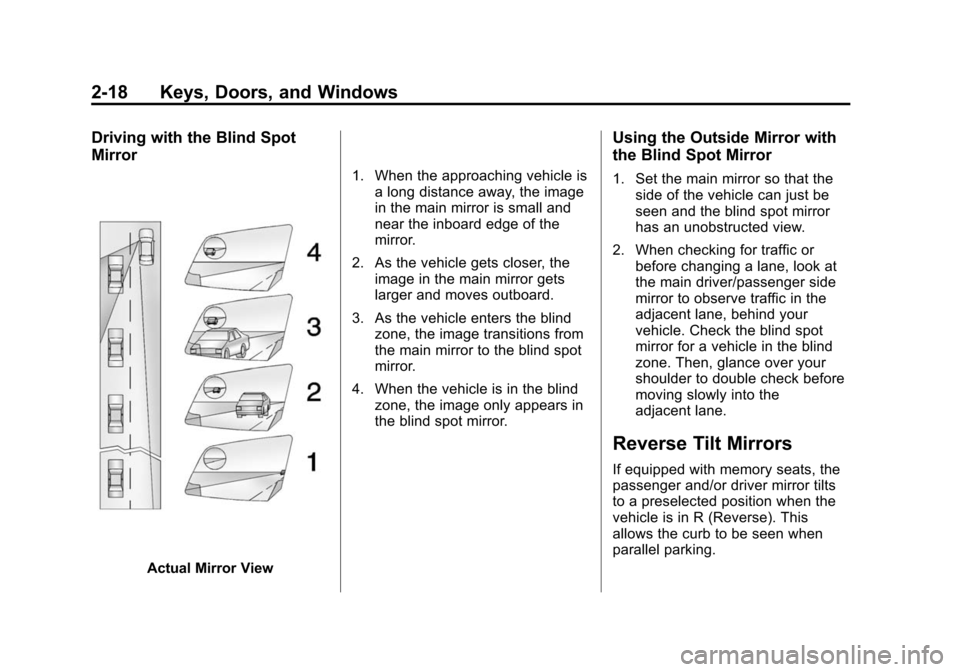
Driving with the Blind Spot
Mirror
Actual Mirror View1. When the approaching vehicle is
a long distance away, the image
in the main mirror is small and
near the inboard edge of the
mirror.
2. As the vehicle gets closer, the image in the main mirror gets
larger and moves outboard.
3. As the vehicle enters the blind zone, the image transitions from
the main mirror to the blind spot
mirror.
4. When the vehicle is in the blind zone, the image only appears in
the blind spot mirror.
Using the Outside Mirror with
the Blind Spot Mirror
1. Set the main mirror so that theside of the vehicle can just be
seen and the blind spot mirror
has an unobstructed view.
2. When checking for traffic or before changing a lane, look at
the main driver/passenger side
mirror to observe traffic in the
adjacent lane, behind your
vehicle. Check the blind spot
mirror for a vehicle in the blind
zone. Then, glance over your
shoulder to double check before
moving slowly into the
adjacent lane.
Reverse Tilt Mirrors
If equipped with memory seats, the
passenger and/or driver mirror tilts
to a preselected position when the
vehicle is in R (Reverse). This
allows the curb to be seen when
parallel parking.
Page 56 of 543
Black plate (19,1)Chevrolet 2015i Silverado Owner Manual (GMNA-Localizing-U.S./Canada/
Mexico-8425172) - 2015 - crc - 2/6/15
Keys, Doors, and Windows 2-19
The mirror(s) return to the original
position when:
.The vehicle is shifted out of
R (Reverse), or remains in
R (Reverse) for about
30 seconds.
.The ignition is turned off.
.The vehicle is driven in
R (Reverse) above a set speed.
To turn this feature on or off, see
Vehicle Personalization on
page 5-45.
Interior Mirrors
Interior Rearview Mirrors
Adjust the rearview mirror for a clear
view of the area behind your
vehicle.
If equipped with OnStar, the vehicle
may have three control buttons at
the bottom of the mirror. See your
dealer for more information about
OnStar and how to subscribe to it.
See OnStar Overview on page 14-1.
Do not spray glass cleaner directly
on the mirror. Use a soft towel
dampened with water.
Manual Rearview Mirror
If equipped, push the tab forward for
daytime use and pull it rearward for
nighttime use to avoid glare from
the headlamps from behind.
Automatic Dimming
Rearview Mirror
If equipped, the mirror will
automatically reduce the glare of the
headlamps from behind. The
dimming feature comes on each
time the vehicle is started.
Page 67 of 543
Black plate (6,1)Chevrolet 2015i Silverado Owner Manual (GMNA-Localizing-U.S./Canada/
Mexico-8425172) - 2015 - crc - 2/6/15
3-6 Seats and Restraints
To adjust a manual seatback:
1. Lift the lever.The seatback will automatically
fold forward.
2. To recline, move the seatback rearward to the desired position,
then release the lever to lock the
seatback in place.
3. Push and pull on the seatback to make sure it is locked.
To return the seatback to the upright
position:
1. Lift the lever fully without applying pressure to the
seatback, and the seatback will
return to the upright position.
2. Push and pull on the seatback to make sure it is locked.Power Reclining Seatbacks
To recline a power seatback,
if equipped:
.Tilt the top of the control
rearward to recline.
.Tilt the top of the control forward
to raise.
Memory Seats
Crew/Double Cab Shown, Other
Models Similar
If memory equipped, the SET, "1,"
"2," and
B(Exit) buttons on the
driver door are used to manually
store and recall memory settings for
the driver seat, outside mirrors, and
adjustable pedals (if equipped).
Page 68 of 543
Black plate (7,1)Chevrolet 2015i Silverado Owner Manual (GMNA-Localizing-U.S./Canada/
Mexico-8425172) - 2015 - crc - 2/6/15
Seats and Restraints 3-7
Storing Memory Positions
To store positions to the“1”and “2”
buttons:
1. Adjust the driver seat, outside mirrors, and adjustable pedals (if
equipped) to the desired driving
positions.
2. Press and release SET. A beep will sound.
3. Immediately press and hold “1”
until two beeps sound.
4. Repeat Steps 1 through 3 for a second driver using “2.”
To store positions to the
B(Exit)
button and easy exit features:
1. Adjust the driver seat, adjustable pedals (if equipped), and the
outside mirrors on some vehicles
to the desired positions for
getting out of the vehicle.
2. Press and release SET. A beep will sound.
3. Immediately press and hold
B
until two beeps sound. Manually Recalling Memory
Positions
If the vehicle is off or not in P (Park),
press and hold "1," "2," or
B(Exit)
to manually recall the previously
stored memory positions. Releasing
"1,” "2," or
B(EXIT) before the
stored positions are reached stops
the recall.
If the vehicle is on and in P (Park),
press and release “1,” “2,”or
Bto
manually recall the previously
stored memory positions. Placing
the ignition in OFF/LOCK before the
stored positions are reached stops
the recall.
Automatically Recalling Memory
Positions (Auto Recall)
The Auto (Automatic) Memory
Recall feature automatically recalls
the current driver ’s previously stored
“1” or“2” position when entering the
vehicle. If the Auto Recall feature is enabled
in the vehicle personalization menu,
memory
“1”or“2” positions are
recalled in the following ways:
.PressKon the RKE transmitter
and open the driver door.
.PressKon the RKE transmitter
when the driver door is
already open.
See Vehicle Personalization on
page 5-45.
To stop recall movement, press one
of the memory, power mirror or
power seat controls; or press the
adjustable pedal control (if
equipped).
RKE Transmitters are not labeled
with a number. If your memory seat
position is stored to “1”or“2” but
this position is not automatically
recalling, then change the stored
position or switch RKE transmitters
with the other driver.
Page 175 of 543
Black plate (38,1)Chevrolet 2015i Silverado Owner Manual (GMNA-Localizing-U.S./Canada/
Mexico-8425172) - 2015 - crc - 2/6/15
5-38 Instruments and Controls
fuel cap fully. SeeFilling the Tank
on page 9-70. The diagnostic
system can determine if the fuel cap
has been left off or improperly
installed. A loose or missing fuel
cap allows fuel to evaporate into the
atmosphere. A few driving trips with
the cap properly installed should
turn this light and message off.
Key and Lock Messages
REPLACE BATTERY IN
REMOTE KEY
This message displays if a Remote
Keyless Entry (RKE) transmitter
battery is low. The battery needs to
be replaced in the transmitter. See
“Battery Replacement” under
Remote Keyless Entry (RKE)
System Operation on page 2-4.
Lamp Messages
TURN SIGNAL ON
This message displays and a chime
sounds if a turn signal is left on for
1.2 km (0.75 mi). Move the turn
signal lever to the off position.
Object Detection System
Messages
FORWARD COLLISION
ALERT OFF
This message displays when the
Forward Collision Alert has been
turned off.
FRONT CAMERA BLOCKED
CLEAN WINDSHIELD
This message displays when the
camera is blocked. Cleaning the
outside of the windshield behind the
rearview mirror may correct the
issue. The Lane Departure Warning
(LDW) system and Forward
Collision Alert (FCA) will not
operate.
LANE DEPARTURE WARNING
UNAVAILABLE
This message displays when
attempting to activate the Lane
Departure Warning (LDW) system
when it is temporarily unavailable.
The LDW system does not need
service.
This message could be due to the
camera being blocked. Cleaning the
outside of the windshield behind the
rearview mirror may correct the
issue.
PARK ASSIST OFF
This message displays when the
Parking Assist system has been
turned off or when there is a
temporary condition causing the
system to be disabled.
SERVICE FRONT CAMERA
If this message remains on after
continued driving, the vehicle needs
service. Do not use the Lane
Departure Warning (LDW) and
Page 185 of 543

Black plate (48,1)Chevrolet 2015i Silverado Owner Manual (GMNA-Localizing-U.S./Canada/
Mexico-8425172) - 2015 - crc - 2/6/15
5-48 Instruments and Controls
Park Assist
If equipped, this feature can assist
in backing up and parking the
vehicle. SeeAssistance Systems for
Parking or Backing on page 9-60.
Select Off, On, or On with Towbar.
Comfort and Convenience
Select and the following may
display:
.Auto Memory Recall
.Easy Exit Options
.Chime Volume
.Reverse Tilt Mirror
.Auto Mirror Folding
Auto Memory Recall
This allows the feature to be turned
on or off. See Memory Seats on
page 3-6.
Select On or Off. Easy Exit Options
This allows the feature to be turned
on or off. See
Memory Seats on
page 3-6.
Select On or Off.
Chime Volume
This allows the selection of the
chime volume level.
Turn the MENU knob or press + or
− to adjust the volume.
Reverse Tilt Mirror
When on, the driver and/or
passenger mirrors will tilt downward
when the vehicle is shifted to
R (Reverse) to improve visibility of
the ground near the rear wheels.
Select Off, On - Driver and
Passenger, On - Driver, or On -
Passenger. Auto Mirror Folding
When on, the outside rearview
mirrors will automatically fold or
unfold when the Remote Keyless
Entry (RKE) transmitter lock or
unlock button is pressed and held.
Select Off or On.
Lighting
Select and the following may
display:
.Vehicle Locator Lights
.Exit Lighting
Vehicle Locator Lights
This feature will flash the exterior
lamps and allows some of the
exterior lamps and most of the
interior lamps to turn on briefly when
Kon the Remote Keyless Entry
(RKE) transmitter is pressed to
locate the vehicle.
Select Off or On.
Page 200 of 543
Black plate (7,1)Chevrolet 2015i Silverado Owner Manual (GMNA-Localizing-U.S./Canada/
Mexico-8425172) - 2015 - crc - 2/6/15
Lighting 6-7
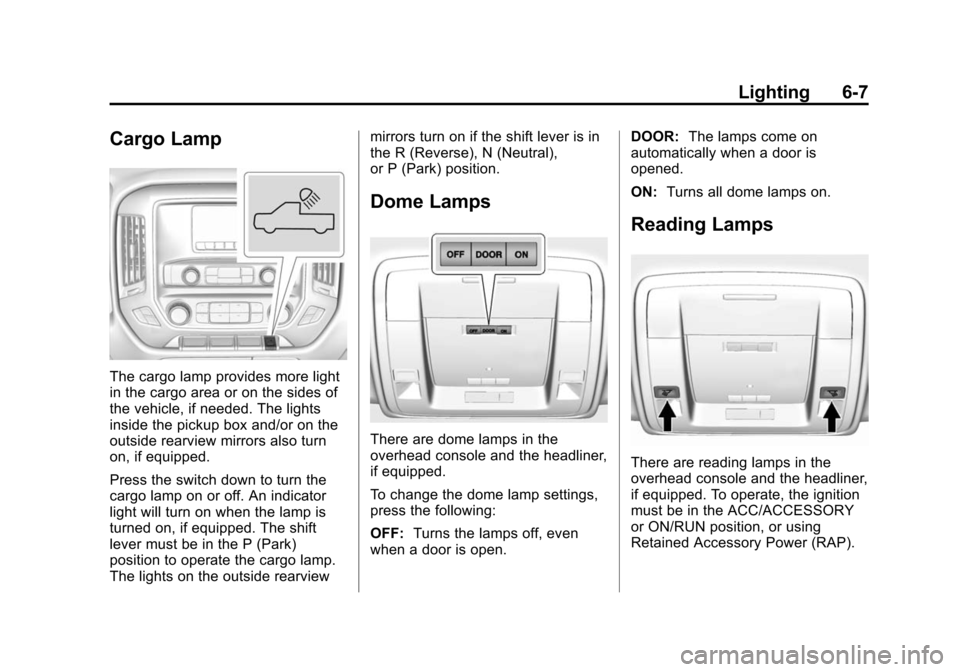
Cargo Lamp
The cargo lamp provides more light
in the cargo area or on the sides of
the vehicle, if needed. The lights
inside the pickup box and/or on the
outside rearview mirrors also turn
on, if equipped.
Press the switch down to turn the
cargo lamp on or off. An indicator
light will turn on when the lamp is
turned on, if equipped. The shift
lever must be in the P (Park)
position to operate the cargo lamp.
The lights on the outside rearviewmirrors turn on if the shift lever is in
the R (Reverse), N (Neutral),
or P (Park) position.
Dome Lamps
There are dome lamps in the
overhead console and the headliner,
if equipped.
To change the dome lamp settings,
press the following:
OFF:
Turns the lamps off, even
when a door is open. DOOR:
The lamps come on
automatically when a door is
opened.
ON: Turns all dome lamps on.
Reading Lamps
There are reading lamps in the
overhead console and the headliner,
if equipped. To operate, the ignition
must be in the ACC/ACCESSORY
or ON/RUN position, or using
Retained Accessory Power (RAP).