change wheel CHEVROLET SILVERADO 2015 3.G Owners Manual
[x] Cancel search | Manufacturer: CHEVROLET, Model Year: 2015, Model line: SILVERADO, Model: CHEVROLET SILVERADO 2015 3.GPages: 543, PDF Size: 7.01 MB
Page 6 of 543
Black plate (5,1)Chevrolet 2015i Silverado Owner Manual (GMNA-Localizing-U.S./Canada/
Mexico-8425172) - 2015 - crc - 2/9/15
Introduction v
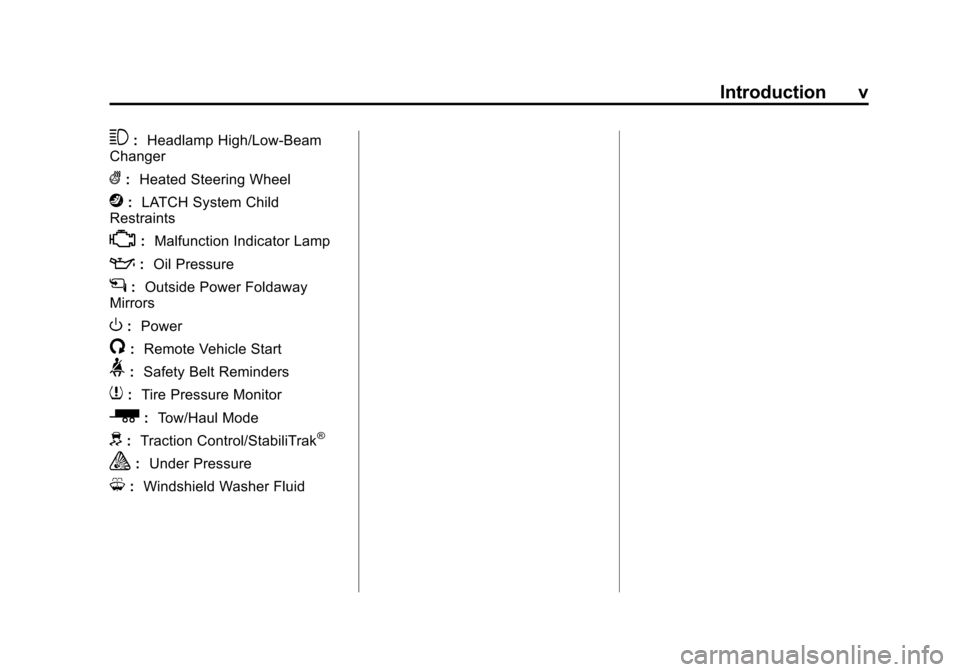
3:Headlamp High/Low-Beam
Changer
(: Heated Steering Wheel
j:LATCH System Child
Restraints
*: Malfunction Indicator Lamp
::Oil Pressure
g:Outside Power Foldaway
Mirrors
O: Power
/:Remote Vehicle Start
>:Safety Belt Reminders
7:Tire Pressure Monitor
_: Tow/Haul Mode
d:Traction Control/StabiliTrak®
a: Under Pressure
M:Windshield Washer Fluid
Page 10 of 543

Black plate (3,1)Chevrolet 2015i Silverado Owner Manual (GMNA-Localizing-U.S./Canada/
Mexico-8425172) - 2015 - crc - 2/6/15
In Brief 1-3
1.Instrument Panel Illumination
Control on page 6-6.
2. Integrated Trailer Brake Control (ITBC) System (If Equipped).
See Towing Equipment on
page 9-90.
3. Exterior Lamp Controls on
page 6-1.
Fog Lamps on page 6-5 (If
Equipped).
4. Air Vents on page 8-8.
5. Turn Signal Lever. See Turn and
Lane-Change Signals on
page 6-4.
Windshield Wiper/Washer on
page 5-4.
6. Favorite Switches (Out of View). See Steering Wheel Controls on
page 5-3.
Volume Switches (Out of View).
See Steering Wheel Controls on
page 5-3.
7. Instrument Cluster on page 5-10. 8.
Hazard Warning Flashers on
page 6-4.
9. Shift Lever. See Automatic
Transmission on page 9-34.
Tow/Haul Selector Button (If
Equipped). See Tow/Haul Mode
on page 9-40.
Range Selection Mode (If
Equipped). See Manual Mode on
page 9-38.
10. Light Sensor. See Automatic
Headlamp System on
page 6-3.
11. Infotainment on page 7-1.
12. Electronic Transfer Case Control (If Equipped). See
Four-Wheel Drive on
page 9-42.
Card Holder (If Equipped). See
Instrument Panel Storage on
page 4-1.
13. Parking Brake on page 9-51.
14. Data Link Connector (DLC) (Out of View). See Malfunction
Indicator Lamp on page 5-21. 15.
Cruise Control on page 9-57.
Forward Collision Alert (FCA)
System on page 9-63 (If
Equipped).
16. Steering Wheel Adjustment on
page 5-2 (Out of View).
17. Horn on page 5-4.
18. Hood Release. See Hood on
page 10-5.
19. Steering Wheel Controls on
page 5-3 (If Equipped).
Driver Information Center (DIC)
Controls (If Equipped). See
Driver Information Center (DIC)
(Base Level) on page 5-29 or
Driver Information Center (DIC)
(Uplevel) on page 5-31.
20. Parking Brake Release (Manual Transmission Only, If
Equipped). See Parking Brake
on page 9-51
21. Heated and Cooled Front
Seats on page 3-8 (If
Equipped).
Page 21 of 543
Black plate (14,1)Chevrolet 2015i Silverado Owner Manual (GMNA-Localizing-U.S./Canada/
Mexico-8425172) - 2015 - crc - 2/6/15
1-14 In Brief
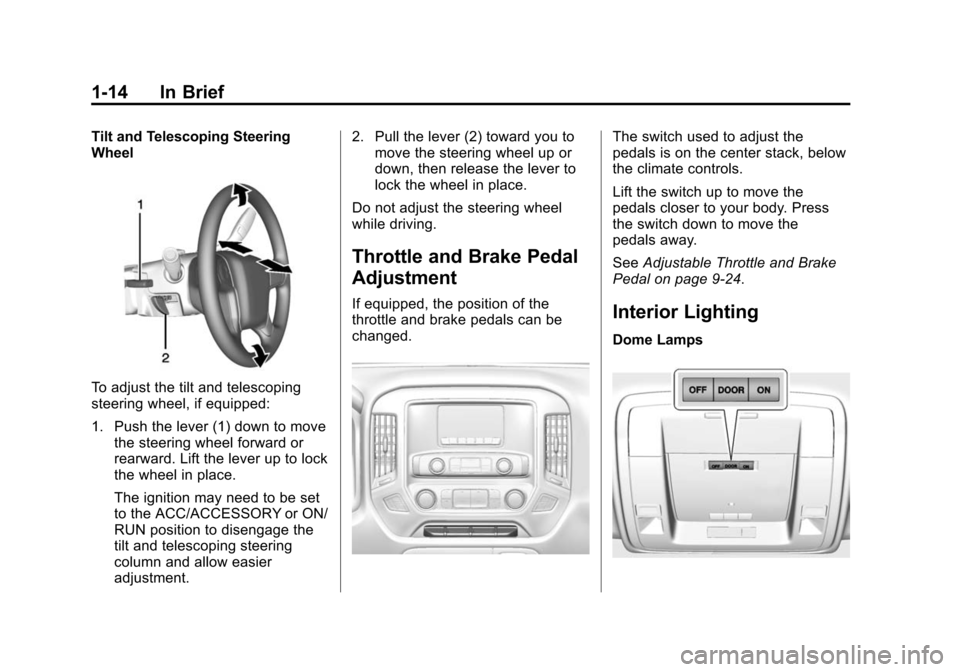
Tilt and Telescoping Steering
Wheel
To adjust the tilt and telescoping
steering wheel, if equipped:
1. Push the lever (1) down to movethe steering wheel forward or
rearward. Lift the lever up to lock
the wheel in place.
The ignition may need to be set
to the ACC/ACCESSORY or ON/
RUN position to disengage the
tilt and telescoping steering
column and allow easier
adjustment. 2. Pull the lever (2) toward you to
move the steering wheel up or
down, then release the lever to
lock the wheel in place.
Do not adjust the steering wheel
while driving.
Throttle and Brake Pedal
Adjustment
If equipped, the position of the
throttle and brake pedals can be
changed.
The switch used to adjust the
pedals is on the center stack, below
the climate controls.
Lift the switch up to move the
pedals closer to your body. Press
the switch down to move the
pedals away.
See Adjustable Throttle and Brake
Pedal on page 9-24.
Interior Lighting
Dome Lamps
Page 22 of 543
Black plate (15,1)Chevrolet 2015i Silverado Owner Manual (GMNA-Localizing-U.S./Canada/
Mexico-8425172) - 2015 - crc - 2/6/15
In Brief 1-15
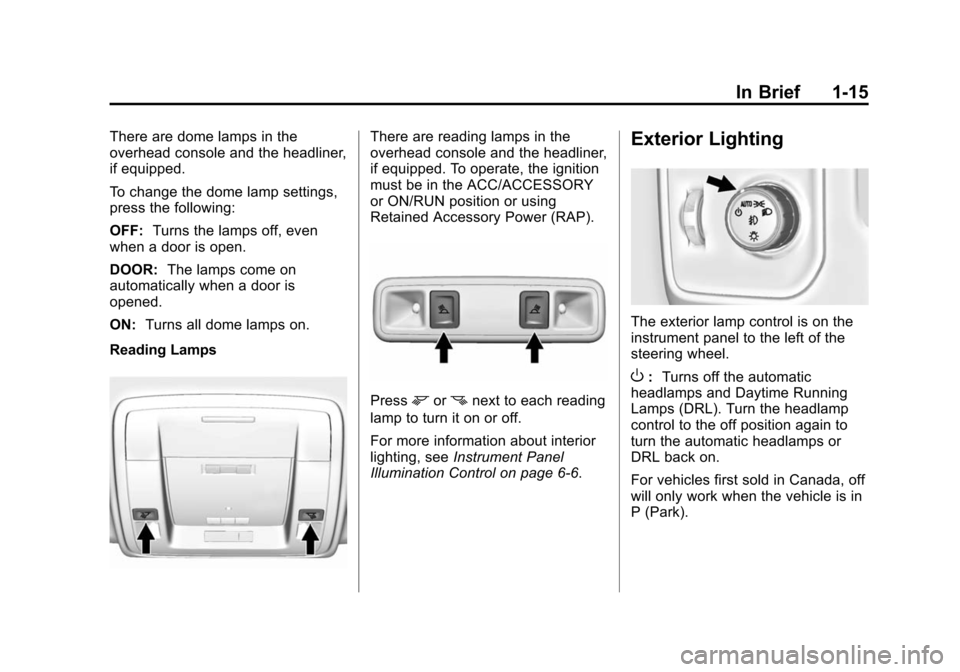
There are dome lamps in the
overhead console and the headliner,
if equipped.
To change the dome lamp settings,
press the following:
OFF:Turns the lamps off, even
when a door is open.
DOOR: The lamps come on
automatically when a door is
opened.
ON: Turns all dome lamps on.
Reading LampsThere are reading lamps in the
overhead console and the headliner,
if equipped. To operate, the ignition
must be in the ACC/ACCESSORY
or ON/RUN position or using
Retained Accessory Power (RAP).
Pressmornnext to each reading
lamp to turn it on or off.
For more information about interior
lighting, see Instrument Panel
Illumination Control on page 6-6.
Exterior Lighting
The exterior lamp control is on the
instrument panel to the left of the
steering wheel.
O: Turns off the automatic
headlamps and Daytime Running
Lamps (DRL). Turn the headlamp
control to the off position again to
turn the automatic headlamps or
DRL back on.
For vehicles first sold in Canada, off
will only work when the vehicle is in
P (Park).
Page 28 of 543
Black plate (21,1)Chevrolet 2015i Silverado Owner Manual (GMNA-Localizing-U.S./Canada/
Mexico-8425172) - 2015 - crc - 2/6/15
In Brief 1-21
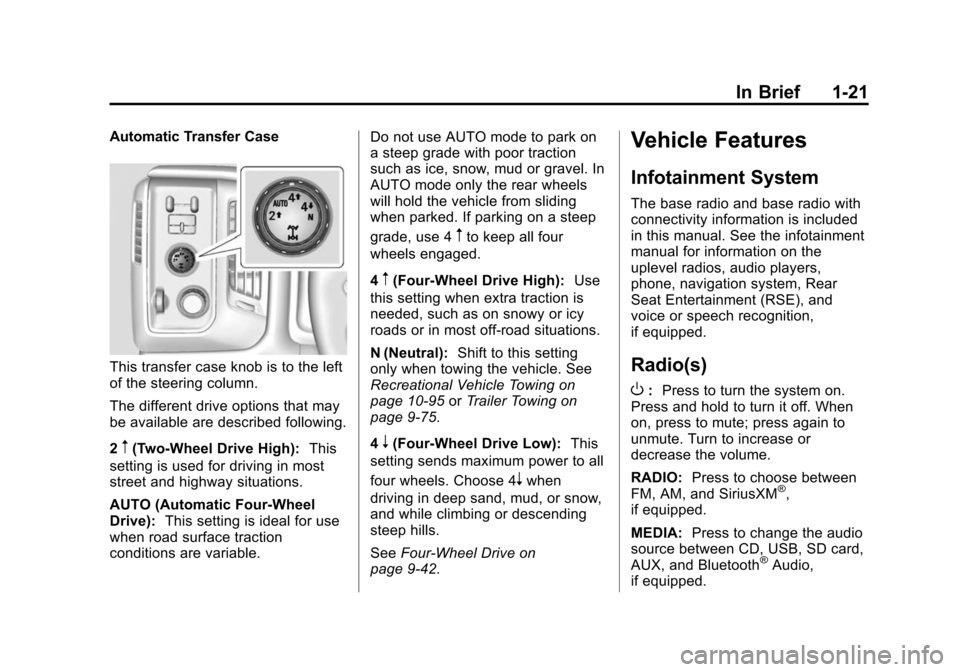
Automatic Transfer Case
This transfer case knob is to the left
of the steering column.
The different drive options that may
be available are described following.
2
m(Two-Wheel Drive High):This
setting is used for driving in most
street and highway situations.
AUTO (Automatic Four-Wheel
Drive): This setting is ideal for use
when road surface traction
conditions are variable. Do not use AUTO mode to park on
a steep grade with poor traction
such as ice, snow, mud or gravel. In
AUTO mode only the rear wheels
will hold the vehicle from sliding
when parked. If parking on a steep
grade, use 4
mto keep all four
wheels engaged.
4
m(Four-Wheel Drive High): Use
this setting when extra traction is
needed, such as on snowy or icy
roads or in most off-road situations.
N (Neutral): Shift to this setting
only when towing the vehicle. See
Recreational Vehicle Towing on
page 10-95 orTrailer Towing on
page 9-75.
4
n(Four-Wheel Drive Low): This
setting sends maximum power to all
four wheels. Choose 4
nwhen
driving in deep sand, mud, or snow,
and while climbing or descending
steep hills.
See Four-Wheel Drive on
page 9-42.
Vehicle Features
Infotainment System
The base radio and base radio with
connectivity information is included
in this manual. See the infotainment
manual for information on the
uplevel radios, audio players,
phone, navigation system, Rear
Seat Entertainment (RSE), and
voice or speech recognition,
if equipped.
Radio(s)
O
: Press to turn the system on.
Press and hold to turn it off. When
on, press to mute; press again to
unmute. Turn to increase or
decrease the volume.
RADIO: Press to choose between
FM, AM, and SiriusXM
®,
if equipped.
MEDIA: Press to change the audio
source between CD, USB, SD card,
AUX, and Bluetooth
®Audio,
if equipped.
Page 39 of 543
Black plate (2,1)Chevrolet 2015i Silverado Owner Manual (GMNA-Localizing-U.S./Canada/
Mexico-8425172) - 2015 - crc - 2/6/15
2-2 Keys, Doors, and Windows
{Warning
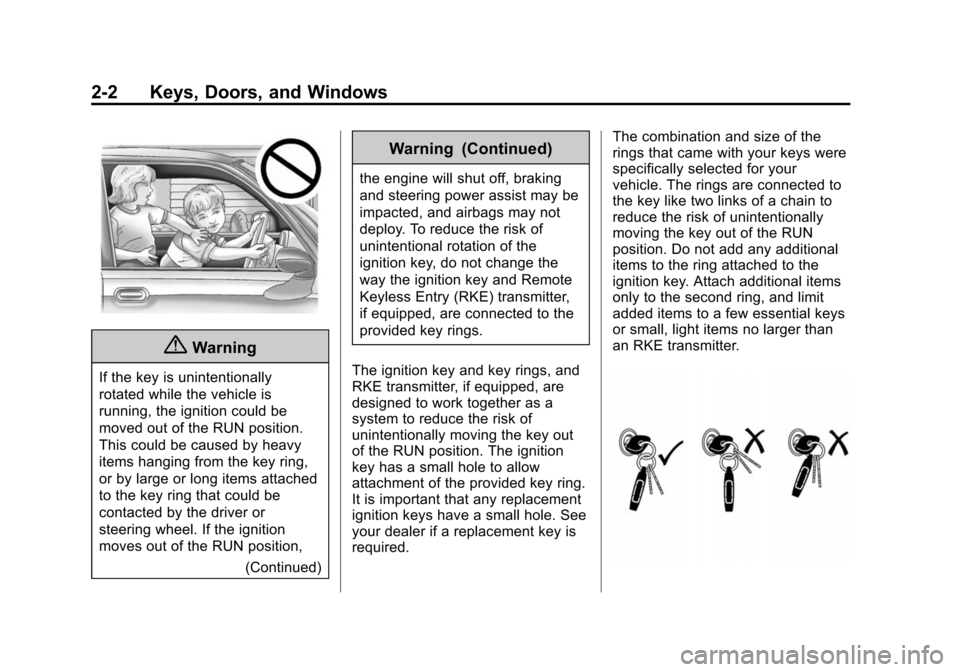
If the key is unintentionally
rotated while the vehicle is
running, the ignition could be
moved out of the RUN position.
This could be caused by heavy
items hanging from the key ring,
or by large or long items attached
to the key ring that could be
contacted by the driver or
steering wheel. If the ignition
moves out of the RUN position,(Continued)
Warning (Continued)
the engine will shut off, braking
and steering power assist may be
impacted, and airbags may not
deploy. To reduce the risk of
unintentional rotation of the
ignition key, do not change the
way the ignition key and Remote
Keyless Entry (RKE) transmitter,
if equipped, are connected to the
provided key rings.
The ignition key and key rings, and
RKE transmitter, if equipped, are
designed to work together as a
system to reduce the risk of
unintentionally moving the key out
of the RUN position. The ignition
key has a small hole to allow
attachment of the provided key ring.
It is important that any replacement
ignition keys have a small hole. See
your dealer if a replacement key is
required. The combination and size of the
rings that came with your keys were
specifically selected for your
vehicle. The rings are connected to
the key like two links of a chain to
reduce the risk of unintentionally
moving the key out of the RUN
position. Do not add any additional
items to the ring attached to the
ignition key. Attach additional items
only to the second ring, and limit
added items to a few essential keys
or small, light items no larger than
an RKE transmitter.
Page 95 of 543
Black plate (34,1)Chevrolet 2015i Silverado Owner Manual (GMNA-Localizing-U.S./Canada/
Mexico-8425172) - 2015 - crc - 2/6/15
3-34 Seats and Restraints
The on indicator may be lit if an
object, such as a briefcase,
handbag, grocery bag, laptop,
or other electronic device, is put on
an unoccupied seat. If this is not
desired, remove the object from
the seat.
{Warning
Stowing of articles under the
passenger seat or between the
passenger seat cushion and
seatback may interfere with the
proper operation of the passenger
sensing system.
Servicing the
Airbag-Equipped Vehicle
Airbags affect how the vehicle
should be serviced. There are parts
of the airbag system in several
places around the vehicle. Your
dealer and the service manual have
information about servicing the
vehicle and the airbag system. Topurchase a service manual, see
Service Publications Ordering
Information on page 13-11.
{Warning
For up to 10 seconds after the
vehicle is turned off and the
battery is disconnected, an airbag
can still inflate during improper
service. You can be injured if you
are close to an airbag when it
inflates. Avoid yellow connectors.
They are probably part of the
airbag system. Be sure to follow
proper service procedures, and
make sure the person performing
work for you is qualified to do so.
Adding Equipment to the
Airbag-Equipped Vehicle
Adding accessories that change the
vehicle's frame, bumper system,
height, front end, or side sheet
metal, may keep the airbag system
from working properly. Theoperation of the airbag system can
also be affected by changing or
moving any parts of the front seats,
safety belts, the airbag sensing and
diagnostic module, steering wheel,
instrument panel, roof-rail airbag
modules, ceiling headliner or pillar
garnish trim, overhead console,
front sensors, side impact sensors,
or airbag wiring.
Your dealer and the service manual
have information about the location
of the airbag sensors, sensing and
diagnostic module, and airbag
wiring.
In addition, the vehicle may have a
passenger sensing system for the
front outboard passenger position,
which includes sensors that are part
of the passenger seat. The
passenger sensing system may not
operate properly if the original seat
trim is replaced with non-GM
covers, upholstery, or trim; or with
GM covers, upholstery, or trim
designed for a different vehicle. Any
object, such as an aftermarket seat
heater or a comfort-enhancing pad
Page 96 of 543
Black plate (35,1)Chevrolet 2015i Silverado Owner Manual (GMNA-Localizing-U.S./Canada/
Mexico-8425172) - 2015 - crc - 2/6/15
Seats and Restraints 3-35
or device, installed under or on top
of the seat fabric, could also
interfere with the operation of the
passenger sensing system. This
could either prevent proper
deployment of the passenger
airbag(s) or prevent the passenger
sensing system from properly
turning off the passenger airbag(s).
SeePassenger Sensing System on
page 3-29.
If the vehicle has rollover roof-rail
airbags, see Different Size Tires
and Wheels on page 10-74 for
additional important information.
If a snow plow is added to the
vehicle, the airbags should still work
properly. The airbag systems were
designed to work properly under a
wide range of conditions, including
snow plowing with vehicles that
have the optional snow plow prep
package (RPO VYU). Do not
change or defeat the snow plow's
“tripping mechanism.” If you do, it
can damage the snow plow and the
vehicle, and may cause an airbag
deployment. If you have to modify your vehicle
because you have a disability and
you have questions about whether
the modifications will affect the
vehicle's airbag system, or if you
have questions about whether the
airbag system will be affected if the
vehicle is modified for any other
reason, call Customer Assistance.
See
Customer Assistance Offices
on page 13-3.
Airbag System Check
The airbag system does not need
regularly scheduled maintenance or
replacement. Make sure the airbag
readiness light is working. See
Airbag Readiness Light on
page 5-17.
{Caution
If an airbag covering is damaged,
opened, or broken, the airbag
may not work properly. Do not
open or break the airbag
(Continued)
Caution (Continued)
coverings. If there are any
opened or broken airbag
coverings, have the airbag
covering and/or airbag module
replaced. For the location of the
airbags, seeWhere Are the
Airbags? on page 3-22. See your
dealer for service.
Replacing Airbag System
Parts after a Crash
{Warning
A crash can damage the airbag
systems in the vehicle.
A damaged airbag system may
not work properly and may not
protect you and your
passenger(s) in a crash, resulting
in serious injury or even death. To
help make sure the airbag
(Continued)
Page 149 of 543
Black plate (12,1)Chevrolet 2015i Silverado Owner Manual (GMNA-Localizing-U.S./Canada/
Mexico-8425172) - 2015 - crc - 2/6/15
5-12 Instruments and Controls
Cluster Menu (Uplevel Cluster)
There is an interactive display area
in the center of the instrument
cluster.
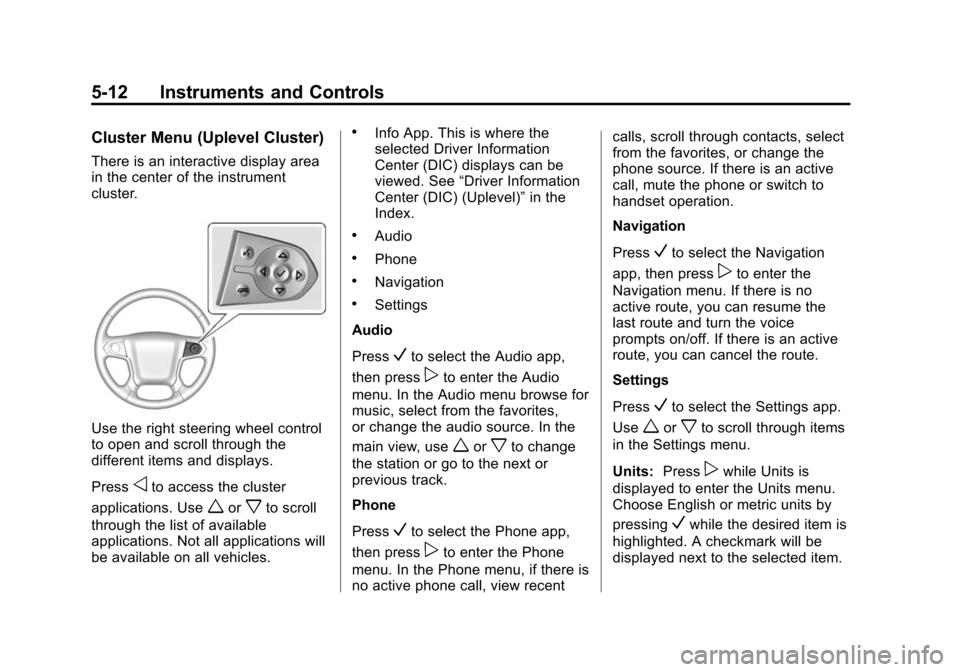
Use the right steering wheel control
to open and scroll through the
different items and displays.
Press
oto access the cluster
applications. Use
worxto scroll
through the list of available
applications. Not all applications will
be available on all vehicles.
.Info App. This is where the
selected Driver Information
Center (DIC) displays can be
viewed. See “Driver Information
Center (DIC) (Uplevel)” in the
Index.
.Audio
.Phone
.Navigation
.Settings
Audio
Press
Vto select the Audio app,
then press
pto enter the Audio
menu. In the Audio menu browse for
music, select from the favorites,
or change the audio source. In the
main view, use
worxto change
the station or go to the next or
previous track.
Phone
Press
Vto select the Phone app,
then press
pto enter the Phone
menu. In the Phone menu, if there is
no active phone call, view recent calls, scroll through contacts, select
from the favorites, or change the
phone source. If there is an active
call, mute the phone or switch to
handset operation.
Navigation
Press
Vto select the Navigation
app, then press
pto enter the
Navigation menu. If there is no
active route, you can resume the
last route and turn the voice
prompts on/off. If there is an active
route, you can cancel the route.
Settings
Press
Vto select the Settings app.
Use
worxto scroll through items
in the Settings menu.
Units: Press
pwhile Units is
displayed to enter the Units menu.
Choose English or metric units by
pressing
Vwhile the desired item is
highlighted. A checkmark will be
displayed next to the selected item.
Page 160 of 543
Black plate (23,1)Chevrolet 2015i Silverado Owner Manual (GMNA-Localizing-U.S./Canada/
Mexico-8425172) - 2015 - crc - 2/6/15
Instruments and Controls 5-23
.Check that good quality fuel is
used. Poor fuel quality causes
the engine not to run as
efficiently as designed and may
cause stalling after start-up,
stalling when the vehicle is
changed into gear, misfiring,
hesitation on acceleration,
or stumbling on acceleration.
These conditions might go away
once the engine is warmed up.
If one or more of these conditions
occurs, change the fuel brand used.
It may require at least one full tank
of the proper fuel to turn the light off.
See Fuel on page 9-67.
If none of the above have made the
light turn off, your dealer can check
the vehicle. The dealer has the
proper test equipment and
diagnostic tools to fix any
mechanical or electrical problems
that might have developed.Emissions Inspection and
Maintenance Programs
Depending on where you live, your
vehicle may be required to
participate in an emission control
system inspection and maintenance
program. For the inspection, the
emission system test equipment will
likely connect to the vehicle's Data
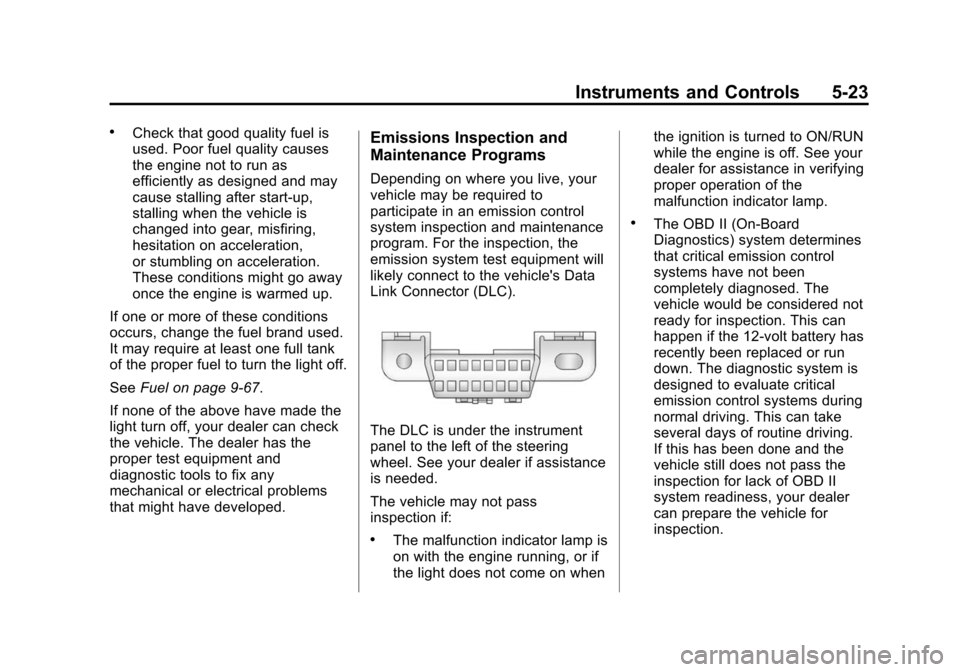
Link Connector (DLC).
The DLC is under the instrument
panel to the left of the steering
wheel. See your dealer if assistance
is needed.
The vehicle may not pass
inspection if:
.The malfunction indicator lamp is
on with the engine running, or if
the light does not come on when the ignition is turned to ON/RUN
while the engine is off. See your
dealer for assistance in verifying
proper operation of the
malfunction indicator lamp.
.The OBD II (On-Board
Diagnostics) system determines
that critical emission control
systems have not been
completely diagnosed. The
vehicle would be considered not
ready for inspection. This can
happen if the 12-volt battery has
recently been replaced or run
down. The diagnostic system is
designed to evaluate critical
emission control systems during
normal driving. This can take
several days of routine driving.
If this has been done and the
vehicle still does not pass the
inspection for lack of OBD II
system readiness, your dealer
can prepare the vehicle for
inspection.