lights CHEVROLET SILVERADO 2019 Owner's Guide
[x] Cancel search | Manufacturer: CHEVROLET, Model Year: 2019, Model line: SILVERADO, Model: CHEVROLET SILVERADO 2019Pages: 474, PDF Size: 7.28 MB
Page 300 of 474
Chevrolet Silverado Owner Manual (GMNA-Localizing-U.S./Canada/Mexico-
1500-11698642) - 2019 - CRC - 2/20/19
Driving and Operating 299
see a tire or trailer dealer for
service. The learning process must
be repeated when the trailer tires
are rotated or replaced. See“Editing
a Trailer Profile” later in this section
for tire pressure sensor relearn
information.
Tool Method: A TTPMS activation
tool can be purchased separately to
learn the sensor locations.
Manual Method: Without the tool,
the air pressure can be increased or
decreased in each tire for
10 seconds. Do not exceed the
maximum inflation pressure found
on the tire sidewalls. Make sure to
re-adjust tire pressure to the
recommended level when the
process is complete.
Sensor Learning Steps
To complete the sensor-to-vehicle
learn process:
1. Touch Start on the Learn Sensors screen. The horn
chirps twice and the Learning
Active screen appears on the
infotainment display. 2. Start with the driver side front
trailer tire.
3. Activate the tool near the valve stem or adjust the air pressure
of this tire until the horn chirps
and all working vehicle and
trailer lights flash.
The process stops without
saving the sensor locations if
this step takes more than
two minutes.
4. Move to the next tire and repeat Step 3 for each sensor.
The horn chirps twice when all
sensors are completed.
5. Return to the vehicle to complete the setup.
Maintenance Reminders
Select Yes to set up the
maintenance reminders for the
Trailer Profile. Follow the on-screen
prompts. The maximum number of
reminders is 10. Select No to skip
this step.
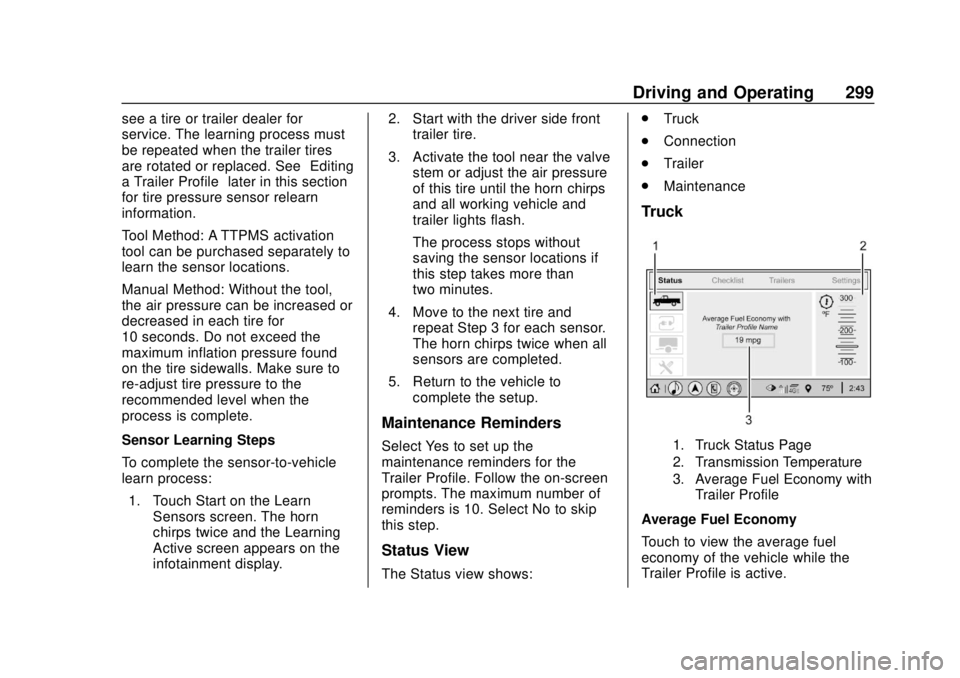
Status View
The Status view shows: .
Truck
. Connection
. Trailer
. Maintenance
Truck
1. Truck Status Page
2. Transmission Temperature
3. Average Fuel Economy with
Trailer Profile
Average Fuel Economy
Touch to view the average fuel
economy of the vehicle while the
Trailer Profile is active.
Page 301 of 474
Chevrolet Silverado Owner Manual (GMNA-Localizing-U.S./Canada/Mexico-
1500-11698642) - 2019 - CRC - 2/20/19
300 Driving and Operating
Transmission Temperature
Touch to view the temperature of
the transmission fluid graphic. The
graphic will indicate a dangerous
level if the temperature is at 130 °C–
150 °C (270 °F–300 °F).
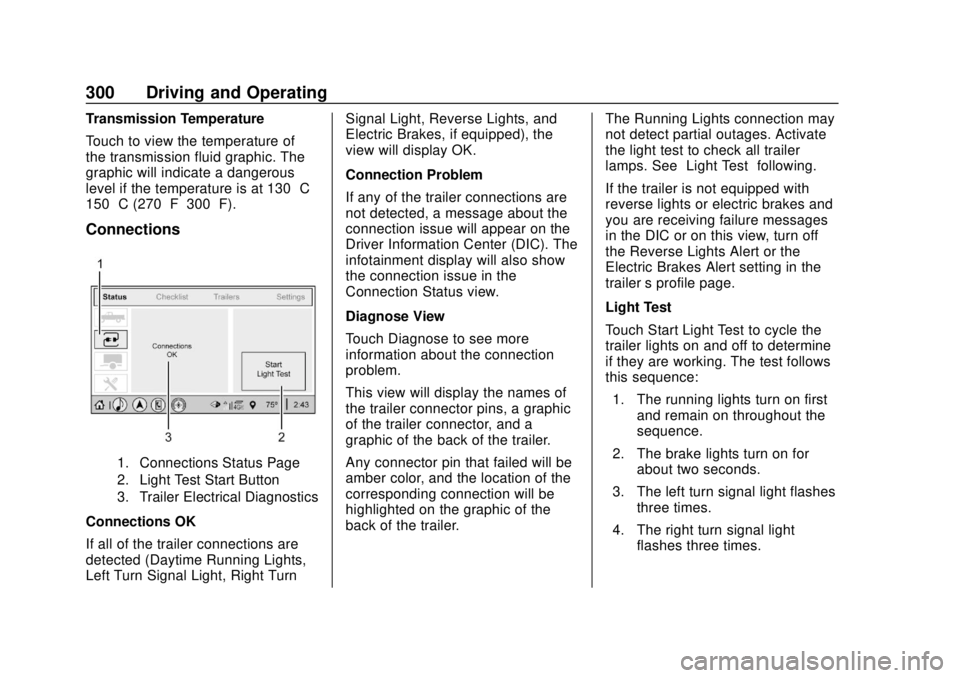
Connections
1. Connections Status Page
2. Light Test Start Button
3. Trailer Electrical Diagnostics
Connections OK
If all of the trailer connections are
detected (Daytime Running Lights,
Left Turn Signal Light, Right TurnSignal Light, Reverse Lights, and
Electric Brakes, if equipped), the
view will display OK.
Connection Problem
If any of the trailer connections are
not detected, a message about the
connection issue will appear on the
Driver Information Center (DIC). The
infotainment display will also show
the connection issue in the
Connection Status view.
Diagnose View
Touch Diagnose to see more
information about the connection
problem.
This view will display the names of
the trailer connector pins, a graphic
of the trailer connector, and a
graphic of the back of the trailer.
Any connector pin that failed will be
amber color, and the location of the
corresponding connection will be
highlighted on the graphic of the
back of the trailer.
The Running Lights connection may
not detect partial outages. Activate
the light test to check all trailer
lamps. See
“Light Test”following.
If the trailer is not equipped with
reverse lights or electric brakes and
you are receiving failure messages
in the DIC or on this view, turn off
the Reverse Lights Alert or the
Electric Brakes Alert setting in the
trailer ’s profile page.
Light Test
Touch Start Light Test to cycle the
trailer lights on and off to determine
if they are working. The test follows
this sequence: 1. The running lights turn on first and remain on throughout the
sequence.
2. The brake lights turn on for about two seconds.
3. The left turn signal light flashes three times.
4. The right turn signal light flashes three times.
Page 302 of 474
Chevrolet Silverado Owner Manual (GMNA-Localizing-U.S./Canada/Mexico-
1500-11698642) - 2019 - CRC - 2/20/19
Driving and Operating 301
5. The reverse lights turn on forabout two seconds.
6. Steps 2–5 repeat for approximately one minute and
45 seconds, or until the test
deactivates.
Touch Stop to stop the test. The test
will automatically end after
one minute and 45 seconds.
The sequence also deactivates
when any of the following occur:
. The ignition is turned off.
. The transmission is shifted out
of P (Park).
. The brake pedal is pressed.
. The turn signal is activated.
. The hazard warning lights are
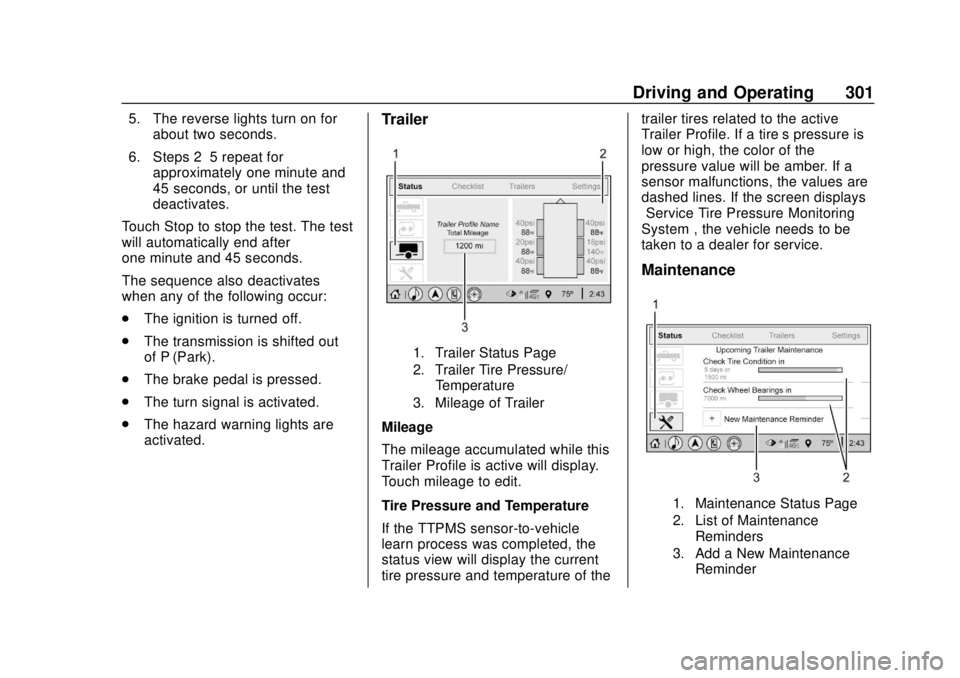
activated.Trailer
1. Trailer Status Page
2. Trailer Tire Pressure/
Temperature
3. Mileage of Trailer
Mileage
The mileage accumulated while this
Trailer Profile is active will display.
Touch mileage to edit.
Tire Pressure and Temperature
If the TTPMS sensor-to-vehicle
learn process was completed, the
status view will display the current
tire pressure and temperature of the trailer tires related to the active
Trailer Profile. If a tire’
s pressure is
low or high, the color of the
pressure value will be amber. If a
sensor malfunctions, the values are
dashed lines. If the screen displays
“Service Tire Pressure Monitoring
System”, the vehicle needs to be
taken to a dealer for service.
Maintenance
1. Maintenance Status Page
2. List of Maintenance
Reminders
3. Add a New Maintenance Reminder
Page 304 of 474
Chevrolet Silverado Owner Manual (GMNA-Localizing-U.S./Canada/Mexico-
1500-11698642) - 2019 - CRC - 2/20/19
Driving and Operating 303
The Custom Trailer Profiles and
Guest Trailer are in order of the
most frequently used.
All personalization features are
based on the settings for each
driver in vehicle personalization.
The list of Trailer Profiles is based
on vehicle personalization settings.
Guest Trailer
If the Guest Trailer Profile is the
active Trailer Profile, trailer
detection, connections status,
security, and the Tow/Haul reminder
alerts can be sent. The system will
not track total mileage or fuel
economy, but the system will track
trip mileage and fuel economy if the
Guest Trailer Profile is active. The
Trailer Tire Pressure Monitoring
System or maintenance reminders
cannot be set up for a Guest Trailer
Profile. The Guest Trailer Profile
cannot be edited.
Touch
pto learn more about the
Guest Trailer option. No Trailer Connected
When there is no trailer connected,
Trailer Profiles cannot be activated
but most options can be edited.
Trailer Brake Gain Memory
The system can memorize the brake
gain setting of a Trailer Profile or a
Guest Trailer Profile. When a Trailer
Profile or Guest Trailer Profile is
selected, and a brake gain setting is
set for that Trailer Profile, a quick
notice will appear to indicate that
the system has recalled that
profile’s brake gain setting.
If a Trailer Profile is already active
and the brake gain setting had been
set for that Trailer Profile, the quick
notice will trigger whenever the
ignition is turned on.
If there was an error in setting the
brake gain for a Trailer Profile, there
will be a notification. This pop-up
will not appear if the Guest Trailer
Profile is active or if there is no
trailer connected.Trailer brake gain should be set for
a specific trailering condition and
must be adjusted anytime vehicle
loading, trailer loading, or road
surface conditions change.
See
“Trailer Gain Adjustment
Procedure” for information about the
gain setting procedure.
Editing a Trailer Profile
Trailer Profile View
Touch to edit any of the following
options in the Trailer Profile view:
. Trailer Name
. Hitch Type
. Trailer Type
. Tire Pressure Setup
. Maintenance Reminders
. Mileage
. Average Fuel Economy
. Reverse Lights Alert
. Electric Brakes Alert
Page 306 of 474
Chevrolet Silverado Owner Manual (GMNA-Localizing-U.S./Canada/Mexico-
1500-11698642) - 2019 - CRC - 2/20/19
Driving and Operating 305
Touch a reminder to view, reset,
delete, or edit it.
Reset Reminder
Touch Maintenance Complete in the
reminder view to reset the reminder.
On the pop-up, touch Reset to reset
the time and mileage values for the
reminder. Touch Cancel to return to
the previous view and nothing will
change.
Edit Reminder
Touch to edit the mileage or time
settings for the reminder. Touch
Save to save the new settings to the
Trailer Profile.
Delete Reminder
Touch to delete the maintenance
reminder. On the pop-up, touch
Delete to delete the reminder or
touch Cancel to return to the
previous view and nothing will
change.
New Maintenance Reminder
Touch + New Maintenance
Reminder to set up a new reminder.
Suggested reminders that werepreviously set will have checkmarks
next to them. Suggested reminders
that have not been set will have
empty boxes next to them. The
maximum number of reminders
is 10.
Mileage
Touch to edit the Trailer Profile’s
mileage.
Effect on Maintenance Reminders
If the mileage is reset or changed,
and mileage has already
accumulated, any maintenance
reminders that have been set up will
be adjusted accordingly.
Average Fuel Economy
Touch to reset the average fuel
economy for the Trailer Profile.
Touch Reset to change, or touch
Cancel to go back to the
previous view.
Reverse Lights Alert
Turn on to receive failure messages
about the reverse lights. Turn off to
not receive failure messages about
the reverse lights, unless they arelater detected. This setting cannot
be edited when the Trailer Profile is
inactive or when the trailer is
disconnected.
Electric Brakes Alert
Turn on to receive failure messages
about the electric trailer brakes.
Turn off to not receive failure
messages about the electric trailer
brakes, unless they are later
detected. This setting cannot be
edited when the Trailer Profile is
inactive or when the trailer is
disconnected.
Delete Trailer
Touch to delete the Trailer Profile
and all of its settings.
On the pop-up, touch Delete to
delete the Trailer Profile. Touch
Cancel to dismiss the pop-up and
return to the previous view.
Settings View
Within the Trailering App, touch the
Settings tab to modify the following
settings:
.
Trailer Detection Alert
Page 425 of 474
Chevrolet Silverado Owner Manual (GMNA-Localizing-U.S./Canada/Mexico-
1500-11698642) - 2019 - CRC - 2/20/19
424 Service and Maintenance
Additional
Maintenance and Care
Your vehicle is an important
investment and caring for it properly
may help to avoid future costly
repairs. To maintain vehicle
performance, additional
maintenance services may be
required.
It is recommended that your dealer
perform these services—their
trained dealer technicians know
your vehicle best. Your dealer can
also perform a thorough
assessment with a multi-point
inspection to recommend when your
vehicle may need attention.
The following list is intended to
explain the services and conditions
to look for that may indicate
services are required.
Battery
The 12-volt battery supplies power
to start the engine and operate any
additional electrical accessories. .
To avoid break-down or failure to
start the vehicle, maintain a
battery with full cranking power.
. Trained dealer technicians have
the diagnostic equipment to test
the battery and ensure that the
connections and cables are
corrosion-free.
Belts
. Belts may need replacing if they
squeak or show signs of
cracking or splitting.
. Trained dealer technicians have
access to tools and equipment
to inspect the belts and
recommend adjustment or
replacement when necessary.
Brakes
Brakes stop the vehicle and are
crucial to safe driving.
. Signs of brake wear may include
chirping, grinding, or squealing
noises, or difficulty stopping. .
Trained dealer technicians have
access to tools and equipment
to inspect the brakes and
recommend quality parts
engineered for the vehicle.
Fluids
Proper fluid levels and approved
fluids protect the vehicle’s systems
and components. See
Recommended Fluids and
Lubricants 0427 for GM approved
fluids.
. Engine oil and windshield
washer fluid levels should be
checked at every fuel fill.
. Instrument cluster lights may
come on to indicate that fluids
may be low and need to be
filled.
Hoses
Hoses transport fluids and should
be regularly inspected to ensure
that there are no cracks or leaks.
With a multi-point inspection, your
dealer can inspect the hoses and
advise if replacement is needed.
Page 466 of 474

Chevrolet Silverado Owner Manual (GMNA-Localizing-U.S./Canada/Mexico-
1500-11698642) - 2019 - CRC - 2/20/19
Index 465
F
FanEngine . . . . . . . . . . . . . . . . . . . . . . . . 334
Features Memory . . . . . . . . . . . . . . . . . . . . . . . . . 13
Filter, Engine Air Cleaner . . . . . . . . . . . 327
Flash-to-Pass . . . . . . . . . . . . . . . . . . . 180
Flashers, Hazard Warning . . . . . . 181
Flat Tire . . . . . . . . . . . . . . . . . . . . . . . . 385 Changing . . . . . . . . . . . . . . . . . . . . . 387
FlexFuel E85 . . . . . . . . . . . . . . . . . . . . . . . . . . . 273
Floor Console Storage . . . . . . . . . . 127
Floor Mats . . . . . . . . . . . . . . . . . . . . . . 413
Fluid
Automatic Transmission . . . . . . 326
Brakes . . . . . . . . . . . . . . . . . . . . . . . . 337
Four-Wheel DriveTransfer Case . . . . . . . . . . . . . . . 236
Washer . . . . . . . . . . . . . . . . . . . . . . . 335
Fog Lamps . . . . . . . . . . . . . . . . . . . . . 182
Folding Mirrors . . . . . . . . . . . . . . . . . . 56
Forward Automatic Braking . . . . . 264
Forward Collision Alert (FCA) System . . . . . . . . . . . . . . . . . 261
Four-Wheel Drive . . . . . . . . . . 236, 341
Four-Wheel-Drive Light . . . . . . . . . 154 Frequency Statement
Radio . . . . . . . . . . . . . . . . . . . . . . . . . 445
Front Axle . . . . . . . . . . . . . . . . . . . . . . 341
Front Fog Lamp Light . . . . . . . . . . . . . . . . . . . . . . . . . . 159
Front Pedestrian Braking (FPB) System . . . . . . . . . . . . . . . . . 265
Front Seats Adjustment . . . . . . . . . . . . . . . . . . . . . 69
Heated and Ventilated . . . . . . . . . . 75
Fuel
Additives . . . . . . . . . . . . . . . . . . . . . 273
Economy Driving . . . . . . . . . . . . . . . 30
Filling a Portable FuelContainer . . . . . . . . . . . . . . . . . . . 276
Filling the Tank . . . . . . . . . . . . . . . 274
Foreign Countries . . . . . . . . . . . . 273
Gauge . . . . . . . . . . . . . . . . . . . . . . . . 144
Low Fuel Warning Light . . . . . . . 158
Management, Active . . . . . . . . . . 228
Prohibited Fuels . . . . . . . . . . . . . . 273
Recommended . . . . . . . . . . . . . . . 272
Top Tier . . . . . . . . . . . . . . . . . . . . . . 272
Full-Size Spare Tire . . . . . . . . . . . . 395
Fuses Engine Compartment FuseBlock . . . . . . . . . . . . . . . . . . . . . . . . 352
Fuses and Circuit Breakers . . . 351 Fuses (cont'd)
Instrument Panel Fuse
Block . . . . . . . . . . . . . . . . . . . 355, 358
G
Garage Door Opener . . . . . . . . . . . 173Programming . . . . . . . . . . . . . . . . . 173
Gas Strut(s) . . . . . . . . . . . . . . . . . . . . 346
Gauges Engine Coolant
Temperature . . . . . . . . . . . . . . . . 146
Engine Oil Pressure . . . . . . . . . . 145
Fuel . . . . . . . . . . . . . . . . . . . . . . . . . . 144
Odometer . . . . . . . . . . . . . . . . . . . . . 144
Speedometer . . . . . . . . . . . . . . . . . 143
Tachometer . . . . . . . . . . . . . . . . . . . 144
Trip Odometer . . . . . . . . . . . . . . . . 144
Voltmeter . . . . . . . . . . . . . . . . . . . . . 147
Warning Lights and Indicators . . . . . . . . . . . . . . . . . . . 138
General Information Service and Maintenance . . . . . 415
Towing . . . . . . . . . . . . . . . . . . . . . . . . 277
Vehicle Care . . . . . . . . . . . . . . . . . . 313
Glass Replacement . . . . . . . . . . . . . 346
Glove Box . . . . . . . . . . . . . . . . . . . . . . 125
GM Mobility Reimbursement Program . . . . . . . . . . . . . . . . . . . . . . . 439
Page 468 of 474

Chevrolet Silverado Owner Manual (GMNA-Localizing-U.S./Canada/Mexico-
1500-11698642) - 2019 - CRC - 2/20/19
Index 467
Lane Keep Assist Light . . . . . . . . . 154
Lap-Shoulder Belt . . . . . . . . . . . . . . . 82
LATCH SystemReplacing Parts after aCrash . . . . . . . . . . . . . . . . . . . . . . . .117
LATCH, Lower Anchors and Tethers for Children . . . . . . . . . . . 106
LED Lighting . . . . . . . . . . . . . . . . . . . . 348
Lighting Entry . . . . . . . . . . . . . . . . . . . . . . . . . 185
Exit . . . . . . . . . . . . . . . . . . . . . . . . . . . 185
Illumination Control . . . . . . . . . . . 184
LED . . . . . . . . . . . . . . . . . . . . . . . . . . 348
Task . . . . . . . . . . . . . . . . . . . . . . . . . . 183
Lights Airbag Readiness . . . . . . . . . . . . . 148
Antilock Brake System
(ABS) Warning . . . . . . . . . . . . . . 153
Brake System Warning . . . . . . . 152
Charging System . . . . . . . . . . . . . 149
Check Engine (Malfunction Indicator) . . . . . . . . . . . . . . . . . . . . 150
Cruise Control . . . . . . . . . . . . . . . . 159
Door Ajar . . . . . . . . . . . . . . . . . . . . . 159
Driver Mode Control . . . . . . . . . . 157
Electric Parking Brake . . . . . . . . 153
Electronic Stability Control (ESC), Off . . . . . . . . . . . . . . . . . . . 156 Lights (cont'd)
Engine Coolant
Temperature Warning . . . . . . . 156
Engine Oil Pressure . . . . . . . . . . 158
Flash-to-Pass . . . . . . . . . . . . . . . . . 180
Four-Wheel-Drive . . . . . . . . . . . . . 154
Front Fog Lamp . . . . . . . . . . . . . . 159
High-Beam On . . . . . . . . . . . . . . . . 158
High/Low Beam Changer . . . . . 179
Hill Descent Control . . . . . . . . . . 154
Lane Keep Assist . . . . . . . . . . . . . 154
Low Fuel Warning . . . . . . . . . . . . 158
Seat Belt Reminders . . . . . . . . . . 147
Security . . . . . . . . . . . . . . . . . . . . . . 158
Service Electric Parking
Brake . . . . . . . . . . . . . . . . . . . . . . . 153
Tire Pressure . . . . . . . . . . . . . . . . . 157
Tow/Haul Mode . . . . . . . . . . . . . . . 154
Traction Off . . . . . . . . . . . . . . . . . . . 155
Limited-Slip Differential . . . . . . . . . 251
Locking Rear Axle . . . . . . . . . . . . . . 251
Locks Automatic Door . . . . . . . . . . . . . . . . . 47
Delayed Locking . . . . . . . . . . . . . . . . 46
Door . . . . . . . . . . . . . . . . . . . . . . . . . . . . 45
Lockout Protection . . . . . . . . . . . . . . 47
Power Door . . . . . . . . . . . . . . . . . . . . . 46
Safety . . . . . . . . . . . . . . . . . . . . . . . . . . 47 Loss of Control . . . . . . . . . . . . . . . . . 201
Low Fuel Warning Light . . . . . . . . . 158
Low-Profile Tires . . . . . . . . . . . . . . . . 362
Lower Anchors and Tethers
for Children (LATCH
System) . . . . . . . . . . . . . . . . . . . . . . . 106
Lumbar Adjustment . . . . . . . . . . . . . . 71
Front Seats . . . . . . . . . . . . . . . . . . . . . 71
M
MaintenanceRecords . . . . . . . . . . . . . . . . . . . . . . 430
Maintenance and Care Additional . . . . . . . . . . . . . . . . . . . . . 424
Maintenance Schedule . . . . . . . . . 417 Recommended Fluids andLubricants . . . . . . . . . . . . . . . . . . . 427
Transfer Case . . . . . . . . . . . . . . . . 236
Malfunction Indicator Lamp . . . . . 150
Manual Mirrors . . . . . . . . . . . . . . . . . . 56
Manual Mode . . . . . . . . . . . . . . . . . . . 233
Manual Windows . . . . . . . . . . . . . . . . 62
Memory Features . . . . . . . . . . . . . . . . 13
Memory Seats . . . . . . . . . . . . . . . . . . . 73
Messages Engine Power . . . . . . . . . . . . . . . . 168
Vehicle . . . . . . . . . . . . . . . . . . . . . . . 167
Vehicle Speed . . . . . . . . . . . . . . . . 168
Page 473 of 474

Chevrolet Silverado Owner Manual (GMNA-Localizing-U.S./Canada/Mexico-
1500-11698642) - 2019 - CRC - 2/20/19
472 Index
Turn SignalBulb Replacement . . . . . . . . . . . . 349
U
Underseat Storage . . . . . . . . . . . . . 126
Uniform Tire Quality Grading . . . 381
Universal Remote System . . . . . . 173
Operation . . . . . . . . . . . . . . . . . . . . . 176
Programming . . . . . . . . . . . . . . . . . 173
Using This Manual . . . . . . . . . . . . . . . . 2
V
Vehicle Alarm System . . . . . . . . . . . . . . . . . . 53
Canadian Owners . . . . . . . . . . . . . . . 2
Control . . . . . . . . . . . . . . . . . . . . . . . 199
Identification Number (VIN) . . . 431
Load Limits . . . . . . . . . . . . . . . . . . . 210
Messages . . . . . . . . . . . . . . . . . . . . 167
Personalization . . . . . . . . . . . . . . . 168
Remote Start . . . . . . . . . . . . . . . . . . . 44
Security . . . . . . . . . . . . . . . . . . . . . . . . 53
Speed Messages . . . . . . . . . . . . . 168
Towing . . . . . . . . . . . . . . . . . . . . . . . . 400
Vehicle Ahead Indicator . . . . . . . . 155
Vehicle Care Tire Pressure . . . . . . . . . . . . . . . . . 369
Vehicle Data Recording and Privacy . . . . . . . . . . . . . . . . . . . . . . . . 447 Ventilation, Air . . . . . . . . . . . . . . . . . . 195
Visors . . . . . . . . . . . . . . . . . . . . . . . . . . . 64
Voltmeter Gauge . . . . . . . . . . . . . . . 147
W
Warning
Brake System Light . . . . . . . . . . . 152
Caution and Danger . . . . . . . . . . . . . 2
Lane Departure (LDW) . . . . . . . 270
Warning Lights, Gauges, and Indicators . . . . . . . . . . . . . . . . . . . . . 138
Warnings
Hazard Flashers . . . . . . . . . . . . . . 181
Washer Fluid . . . . . . . . . . . . . . . . . . . 335
Wheels Alignment and Tire Balance . . 383
Different Size . . . . . . . . . . . . . . . . . 381
Replacement . . . . . . . . . . . . . . . . . 383
When It Is Time for New Tires . . . . . . . . . . . . . . . . . . . . . . . . . . 378
Where to Put the Restraint . . . . . 104
Windows . . . . . . . . . . . . . . . . . . . . . . . . 62
Manual . . . . . . . . . . . . . . . . . . . . . . . . . 62
Power . . . . . . . . . . . . . . . . . . . . . . . . . . 62
Rear . . . . . . . . . . . . . . . . . . . . . . . . . . . . 64
Windshield
Replacement . . . . . . . . . . . . . . . . . 346
Wiper/Washer . . . . . . . . . . . . . . . . 132 Winter
Driving . . . . . . . . . . . . . . . . . . . . . . . . 207
Winter Tires . . . . . . . . . . . . . . . . . . . . 361
Wiper Blade Replacement . . . . . . 345
Wireless Charging . . . . . . . . . . . . . . 136