window CHEVROLET SILVERADO 2019 Owner's Guide
[x] Cancel search | Manufacturer: CHEVROLET, Model Year: 2019, Model line: SILVERADO, Model: CHEVROLET SILVERADO 2019Pages: 474, PDF Size: 7.28 MB
Page 55 of 474

Chevrolet Silverado Owner Manual (GMNA-Localizing-U.S./Canada/Mexico-
1500-11698642) - 2019 - CRC - 2/20/19
54 Keys, Doors, and Windows
Fast Flash :Vehicle is unsecured.
A door or the hood is open.
Slow Flash : Alarm system is
armed.
Arming the Alarm System
1. Turn off the vehicle.
2. Lock the vehicle in one of two ways:
.Use the RKE transmitter.
. With a door open, press
Q
on the interior of the door.
3. After 30 seconds, the alarm system will arm and the
indicator light will begin to
slowly flash. Pressing
Qon the
RKE transmitter a second time
will bypass the 30-second
delay and immediately arm the
alarm system.
The vehicle alarm system will not
arm if the doors are locked with
the key.
If the driver door is opened without
first unlocking with the RKE
transmitter, the horn will chirp and the lights will flash to indicate
pre-alarm. If the vehicle is not
started, or the door is not unlocked
by pressing
Kon the RKE
transmitter during the 10-second
pre-alarm, the alarm will be
activated.
The alarm will also be activated if a
passenger door or the hood is
opened without first disarming the
system. When the alarm is
activated, the turn signals flash and
the horn sounds for about
30 seconds. The alarm system will
then re-arm to monitor for the next
unauthorized event.
Disarming the Alarm System
To disarm the alarm system or turn
off the alarm if it has been activated:
. Press
Kon the RKE transmitter.
. Start the vehicle.
To avoid setting off the alarm by
mistake:
. Lock the vehicle after all
occupants have exited. .
Always unlock a door with the
RKE transmitter.
Unlocking the driver door with
the key will not disarm the
system or turn off the alarm.
How to Detect a Tamper
Condition
IfKis pressed on the RKE
transmitter and the horn chirps three
times, an alarm occurred previously
while the alarm system was armed.
If the alarm has been activated, a
message will appear on the DIC.
Immobilizer
See Radio Frequency Statement
0 445.
Immobilizer Operation
Page 56 of 474
Chevrolet Silverado Owner Manual (GMNA-Localizing-U.S./Canada/Mexico-
1500-11698642) - 2019 - CRC - 2/20/19
Keys, Doors, and Windows 55
This vehicle has a passive
theft-deterrent system.
The system does not have to be
manually armed or disarmed.
The vehicle is automatically
immobilized when the vehicle is
turned off.
The system is automatically
disarmed when the ignition is turned
from off to on.
The security light, in the instrument
cluster, comes on if there is a
problem with arming or disarming
the theft-deterrent system.
When trying to start the vehicle, the
security light comes on briefly when
the ignition is turned on.
If the engine does not start and the
security light stays on, there is a
problem with the system. Turn the
ignition off and try again.
If the vehicle will not change ignition
modes (ACC/ACCESSORY, on, off),
and the RKE transmitter appears to
be undamaged, try another
transmitter. Or, you may try placingthe transmitter in the transmitter
pocket in the center console. See
Keys
031.
If the ignition modes will not change
with the other transmitter or in the
transmitter pocket, your vehicle
needs service. If the ignition does
change modes, the first transmitter
may be faulty. See your dealer who
can service the theft-deterrent
system and have a new RKE
transmitter programmed to the
vehicle.
It is possible for the immobilizer
system to learn a new or
replacement transmitter. Up to eight
transmitters can be programmed for
the vehicle. To program additional
transmitters, see your dealer.
Do not leave the transmitter or
device that disarms or deactivates
the vehicle theft system in the
vehicle.
When equipped with a key, if the
engine still does not start, and the
key appears to be undamaged, try
another ignition key. It may be necessary to check the fuse. See
Fuses and Circuit Breakers
0351.
If the engine still does not start with
the other key, the vehicle needs
service. If the vehicle does start, the
first key may be faulty. See your
dealer. It is possible for the
immobilizer system to learn new or
replacement keys. Up to eight keys
can be programmed for the vehicle.
To program additional keys, see
Keys 031. Do not leave the key or
device that disarms or deactivates
the vehicle theft system in the
vehicle.
See your dealer to get a new key
blank cut exactly as the ignition key
that operates the system.
Page 57 of 474

Chevrolet Silverado Owner Manual (GMNA-Localizing-U.S./Canada/Mexico-
1500-11698642) - 2019 - CRC - 2/20/19
56 Keys, Doors, and Windows
Exterior Mirrors
Convex Mirrors
{Warning
A convex mirror can make things,
like other vehicles, look farther
away than they really are. If you
cut too sharply into the right lane,
you could hit a vehicle on the
right. Check the inside mirror or
glance over your shoulder before
changing lanes.
The passenger side mirror is convex
shaped. A convex mirror's surface is
curved so more can be seen from
the driver seat.
Manual Mirrors
If equipped, adjust manual mirrors
by moving the mirror up and down
or left to right to see a little of the
side of the vehicle and to have a
clear view behind the vehicle. Using hood-mounted air deflectors
and add-on convex mirror
attachments could decrease mirror
performance.
Power Mirrors
1. Select}or|for the driver or
passenger side mirror. The
switch will illuminate.
2. Press the arrows on the control pad to move the mirror up,
down, right, or left.
3. Adjust each outside mirror so that a little of the vehicle and
the area behind it can be seen. The mirrors may be equipped with a
memory function that works with the
memory seats. See
Memory Seats
0 73.
There may be cargo lamps on the
bottom of the mirrors. See Exterior
Cargo Lamps 0183.
Folding Mirrors
Manual Folding
If equipped, push the mirror toward
the vehicle to fold. Push the mirror
outward to return to its original
position.
Manually fold the mirrors inward to
prevent damage when going
through an automatic car wash.
Page 58 of 474
Chevrolet Silverado Owner Manual (GMNA-Localizing-U.S./Canada/Mexico-
1500-11698642) - 2019 - CRC - 2/20/19
Keys, Doors, and Windows 57
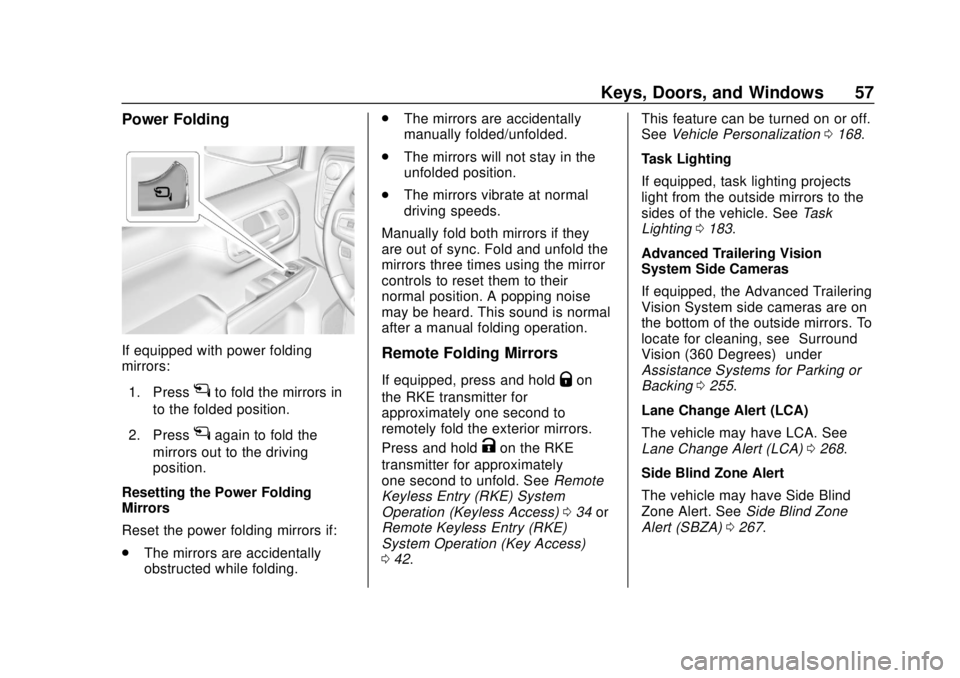
Power Folding
If equipped with power folding
mirrors:1. Press
gto fold the mirrors in
to the folded position.
2. Press
gagain to fold the
mirrors out to the driving
position.
Resetting the Power Folding
Mirrors
Reset the power folding mirrors if:
. The mirrors are accidentally
obstructed while folding. .
The mirrors are accidentally
manually folded/unfolded.
. The mirrors will not stay in the
unfolded position.
. The mirrors vibrate at normal
driving speeds.
Manually fold both mirrors if they
are out of sync. Fold and unfold the
mirrors three times using the mirror
controls to reset them to their
normal position. A popping noise
may be heard. This sound is normal
after a manual folding operation.
Remote Folding Mirrors
If equipped, press and holdQon
the RKE transmitter for
approximately one second to
remotely fold the exterior mirrors.
Press and hold
Kon the RKE
transmitter for approximately
one second to unfold. See Remote
Keyless Entry (RKE) System
Operation (Keyless Access) 034 or
Remote Keyless Entry (RKE)
System Operation (Key Access)
0 42. This feature can be turned on or off.
See
Vehicle Personalization 0168.
Task Lighting
If equipped, task lighting projects
light from the outside mirrors to the
sides of the vehicle. See Task
Lighting 0183.
Advanced Trailering Vision
System Side Cameras
If equipped, the Advanced Trailering
Vision System side cameras are on
the bottom of the outside mirrors. To
locate for cleaning, see “Surround
Vision (360 Degrees)” under
Assistance Systems for Parking or
Backing 0255.
Lane Change Alert (LCA)
The vehicle may have LCA. See
Lane Change Alert (LCA) 0268.
Side Blind Zone Alert
The vehicle may have Side Blind
Zone Alert. See Side Blind Zone
Alert (SBZA) 0267.
Page 59 of 474
Chevrolet Silverado Owner Manual (GMNA-Localizing-U.S./Canada/Mexico-
1500-11698642) - 2019 - CRC - 2/20/19
58 Keys, Doors, and Windows
Heated Mirrors
1
REAR :If equipped, the rear
window defogger also heats the
outside mirrors.
W: If equipped, press to turn the
heated outside mirrors on or off.
See “Rear Window Defogger” under
Climate Control Systems 0189 or
Dual Automatic Climate Control
System 0191.
Automatic Dimming
Mirror
If equipped, the driver outside mirror
automatically adjusts for the glare of
the headlamps from behind. This
feature comes on when the vehicle
is started.
Blind Spot Mirrors
If equipped, there is a small convex
mirror built into the upper and outer
corner of the driver outside mirror.
It can show objects that may be in
the vehicle's blind zone.
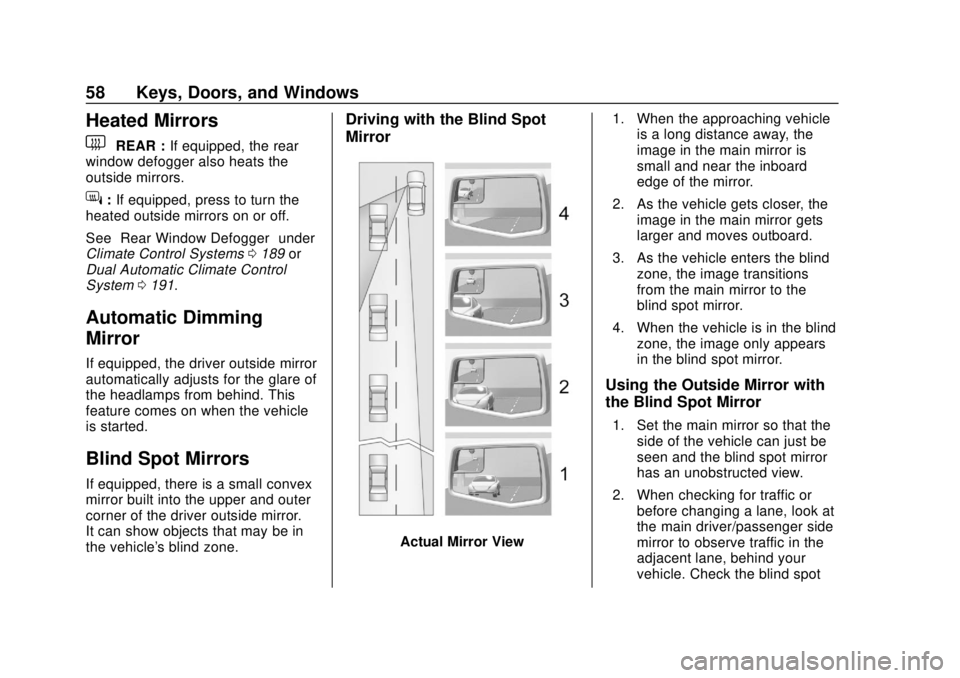
Driving with the Blind Spot
Mirror
Actual Mirror View 1. When the approaching vehicle
is a long distance away, the
image in the main mirror is
small and near the inboard
edge of the mirror.
2. As the vehicle gets closer, the image in the main mirror gets
larger and moves outboard.
3. As the vehicle enters the blind zone, the image transitions
from the main mirror to the
blind spot mirror.
4. When the vehicle is in the blind zone, the image only appears
in the blind spot mirror.
Using the Outside Mirror with
the Blind Spot Mirror
1. Set the main mirror so that theside of the vehicle can just be
seen and the blind spot mirror
has an unobstructed view.
2. When checking for traffic or before changing a lane, look at
the main driver/passenger side
mirror to observe traffic in the
adjacent lane, behind your
vehicle. Check the blind spot
Page 60 of 474
Chevrolet Silverado Owner Manual (GMNA-Localizing-U.S./Canada/Mexico-
1500-11698642) - 2019 - CRC - 2/20/19
Keys, Doors, and Windows 59
mirror for a vehicle in the blind
zone. Then, glance over your
shoulder to double check
before moving slowly into the
adjacent lane.
Reverse Tilt Mirrors
If equipped with memory seats, the
passenger and/or driver mirror tilts
to a preselected position when the
vehicle is in R (Reverse). This
allows the curb to be seen when
parallel parking.
The mirror(s) return to the original
position when:
.The vehicle is shifted out of
R (Reverse), or remains in
R (Reverse) for about
30 seconds.
. The ignition is turned off.
. The vehicle is driven in
R (Reverse) above a set speed.
To turn this feature on or off, see
Vehicle Personalization 0168.
Interior Mirrors
Interior Rearview Mirrors
Adjust the rearview mirror for a clear
view of the area behind your
vehicle.
Do not spray glass cleaner directly
on the mirror. Use a soft towel
dampened with water.
Manual Rearview Mirror
If equipped, push the tab forward for
daytime use and pull it rearward for
nighttime use to avoid glare from
the headlamps from behind.
Automatic Dimming
Rearview Mirror
If equipped, the mirror will
automatically reduce the glare of the
headlamps from behind. The
dimming feature comes on each
time the vehicle is started.
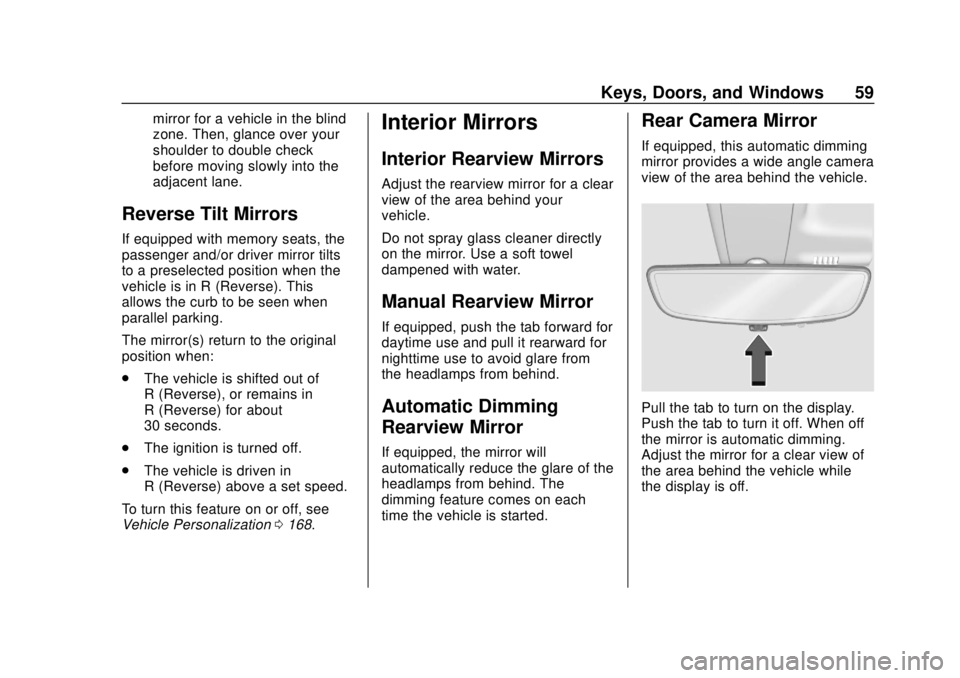
Rear Camera Mirror
If equipped, this automatic dimming
mirror provides a wide angle camera
view of the area behind the vehicle.
Pull the tab to turn on the display.
Push the tab to turn it off. When off
the mirror is automatic dimming.
Adjust the mirror for a clear view of
the area behind the vehicle while
the display is off.
Page 61 of 474

Chevrolet Silverado Owner Manual (GMNA-Localizing-U.S./Canada/Mexico-
1500-11698642) - 2019 - CRC - 2/20/19
60 Keys, Doors, and Windows
PressVto scroll through the
adjustment options.
Press
tanduto adjust the
settings using the indicators on the
mirror. The indicators will remain
visible for five seconds after the last
button activation, and the settings
will remain saved.
The adjustment options are:
. Brightness
.Zoom
.Tilt
Page 62 of 474

Chevrolet Silverado Owner Manual (GMNA-Localizing-U.S./Canada/Mexico-
1500-11698642) - 2019 - CRC - 2/20/19
Keys, Doors, and Windows 61
{Warning
The Rear Camera Mirror (RCM)
has a limited view. Portions of the
road, vehicles, and other objects
may not be seen. Do not drive or
park the vehicle using only this
camera. Objects may appear
closer than they are. Check the
outside mirrors or glance over
your shoulder when making lane
changes or merging. Failure to
use proper care may result in
injury, death, or vehicle damage.Troubleshooting
See your dealer for service if a blue
screen and
3are displayed in
the mirror, and the display shuts off.
Also, push the tab as indicated to
return to the automatic
dimming mode.
The Rear Camera Mirror may not
work properly or display a clear
image if:
. There is glare from the sun or
headlamps. This may obstruct
objects from view. If needed,
push the tab to turn off the
display. .
Dirt, snow, or other debris blocks
the camera lens. Clean the lens
with a soft damp cloth.
. The camera’s mounting on the
vehicle has been damaged, and/
or the position or the mounting
angle of the camera has
changed.
Page 63 of 474
Chevrolet Silverado Owner Manual (GMNA-Localizing-U.S./Canada/Mexico-
1500-11698642) - 2019 - CRC - 2/20/19
62 Keys, Doors, and Windows
Windows
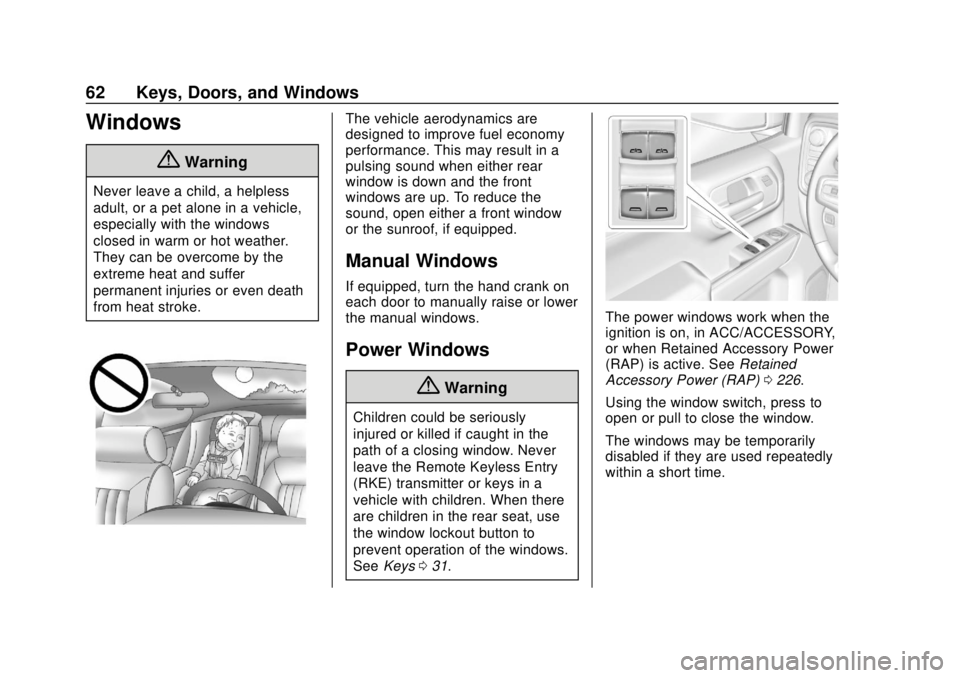
{Warning
Never leave a child, a helpless
adult, or a pet alone in a vehicle,
especially with the windows
closed in warm or hot weather.
They can be overcome by the
extreme heat and suffer
permanent injuries or even death
from heat stroke.
The vehicle aerodynamics are
designed to improve fuel economy
performance. This may result in a
pulsing sound when either rear
window is down and the front
windows are up. To reduce the
sound, open either a front window
or the sunroof, if equipped.
Manual Windows
If equipped, turn the hand crank on
each door to manually raise or lower
the manual windows.
Power Windows
{Warning
Children could be seriously
injured or killed if caught in the
path of a closing window. Never
leave the Remote Keyless Entry
(RKE) transmitter or keys in a
vehicle with children. When there
are children in the rear seat, use
the window lockout button to
prevent operation of the windows.
SeeKeys 031.
The power windows work when the
ignition is on, in ACC/ACCESSORY,
or when Retained Accessory Power
(RAP) is active. See Retained
Accessory Power (RAP) 0226.
Using the window switch, press to
open or pull to close the window.
The windows may be temporarily
disabled if they are used repeatedly
within a short time.
Page 64 of 474
Chevrolet Silverado Owner Manual (GMNA-Localizing-U.S./Canada/Mexico-
1500-11698642) - 2019 - CRC - 2/20/19
Keys, Doors, and Windows 63
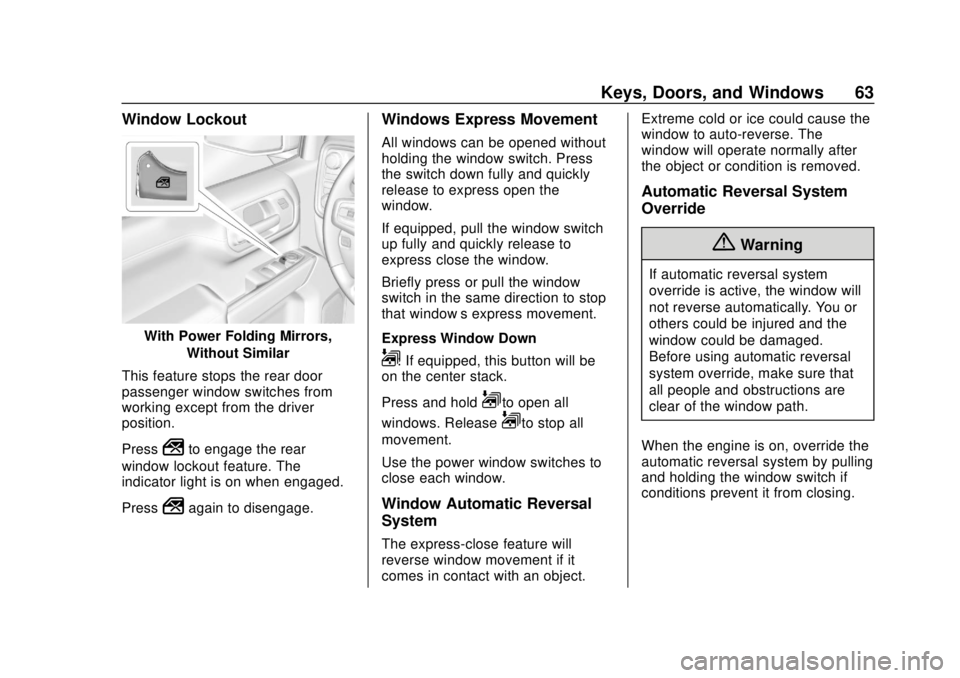
Window Lockout
With Power Folding Mirrors,Without Similar
This feature stops the rear door
passenger window switches from
working except from the driver
position.
Press
2to engage the rear
window lockout feature. The
indicator light is on when engaged.
Press
2again to disengage.
Windows Express Movement
All windows can be opened without
holding the window switch. Press
the switch down fully and quickly
release to express open the
window.
If equipped, pull the window switch
up fully and quickly release to
express close the window.
Briefly press or pull the window
switch in the same direction to stop
that window’s express movement.
Express Window Down
L: If equipped, this button will be
on the center stack.
Press and hold
Lto open all
windows. Release
Lto stop all
movement.
Use the power window switches to
close each window.
Window Automatic Reversal
System
The express-close feature will
reverse window movement if it
comes in contact with an object. Extreme cold or ice could cause the
window to auto-reverse. The
window will operate normally after
the object or condition is removed.
Automatic Reversal System
Override
{Warning
If automatic reversal system
override is active, the window will
not reverse automatically. You or
others could be injured and the
window could be damaged.
Before using automatic reversal
system override, make sure that
all people and obstructions are
clear of the window path.
When the engine is on, override the
automatic reversal system by pulling
and holding the window switch if
conditions prevent it from closing.