Transmission CHEVROLET SILVERADO 2019 Service Manual
[x] Cancel search | Manufacturer: CHEVROLET, Model Year: 2019, Model line: SILVERADO, Model: CHEVROLET SILVERADO 2019Pages: 474, PDF Size: 7.28 MB
Page 300 of 474
Chevrolet Silverado Owner Manual (GMNA-Localizing-U.S./Canada/Mexico-
1500-11698642) - 2019 - CRC - 2/20/19
Driving and Operating 299
see a tire or trailer dealer for
service. The learning process must
be repeated when the trailer tires
are rotated or replaced. See“Editing
a Trailer Profile” later in this section
for tire pressure sensor relearn
information.
Tool Method: A TTPMS activation
tool can be purchased separately to
learn the sensor locations.
Manual Method: Without the tool,
the air pressure can be increased or
decreased in each tire for
10 seconds. Do not exceed the
maximum inflation pressure found
on the tire sidewalls. Make sure to
re-adjust tire pressure to the
recommended level when the
process is complete.
Sensor Learning Steps
To complete the sensor-to-vehicle
learn process:
1. Touch Start on the Learn Sensors screen. The horn
chirps twice and the Learning
Active screen appears on the
infotainment display. 2. Start with the driver side front
trailer tire.
3. Activate the tool near the valve stem or adjust the air pressure
of this tire until the horn chirps
and all working vehicle and
trailer lights flash.
The process stops without
saving the sensor locations if
this step takes more than
two minutes.
4. Move to the next tire and repeat Step 3 for each sensor.
The horn chirps twice when all
sensors are completed.
5. Return to the vehicle to complete the setup.
Maintenance Reminders
Select Yes to set up the
maintenance reminders for the
Trailer Profile. Follow the on-screen
prompts. The maximum number of
reminders is 10. Select No to skip
this step.
Status View
The Status view shows: .
Truck
. Connection
. Trailer
. Maintenance
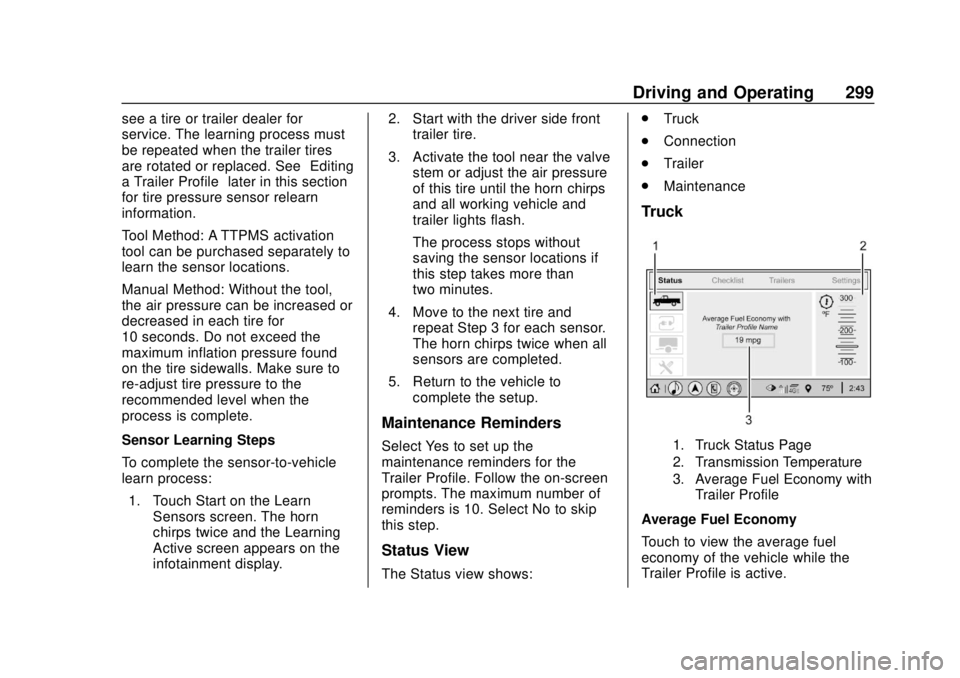
Truck
1. Truck Status Page
2. Transmission Temperature
3. Average Fuel Economy with
Trailer Profile
Average Fuel Economy
Touch to view the average fuel
economy of the vehicle while the
Trailer Profile is active.
Page 301 of 474
Chevrolet Silverado Owner Manual (GMNA-Localizing-U.S./Canada/Mexico-
1500-11698642) - 2019 - CRC - 2/20/19
300 Driving and Operating
Transmission Temperature
Touch to view the temperature of
the transmission fluid graphic. The
graphic will indicate a dangerous
level if the temperature is at 130 °C–
150 °C (270 °F–300 °F).
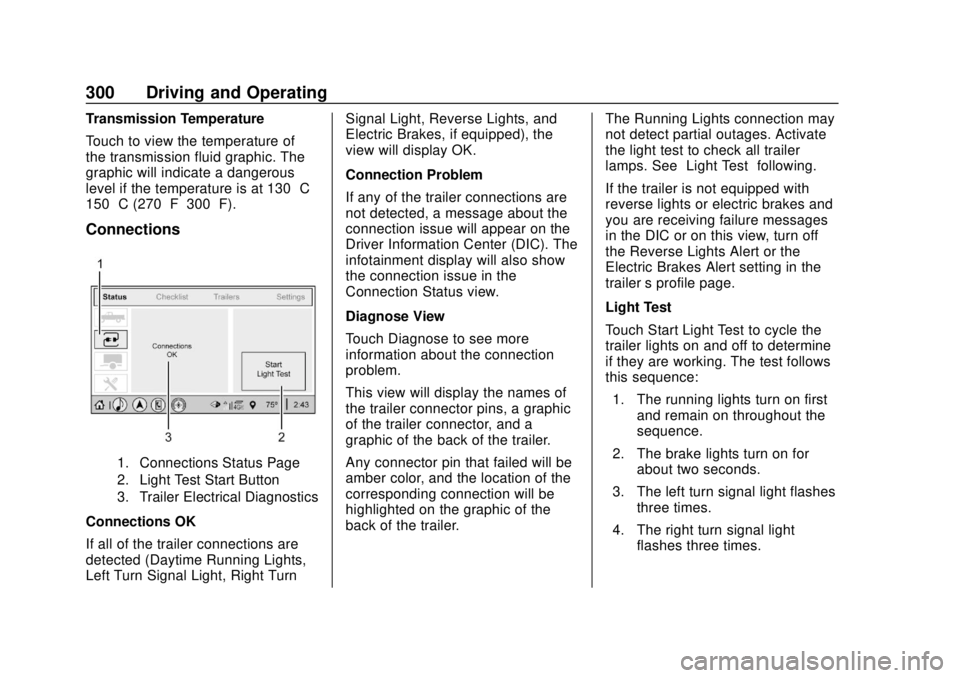
Connections
1. Connections Status Page
2. Light Test Start Button
3. Trailer Electrical Diagnostics
Connections OK
If all of the trailer connections are
detected (Daytime Running Lights,
Left Turn Signal Light, Right TurnSignal Light, Reverse Lights, and
Electric Brakes, if equipped), the
view will display OK.
Connection Problem
If any of the trailer connections are
not detected, a message about the
connection issue will appear on the
Driver Information Center (DIC). The
infotainment display will also show
the connection issue in the
Connection Status view.
Diagnose View
Touch Diagnose to see more
information about the connection
problem.
This view will display the names of
the trailer connector pins, a graphic
of the trailer connector, and a
graphic of the back of the trailer.
Any connector pin that failed will be
amber color, and the location of the
corresponding connection will be
highlighted on the graphic of the
back of the trailer.
The Running Lights connection may
not detect partial outages. Activate
the light test to check all trailer
lamps. See
“Light Test”following.
If the trailer is not equipped with
reverse lights or electric brakes and
you are receiving failure messages
in the DIC or on this view, turn off
the Reverse Lights Alert or the
Electric Brakes Alert setting in the
trailer ’s profile page.
Light Test
Touch Start Light Test to cycle the
trailer lights on and off to determine
if they are working. The test follows
this sequence: 1. The running lights turn on first and remain on throughout the
sequence.
2. The brake lights turn on for about two seconds.
3. The left turn signal light flashes three times.
4. The right turn signal light flashes three times.
Page 302 of 474
Chevrolet Silverado Owner Manual (GMNA-Localizing-U.S./Canada/Mexico-
1500-11698642) - 2019 - CRC - 2/20/19
Driving and Operating 301
5. The reverse lights turn on forabout two seconds.
6. Steps 2–5 repeat for approximately one minute and
45 seconds, or until the test
deactivates.
Touch Stop to stop the test. The test
will automatically end after
one minute and 45 seconds.
The sequence also deactivates
when any of the following occur:
. The ignition is turned off.
. The transmission is shifted out
of P (Park).
. The brake pedal is pressed.
. The turn signal is activated.
. The hazard warning lights are
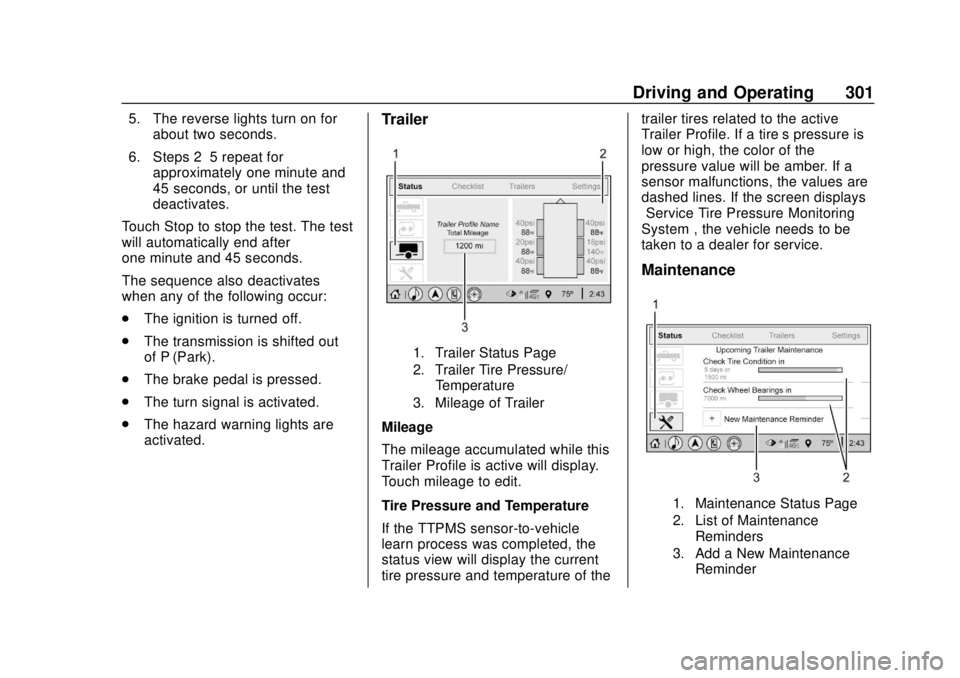
activated.Trailer
1. Trailer Status Page
2. Trailer Tire Pressure/
Temperature
3. Mileage of Trailer
Mileage
The mileage accumulated while this
Trailer Profile is active will display.
Touch mileage to edit.
Tire Pressure and Temperature
If the TTPMS sensor-to-vehicle
learn process was completed, the
status view will display the current
tire pressure and temperature of the trailer tires related to the active
Trailer Profile. If a tire’
s pressure is
low or high, the color of the
pressure value will be amber. If a
sensor malfunctions, the values are
dashed lines. If the screen displays
“Service Tire Pressure Monitoring
System”, the vehicle needs to be
taken to a dealer for service.
Maintenance
1. Maintenance Status Page
2. List of Maintenance
Reminders
3. Add a New Maintenance Reminder
Page 313 of 474
Chevrolet Silverado Owner Manual (GMNA-Localizing-U.S./Canada/Mexico-
1500-11698642) - 2019 - CRC - 2/20/19
312 Vehicle Care
Vehicle Care
General Information
General Information . . . . . . . . . . 313
California Proposition65 Warning . . . . . . . . . . . . . . . . . 314
California Perchlorate Materials Requirements . . . . . 314
Accessories and Modifications . . . . . . . . . . . . . . . . 314
Vehicle Checks
Doing Your OwnService Work . . . . . . . . . . . . . . . 315
Hood . . . . . . . . . . . . . . . . . . . . . . . . . 315
Engine Compartment Overview . . . . . . . . . . . . . . . . . . . . 317
Engine Oil . . . . . . . . . . . . . . . . . . . . 322
Engine Oil Life System . . . . . . . 324
Automatic Transmission Fluid . . . . . . . . . . . . . . . . . . . . . . . . 326
Engine Air Filter Life System . . . . . . . . . . . . . . . . . . . . . . 326
Engine Air Cleaner/Filter . . . . . . 327
Cooling System . . . . . . . . . . . . . . 328
Engine Overheating . . . . . . . . . . 332
Overheated Engine Protection Operating Mode . . . . . . . . . . . . . 334
Engine Fan . . . . . . . . . . . . . . . . . . . 334 Washer Fluid . . . . . . . . . . . . . . . . . 335
Brakes . . . . . . . . . . . . . . . . . . . . . . . 336
Brake Pad Life System . . . . . . . 336
Brake Fluid . . . . . . . . . . . . . . . . . . . 337
Battery - North America . . . . . . 338
Four-Wheel Drive . . . . . . . . . . . . . 341
Front Axle . . . . . . . . . . . . . . . . . . . . 341
Rear Axle . . . . . . . . . . . . . . . . . . . . 342
Noise Control System . . . . . . . . 343
Starter Switch Check . . . . . . . . . 344
Ignition Transmission Lock
Check . . . . . . . . . . . . . . . . . . . . . . . 344
Park Brake and P (Park) Mechanism Check . . . . . . . . . . 344
Wiper Blade Replacement . . . . 345
Glass Replacement . . . . . . . . . . 346
Windshield Replacement . . . . . 346
Gas Strut(s) . . . . . . . . . . . . . . . . . . 346
Headlamp Aiming
Headlamp Aiming . . . . . . . . . . . . 347
Bulb Replacement
Bulb Replacement . . . . . . . . . . . . 347
Halogen Bulbs . . . . . . . . . . . . . . . . 347
LED Lighting . . . . . . . . . . . . . . . . . 348
Headlamps, Front Turn Signal, Sidemarker, and Parking
Lamps . . . . . . . . . . . . . . . . . . . . . . 348 Taillamps, Turn Signal,
Stoplamps, and Back-Up
Lamps . . . . . . . . . . . . . . . . . . . . . . 349
Center High-Mounted Stoplamp (CHMSL) and
Cargo Lamp . . . . . . . . . . . . . . . . . 350
License Plate Lamp . . . . . . . . . . 350
Electrical System
Electrical System Overload . . . 351
Fuses and Circuit Breakers . . . 351
Engine Compartment Fuse Block . . . . . . . . . . . . . . . . . . . . . . . . 352
Instrument Panel Fuse Block (Right) . . . . . . . . . . . . . . . . . . . . . . 355
Instrument Panel Fuse Block (Left) . . . . . . . . . . . . . . . . . 358
Wheels and Tires
Tires . . . . . . . . . . . . . . . . . . . . . . . . . . 360
All-Season Tires . . . . . . . . . . . . . . 361
Winter Tires . . . . . . . . . . . . . . . . . . 361
Low-Profile Tires . . . . . . . . . . . . . 362
All-Terrain Tires . . . . . . . . . . . . . . . 362
Tire Sidewall Labeling . . . . . . . . 362
Tire Designations . . . . . . . . . . . . . 365
Tire Terminology and
Definitions . . . . . . . . . . . . . . . . . . 366
Tire Pressure . . . . . . . . . . . . . . . . . 369
Tire Pressure for High-Speed
Operation . . . . . . . . . . . . . . . . . . . 370
Page 327 of 474
Chevrolet Silverado Owner Manual (GMNA-Localizing-U.S./Canada/Mexico-
1500-11698642) - 2019 - CRC - 2/20/19
326 Vehicle Care
Automatic Transmission
Fluid
When to Check and Change
Automatic Transmission Fluid
It is usually not necessary to check
the transmission fluid level. The only
reason for fluid loss is a
transmission leak or overheated
transmission. This vehicle is not
equipped with a transmission fluid
level dipstick. There is a special
procedure for checking and
changing the transmission fluid in
these vehicles. Because this
procedure is difficult, this should be
done at the dealer. Contact the
dealer for additional information or
the procedure can be found in the
service manual. SeePublication
Ordering Information 0444.
Caution
Use of the incorrect automatic
transmission fluid may damage
the vehicle, and the damage may
(Continued)
Caution (Continued)
not be covered by the vehicle
warranty. Always use the correct
automatic transmission fluid. See
Recommended Fluids and
Lubricants0427.
Change the fluid and filter at the
scheduled maintenance intervals
listed in Maintenance Schedule
0 417. Be sure to use the
transmission fluid listed in
Recommended Fluids and
Lubricants 0427.
Engine Air Filter Life
System
If equipped, this feature provides
the engine air filter ’s remaining life
and best timing for a change. The
timing to change an engine air filter
depends on driving and
environmental conditions.
When to Change the Engine
Air Filter
When the Driver Information Center
(DIC) displays a message to replace
the engine air filter at the next oil
change, follow this timing.
When the DIC displays a message
to replace the engine air filter soon,
replace the engine air filter at the
earliest convenience.
The system must be reset after the
engine air filter is changed.
If the DIC displays a message to
check the engine air filter system,
see your dealer.
How to Reset the Engine Air
Filter Life System
To reset:
1. Place the vehicle in P (Park).
2. Display the Air Filter Life on the DIC. See Driver Information
Center (DIC) (Base Level)
0 160 or
Driver Information Center (DIC)
(Midlevel and Uplevel) 0161.
Page 332 of 474
Chevrolet Silverado Owner Manual (GMNA-Localizing-U.S./Canada/Mexico-
1500-11698642) - 2019 - CRC - 2/20/19
Vehicle Care 331
3. Connect the vehicle to abattery charger.
4. Turn the ignition on for Key Access vehicles or to Service
Only for Keyless Access
vehicles. See Ignition Positions
(Key Access) 0218 or
Ignition Positions (Keyless
Access) 0220.
5. Turn off the air conditioning.
6. Set the parking brake.
7. At the same time, press the accelerator and the brake for
automatic transmission
vehicles for two seconds, then
release.
At the end of the cycle, check the
coolant level in the surge tank and
add coolant if it is low. Turn off the
vehicle, allow the Electronic Control
Module (ECM) to go to sleep, about
2 minutes, and repeat Steps 3-7.
Listen for pump activation and
movement of the control valves
while watching the level of the
coolant in the surge tank. If the tank
empties, turn the ignition off, carefully remove the surge tank cap,
refill to the indicated mark, and
repeat Steps 3-6. The fill and air
removal process will run for
approximately 10 minutes.
How to Add Coolant to the
Coolant Surge Tank for
Gasoline Engines Except L3B
If the vehicle has a diesel engine,
see
“Cooling System” in the
Duramax diesel supplement for the
proper coolant fill procedure.
{Warning
Spilling coolant on hot engine
parts can burn you. Coolant
contains ethylene glycol and it will
burn if the engine parts are hot
enough.
{Warning
Plain water, or other liquids such
as alcohol, can boil before the
proper coolant mixture will. With
plain water or the wrong mixture,
the engine could get too hot but
there would not be an overheat
warning. The engine could catch
fire and you or others could be
burned.
{Warning
Steam and scalding liquids from a
hot cooling system are under
pressure. Turning the pressure
cap, even a little, can cause them
to come out at high speed and
you could be burned. Never turn
the cap when the cooling system,
including the pressure cap, is hot.
Wait for the cooling system and
pressure cap to cool.
Page 345 of 474
Chevrolet Silverado Owner Manual (GMNA-Localizing-U.S./Canada/Mexico-
1500-11698642) - 2019 - CRC - 2/20/19
344 Vehicle Care
Insulation:
Removal of the noise shields or any
underhood insulation.
Engine:
Removal or rendering the engine
speed governor, if equipped,
inoperative so as to allow engine
speed to exceed manufacturer
specifications.
Fan and Drive:
.Removal of the fan clutch,
if equipped, or rendering the
clutch inoperative.
. Removal of the fan shroud,
if equipped.
Air Intake:
. Removal of the air cleaner
silencer.
. Modification of the air cleaner.
Exhaust:
. Removal of the muffler and/or
resonator.
. Removal of the exhaust pipes
and exhaust pipe clamps.Starter Switch Check
{Warning
When you are doing this
inspection, the vehicle could
move suddenly. If the vehicle
moves, you or others could be
injured.
1. Before starting this check, be sure there is enough room
around the vehicle.
2. Apply both the parking brake and the regular brake.
Do not use the accelerator
pedal, and be ready to turn off
the engine immediately if it
starts.
3. Try to start the engine in each gear. The vehicle should start
only in P (Park) or N (Neutral).
If the vehicle starts in any other
position, contact your dealer for
service.
Ignition Transmission
Lock Check
If equipped with Key Access
ignition, while parked, and with the
parking brake set, try to turn the
ignition off in each shift lever
position. The ignition should turn to
off only when the shift lever is in
P (Park).
The ignition key should come out
only when the ignition is off. Contact
your dealer if service is required.
Park Brake and P (Park)
Mechanism Check
{Warning
When you are doing this check,
the vehicle could begin to move.
You or others could be injured
and property could be damaged.
Make sure there is room in front
of the vehicle in case it begins to
roll. Be ready to apply the regular
brake at once should the vehicle
begin to move.
Page 346 of 474
Chevrolet Silverado Owner Manual (GMNA-Localizing-U.S./Canada/Mexico-
1500-11698642) - 2019 - CRC - 2/20/19
Vehicle Care 345
Park on a fairly steep hill, with the
vehicle facing downhill. Keeping
your foot on the regular brake, set
the parking brake.
.To check the parking brake's
holding ability: With the engine
running and the transmission in
N (Neutral), slowly remove foot
pressure from the regular brake
pedal. Do this until the vehicle is
held by the parking brake only.
. To check the P (Park)
mechanism's holding ability:
With the engine running, shift to
P (Park). Then release the
parking brake followed by the
regular brake.
Contact your dealer if service is
required.
Wiper Blade Replacement
Windshield wiper blades should be
replaced periodically. See
Maintenance Schedule 0417. Replacement blades come in
different types and are removed in
different ways. For proper type and
length, see
Maintenance
Replacement Parts 0428.
Caution
Allowing the wiper arm to touch
the windshield when no wiper
blade is installed could damage
the windshield. Any damage that
occurs would not be covered by
the vehicle warranty. Do not allow
the wiper arm to touch the
windshield.
Front Wiper Blade
Replacement
To replace the wiper blade:
1. Pull the wiper assembly away from the windshield.
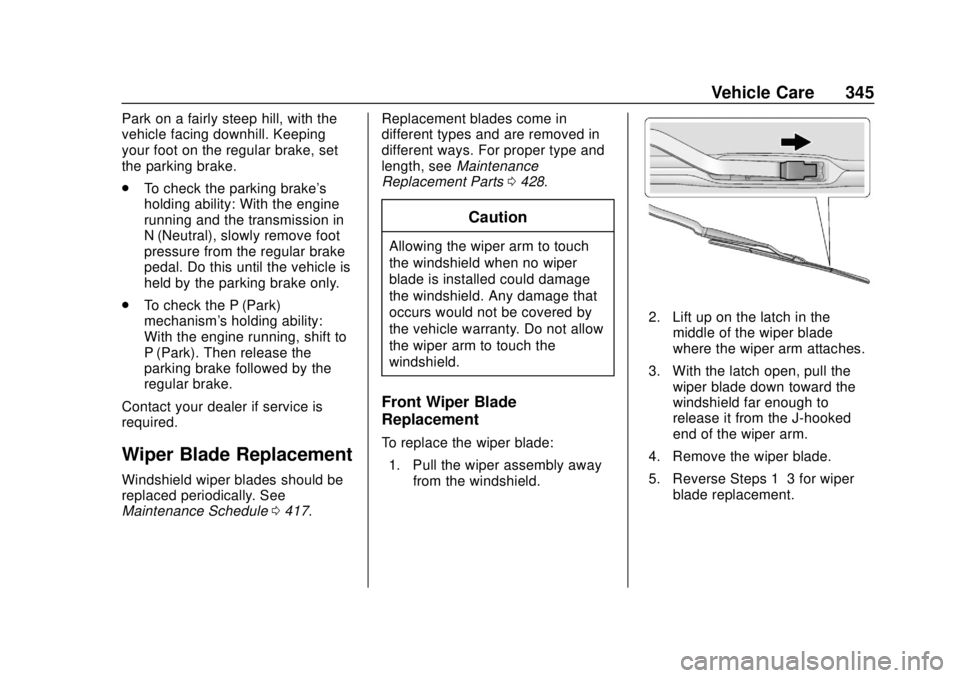
2. Lift up on the latch in themiddle of the wiper blade
where the wiper arm attaches.
3. With the latch open, pull the wiper blade down toward the
windshield far enough to
release it from the J-hooked
end of the wiper arm.
4. Remove the wiper blade.
5. Reverse Steps 1–3 for wiper blade replacement.
Page 355 of 474
Chevrolet Silverado Owner Manual (GMNA-Localizing-U.S./Canada/Mexico-
1500-11698642) - 2019 - CRC - 2/20/19
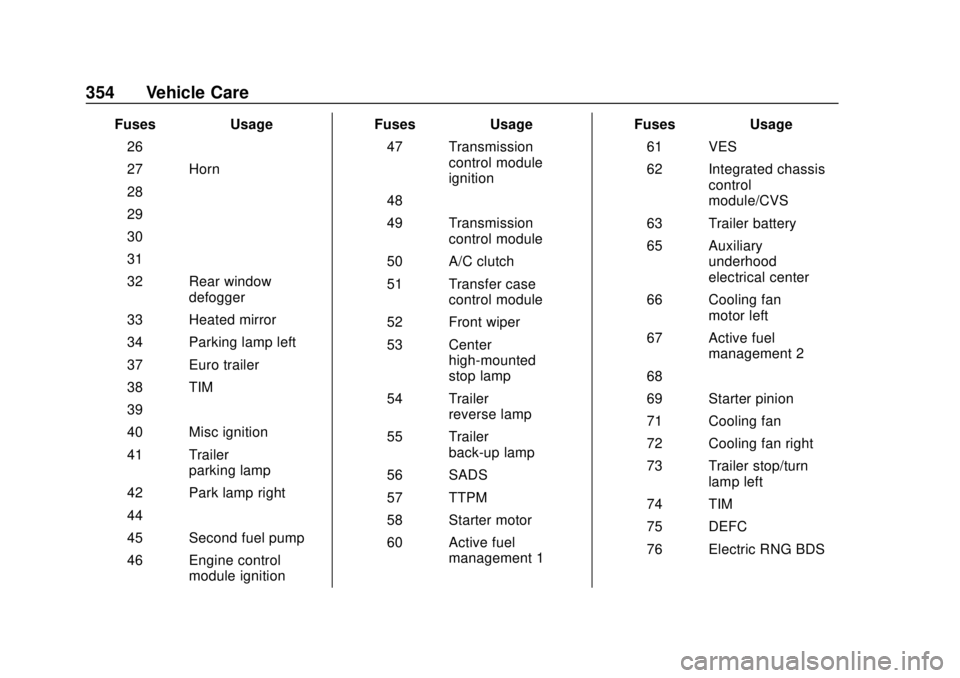
354 Vehicle Care
FusesUsage
26 –
27 Horn
28 –
29 –
30 –
31 –
32 Rear window defogger
33 Heated mirror
34 Parking lamp left
37 Euro trailer
38 TIM
39 –
40 Misc ignition
41 Trailer parking lamp
42 Park lamp right
44 –
45 Second fuel pump
46 Engine control module ignition Fuses
Usage
47 Transmission control module
ignition
48 –
49 Transmission control module
50 A/C clutch
51 Transfer case control module
52 Front wiper
53 Center high-mounted
stop lamp
54 Trailer reverse lamp
55 Trailer back-up lamp
56 SADS
57 TTPM
58 Starter motor
60 Active fuel management 1 Fuses
Usage
61 VES
62 Integrated chassis control
module/CVS
63 Trailer battery
65 Auxiliary underhood
electrical center
66 Cooling fan motor left
67 Active fuel management 2
68 –
69 Starter pinion
71 Cooling fan
72 Cooling fan right
73 Trailer stop/turn lamp left
74 TIM
75 DEFC
76 Electric RNG BDS
Page 358 of 474
Chevrolet Silverado Owner Manual (GMNA-Localizing-U.S./Canada/Mexico-
1500-11698642) - 2019 - CRC - 2/20/19
Vehicle Care 357
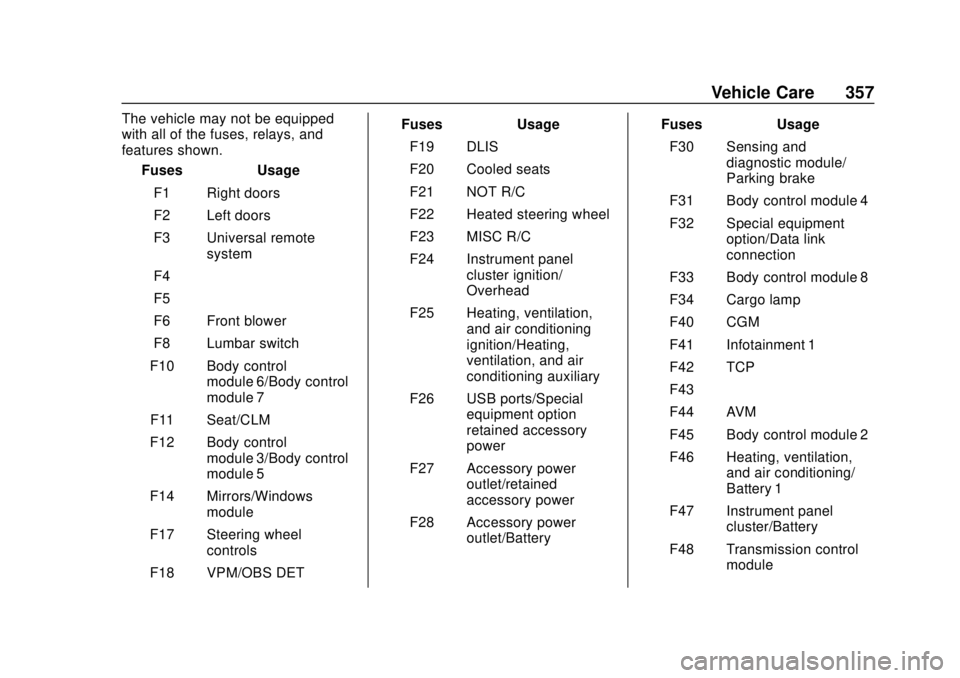
The vehicle may not be equipped
with all of the fuses, relays, and
features shown.Fuses Usage
F1 Right doors
F2 Left doors
F3 Universal remote system
F4 –
F5 –
F6 Front blower
F8 Lumbar switch
F10 Body control module 6/Body control
module 7
F11 Seat/CLM
F12 Body control module 3/Body control
module 5
F14 Mirrors/Windows module
F17 Steering wheel controls
F18 VPM/OBS DET Fuses Usage
F19 DLIS
F20 Cooled seats
F21 NOT R/C
F22 Heated steering wheel
F23 MISC R/C
F24 Instrument panel cluster ignition/
Overhead
F25 Heating, ventilation, and air conditioning
ignition/Heating,
ventilation, and air
conditioning auxiliary
F26 USB ports/Special equipment option
retained accessory
power
F27 Accessory power outlet/retained
accessory power
F28 Accessory power outlet/Battery Fuses Usage
F30 Sensing and diagnostic module/
Parking brake
F31 Body control module 4
F32 Special equipment option/Data link
connection
F33 Body control module 8
F34 Cargo lamp
F40 CGM
F41 Infotainment 1
F42 TCP
F43 –
F44 AVM
F45 Body control module 2
F46 Heating, ventilation, and air conditioning/
Battery 1
F47 Instrument panel cluster/Battery
F48 Transmission control module