cruise control CHEVROLET SILVERADO 2019 Owner's Manual
[x] Cancel search | Manufacturer: CHEVROLET, Model Year: 2019, Model line: SILVERADO, Model: CHEVROLET SILVERADO 2019Pages: 474, PDF Size: 7.28 MB
Page 6 of 474
Chevrolet Silverado Owner Manual (GMNA-Localizing-U.S./Canada/Mexico-
1500-11698642) - 2019 - CRC - 2/20/19
In Brief 5
In Brief
Instrument Panel
Instrument Panel . . . . . . . . . . . . . . . . 6
Initial Drive Information
Initial Drive Information . . . . . . . . . . 8
Stop/Start System . . . . . . . . . . . . . . . 8
Remote Keyless Entry (RKE)System . . . . . . . . . . . . . . . . . . . . . . . . 9
Remote Vehicle Start . . . . . . . . . . . 9
Door Locks . . . . . . . . . . . . . . . . . . . . 10
Windows . . . . . . . . . . . . . . . . . . . . . . . 10
Seat Adjustment . . . . . . . . . . . . . . . 11
Memory Features . . . . . . . . . . . . . . 13
Heated and Ventilated Seats . . . 13
Head Restraint Adjustment . . . . 14
Seat Belts . . . . . . . . . . . . . . . . . . . . . 14
Passenger Sensing System . . . 14
Mirror Adjustment . . . . . . . . . . . . . . 15
Steering Wheel Adjustment . . . . 16
Interior Lighting . . . . . . . . . . . . . . . . 17
Exterior Lighting . . . . . . . . . . . . . . . 18
Windshield Wiper/Washer . . . . . . 19
Climate Controls . . . . . . . . . . . . . . . 19
Transmission . . . . . . . . . . . . . . . . . . 21
Four-Wheel Drive . . . . . . . . . . . . . . 22
Vehicle Features
Infotainment System . . . . . . . . . . . 23
Steering Wheel Controls . . . . . . . 23
Cruise Control . . . . . . . . . . . . . . . . . 23
Driver Information Center (DIC) . . . . . . . . . . . . . . . . . 23
Forward Collision Alert (FCA) System . . . . . . . . . . . . . . . . . . . . . . . 24
Forward Automatic Braking (FAB) . . . . . . . . . . . . . . . . 24
Front Pedestrian Braking (FPB) System . . . . . . . . . . . . . . . . . . . . . . . 24
Lane Keep Assist (LKA) . . . . . . . 25
Lane Change Alert (LCA) . . . . . . 25
Surround Vision . . . . . . . . . . . . . . . 25
Rear Vision Camera (RVC) . . . . 25
Rear Cross Traffic Alert (RCTA) System . . . . . . . . . . . . . . . . . . . . . . . 25
Park Assist . . . . . . . . . . . . . . . . . . . . 25
Power Outlets . . . . . . . . . . . . . . . . . 26
Universal Remote System . . . . . 26
Sunroof . . . . . . . . . . . . . . . . . . . . . . . . 26
Performance and Maintenance
Traction Control/Electronic Stability Control . . . . . . . . . . . . . . 27
Tire Pressure Monitor . . . . . . . . . . 28
Fuel (Gasoline - Except L87 6.2L Engine) . . . . . . . . . . . . . 28 Fuel (Gasoline - L87 6.2L
Engine) . . . . . . . . . . . . . . . . . . . . . . . 29
Fuel (Diesel) . . . . . . . . . . . . . . . . . . . 29
E85 or FlexFuel . . . . . . . . . . . . . . . . 29
Engine Oil Life System . . . . . . . . 29
Driving for Better Fuel Economy . . . . . . . . . . . . . . . . . . . . . 30
Roadside Assistance Program . . . . . . . . . . . . . . . . . . . . . . 30
Page 9 of 474
Chevrolet Silverado Owner Manual (GMNA-Localizing-U.S./Canada/Mexico-
1500-11698642) - 2019 - CRC - 2/20/19
8 In Brief
17. ENGINE START/STOP. SeeIgnition Positions (Key Access)
0218 or
Ignition Positions (Keyless
Access) 0220.
18. Steering Wheel Controls 0132
(If Equipped).
Driver Information Center (DIC)
Controls. See Driver
Information Center (DIC) (Base
Level) 0160 or
Driver Information Center (DIC)
(Midlevel and Uplevel) 0161.
19. Horn 0132.
20. Hood Release. See Hood
0 315.
21. Steering Wheel Adjustment
0131 (Out of View).
22. Cruise Control 0251.
Forward Collision Alert (FCA)
System 0261 (If Equipped).
23. Data Link Connector (DLC) (Out of View). See Malfunction
Indicator Lamp (Check Engine
Light) 0150.
24. Electric Parking Brake 0242. 25.
Fog Lamps 0182 (If
Equipped).
Instrument Panel Illumination
Control 0184.
Exterior Cargo Lamps 0183.
Exterior Lamp Controls 0177.
Task Lighting 0183 (If
Equipped).Initial Drive
Information
This section provides a brief
overview about some of the
important features that may or may
not be on your specific vehicle.
For more detailed information, refer
to each of the features which can be
found later in this owner ’s manual.
Stop/Start System
If equipped, the Stop/Start system
will shut off the engine to help
conserve fuel. It has components
designed for the increased number
of starts.
When the brakes are applied and
the vehicle is at a complete stop,
the engine may turn off. When
stopped, the tachometer displays
AUTO STOP. SeeTachometer
0 144. When the brake pedal is
released or the accelerator pedal is
pressed, the engine will restart. See
Stop/Start System 0223.
Page 23 of 474
Chevrolet Silverado Owner Manual (GMNA-Localizing-U.S./Canada/Mexico-
1500-11698642) - 2019 - CRC - 2/20/19
22 In Brief
While using Range Selection Mode,
cruise control and the Tow/Haul
Mode can be used.
Grade Braking is not available when
Range Selection Mode is active.
SeeTow/Haul Mode 0235.
Four-Wheel Drive
If equipped with four-wheel drive,
the engine's driving power can be
sent to all four wheels for extra
traction.
Transfer Case Controls
Use the transfer case controls to
shift into and out of the different
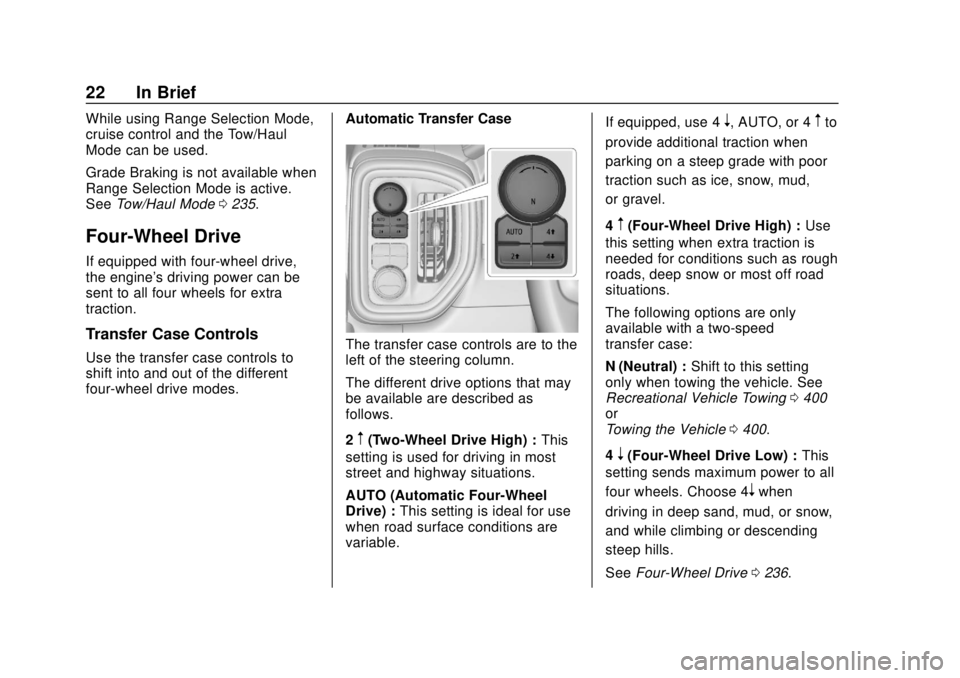
four-wheel drive modes. Automatic Transfer CaseThe transfer case controls are to the
left of the steering column.
The different drive options that may
be available are described as
follows.
2
m(Two-Wheel Drive High) :
This
setting is used for driving in most
street and highway situations.
AUTO (Automatic Four-Wheel
Drive) : This setting is ideal for use
when road surface conditions are
variable. If equipped, use 4
n, AUTO, or 4mto
provide additional traction when
parking on a steep grade with poor
traction such as ice, snow, mud,
or gravel.
4
m(Four-Wheel Drive High) : Use
this setting when extra traction is
needed for conditions such as rough
roads, deep snow or most off road
situations.
The following options are only
available with a two-speed
transfer case:
N (Neutral) : Shift to this setting
only when towing the vehicle. See
Recreational Vehicle Towing 0400
or
Towing the Vehicle 0400.
4
n(Four-Wheel Drive Low) : This
setting sends maximum power to all
four wheels. Choose 4
nwhen
driving in deep sand, mud, or snow,
and while climbing or descending
steep hills.
See Four-Wheel Drive 0236.
Page 24 of 474
Chevrolet Silverado Owner Manual (GMNA-Localizing-U.S./Canada/Mexico-
1500-11698642) - 2019 - CRC - 2/20/19
In Brief 23
Vehicle Features
Infotainment System
See the infotainment manual for
information on the radio, audio
players, phone, navigation system,
and voice or speech recognition.
It also includes information on
settings.
Steering Wheel Controls
The infotainment system can be
operated by using the steering
wheel controls. See“Steering Wheel
Controls” in the infotainment
manual.
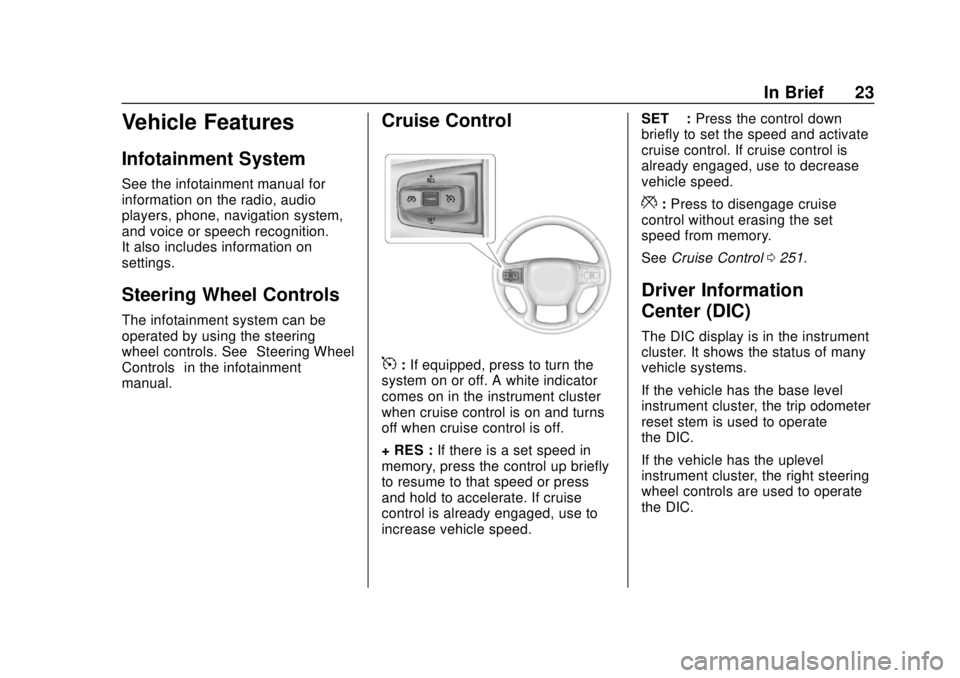
Cruise Control
5: If equipped, press to turn the
system on or off. A white indicator
comes on in the instrument cluster
when cruise control is on and turns
off when cruise control is off.
+ RES : If there is a set speed in
memory, press the control up briefly
to resume to that speed or press
and hold to accelerate. If cruise
control is already engaged, use to
increase vehicle speed. SET
−:Press the control down
briefly to set the speed and activate
cruise control. If cruise control is
already engaged, use to decrease
vehicle speed.
*: Press to disengage cruise
control without erasing the set
speed from memory.
See Cruise Control 0251.
Driver Information
Center (DIC)
The DIC display is in the instrument
cluster. It shows the status of many
vehicle systems.
If the vehicle has the base level
instrument cluster, the trip odometer
reset stem is used to operate
the DIC.
If the vehicle has the uplevel
instrument cluster, the right steering
wheel controls are used to operate
the DIC.
Page 31 of 474
Chevrolet Silverado Owner Manual (GMNA-Localizing-U.S./Canada/Mexico-
1500-11698642) - 2019 - CRC - 2/20/19
30 In Brief
SeeEngine Oil Life System 0324.
Driving for Better Fuel
Economy
Driving habits can affect fuel
mileage. Here are some driving tips
to get the best fuel economy
possible:
.
Set the climate controls to the
desired temperature after the
engine is started, or turn them
off when not required.
. Avoid fast starts and accelerate
smoothly.
. Brake gradually and avoid
abrupt stops.
. Avoid idling the engine for long
periods of time.
. When road and weather
conditions are appropriate, use
cruise control.
. Always follow posted speed
limits or drive more slowly when
conditions require.
. Keep vehicle tires properly
inflated. .
Combine several trips into a
single trip.
. Replace the vehicle's tires with
the same TPC Spec number
molded into the tire's sidewall
near the size.
. Follow recommended scheduled
maintenance.
Roadside Assistance
Program
U.S.: 1-800-243-8872
TTY Users (U.S. Only):
1-888-889-2438
Canada: 1-800-268-6800
New Chevrolet owners are
automatically enrolled in the
Roadside Assistance Program.
See Roadside Assistance Program
0 439.
Page 131 of 474
Chevrolet Silverado Owner Manual (GMNA-Localizing-U.S./Canada/Mexico-
1500-11698642) - 2019 - CRC - 2/20/19
130 Instruments and Controls
Instruments and
Controls
Controls
Steering Wheel Adjustment . . . 131
Steering Wheel Controls . . . . . . 132
Heated Steering Wheel . . . . . . . 132
Horn . . . . . . . . . . . . . . . . . . . . . . . . . . 132
Windshield Wiper/Washer . . . . 132
Compass . . . . . . . . . . . . . . . . . . . . . 133
Clock . . . . . . . . . . . . . . . . . . . . . . . . . 133
Power Outlets . . . . . . . . . . . . . . . . 133
Wireless Charging . . . . . . . . . . . . 136
Warning Lights, Gauges, and
Indicators
Warning Lights, Gauges, andIndicators . . . . . . . . . . . . . . . . . . . 138
Instrument Cluster . . . . . . . . . . . . 139
Speedometer . . . . . . . . . . . . . . . . . 143
Odometer . . . . . . . . . . . . . . . . . . . . . 144
Trip Odometer . . . . . . . . . . . . . . . . 144
Tachometer . . . . . . . . . . . . . . . . . . . 144
Fuel Gauge . . . . . . . . . . . . . . . . . . . 144
Engine Oil Pressure Gauge . . . . . . . . . . . . . . . . . . . . . . 145
Engine Coolant Temperature Gauge . . . . . . . . . . . . . . . . . . . . . . 146 Voltmeter Gauge . . . . . . . . . . . . . 147
Seat Belt Reminders . . . . . . . . . 147
Airbag Readiness Light . . . . . . . 148
Passenger Airbag Status
Indicator . . . . . . . . . . . . . . . . . . . . 148
Charging System Light . . . . . . . 149
Malfunction Indicator Lamp (Check Engine Light) . . . . . . . . 150
Brake System Warning Light . . . . . . . . . . . . . . . . . . . . . . . . 152
Electric Parking Brake Light . . . . . . . . . . . . . . . . . . . . . . . . 153
Service Electric Parking Brake Light . . . . . . . . . . . . . . . . . . . . . . . . 153
Antilock Brake System (ABS) Warning Light . . . . . . . . . . . . . . . 153
Four-Wheel-Drive Light . . . . . . . 154
Tow/Haul Mode Light . . . . . . . . . 154
Hill Descent Control Light . . . . 154
Lane Keep Assist (LKA) Light . . . . . . . . . . . . . . . . . . . . . . . . 154
Vehicle Ahead Indicator . . . . . . 155
Pedestrian Ahead Indicator . . . 155
Traction Off Light . . . . . . . . . . . . . 155
Traction Control System (TCS)/ Electronic Stability Control
Light . . . . . . . . . . . . . . . . . . . . . . . . 155
Electronic Stability Control (ESC) Off Light . . . . . . . . . . . . . . 156 Engine Coolant Temperature
Warning Light . . . . . . . . . . . . . . . 156
Driver Mode Control Light . . . . 157
Tire Pressure Light . . . . . . . . . . . 157
Engine Oil Pressure Light (Uplevel Cluster) . . . . . . . . . . . . 158
Low Fuel Warning Light . . . . . . 158
Security Light . . . . . . . . . . . . . . . . . 158
High-Beam On Light . . . . . . . . . . 158
Front Fog Lamp Light . . . . . . . . . 159
Lamps On Reminder . . . . . . . . . 159
Cruise Control Light . . . . . . . . . . 159
Door Ajar Light . . . . . . . . . . . . . . . 159
Information Displays
Driver Information Center (DIC) (Base Level) . . . . . . . . . . . . . . . . 160
Driver Information Center (DIC) (Midlevel and Uplevel) . . . . . . 161
Head-Up Display (HUD) . . . . . . 164
Vehicle Messages
Vehicle Messages . . . . . . . . . . . . 167
Engine Power Messages . . . . . 168
Vehicle Speed Messages . . . . . 168
Vehicle Personalization
Vehicle Personalization . . . . . . . 168
Universal Remote System
Universal Remote System . . . . 173
Page 160 of 474
Chevrolet Silverado Owner Manual (GMNA-Localizing-U.S./Canada/Mexico-
1500-11698642) - 2019 - CRC - 2/20/19
Instruments and Controls 159
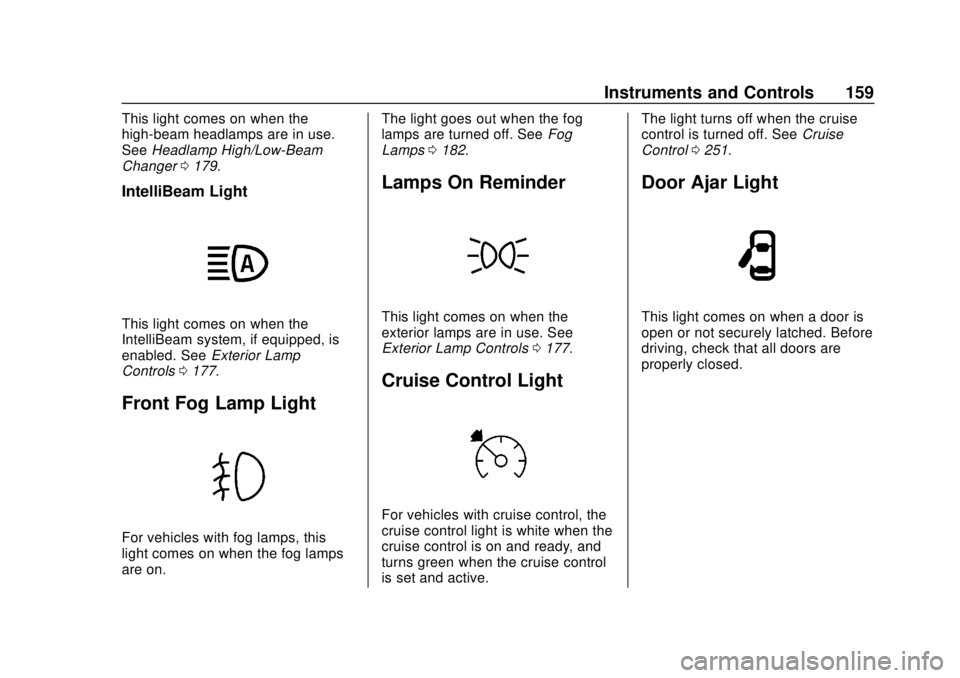
This light comes on when the
high-beam headlamps are in use.
SeeHeadlamp High/Low-Beam
Changer 0179.
IntelliBeam Light
This light comes on when the
IntelliBeam system, if equipped, is
enabled. See Exterior Lamp
Controls 0177.
Front Fog Lamp Light
For vehicles with fog lamps, this
light comes on when the fog lamps
are on. The light goes out when the fog
lamps are turned off. See
Fog
Lamps 0182.
Lamps On Reminder
This light comes on when the
exterior lamps are in use. See
Exterior Lamp Controls 0177.
Cruise Control Light
For vehicles with cruise control, the
cruise control light is white when the
cruise control is on and ready, and
turns green when the cruise control
is set and active. The light turns off when the cruise
control is turned off. See
Cruise
Control 0251.
Door Ajar Light
This light comes on when a door is
open or not securely latched. Before
driving, check that all doors are
properly closed.
Page 169 of 474
Chevrolet Silverado Owner Manual (GMNA-Localizing-U.S./Canada/Mexico-
1500-11698642) - 2019 - CRC - 2/20/19
168 Instruments and Controls
.Vehicle Security
. Brakes
. Steering
. Ride Control Systems
. Driver Assistance Systems
. Cruise Control
. Lighting and Bulb Replacement
. Wiper/Washer Systems
. Doors and Windows
. Seat Belts
. Airbag Systems
. Engine and Transmission
. Tire Pressure
. Battery
Engine Power Messages
ENGINE POWER IS REDUCED
This message displays when the
vehicle's propulsion power is
reduced. A reduction in propulsion
power can affect the vehicle's ability
to accelerate. If this message is on,
but there is no observed reduction in performance, proceed to your
destination. The performance may
be reduced the next time the vehicle
is driven. The vehicle may be driven
while this message is on, but
maximum acceleration and speed
may be reduced. Anytime this
message stays on, or displays
repeatedly, the vehicle should be
taken to your dealer for service as
soon as possible.
Vehicle Speed Messages
SPEED LIMITED TO XXX KM/
H (MPH)
This message shows that the
vehicle speed has been limited to
the speed displayed. The limited
speed is a protection for various
propulsion and vehicle systems,
such as lubrication, thermal,
suspension, Teen Driver if
equipped, or tires.
Vehicle
Personalization
The following are all possible
vehicle personalization features.
Depending on the vehicle, some
may not be available.
For System, Apps, and Personal
features and functions, see
“Settings”
in the infotainment
manual.
To access the vehicle
personalization menu:
1. Touch the SETTINGS icon on the Home Page of the
infotainment display.
2. Touch Vehicle to display a list of available options.
3. Touch to select the desired feature setting.
4. Touch
9orRto turn a feature
off or on.
5. Touch
zto go to the top level
of the Settings menu.
Page 198 of 474
Chevrolet Silverado Owner Manual (GMNA-Localizing-U.S./Canada/Mexico-
1500-11698642) - 2019 - CRC - 2/20/19
Driving and Operating 197
Driving and
Operating
Driving Information
Distracted Driving . . . . . . . . . . . . 198
Defensive Driving . . . . . . . . . . . . . 199
Drunk Driving . . . . . . . . . . . . . . . . . 199
Control of a Vehicle . . . . . . . . . . . 199
Braking . . . . . . . . . . . . . . . . . . . . . . . 199
Steering . . . . . . . . . . . . . . . . . . . . . . 200
Off-Road Recovery . . . . . . . . . . . 200
Loss of Control . . . . . . . . . . . . . . . 201
Off-Road Driving . . . . . . . . . . . . . 201
Driving on Wet Roads . . . . . . . . 206
Hill and Mountain Roads . . . . . 207
Winter Driving . . . . . . . . . . . . . . . . 207
If the Vehicle Is Stuck . . . . . . . . 209
Vehicle Load Limits . . . . . . . . . . . 210
Truck-Camper LoadingInformation . . . . . . . . . . . . . . . . . . 215
Starting and Operating
New Vehicle Break-In . . . . . . . . . 217
Ignition Positions (KeyAccess) . . . . . . . . . . . . . . . . . . . . . 218
Ignition Positions (Keyless Access) . . . . . . . . . . . . . . . . . . . . . 220
Starting the Engine . . . . . . . . . . . 222 Stop/Start System . . . . . . . . . . . . 223
Engine Heater . . . . . . . . . . . . . . . . 224
Retained Accessory
Power (RAP) . . . . . . . . . . . . . . . . 226
Shifting Into Park . . . . . . . . . . . . . 226
Shifting out of Park . . . . . . . . . . . 227
Parking over Things
That Burn . . . . . . . . . . . . . . . . . . . 228
Active Fuel Management . . . . . 228
Extended Parking . . . . . . . . . . . . 228
Engine Exhaust
Engine Exhaust . . . . . . . . . . . . . . 229
Running the Vehicle While Parked . . . . . . . . . . . . . . . . . . . . . . 229
Automatic Transmission
Automatic Transmission . . . . . . 230
Manual Mode . . . . . . . . . . . . . . . . . 233
Tow/Haul Mode . . . . . . . . . . . . . . . 235
Drive Systems
Four-Wheel Drive . . . . . . . . . . . . . 236
Brakes
Antilock BrakeSystem (ABS) . . . . . . . . . . . . . . . 241
Electric Parking Brake . . . . . . . . 242
Brake Assist . . . . . . . . . . . . . . . . . . 243
Hill Start Assist (HSA) . . . . . . . . 244
Ride Control Systems
Traction Control/Electronic Stability Control . . . . . . . . . . . . . 244
Hill Descent Control (HDC) . . . 246
Driver Mode Control . . . . . . . . . . 247
Limited-Slip Differential . . . . . . . 251
Locking Rear Axle . . . . . . . . . . . . 251
Cruise Control
Cruise Control . . . . . . . . . . . . . . . . 251
Driver Assistance Systems
Driver Assistance Systems . . . 254
Assistance Systems for Parking or Backing . . . . . . . . . . 255
Assistance Systems for Driving . . . . . . . . . . . . . . . . . . . . . . 261
Forward Collision Alert (FCA) System . . . . . . . . . . . . . . . . . . . . . . 261
Forward Automatic Braking (FAB) . . . . . . . . . . . . . . . 264
Front Pedestrian Braking (FPB) System . . . . . . . . . . . . . . . 265
Side Blind Zone Alert (SBZA) . . . . . . . . . . . . . . . . 267
Lane Change Alert (LCA) . . . . . 268
Lane Departure Warning (LDW) . . . . . . . . . . . . . 270
Lane Keep Assist (LKA) . . . . . . 270
Page 208 of 474
Chevrolet Silverado Owner Manual (GMNA-Localizing-U.S./Canada/Mexico-
1500-11698642) - 2019 - CRC - 2/20/19
Driving and Operating 207
wet enough and you are going fast
enough. When the vehicle is
hydroplaning, it has little or no
contact with the road.
There is no hard and fast rule about
hydroplaning. The best advice is to
slow down when the road is wet.
Other Rainy Weather Tips
Besides slowing down, other wet
weather driving tips include:
.Allow extra following distance.
. Pass with caution.
. Keep windshield wiping
equipment in good shape.
. Keep the windshield washer fluid
reservoir filled.
. Have good tires with proper
tread depth. See Tires0360.
. Turn off cruise control.
Hill and Mountain Roads
Driving on steep hills or through
mountains is different than driving
on flat or rolling terrain. Tips include: .
Keep the vehicle serviced and in
good shape.
. Check all fluid levels, brakes,
tires, and cooling system.
. Shift to a lower gear when going
down steep or long hills.
{Warning
Using the brakes to slow the
vehicle on a long downhill slope
can cause brake overheating, can
reduce brake performance, and
could result in a loss of braking.
Shift the transmission to a lower
gear to let the engine assist the
brakes on a steep downhill slope.
{Warning
Coasting downhill in N (Neutral)
or with the ignition off is
dangerous. This can cause
overheating of the brakes and
(Continued)
Warning (Continued)
loss of steering assist. Always
have the engine running and the
vehicle in gear.
. Drive at speeds that keep the
vehicle in its own lane. Do not
swing wide or cross the
center line.
. Be alert on top of hills;
something could be in your lane
(e.g., stalled car, crash).
. Pay attention to special road
signs (e.g., falling rocks area,
winding roads, long grades,
passing or no-passing zones)
and take appropriate action.
Winter Driving
Driving on Snow or Ice
Snow or ice between the tires and
the road creates less traction or
grip, so drive carefully. Wet ice can
occur at about 0 °C (32 °F) when