horn CHEVROLET SILVERADO 2020 Get To Know Guide
[x] Cancel search | Manufacturer: CHEVROLET, Model Year: 2020, Model line: SILVERADO, Model: CHEVROLET SILVERADO 2020Pages: 24, PDF Size: 4.67 MB
Page 4 of 24
F
The Keyless Access System enables operation of the doors and tailgate wi\
thout removing the Remote Keyless Ent")
4F Optional equipment
KEYLESS ACCESS SYSTEMF
REMOTE KEYLESS ENTRY TRANSMITTER (KEY FOB)F
The Keyless Access System enables operation of the doors and tailgate wi\
thout removing the Remote Keyless Entry (RKE) transmitter from your pocket or purse. \
The transmitter must be within 3 feet of the tailgate or the door being unlocked.
KEYLESS UNLOCKING
With the transmitter within range:
Press the button on the driver’s door handle to unlock the driver’s door; press it again within 5 seconds to unlock all doors and tailgate.
Press the button on the front passenger’s door handle to unlock all doors and tailgate.
Press the button on the tailgate to lower the standard tailgate.
KEYLESS LOCKING
With the ignition off, the transmitter removed from the vehicle, and all\
doors closed:
Press the button on any front door handle to lock all doors and tailgate immediate\
ly.
If Passive Locking is turned on, all doors will lock automatically after\
a short delay.
Note: To change the door lock and unlock settings, go to Settings > Vehicle > Remote Lock, Unlock, Start.
See Keys, Doors and Windows in your Owner’s Manual.
Lock
Press to lock all doors and tailgate.
Unlock
Press to unlock the driver’s door.
Press again to unlock all doors and tailgate.
Press and hold until the windows are fully open.F To enable, go to Settings > Vehicle > Remote Lock, Unlock, Start.
Press and hold the Lock/Unlock button for 1 second to fold/unfold the power mirrors.F To enable, go to Settings > Vehicle > Comfort and Convenience.
Power ReleaseF/Power TailgateF
Press twice to lower the tailgate.
To raise the power tailgateF, press once and then press again and hold until the tailgate is fully closed.
Vehicle Locator/Panic Alarm
Press and release to locate your vehicle. The exterior lamps flash and the horn chirps 3 times.
Press and hold to activate the alarm. Press again to cancel the alarm.
Remote Vehicle StartF
Press and release the Lock button and then press and hold the button until the turn signal lamps flash to start the engine from outside the vehicle. After entering the vehicle, turn on the ignition.
To cancel a remote start, press and hold the button until the parking lamps turn off.
See Keys, Doors and Windows in your Owner’s Manual.
Page 22 of 24
22
CRUISE CONTROL
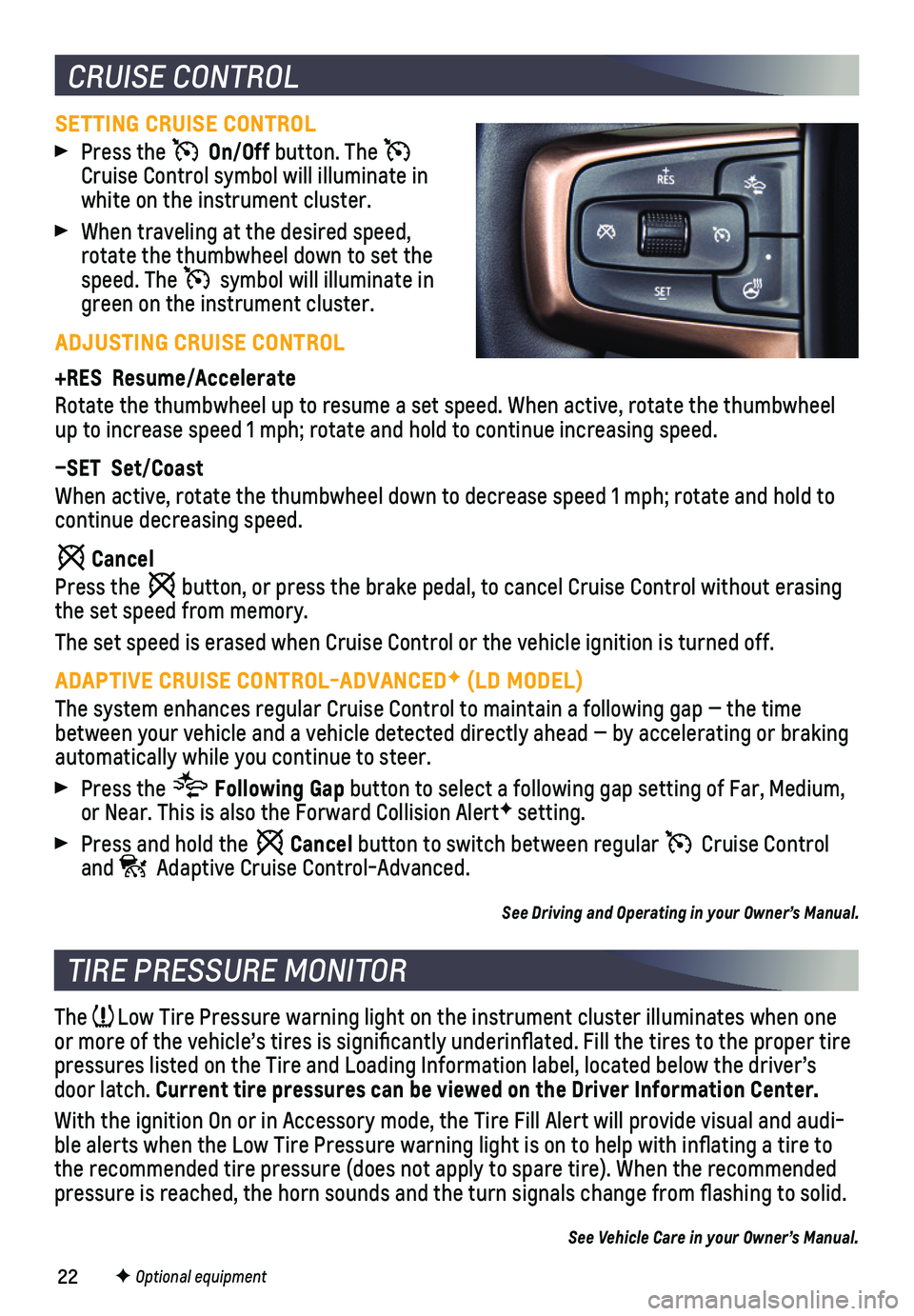
SETTING CRUISE CONTROL
Press the On/Off button. The Cruise Control symbol will illuminate in white on the instrument cluster.
When traveling at the desired speed, rotate the thumbwheel down to set the speed. The symbol will illuminate in green on the instrument cluster.
ADJUSTING CRUISE CONTROL
+RES Resume/Accelerate
Rotate the thumbwheel up to resume a set speed. When active, rotate the \
thumbwheel up to increase speed 1 mph; rotate and hold to continue increasing speed\
.
–SET Set/Coast
When active, rotate the thumbwheel down to decrease speed 1 mph; rotate \
and hold to continue decreasing speed.
Cancel
Press the button, or press the brake pedal, to cancel Cruise Control without erasi\
ng the set speed from memory.
The set speed is erased when Cruise Control or the vehicle ignition is t\
urned off.
ADAPTIVE CRUISE CONTROL-ADVANCEDF (LD MODEL)
The system enhances regular Cruise Control to maintain a following gap —\
the time between your vehicle and a vehicle detected directly ahead — by accel\
erating or braking automatically while you continue to steer.
Press the Following Gap button to select a following gap setting of Far, Medium, or Near. This is also the Forward Collision AlertF setting.
Press and hold the Cancel button to switch between regular Cruise Control and Adaptive Cruise Control-Advanced.
See Driving and Operating in your Owner’s Manual.
TIRE PRESSURE MONITOR
The Low Tire Pressure warning light on the instrument cluster illuminates wh\
en one or more of the vehicle’s tires is significantly underinflated. Fi\
ll the tires to the proper tire pressures listed on the Tire and Loading Information label, located belo\
w the driver’s door latch. Current tire pressures can be viewed on the Driver Information Center.
With the ignition On or in Accessory mode, the Tire Fill Alert will prov\
ide visual and audi-ble alerts when the Low Tire Pressure warning light is on to help with i\
nflating a tire to the recommended tire pressure (does not apply to spare tire). When the\
recommended pressure is reached, the horn sounds and the turn signals change from fl\
ashing to solid.
See Vehicle Care in your Owner’s Manual.
F Optional equipment