lane assist CHEVROLET SILVERADO 2020 Get To Know Guide
[x] Cancel search | Manufacturer: CHEVROLET, Model Year: 2020, Model line: SILVERADO, Model: CHEVROLET SILVERADO 2020Pages: 24, PDF Size: 4.67 MB
Page 2 of 24
2
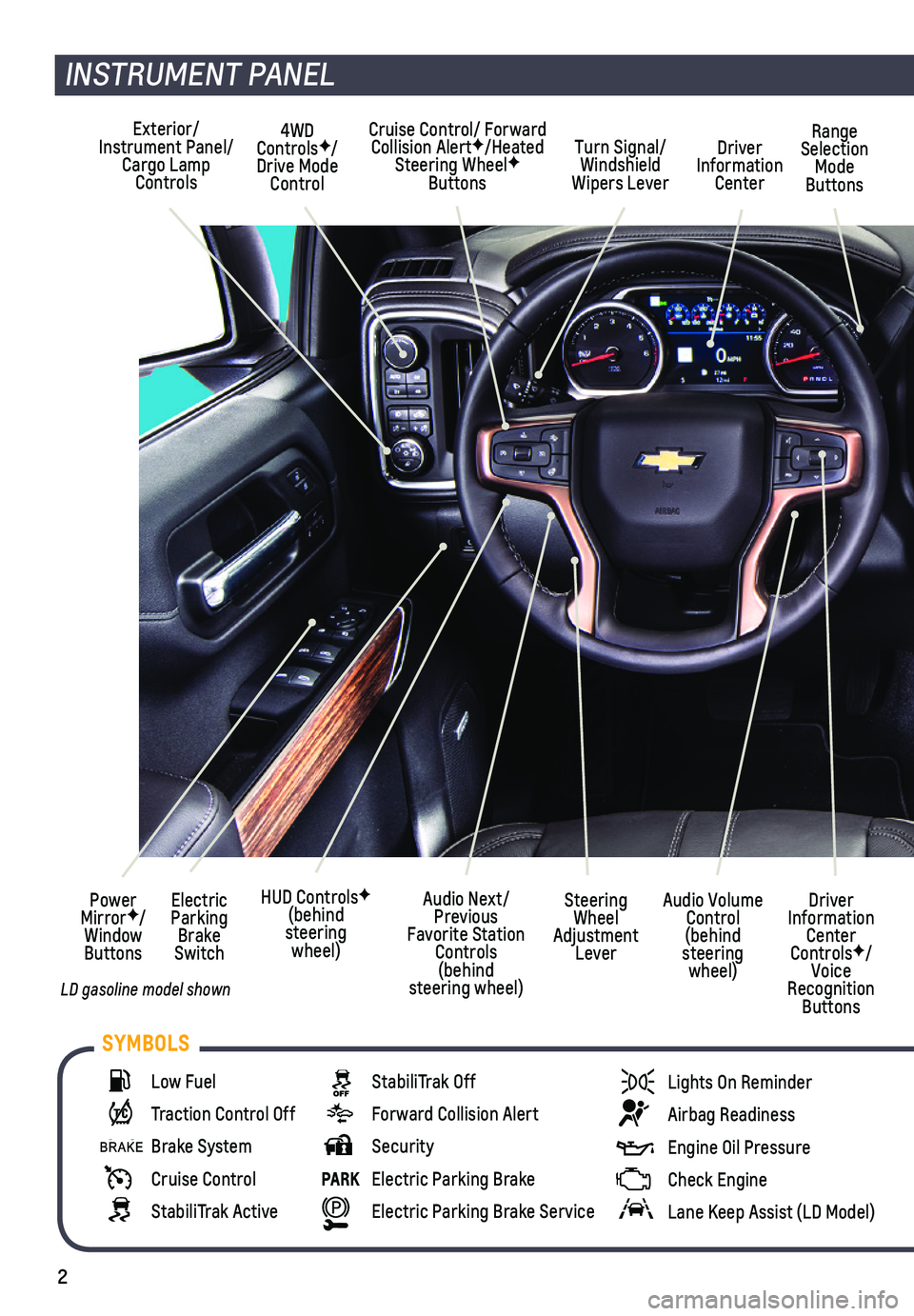
INSTRUMENT PANEL
Cruise Control/ Forward Collision AlertF/Heated Steering WheelF Buttons
Electric Parking Brake Switch
Power MirrorF/Window Buttons
Driver Information Center ControlsF/Voice Recognition Buttons
Audio Volume Control (behind steering wheel)
Steering Wheel Adjustment Lever
Audio Next/Previous Favorite Station Controls (behind steering wheel)
Exterior/Instrument Panel/Cargo Lamp Controls
4WD ControlsF/Drive Mode Control
Turn Signal/Windshield Wipers Lever
Range Selection Mode Buttons
Driver Information Center
HUD ControlsF (behind steering wheel)
Low Fuel
Traction Control Off
Brake System
Cruise Control
StabiliTrak Active
StabiliTrak Off
Forward Collision Alert
Security
PARK Electric Parking Brake
Electric Parking Brake Service
Lights On Reminder
Airbag Readiness
Engine Oil Pressure
Check Engine
Lane Keep Assist (LD Model)
SYMBOLS
LD gasoline model shown
Page 3 of 24
3
Refer to your Owner’s Manual to learn about the information being relayed by the lights, gauges and indicators on the instrument cluster.
See Introduction in your Owner’s Manual.
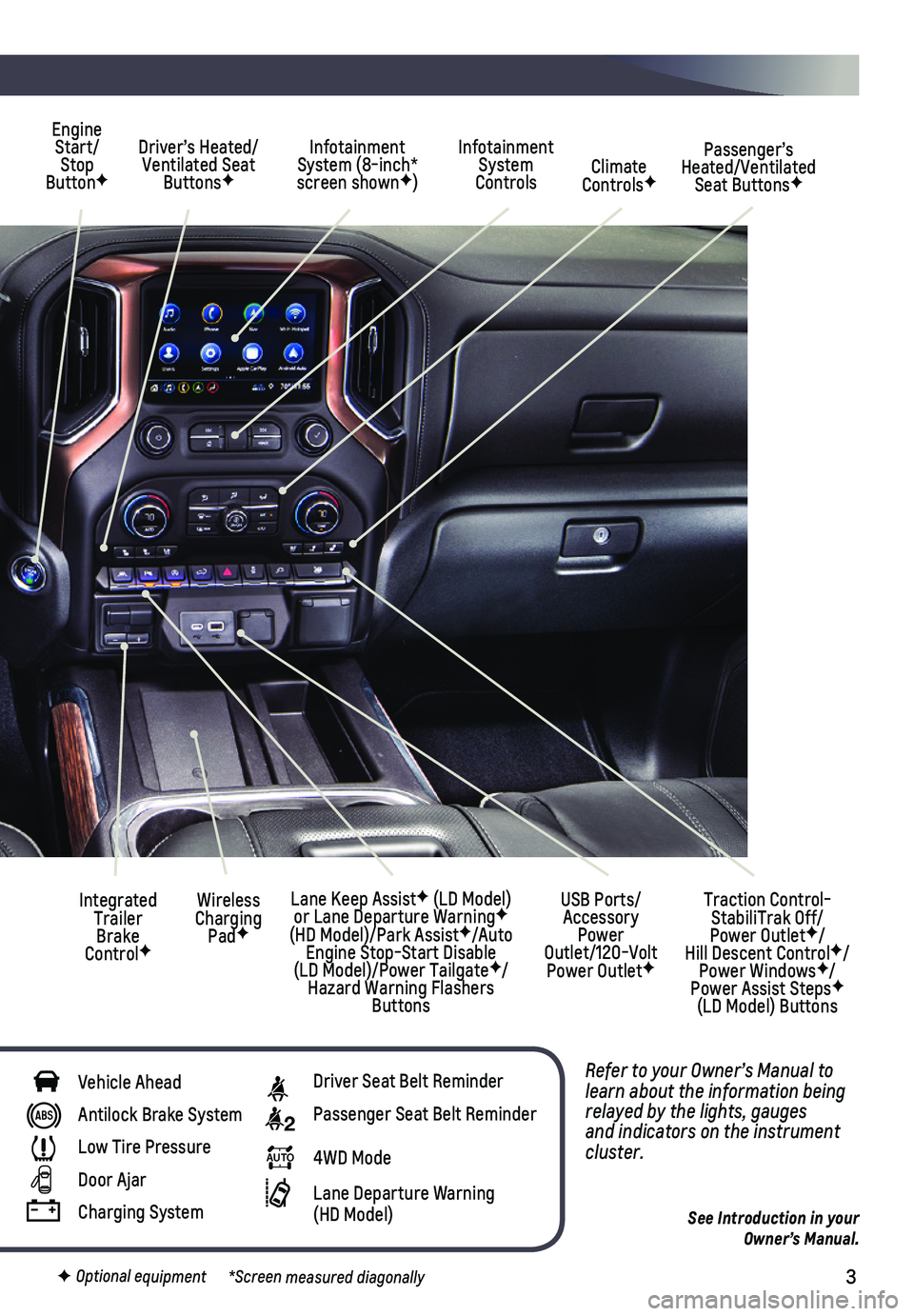
Driver’s Heated/Ventilated Seat ButtonsF
Infotainment System (8-inch* screen shownF)
Passenger’s Heated/Ventilated Seat ButtonsF
Infotainment System Controls Climate ControlsF
USB Ports/ Accessory Power Outlet/120-Volt Power OutletF
Engine Start/Stop ButtonF
Integrated Trailer Brake ControlF
Wireless Charging PadF
Lane Keep AssistF (LD Model) or Lane Departure WarningF (HD Model)/Park AssistF/Auto Engine Stop-Start Disable (LD Model)/Power TailgateF/Hazard Warning Flashers Buttons
F Optional equipment *Screen measured diagonally
Traction Control-StabiliTrak Off/ Power OutletF/ Hill Descent ControlF/Power WindowsF/Power Assist StepsF (LD Model) Buttons
Vehicle Ahead
Antilock Brake System
Low Tire Pressure
Door Ajar
Charging System
Driver Seat Belt Reminder
2 Passenger Seat Belt Reminder
AUTO 4WD Mode
Lane Departure Warning (HD Model)
Page 9 of 24

9F Optional equipment
HEATED/VENTILATED FRONT SEATSF
AUTO HEATED SEATS
When the vehicle is on, the automatic heated seats will activate based o\
n the vehicle’s interior temperature. Turn off the seats using the heated seat buttons o\
n the center of the instrument panel.
To enable the auto heated seats, go to Settings > Vehicle > Climate and \
Air Quality > Auto Heated Seats.
See Seats and Restraints in your Owner’s Manual.
CLIMATE CONTROLS/VEHICLE CONTROLSF
AUTO Driver’s Temp. Control/Automatic OperationF
SYNC Passenger’s Temp. Control/Link passenger’s setting to driver’s settingF
AC/ Air Conditioning/ Recirculation Mode
Fan Speed/ On/Off
MAX/REAR Defrost Mode/Rear Window-Heated Outside Mirror DefogF
Air Delivery Modes: Defog Vent Floor
Park Assist On/OffF
Lane Keep Assist (LD Model) or
Lane Departure Warning (HD Model) On/OffF
Press and hold to open all windowsF
$ Auto Engine Stop-Start Disable On/Off (LD Model)
Press to lower/Press and hold to raise the power tailgateF
Cargo Box Power Outlet On/OffF (Ignition must be On)
Hazard Warning Flashers On/Off
Traction Control/ StabiliTrak On/Off
Dual automatic climate controlsF shown
See Introduction in your Owner’s Manual.
Page 18 of 24

18F Optional equipment
DRIVER ASSISTANCE SYSTEMSF
Safety or driver assistance features are no substitute for the driver’\
s responsibility to operate the vehicle in a safe manner. The driver should remain attentive to traffic, surroundings and road conditions at all times. Read your Owner’s Manual for important feature limitations and information.
SAFETY ALERT SEAT – The driver’s seat pulses — left side, right side or simultan\
eously — to alert the driver of the direction of potential hazards.
Audible alerts or seat pulsing alerts may be selected. To change the ale\
rt settings, go to Settings > Vehicle > Collision/Detection Systems > Alert Type.
LANE CHANGE ALERT WITH SIDE BLIND ZONE ALERT – While driving, the system displays a warning symbol on the left or right side mirror when a vehicle is detected in that side blind zone area or rapidly approaching that area. The warning symbol flashes if a turn signal is activated when a vehicle has been detected on the same side.
To turn on or off, go to Settings > Vehicle > Collision/Detection Systems > Lane Change Alert.
FORWARD COLLISION ALERT – The Vehicle Ahead Indicator is green when a vehicle is detected and is amber when following a vehicle ahead much too closely. W\
hen approach-ing a vehicle directly ahead too rapidly, a red alert flashes on the w\
indshield and the Safety Alert Seat pulses or rapid beeps sound (if selected).
Press the Collision Alert button on the steering wheel to set the alert timing to Far, Medium, or Near.
FOLLOWING DISTANCE INDICATOR – The following distance to the vehicle ahead is
indicated in seconds under the Info menu on the Driver Information Center. If no vehi-cle is detected ahead, dashes are displayed.
ENHANCED AUTOMATIC EMERGENCY BRAKING – In detected potential imminent collision situations with vehicles directly ahead, the system can provide alerts and enhance driver braking or apply the brakes, if you have not already done\
so, to help reduce the severity or help avoid collisions at very low speeds.
To set Enhanced Automatic Emergency Braking and Forward Collision Alert \
to Alert and Brake, Alert, or Off, go to Settings > Vehicle > Collision/Detection\
Systems > Forward Collision System.
See Driving and Operating in your Owner’s Manual.
LD Model shown
Page 19 of 24
19F Optional equipment
DRIVER ASSISTANCE SYSTEMSF
FRONT PEDESTRIAN BRAKING (LD Model) – During daytime driving, the system can detect pedestrians directly ahead up to a distance of approximately 131 \
ft. and dis-plays an amber indicator. When approaching a detected pedestrian too quickly, a red alert flashes on the windshield and the Safety Alert Seat pulses or rapid beeps sound (if selected). The system may enhance driver braking or automatically brake\
the vehicle, if you have not already done so.
To set to Alert and Brake, Alert, or Off, go to Settings > Vehicle > Col\
lision/Detection Systems > Front Pedestrian Detection.
LANE KEEP ASSIST WITH LANE DEPARTURE WARNING (LD Model) – The system may help you avoid collisions due to unintentional lane departures. The Lane Keep Assist indicator is green if the system is available to assist. If the vehicle \
approaches a detected lane marking without using a turn signal in that direction, the system m\
ay assist by
gently turning the steering wheel and displaying an amber .
If active driver steering is not detected, the amber may flash and the Safety Alert Seat may pulse or beeps may sound (if selected) on the side of the dep\
arture direction as the lane marking is crossed. The Lane Keep Assist system does not con\
tinuously steer the vehicle; the driver needs to steer and be in complete control of the\
vehicle.
To turn on or off, press the Lane Keep Assist button on the center of the instru-ment panel.
LANE DEPARTURE WARNING (HD Model) – When crossing a detected lane marking with-out using a turn signal in that direction, the system flashes an amber\
indicator on the instrument cluster and the Safety Alert Seat pulses or beeps sound (if \
selected) on the side of the lane departure direction.
To turn on or off, press the Lane Departure Warning button on the center of the instrument panel.
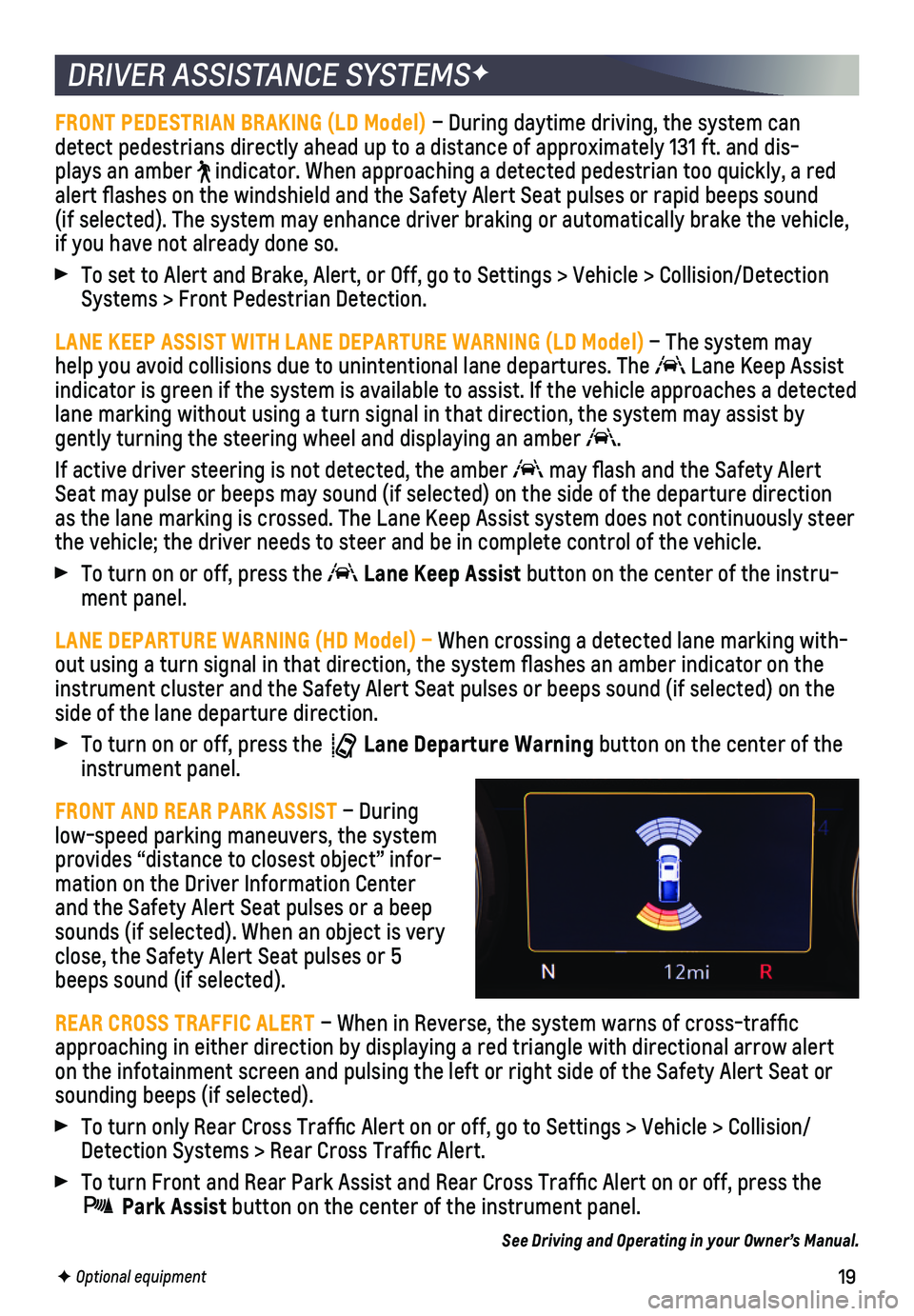
FRONT AND REAR PARK ASSIST – During low-speed parking maneuvers, the system
provides “distance to closest object” infor-mation on the Driver Information Center and the Safety Alert Seat pulses or a beep sounds (if selected). When an object is very close, the Safety Alert Seat pulses or 5 beeps sound (if selected).
REAR CROSS TRAFFIC ALERT – When in Reverse, the system warns of cross-traffic approaching in either direction by displaying a red triangle with direct\
ional arrow alert on the infotainment screen and pulsing the left or right side of the Safety Alert Seat or sounding beeps (if selected).
To turn only Rear Cross Traffic Alert on or off, go to Settings > Vehi\
cle > Collision/Detection Systems > Rear Cross Traffic Alert.
To turn Front and Rear Park Assist and Rear Cross Traffic Alert on or \
off, press the
Park Assist button on the center of the instrument panel.
See Driving and Operating in your Owner’s Manual.
Page 21 of 24

21F Optional equipment
REAR CAMERA MIRRORF
The rear camera mirror provides a wider, less obstructed field of view\
to assist when driving, changing lanes and checking traffic conditions.
A. On/Off
Pull or push the lever at the bottom of the mirror to turn the video display on or off.
B. Selection Control
Press and release the button to select the brightness, zoom, or tilt feature.
C. + / –
Press and release either button to adjust the selected view.
PARK GRADE HOLD ASSIST
Park Grade Hold Assist enhances hill hold by using braking effort at all\
four wheels to help keep the truck in place for an extended length of time.
See Driving and Operating in your Owner’s Manual.
HILL DESCENT CONTROLF
Hill Descent Control sets and maintains vehicle speed from 1–14 mph w\
hile descending a steep incline in a forward or reverse gear.
1. Press the Hill Descent Control button on the center of the instrument panel. Vehicle speed must be below 31 mph to enable the system. The Hill Descen\
t Control symbol will illuminate on the instrument cluster.
2. Increase or decrease speed by applying the accelerator or brake pedal or\
use the Cruise Control +/– buttons on the steering wheel. The adjusted speed becomes the new set speed. The symbol flashes when the system is actively applying\
the brakes to maintain vehicle speed.
See Driving and Operating in your Owner’s Manual.
See Keys, Doors and Windows in your Owner’s Manual.
ABC