automatic transmission CHEVROLET SILVERADO 2500 2020 User Guide
[x] Cancel search | Manufacturer: CHEVROLET, Model Year: 2020, Model line: SILVERADO 2500, Model: CHEVROLET SILVERADO 2500 2020Pages: 500, PDF Size: 9.71 MB
Page 223 of 500
Chevrolet Silverado Owner Manual (GMNA-Localizing-U.S./Canada/Mexico-
13337620) - 2020 - CRC - 4/11/19
222 Driving and Operating
To rock the vehicle back and forth to
get out of snow, ice, or sand without
damaging the transmission, seeIf
the Vehicle Is Stuck 0199.
N : In this position, the engine does
not connect with the wheels. To
restart the engine when the vehicle
is already moving, use
N (Neutral) only.
Also, use N (Neutral) when the
vehicle is being towed.
{Warning
Shifting into a drive gear while the
engine is running at high speed is
dangerous. Unless your foot is
firmly on the brake pedal, the
vehicle could move very rapidly.
You could lose control and hit
people or objects. Do not shift
into a drive gear while the engine
is running at high speed.
Caution
Shifting out of P (Park) or
N (Neutral) with the engine
running at high speed may
damage the transmission. The
repairs would not be covered by
the vehicle warranty. Be sure the
engine is not running at high
speed when shifting the vehicle.
Caution
A transmission or engine oil hot
message may display if the
automatic transmission fluid or
engine oil is too hot. Driving
under this condition can damage
the vehicle. Stop and idle the
engine to cool the engine oil or
automatic transmission fluid.
These messages will clear when
the engine oil or transmission
fluid has cooled sufficiently. D :
This position is for normal
driving. It provides the best fuel
economy. If more power is needed
for passing, press the accelerator
pedal down.
. When going less than about 55
km/h (35 mph), push the
accelerator pedal about
halfway down.
. When going about 55 km/h (35
mph) or more, push the
accelerator all the way down.
By doing this, the vehicle shifts
down to the next gear and has
more power.
Use D (Drive) and Tow/Haul Mode
when towing a trailer, carrying a
heavy load, driving on steep hills,
or driving off-road. Shift the
transmission to a lower gear if the
transmission shifts too often.
Downshifting the transmission in
slippery road conditions could result
in skidding. See “Skidding”under
Loss of Control 0190.
Page 225 of 500
Chevrolet Silverado Owner Manual (GMNA-Localizing-U.S./Canada/Mexico-
13337620) - 2020 - CRC - 4/11/19
224 Driving and Operating
Manual Mode
Range Selection Mode
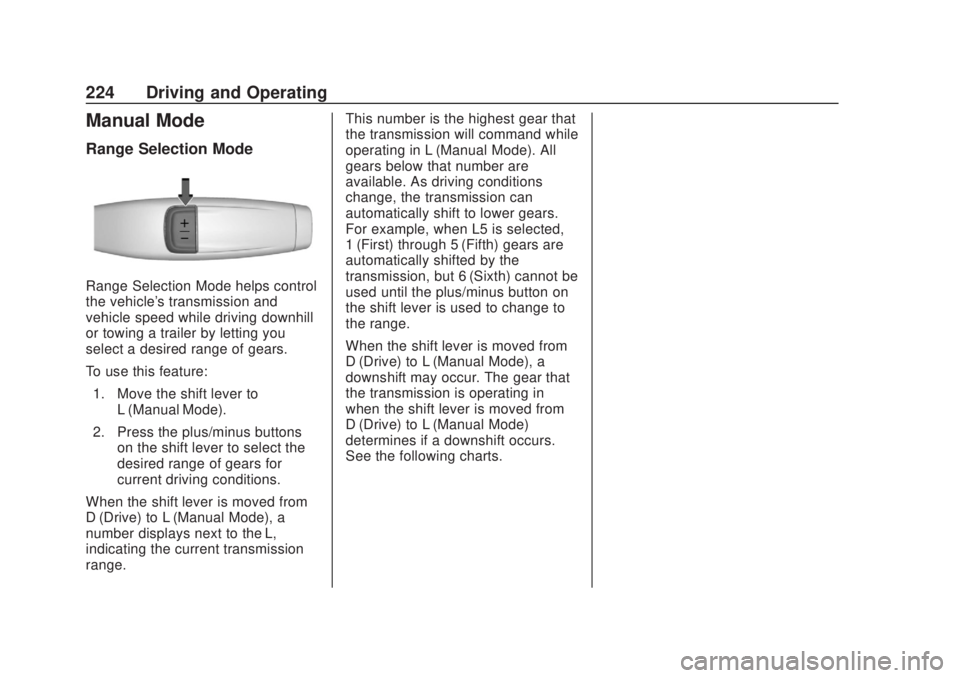
Range Selection Mode helps control
the vehicle's transmission and
vehicle speed while driving downhill
or towing a trailer by letting you
select a desired range of gears.
To use this feature:1. Move the shift lever to L (Manual Mode).
2. Press the plus/minus buttons on the shift lever to select the
desired range of gears for
current driving conditions.
When the shift lever is moved from
D (Drive) to L (Manual Mode), a
number displays next to the L,
indicating the current transmission
range. This number is the highest gear that
the transmission will command while
operating in L (Manual Mode). All
gears below that number are
available. As driving conditions
change, the transmission can
automatically shift to lower gears.
For example, when L5 is selected,
1 (First) through 5 (Fifth) gears are
automatically shifted by the
transmission, but 6 (Sixth) cannot be
used until the plus/minus button on
the shift lever is used to change to
the range.
When the shift lever is moved from
D (Drive) to L (Manual Mode), a
downshift may occur. The gear that
the transmission is operating in
when the shift lever is moved from
D (Drive) to L (Manual Mode)
determines if a downshift occurs.
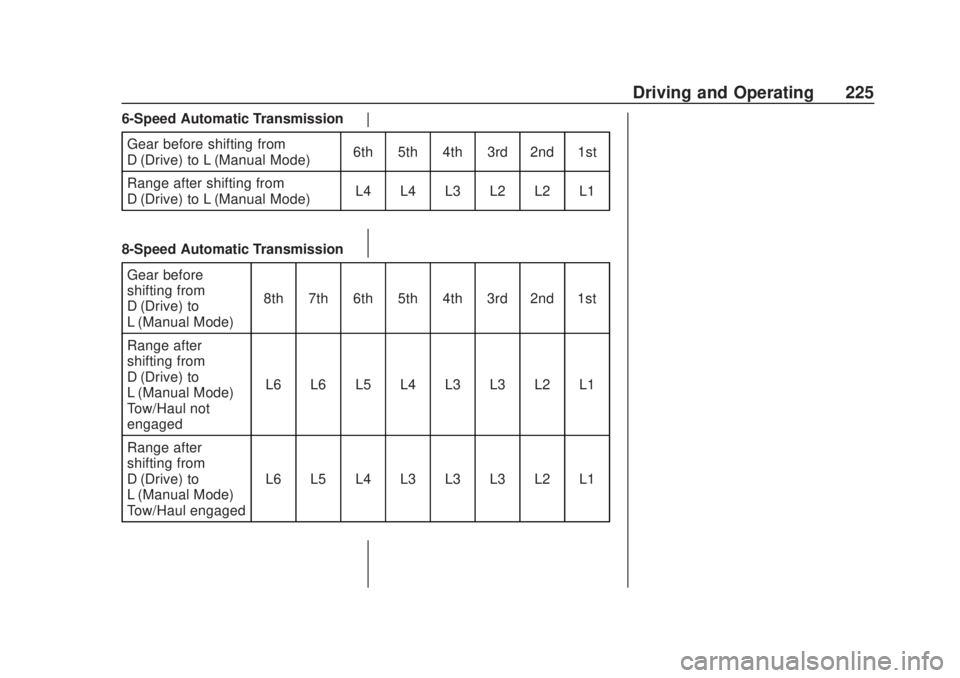
See the following charts.
Page 226 of 500
Chevrolet Silverado Owner Manual (GMNA-Localizing-U.S./Canada/Mexico-
13337620) - 2020 - CRC - 4/11/19
Driving and Operating 225
6-Speed Automatic TransmissionGear before shifting from
D (Drive) to L (Manual Mode) 6th 5th 4th 3rd 2nd 1st
Range after shifting from
D (Drive) to L (Manual Mode) L4 L4 L3 L2 L2 L1
8-Speed Automatic Transmission Gear before
shifting from
D (Drive) to
L (Manual Mode) 8th 7th 6th 5th 4th 3rd 2nd 1st
Range after
shifting from
D (Drive) to
L (Manual Mode) –
Tow/Haul not
engaged L6 L6 L5 L4 L3 L3 L2 L1
Range after
shifting from
D (Drive) to
L (Manual Mode) –
Tow/Haul engaged L6 L5 L4 L3 L3 L3 L2 L1
Page 227 of 500
Chevrolet Silverado Owner Manual (GMNA-Localizing-U.S./Canada/Mexico-
13337620) - 2020 - CRC - 4/11/19
226 Driving and Operating
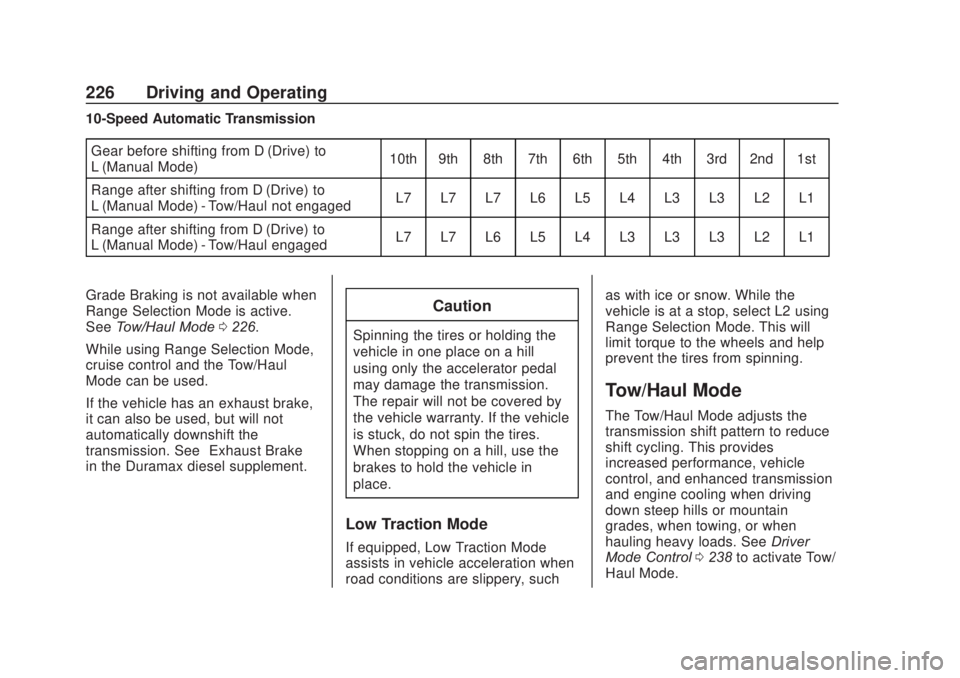
10-Speed Automatic TransmissionGear before shifting from D (Drive) to
L (Manual Mode) 10th 9th 8th 7th 6th 5th 4th 3rd 2nd 1st
Range after shifting from D (Drive) to
L (Manual Mode) - Tow/Haul not engaged L7 L7 L7 L6 L5 L4 L3 L3 L2 L1
Range after shifting from D (Drive) to
L (Manual Mode) - Tow/Haul engaged L7 L7 L6 L5 L4 L3 L3 L3 L2 L1
Grade Braking is not available when
Range Selection Mode is active.
See Tow/Haul Mode 0226.
While using Range Selection Mode,
cruise control and the Tow/Haul
Mode can be used.
If the vehicle has an exhaust brake,
it can also be used, but will not
automatically downshift the
transmission. See “Exhaust Brake”
in the Duramax diesel supplement.
Caution
Spinning the tires or holding the
vehicle in one place on a hill
using only the accelerator pedal
may damage the transmission.
The repair will not be covered by
the vehicle warranty. If the vehicle
is stuck, do not spin the tires.
When stopping on a hill, use the
brakes to hold the vehicle in
place.
Low Traction Mode
If equipped, Low Traction Mode
assists in vehicle acceleration when
road conditions are slippery, such as with ice or snow. While the
vehicle is at a stop, select L2 using
Range Selection Mode. This will
limit torque to the wheels and help
prevent the tires from spinning.
Tow/Haul Mode
The Tow/Haul Mode adjusts the
transmission shift pattern to reduce
shift cycling. This provides
increased performance, vehicle
control, and enhanced transmission
and engine cooling when driving
down steep hills or mountain
grades, when towing, or when
hauling heavy loads. See
Driver
Mode Control 0238 to activate Tow/
Haul Mode.
Page 230 of 500
Chevrolet Silverado Owner Manual (GMNA-Localizing-U.S./Canada/Mexico-
13337620) - 2020 - CRC - 4/11/19
Driving and Operating 229
automatically based on driving
conditions. This setting provides
slightly lower fuel economy than 2
m.
4
m(Four-Wheel Drive High) : Use
this setting when extra traction is
needed, such as when driving on
snowy or icy roads, when
off-roading, or when plowing snow.
4
n(Four-Wheel Drive Low) : This
setting engages the front axle and
delivers extra torque. Choose 4
n
when driving off-road in deep sand,
deep mud, or deep snow, and while
climbing or descending steep hills.
While driving in 4
n, keep vehicle
speed below 72 km/h (45 mph).
Shifting into 4
nwill turn Traction
Control and StabiliTrak/ESC off.
See Traction Control/Electronic
Stability Control 0235.
Shifts between 2
m, 4m, and AUTO
Any of these shifts can be made at
normal driving speed. The actual 4x4 shift request is only
made after the button is released.
The 4x4 graphic will remain flashing
until the shift request has
completed. A DIC message displays
to indicate that the 4x4 transfer case
has been requested to shift to the
new desired state.
Once the 4x4 shift has completed,
the DIC message disappears, the
4x4 graphic stops flashing, and the
current setting is indicated.
When a shift to 2
mis completed
successfully while in P (Park), the
parking brake will engage. To
resume driving, shift the
transmission to the desired gear
and manually release the parking
brake or press the accelerator pedal
to begin driving. See Electric
Parking Brake 0233.
If equipped, use 4
n, AUTO, or 4mto
provide additional traction when
parking on a steep grade with poor
traction such as ice, snow, mud,
or gravel. Shifting Into 4
n
1. The ignition must be on and
the vehicle must be stopped or
moving less than 5 km/h
(3 mph) with the transmission
in N (Neutral). It is best for the
vehicle to be moving
1.6 to 3.2 km/h (1 to 2 mph).
2. Press 4
n. The actual 4x4 shift
request is only made after the
button is released. The 4x4
graphic will remain flashing
until the shift request has
completed. A DIC message
displays to indicate that the 4x4
transfer case has been
requested to shift to the new
desired state.
Once the 4x4 shift has
completed, the DIC message
disappears, the 4x4 graphic
stops flashing and the current
setting is indicated.
If vehicle speed is higher when shift
request occurs, a DIC message
displays. Reduce vehicle speed.
Page 240 of 500
Chevrolet Silverado Owner Manual (GMNA-Localizing-U.S./Canada/Mexico-
13337620) - 2020 - CRC - 4/11/19
Driving and Operating 239
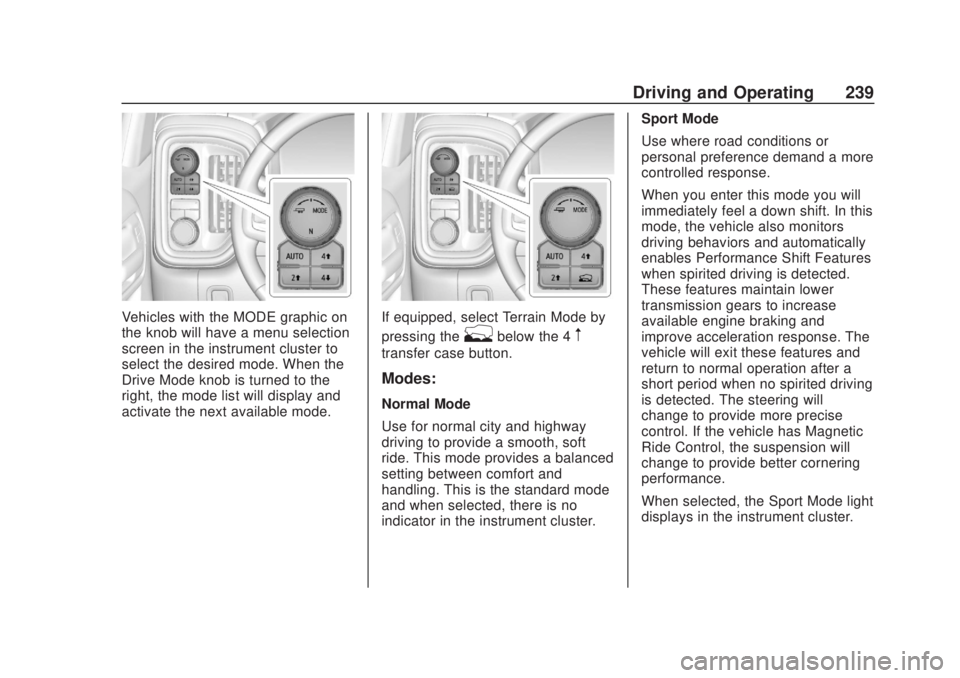
Vehicles with the MODE graphic on
the knob will have a menu selection
screen in the instrument cluster to
select the desired mode. When the
Drive Mode knob is turned to the
right, the mode list will display and
activate the next available mode.If equipped, select Terrain Mode by
pressing the
gbelow the 4m
transfer case button.
Modes:
Normal Mode
Use for normal city and highway
driving to provide a smooth, soft
ride. This mode provides a balanced
setting between comfort and
handling. This is the standard mode
and when selected, there is no
indicator in the instrument cluster.Sport Mode
Use where road conditions or
personal preference demand a more
controlled response.
When you enter this mode you will
immediately feel a down shift. In this
mode, the vehicle also monitors
driving behaviors and automatically
enables Performance Shift Features
when spirited driving is detected.
These features maintain lower
transmission gears to increase
available engine braking and
improve acceleration response. The
vehicle will exit these features and
return to normal operation after a
short period when no spirited driving
is detected. The steering will
change to provide more precise
control. If the vehicle has Magnetic
Ride Control, the suspension will
change to provide better cornering
performance.
When selected, the Sport Mode light
displays in the instrument cluster.
Page 242 of 500
Chevrolet Silverado Owner Manual (GMNA-Localizing-U.S./Canada/Mexico-
13337620) - 2020 - CRC - 4/11/19
Driving and Operating 241
characteristics of four-wheel-drive
low (4
n) without the torque
capabilities.
Use when:
. Traveling on very rough roads at
very low speeds, such as a
two-track or heavily rutted road.
. Traveling slowly in grassy fields.
. Pulling a boat out of the water
on a trailer.
. Using the vehicle for public
off-road recreational driving. See
Off-Road Driving 0191 and
Hill and Mountain Roads 0197.
When in Terrain Mode, the vehicle
will shift automatically but may hold
a lower gear longer to maximize
engine torque. The steering will
change to provide more precise
control. A unique pedal map, transmission shift pattern, and rpm
control are utilized to give better
control at lower speeds and over
rough terrain. When the vehicle
comes to a stop, Vehicle Hold is
engaged. TCS will be optimized for
maximum torque transfer across
axles, and Active Braking During Lift
Throttle will be engaged.
Active Braking During Lift Throttle:
.
Automatically applies light
braking, similar to heavy engine
braking of four-wheel-drive low.
. Applies light braking in D (Drive)
until the vehicle is at idle
speeds. In Manual L1 and
Manual L2, moderate braking
may stop the vehicle.
. Reduces trailer braking.
Page 246 of 500
Chevrolet Silverado Owner Manual (GMNA-Localizing-U.S./Canada/Mexico-
13337620) - 2020 - CRC - 4/11/19
Driving and Operating 245
.To increase vehicle speed in
small increments, press +RES
up briefly. For each press, the
vehicle goes about 1 km/h
(1 mph) faster.
The speedometer reading can be
displayed in either English or metric
units. See Instrument Cluster 0127.
The increment value used depends
on the units displayed.
Reducing Speed While Using
Cruise Control
Do one of the following:
. Press and hold SET– down until
the desired lower speed is
reached, then release it.
. To slow down in small
increments, press SET– down
briefly. For each press, the
vehicle goes about 1 km/h
(1 mph) slower.
The speedometer reading can be
displayed in either English or metric
units. See Instrument Cluster 0127.
The increment value used depends
on the units displayed. Passing Another Vehicle While
Using Cruise Control
Use the accelerator pedal to
increase the vehicle speed. When
you take your foot off the pedal, the
vehicle will slow down to the
previously set cruise speed. While
pressing the accelerator pedal or
shortly following the release to
override cruise control, briefly
pressing SET–
will result in cruise
control set to the current vehicle
speed.
Using Cruise Control on Hills
How well the cruise control works
on hills depends on the vehicle
speed, the load, and the steepness
of the hills. When going up steep
hills, pressing the accelerator pedal
may be necessary to maintain
vehicle speed.
While going downhill, cruise braking
helps maintain driver selected
speed.
Cruise Grade Braking is enabled
when the vehicle is started and
cruise control is active. It is not
enabled in Range Selection Mode. It assists in maintaining driver
selected speed when driving on
downhill grades by using the engine
and transmission to slow the
vehicle.
For other forms of descent control,
see
Hill Descent Control (HDC)
0 237, Automatic Transmission
0 221, and Tow/Haul Mode 0226.
Ending Cruise Control
There are four ways to end cruise
control:
. Step lightly on the brake pedal.
. Press
*.
. Shift the transmission to
N (Neutral).
. To turn off cruise control,
press
5.
Erasing Speed Memory
The cruise control set speed is
erased from memory if
5is pressed
or the ignition is turned off.
Page 289 of 500
Chevrolet Silverado Owner Manual (GMNA-Localizing-U.S./Canada/Mexico-
13337620) - 2020 - CRC - 4/11/19
288 Driving and Operating
important for your safety and that of
your passengers. Read this section
carefully before pulling a trailer.
When towing a trailer:
.Become familiar with and follow
all state and local laws that
apply to trailer towing. These
requirements vary from state to
state.
. State laws may require the use
of extended side view mirrors.
Even if not required, you should
install extended side view
mirrors if your visibility is limited
or restricted while towing.
. Do not tow a trailer during the
first 800 km (500 mi) of vehicle
use to prevent damage to the
engine, axle, or other parts.
. It is recommended to perform
the first oil change before heavy
towing.
. During the first 800 km (500 mi)
of trailer towing, do not drive
over 80 km/h (50 mph) and do
not make starts at full throttle. .
Vehicles can tow in D (Drive).
Tow/Haul Mode is recommended
for heavier trailers. See Tow/
Haul Mode 0226. If the
transmission downshifts too
often, a lower gear may be
selected using Manual Mode.
See Manual Mode 0224.
If equipped, the following driver
assistance features should be
turned off when towing a trailer:
. Adaptive Cruise Control (ACC)
. Super Cruise Control
. Lane Keep Assist (LKA)
. Park Assist
. Automatic Parking Assist (APA)
. Reverse Automatic
Braking (RAB)
If equipped, the following driver
assistance features should be
turned to alert or off when towing a
trailer:
. Automatic Emergency
Braking (AEB)
. Intelligent Brake Assist (IBA) .
Front Pedestrian Braking (FPB)
If equipped with Lane Change Alert
(LCA), the LCA detection zones that
extend back from the side of the
vehicle do not move further back
when a trailer is towed. Use caution
while changing lanes when towing a
trailer.
If equipped with Rear Cross Traffic
Alert (RCTA), use caution while
backing up when towing a trailer, as
the RCTA detection zones that
extend out from the back of the
vehicle do not move further back
when a trailer is towed.
{Warning
To prevent serious injury or death
from carbon monoxide (CO),
when towing a trailer: . Do not drive with the
liftgate, trunk/hatch,
or rear-most window open.
(Continued)
Page 305 of 500
Chevrolet Silverado Owner Manual (GMNA-Localizing-U.S./Canada/Mexico-
13337620) - 2020 - CRC - 4/11/19
304 Driving and Operating
lamp circuits on the trailer. DIC
messages and Trailering App alerts
may be displayed if lighting circuit
issues are detected on the trailer.
Pressing START LIGHT TEST in the
Trailering App automatically
activates the trailer lamps. The
Trailering App is not a substitute for
manually inspecting your trailer
lamps. SeeTrailering App 0310.
Turn Signals When Towing a
Trailer
When properly connected, the trailer
turn signals will illuminate to indicate
the vehicle is turning, changing
lanes, or stopping. When towing a
trailer, the arrows on the instrument
cluster will illuminate even if the
trailer is not properly connected or
the bulbs are burned out.
Tow/Haul Mode
For instructions on how to enter
Tow/Haul Mode, see Driver Mode
Control 0238.
Tow/Haul assists when pulling a
heavy trailer or a large or heavy
load. See Tow/Haul Mode 0226. Tow/Haul Mode is designed to be
most effective when the vehicle and
trailer combined weight is at least
75% of the vehicle's Gross
Combined Weight Rating (GCWR).
See
“Trailer Weight ”under Trailer
Towing 0292.
Tow/Haul Mode is most useful when
towing a heavy trailer or carrying a
large or heavy load:
. Through rolling terrain.
. In stop-and-go traffic.
. In busy parking lots.
Operating the vehicle in Tow/Haul
Mode when lightly loaded or not
towing will not cause damage;
however, it is not recommended and
may result in unpleasant engine and
transmission driving characteristics,
heavy or light steering efforts, and
reduced fuel economy.Integrated Trailer Brake
Control System
The vehicle may have an Integrated
Trailer Brake Control (ITBC) system
for use with electric trailer brakes or
most electric over hydraulic trailer brake systems. These instructions
apply to both types of electric trailer
brakes.
This symbol is on the Trailer Brake
Control Panel on vehicles with an
ITBC system. The power output to
the trailer brakes is proportional to
the amount of vehicle braking. This
available power output to the trailer
brakes can be adjusted to a wide
range of trailering situations.
The ITBC system is integrated with
the vehicle’
s brake, antilock brake,
and StabiliTrak/Electronic Stability
Control (ESC) systems. In trailering
conditions that cause the vehicle’s
antilock brake or StabiliTrak/ESC
systems to activate, power sent to
the trailer's brakes will be
automatically adjusted to minimize