ad blue CHEVROLET SILVERADO 3500 2019 Owner's Manual
[x] Cancel search | Manufacturer: CHEVROLET, Model Year: 2019, Model line: SILVERADO 3500, Model: CHEVROLET SILVERADO 3500 2019Pages: 489, PDF Size: 6.81 MB
Page 209 of 489
Chevrolet Silverado LD 1500 and Silverado 2500/3500 Owner Manual (GMNA-
Localizing-U.S./Canada-12162993) - 2019 - crc - 4/4/18
208 Infotainment System
.ewill appear on the screen if
the stereo headset is
successfully connected.
. The sound played by the
Bluetooth device is delivered
through the infotainment system.
. Bluetooth music can be played
only when a Bluetooth device
has been connected. To play
Bluetooth music, connect the
Bluetooth phone to the
infotainment system.
. If the Bluetooth device is
disconnected while playing
phone music, the music is
discontinued. The audio
streaming function may not be
supported in some Bluetooth
phones. Only one function can
be used at a time between the
Bluetooth hands-free or Phone
music function. For example,
if you convert to Bluetooth
hands-free while playing Phone
music, the music is
discontinued. Playing music from the car is not possible when
there are no music files stored in
the cell phone.
Playing Bluetooth Music
1. Press
{.
2. Touch AUDIO.
3. Touch Source.
4. Touch Bluetooth.
Pause
Touch
jto pause.
Touch
rto resume.
Playing the Next Song
Touch
l.
Playing the Previous Song
Touch
gwithin two seconds of
playback time to play the
previous song.
Returning to the Beginning of the
Current Song
Touch
gafter two seconds of
playback time. Search
Touch and hold
gorlto rewind
or fast forward.
Playing Music Randomly
Touch
Zduring playback. Touch
again to return to normal play.
This function may not be supported
depending on the bluetooth device.
Do not change the track too quickly
when playing Bluetooth music.
Conditions that may occur when
playing Bluetooth music:
. It takes time to transmit data
from the bluetooth device to the
infotainment system.
. If the cell phone or Bluetooth
device is not in the waiting
screen mode, it may not
automatically play.
. The infotainment system
transmits the order to play from
the bluetooth device in the
Bluetooth music play mode.
If this is done in a different
mode, then the device transmits
Page 210 of 489
Chevrolet Silverado LD 1500 and Silverado 2500/3500 Owner Manual (GMNA-
Localizing-U.S./Canada-12162993) - 2019 - crc - 4/4/18
Infotainment System 209
the order to stop. Depending on
the bluetooth device options, this
order to play/stop may take time
to activate.
. If the Bluetooth music playback
is not functioning, then check to
see if the bluetooth device is in
the waiting screen mode.
. Sounds may be cut off during
the Bluetooth music playback.
. The infotainment system outputs
the audio from the cell phone or
Bluetooth device as it is
transmitted.
Apple CarPlay and
Android Auto
If equipped, Android Auto and/or
Apple CarPlay capability may be
available through a compatible
smartphone. If available,
PROJECTION will appear on the
Home Page of the infotainment
display. To use Android Auto or Apple
CarPlay:
1. Download the Android Auto app to your phone from the
Google Play store. No app is
required for Apple CarPlay.
2. Connect an Android phone or iPhone by using the compatible
phone USB cable and plugging
into a USB data port. For best
performance, use the device’ s
factory-provided USB cable.
Aftermarket or third-party
cables may not work.
3. When the phone is first connected to activate Apple
CarPlay or Android Auto, the
message “Device Projection
Privacy Consent” will appear.
. Select Continue to launch
Apple CarPlay or
Android Auto.
. Select Disable to remove
Apple CarPlay and Android
Auto capability from the
vehicle Settings menu.
Other functions may
still work. PROJECTION on the Home Page
will change to Android Auto or Apple
CarPlay depending on the phone.
Android Auto and/or Apple CarPlay
may automatically launch upon USB
connection. If not, touch the
ANDROID AUTO and/or APPLE
CARPLAY icon on the Home Page
to launch.
Press
{on the center stack to
return to the Home Page.
For further information on how to set
up Android Auto and Apple CarPlay
in the vehicle, see my.chevrolet.com
or see Customer Assistance Offices
0 451.
Android Auto is provided by Google
and is subject to Google’s terms
and privacy policy. Apple CarPlay is
provided by Apple and is subject to
Apple’ s terms and privacy policy.
Data plan rates apply. For Android
Auto support see https://
support.google.com/androidauto.
For Apple CarPlay support see
www.apple.com/ios/carplay/. Apple
or Google may change or suspend
availability at any time. Android
Page 212 of 489
Chevrolet Silverado LD 1500 and Silverado 2500/3500 Owner Manual (GMNA-
Localizing-U.S./Canada-12162993) - 2019 - crc - 4/4/18
Infotainment System 211
Explicit Language Notice: Channels
with frequent explicit language are
indicated with an“XL”preceding the
channel name. Channel blocking is
available for SiriusXM Satellite
Radio receivers by notifying
SiriusXM:
. USA Customers —See
www.siriusxm.com or call
1-866-635–2349.
. Canadian Customers —See
www.xmradio.ca or call
1-877-209-0079.
It is prohibited to copy, decompile,
disassemble, reverse engineer,
hack, manipulate, or otherwise
make available any technology or
software incorporated in receivers
compatible with the SiriusXM
Satellite Radio System or that
support the SiriusXM website, the
Online Service or any of its content.
Furthermore, the AMBER voice
compression software included in
this product is protected by
intellectual property rights including
patent rights, copyrights, and trade
secrets of Digital Voice
Systems, Inc. General Requirements:
1. A License Agreement from SiriusXM is required for any
product that incorporates
SiriusXM Technology and/or for
use of any of the SiriusXM
marks to be manufactured,
distributed, or marketed in the
SiriusXM Service Area.
2. For products to be distributed, marketed, and/or sold in
Canada, a separate agreement
is required with Canadian
Satellite Radio Inc. (operating
as SiriusXM Canada).
Other Information
The Bluetooth word mark and logos
are owned by the Bluetooth SIG,
Inc. and any use of such marks by
General Motors is under license.
Other trademarks and trade names
are those of their respective owners.
Schedule I: Gracenote EULA
Music recognition technology and
related data are provided by
Gracenote. Gracenote is the
industry standard in music
recognition technology and related
content delivery. For more
information visit
www.gracenote.com.
Music-related data from Gracenote,
Inc., copyright 2000 to present
Gracenote. Gracenote Software,
copyright 2000 to present
Gracenote. One or more patents
owned by Gracenote may apply to
this product and service. See the
Gracenote website for a
non-exhaustive list of applicable
Gracenote patents. Gracenote,
CDDB, MusicID, MediaVOCS, the
Gracenote logo and logotype, and
the "Powered by Gracenote" logo
Page 310 of 489
Chevrolet Silverado LD 1500 and Silverado 2500/3500 Owner Manual (GMNA-
Localizing-U.S./Canada-12162993) - 2019 - crc - 4/4/18
Driving and Operating 309
Caution (Continued)
may exceed the
maximum amperage rating of
30 amps.
Trailer Wiring Harness
Basic Trailer Wiring
If the vehicle is not equipped with a
trailer connector on the rear bumper,
a 7-wire trailering harness is tied to
the vehicles frame. The harness
requires the installation of a trailer
connector, which is available
through your dealer.
Use only a round, seven-wire
connector with flat blade terminals
meeting SAE J2863 specifications
for proper electrical connectivity.
The seven-wire harness contains
the following trailer circuits:Stop/Turn
Signal Left Yellow/Blue
Stop/Turn
Signal Right Green/Brown Tail/Parking
Lamps
Gray/Brown
Reverse Lamps White/Green
Battery Feed Red/Violet
Ground Black
Electric Trailer
Brake Blue
Heavy-Duty Trailer Wiring Harness
Package
If equipped, the trailer wiring
harness, with a 7-pin connector and
a 4-pin connector, is mounted on
the vehicle's rear bumper.
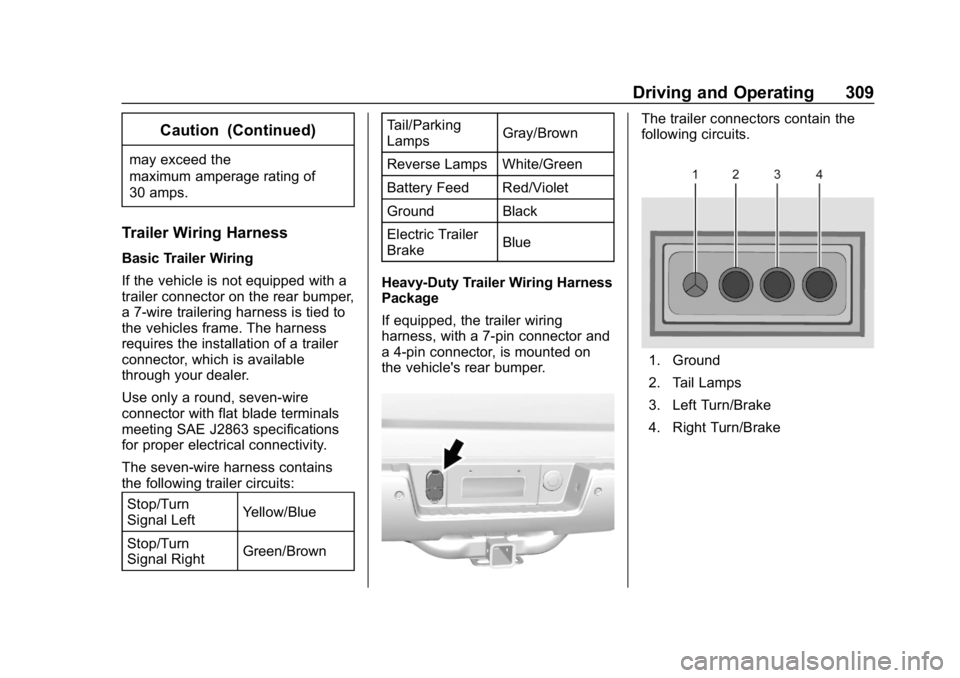
The trailer connectors contain the
following circuits.
1. Ground
2. Tail Lamps
3. Left Turn/Brake
4. Right Turn/Brake
Page 311 of 489
Chevrolet Silverado LD 1500 and Silverado 2500/3500 Owner Manual (GMNA-
Localizing-U.S./Canada-12162993) - 2019 - crc - 4/4/18
310 Driving and Operating
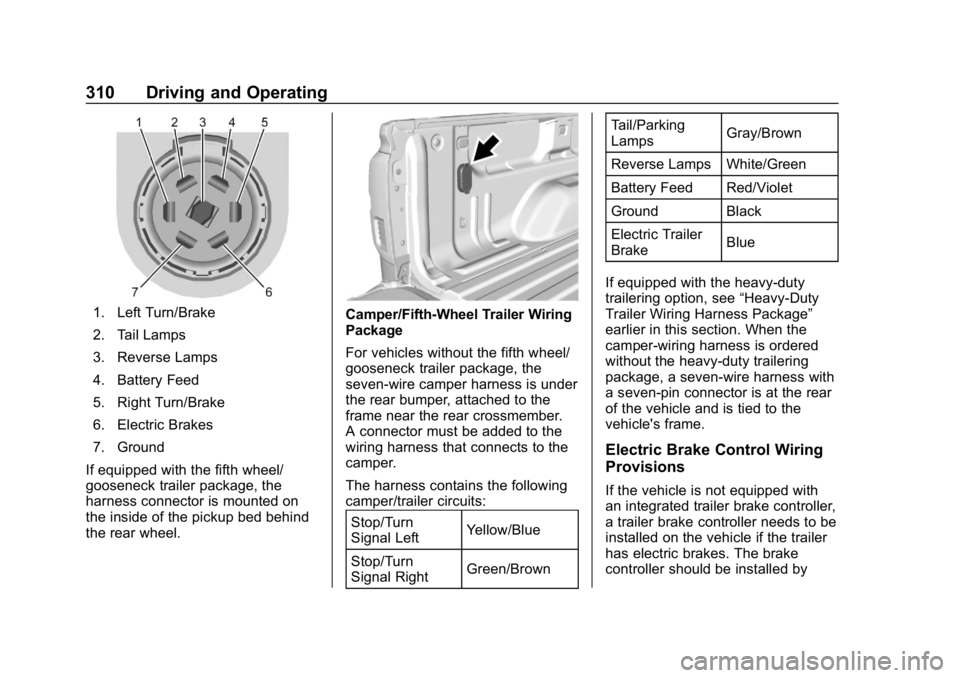
1. Left Turn/Brake
2. Tail Lamps
3. Reverse Lamps
4. Battery Feed
5. Right Turn/Brake
6. Electric Brakes
7. Ground
If equipped with the fifth wheel/
gooseneck trailer package, the
harness connector is mounted on
the inside of the pickup bed behind
the rear wheel.Camper/Fifth-Wheel Trailer Wiring
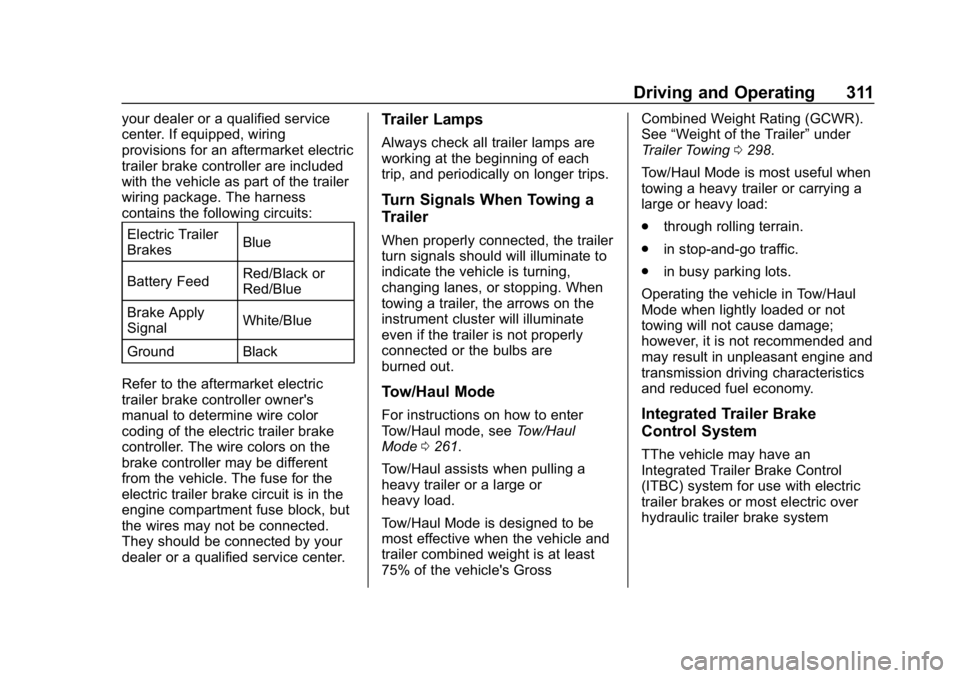
Package
For vehicles without the fifth wheel/
gooseneck trailer package, the
seven-wire camper harness is under
the rear bumper, attached to the
frame near the rear crossmember.
A connector must be added to the
wiring harness that connects to the
camper.
The harness contains the following
camper/trailer circuits: Stop/Turn
Signal Left Yellow/Blue
Stop/Turn
Signal Right Green/Brown Tail/Parking
Lamps
Gray/Brown
Reverse Lamps White/Green
Battery Feed Red/Violet
Ground Black
Electric Trailer
Brake Blue
If equipped with the heavy-duty
trailering option, see “Heavy-Duty
Trailer Wiring Harness Package”
earlier in this section. When the
camper-wiring harness is ordered
without the heavy-duty trailering
package, a seven-wire harness with
a seven-pin connector is at the rear
of the vehicle and is tied to the
vehicle's frame.
Electric Brake Control Wiring
Provisions
If the vehicle is not equipped with
an integrated trailer brake controller,
a trailer brake controller needs to be
installed on the vehicle if the trailer
has electric brakes. The brake
controller should be installed by
Page 312 of 489
Chevrolet Silverado LD 1500 and Silverado 2500/3500 Owner Manual (GMNA-
Localizing-U.S./Canada-12162993) - 2019 - crc - 4/4/18
Driving and Operating 311
your dealer or a qualified service
center. If equipped, wiring
provisions for an aftermarket electric
trailer brake controller are included
with the vehicle as part of the trailer
wiring package. The harness
contains the following circuits:Electric Trailer
Brakes Blue
Battery Feed Red/Black or
Red/Blue
Brake Apply
Signal White/Blue
Ground Black
Refer to the aftermarket electric
trailer brake controller owner's
manual to determine wire color
coding of the electric trailer brake
controller. The wire colors on the
brake controller may be different
from the vehicle. The fuse for the
electric trailer brake circuit is in the
engine compartment fuse block, but
the wires may not be connected.
They should be connected by your
dealer or a qualified service center.Trailer Lamps
Always check all trailer lamps are
working at the beginning of each
trip, and periodically on longer trips.
Turn Signals When Towing a
Trailer
When properly connected, the trailer
turn signals should will illuminate to
indicate the vehicle is turning,
changing lanes, or stopping. When
towing a trailer, the arrows on the
instrument cluster will illuminate
even if the trailer is not properly
connected or the bulbs are
burned out.
Tow/Haul Mode
For instructions on how to enter
Tow/Haul mode, see Tow/Haul
Mode 0261.
Tow/Haul assists when pulling a
heavy trailer or a large or
heavy load.
Tow/Haul Mode is designed to be
most effective when the vehicle and
trailer combined weight is at least
75% of the vehicle's Gross Combined Weight Rating (GCWR).
See
“Weight of the Trailer” under
Trailer Towing 0298.
Tow/Haul Mode is most useful when
towing a heavy trailer or carrying a
large or heavy load:
. through rolling terrain.
. in stop-and-go traffic.
. in busy parking lots.
Operating the vehicle in Tow/Haul
Mode when lightly loaded or not
towing will not cause damage;
however, it is not recommended and
may result in unpleasant engine and
transmission driving characteristics
and reduced fuel economy.Integrated Trailer Brake
Control System
TThe vehicle may have an
Integrated Trailer Brake Control
(ITBC) system for use with electric
trailer brakes or most electric over
hydraulic trailer brake system
Page 464 of 489
Chevrolet Silverado LD 1500 and Silverado 2500/3500 Owner Manual (GMNA-
Localizing-U.S./Canada-12162993) - 2019 - crc - 4/4/18
OnStar 463
OnStar
OnStar Overview
OnStar Overview . . . . . . . . . . . . . 463
OnStar Services
Emergency . . . . . . . . . . . . . . . . . . . 464
Security . . . . . . . . . . . . . . . . . . . . . . 465
OnStar Additional Information
OnStar AdditionalInformation . . . . . . . . . . . . . . . . . . 465
OnStar Overview
=Voice Command Button
QBlue OnStar Button
>Red Emergency Button
This vehicle may be equipped with a
comprehensive, in-vehicle system
that can connect to an OnStar
Advisor for Emergency, Security,
Navigation, Connections, and
Diagnostics Services. OnStar
services may require a paid service
plan and data plan. OnStar requires
the vehicle battery and electrical
system, cellular service, and GPS
satellite signals to be available and
operating. OnStar acts as a link to
existing emergency service
providers. OnStar may collect
information about you and your
vehicle, including location
information. See OnStar User Terms, Privacy Statement, and
Software Terms for more details
including system limitations at
www.onstar.com (U.S.) or
www.onstar.ca (Canada).
The OnStar system status light is
next to the OnStar buttons. If the
status light is:
.
Solid Green: System is ready.
. Flashing Green: On a call.
. Red: Indicates a problem.
. Off: System is off. Press
Q
twice to speak with an OnStar
Advisor.
Press
Qor call 1-888-4ONSTAR
(1-888-466-7827) to speak to an
Advisor.
Functionality of the Voice Command
button may vary by vehicle and
region.
Page 477 of 489

Chevrolet Silverado LD 1500 and Silverado 2500/3500 Owner Manual (GMNA-
Localizing-U.S./Canada-12162993) - 2019 - crc - 4/4/18
476 Index
Antilock Brake System (ABS) . . . 270Warning Light . . . . . . . . . . . . . . . . . 149
Appearance Care Exterior . . . . . . . . . . . . . . . . . . . . . . . 418
Interior . . . . . . . . . . . . . . . . . . . . . . . . 423
Apple CarPlay and Android Auto . . . . . . . . . . . . . . . . . . 209
Assistance Program, Roadside . . . . . . . . . . . . . . . . . . . . . . 453
Assistance Systems for Driving . . . . . . . . . . . . . . . . . . . . . . . . 282
Assistance Systems for Parking and Backing . . . . . . . . . . 280
Audio Bluetooth . . . . . . . . . . . . . . . . . . . . . 196
Theft-Deterrent Feature . . . . . . . 182
Automatic Dimming Mirrors . . . . . . . . . . . . . . . . 48
Door Locks . . . . . . . . . . . . . . . . . . . . . 40
Forward Braking . . . . . . . . . . . . . . 285
Headlamp System . . . . . . . . . . . . 174
Transmission . . . . . . . . . . . . . . . . . 256
Transmission Fluid . . . . . . 335, 337
Automatic Transmission Manual Mode . . . . . . . . . . . . . . . . . 259
Shift Lock Control Function
Check . . . . . . . . . . . . . . . . . . . . . . . 354 Auxiliary
Roof Mounted Lamp . . . . . . . . . . 176
Auxiliary Jack . . . . . . . . . . . . . . . . . . . 195
Avoiding Untrusted Media Devices . . . . . . . . . . . . . . . . . . . . . . . 190
Axle, Front . . . . . . . . . . . . . . . . . . . . . . 350
Axle, Rear . . . . . . . . . . . . . . . . . . . . . . 351
B
Battery Exterior Lighting BatterySaver . . . . . . . . . . . . . . . . . . . . . . . 180
Load Management . . . . . . . . . . . . 179
Power Protection . . . . . . . . . . . . . 180
Battery - North America . . . . 349, 408
Blade Replacement, Wiper . . . . . 355
Blind Spot Mirrors . . . . . . . . . . . . . . . 48
Bluetooth Overview . . . . . . . . . . . . . . . . 203, 205
Bluetooth Audio . . . . . . . . . . . . . . . . 196
Brake Pedal and AdjustableThrottle . . . . . . . . . . . . . . . . . . . . . . 246
System Warning Light . . . . . . . . 148
Brakes . . . . . . . . . . . . . . . . . . . . . . . . . . 347 Antilock . . . . . . . . . . . . . . . . . . . . . . . 270
Assist . . . . . . . . . . . . . . . . . . . . . . . . . 272
Fluid . . . . . . . . . . . . . . . . . . . . . . . . . . 348 Brakes (cont'd)
Parking . . . . . . . . . . . . . . . . . . . . . . . 271
Braking . . . . . . . . . . . . . . . . . . . . . . . . . 227 Automatic Forward . . . . . . . . . . . 285
Break-In, New Vehicle . . . . . . . . . . 246
Bulb Replacement Center High-MountedStoplamp (CHMSL) and
Cargo Lamp . . . . . . . . . . . . . . . . . 361
Fog Lamps . . . . . . . . . . . . . . . . . . . 359
Halogen Bulbs . . . . . . . . . . . . . . . . 357
Headlamp Aiming . . . . . . . . . . . . . 357
Headlamps . . . . . . . . . . . . . . . . . . . 357
Headlamps, Front Turn Signal, Sidemarker, and
Parking Lamps . . . . . . . . . . . . . . 358
High Intensity Discharge (HID) Lighting . . . . . . . . . . . . . . . 358
Taillamps . . . . . . . . . . . . . . . . . . . . . 359
Taillamps, Turn Signal, Stoplamps, and Back-up
Lamps . . . . . . . . . . . . . . . . . . . . . . 359
Buying New Tires . . . . . . . . . . . . . . . 389
C
Calibration . . . . . . . . . . . . . . . . . . . . . . 129
Page 484 of 489

Chevrolet Silverado LD 1500 and Silverado 2500/3500 Owner Manual (GMNA-
Localizing-U.S./Canada-12162993) - 2019 - crc - 4/4/18
Index 483
ParkingBrake . . . . . . . . . . . . . . . . . . . . . . . . . 271
Brake and P (Park)
Mechanism Check . . . . . . . . . . 354
Over Things That Burn . . . . . . . 254
Parking or Backing Assistance Systems . . . . . . . . . . 280
Passenger Airbag Status Indicator . . . . . . . . . . . . . . . . . . . . . . 145
Passenger Compartment Air Filter . . . . . . . . . . . . . . . . . . . . . . . . . . 223
Passenger Sensing System . . . . . 84
Perchlorate Materials Requirements, California . . . . . . 325
Personalization Vehicle . . . . . . . . . . . . . . . . . . . . . . . 160
Phone Apple CarPlay andAndroid Auto . . . . . . . . . . . . . . . . 209
Bluetooth . . . . . . . . . . . . . . . . 203, 205
Pickup Conversion to
Chassis Cab . . . . . . . . . . . . . . . . . . 322
Port USB . . . . . . . . . . . . . . . . . . . . . . . . . . 190
Power
Door Locks . . . . . . . . . . . . . . . . . . . . . 40
Mirrors . . . . . . . . . . . . . . . . . . . . . . . . . . 46
Outlets . . . . . . . . . . . . . . . . . . . . . . . 130 Power (cont'd)
Protection, Battery . . . . . . . . . . . . 180
Retained Accessory (RAP) . . . 251
Seat Adjustment . . . . . . . . . . . . . . . . 58
Steering Fluid . . . . . . . . . . . . . . . . . 345
Windows . . . . . . . . . . . . . . . . . . . . . . . 50
Power Assist Steps . . . . . . . . . . . . . . 42
Pregnancy, Using Seat Belts . . . . 73
Privacy Vehicle Data Recording . . . . . . . 461
Program Courtesy Transportation . . . . . . 455
Prohibited Fuels . . . . . . . . . . . . . . . . 290
Proposition 65 Warning,
California . . . . . . . . . . . .325, 349, 408, Back Cover
Publication Ordering
Information . . . . . . . . . . . . . . . . . . . . 458
R
Radio Frequency Statement . . . . 459
Radio Reception . . . . . . . . . . . . . . . . 188
RadiosAM-FM Radio . . . . . . . . . . . . . . . . . 185
Satellite . . . . . . . . . . . . . . . . . . . . . . . 187
Reading Lamps . . . . . . . . . . . . . . . . . 178 Rear Axle . . . . . . . . . . . . . . . . . . . . . . . 351
Locking . . . . . . . . . . . . . . . . . . . . . . . 276
Rear Seats . . . . . . . . . . . . . . . . . . 65, 66
Rear Vision Camera (RVC) . . . . . 280
Rear Windows . . . . . . . . . . . . . . . . . . . 52
Rearview Mirrors . . . . . . . . . . . . . . . . 49 Automatic Dimming . . . . . . . . . . . . . 50
Reclining Seatbacks . . . . . . . . . . . . . 59
Recognition Voice . . . . . . . . . . . . . . . . . . . . . . . . . 197
Recommended
Fuel . . . . . . . . . . . . . . . . . . . . . . . . . . 290
Recommended Fluids and Lubricants . . . . . . . . . . . . . . . . . . . . . 440
Records Maintenance . . . . . . . . . . . . . . . . . . 444
Recreational Vehicle Towing . . . . 412
Reimbursement Program, GM Mobility . . . . . . . . . . . . . . . . . . . 453
Remote Keyless Entry (RKE) System . . . . . . . . . . . . . . . . . . . . . . . . . 36
Remote Vehicle Start . . . . . . . . . . . . 38
Replacement Parts Airbags . . . . . . . . . . . . . . . . . . . . . . . . . 90
Maintenance . . . . . . . . . . . . . . . . . . 442
Replacing Airbag System . . . . . . . . 90
Replacing LATCH System Parts after a Crash . . . . . . . . . . . . 109