ABS CHEVROLET SILVERADO EV 2024 User Guide
[x] Cancel search | Manufacturer: CHEVROLET, Model Year: 2024, Model line: SILVERADO EV, Model: CHEVROLET SILVERADO EV 2024Pages: 429, PDF Size: 8.98 MB
Page 205 of 429
Chevrolet Silverado EV Owner Manual (GMNA-Localizing-U.S./Canada-
16702912) - 2024 - CRC - 1/17/23
204 Driving and Operating
used to hold the vehicle after coming to a
stop, and a noise may be noticed when the
brakes apply.
When driving on slippery roads, it is
recommended to turn off One-Pedal Driving
for maximum vehicle stability. SeeWinter
Driving 0191.
One-Pedal Driving is a useful feature when
towing a trailer, however, using the brake
pedal may be required to slow down and
hold the vehicle with large loads or steep
hills. Trailer brakes are only activated with
the brake pedal but trailer brake lights will
be functional during substantial deceleration
or when the vehicle is stopped. See Trailer
Towing 0297.
While using One-Pedal Driving, the Electric
Parking Brake (EPB) may apply in some
circumstances. This can occur when:
.The driver exits the vehicle.
.The vehicle has remained stationary for
five minutes.
To resume driving, press the accelerator
pedal, and the EPB will automatically
disengage.
Drive Systems
Four-Wheel Drive
This vehicle is equipped with advanced
electric four-wheel drive (e4WD). The e4WD
system delivers power to all four wheels,
and the system adjusts automatically to the
driving conditions. The e4WD system
continuously varies the drive power to the
front and rear wheels to maximize driving
efficiency and improve driving dynamics.
Your vehicle has exceptional driving
capability, but care must always be taken to
adjust driving style to the traffic and road
conditions.
Torque Vectoring
If equipped, the torque vectoring feature of
e4WD enhances vehicle performance by
focusing the vehicle torque to the optimal
wheel(s).
The vehicle e4WD settings may be
customized for the driver mode selected. See
Driver Mode Control 0209 for more
information.
Brakes
Antilock Brake System (ABS)
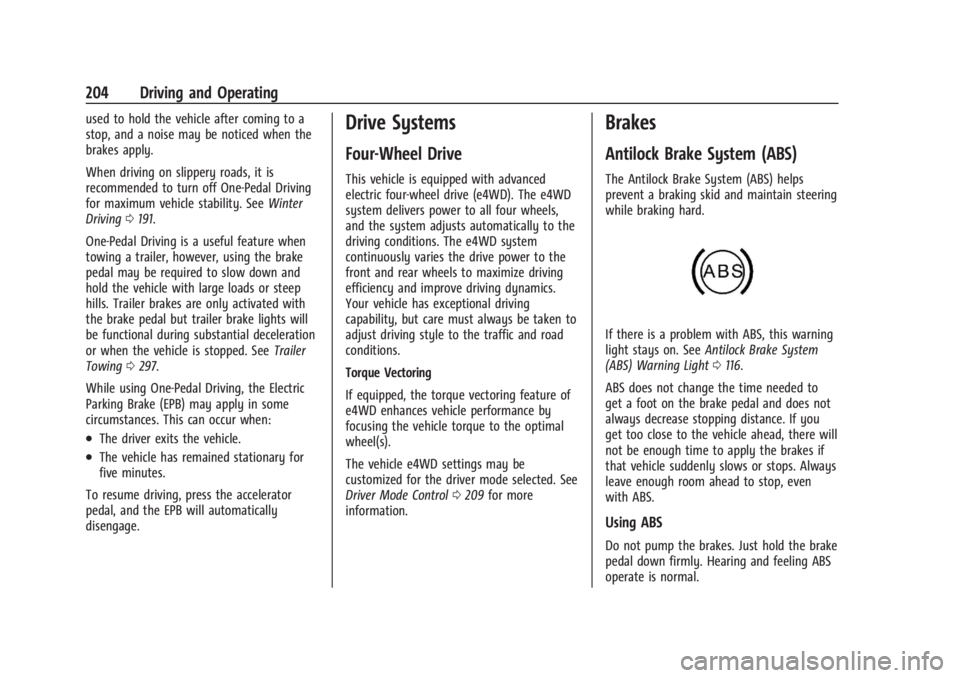
The Antilock Brake System (ABS) helps
prevent a braking skid and maintain steering
while braking hard.
If there is a problem with ABS, this warning
light stays on. See Antilock Brake System
(ABS) Warning Light 0116.
ABS does not change the time needed to
get a foot on the brake pedal and does not
always decrease stopping distance. If you
get too close to the vehicle ahead, there will
not be enough time to apply the brakes if
that vehicle suddenly slows or stops. Always
leave enough room ahead to stop, even
with ABS.
Using ABS
Do not pump the brakes. Just hold the brake
pedal down firmly. Hearing and feeling ABS
operate is normal.
Page 206 of 429
Chevrolet Silverado EV Owner Manual (GMNA-Localizing-U.S./Canada-
16702912) - 2024 - CRC - 1/17/23
Driving and Operating 205
Braking in Emergencies
ABS allows steering and braking at the same
time. In many emergencies, steering can
help even more than braking.
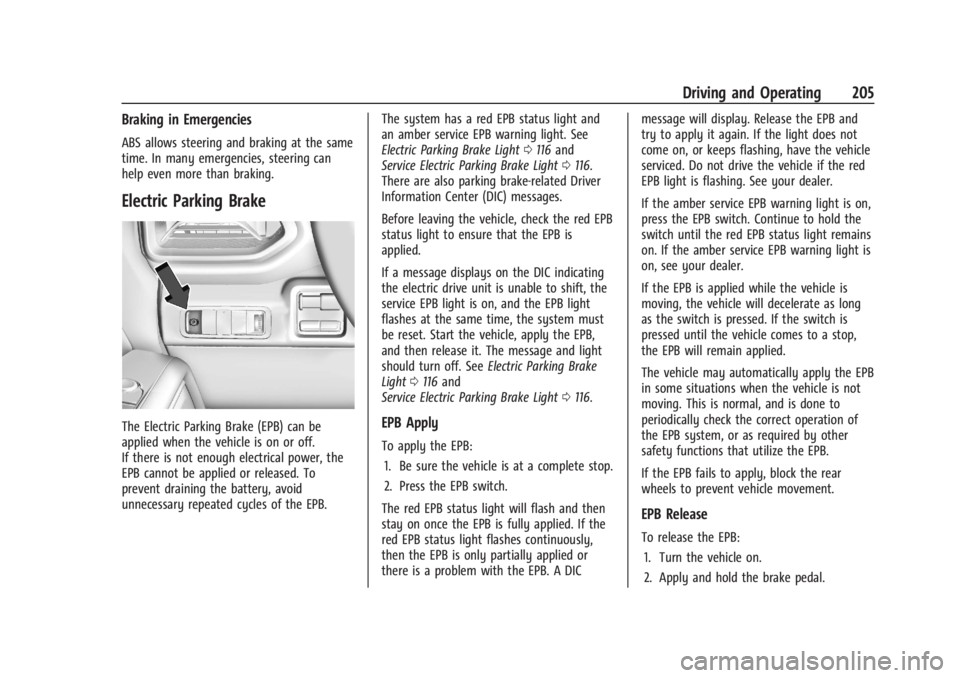
Electric Parking Brake
The Electric Parking Brake (EPB) can be
applied when the vehicle is on or off.
If there is not enough electrical power, the
EPB cannot be applied or released. To
prevent draining the battery, avoid
unnecessary repeated cycles of the EPB.The system has a red EPB status light and
an amber service EPB warning light. See
Electric Parking Brake Light
0116 and
Service Electric Parking Brake Light 0116.
There are also parking brake-related Driver
Information Center (DIC) messages.
Before leaving the vehicle, check the red EPB
status light to ensure that the EPB is
applied.
If a message displays on the DIC indicating
the electric drive unit is unable to shift, the
service EPB light is on, and the EPB light
flashes at the same time, the system must
be reset. Start the vehicle, apply the EPB,
and then release it. The message and light
should turn off. See Electric Parking Brake
Light 0116 and
Service Electric Parking Brake Light 0116.EPB Apply
To apply the EPB:
1. Be sure the vehicle is at a complete stop.
2. Press the EPB switch.
The red EPB status light will flash and then
stay on once the EPB is fully applied. If the
red EPB status light flashes continuously,
then the EPB is only partially applied or
there is a problem with the EPB. A DIC message will display. Release the EPB and
try to apply it again. If the light does not
come on, or keeps flashing, have the vehicle
serviced. Do not drive the vehicle if the red
EPB light is flashing. See your dealer.
If the amber service EPB warning light is on,
press the EPB switch. Continue to hold the
switch until the red EPB status light remains
on. If the amber service EPB warning light is
on, see your dealer.
If the EPB is applied while the vehicle is
moving, the vehicle will decelerate as long
as the switch is pressed. If the switch is
pressed until the vehicle comes to a stop,
the EPB will remain applied.
The vehicle may automatically apply the EPB
in some situations when the vehicle is not
moving. This is normal, and is done to
periodically check the correct operation of
the EPB system, or as required by other
safety functions that utilize the EPB.
If the EPB fails to apply, block the rear
wheels to prevent vehicle movement.
EPB Release
To release the EPB:
1. Turn the vehicle on.
2. Apply and hold the brake pedal.
Page 207 of 429
Chevrolet Silverado EV Owner Manual (GMNA-Localizing-U.S./Canada-
16702912) - 2024 - CRC - 1/17/23
206 Driving and Operating
3. Press the EPB switch.
The EPB is released when the red parking
brake status light is off.
If the amber service EPB warning light is on,
release the EPB by pressing and holding the
EPB switch. Continue to hold the switch
until the red parking brake status light is
off. If either light stays on after release is
attempted, see your dealer.
Caution
Driving with the parking brake on can
overheat the brake system and cause
premature wear or damage to brake
system parts. Make sure that the parking
brake is fully released and the brake
warning light is off before driving.
If you are towing a trailer and parking on a
hill, see Driving Characteristics and Towing
Tips 0294.
Automatic EPB Release
The EPB automatically releases if the vehicle
is running, placed into gear, and an attempt
is made to drive away. Avoid rapid
acceleration when the EPB is applied, to
preserve parking brake lining life.
Brake Assist
Brake Assist detects rapid brake pedal
applications due to emergency braking
situations and provides additional braking to
activate the Antilock Brake System (ABS) if
the brake pedal is not pushed hard enough
to activate ABS normally. Minor noise, brake
pedal pulsation, and/or pedal movement
during this time may occur. Continue to
apply the brake pedal as the driving
situation dictates. Brake Assist disengages
when the brake pedal is released.
Hill Start Assist (HSA)
{Warning
Do not rely on the HSA feature. HSA does
not replace the need to pay attention
and drive safely. You may not hear or
feel alerts or warnings provided by this
system. Failure to use proper care when
driving may result in injury, death,
or vehicle damage. See Defensive Driving
0 183.
When the vehicle is stopped on a grade, Hill
Start Assist (HSA) prevents the vehicle from
rolling in an unintended direction during the
transition from brake pedal release to accelerator pedal apply. The brakes release
when the accelerator pedal is applied. If the
accelerator pedal is not applied within a few
minutes, the Electric Parking Brake will
apply. The brakes may also release under
other conditions. Do not rely on HSA to hold
the vehicle.
HSA is available when the vehicle is facing
uphill in a forward gear, or when facing
downhill in R (Reverse). The vehicle must
come to a complete stop on a grade for HSA
to activate.
Regenerative Braking
Regenerative braking takes some of the
energy from the moving vehicle and turns it
back into electrical energy. This energy is
then stored back into the high voltage
battery system, contributing to increased
energy efficiency.
Regenerative power may be limited when
the battery is near full charge or cold. See
“Regenerative Power Limited”
underPower
Indicator Gauge 0111. Regenerative braking
supplements your vehicle’s conventional
brakes, especially when going downhill. See
Hill and Mountain Roads 0190.
Page 210 of 429
Chevrolet Silverado EV Owner Manual (GMNA-Localizing-U.S./Canada-
16702912) - 2024 - CRC - 1/17/23
Driving and Operating 209
To turn ESC off, selectTnext to the
Traction Control menu. Select the Traction
Control and ESC Off option. The ESC off light
gwill display in the instrument cluster. See
Electronic Stability Control (ESC) Off Light
0 119.
TCS cannot be on when ESC is off.
ESC will automatically turn on if the vehicle
exceeds 56 km/h (35 mph) and cannot be
turned off again until speed is reduced.
Traction control will remain off.
Vehicles equipped with the four corner air
suspension will re-enable ESC at 32 km/h
(20 mph).
The vehicle has a Trailer Sway Control (TSC)
feature and a Hill Start Assist (HSA) feature.
See Trailer Sway Control (TSC) 0309 or
Hill Start Assist (HSA) 0206.
Entering Teen Driver will automatically
enable both TCS and ESC, and prevent these
safety features from being turned off. See
Teen Driver 0168.
Adding accessories can affect the vehicle
performance. See Accessories and
Modifications 0324.
Driver Mode Control
Driver Mode Control allows the driver to
adjust the overall driving experience by
selecting different modes. Driver Mode
Control has the following modes: Tour,
Sport, Snow/Ice, and a customizable mode:
My mode. Driver mode availability and
affected vehicle subsystems are dependent
upon trim level, region, and optional
features.
If the vehicle is in Tour mode, My mode,
or Sport mode it will stay in that mode
through future on/off cycles. If the vehicle is
in Snow/Ice mode, it will return to Tour
mode when the vehicle is restarted. When
each mode is selected, a unique and
persistent indicator is displayed in the
instrument cluster.
Mode Activation
To activate each mode, open the Drive Mode
App on the infotainment home screen.
Activate each mode by selecting the
mode icon.
Mode Descriptions
Normal Mode : Use for normal city and
highway driving to provide a smooth ride.
This setting provides balance between comfort and handling. There is no persistent
indicator in the instrument cluster for
this mode.
Off Road Mode :
Use this mode for off-road
recreational driving. Off Road mode should
be used to improve driving at moderate
speeds, on grass, gravel, dirt, unpaved roads,
or snow-covered roads. The accelerator pedal
is tuned for off road use. If equipped, this
mode also modifies steering, suspension,
active rear steer, e4WD, EVSE, ABS, ESC, and
TCS Performance.
For more information on off-road driving,
see Off-Road Driving 0185.
Tow/Haul Mode : Use this mode when
hauling heavy loads to provide increased
performance and vehicle control. Tow/Haul
mode adjusts the pedal map, steering, active
rear steer, suspension, and TSC performance.
If equipped with a Work Truck, the
Tow/Haul mode may be operated through a
button on the center stack. Press
_to
activate Tow/Haul mode.
If the vehicle is turned off with Tow/Haul
mode active and then restarted within four
hours or less, Tow/Haul mode will remain
active. Otherwise, the vehicle will start in
Normal mode.
Page 297 of 429
Chevrolet Silverado EV Owner Manual (GMNA-Localizing-U.S./Canada-
16702912) - 2024 - CRC - 1/17/23
296 Driving and Operating
When parking your vehicle and trailer on
a hill:1. Press and hold the brake pedal, but do not shift into P (Park). Turn the wheels
toward the curb if facing downhill or
toward traffic if facing uphill.
2. Have someone place chocks under the trailer wheels.
3. When the wheel chocks are in place, gradually release the brake pedal to
allow the chocks to absorb the load of
the trailer.
4. Reapply the brake pedal. Then apply the electric parking brake and shift into
P (Park).
5. Release the brake pedal.
Leaving After Parking on a Hill
1. Apply and hold the brake pedal.
.Start the vehicle.
.Shift into the desired gear.
.Release the parking brake.
2. Let up on the brake pedal.
3. Drive slowly until the trailer is clear of the chocks.
4. Stop and have someone pick up and store the chocks.
Launching and Retrieving a Boat
Backing the Trailer into the Water
{Warning
.Have all passengers get out of the
vehicle before backing onto the sloped
part of the ramp. Lower the driver and
passenger side windows before
backing onto the ramp. This will
provide a means of escape in the
unlikely event the vehicle slides into
the water.
.If the boat launch surface is slippery,
have the driver remain in the vehicle
with the brake pedal applied while the
boat is being launched. The boat
launch can be especially slippery at
low tide when part of the ramp was
previously submerged at high tide. Do
not back onto the ramp to launch the
boat if you are not sure the vehicle
can maintain traction.
.Do not move the vehicle if someone is
in the path of the trailer. Some parts
of the trailer might be underwater and
not visible to people who are assisting
in launching the boat. Disconnect the trailer wiring before backing
the trailer into the water to prevent damage
to the electrical circuits. Reconnect the
wiring to the trailer after removing the
trailer from the water. If the trailer has
electric brakes that can function when the
trailer is submerged, it might help to leave
the electrical trailer connector attached to
maintain trailer brake functionality while on
the boat ramp.
To back the trailer into the water:
1. Slowly back down the boat ramp until the boat is floating, but no further than
necessary.
2. Press and hold the brake pedal, but do not shift into P (Park).
3. Have someone place chocks under the front wheels of the vehicle.
4. Gradually release the brake pedal to allow the chocks to absorb the load of
the trailer.
5. Reapply the brake pedal. Then apply the parking brake and shift into P (Park).
6. Release the brake pedal.
Page 307 of 429
Chevrolet Silverado EV Owner Manual (GMNA-Localizing-U.S./Canada-
16702912) - 2024 - CRC - 1/17/23
306 Driving and Operating
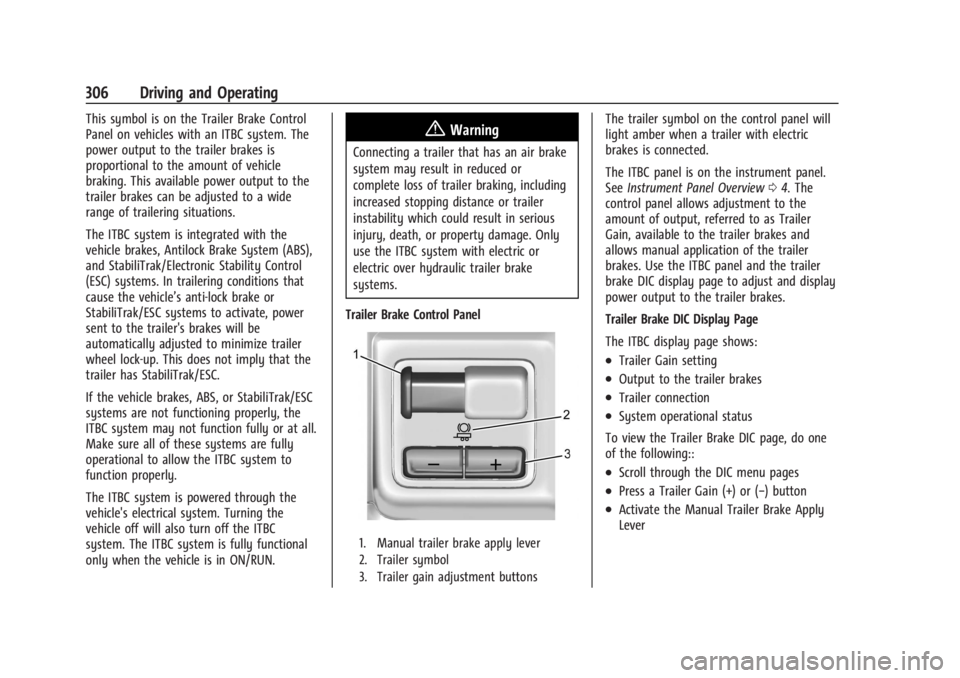
This symbol is on the Trailer Brake Control
Panel on vehicles with an ITBC system. The
power output to the trailer brakes is
proportional to the amount of vehicle
braking. This available power output to the
trailer brakes can be adjusted to a wide
range of trailering situations.
The ITBC system is integrated with the
vehicle brakes, Antilock Brake System (ABS),
and StabiliTrak/Electronic Stability Control
(ESC) systems. In trailering conditions that
cause the vehicle’s anti-lock brake or
StabiliTrak/ESC systems to activate, power
sent to the trailer's brakes will be
automatically adjusted to minimize trailer
wheel lock-up. This does not imply that the
trailer has StabiliTrak/ESC.
If the vehicle brakes, ABS, or StabiliTrak/ESC
systems are not functioning properly, the
ITBC system may not function fully or at all.
Make sure all of these systems are fully
operational to allow the ITBC system to
function properly.
The ITBC system is powered through the
vehicle's electrical system. Turning the
vehicle off will also turn off the ITBC
system. The ITBC system is fully functional
only when the vehicle is in ON/RUN.{Warning
Connecting a trailer that has an air brake
system may result in reduced or
complete loss of trailer braking, including
increased stopping distance or trailer
instability which could result in serious
injury, death, or property damage. Only
use the ITBC system with electric or
electric over hydraulic trailer brake
systems.
Trailer Brake Control Panel
1. Manual trailer brake apply lever
2. Trailer symbol
3. Trailer gain adjustment buttons
The trailer symbol on the control panel will
light amber when a trailer with electric
brakes is connected.
The ITBC panel is on the instrument panel.
See Instrument Panel Overview 04. The
control panel allows adjustment to the
amount of output, referred to as Trailer
Gain, available to the trailer brakes and
allows manual application of the trailer
brakes. Use the ITBC panel and the trailer
brake DIC display page to adjust and display
power output to the trailer brakes.
Trailer Brake DIC Display Page
The ITBC display page shows:
.Trailer Gain setting
.Output to the trailer brakes
.Trailer connection
.System operational status
To view the Trailer Brake DIC page, do one
of the following::
.Scroll through the DIC menu pages
.Press a Trailer Gain (+) or (−) button
.Activate the Manual Trailer Brake Apply
Lever
Page 330 of 429
Chevrolet Silverado EV Owner Manual (GMNA-Localizing-U.S./Canada-
16702912) - 2024 - CRC - 1/13/23
Vehicle Care 329
Caution
Continuing to drive with worn-out brake
linings could result in costly brake
repairs.
Some driving conditions or climates can
cause a brake squeal when the brakes are
first applied, clearing up following several
applications. This does not mean something
is wrong with the brakes.
Properly torqued wheel nuts are necessary
to help prevent brake pulsation. When tires
are rotated, inspect brake linings for wear
and evenly tighten wheel nuts in the proper
sequence to torque specifications. See
Capacities and Specifications 0395.
Brake pads should be replaced as complete
axle sets.
Brake Pedal Travel
See your dealer if the brake pedal does not
return to normal height, or if there is a
rapid increase in pedal travel. This could be
a sign that brake service may be required.
Replacing Brake System Parts
Always replace brake system parts with
new, approved replacement parts. If this is
not done, the brakes may not work
properly. The braking performance can
change in many ways if the wrong brake
parts are installed or if parts are improperly
installed.
Brake Fluid
The brake master cylinder reservoir is filled
with GM approved DOT 4 brake fluid as
indicated on the reservoir cap. See
Underhood Compartment Overview 0325 for
the location of the reservoir.
Checking Brake Fluid
With the vehicle in P (Park) on a level
surface, the brake fluid level should be
between the minimum and maximum marks
on the brake fluid reservoir. There are only two reasons why the brake
fluid level in the reservoir may go down:
.Normal brake lining wear. When new
linings are installed, the fluid level goes
back up.
.A fluid leak in the brake hydraulic system.
Have the brake hydraulic system fixed.
With a leak, the brakes will not
work well.
Always clean the brake fluid reservoir cap
and the area around the cap before
removing it.
Do not top off the brake fluid. Adding fluid
does not correct a leak. If fluid is added
when the linings are worn, there will be too
much fluid when new brake linings are
installed. Add or remove fluid, as necessary,
only when work is done on the brake
hydraulic system.
When the brake fluid falls to a low level,
the brake warning light comes on. See Brake
System Warning Light 0115.
Brake fluid absorbs water over time which
degrades the effectiveness of the brake fluid.
Replace brake fluid at the specified intervals
to prevent increased stopping distance. See
Maintenance Schedule 0389.
Page 331 of 429
Chevrolet Silverado EV Owner Manual (GMNA-Localizing-U.S./Canada-
16702912) - 2024 - CRC - 1/13/23
330 Vehicle Care
What to Add
Use only GM approved DOT 4 brake fluid
from a clean, sealed container. See
Recommended Fluids and Lubricants0392.
{Warning
The wrong or contaminated brake fluid
could result in damage to the brake
system. This could result in the loss of
braking leading to a possible injury.
Always use the proper GM approved
brake fluid.
Caution
If brake fluid is spilled on the vehicle's
painted surfaces, the paint finish can be
damaged. Immediately wash off any
painted surface.
Battery - North America
This vehicle has a high voltage battery and
a standard 12-volt battery.
See your dealer if either the 12-volt or high
voltage battery needs service.
12-Volt Battery
The original equipment battery is
maintenance free. Do not remove the cap
and do not add fluid.
Do not disconnect the 12-volt battery during
storage.
Refer to the replacement number shown on
the original battery label when a new 12-volt
battery is needed. The vehicle has an
Absorbent Glass Mat (AGM) 12-volt battery.
Installation of a standard 12-volt battery will
result in reduced 12-volt battery life.
Some 12-volt chargers have an AGM battery
setting. This setting limits the charge
voltage to 14.8 volts and helps extend the
battery life. If available, use the AGM
setting when charging the battery.
{Warning
WARNING: Battery posts, terminals and
related accessories can expose you to
chemicals including lead and lead
compounds, which are known to the
State of California to cause cancer and
birth defects or other reproductive harm.
(Continued)
Warning (Continued)
Wash hands after handling. For more
information go to
www.P65Warnings.ca.gov.
See California Proposition 65 Warning 01.
High Voltage Battery
Only a trained service technician should
inspect, test, or replace the high voltage
battery. The dealer has information on how
to recycle the high voltage battery. There
is also information available at
https://www.recyclemybattery.com.
{Warning
Damage to the high voltage battery or
high voltage system can create a risk of
electric shock, overheating, or fire.
If the vehicle is damaged from a
moderate to severe crash, flood, fire,
or other event, the vehicle should be
inspected as soon as possible. Until the
vehicle has been inspected, store it
outside at least 15 m (50 ft) from any
(Continued)
Page 341 of 429
Chevrolet Silverado EV Owner Manual (GMNA-Localizing-U.S./Canada-
16702912) - 2024 - CRC - 1/13/23
340 Vehicle Care
FusesUsage
F66 –
F67 EMB/GRILL LIGHT
F68 HDLP_LT
F69 MIDGATE LEFT MOTOR F70 EBCM 1 F71 DC/AC INV
F72 Spare
F73 –
F74 –
F75 Spare
F76 HDLP_RT F77 –
F78 MIDGATE CROSS BAR MOTOR 2
MIDGATE CROSS BAR
MOTOR 1
F79 PCV_PEEV_ALD FR RADAR/VIRTUAL KEY
F80 IECR 2 F81 IECL 1 Fuses
Usage
F82 –
F83 –
F84 V2LIM F85 Spare HVS (HIGH VOLTAGE
SERVICE DISCONNECT)
F86 HORN F87 FRT WSHR PMP
F88 –
F89 –
F90 –
F91 –Instrument Panel Fuse Block (Left)
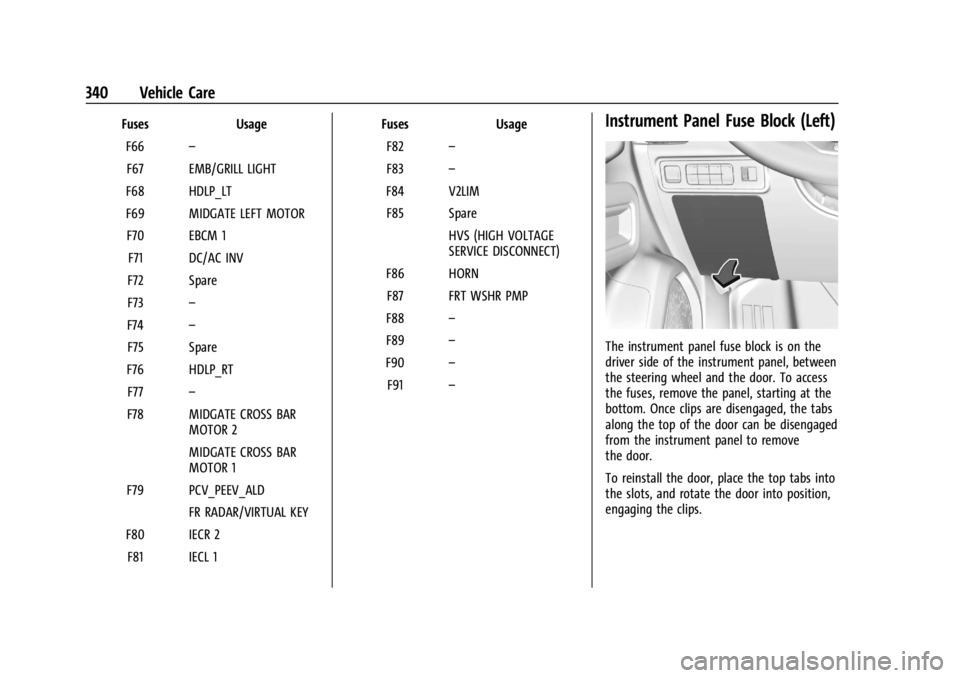
The instrument panel fuse block is on the
driver side of the instrument panel, between
the steering wheel and the door. To access
the fuses, remove the panel, starting at the
bottom. Once clips are disengaged, the tabs
along the top of the door can be disengaged
from the instrument panel to remove
the door.
To reinstall the door, place the top tabs into
the slots, and rotate the door into position,
engaging the clips.
Page 380 of 429
Chevrolet Silverado EV Owner Manual (GMNA-Localizing-U.S./Canada-
16702912) - 2024 - CRC - 1/13/23
Vehicle Care 379
The vehicle is equipped with a tow eye.
Only use the tow eye to pull the vehicle
onto a flatbed car carrier from a flat road
surface. Do not use the tow eye to pull the
vehicle from snow, mud, sand, or ditch.
Carefully open the cover in the fascia by
using the small notch that conceals the tow
eye socket.
Install the tow eye into the socket and turn
it until it is fully tightened. When the tow
eye is removed, reinstall the cover with the
notch in the original position.
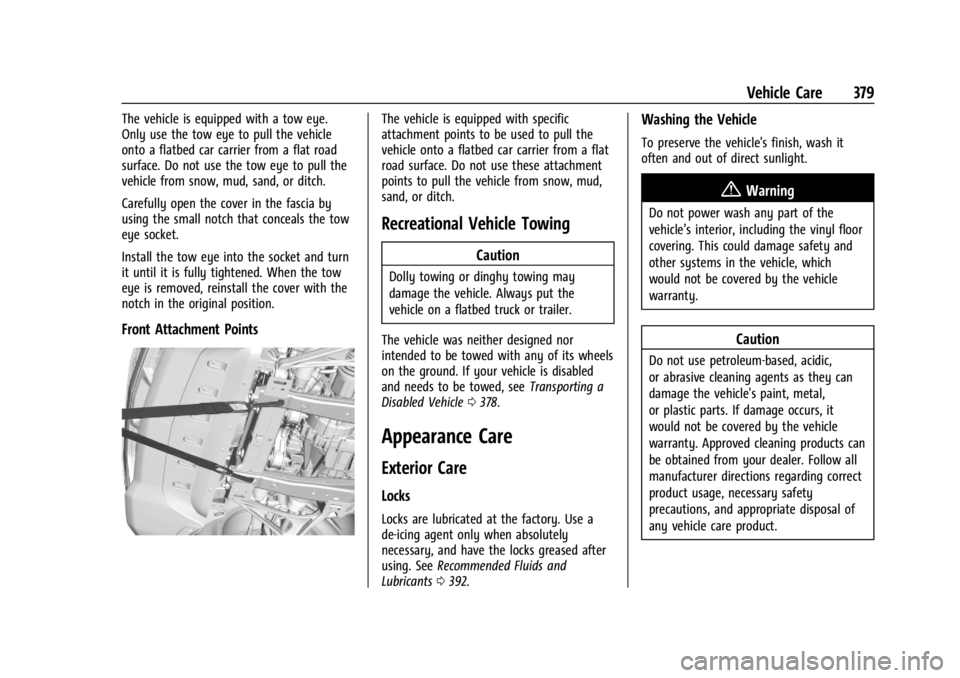
Front Attachment Points
The vehicle is equipped with specific
attachment points to be used to pull the
vehicle onto a flatbed car carrier from a flat
road surface. Do not use these attachment
points to pull the vehicle from snow, mud,
sand, or ditch.
Recreational Vehicle Towing
Caution
Dolly towing or dinghy towing may
damage the vehicle. Always put the
vehicle on a flatbed truck or trailer.
The vehicle was neither designed nor
intended to be towed with any of its wheels
on the ground. If your vehicle is disabled
and needs to be towed, see Transporting a
Disabled Vehicle 0378.
Appearance Care
Exterior Care
Locks
Locks are lubricated at the factory. Use a
de-icing agent only when absolutely
necessary, and have the locks greased after
using. See Recommended Fluids and
Lubricants 0392.
Washing the Vehicle
To preserve the vehicle's finish, wash it
often and out of direct sunlight.
{Warning
Do not power wash any part of the
vehicle’s interior, including the vinyl floor
covering. This could damage safety and
other systems in the vehicle, which
would not be covered by the vehicle
warranty.
Caution
Do not use petroleum-based, acidic,
or abrasive cleaning agents as they can
damage the vehicle's paint, metal,
or plastic parts. If damage occurs, it
would not be covered by the vehicle
warranty. Approved cleaning products can
be obtained from your dealer. Follow all
manufacturer directions regarding correct
product usage, necessary safety
precautions, and appropriate disposal of
any vehicle care product.