Lane CHEVROLET SILVERADO EV 2024 User Guide
[x] Cancel search | Manufacturer: CHEVROLET, Model Year: 2024, Model line: SILVERADO EV, Model: CHEVROLET SILVERADO EV 2024Pages: 429, PDF Size: 8.98 MB
Page 133 of 429
Chevrolet Silverado EV Owner Manual (GMNA-Localizing-U.S./Canada-
16702912) - 2024 - CRC - 1/13/23
132 Instruments and Controls
Off :Allows for no information to be
displayed in the cluster info display areas.
Right Zone
Auto Lane Change : Displays the status of a
driver-requested lane change when Super
Cruise is active. See Super Cruise0227.
Audio Now Playing : Displays the actively
playing audio.
Navigation : Displays a variety of navigation
information.
Phone : Displays a variety of call
information.
Off : Allows for no information to be
displayed in the cluster info display areas.
Vehicle Status
The following are all possible vehicle status
features.
To access the vehicle status menu touch
A
from the list of home page icons displayed
on the left side of the infotainment display.
Vehicle status content is shown on cards
that are grouped together in option tabs
that are displayed on the infotainment
display. Touching a card on the infotainment display
opens up a dialog box for that card. To
select a desired option within a dialog box,
touch the option and follow any message or
alerts that may display. Some options may
be unavailable while driving.
Touch Add to Driver Display to send the
desired card to the Driver Information
Center (DIC) on the instrument cluster.
Touch Remove from Driver Display to
remove the selected card from the
instrument cluster. See
Driver Information
Center (DIC) (Base Level) 0129 or
Driver Information Center (DIC) (Uplevel)
0 130.
Options
The following is the list of all possible cards
and their locations. Some of the cards may
not be available for your particular vehicle.
Overview
Displays an interactive 3-D rendered image
of your vehicle that shows performance and
health information.
Tire Pressure
Displays the approximate pressures of all
four tires. Tire pressure is displayed in either
kilopascal (kPa) or in pounds per square inch (psi). If the pressure is low, the value
for that tire is shown in amber. See
Tire
Pressure Monitor System 0351 and
Tire Pressure Monitor Operation 0351.
If equipped, Tire Temperature is located
below the tire pressure graphic. Tire
Temperature shows overall temperature as
either Cold, Cool, Normal, Warm, or Hot.
Normal is typical for normal driving while
Warm is typical for spirited driving.
Unknown displays when tire temperature
information is unavailable.
When selected, the following options may
be chosen in the dialog: Relearn Tire
Pressure, Turn Off/On Leak Detection, Reset
Leak Detection, and Add to Driver Display.
When enabled, you will receive alerts when
a fast and/or slow tire leak is detected. The
Leak Detection speeds shown are either Tire
Leak or Fast Leak. When disabled, you will
still receive low tire pressure alerts.
However, you will stop receiving additional
alerts when a tire is leaking air.
Energy Info
Energy Usage : Displays how energy is
being used for the current drive since the
last time the vehicle was started.
Percentages of the Driving, Remote Climate,
and Climate and Prep vehicle systems as
Page 136 of 429
Chevrolet Silverado EV Owner Manual (GMNA-Localizing-U.S./Canada-
16702912) - 2024 - CRC - 1/13/23
Instruments and Controls 135
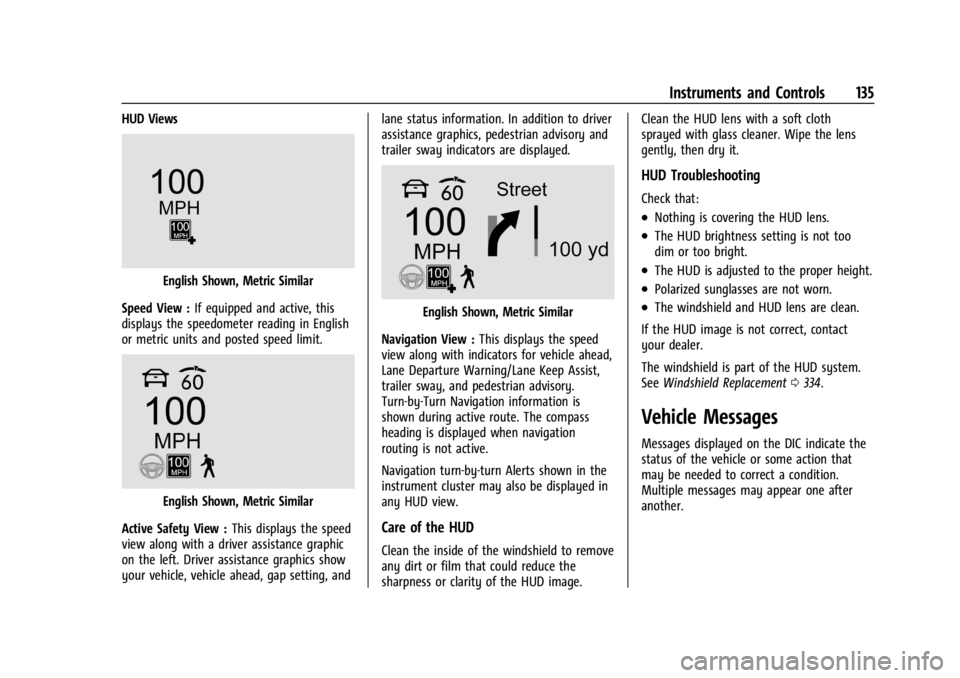
HUD Views
English Shown, Metric Similar
Speed View : If equipped and active, this
displays the speedometer reading in English
or metric units and posted speed limit.
English Shown, Metric Similar
Active Safety View : This displays the speed
view along with a driver assistance graphic
on the left. Driver assistance graphics show
your vehicle, vehicle ahead, gap setting, and lane status information. In addition to driver
assistance graphics, pedestrian advisory and
trailer sway indicators are displayed.
English Shown, Metric Similar
Navigation View : This displays the speed
view along with indicators for vehicle ahead,
Lane Departure Warning/Lane Keep Assist,
trailer sway, and pedestrian advisory.
Turn-by-Turn Navigation information is
shown during active route. The compass
heading is displayed when navigation
routing is not active.
Navigation turn-by-turn Alerts shown in the
instrument cluster may also be displayed in
any HUD view.
Care of the HUD
Clean the inside of the windshield to remove
any dirt or film that could reduce the
sharpness or clarity of the HUD image. Clean the HUD lens with a soft cloth
sprayed with glass cleaner. Wipe the lens
gently, then dry it.
HUD Troubleshooting
Check that:
.Nothing is covering the HUD lens.
.The HUD brightness setting is not too
dim or too bright.
.The HUD is adjusted to the proper height.
.Polarized sunglasses are not worn.
.The windshield and HUD lens are clean.
If the HUD image is not correct, contact
your dealer.
The windshield is part of the HUD system.
See Windshield Replacement 0334.
Vehicle Messages
Messages displayed on the DIC indicate the
status of the vehicle or some action that
may be needed to correct a condition.
Multiple messages may appear one after
another.
Page 141 of 429
Chevrolet Silverado EV Owner Manual (GMNA-Localizing-U.S./Canada-
16702912) - 2024 - CRC - 1/13/23
140 Lighting
Lighting
Exterior Lighting
Exterior Lamp Controls . . . . . . . . . . . . . . . . 140
Exterior Lamps Off Reminder . . . . . . . . . . . 141
Headlamp High/Low-Beam Changer . . . . 141
Flash-to-Pass . . . . . . . . . . . . . . . . . . . . . . . . . . . 141
Daytime Running Lamps (DRL) . . . . . . . . . 141
Automatic Headlamp System . . . . . . . . . . 142
Hazard Warning Flashers . . . . . . . . . . . . . . 142
Turn and Lane-Change Signals . . . . . . . . . 143
Exterior Cargo Lamps . . . . . . . . . . . . . . . . . . 143
Interior Lighting
Instrument Panel IlluminationControl . . . . . . . . . . . . . . . . . . . . . . . . . . . . . . 143
Dome Lamps . . . . . . . . . . . . . . . . . . . . . . . . . . 144
Reading Lamps . . . . . . . . . . . . . . . . . . . . . . . . 144
Lighting Features
Entry Lighting . . . . . . . . . . . . . . . . . . . . . . . . . 144
Exit Lighting . . . . . . . . . . . . . . . . . . . . . . . . . . . 145
Battery Load Management . . . . . . . . . . . . 145
Battery Power Protection . . . . . . . . . . . . . . 145
Exterior Lighting Battery Saver . . . . . . . . 146
Exterior Lighting
Exterior Lamp Controls
The exterior lamp controls, also known as
headlights, are in the Controls App on the
infotainment home screen. Select Controls >
Lights > Headlights.
To operate, select the following options:
Off : Turns off the exterior lamps.
For vehicles first sold in Canada, the
headlamps will automatically reactivate
when the vehicle is shifted out of P (Park).
Auto : Automatically turns on the
headlamps, parking lamps, taillamps,
instrument panel lights, roof marker lamps
(if equipped), license plate lamps or Daytime
Running Lamps (DRL), depending on outside
light conditions.
Parking : Turns on the parking lamps.
On : Turns on the exterior lamps.
IntelliBeam System
If equipped, this system turns the high-beam
headlamps on and off according to
surrounding traffic conditions. The system turns the high-beam headlamps
on when it is dark enough and there is no
other traffic present.
This light
bappears on the instrument
cluster when the IntelliBeam system is
enabled.
Turning the IntelliBeam On and Off
To enable and disable the IntelliBeam
system on the infotainment home screen,
select Control App > Lights >
bAuto
High Beams when the headlights are set in
the Auto position.
Driving with IntelliBeam
The system only activates the high beams
when driving over 40 km/h (25 mph).
The blue high-beam on light appears on the
instrument cluster when the high beams
are on.
There is a sensor near the top center of the
windshield that automatically controls the
system. Keep this area of the windshield
clear of debris to allow for best system
performance.
Page 144 of 429
Chevrolet Silverado EV Owner Manual (GMNA-Localizing-U.S./Canada-
16702912) - 2024 - CRC - 1/13/23
Lighting 143
Turn and Lane-Change Signals
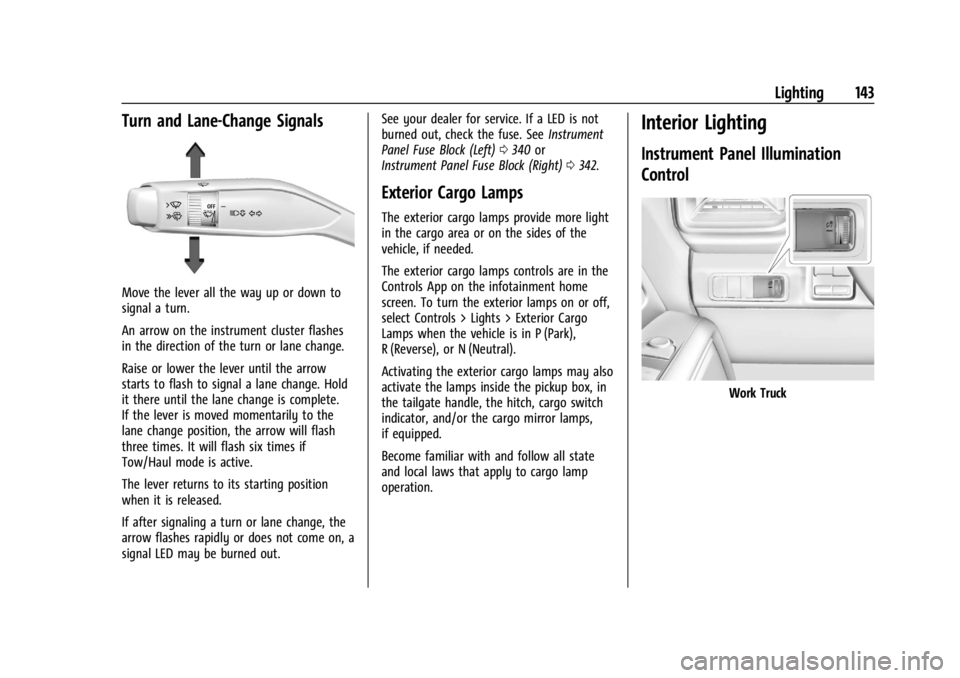
Move the lever all the way up or down to
signal a turn.
An arrow on the instrument cluster flashes
in the direction of the turn or lane change.
Raise or lower the lever until the arrow
starts to flash to signal a lane change. Hold
it there until the lane change is complete.
If the lever is moved momentarily to the
lane change position, the arrow will flash
three times. It will flash six times if
Tow/Haul mode is active.
The lever returns to its starting position
when it is released.
If after signaling a turn or lane change, the
arrow flashes rapidly or does not come on, a
signal LED may be burned out.See your dealer for service. If a LED is not
burned out, check the fuse. See
Instrument
Panel Fuse Block (Left) 0340 or
Instrument Panel Fuse Block (Right) 0342.
Exterior Cargo Lamps
The exterior cargo lamps provide more light
in the cargo area or on the sides of the
vehicle, if needed.
The exterior cargo lamps controls are in the
Controls App on the infotainment home
screen. To turn the exterior lamps on or off,
select Controls > Lights > Exterior Cargo
Lamps when the vehicle is in P (Park),
R (Reverse), or N (Neutral).
Activating the exterior cargo lamps may also
activate the lamps inside the pickup box, in
the tailgate handle, the hitch, cargo switch
indicator, and/or the cargo mirror lamps,
if equipped.
Become familiar with and follow all state
and local laws that apply to cargo lamp
operation.
Interior Lighting
Instrument Panel Illumination
Control
Work Truck
Page 181 of 429
Chevrolet Silverado EV Owner Manual (GMNA-Localizing-U.S./Canada-
16702912) - 2024 - CRC - 1/17/23
180 Driving and Operating
Driving and Operating
Driving Information
Driving for Better Energy Efficiency . . . . 181
Distracted Driving . . . . . . . . . . . . . . . . . . . . . 182
Defensive Driving . . . . . . . . . . . . . . . . . . . . . . 183
Impaired Driving . . . . . . . . . . . . . . . . . . . . . . . 183
Control of a Vehicle . . . . . . . . . . . . . . . . . . . 183
Braking . . . . . . . . . . . . . . . . . . . . . . . . . . . . . . . . 183
Steering . . . . . . . . . . . . . . . . . . . . . . . . . . . . . . . 184
Off-Road Recovery . . . . . . . . . . . . . . . . . . . . . 184
Loss of Control . . . . . . . . . . . . . . . . . . . . . . . . 185
Off-Road Driving . . . . . . . . . . . . . . . . . . . . . . . 185
Driving on Wet Roads . . . . . . . . . . . . . . . . . 189
Hill and Mountain Roads . . . . . . . . . . . . . . 190
Winter Driving . . . . . . . . . . . . . . . . . . . . . . . . . 191
If the Vehicle Is Stuck . . . . . . . . . . . . . . . . . 192
Vehicle Load Limits . . . . . . . . . . . . . . . . . . . . 193
Truck-Camper Loading Information . . . . . 197
Starting and Operating
New Vehicle Break-In . . . . . . . . . . . . . . . . . . 197
Power Modes . . . . . . . . . . . . . . . . . . . . . . . . . . 197
Shifting Into Park . . . . . . . . . . . . . . . . . . . . . 199
Shifting out of Park . . . . . . . . . . . . . . . . . . . 199
Electric Drive Unit
Electric Drive Unit . . . . . . . . . . . . . . . . . . . . . 200
One-Pedal Driving . . . . . . . . . . . . . . . . . . . . . 203
Drive Systems
Four-Wheel Drive . . . . . . . . . . . . . . . . . . . . . . 204
Brakes
Antilock Brake System (ABS) . . . . . . . . . . 204
Electric Parking Brake . . . . . . . . . . . . . . . . . 205
Brake Assist . . . . . . . . . . . . . . . . . . . . . . . . . . . 206
Hill Start Assist (HSA) . . . . . . . . . . . . . . . . . 206
Regenerative Braking . . . . . . . . . . . . . . . . . . 206
Ride Control Systems
Traction Control/Electronic StabilityControl . . . . . . . . . . . . . . . . . . . . . . . . . . . . . . 207
Driver Mode Control . . . . . . . . . . . . . . . . . . 209
Four-Wheel Steering . . . . . . . . . . . . . . . . . . . 210
Limited-Slip Differential . . . . . . . . . . . . . . . . 211
Air Suspension . . . . . . . . . . . . . . . . . . . . . . . . . 211
Cruise Control
Cruise Control . . . . . . . . . . . . . . . . . . . . . . . . . . 213
Speed Limiter . . . . . . . . . . . . . . . . . . . . . . . . . . 215
Adaptive Cruise Control (Advanced) . . . . 217
Super Cruise . . . . . . . . . . . . . . . . . . . . . . . . . . . 227
Advanced Driver Assistance Systems
Advanced Driver Assistance Systems . . . . . . . . . . . . . . . . . . . . . . . . . . . . . 244
Assistance Systems for Parking or Backing . . . . . . . . . . . . . . . . . . . . . . . . . . . . . . 246
Rear Vision Camera (RVC) . . . . . . . . . . . . . 246
Surround Vision System . . . . . . . . . . . . . . . 247 Park Assist . . . . . . . . . . . . . . . . . . . . . . . . . . . . 254
Automatic Parking Assist (APA) . . . . . . . . 255
Reverse Automatic Braking (RAB) . . . . . . 258
Rear Pedestrian Alert . . . . . . . . . . . . . . . . . . 259
Rear Cross Traffic Alert (RCTA)
System . . . . . . . . . . . . . . . . . . . . . . . . . . . . . . 260
Assistance Systems for Driving . . . . . . . . 261
Forward Collision Alert (FCA) System . . . . . . . . . . . . . . . . . . . . . . . . . . . . . . 261
Automatic Emergency Braking (AEB) . . . . . . . . . . . . . . . . . . . . . . . . 263
Front Pedestrian Braking (FPB) System . . . . . . . . . . . . . . . . . . . . . . . . . . . . . . 266
Side Blind Zone Alert (SBZA) . . . . . . . . . . 268
Lane Change Alert (LCA) . . . . . . . . . . . . . . . 269
Blind Zone Steering Assist (BZSA) . . . . . . 271
Traffic Sign Assistant . . . . . . . . . . . . . . . . . . 271
Driver Attention Assist . . . . . . . . . . . . . . . . . 273
Lane Keep Assist (LKA) . . . . . . . . . . . . . . . . 274
Surround Vision Recorder . . . . . . . . . . . . . . 276
Charging
When to Charge . . . . . . . . . . . . . . . . . . . . . . . 278
Plug-In Charging . . . . . . . . . . . . . . . . . . . . . . . 278
Delayed Charging Override . . . . . . . . . . . . 282
Charging Status Feedback . . . . . . . . . . . . . 283
Charge Cord . . . . . . . . . . . . . . . . . . . . . . . . . . . 286
Utility Interruption of Charging . . . . . . . 293
Electrical Requirements for Battery Charging . . . . . . . . . . . . . . . . . . . . . . . . . . . . . 293
Page 185 of 429
Chevrolet Silverado EV Owner Manual (GMNA-Localizing-U.S./Canada-
16702912) - 2024 - CRC - 1/17/23
184 Driving and Operating
Steering
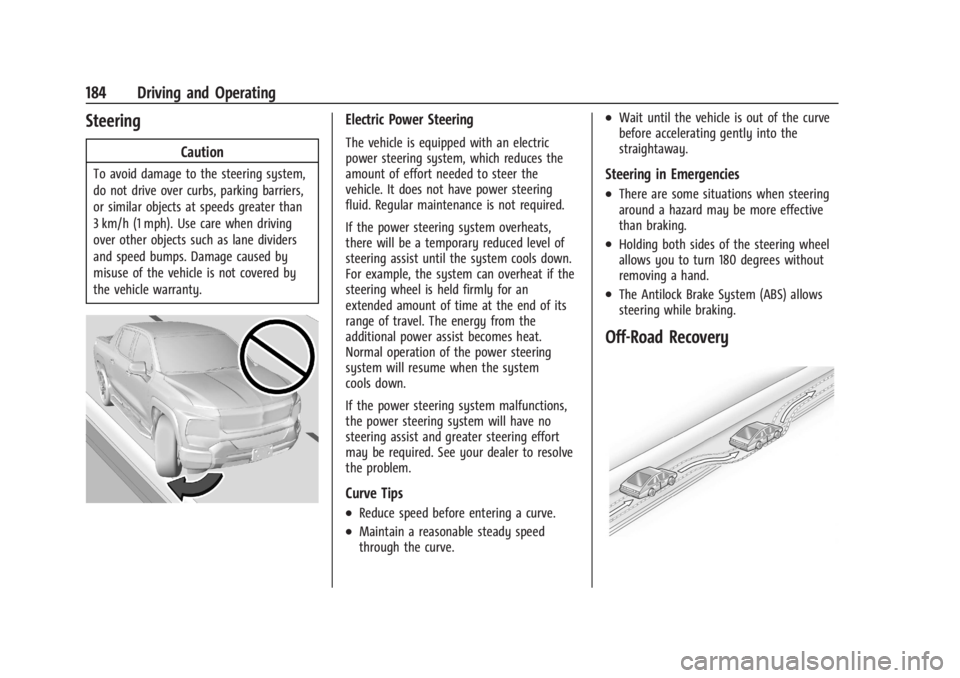
Caution
To avoid damage to the steering system,
do not drive over curbs, parking barriers,
or similar objects at speeds greater than
3 km/h (1 mph). Use care when driving
over other objects such as lane dividers
and speed bumps. Damage caused by
misuse of the vehicle is not covered by
the vehicle warranty.
Electric Power Steering
The vehicle is equipped with an electric
power steering system, which reduces the
amount of effort needed to steer the
vehicle. It does not have power steering
fluid. Regular maintenance is not required.
If the power steering system overheats,
there will be a temporary reduced level of
steering assist until the system cools down.
For example, the system can overheat if the
steering wheel is held firmly for an
extended amount of time at the end of its
range of travel. The energy from the
additional power assist becomes heat.
Normal operation of the power steering
system will resume when the system
cools down.
If the power steering system malfunctions,
the power steering system will have no
steering assist and greater steering effort
may be required. See your dealer to resolve
the problem.
Curve Tips
.Reduce speed before entering a curve.
.Maintain a reasonable steady speed
through the curve.
.Wait until the vehicle is out of the curve
before accelerating gently into the
straightaway.
Steering in Emergencies
.There are some situations when steering
around a hazard may be more effective
than braking.
.Holding both sides of the steering wheel
allows you to turn 180 degrees without
removing a hand.
.The Antilock Brake System (ABS) allows
steering while braking.
Off-Road Recovery
Page 192 of 429
Chevrolet Silverado EV Owner Manual (GMNA-Localizing-U.S./Canada-
16702912) - 2024 - CRC - 1/17/23
Driving and Operating 191
Driving on steep hills or through mountains
is different than driving on flat or rolling
terrain. Be sure to:
.Use regenerative braking to help slow the
vehicle or maintain speed by keeping the
vehicle in gear and limiting the initial
battery charge to 80% or less. See
Regenerative Braking0206.
.When braking is necessary, use frequent,
light taps of the brake pedal. This
maximizes regenerative braking and
minimizes the load on the vehicle brake
system.
.Keep the vehicle serviced and in good
shape.
.Check all fluid levels, brakes, tires, and
cooling system.
.Drive at speeds that keep the vehicle in
its own lane. Do not swing wide or cross
the center line.
.Be alert on top of hills; something could
be in your lane (e.g., stalled car, crash).
.Pay attention to special road signs (e.g.,
falling rocks area, winding roads, long
grades, passing or no-passing zones) and
take appropriate action.
Winter Driving
Driving on Snow or Ice
Caution
To avoid damage to the wheels and
brake components, always clear snow and
ice from inside the wheels and
underneath the vehicle before driving.
Snow or ice between the tires and the road
creates less traction or grip, so drive
carefully. Wet ice can occur at about 0°C
(32°F) when freezing rain begins to fall.
Avoid driving on wet ice or in freezing rain
until roads can be treated.
For Slippery Road Driving:
.Turn off cruise control.
.If enabled, turn off One-Pedal Driving. See
One-Pedal Driving 0203.
.If turned off, turn on the Traction Control
System (TCS) and Electronic Stability
Control (ESC). See Traction Control/
Electronic Stability Control 0207.
.Select the Snow/Ice driver mode. See
Driver Mode Control 0209.
.Accelerate gently. Accelerating too quickly
causes the wheels to spin and makes the
surface under the tires slick.
.Allow greater following distance and
watch for slippery spots. Icy patches can
occur on otherwise clear roads in shaded
areas. The surface of a curve or an
overpass can remain icy when the
surrounding roads are clear. Avoid sudden
steering maneuvers and braking while
on ice.
.The Antilock Brake System (ABS) improves
vehicle stability during hard stops, but
the brakes should be applied sooner than
when on dry pavement. See Antilock
Brake System (ABS) 0204.
.Avoid using the Regen on Demand
paddle. See Regenerative Braking 0206.
Blizzard Conditions
If you become stranded or cannot continue
driving due to winter storm conditions, stop
the vehicle in a safe place and signal for
help. If possible, use Roadside Assistance
Program 0399. Stay with the vehicle unless
there is help nearby.
Page 211 of 429
Chevrolet Silverado EV Owner Manual (GMNA-Localizing-U.S./Canada-
16702912) - 2024 - CRC - 1/17/23
210 Driving and Operating
For more information on Tow/Haul mode,
seeTowing Equipment 0301.
Wide Open Watts : Use this mode for short
durations. It not intended for daily use.
Wide Open Watts provides maximum
propulsion. Engaging Wide Open Watts will
not change the currently active drive mode
but will provide additional propulsion torque
for maximum acceleration.
Wide Open Watts will not function when
the vehicle battery is low. Remaining in this
mode will reduce the range of the vehicle.
Wide Open Watts adjusts the acceleration
pedal map.
qMy Mode : Use this mode to
personalize everyday driving. This mode
allows the driver to configure the vehicle
subsystem settings to their driving
preferences. My mode remains active across
on/off cycles.
Through the infotainment display, the
following vehicle subsystems may be
available for customization in this mode:
Acceleration Pedal : Relaxed, Normal, Sport
Steering Effort : Low, Normal, High
Suspension : Soft, Normal, Firm Motor Sound :
Off, Refined, Engaging
For a more detailed description of each
selectable option, refer to “Drive Mode
Customization.”
Drive Mode Customization
The vehicle is equipped to modify the
following settings based on vehicle content.
Through the infotainment home screen,
select Settings > Vehicle > Drive Mode
Customization to personalize My mode.
These settings will be retained over each
on/off cycle, and do not have to be reset
each time the vehicle is started.
Acceleration Pedal : Choose how responsive
you want acceleration to feel. You can
adjust the accelerator pedal to provide
increased power.
Steering Effort : Choose how responsive you
want the steering to feel. You can set the
steering wheel to provide more feedback,
which requires more steering effort.
Suspension : Choose how responsive you
want the suspension to feel. You can make
the suspension stiffer or more comfortable. Motor Sound :
Customize how your vehicle
sounds when you are accelerating. Your
electric motor remains quiet outside but the
sound you hear inside changes as you drive
faster or slower.Four-Wheel Steering
This vehicle is equipped with four-wheel
steering. This feature steers the vehicle with
all four wheels, which reduces the vehicle
turn diameter and improves maneuverability
of the vehicle.
At slower speeds the front and rear wheels
will turn in opposite directions. This helps
the vehicle make tighter turns, such as
during parking, cornering and turning into
tight spaces. At higher speeds the front and
rear wheels will turn in the same direction.
This improves stability of the vehicle during
lane changes and wide turns
When the vehicle is shut-off, the rear
steering angle will automatically return to
the forward position.
Four-wheel steering is not operational when
Super Cruise is active. See Super Cruise
0 227.
Page 212 of 429
Chevrolet Silverado EV Owner Manual (GMNA-Localizing-U.S./Canada-
16702912) - 2024 - CRC - 1/17/23
Driving and Operating 211
Maximum vehicle speed may be limited if
the four-wheel steering system becomes
inoperable.
When towing a trailer the four-wheel
steering provides enhanced stability allowing
the trailer to follow the path of the tow
vehicle more closely, especially during lane
changes. SeeGeneral Towing Information
0 293 for more information on towing a
trailer.
Four-Wheel Steering Behavior at 0 MPH
The rear wheels may not steer to full travel
when the vehicle is stationary. Additional
travel may be achieved once the vehicle
begins to move.
Care should be taken to ensure the vehicle
path is clear of obstacles if the rear tires
steer once the vehicle is moving.
Limited-Slip Differential
If equipped, the limited-slip differential can
give more traction on snow, mud, ice, sand,
or gravel. It works like a standard axle most
of the time, but when traction is low, this
feature allows the drive wheel with the
most traction to move the vehicle. For
vehicles with the limited-slip differential, driven under severe conditions, the rear axle
fluid should be changed. See
Maintenance
Schedule 0389.
Air Suspension
If equipped, the Air Suspension feature
provides full time load leveling capability
along with the benefit of adjusting ride
height for increased convenience and
capability.
{Warning
To help avoid personal injury or death,
make sure the area underneath the
vehicle and inside the wheel wells is clear
when lowering the vehicle.
{Warning
To help avoid personal injury or death,
always select the lowest ride height for
the current driving conditions. Higher ride
heights raise the vehicle's center of
gravity, increasing the chance of a
rollover during extreme maneuvers.
{Warning
Heavy loads on the roof rack will make
the vehicle's center of gravity higher,
increasing the possibility of a rollover. To
avoid losing control of the vehicle, always
select the normal height setting and
avoid high speeds, sudden starts, sharp
turns, sudden braking, or abrupt
maneuvers when carrying cargo on the
roof rack.
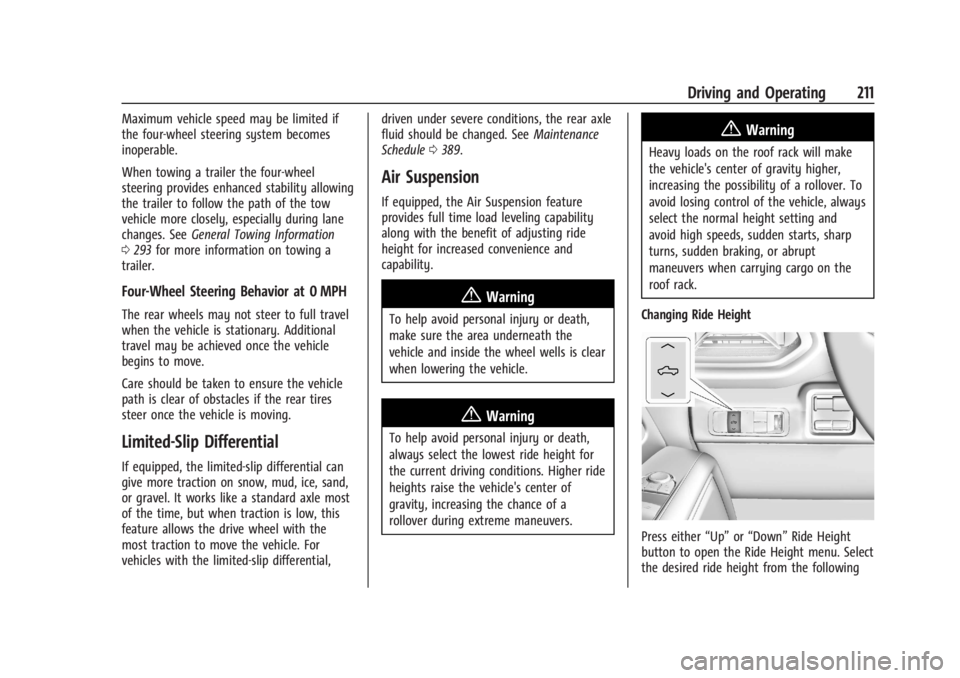
Changing Ride Height
Press either “Up”or“Down” Ride Height
button to open the Ride Height menu. Select
the desired ride height from the following
Page 219 of 429
Chevrolet Silverado EV Owner Manual (GMNA-Localizing-U.S./Canada-
16702912) - 2024 - CRC - 1/17/23
218 Driving and Operating
Disabling the TCS or StabiliTrak/ESC system
will disengage ACC and prevent ACC from
being re-engaged while TCS or StabiliTrak/
ESC is disabled.
ACC can reduce the need for you to
frequently brake and accelerate, especially
when used on expressways, freeways, and
interstate highways. When used on other
roads, you may need to take over the
control of braking or acceleration more
often.
{Warning
ACC has limited braking ability and may
not have time to slow the vehicle down
enough to avoid a collision with another
vehicle you are following. This can occur
when vehicles suddenly slow or stop
ahead, or enter your lane. Also see
“Alerting the Driver”later in this section.
Complete attention is always required
while driving and you should be ready to
take action and apply the brakes. See
Defensive Driving 0183.
{Warning
ACC will not detect or brake for children,
pedestrians, animals, or other objects.
Do not use ACC when:
.On winding and hilly roads or when
the sensors are blocked by snow, ice,
or dirt. The system may not detect a
vehicle ahead. Keep the entire front of
the vehicle clean.
.Visibility is poor due to rain, snow,
fog, dirt, insect residue, or dust; when
other foreign objects obscure the
camera and/or radar; or when the
vehicle in front or oncoming traffic
causes additional environmental
obstructions, such as road spray. ACC
performance is limited under these
conditions.
.On slippery roads where fast changes
in tire traction can cause excessive
wheel slip.
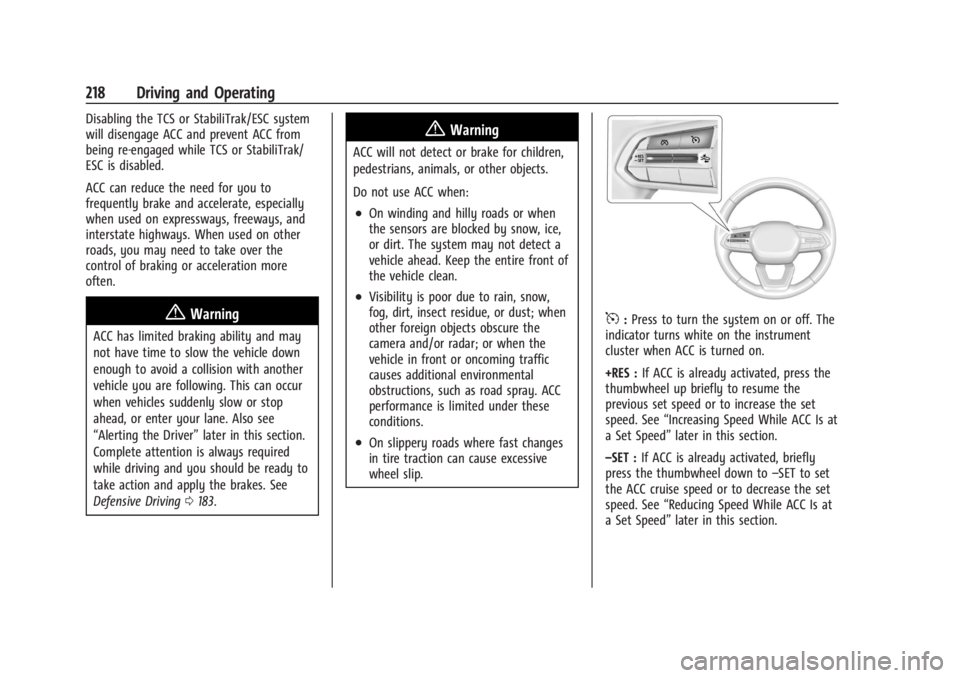
5:Press to turn the system on or off. The
indicator turns white on the instrument
cluster when ACC is turned on.
+RES : If ACC is already activated, press the
thumbwheel up briefly to resume the
previous set speed or to increase the set
speed. See “Increasing Speed While ACC Is at
a Set Speed” later in this section.
–SET : If ACC is already activated, briefly
press the thumbwheel down to –SET to set
the ACC cruise speed or to decrease the set
speed. See “Reducing Speed While ACC Is at
a Set Speed” later in this section.