manual radio set CHEVROLET SILVERADO EV 2024 User Guide
[x] Cancel search | Manufacturer: CHEVROLET, Model Year: 2024, Model line: SILVERADO EV, Model: CHEVROLET SILVERADO EV 2024Pages: 429, PDF Size: 8.98 MB
Page 172 of 429
Chevrolet Silverado EV Owner Manual (GMNA-Localizing-U.S./Canada-
16702912) - 2024 - CRC - 1/13/23
Infotainment System 171
.Forward Collision Alerts (if equipped)–
the number of times the driver was
notified when approaching a vehicle
ahead too quickly and at potential risk for
a crash.
.Forward Automatic Braking, also called
Automatic Emergency Braking (if
equipped) –the number of times the
vehicle detected that a forward collision
was imminent and applied the brakes.
.Reverse Automatic Braking (if equipped) –
the number of times the vehicle detected
that a rearward collision was imminent
and applied the brakes.
.Traction Control –the number of times
the Traction Control System activated to
reduce wheel spin or loss of traction.
.Stability Control –the number of events
which required the use of electronic
stability control.
.Antilock Braking System Active –The
number of Antilock Brake System
activations.
.Tailgating Alerts (if equipped) –the
number of times the driver was alerted
for following a vehicle ahead too closely. Report Card Data
Cumulative Data is saved for all trips until
the Report Card is reset or until the
maximum count is exceeded. If the
maximum count is exceeded for a Report
Card line item, that item will no longer be
updated in the Report Card until it is reset.
Each item will report a maximum of
1,000 counts. The distance driven will report
a maximum of 64,374 km (40,000 mi).
To delete Report Card data, do one of the
following:
.From the Report Card display, touch
Reset.
.Touch Clear PIN and All Teen Driver Keys
from the Teen Driver menu. This will also
unregister any Teen Driver keys and
delete the PIN.
Forgotten PIN
See your dealer to reset the PIN.
Trademarks and License
Agreements
FCC Information
See Radio Frequency Statement 0404.
"Made for iPhone," means that an electronic
accessory has been designed to connect
specifically to iPhone, and has been certified
by the developer to meet Apple
performance standards. Apple is not
responsible for the operation of this device
or its compliance with safety and regulatory
standards. Please note that the use of this
accessory with iPhone may affect wireless
performance. iPhone are trademarks of
Apple Inc., registered in the U.S. and other
countries.
Page 183 of 429
Chevrolet Silverado EV Owner Manual (GMNA-Localizing-U.S./Canada-
16702912) - 2024 - CRC - 1/17/23
182 Driving and Operating
Keep the inside of the windows clean to
reduce fogging. Turn off the front defroster
and rear defogger when they are not
needed.
Avoid driving with the windows open at
highway speeds.
Use the battery gauge on the instrument
cluster to view the effect of climate control
settings on your estimated driving range.
SeeBattery Gauge (High Voltage) 0110.
Outside Temperature
In cold weather conditions, it is best to plug
in the vehicle overnight, then remote start
the vehicle.
Allow the vehicle to warm up for
20 minutes before driving.
If possible, use a level 2 (240 volt) high
power charge station for best results. This
allows the interior of the vehicle and high
voltage battery to warm to the optimal
temperature.
In colder temperatures, while these
efficiency tips will help, the driving range
will be lower due to higher energy usage
including energy spent heating the cabin.
Vehicle Charging/Maintenance
Charging
Keep the vehicle plugged in, even when fully
charged, to maintain the battery
temperature ready for the next drive. This is
important when outside temperatures are
extremely hot or cold.
Maintenance
Always keep the tires properly inflated and
aligned.
Avoid unnecessary use of electrical
accessories. Power used for functions other
than propelling the vehicle will reduce
driving range.
Cargo Weight
The weight of excess cargo in the vehicle
affects efficiency and driving range. Avoid
carrying more than is needed.
Using a rooftop carrier will reduce efficiency
due to additional weight and drag.
Distracted Driving
Distraction comes in many forms and can
take your focus from the task of driving.
Exercise good judgment and do not let other
activities divert your attention away from the road. Many local governments have
enacted laws regarding driver distraction.
Become familiar with the local laws in
your area.
To avoid distracted driving, keep your eyes
on the road, keep your hands on the
steering wheel, and focus your attention on
driving.
.Do not use a phone in demanding driving
situations. Use a hands-free method to
place or receive necessary phone calls.
.Watch the road. Do not read, take notes,
or look up information on phones or
other electronic devices.
.Designate a front seat passenger to
handle potential distractions.
.Become familiar with vehicle features
before driving, such as programming
favorite radio stations and adjusting
climate control and seat settings. Program
all trip information into any navigation
device prior to driving.
.Wait until the vehicle is parked to
retrieve items that have fallen to the
floor.
.Stop or park the vehicle to tend to
children.
Page 218 of 429
Chevrolet Silverado EV Owner Manual (GMNA-Localizing-U.S./Canada-
16702912) - 2024 - CRC - 1/17/23
Driving and Operating 217
.To accept the new set speed, briefly
move the thumbwheel down to−SET and
release it.
.To decline the new set speed, briefly
move the thumbwheel up to +RES and
release it.
If you do not accept or decline the new
proposed set speed, there is no change to
the set speed.
Conditions Affecting Automatic Speed
Limiter (Auto)
.There are changes in brightness, such as
entering and exiting tunnels, bridges, and
overpasses.
.There are low sun angles.
.Ambient lighting is poor in the evening or
early morning.
.There are multiple changes in brightness
or there are shadows along the roadway.
.There are conditions associated with low
visibility such as fog, rain, snow, or road
spray.
.The on-board camera’s view of the road is
blocked by leaves, snow, or other debris.
If Automatic Speed Limiter becomes
temporarily unavailable, change to
Manual mode. Resuming Speed Limiter
If Speed Limiter was active but then
*was
pressed, Speed Limiter can be resumed using
the previous set speed. Briefly move the
thumbwheel up to +RES and release it to
activate Speed Limiter using the previous set
speed.
If Speed Limiter was turned off because
cruise control, ACC, or Super Cruise was
turned on, to use Speed Limiter again:
1. Turn off cruise control, ACC, or Super Cruise.
2. On the infotainment home screen, touch Controls > Drive (Drive & Park) > Speed
Limiter.
3. Select Manual or Auto.
Overriding Speed Limiter
When Speed Limiter is active, the set speed
can be temporarily overridden only when
you fully apply the accelerator pedal. You
can control vehicle acceleration again when
the vehicle speed is below the set speed.
Turning Off Speed Limiter
To turn off Speed Limiter, from the
infotainment home screen, touch Controls >
Drive (Drive & Park) > Speed Limiter > Off.
Adaptive Cruise Control
(Advanced)
If equipped, Adaptive Cruise Control (ACC)
allows the cruise control set speed and
following gap to be selected. Read this
entire section before using this system. The
following gap is the following time (or
distance) between your vehicle and a vehicle
detected directly ahead in your path,
moving in the same direction. If no vehicle
is detected in your path, ACC works like
regular cruise control. ACC uses a camera
and radar sensor(s) to detect other vehicles.
See Radio Frequency Statement 0404.
If a vehicle is detected in your path, ACC can
apply acceleration or limited, moderate
braking to maintain the selected following
gap. To disengage ACC, apply the brake
pedal or press
*. If ACC is controlling the
vehicle speed when the Traction Control
System (TCS) or StabiliTrak/Electronic
Stability Control (ESC) system activates, ACC
may disengage. See Traction Control/
Electronic Stability Control 0207. When road
conditions allow ACC to be safely used, ACC
can be turned back on.
Page 275 of 429
Chevrolet Silverado EV Owner Manual (GMNA-Localizing-U.S./Canada-
16702912) - 2024 - CRC - 1/17/23
274 Driving and Operating
available settings from the infotainment
screen, touch Settings > Vehicle >
Collision/Detection Systems.
Drowsiness Alerts
Depending on the drowsiness level, Driver
Attention Assist will display escalating alerts
in the instrument cluster. These alerts
progress as the drowsiness level increases.
Each level is designated by a coffee cup and
a DIC message recommending that the
driver consider taking a rest break.
Depending on the driver’s drowsiness level,
the system will also send chimes or haptic
alerts, if equipped with Safety Alert Seat.
The higher alerts will be seen more
frequently. Not all alerts may occur during a
drowsy event.
When the maximum drowsiness alert occurs,
the driver will be presented with the
following options on the infotainment
screen:
.Phone a Friend
.Place an OnStar call
.Navigate to Nearest Point of Interest (POI)
Select an option from the list and follow the
instructions displayed on infotainment
screen.
Attention Alerts
Depending on the attention level, Driver
Attention Assist will display escalating alerts
in the instrument cluster that advance from
level one to level two as the attention level
decreases. Depending on the driver’s
distraction level, the system will also send
chimes or haptic alerts, if equipped with
Safety Alert Seat. See Driver Attention Assist
Light 0122.
When Teen Driver is Active, the radio will
momentarily be set to mute when alert
level two is active. See Teen Driver0168.
Cleaning the Camera
The camera lens cover on the steering
column may become dirty over time. If this
occurs, clean the lens cover with a soft cloth
sprayed with glass cleaner. Wipe the lens
gently, then dry it. Never use abrasive
cloths, cleaners, or corrosive chemicals of
any kind on the lens cover.
Limitations
Some factors can impact the performance of
the Driver Attention Assist feature, causing
it to not to function as intended. These
include (but are not limited to):
.Damage to the Driver Monitoring System,
camera, or lens.
.The camera being blocked by the steering
wheel, hands, or objects.
If there is a problem with the system, a DIC
message or icon in the instrument cluster
may display.
Lane Keep Assist (LKA)
If equipped, LKA may help avoid crashes due
to unintentional lane departures. This
system uses a camera to detect lane
markings. The LKA system can be ready to
assist at speeds between approximately
60 km/h (37 mph) and 180 km/h (112 mph).
On some vehicles, the system will instead
operate above 50 km/h (31 mph). LKA may
assist by gently turning the steering wheel
if the vehicle approaches a detected lane
marking. It may also provide a Lane
Departure Warning (LDW) alert if the vehicle
unintentionally crosses a detected lane
marking.
Page 293 of 429
Chevrolet Silverado EV Owner Manual (GMNA-Localizing-U.S./Canada-
16702912) - 2024 - CRC - 1/17/23
292 Driving and Operating
the charging. If this error continues, stop
charging your vehicle. See your dealer for
service.
Charge Level Selection
Charge level selection can be made using
the Charging tab in the Energy Application
on the infotainment display. For instructions
to set cord limit settings for a charge
session, seeCharging0123.
{Warning
Using a charge level that exceeds the
electrical circuit or electrical outlet
capacity may start a fire or damage the
electrical circuit. Use the lowest charge
level until a qualified electrician inspects
the electrical circuit capacity. Use the
lowest charge level if the electrical circuit
or electrical outlet capacity is not known.
Troubleshooting
Disconnect the charge cord from the vehicle
and confirm that the attachment plug is not
too hot to grasp before removing. If it is not hot, manually reboot the charge
cord by unplugging and re-plugging the
attachment plug into the electrical outlet.
If the same fault reoccurs, test the charge
cord with a different electrical outlet.
The charge cord monitors temperature at
several locations and may reduce charging
power or interrupt charging if temperatures
become too high. The charge cord status
indicators illuminate and identify this fault.
In hot climates, move the charge cord away
from direct sunlight and/or hot surfaces
such as asphalt paving for approximately
30 minutes.
If there are signs of melting or scorching, do
not touch the charge cord or attachment
plug. Have a qualified electrician inspect and
repair the issue.
If there are no signs of damage, check how
firm the fit of the plug is. If the plug easily
pulls away from the electrical outlet, test
the plug on a known good electrical outlet.
If the fault condition returns, have your
charge cord inspected by your dealership.
If the fault does not return, stop using the
suspected circuit and have a qualified
electrician inspect and repair the issue.
Grounding Instructions
The charge circuit must be grounded. If the
charge circuit should malfunction or break
down, grounding provides a path of least
resistance for the electric current to reduce
the risk of electric shock. This product is
equipped with a cord that has an equipment
grounding conductor and a grounding plug.
The plug must be plugged into an
appropriate outlet that is properly installed
and grounded in accordance with all local
codes and ordinances.
{Warning
Improper connection of the charge cord
ground may cause electrical shock. Check
with a qualified electrician if there is
doubt as to whether the charge circuit is
properly grounded. Do not modify the
plug provided with the product. If it will
not fit the electrical outlet, have a proper
electrical outlet installed by a qualified
electrician.
FCC Information
See
Radio Frequency Statement 0404.
Page 332 of 429
Chevrolet Silverado EV Owner Manual (GMNA-Localizing-U.S./Canada-
16702912) - 2024 - CRC - 1/13/23
Vehicle Care 331
Warning (Continued)
structure or anything that can burn.
Ventilate the vehicle by opening a
window or a door.
Contact Customer Assistance as soon as
possible to determine whether an
inspection is needed. SeeCustomer
Assistance Offices 0398.
If the vehicle is in a crash, the sensing
system may shut down the high voltage
system. When this occurs, the high voltage
battery is disconnected and the vehicle will
not start. The SERVICE VEHICLE SOON
message in the Driver Information Center
(DIC) will display. Before the vehicle can
operate again, it must be serviced at your
dealer. If a crash occurs or an airbag(s)
inflates, see “If a Crash Occurs” under
Collision Damage Repair 0402 and
What Will You See after an Airbag Inflates?
0 64 for additional information.
Keep the vehicle plugged in, even when fully
charged, to keep the high voltage battery
temperature ready for the next drive. This is
important when outside temperatures are
extremely hot or cold. Propulsion power may be reduced in
extremely cold temperatures, or if the high
voltage battery is too cold. The message
BATTERY TOO COLD, PLUG IN TO WARM will
display. If the message displays, a level 2
charger is required to heat the battery to a
minimum temperature to enable propulsion
or charging.
A vehicle cover, which can reduce sun
loading on the vehicle and improve high
voltage battery life, is available from your
dealer.
See
Radio Frequency Statement 0404.
Federal Communications Commission (FCC)
Radiation Exposure Statement
This equipment has been evaluated to be
installed and operated at a minimum
distance of 5.7 cm (2.2 in) between the
device and your body. The vehicle design
ensures this distance is maintained during
normal use. Changes or modifications to any
of these systems by other than an
authorized service facility could void
authorization to use this equipment. Innovation, Science, and Economic
Development (ISED) Radiation Exposure
Statement
This equipment complies with RSS-102
radiation exposure limits set forth for an
uncontrolled environment. This equipment
should be installed and operated with a
minimum distance of 5.7 cm (2.2 in) between
the radiator and any part of your body. The
vehicle design ensures this distance is
maintained during normal use. Changes or
modifications to any of these systems by
other than an authorized service facility
could void authorization to use this
equipment.
Vehicle Storage
The best way to store the vehicle for any
length of time is to plug in the charge cord
and leave it plugged in. The vehicle
monitors and maintains the 12-volt battery
daily. It is okay to leave the vehicle plugged
in for extended periods of time. Once
charged to full, very little energy is required
to maintain the 12-volt battery and high
voltage battery.
If it is not possible to charge the vehicle
with the charge cord left plugged in, be sure
to fully charge the high voltage battery
Page 352 of 429
Chevrolet Silverado EV Owner Manual (GMNA-Localizing-U.S./Canada-
16702912) - 2024 - CRC - 1/13/23
Vehicle Care 351
Warning (Continued)
are in excellent condition, and are set to
the correct cold tire inflation pressure for
the vehicle load.
Tire Pressure Monitor System
The Tire Pressure Monitor System (TPMS)
uses radio and sensor technology to check
tire pressure levels. The TPMS sensors
monitor the air pressure in your tires and
transmit tire pressure readings to a receiver
located in the vehicle.
Each tire, including the spare (if provided),
should be checked monthly when cold and
inflated to the inflation pressure
recommended by the vehicle manufacturer
on the vehicle placard or tire inflation
pressure label. (If your vehicle has tires of a
different size than the size indicated on the
vehicle placard or tire inflation pressure
label, you should determine the proper tire
inflation pressure for those tires.)
As an added safety feature, your vehicle has
been equipped with a tire pressure
monitoring system (TPMS) that illuminates a
low tire pressure telltale when one or more
of your tires is significantly under-inflated.Accordingly, when the low tire pressure
telltale illuminates, you should stop and
check your tires as soon as possible, and
inflate them to the proper pressure. Driving
on a significantly under-inflated tire causes
the tire to overheat and can lead to tire
failure. Under-inflation also reduces energy
efficiency and tire tread life, and may affect
the vehicle's handling and stopping ability.
Please note that the TPMS is not a
substitute for proper tire maintenance, and
it is the driver's responsibility to maintain
correct tire pressure, even if under-inflation
has not reached the level to trigger
illumination of the TPMS low tire pressure
telltale.
Your vehicle has also been equipped with a
TPMS malfunction indicator to indicate when
the system is not operating properly. The
TPMS malfunction indicator is combined
with the low tire pressure telltale. When the
system detects a malfunction, the telltale
will flash for approximately one minute and
then remain continuously illuminated. This
sequence will continue upon subsequent
vehicle start-ups as long as the malfunction
exists.
When the malfunction indicator is
illuminated, the system may not be able to
detect or signal low tire pressure as
intended. TPMS malfunctions may occur for
a variety of reasons, including the
installation of replacement or alternate tires
or wheels on the vehicle that prevent the
TPMS from functioning properly. Always
check the TPMS malfunction telltale after
replacing one or more tires or wheels on
your vehicle to ensure that the replacement
or alternate tires and wheels allow the
TPMS to continue to function properly.
See
Tire Pressure Monitor Operation 0351.
See Radio Frequency Statement 0404.
Tire Pressure Monitor Operation
This vehicle may have a Tire Pressure
Monitor System (TPMS). The TPMS is
designed to warn the driver when a low tire
pressure condition exists. TPMS sensors are
mounted onto each tire and wheel
assembly, excluding the spare tire and
wheel assembly. The TPMS sensors monitor
the air pressure in the tires and transmit the
tire pressure readings to a receiver located
in the vehicle.
Page 354 of 429
Chevrolet Silverado EV Owner Manual (GMNA-Localizing-U.S./Canada-
16702912) - 2024 - CRC - 1/13/23
Vehicle Care 353
.The TPMS sensor matching process was
not done or not completed successfully
after rotating the tires. The malfunction
light and the DIC message should go off
after successfully completing the sensor
matching process. See "TPMS Sensor
Matching Process" later in this section.
.One or more TPMS sensors are missing or
damaged. The malfunction light and the
DIC message should go off when the
TPMS sensors are installed and the sensor
matching process is performed
successfully. See your dealer for service.
.Replacement tires or wheels do not match
the original equipment tires or wheels.
Tires and wheels other than those
recommended could prevent the TPMS
from functioning properly. SeeBuying
New Tires 0358.
.Operating electronic devices or being near
facilities using radio wave frequencies
similar to the TPMS could cause the TPMS
sensors to malfunction.
If the TPMS is not functioning properly it
cannot detect or signal a low tire pressure
condition. See your dealer for service if the
TPMS malfunction light and DIC message
come on and stay on.
Tire Fill Alert (If Equipped)
This feature provides visual and audible
alerts outside the vehicle to help when
inflating an underinflated tire to the
recommended cold tire pressure.
When the low tire pressure warning light
comes on: 1. Park the vehicle in a safe, level place.
2. Set the parking brake firmly.
3. Place the vehicle in P (Park).
4. Add air to the tire that is underinflated. The turn signal lamp will flash.
When the recommended pressure is
reached, the horn sounds once and the
turn signal lamp will stop flashing and
briefly turn solid.
Repeat these steps for all underinflated tires
that have illuminated the low tire pressure
warning light.
{Warning
Overinflating a tire could cause the tire
to rupture and you or others could be
injured. Do not exceed the maximum (Continued)
Warning (Continued)
pressure listed on the tire sidewall. See
Tire Sidewall Labeling0346 and
Vehicle Load Limits 0193.
If the tire is overinflated by more than
35 kPa (5 psi), the horn will sound multiple
times and the turn signal lamp will continue
to flash for several seconds after filling
stops. To release and correct the pressure,
while the turn signal lamp is still flashing,
briefly press the center of the valve stem.
When the recommended pressure is reached,
the horn sounds once.
If the turn signal lamp does not flash within
15 seconds after starting to inflate the tire,
the tire fill alert has not been activated or is
not working.
If the hazard warning flashers are on, the
tire fill alert visual feedback will not work
properly.
The TPMS will not activate the tire fill alert
properly under the following conditions:
.There is interference from an external
device or transmitter.
.The air pressure from the inflation device
is not sufficient to inflate the tire.
Page 377 of 429
Chevrolet Silverado EV Owner Manual (GMNA-Localizing-U.S./Canada-
16702912) - 2024 - CRC - 1/13/23
376 Vehicle Care
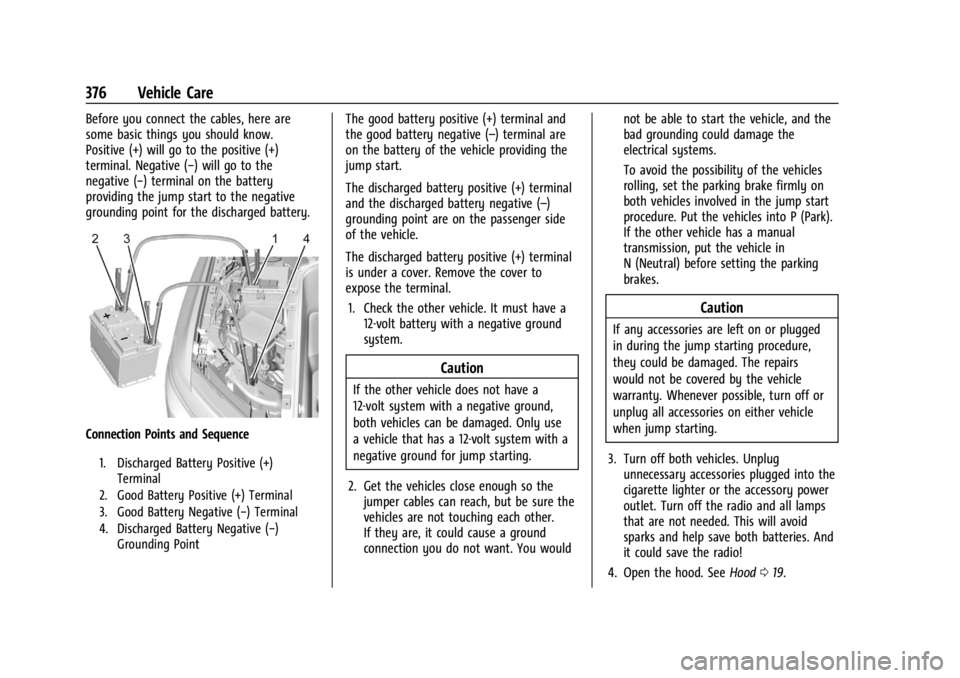
Before you connect the cables, here are
some basic things you should know.
Positive (+) will go to the positive (+)
terminal. Negative (−) will go to the
negative (−) terminal on the battery
providing the jump start to the negative
grounding point for the discharged battery.
Connection Points and Sequence
1. Discharged Battery Positive (+)Terminal
2. Good Battery Positive (+) Terminal
3. Good Battery Negative (−) Terminal
4. Discharged Battery Negative (−) Grounding Point
The good battery positive (+) terminal and
the good battery negative (–) terminal are
on the battery of the vehicle providing the
jump start.
The discharged battery positive (+) terminal
and the discharged battery negative (–)
grounding point are on the passenger side
of the vehicle.
The discharged battery positive (+) terminal
is under a cover. Remove the cover to
expose the terminal.
1. Check the other vehicle. It must have a 12-volt battery with a negative ground
system.
Caution
If the other vehicle does not have a
12-volt system with a negative ground,
both vehicles can be damaged. Only use
a vehicle that has a 12-volt system with a
negative ground for jump starting.
2. Get the vehicles close enough so the jumper cables can reach, but be sure the
vehicles are not touching each other.
If they are, it could cause a ground
connection you do not want. You would not be able to start the vehicle, and the
bad grounding could damage the
electrical systems.
To avoid the possibility of the vehicles
rolling, set the parking brake firmly on
both vehicles involved in the jump start
procedure. Put the vehicles into P (Park).
If the other vehicle has a manual
transmission, put the vehicle in
N (Neutral) before setting the parking
brakes.
Caution
If any accessories are left on or plugged
in during the jump starting procedure,
they could be damaged. The repairs
would not be covered by the vehicle
warranty. Whenever possible, turn off or
unplug all accessories on either vehicle
when jump starting.
3. Turn off both vehicles. Unplug unnecessary accessories plugged into the
cigarette lighter or the accessory power
outlet. Turn off the radio and all lamps
that are not needed. This will avoid
sparks and help save both batteries. And
it could save the radio!
4. Open the hood. See Hood019.
Page 406 of 429
Chevrolet Silverado EV Owner Manual (GMNA-Localizing-U.S./Canada-
16702912) - 2024 - CRC - 1/13/23
Customer Information 405
and remedy campaign. However, NHTSA
cannot become involved in individual
problems between you, your dealer,
or General Motors.
To contact NHTSA, you may call the
Vehicle Safety Hotline toll-free at
1-888-327-4236 (TTY: 1-800-424-9153); go
to
https://www.safercar.gov;or write to:
Administrator, NHTSA
1200 New Jersey Avenue, S.E.
Washington, D.C. 20590
You can also obtain other information
about motor vehicle safety from
https://www.safercar.gov.
Reporting Safety Defects to the
Canadian Government
If you live in Canada, and you believe
that the vehicle has a safety defect,
notify Transport Canada immediately,
and notify General Motors of Canada
Company. Call Transport Canada at
1-800-333-0510; go to:
www.tc.gc.ca/recalls (English)
www.tc.gc.ca/rappels (French) or write to:
Transport Canada
Motor Vehicle Safety Directorate
Defect Investigations and Recalls
Division
80 Noel Street
Gatineau
,QC J8Z 0A1
Reporting Safety Defects to
General Motors
In addition to notifying NHTSA (or Transport
Canada) in a situation like this, notify
General Motors.
In the U.S., call 1-800-222-1020, or write:
Chevrolet Motor Division
Chevrolet Customer Assistance Center
P.O. Box 33170
Detroit, MI 48232-5170
In Canada, call 1-800-263-3777 (English) or
1-800-263-7854 (French), or write:
Customer Care Centre
General Motors of Canada Company
500 Wentworth Street W
Oshawa, ON L1J 0C5
In Mexico, call 800-466-0811 or
800-508-0000.In other Central America and Caribbean
Countries, call 52-555-901-2369.
Vehicle Data Recording and
Privacy
The vehicle has a number of computers that
record information about the vehicle’s
performance and how it is driven or used.
For example, the vehicle uses computer
modules to monitor and control electric
drive unit performance, to monitor the
conditions for airbag deployment and to
deploy them in a crash, and, if equipped, to
provide antilock braking to help the driver
control the vehicle. These modules may
store data to help the dealer technician
service the vehicle or to help GM improve
safety or features. Some modules may also
store data about how the vehicle is
operated, such as rate of energy
consumption or average speed. These
modules may retain personal preferences,
such as radio presets, seat positions, and
temperature settings.