brake CHEVROLET SILVERADO EV 2024 Owner's Manual
[x] Cancel search | Manufacturer: CHEVROLET, Model Year: 2024, Model line: SILVERADO EV, Model: CHEVROLET SILVERADO EV 2024Pages: 429, PDF Size: 8.98 MB
Page 172 of 429
Chevrolet Silverado EV Owner Manual (GMNA-Localizing-U.S./Canada-
16702912) - 2024 - CRC - 1/13/23
Infotainment System 171
.Forward Collision Alerts (if equipped)–
the number of times the driver was
notified when approaching a vehicle
ahead too quickly and at potential risk for
a crash.
.Forward Automatic Braking, also called
Automatic Emergency Braking (if
equipped) –the number of times the
vehicle detected that a forward collision
was imminent and applied the brakes.
.Reverse Automatic Braking (if equipped) –
the number of times the vehicle detected
that a rearward collision was imminent
and applied the brakes.
.Traction Control –the number of times
the Traction Control System activated to
reduce wheel spin or loss of traction.
.Stability Control –the number of events
which required the use of electronic
stability control.
.Antilock Braking System Active –The
number of Antilock Brake System
activations.
.Tailgating Alerts (if equipped) –the
number of times the driver was alerted
for following a vehicle ahead too closely. Report Card Data
Cumulative Data is saved for all trips until
the Report Card is reset or until the
maximum count is exceeded. If the
maximum count is exceeded for a Report
Card line item, that item will no longer be
updated in the Report Card until it is reset.
Each item will report a maximum of
1,000 counts. The distance driven will report
a maximum of 64,374 km (40,000 mi).
To delete Report Card data, do one of the
following:
.From the Report Card display, touch
Reset.
.Touch Clear PIN and All Teen Driver Keys
from the Teen Driver menu. This will also
unregister any Teen Driver keys and
delete the PIN.
Forgotten PIN
See your dealer to reset the PIN.
Trademarks and License
Agreements
FCC Information
See Radio Frequency Statement 0404.
"Made for iPhone," means that an electronic
accessory has been designed to connect
specifically to iPhone, and has been certified
by the developer to meet Apple
performance standards. Apple is not
responsible for the operation of this device
or its compliance with safety and regulatory
standards. Please note that the use of this
accessory with iPhone may affect wireless
performance. iPhone are trademarks of
Apple Inc., registered in the U.S. and other
countries.
Page 181 of 429
Chevrolet Silverado EV Owner Manual (GMNA-Localizing-U.S./Canada-
16702912) - 2024 - CRC - 1/17/23
180 Driving and Operating
Driving and Operating
Driving Information
Driving for Better Energy Efficiency . . . . 181
Distracted Driving . . . . . . . . . . . . . . . . . . . . . 182
Defensive Driving . . . . . . . . . . . . . . . . . . . . . . 183
Impaired Driving . . . . . . . . . . . . . . . . . . . . . . . 183
Control of a Vehicle . . . . . . . . . . . . . . . . . . . 183
Braking . . . . . . . . . . . . . . . . . . . . . . . . . . . . . . . . 183
Steering . . . . . . . . . . . . . . . . . . . . . . . . . . . . . . . 184
Off-Road Recovery . . . . . . . . . . . . . . . . . . . . . 184
Loss of Control . . . . . . . . . . . . . . . . . . . . . . . . 185
Off-Road Driving . . . . . . . . . . . . . . . . . . . . . . . 185
Driving on Wet Roads . . . . . . . . . . . . . . . . . 189
Hill and Mountain Roads . . . . . . . . . . . . . . 190
Winter Driving . . . . . . . . . . . . . . . . . . . . . . . . . 191
If the Vehicle Is Stuck . . . . . . . . . . . . . . . . . 192
Vehicle Load Limits . . . . . . . . . . . . . . . . . . . . 193
Truck-Camper Loading Information . . . . . 197
Starting and Operating
New Vehicle Break-In . . . . . . . . . . . . . . . . . . 197
Power Modes . . . . . . . . . . . . . . . . . . . . . . . . . . 197
Shifting Into Park . . . . . . . . . . . . . . . . . . . . . 199
Shifting out of Park . . . . . . . . . . . . . . . . . . . 199
Electric Drive Unit
Electric Drive Unit . . . . . . . . . . . . . . . . . . . . . 200
One-Pedal Driving . . . . . . . . . . . . . . . . . . . . . 203
Drive Systems
Four-Wheel Drive . . . . . . . . . . . . . . . . . . . . . . 204
Brakes
Antilock Brake System (ABS) . . . . . . . . . . 204
Electric Parking Brake . . . . . . . . . . . . . . . . . 205
Brake Assist . . . . . . . . . . . . . . . . . . . . . . . . . . . 206
Hill Start Assist (HSA) . . . . . . . . . . . . . . . . . 206
Regenerative Braking . . . . . . . . . . . . . . . . . . 206
Ride Control Systems
Traction Control/Electronic StabilityControl . . . . . . . . . . . . . . . . . . . . . . . . . . . . . . 207
Driver Mode Control . . . . . . . . . . . . . . . . . . 209
Four-Wheel Steering . . . . . . . . . . . . . . . . . . . 210
Limited-Slip Differential . . . . . . . . . . . . . . . . 211
Air Suspension . . . . . . . . . . . . . . . . . . . . . . . . . 211
Cruise Control
Cruise Control . . . . . . . . . . . . . . . . . . . . . . . . . . 213
Speed Limiter . . . . . . . . . . . . . . . . . . . . . . . . . . 215
Adaptive Cruise Control (Advanced) . . . . 217
Super Cruise . . . . . . . . . . . . . . . . . . . . . . . . . . . 227
Advanced Driver Assistance Systems
Advanced Driver Assistance Systems . . . . . . . . . . . . . . . . . . . . . . . . . . . . . 244
Assistance Systems for Parking or Backing . . . . . . . . . . . . . . . . . . . . . . . . . . . . . . 246
Rear Vision Camera (RVC) . . . . . . . . . . . . . 246
Surround Vision System . . . . . . . . . . . . . . . 247 Park Assist . . . . . . . . . . . . . . . . . . . . . . . . . . . . 254
Automatic Parking Assist (APA) . . . . . . . . 255
Reverse Automatic Braking (RAB) . . . . . . 258
Rear Pedestrian Alert . . . . . . . . . . . . . . . . . . 259
Rear Cross Traffic Alert (RCTA)
System . . . . . . . . . . . . . . . . . . . . . . . . . . . . . . 260
Assistance Systems for Driving . . . . . . . . 261
Forward Collision Alert (FCA) System . . . . . . . . . . . . . . . . . . . . . . . . . . . . . . 261
Automatic Emergency Braking (AEB) . . . . . . . . . . . . . . . . . . . . . . . . 263
Front Pedestrian Braking (FPB) System . . . . . . . . . . . . . . . . . . . . . . . . . . . . . . 266
Side Blind Zone Alert (SBZA) . . . . . . . . . . 268
Lane Change Alert (LCA) . . . . . . . . . . . . . . . 269
Blind Zone Steering Assist (BZSA) . . . . . . 271
Traffic Sign Assistant . . . . . . . . . . . . . . . . . . 271
Driver Attention Assist . . . . . . . . . . . . . . . . . 273
Lane Keep Assist (LKA) . . . . . . . . . . . . . . . . 274
Surround Vision Recorder . . . . . . . . . . . . . . 276
Charging
When to Charge . . . . . . . . . . . . . . . . . . . . . . . 278
Plug-In Charging . . . . . . . . . . . . . . . . . . . . . . . 278
Delayed Charging Override . . . . . . . . . . . . 282
Charging Status Feedback . . . . . . . . . . . . . 283
Charge Cord . . . . . . . . . . . . . . . . . . . . . . . . . . . 286
Utility Interruption of Charging . . . . . . . 293
Electrical Requirements for Battery Charging . . . . . . . . . . . . . . . . . . . . . . . . . . . . . 293
Page 184 of 429
Chevrolet Silverado EV Owner Manual (GMNA-Localizing-U.S./Canada-
16702912) - 2024 - CRC - 1/17/23
Driving and Operating 183
.Keep pets in an appropriate carrier or
restraint.
.Avoid stressful conversations while
driving, whether with a passenger or on a
mobile phone.
{Warning
Taking your eyes off the road too long or
too often could cause a crash resulting in
injury or death. Focus your attention on
driving.
Your vehicle may be equipped with features
that can help with hands-free use of the
infotainment system, navigation system,
and your mobile phone. For more
information, see Introduction0147 in the
Infotainment section, Voice Recognition
0 159, Bluetooth (Pairing and Using a Phone)
0 161 or
Bluetooth (Overview) 0160, and Steering
Wheel Controls 0149.
Defensive Driving
Defensive driving means to always expect
the unexpected. The first step in driving
defensively is to wear a seat belt. See Seat
Belts 052.
.Assume that other road users
(pedestrians, bicyclists, and other drivers)
are going to be careless and make
mistakes. Anticipate what they may do
and be ready.
.Allow enough following distance between
your vehicle and the vehicle in front
of you.
.Focus on the task of driving.
Impaired Driving
Death and injury associated with impaired
driving is a global tragedy.
{Warning
Drinking alcohol or taking drugs and then
driving is very dangerous. Your reflexes,
perceptions, attentiveness, and judgment
can be affected by even a small amount
of alcohol or drugs. You can have a
serious —or even fatal —collision if you
drive after drinking or taking drugs.
Do not drive while under the influence of
alcohol or drugs, or ride with a driver
who has been drinking or is impaired by (Continued)
Warning (Continued)
drugs. Find alternate transportation
home; or if you are with a group,
designate a driver who will remain sober.
Control of a Vehicle
Braking, steering, and accelerating are
important factors in helping to control a
vehicle while driving.
Braking
Braking action involves perception time and
reaction time. Deciding to push the brake
pedal is perception time. Actually doing it is
reaction time.
Average driver reaction time is about
three-quarters of a second. In that time, a
vehicle moving at 100 km/h (60 mph) travels
20 m (66 ft), which could be a lot of
distance in an emergency.
Helpful braking tips to keep in mind include:
.Keep enough distance between you and
the vehicle in front of you.
.Avoid needless heavy braking.
.Keep pace with traffic.
Page 185 of 429
Chevrolet Silverado EV Owner Manual (GMNA-Localizing-U.S./Canada-
16702912) - 2024 - CRC - 1/17/23
184 Driving and Operating
Steering
Caution
To avoid damage to the steering system,
do not drive over curbs, parking barriers,
or similar objects at speeds greater than
3 km/h (1 mph). Use care when driving
over other objects such as lane dividers
and speed bumps. Damage caused by
misuse of the vehicle is not covered by
the vehicle warranty.
Electric Power Steering
The vehicle is equipped with an electric
power steering system, which reduces the
amount of effort needed to steer the
vehicle. It does not have power steering
fluid. Regular maintenance is not required.
If the power steering system overheats,
there will be a temporary reduced level of
steering assist until the system cools down.
For example, the system can overheat if the
steering wheel is held firmly for an
extended amount of time at the end of its
range of travel. The energy from the
additional power assist becomes heat.
Normal operation of the power steering
system will resume when the system
cools down.
If the power steering system malfunctions,
the power steering system will have no
steering assist and greater steering effort
may be required. See your dealer to resolve
the problem.
Curve Tips
.Reduce speed before entering a curve.
.Maintain a reasonable steady speed
through the curve.
.Wait until the vehicle is out of the curve
before accelerating gently into the
straightaway.
Steering in Emergencies
.There are some situations when steering
around a hazard may be more effective
than braking.
.Holding both sides of the steering wheel
allows you to turn 180 degrees without
removing a hand.
.The Antilock Brake System (ABS) allows
steering while braking.
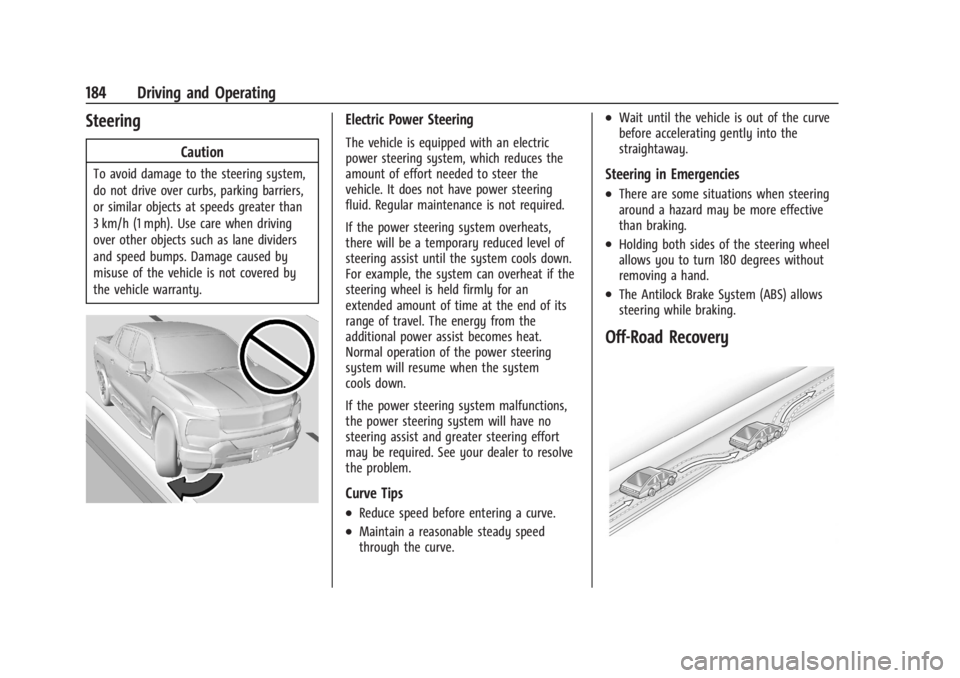
Off-Road Recovery
Page 186 of 429
Chevrolet Silverado EV Owner Manual (GMNA-Localizing-U.S./Canada-
16702912) - 2024 - CRC - 1/17/23
Driving and Operating 185
The vehicle's right wheels can drop off the
edge of a road onto the shoulder while
driving. Follow these tips:1. Ease off the accelerator and then, if there is nothing in the way, steer the
vehicle so that it straddles the edge of
the pavement.
2. Turn the steering wheel about one-eighth of a turn, until the right front
tire contacts the pavement edge.
3. Turn the steering wheel to go straight down the roadway.
Loss of Control
Skidding
There are three types of skids that
correspond to the vehicle's three control
systems:
.Braking Skid —wheels are not rolling.
.Steering or Cornering Skid —too much
speed or steering in a curve causes tires
to slip and lose cornering force.
.Acceleration Skid —too much throttle
causes the driving wheels to spin.
Antilock brakes help to avoid only the
braking skid. Defensive drivers avoid most skids by taking
reasonable care suited to existing conditions,
and by not exceeding those conditions. But
skids are always possible.
If the vehicle starts to skid, follow these
suggestions:
.Ease your foot off the accelerator pedal
and steer the way you want the vehicle
to go. The vehicle may straighten out,
but if it skids again from oversteer, be
ready to correct another skid if it occurs.
.Slow down and adjust your driving
according to weather conditions. Stopping
distance may be longer and vehicle
control may be affected when traction is
reduced by water, snow, ice, gravel,
or other material on the road. Learn to
recognize warning clues
—such as
enough water, ice, or packed snow on the
road to make a mirrored surface —and
slow down when you have any doubt.
.Try to avoid sudden steering, acceleration,
or braking, including reducing vehicle
speed by shifting to a lower gear. Any
sudden changes could cause the tires to
slide.
Off-Road Driving
Four-wheel-drive vehicles can be used for
off-road driving. Vehicles without four-wheel
drive and vehicles not equipped with All
Terrain (AT) or On-Off Road (OOR) tires must
not be driven off-road except on a level,
solid surface. For contact information about
the original equipment tires, see the
warranty manual.
One of the best ways for successful off-road
driving is to control the speed.
{Warning
When driving off-road, bouncing and
quick changes in direction can easily
throw you out of position. This could
cause you to lose control and crash. You
and your passengers should always wear
seat belts.
Off-Road Vehicle Features
If equipped, the following off-road features
may be available:
.Four-Wheel Steering: Provides the ability
to steer the vehicle with all four wheels,
reducing the turning diameter and
improving maneuverability of the vehicle.
See Four-Wheel Steering 0210.
Page 188 of 429
Chevrolet Silverado EV Owner Manual (GMNA-Localizing-U.S./Canada-
16702912) - 2024 - CRC - 1/17/23
Driving and Operating 187
Warning (Continued)
another vehicle. You could be seriously
injured or killed. As you near the top of a
hill, slow down and stay alert.
.When possible, drive straight up or down
the hill.
.Slow down when approaching the top of
the hill.
.Use headlamps even during the day to
make the vehicle more visible.
.Never go downhill forward or backward
with the vehicle in N (Neutral). The brakes
could overheat and you could lose
control.
.When driving down a hill, keep the
vehicle headed straight down. Use L (Low)
mode to slow the vehicle and help keep
the vehicle under control.
{Warning
Do not coast downhill in N (Neutral) or
with the vehicle turned off. SeeHill and
Mountain Roads 0190 for tips on
maximizing regenerative braking and
minimizing the load on the brake system. (Continued)
Warning (Continued)
Heavy braking when going down a hill
can cause your brakes to overheat and
fade. This could cause loss of control and
you or others could be injured or killed.
Apply the brakes lightly when descending
a hill and use a low mode to keep vehicle
speed under control.
.Avoid turns that take the vehicle across
the incline of the hill. Driving across an
incline puts more weight on the downhill
wheels, which could cause a downhill
slide or a rollover.
.Loose gravel, muddy spots, or even wet
grass can cause the tires to slip sideways,
downhill. If the vehicle slips sideways, it
can hit an object or a rut and potentially
roll over.
.Hidden obstacles can make the steepness
of the incline more severe. If a rock is
driven across with the uphill wheels, or if
the downhill wheels drop into a rut or
depression, the vehicle can tilt even more.
.If an incline must be driven across, and
the vehicle starts to slide, turn downhill.
This should help straighten out the
vehicle and prevent side slipping.
{Warning
Getting out of the vehicle on the
downhill side when stopped across an
incline is dangerous. If the vehicle rolls
over, you could be crushed or killed.
Always get out on the uphill side of the
vehicle and stay well clear of the
rollover path.
Driving in Mud, Sand, Snow, or Ice
Use L (Low) mode when driving in mud.
Keep the vehicle moving to avoid getting
stuck.
Traction changes when driving on sand. On
loose sand, such as on beaches or sand
dunes, the tires tend to sink into the sand.
This affects steering, accelerating, and
braking. Drive at a reduced speed and avoid
sharp turns or abrupt maneuvers.
Traction is reduced on hard-packed snow and
ice, and it is easy to lose control. Reduce
vehicle speed when driving on hard-packed
snow and ice.
Page 190 of 429
Chevrolet Silverado EV Owner Manual (GMNA-Localizing-U.S./Canada-
16702912) - 2024 - CRC - 1/17/23
Driving and Operating 189
.After exiting the water, repeatedly and
gently apply the brakes to dry them off
and restore effectiveness.
If Something Goes Wrong
If during your off-road experience a warning
light or warning message displays on the
instrument cluster, or if the vehicle sustains
damage, stop driving as soon as it is safe to
do so. Correct the condition if possible
before continuing driving. If a warning light
or message appears, or if the condition
cannot be corrected, see your dealer. See
Vehicle Messages0135.
If the vehicle is operating with reduced
acceleration or reduced propulsion, stop
your off-road experience and drive slowly to
an accessible point for further assistance.
The vehicle should be taken to your dealer
for service as soon as possible. See
Propulsion Power Messages 0136 and
Propulsion Power is Limited Light 0115.
{Warning
A vehicle with driveline damage may roll
when shifted into P (Park). Always set
the Electric Parking Brake before
inspecting for driveline damage or when
(Continued)
Warning (Continued)
securing the vehicle on a flatbed tow
truck. SeeElectric Parking Brake 0205
and
Transporting a Disabled Vehicle 0378.
After Driving Your Vehicle Off-Road
Be sure to switch out of Off-Road Mode or
Terrain Mode to return to normal driving.
See Driver Mode Control 0209.
Remove any brush or debris that has
collected on the underbody or chassis,
or under the hood. Clean the lens of the
underbody camera. These accumulations can
be a fire hazard.
The extreme conditions of off-road driving
require more frequent maintenance service.
See "Severe Conditions Requiring More
Frequent Maintenance" and "Additional
Required Services —Severe Service" on
Maintenance Schedule 0389.
After operation in mud or sand, have the
brake linings cleaned and checked. These
substances can cause glazing and uneven
braking. Check the body structure, driveline, steering,
suspension, wheels, tires, and other vehicle
systems for damage, or have these
inspections done by your dealer.
{Warning
Lifting a vehicle and getting under it to
do maintenance or repairs is dangerous
without the appropriate safety equipment
and training. If a jack is provided with
the vehicle, it is designed only for
changing a flat tire. If it is used for
anything else, you or others could be
badly injured or killed if the vehicle slips
off the jack. If a jack is provided with the
vehicle, only use it for changing a
flat tire.
Driving on Wet Roads
Rain and wet roads can reduce vehicle
traction and affect your ability to stop and
accelerate. Always drive slower in these
types of driving conditions and avoid driving
through large puddles and deep-standing or
flowing water.
Page 191 of 429
Chevrolet Silverado EV Owner Manual (GMNA-Localizing-U.S./Canada-
16702912) - 2024 - CRC - 1/17/23
190 Driving and Operating
{Warning
Wet brakes can cause crashes. They
might not work as well in a quick stop
and could cause pulling to one side. You
could lose control of the vehicle.
After driving through a large puddle of
water or a car/vehicle wash, lightly apply
the brake pedal until the brakes work
normally.
Flowing or rushing water creates strong
forces. Driving through flowing water
could cause the vehicle to be carried
away. If this happens, you and other
vehicle occupants could drown. Do not
ignore police warnings and be very
cautious about trying to drive through
flowing water.
Hydroplaning
Hydroplaning is dangerous. Water can build
up under the vehicle's tires so they actually
ride on the water. This can happen when
the road is wet and you are driving fast.
When the vehicle is hydroplaning, it has
little or no contact with the road.There is no hard and fast rule about
hydroplaning. The best advice is to slow
down when the road is wet.
Other Rainy Weather Tips
Besides slowing down, other wet weather
driving tips include:
.Allow extra following distance.
.Pass with caution.
.Keep windshield wiping equipment in
good shape, and keep the windshield
washer fluid reservoir filled.
.Ensure the tires are maintained and have
proper tread depth. See
Tires0344.
.Turn off any cruise control, if equipped.
See Adaptive Cruise Control (Advanced)
0 217 or
Super Cruise 0227.
.Turn off One-Pedal Driving mode. See
One-Pedal Driving 0203.
.Turn on the Traction Control System (TCS)
and the Electronic Stability Control (ESC).
See Traction Control/Electronic Stability
Control 0207.
Hill and Mountain Roads
{Warning
Do not charge your vehicle’s battery
above an 80% charge if you are going to
drive down long, steep grades such as
mountain passes. This provides room in
the battery for regenerative braking to
supplement your conventional brakes
during the descent. This is especially
important when towing a trailer, which
puts additional stress on your vehicle’s
braking system.
If the battery becomes full, regenerative
braking will be limited or unavailable. The
brakes will have to do all the work of
slowing down the vehicle and could
become too hot. Hot brakes may not be
able to slow the vehicle enough to
maintain speed and control. To help avoid
the risk of a crash, limit the battery’s
charge and, if you experience brake fade
or receive a brake warning, stop the
vehicle and allow the brakes to cool.
See “Charge Now” underCharging 0123
for information on setting charge limits.
Page 192 of 429
Chevrolet Silverado EV Owner Manual (GMNA-Localizing-U.S./Canada-
16702912) - 2024 - CRC - 1/17/23
Driving and Operating 191
Driving on steep hills or through mountains
is different than driving on flat or rolling
terrain. Be sure to:
.Use regenerative braking to help slow the
vehicle or maintain speed by keeping the
vehicle in gear and limiting the initial
battery charge to 80% or less. See
Regenerative Braking0206.
.When braking is necessary, use frequent,
light taps of the brake pedal. This
maximizes regenerative braking and
minimizes the load on the vehicle brake
system.
.Keep the vehicle serviced and in good
shape.
.Check all fluid levels, brakes, tires, and
cooling system.
.Drive at speeds that keep the vehicle in
its own lane. Do not swing wide or cross
the center line.
.Be alert on top of hills; something could
be in your lane (e.g., stalled car, crash).
.Pay attention to special road signs (e.g.,
falling rocks area, winding roads, long
grades, passing or no-passing zones) and
take appropriate action.
Winter Driving
Driving on Snow or Ice
Caution
To avoid damage to the wheels and
brake components, always clear snow and
ice from inside the wheels and
underneath the vehicle before driving.
Snow or ice between the tires and the road
creates less traction or grip, so drive
carefully. Wet ice can occur at about 0°C
(32°F) when freezing rain begins to fall.
Avoid driving on wet ice or in freezing rain
until roads can be treated.
For Slippery Road Driving:
.Turn off cruise control.
.If enabled, turn off One-Pedal Driving. See
One-Pedal Driving 0203.
.If turned off, turn on the Traction Control
System (TCS) and Electronic Stability
Control (ESC). See Traction Control/
Electronic Stability Control 0207.
.Select the Snow/Ice driver mode. See
Driver Mode Control 0209.
.Accelerate gently. Accelerating too quickly
causes the wheels to spin and makes the
surface under the tires slick.
.Allow greater following distance and
watch for slippery spots. Icy patches can
occur on otherwise clear roads in shaded
areas. The surface of a curve or an
overpass can remain icy when the
surrounding roads are clear. Avoid sudden
steering maneuvers and braking while
on ice.
.The Antilock Brake System (ABS) improves
vehicle stability during hard stops, but
the brakes should be applied sooner than
when on dry pavement. See Antilock
Brake System (ABS) 0204.
.Avoid using the Regen on Demand
paddle. See Regenerative Braking 0206.
Blizzard Conditions
If you become stranded or cannot continue
driving due to winter storm conditions, stop
the vehicle in a safe place and signal for
help. If possible, use Roadside Assistance
Program 0399. Stay with the vehicle unless
there is help nearby.
Page 198 of 429
Chevrolet Silverado EV Owner Manual (GMNA-Localizing-U.S./Canada-
16702912) - 2024 - CRC - 1/17/23
Driving and Operating 197
Truck-Camper Loading Information
The vehicle was neither designed nor
intended to carry a slide-in camper.Caution
Adding a slide-in camper or similar
equipment to the vehicle can damage it,
and the repairs would not be covered by
the vehicle warranty. Do not install a
slide-in camper or similar equipment on
the vehicle.
Starting and Operating
New Vehicle Break-In
Caution
Avoid making hard stops for the first
322 km (200 mi). During this time the
new brake linings are not yet broken in.
Hard stops with new linings can mean
premature wear and earlier replacement.
Follow this breaking-in guideline every
time you get new brake linings.
Following break-in, vehicle speed and load
can be gradually increased.
Power Modes
Powering On
This vehicle is equipped with Hands-Free
Start, which automatically starts the vehicle
when you enter with a remote key, press
the brake, or close the driver door.
If a remote key was left in the vehicle after
the last power cycle, closing the driver door
will not turn on the vehicle. The brake pedal
must be pressed to turn the vehicle on.
Driver Information Center (DIC) messages
will display explaining how to turn on the
vehicle.
If the remote key is not in the vehicle or
something is interfering with the remote
key, a message displays in the DIC.
If the vehicle does not turn on due to a low
remote key battery, the vehicle can still be
driven. SeeRemote Key Operation 09.
A vehicle ready light displays in the lower
right corner of the instrument cluster when
the vehicle is ready to be driven. This could
take up to 15 seconds at extremely cold
temperatures.
The instrument cluster also displays an
active battery gauge when the vehicle is
ready to be driven.
A chime will sound if the driver door is
opened while the vehicle is on.
Powering Off
When the drive cycle has been completed
and the vehicle is shifted to P (Park), the
vehicle will turn off when a driver exit is
detected. The vehicle can also be turned off
by pressing
fon the infotainment display.
Retained Accessory Power (RAP) will remain
active until the driver door is opened.
If the vehicle has not been shifted out of
P (Park), it will not turn off based on driver
exit detection and will need to be turned off
through
for waiting for the automatic
shutdown timeout.