AUX CHEVROLET SILVERADO EV 2024 Owners Manual
[x] Cancel search | Manufacturer: CHEVROLET, Model Year: 2024, Model line: SILVERADO EV, Model: CHEVROLET SILVERADO EV 2024Pages: 429, PDF Size: 8.98 MB
Page 94 of 429
Chevrolet Silverado EV Owner Manual (GMNA-Localizing-U.S./Canada-
16702912) - 2024 - CRC - 1/13/23
Storage 93
Floor Console Storage
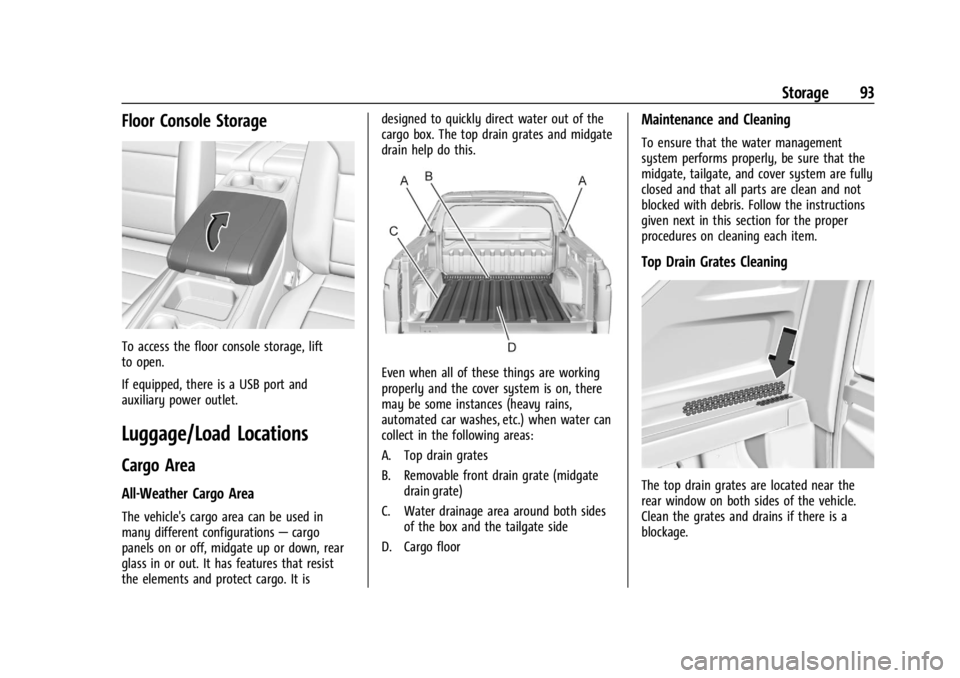
To access the floor console storage, lift
to open.
If equipped, there is a USB port and
auxiliary power outlet.
Luggage/Load Locations
Cargo Area
All-Weather Cargo Area
The vehicle's cargo area can be used in
many different configurations—cargo
panels on or off, midgate up or down, rear
glass in or out. It has features that resist
the elements and protect cargo. It is designed to quickly direct water out of the
cargo box. The top drain grates and midgate
drain help do this.
Even when all of these things are working
properly and the cover system is on, there
may be some instances (heavy rains,
automated car washes, etc.) when water can
collect in the following areas:
A. Top drain grates
B. Removable front drain grate (midgate
drain grate)
C. Water drainage area around both sides of the box and the tailgate side
D. Cargo floor
Maintenance and Cleaning
To ensure that the water management
system performs properly, be sure that the
midgate, tailgate, and cover system are fully
closed and that all parts are clean and not
blocked with debris. Follow the instructions
given next in this section for the proper
procedures on cleaning each item.
Top Drain Grates Cleaning
The top drain grates are located near the
rear window on both sides of the vehicle.
Clean the grates and drains if there is a
blockage.
Page 150 of 429

Chevrolet Silverado EV Owner Manual (GMNA-Localizing-U.S./Canada-
16702912) - 2024 - CRC - 1/13/23
Infotainment System 149
Steering Wheel Controls
If equipped, some audio controls can be
adjusted at the steering wheel.
g:Press to answer an incoming call or
start voice recognition. See Bluetooth
(Pairing and Using a Phone) 0161 or
Bluetooth (Overview) 0160.
e:Press show the audio sources list.
y:Press the control up to answer an
incoming call.
c: Press the control down to decline an
incoming call or end a current call.
The favorites and volume switches are on
the back of the steering wheel.
1. Favorite: When on a radio source, press to select the next or previous audio
broadcast favorite. When listening to a
media device, press to select the next or
previous track.
2. Volume: Press to increase or decrease the volume.
Using the System
Audio
Touch the Audio icon to display the active
audio source page. Examples of available
sources may include AM, FM, SXM (if
equipped), USB, AUX, and Bluetooth.
Phone
Touch the Phone icon to display the Phone
main page. See Bluetooth (Pairing and Using
a Phone) 0161 or
Bluetooth (Overview) 0160.
Maps
If equipped, touch the Maps icon to display
the navigation map. See Using the
Navigation System 0155.
Google Assistant
If equipped, touch the Google Assistant icon
to open the Google Assistant app. See Voice
Recognition 0159.
Google Play
If equipped, touch to download some of
your favorite apps in your vehicle.
Downloading apps on Google Play requires
you to sign into a Google Account and have
internet connectivity in your vehicle. Some
third-party apps require a separate account
and, in some cases, a paid subscription for
in-vehicle access.
Settings
Touch the Settings icon to display the
Settings menu. See Settings0166.
Page 182 of 429
Chevrolet Silverado EV Owner Manual (GMNA-Localizing-U.S./Canada-
16702912) - 2024 - CRC - 1/17/23
Driving and Operating 181
Trailer Towing
General Towing Information . . . . . . . . . . . 293
Driving Characteristics andTowing Tips . . . . . . . . . . . . . . . . . . . . . . . . . 294
Trailer Towing . . . . . . . . . . . . . . . . . . . . . . . . . 297
Towing Equipment . . . . . . . . . . . . . . . . . . . . 301
Trailer Sway Control (TSC) . . . . . . . . . . . . 309
Trailering App . . . . . . . . . . . . . . . . . . . . . . . . . 310
Conversions and Add-Ons
Add-On Electrical Equipment . . . . . . . . . . . 321
Auxiliary Switches . . . . . . . . . . . . . . . . . . . . . 321
Driving Information
Driving for Better Energy
Efficiency
Use the following tips to help maximize
energy efficiency and driving range.
The Energy Usage card available on the
Driver Information Center (DIC) estimates
the influence of the main factors impacting
vehicle range. It displays how energy is
being used for the current drive
as percentages of overall vehicle energy use.
See Driver Information Center (DIC) (Base
Level) 0129 or
Driver Information Center (DIC) (Uplevel)
0 130 and
Vehicle Status 0132.
Acceleration/Braking/Coasting
Avoid rapid accelerations and decelerations.
Driving range is maximized at 89 km/h
(55 mph) and less.
Use cruise control when appropriate.
Using the steering wheel paddle during
deceleration recovers more energy. See
Regenerative Braking 0206. Terrain and Vehicle Speed
Plan ahead for decelerations and coast
whenever possible. Do not rush to traffic
signals. Do not shift to N (Neutral) to coast.
Higher speeds and grade changes use more
energy and can significantly reduce driving
range.
Climate Setting
Using the heat and air conditioning systems
decreases the energy available for electric
driving.
Optimal energy efficiency is achieved when
the heat, air conditioning, and fan are
turned off.
Use the heated seat features instead of
climate control system. Heating the seat
uses less energy than heating and cooling
the interior.
Use remote start to heat or cool the interior
when the vehicle is plugged in to maximize
the driving range by using electricity from
the electrical outlet.
In hot weather, avoid parking in direct
sunlight or use sunshades inside the vehicle.
Page 322 of 429
Chevrolet Silverado EV Owner Manual (GMNA-Localizing-U.S./Canada-
16702912) - 2024 - CRC - 1/17/23
Driving and Operating 321
Conversions and Add-Ons
Add-On Electrical Equipment
{Warning
The Data Link Connector (DLC) is used for
vehicle service and Emission Inspection/
Maintenance testing. SeeService Vehicle
Soon Light (Propulsion System Failure)
0 115. A device connected to the DLC —
such as an aftermarket fleet or
driver-behavior tracking device —may
interfere with vehicle systems. This could
affect vehicle operation and cause a
crash. Such devices may also access
information stored in the vehicle’s
systems.
Caution
Some electrical equipment can damage
the vehicle or cause components to not
work and would not be covered by the
vehicle warranty. Always check with your
dealer before adding electrical equipment. Add-on equipment can drain the vehicle's
12-volt battery, even if the vehicle is not
operating.
When adding electrical equipment, it should
only be connected using the accessory
power outlets. The maximum power that
can be supplied by one accessory power
outlet or spread across all three is 200 watts
or 15 amps. Exceeding 200 watts or 15 amps
may cause erratic vehicle operation.
The vehicle has an airbag system. Before
attempting to add anything electrical to the
vehicle, see
Servicing the Airbag-Equipped
Vehicle 068 and
Adding Equipment to the Airbag-Equipped
Vehicle 068.
Auxiliary Switches
On-screen auxiliary switches, if equipped, are
quick-touch icons that appear within the
infotainment system, giving you easy access
to some of the features of certain
aftermarket accessories installed on the
vehicle (off-road lighting, light bars, etc.). To access the on-screen auxiliary switches,
select Controls > Aux Switches. Six on-screen
auxiliary switches are available.
Use of the on-screen switches requires
installation of an auxiliary switch interface
module, which is mounted under the hood.
See your dealer for purchase and installation
of the necessary components. When an
aftermarket accessory is installed onto the
vehicle, it should be hard-wired to the
auxiliary switch interface module to the
numbered connection that corresponds with
the numbered on-screen auxiliary switch.
See
Accessories and Modifications 0324.
If you touch an on-screen auxiliary switch
but the auxiliary switch interface module is
not installed or has no accessory wired at
that connection, a message “No accessory
connected to this switch” displays.
Customizing the On-Screen Auxiliary
Switches
After a purchased accessory is installed,
create a text label for the corresponding
on-screen auxiliary switch and choose an
icon to represent the installed accessory.
1. While the vehicle is in P (Park), touch the Controls icon on the infotainment
home page.
Page 323 of 429
Chevrolet Silverado EV Owner Manual (GMNA-Localizing-U.S./Canada-
16702912) - 2024 - CRC - 1/17/23
322 Driving and Operating
2. Touch the Aux Switches icon.
3. For each switch you want to customize,touch the arrow at the top right of the
icon, and then:
.To enter a new label for the switch,
touch the name field and type in a
new label. To save your update,
touch
V(Done) on the keyboard.
.To change the icon, touch a new one
on the list.
.Review the additional options listed
below the name field. Touch the
checkbox next to the option
description to enable or disable the
option.
Turn on only while switch is held
down: When this option is enabled,
the switch will only operate while
your finger continues to touch and
hold the on-screen switch. This may
be useful for accessories that only
need to be turned on for short
intervals. Turn on parking lights while switch is
on: When this option is enabled, the
vehicle parking lights will
automatically turn on while the
switch is in use. This may be
particularly useful to use for a light
bar, as it will help ensure your
vehicle remains visible while driving
in low-light conditions with the
headlights off.
4. To save your customizations for the on-screen auxiliary switch, touch the
BACK icon.
Page 345 of 429
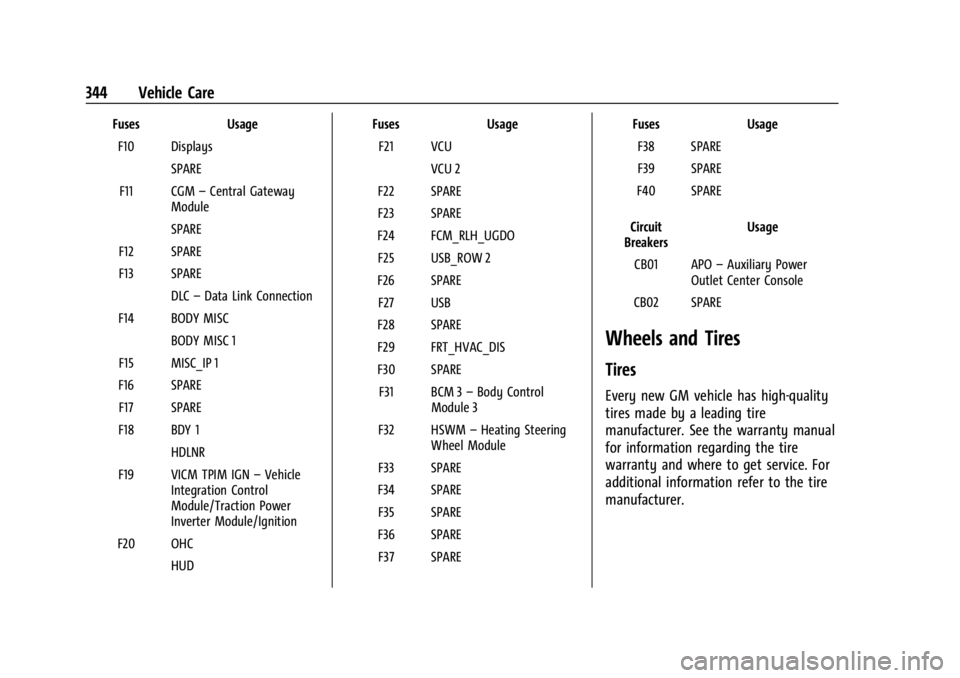
Chevrolet Silverado EV Owner Manual (GMNA-Localizing-U.S./Canada-
16702912) - 2024 - CRC - 1/13/23
344 Vehicle Care
FusesUsage
F10 Displays SPARE
F11 CGM –Central Gateway
Module
SPARE
F12 SPARE
F13 SPARE DLC–Data Link Connection
F14 BODY MISC BODY MISC 1
F15 MISC_IP 1
F16 SPARE F17 SPARE
F18 BDY 1 HDLNR
F19 VICM TPIM IGN –Vehicle
Integration Control
Module/Traction Power
Inverter Module/Ignition
F20 OHC HUD Fuses
Usage
F21 VCU VCU 2
F22 SPARE
F23 SPARE
F24 FCM_RLH_UGDO F25 USB_ROW 2
F26 SPARE F27 USB
F28 SPARE
F29 FRT_HVAC_DIS
F30 SPARE F31 BCM 3 –Body Control
Module 3
F32 HSWM –Heating Steering
Wheel Module
F33 SPARE
F34 SPARE F35 SPARE
F36 SPARE F37 SPARE Fuses
Usage
F38 SPARE
F39 SPARE
F40 SPARE
Circuit
Breakers Usage
CB01 APO –Auxiliary Power
Outlet Center Console
CB02 SPARE
Wheels and Tires
Tires
Every new GM vehicle has high-quality
tires made by a leading tire
manufacturer. See the warranty manual
for information regarding the tire
warranty and where to get service. For
additional information refer to the tire
manufacturer.
Page 418 of 429

Chevrolet Silverado EV Owner Manual (GMNA-Localizing-U.S./Canada-
16702912) - 2024 - CRC - 1/13/23
Index 417
Assistance Systems (cont'd)Automatic Emergency
Braking (AEB) . . . . . . . . . . . . . . . . . . . . . . . . 263
Automatic Parking Assist (APA) . . . . . . . . 255
Blind Zone Alert (SBZA) . . . . . . . . . . . . . . . . 268
Blind Zone Steering (BZSA) . . . . . . . . . . . . . 271
Driver Attention . . . . . . . . . . . . . . . . . . . . . . . 273
Driving . . . . . . . . . . . . . . . . . . . . . . . . . . . . . . . . 261
Forward Collision Alert (FCA) System . . . . . . . . . . . . . . . . . . . . . . . . . . . . . . 261
Front Pedestrian Braking (FPB) . . . . . . . . . 266
Lane Change Alert (LCA) . . . . . . . . . . . . . . . 269
Lane Keep Assist (LKA) . . . . . . . . . . . . . . . . . 274
Parking . . . . . . . . . . . . . . . . . . . . . . . . . . . . . . . . 254
Parking and Backing . . . . . . . . . . . . . . . . . . . 246
Rear Cross Traffic Alert (RCTA) . . . . . . . . . 260
Rear Pedestrian Alert . . . . . . . . . . . . . . . . . . 259
Rear Vision Camera (RVC) . . . . . . . . . . . . . . 246
Reverse Automatic Braking (RAB) . . . . . . 258
Surround Vision Recorder . . . . . . . . . . . . . . 276
Surround Vision System . . . . . . . . . . . . . . . 247
Traffic Sign . . . . . . . . . . . . . . . . . . . . . . . . . . . . . 271
Audio Bluetooth . . . . . . . . . . . . . . . . . . . . . . . . . . . . . . 155
Automatic Dimming Mirrors . . . . . . . . . . . . . . . . . . . . . . . 36
Door Locks . . . . . . . . . . . . . . . . . . . . . . . . . . . . . . . 17 Automatic (cont'd)
Emergency Braking (AEB) Disabled
Light . . . . . . . . . . . . . . . . . . . . . . . . . . . . . . . . . . 117
Headlamp System . . . . . . . . . . . . . . . . . . . . . 142
Parking Assist (APA) . . . . . . . . . . . . . . . . . . . 255
Auxiliary Switches . . . . . . . . . . . . . . . . . . . . . . . . . . . . . . . 321
Avoiding Untrusted Media Devices . . . . . . . .154
B
Battery Charging Electrical Requirements . . . . . . 293
Exterior Lighting Battery Saver . . . . . . . . 146
Fault Light . . . . . . . . . . . . . . . . . . . . . . . . . . . . . . 115
Gauge . . . . . . . . . . . . . . . . . . . . . . . . . . . . . . . . . 110
Load Management . . . . . . . . . . . . . . . . . . . . . 145
Power Protection . . . . . . . . . . . . . . . . . . . . . . 145
Battery - North America . . . . . . . . . . . . .330, 375
Blade Replacement, Wiper . . . . . . . . . . . . . . . 333
Bluetooth Audio . . . . . . . . . . . . . . . . . . . . . . . . . . . . . . . . . . 155
Overview . . . . . . . . . . . . . . . . . . . . . . . . . . 160, 161
Brake Fluid . . . . . . . . . . . . . . . . . . . . . . . . . . . . . . . . . . . 329
System Warning Light . . . . . . . . . . . . . . . . . . 115
Brakes . . . . . . . . . . . . . . . . . . . . . . . . . . . . . . . . . . . 328
Antilock . . . . . . . . . . . . . . . . . . . . . . . . . . . . . . . . 204
Brake Assist . . . . . . . . . . . . . . . . . . . . . . . . . . . 206 Brakes (cont'd)
Electric Parking Brake . . . . . . . . . . . . . . . . . . 205
Regenerative Braking . . . . . . . . . . . . . . . . . . 206
Braking . . . . . . . . . . . . . . . . . . . . . . . . . . . . . . . . . . .183 Automatic Emergency (AEB) . . . . . . . . . . . 263
Front Pedestrian (FPB) System . . . . . . . . . 266
Reverse Automatic . . . . . . . . . . . . . . . . . . . . . 258
Break-In, New Vehicle . . . . . . . . . . . . . . . . . . . . 197
Buckle To Drive . . . . . . . . . . . . . . . . . . . . . . . . . . . .53
Bulb Replacement Headlamp Aiming . . . . . . . . . . . . . . . . . . . . . . 335
Buying New Tires . . . . . . . . . . . . . . . . . . . . . . . . 358
C
California
Perchlorate Materials Requirements . . . 324
California Proposition 65 Warning . . . . . 1, 375
Camera
Rear Vision (RVC) . . . . . . . . . . . . . . . . . . . . . . 246
Canadian Vehicle Owners . . . . . . . . . . . . . . . . . . .2
Capacities and Specifications . . . . . . . . . . . . . 395
Car Wash Mode . . . . . . . . . . . . . . . . . . . . . . . . . 200
Carbon Monoxide Midgate . . . . . . . . . . . . . . . . . . . . . . . . . . . . . . . . 23
Tailgate . . . . . . . . . . . . . . . . . . . . . . . . . . . . . . . . . 28
Winter Driving . . . . . . . . . . . . . . . . . . . . . . . . . . 191
Cargo Area . . . . . . . . . . . . . . . . . . . . . . . . . . . . . . . . . . . . 93
Page 426 of 429

Chevrolet Silverado EV Owner Manual (GMNA-Localizing-U.S./Canada-
16702912) - 2024 - CRC - 1/13/23
Index 425
SpeedLimiter . . . . . . . . . . . . . . . . . . . . . . . . . . . . . . . . . 215
Limiter Indicator . . . . . . . . . . . . . . . . . . . . . . . . 112
Speedometer . . . . . . . . . . . . . . . . . . . . . . . . . . . . .110
Start Assist, Hill . . . . . . . . . . . . . . . . . . . . . . . . . . 206
Start Vehicle, Remote . . . . . . . . . . . . . . . . . . . . . .14
Status Charging Feedback . . . . . . . . . . . . . . . . . . . . . 283
Vehicle . . . . . . . . . . . . . . . . . . . . . . . . . . . . . . . . 132
Steering . . . . . . . . . . . . . . . . . . . . . . . . . . . . . . . . . 184 Four-Wheel . . . . . . . . . . . . . . . . . . . . . . . . . . . . 210
Heated Wheel . . . . . . . . . . . . . . . . . . . . . . . . . . 97
Wheel Adjustment . . . . . . . . . . . . . . . . . . . . . . 97
Wheel Controls . . . . . . . . . . . . . . . . . . . . . . . . 149
Storage Cargo Area . . . . . . . . . . . . . . . . . . . . . . . . . . . . . 93
Compartments . . . . . . . . . . . . . . . . . . . . . . . . . . 91
Cupholders . . . . . . . . . . . . . . . . . . . . . . . . . . . . . 91
Floor Console . . . . . . . . . . . . . . . . . . . . . . . . . . . 93
Glove Box . . . . . . . . . . . . . . . . . . . . . . . . . . . . . . 91
Underseat . . . . . . . . . . . . . . . . . . . . . . . . . . . . . . 92
Storage Areas Underhood . . . . . . . . . . . . . . . . . . . . . . . . . . . . . 91
Storing the Tire Sealant and Compressor Kit . . . . . . . . . . . . . . . . . . . . . . . . . 368
Struts Gas . . . . . . . . . . . . . . . . . . . . . . . . . . . . . . . . . . . . 334
Stuck Vehicle . . . . . . . . . . . . . . . . . . . . . . . . . . . . 192 Sun Visors . . . . . . . . . . . . . . . . . . . . . . . . . . . . . . . . 40
Super Cruise . . . . . . . . . . . . . . . . . . . . . . . . . . . . . 227
Surround
Vision System . . . . . . . . . . . . . . . . . . . . . . . . . 247
Switches Auxiliary . . . . . . . . . . . . . . . . . . . . . . . . . . . . . . . 321
Symbols . . . . . . . . . . . . . . . . . . . . . . . . . . . . . . . . . . . .3
Navigation . . . . . . . . . . . . . . . . . . . . . . . . . . . . . 156
System Airbag . . . . . . . . . . . . . . . . . . . . . . . . . . . . . . . . . . 60
Global Positioning . . . . . . . . . . . . . . . . . . . . . . 157
Infotainment . . . . . . . . . . . . . . . . . . . . . . . . . . . 407
Noise Control . . . . . . . . . . . . . . . . . . . . . . . . . . 332
T
Tailgate . . . . . . . . . . . . . . . . . . . . . . . . . . . . . . . . . . . 28
Teen Driver . . . . . . . . . . . . . . . . . . . . . . . . . . . . . . 168
Text Telephone (TTY) Users . . . . . . . . . . . . . . 398
Theft-Deterrent Systems . . . . . . . . . . . . . . . . . . .33Immobilizer . . . . . . . . . . . . . . . . . . . . . . . . . . . . . 33
Time . . . . . . . . . . . . . . . . . . . . . . . . . . . . . . . . . . . . . . 99
Tires . . . . . . . . . . . . . . . . . . . . . . . . . . . . . . . . . . . . . 344
All-Season . . . . . . . . . . . . . . . . . . . . . . . . . . . . . 345
Buying New Tires . . . . . . . . . . . . . . . . . . . . . . 358
Chains . . . . . . . . . . . . . . . . . . . . . . . . . . . . . . . . . 361
Changing . . . . . . . . . . . . . . . . . . . . . . . . . . . . . . 369
Designations . . . . . . . . . . . . . . . . . . . . . . . . . . . 347
Different Size . . . . . . . . . . . . . . . . . . . . . . . . . . 359 Tires (cont'd)
Full-Size Spare . . . . . . . . . . . . . . . . . . . . . . . . . 374
If a Tire Goes Flat . . . . . . . . . . . . . . . . . . . . . 362
Inspection . . . . . . . . . . . . . . . . . . . . . . . . . . . . . 355
Pressure . . . . . . . . . . . . . . . . . . . . . . . . . . 349, 350
Pressure Light . . . . . . . . . . . . . . . . . . . . . . . . . 120
Pressure Monitor Operation . . . . . . . . . . . 351
Pressure Monitor System . . . . . . . . . . . . . . 351
Rotation . . . . . . . . . . . . . . . . . . . . . . . . . . . . . . . 356
Sealant and Compressor Kit . . . . . . . . . . . . 363
Sealant and Compressor Kit,
Storing . . . . . . . . . . . . . . . . . . . . . . . . . . . . . . . 368
Sidewall Labeling . . . . . . . . . . . . . . . . . . . . . . 346
Terminology and Definitions . . . . . . . . . . . 347
Uniform Tire Quality Grading . . . . . . . . . . 359
Wheel Alignment and Tire Balance . . . . 360
Wheel Replacement . . . . . . . . . . . . . . . . . . . . 360
When It Is Time for New Tires . . . . . . . . . 357
Winter . . . . . . . . . . . . . . . . . . . . . . . . . . . . . . . . . 345
Towing App . . . . . . . . . . . . . . . . . . . . . . . . . . . . . . . . . . . . 310
Driving Characteristics . . . . . . . . . . . . . . . . . 294
Equipment . . . . . . . . . . . . . . . . . . . . . . . . . . . . . 301
General Information . . . . . . . . . . . . . . . . . . . 293
Recreational Vehicle . . . . . . . . . . . . . . . . . . . 379
Trailer . . . . . . . . . . . . . . . . . . . . . . . . . . . . . . . . . 297
Trailer Sway Control (TSC) . . . . . . . . . . . . . 309