air conditioning CHEVROLET SILVERADO EV 2024 Owners Manual
[x] Cancel search | Manufacturer: CHEVROLET, Model Year: 2024, Model line: SILVERADO EV, Model: CHEVROLET SILVERADO EV 2024Pages: 429, PDF Size: 8.98 MB
Page 4 of 429
Chevrolet Silverado EV Owner Manual (GMNA-Localizing-U.S./Canada-
16702912) - 2024 - CRC - 1/17/23
Introduction 3
A circle with a slash through it is a safety
symbol which means“Do not,” “Do not do
this,” or“Do not let this happen.”
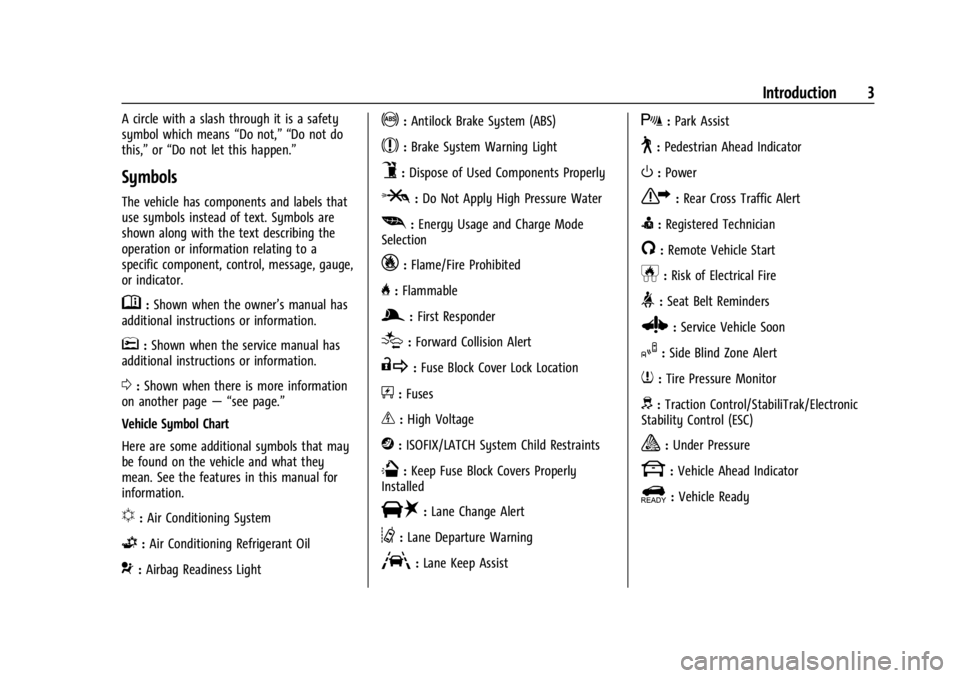
Symbols
The vehicle has components and labels that
use symbols instead of text. Symbols are
shown along with the text describing the
operation or information relating to a
specific component, control, message, gauge,
or indicator.
M:Shown when the owner’s manual has
additional instructions or information.
*: Shown when the service manual has
additional instructions or information.
0: Shown when there is more information
on another page — “see page.”
Vehicle Symbol Chart
Here are some additional symbols that may
be found on the vehicle and what they
mean. See the features in this manual for
information.
u: Air Conditioning System
G:Air Conditioning Refrigerant Oil
9:Airbag Readiness Light
!:Antilock Brake System (ABS)
$:Brake System Warning Light
9:Dispose of Used Components Properly
P:Do Not Apply High Pressure Water
[: Energy Usage and Charge Mode
Selection
_: Flame/Fire Prohibited
H: Flammable
g:First Responder
[:Forward Collision Alert
R:Fuse Block Cover Lock Location
+:Fuses
_:High Voltage
j:ISOFIX/LATCH System Child Restraints
Q:Keep Fuse Block Covers Properly
Installed
|: Lane Change Alert
@:Lane Departure Warning
A:Lane Keep Assist
X: Park Assist
~:Pedestrian Ahead Indicator
O:Power
7:Rear Cross Traffic Alert
I:Registered Technician
/:Remote Vehicle Start
h:Risk of Electrical Fire
>:Seat Belt Reminders
Z: Service Vehicle Soon
I:Side Blind Zone Alert
7:Tire Pressure Monitor
d:Traction Control/StabiliTrak/Electronic
Stability Control (ESC)
a: Under Pressure
k: Vehicle Ahead Indicator
]:Vehicle Ready
Page 15 of 429
Chevrolet Silverado EV Owner Manual (GMNA-Localizing-U.S./Canada-
16702912) - 2024 - CRC - 1/23/23
14 Keys, Doors, and Windows
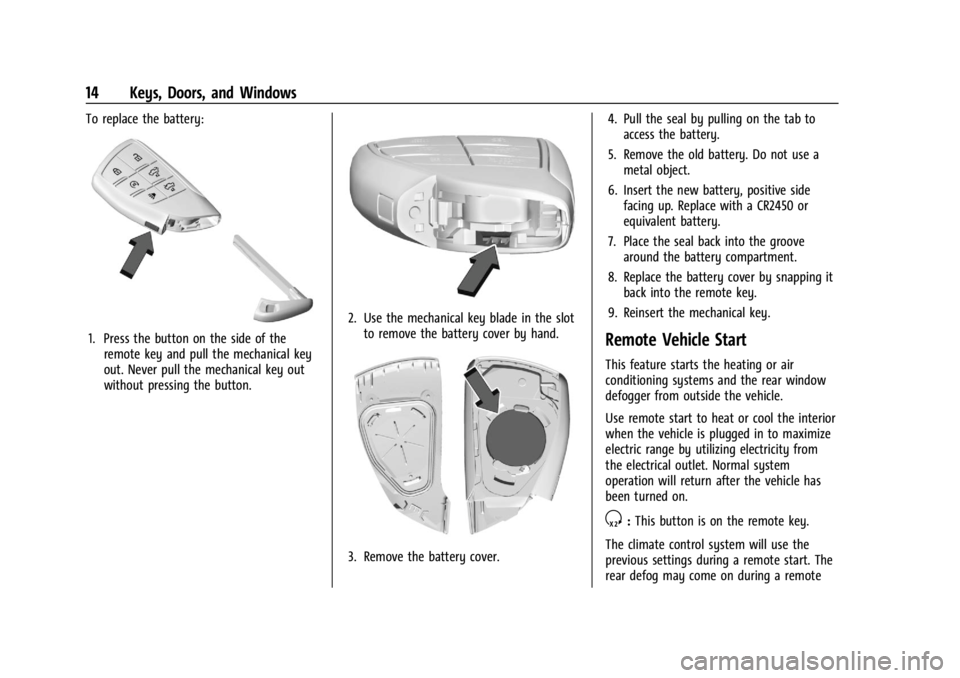
To replace the battery:
1. Press the button on the side of theremote key and pull the mechanical key
out. Never pull the mechanical key out
without pressing the button.
2. Use the mechanical key blade in the slotto remove the battery cover by hand.
3. Remove the battery cover. 4. Pull the seal by pulling on the tab to
access the battery.
5. Remove the old battery. Do not use a metal object.
6. Insert the new battery, positive side facing up. Replace with a CR2450 or
equivalent battery.
7. Place the seal back into the groove around the battery compartment.
8. Replace the battery cover by snapping it back into the remote key.
9. Reinsert the mechanical key.
Remote Vehicle Start
This feature starts the heating or air
conditioning systems and the rear window
defogger from outside the vehicle.
Use remote start to heat or cool the interior
when the vehicle is plugged in to maximize
electric range by utilizing electricity from
the electrical outlet. Normal system
operation will return after the vehicle has
been turned on.
S: This button is on the remote key.
The climate control system will use the
previous settings during a remote start. The
rear defog may come on during a remote
Page 161 of 429
Chevrolet Silverado EV Owner Manual (GMNA-Localizing-U.S./Canada-
16702912) - 2024 - CRC - 1/13/23
160 Infotainment System
“Play
Page 175 of 429
Chevrolet Silverado EV Owner Manual (GMNA-Localizing-U.S./Canada-
16702912) - 2024 - CRC - 1/13/23
174 Climate Controls
Climate Controls
Climate Control Systems
Dual Automatic Climate ControlSystem . . . . . . . . . . . . . . . . . . . . . . . . . . . . . . 174
Air Vents
Air Vents . . . . . . . . . . . . . . . . . . . . . . . . . . . . . . 177
Maintenance
Passenger Compartment Air Filter . . . . . 178
Service . . . . . . . . . . . . . . . . . . . . . . . . . . . . . . . . . 179
Climate Control Systems
Dual Automatic Climate Control System
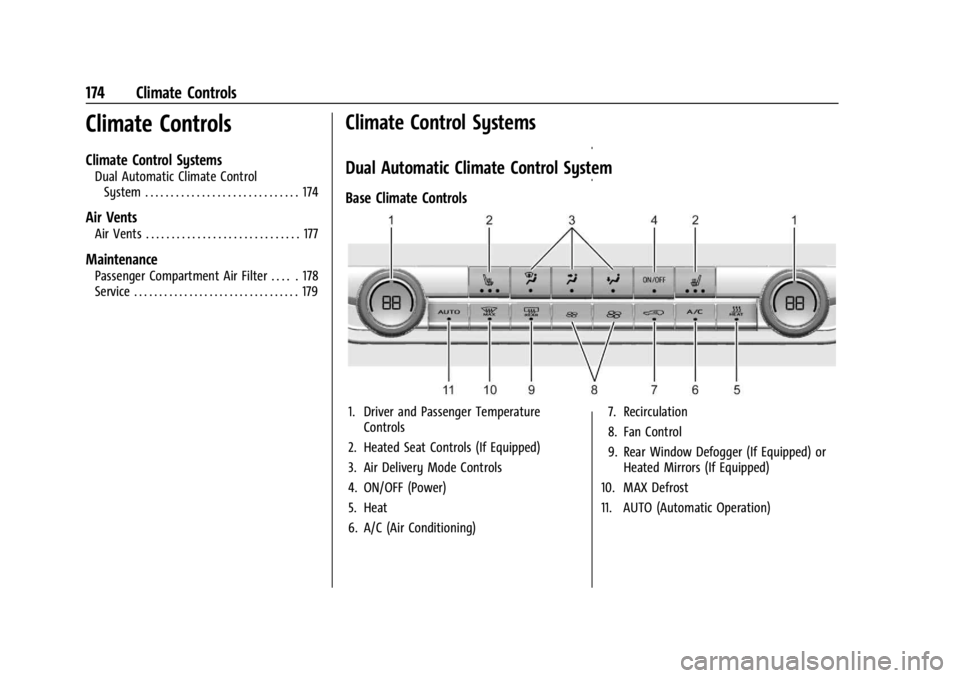
Base Climate Controls
1. Driver and Passenger Temperature Controls
2. Heated Seat Controls (If Equipped)
3. Air Delivery Mode Controls
4. ON/OFF (Power)
5. Heat
6. A/C (Air Conditioning) 7. Recirculation
8. Fan Control
9. Rear Window Defogger (If Equipped) or
Heated Mirrors (If Equipped)
10. MAX Defrost
11. AUTO (Automatic Operation)
Page 176 of 429
Chevrolet Silverado EV Owner Manual (GMNA-Localizing-U.S./Canada-
16702912) - 2024 - CRC - 1/13/23
Climate Controls 175
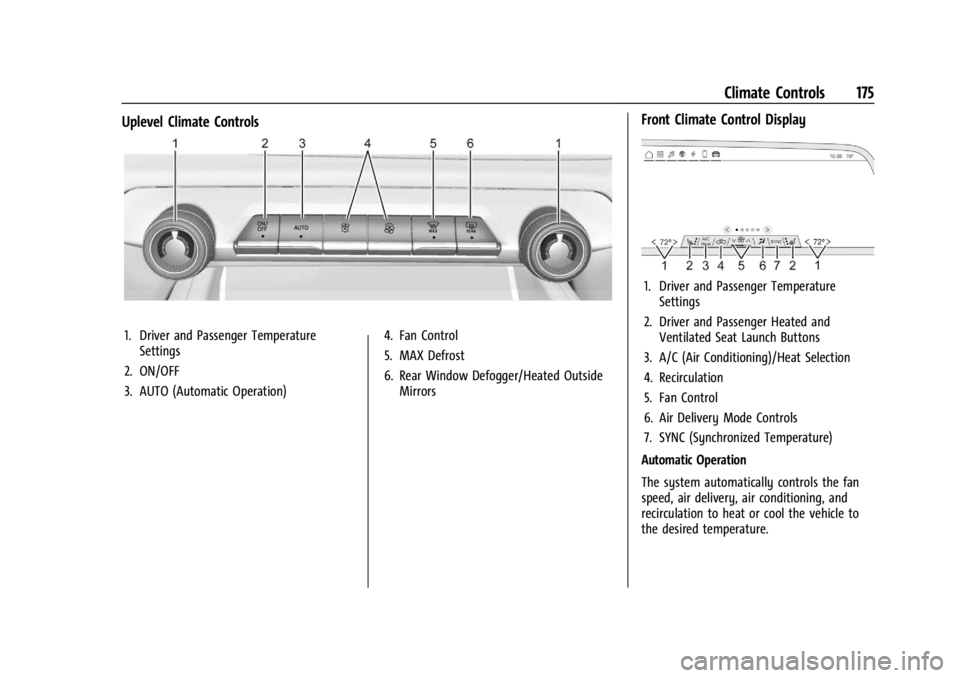
Uplevel Climate Controls
1. Driver and Passenger TemperatureSettings
2. ON/OFF
3. AUTO (Automatic Operation) 4. Fan Control
5. MAX Defrost
6. Rear Window Defogger/Heated Outside
Mirrors
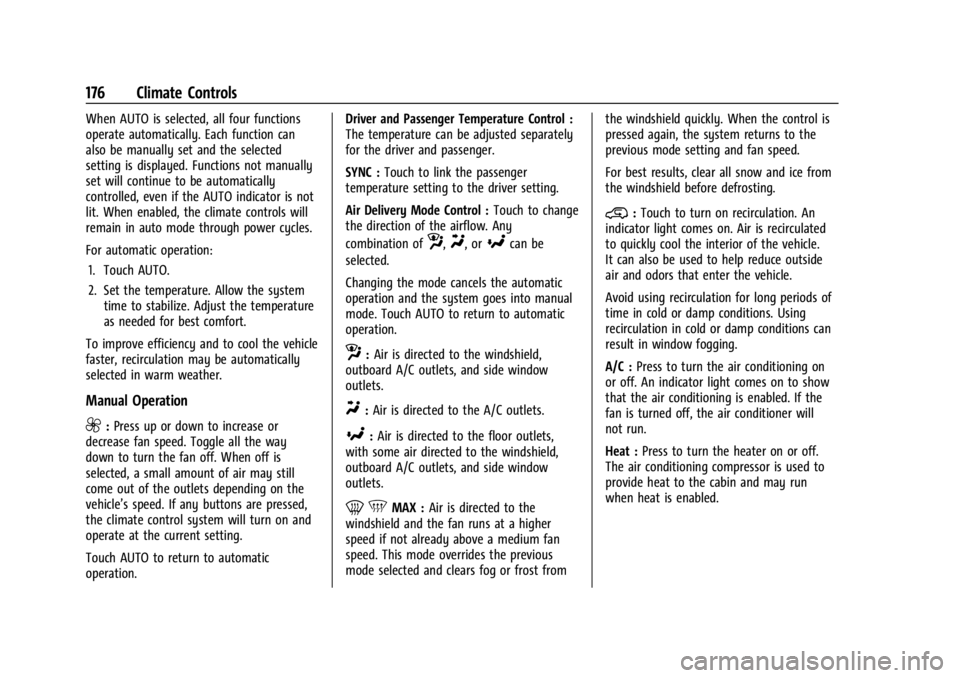
Front Climate Control Display
1. Driver and Passenger TemperatureSettings
2. Driver and Passenger Heated and Ventilated Seat Launch Buttons
3. A/C (Air Conditioning)/Heat Selection
4. Recirculation
5. Fan Control
6. Air Delivery Mode Controls
7. SYNC (Synchronized Temperature)
Automatic Operation
The system automatically controls the fan
speed, air delivery, air conditioning, and
recirculation to heat or cool the vehicle to
the desired temperature.
Page 177 of 429
Chevrolet Silverado EV Owner Manual (GMNA-Localizing-U.S./Canada-
16702912) - 2024 - CRC - 1/13/23
176 Climate Controls
When AUTO is selected, all four functions
operate automatically. Each function can
also be manually set and the selected
setting is displayed. Functions not manually
set will continue to be automatically
controlled, even if the AUTO indicator is not
lit. When enabled, the climate controls will
remain in auto mode through power cycles.
For automatic operation:1. Touch AUTO.
2. Set the temperature. Allow the system time to stabilize. Adjust the temperature
as needed for best comfort.
To improve efficiency and to cool the vehicle
faster, recirculation may be automatically
selected in warm weather.
Manual Operation
9: Press up or down to increase or
decrease fan speed. Toggle all the way
down to turn the fan off. When off is
selected, a small amount of air may still
come out of the outlets depending on the
vehicle’s speed. If any buttons are pressed,
the climate control system will turn on and
operate at the current setting.
Touch AUTO to return to automatic
operation. Driver and Passenger Temperature Control :
The temperature can be adjusted separately
for the driver and passenger.
SYNC :
Touch to link the passenger
temperature setting to the driver setting.
Air Delivery Mode Control : Touch to change
the direction of the airflow. Any
combination of
z,Y, or[can be
selected.
Changing the mode cancels the automatic
operation and the system goes into manual
mode. Touch AUTO to return to automatic
operation.
z: Air is directed to the windshield,
outboard A/C outlets, and side window
outlets.
Y: Air is directed to the A/C outlets.
[:Air is directed to the floor outlets,
with some air directed to the windshield,
outboard A/C outlets, and side window
outlets.
0 5MAX : Air is directed to the
windshield and the fan runs at a higher
speed if not already above a medium fan
speed. This mode overrides the previous
mode selected and clears fog or frost from the windshield quickly. When the control is
pressed again, the system returns to the
previous mode setting and fan speed.
For best results, clear all snow and ice from
the windshield before defrosting.
@:
Touch to turn on recirculation. An
indicator light comes on. Air is recirculated
to quickly cool the interior of the vehicle.
It can also be used to help reduce outside
air and odors that enter the vehicle.
Avoid using recirculation for long periods of
time in cold or damp conditions. Using
recirculation in cold or damp conditions can
result in window fogging.
A/C : Press to turn the air conditioning on
or off. An indicator light comes on to show
that the air conditioning is enabled. If the
fan is turned off, the air conditioner will
not run.
Heat : Press to turn the heater on or off.
The air conditioning compressor is used to
provide heat to the cabin and may run
when heat is enabled.
Page 180 of 429
Chevrolet Silverado EV Owner Manual (GMNA-Localizing-U.S./Canada-
16702912) - 2024 - CRC - 1/13/23
Climate Controls 179
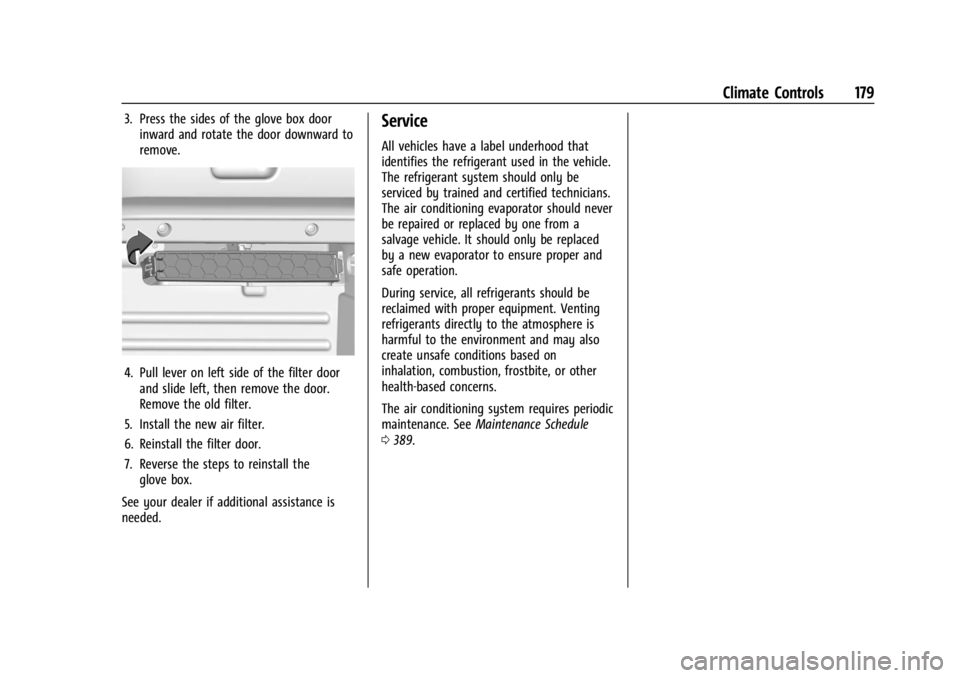
3. Press the sides of the glove box doorinward and rotate the door downward to
remove.
4. Pull lever on left side of the filter doorand slide left, then remove the door.
Remove the old filter.
5. Install the new air filter.
6. Reinstall the filter door.
7. Reverse the steps to reinstall the glove box.
See your dealer if additional assistance is
needed.
Service
All vehicles have a label underhood that
identifies the refrigerant used in the vehicle.
The refrigerant system should only be
serviced by trained and certified technicians.
The air conditioning evaporator should never
be repaired or replaced by one from a
salvage vehicle. It should only be replaced
by a new evaporator to ensure proper and
safe operation.
During service, all refrigerants should be
reclaimed with proper equipment. Venting
refrigerants directly to the atmosphere is
harmful to the environment and may also
create unsafe conditions based on
inhalation, combustion, frostbite, or other
health-based concerns.
The air conditioning system requires periodic
maintenance. See Maintenance Schedule
0 389.
Page 182 of 429
Chevrolet Silverado EV Owner Manual (GMNA-Localizing-U.S./Canada-
16702912) - 2024 - CRC - 1/17/23
Driving and Operating 181
Trailer Towing
General Towing Information . . . . . . . . . . . 293
Driving Characteristics andTowing Tips . . . . . . . . . . . . . . . . . . . . . . . . . 294
Trailer Towing . . . . . . . . . . . . . . . . . . . . . . . . . 297
Towing Equipment . . . . . . . . . . . . . . . . . . . . 301
Trailer Sway Control (TSC) . . . . . . . . . . . . 309
Trailering App . . . . . . . . . . . . . . . . . . . . . . . . . 310
Conversions and Add-Ons
Add-On Electrical Equipment . . . . . . . . . . . 321
Auxiliary Switches . . . . . . . . . . . . . . . . . . . . . 321
Driving Information
Driving for Better Energy
Efficiency
Use the following tips to help maximize
energy efficiency and driving range.
The Energy Usage card available on the
Driver Information Center (DIC) estimates
the influence of the main factors impacting
vehicle range. It displays how energy is
being used for the current drive
as percentages of overall vehicle energy use.
See Driver Information Center (DIC) (Base
Level) 0129 or
Driver Information Center (DIC) (Uplevel)
0 130 and
Vehicle Status 0132.
Acceleration/Braking/Coasting
Avoid rapid accelerations and decelerations.
Driving range is maximized at 89 km/h
(55 mph) and less.
Use cruise control when appropriate.
Using the steering wheel paddle during
deceleration recovers more energy. See
Regenerative Braking 0206. Terrain and Vehicle Speed
Plan ahead for decelerations and coast
whenever possible. Do not rush to traffic
signals. Do not shift to N (Neutral) to coast.
Higher speeds and grade changes use more
energy and can significantly reduce driving
range.
Climate Setting
Using the heat and air conditioning systems
decreases the energy available for electric
driving.
Optimal energy efficiency is achieved when
the heat, air conditioning, and fan are
turned off.
Use the heated seat features instead of
climate control system. Heating the seat
uses less energy than heating and cooling
the interior.
Use remote start to heat or cool the interior
when the vehicle is plugged in to maximize
the driving range by using electricity from
the electrical outlet.
In hot weather, avoid parking in direct
sunlight or use sunshades inside the vehicle.
Page 199 of 429
Chevrolet Silverado EV Owner Manual (GMNA-Localizing-U.S./Canada-
16702912) - 2024 - CRC - 1/17/23
198 Driving and Operating
If the vehicle must be shut off in an
emergency:1. Brake using firm and steady pressure. Do not pump the brakes repeatedly. This
may deplete power assist, requiring
increased brake pedal force.
2. Shift the vehicle to N (Neutral). This can be done while the vehicle is moving.
After shifting to N (Neutral), firmly apply
the brakes and steer the vehicle to a
safe location.
3. Come to a complete stop, shift to P (Park), and turn the vehicle off.
4. Set the parking brake. See Electric
Parking Brake 0205.
{Warning
Turning off the vehicle while moving may
disable the airbags. While driving, only
shut the propulsion system off in an
emergency.
If a drive mode is entered where
fis
present while moving, the vehicle can be
shut off while driving. Press
fand follow
the instructions displayed in the Driver
Information Center (DIC) to confirm that
vehicle off mode is desired. Climate control functions, such as defrost,
heating, and air conditioning are only
available while the vehicle is powered on.
Turning the vehicle off will turn off all
climate controls.
If a collision is detected an additional
emergency vehicle off display will be shown
and can be pressed to turn the vehicle off.
Keeping Vehicle On After Driver Exit
{Warning
It is dangerous to get out of the vehicle
if the P (Park) button is not pressed with
the parking brake set. The vehicle
can roll.
Do not leave the vehicle when the
propulsion system is running. If you have
left the propulsion system running, the
vehicle can move suddenly. You or others
could be injured. To be sure the vehicle
will not move, even when you are on
fairly level ground, always set the
parking brake and press the P (Park)
button.
Press
gon the infotainment display to
keep the vehicle on after a driver exit is
detected.
gneeds to be selected each
time the vehicle is shifted to P (Park) to be
active. The vehicle will remain on for a set
time displayed in a notification upon
activation.
gcan be reselected to restart
the time interval.
Before exiting the vehicle, press the P (Park)
button and the Electric Parking Brake (EPB)
switch, then activate
g. See Shifting Into
Park 0199.
Using
gwill reduce the charge level of
the high voltage battery. Ensure your
battery has sufficient charge before
activating
g. See Battery Gauge (High
Voltage) 0110.
gshould only be used when the vehicle
is attended. A horn chirp will sound if the
vehicle turns off during the set time
interval.
Page 328 of 429
Chevrolet Silverado EV Owner Manual (GMNA-Localizing-U.S./Canada-
16702912) - 2024 - CRC - 1/13/23
Vehicle Care 327
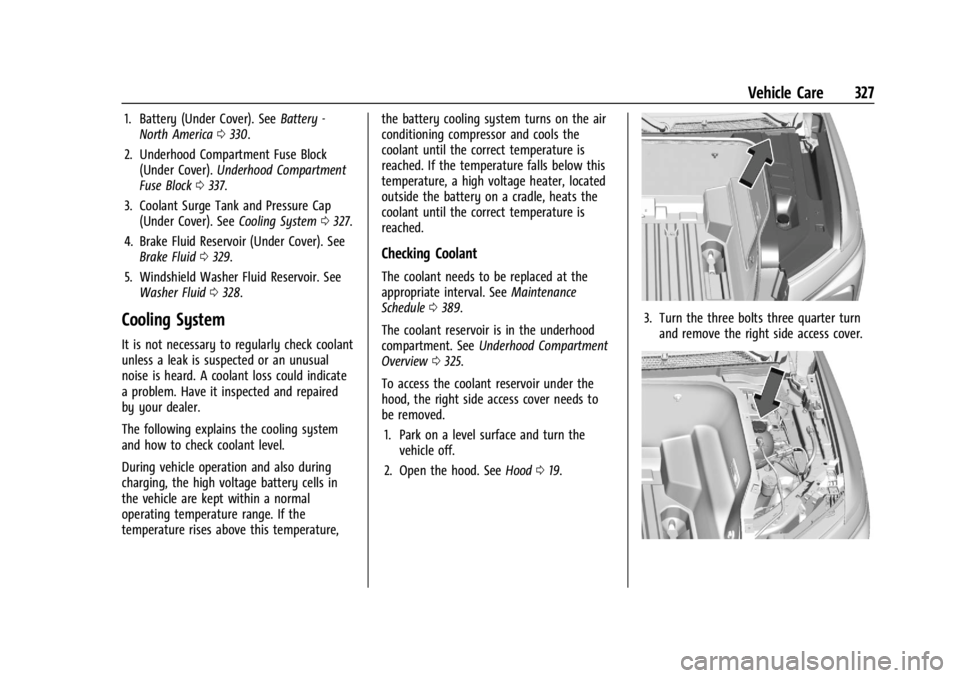
1. Battery (Under Cover). SeeBattery -
North America 0330.
2. Underhood Compartment Fuse Block (Under Cover). Underhood Compartment
Fuse Block 0337.
3. Coolant Surge Tank and Pressure Cap (Under Cover). See Cooling System0327.
4. Brake Fluid Reservoir (Under Cover). See Brake Fluid 0329.
5. Windshield Washer Fluid Reservoir. See Washer Fluid 0328.
Cooling System
It is not necessary to regularly check coolant
unless a leak is suspected or an unusual
noise is heard. A coolant loss could indicate
a problem. Have it inspected and repaired
by your dealer.
The following explains the cooling system
and how to check coolant level.
During vehicle operation and also during
charging, the high voltage battery cells in
the vehicle are kept within a normal
operating temperature range. If the
temperature rises above this temperature, the battery cooling system turns on the air
conditioning compressor and cools the
coolant until the correct temperature is
reached. If the temperature falls below this
temperature, a high voltage heater, located
outside the battery on a cradle, heats the
coolant until the correct temperature is
reached.
Checking Coolant
The coolant needs to be replaced at the
appropriate interval. See
Maintenance
Schedule 0389.
The coolant reservoir is in the underhood
compartment. See Underhood Compartment
Overview 0325.
To access the coolant reservoir under the
hood, the right side access cover needs to
be removed. 1. Park on a level surface and turn the vehicle off.
2. Open the hood. See Hood019.
3. Turn the three bolts three quarter turn
and remove the right side access cover.