clock CHEVROLET SONIC 2012 2.G User Guide
[x] Cancel search | Manufacturer: CHEVROLET, Model Year: 2012, Model line: SONIC, Model: CHEVROLET SONIC 2012 2.GPages: 352, PDF Size: 6.32 MB
Page 239 of 352
Black plate (31,1)Chevrolet Sonic Owner Manual - 2012
Vehicle Care 10-31
5. Install the bulb socket into theheadlamp assembly by turning
clockwise.
Taillamps, Turn Signal,
Stoplamps, and Back-Up
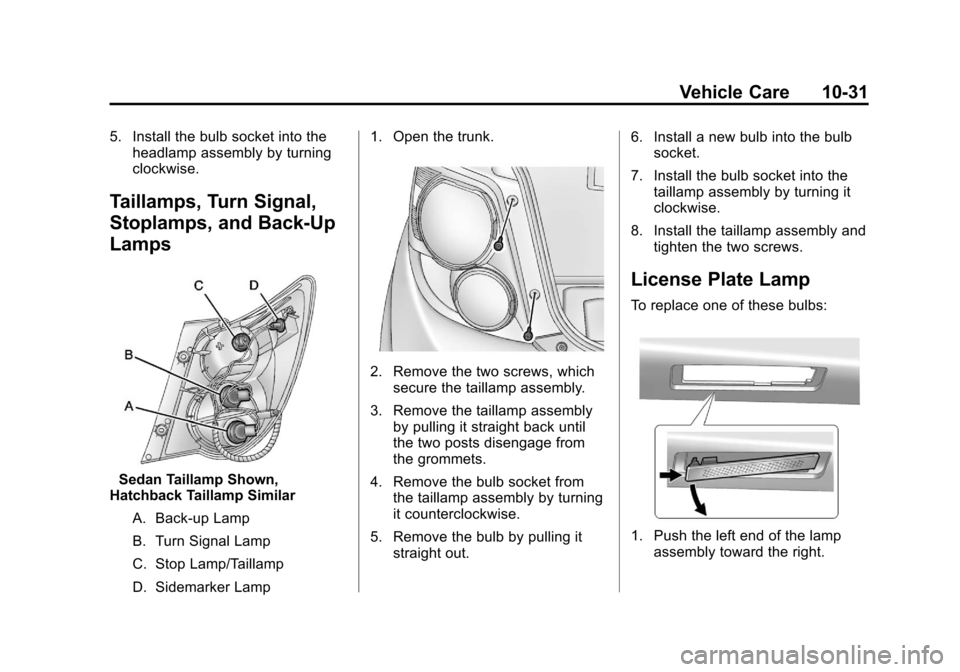
Lamps
Sedan Taillamp Shown,
Hatchback Taillamp Similar
A. Back‐up Lamp
B. Turn Signal Lamp
C. Stop Lamp/Taillamp
D. Sidemarker Lamp 1. Open the trunk.
2. Remove the two screws, which
secure the taillamp assembly.
3. Remove the taillamp assembly by pulling it straight back until
the two posts disengage from
the grommets.
4. Remove the bulb socket from the taillamp assembly by turning
it counterclockwise.
5. Remove the bulb by pulling it straight out. 6. Install a new bulb into the bulb
socket.
7. Install the bulb socket into the taillamp assembly by turning it
clockwise.
8. Install the taillamp assembly and tighten the two screws.
License Plate Lamp
To replace one of these bulbs:
1. Push the left end of the lampassembly toward the right.
Page 240 of 352
Black plate (32,1)Chevrolet Sonic Owner Manual - 2012
10-32 Vehicle Care
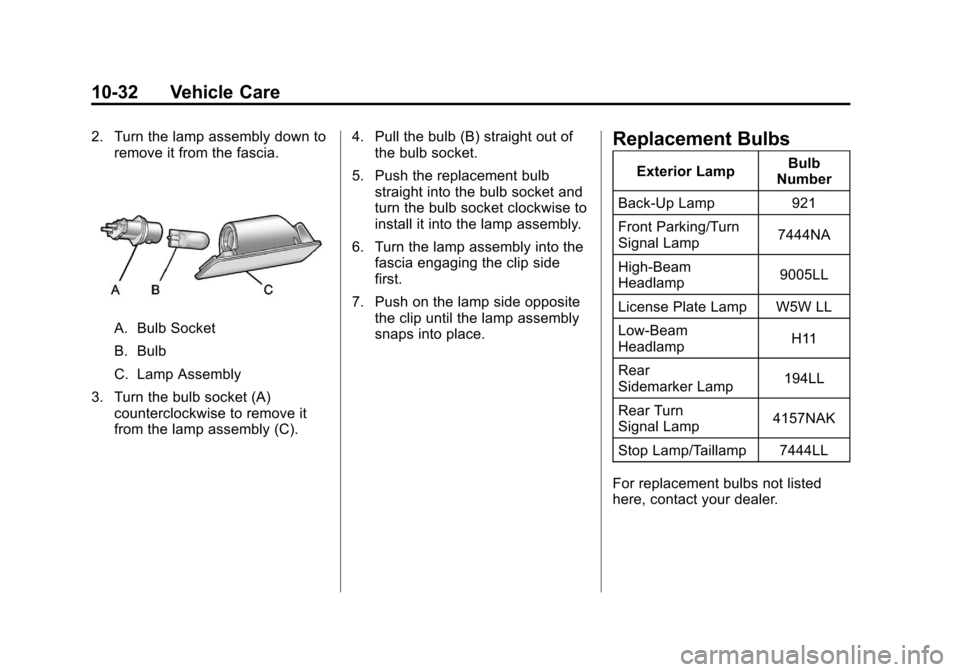
2. Turn the lamp assembly down toremove it from the fascia.
A. Bulb Socket
B. Bulb
C. Lamp Assembly
3. Turn the bulb socket (A) counterclockwise to remove it
from the lamp assembly (C). 4. Pull the bulb (B) straight out of
the bulb socket.
5. Push the replacement bulb straight into the bulb socket and
turn the bulb socket clockwise to
install it into the lamp assembly.
6. Turn the lamp assembly into the fascia engaging the clip side
first.
7. Push on the lamp side opposite the clip until the lamp assembly
snaps into place.
Replacement Bulbs
Exterior Lamp Bulb
Number
Back-Up Lamp 921
Front Parking/Turn
Signal Lamp 7444NA
High‐Beam
Headlamp 9005LL
License Plate Lamp W5W LL
Low‐Beam
Headlamp H11
Rear
Sidemarker Lamp 194LL
Rear Turn
Signal Lamp 4157NAK
Stop Lamp/Taillamp 7444LL
For replacement bulbs not listed
here, contact your dealer.
Page 246 of 352
Black plate (38,1)Chevrolet Sonic Owner Manual - 2012
10-38 Vehicle Care
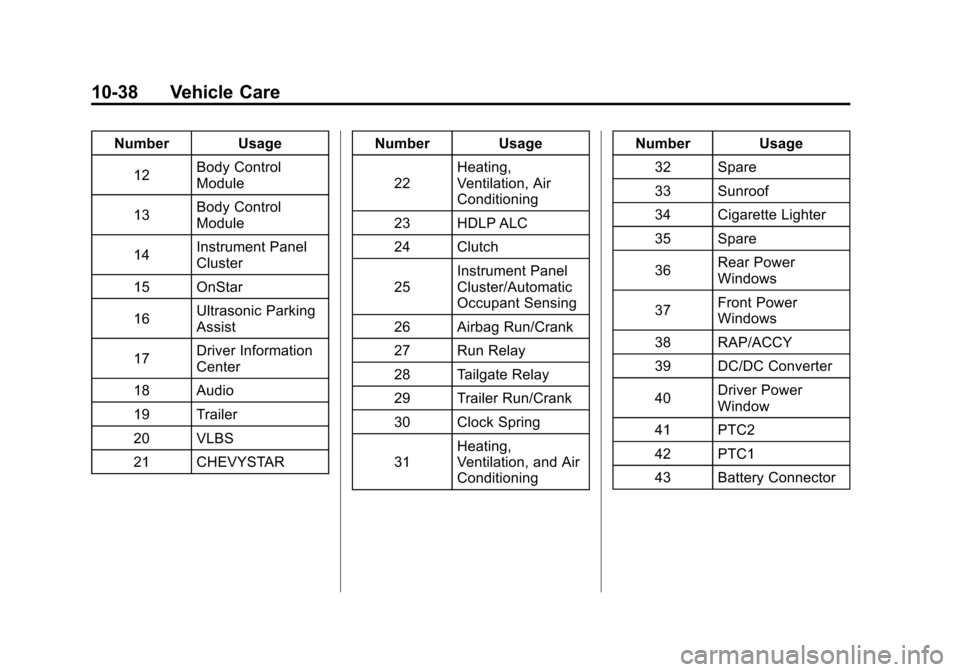
Number Usage12 Body Control
Module
13 Body Control
Module
14 Instrument Panel
Cluster
15 OnStar
16 Ultrasonic Parking
Assist
17 Driver Information
Center
18 Audio
19 Trailer
20 VLBS
21 CHEVYSTAR Number Usage
22 Heating,
Ventilation, Air
Conditioning
23 HDLP ALC
24 Clutch
25 Instrument Panel
Cluster/Automatic
Occupant Sensing
26 Airbag Run/Crank
27 Run Relay
28 Tailgate Relay
29 Trailer Run/Crank
30 Clock Spring
31 Heating,
Ventilation, and Air
Conditioning Number Usage
32 Spare
33 Sunroof
34 Cigarette Lighter
35 Spare
36 Rear Power
Windows
37 Front Power
Windows
38 RAP/ACCY
39 DC/DC Converter
40 Driver Power
Window
41 PTC2
42 PTC1
43 Battery Connector
Page 270 of 352
Black plate (62,1)Chevrolet Sonic Owner Manual - 2012
10-62 Vehicle Care
Do not remove any objects that
have penetrated the tire.
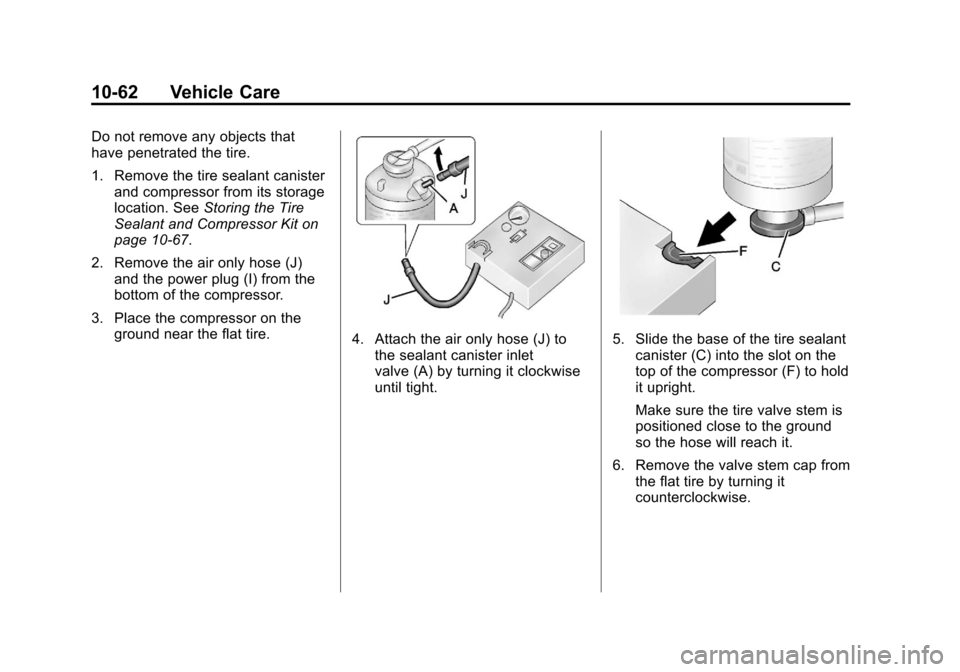
1. Remove the tire sealant canisterand compressor from its storage
location. See Storing the Tire
Sealant and Compressor Kit on
page 10‑67.
2. Remove the air only hose (J) and the power plug (I) from the
bottom of the compressor.
3. Place the compressor on the ground near the flat tire.
4. Attach the air only hose (J) tothe sealant canister inlet
valve (A) by turning it clockwise
until tight.5. Slide the base of the tire sealantcanister (C) into the slot on the
top of the compressor (F) to hold
it upright.
Make sure the tire valve stem is
positioned close to the ground
so the hose will reach it.
6. Remove the valve stem cap from the flat tire by turning it
counterclockwise.
Page 271 of 352
Black plate (63,1)Chevrolet Sonic Owner Manual - 2012
Vehicle Care 10-63
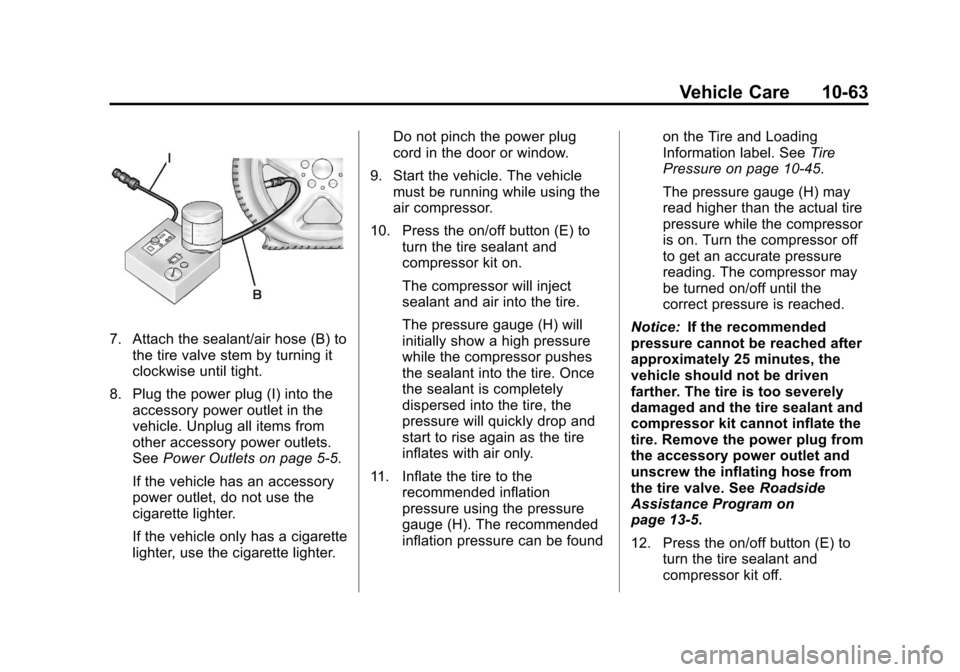
7. Attach the sealant/air hose (B) tothe tire valve stem by turning it
clockwise until tight.
8. Plug the power plug (I) into the accessory power outlet in the
vehicle. Unplug all items from
other accessory power outlets.
See Power Outlets on page 5‑5.
If the vehicle has an accessory
power outlet, do not use the
cigarette lighter.
If the vehicle only has a cigarette
lighter, use the cigarette lighter. Do not pinch the power plug
cord in the door or window.
9. Start the vehicle. The vehicle must be running while using the
air compressor.
10. Press the on/off button (E) to turn the tire sealant and
compressor kit on.
The compressor will inject
sealant and air into the tire.
The pressure gauge (H) will
initially show a high pressure
while the compressor pushes
the sealant into the tire. Once
the sealant is completely
dispersed into the tire, the
pressure will quickly drop and
start to rise again as the tire
inflates with air only.
11. Inflate the tire to the recommended inflation
pressure using the pressure
gauge (H). The recommended
inflation pressure can be found on the Tire and Loading
Information label. See
Tire
Pressure on page 10‑45.
The pressure gauge (H) may
read higher than the actual tire
pressure while the compressor
is on. Turn the compressor off
to get an accurate pressure
reading. The compressor may
be turned on/off until the
correct pressure is reached.
Notice: If the recommended
pressure cannot be reached after
approximately 25 minutes, the
vehicle should not be driven
farther. The tire is too severely
damaged and the tire sealant and
compressor kit cannot inflate the
tire. Remove the power plug from
the accessory power outlet and
unscrew the inflating hose from
the tire valve. See Roadside
Assistance Program on
page 13‑5.
12. Press the on/off button (E) to turn the tire sealant and
compressor kit off.
Page 272 of 352

Black plate (64,1)Chevrolet Sonic Owner Manual - 2012
10-64 Vehicle Care
The tire is not sealed and will
continue to leak air until the
vehicle is driven and the
sealant is distributed in the tire.
Therefore, Steps 13 through
21 must be done immediately
after Step 12.
Be careful while handling the
tire sealant and compressor kit
as it could be warm after
usage.
13. Unplug the power plug (I) from the accessory power outlet in
the vehicle.
14. Turn the sealant/air hose (B) counterclockwise to remove it
from the tire valve stem.
15. Replace the tire valve stem cap.
16. Remove the tire sealant canister (D) from the slot on
top of the compressor (F). 17. Turn the air only hose (J)
counterclockwise to remove it
from the tire sealant canister
inlet valve (A).
18. Turn the sealant/air hose (B) clockwise onto the sealant
canister inlet valve (A) to
prevent sealant leakage.
19. Return the air only hose (J) and power plug (I) back to their
original storage location.
20. If the flat tire was able to inflateto the recommended inflation
pressure, remove the
maximum speed label from the
sealant canister and place it in
a highly visible location.
Do not exceed the speed on
this label until the damaged tire
is repaired or replaced. 21. Return the equipment to its
original storage location in the
vehicle.
22. Immediately drive the vehicle 8 km (5 mi) to distribute the
sealant in the tire.
23. Stop at a safe location and check the tire pressure. Refer
to Steps 1 through 10 under
“Using the Tire Sealant and
Compressor Kit without Sealant
to Inflate a Tire (Not
Punctured).”
If the tire pressure has fallen
more than 68 kPa (10 psi)
below the recommended
inflation pressure, stop driving
the vehicle. The tire is too
severely damaged and the tire
sealant cannot seal the tire.
SeeRoadside Assistance
Program on page 13‑5.
Page 274 of 352
Black plate (66,1)Chevrolet Sonic Owner Manual - 2012
10-66 Vehicle Care
SeeIf a Tire Goes Flat on
page 10‑58 for other important
safety warnings.
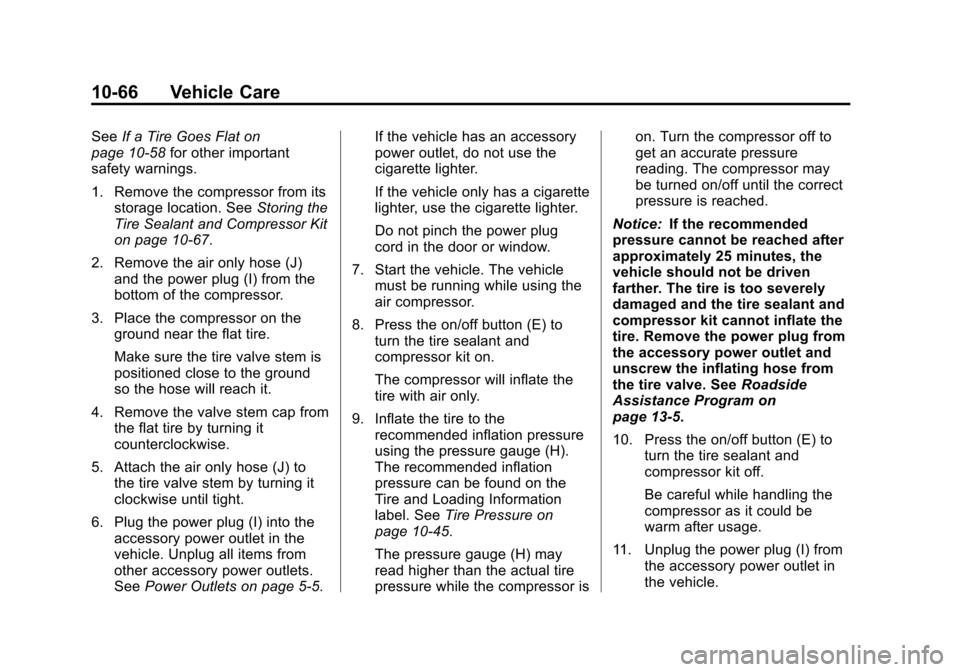
1. Remove the compressor from its storage location. See Storing the
Tire Sealant and Compressor Kit
on page 10‑67.
2. Remove the air only hose (J) and the power plug (I) from the
bottom of the compressor.
3. Place the compressor on the ground near the flat tire.
Make sure the tire valve stem is
positioned close to the ground
so the hose will reach it.
4. Remove the valve stem cap from the flat tire by turning it
counterclockwise.
5. Attach the air only hose (J) to the tire valve stem by turning it
clockwise until tight.
6. Plug the power plug (I) into the accessory power outlet in the
vehicle. Unplug all items from
other accessory power outlets.
See Power Outlets on page 5‑5. If the vehicle has an accessory
power outlet, do not use the
cigarette lighter.
If the vehicle only has a cigarette
lighter, use the cigarette lighter.
Do not pinch the power plug
cord in the door or window.
7. Start the vehicle. The vehicle must be running while using the
air compressor.
8. Press the on/off button (E) to turn the tire sealant and
compressor kit on.
The compressor will inflate the
tire with air only.
9. Inflate the tire to the recommended inflation pressure
using the pressure gauge (H).
The recommended inflation
pressure can be found on the
Tire and Loading Information
label. See Tire Pressure on
page 10‑45.
The pressure gauge (H) may
read higher than the actual tire
pressure while the compressor is on. Turn the compressor off to
get an accurate pressure
reading. The compressor may
be turned on/off until the correct
pressure is reached.
Notice: If the recommended
pressure cannot be reached after
approximately 25 minutes, the
vehicle should not be driven
farther. The tire is too severely
damaged and the tire sealant and
compressor kit cannot inflate the
tire. Remove the power plug from
the accessory power outlet and
unscrew the inflating hose from
the tire valve. See Roadside
Assistance Program on
page 13‑5.
10. Press the on/off button (E) to turn the tire sealant and
compressor kit off.
Be careful while handling the
compressor as it could be
warm after usage.
11. Unplug the power plug (I) from the accessory power outlet in
the vehicle.
Page 275 of 352
Black plate (67,1)Chevrolet Sonic Owner Manual - 2012
Vehicle Care 10-67
12. Turn the air only hose (J)counterclockwise to remove it
from the tire valve stem.
13. Replace the tire valve stem cap.
14. Return the air only hose (J) and power plug (I) back to their
original storage location.
15. Return the equipment to its original storage location in the
vehicle.
The tire sealant and compressor kit
has accessory adapters located in a
compartment on the bottom of its
housing that can be used to inflate
air mattresses, balls, etc.Storing the Tire Sealant
and Compressor Kit
The tire sealant and compressor kit
is located in the rear storage area.
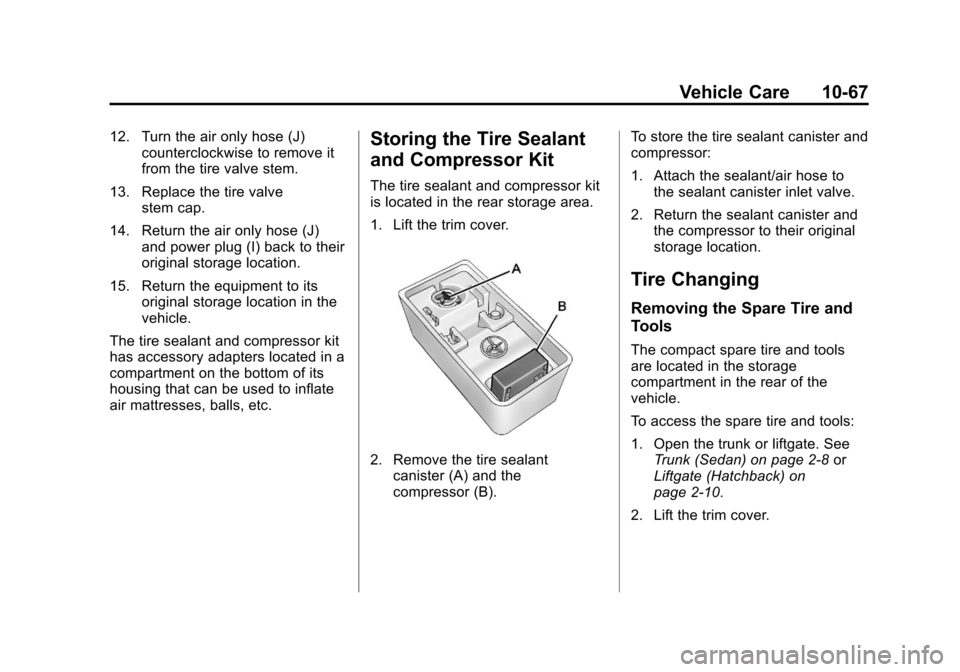
1. Lift the trim cover.
2. Remove the tire sealant canister (A) and the
compressor (B). To store the tire sealant canister and
compressor:
1. Attach the sealant/air hose to
the sealant canister inlet valve.
2. Return the sealant canister and the compressor to their original
storage location.
Tire Changing
Removing the Spare Tire and
Tools
The compact spare tire and tools
are located in the storage
compartment in the rear of the
vehicle.
To access the spare tire and tools:
1. Open the trunk or liftgate. See
Trunk (Sedan) on page 2‑8 or
Liftgate (Hatchback) on
page 2‑10.
2. Lift the trim cover.
Page 276 of 352
Black plate (68,1)Chevrolet Sonic Owner Manual - 2012
10-68 Vehicle Care
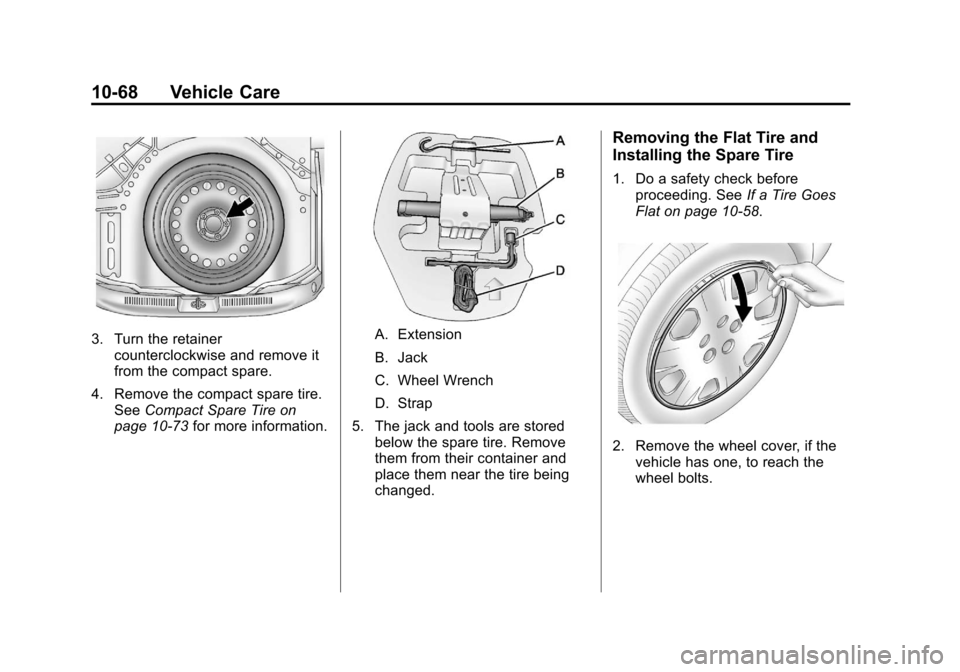
3. Turn the retainercounterclockwise and remove it
from the compact spare.
4. Remove the compact spare tire. See Compact Spare Tire on
page 10‑73 for more information.A. Extension
B. Jack
C. Wheel Wrench
D. Strap
5. The jack and tools are stored below the spare tire. Remove
them from their container and
place them near the tire being
changed.
Removing the Flat Tire and
Installing the Spare Tire
1. Do a safety check before
proceeding. See If a Tire Goes
Flat on page 10‑58.
2. Remove the wheel cover, if the vehicle has one, to reach the
wheel bolts.
Page 277 of 352
Black plate (69,1)Chevrolet Sonic Owner Manual - 2012
Vehicle Care 10-69
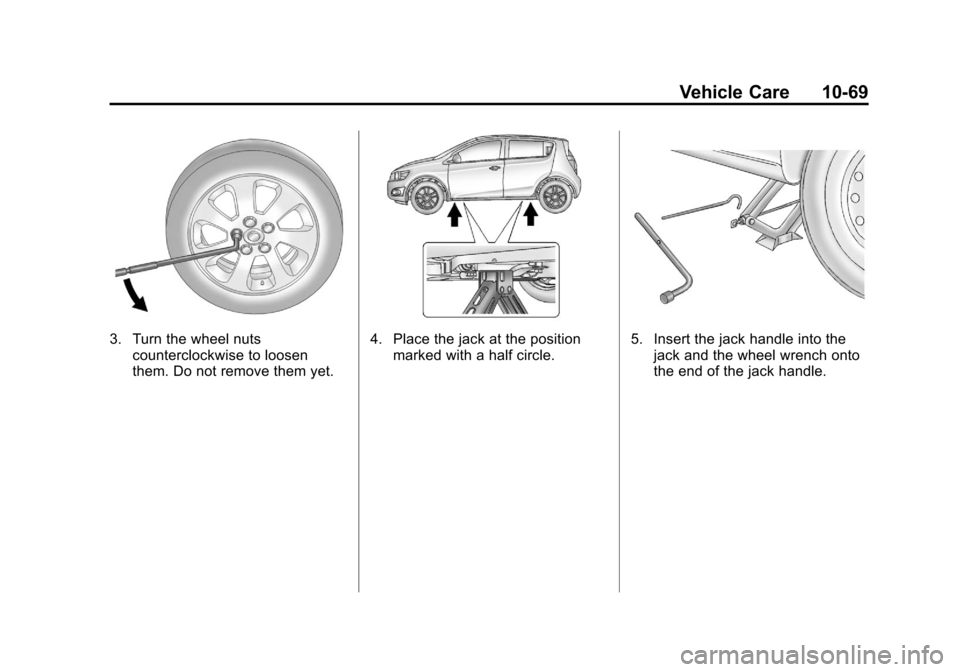
3. Turn the wheel nutscounterclockwise to loosen
them. Do not remove them yet.4. Place the jack at the positionmarked with a half circle.5. Insert the jack handle into thejack and the wheel wrench onto
the end of the jack handle.