cruise control CHEVROLET SONIC 2012 2.G User Guide
[x] Cancel search | Manufacturer: CHEVROLET, Model Year: 2012, Model line: SONIC, Model: CHEVROLET SONIC 2012 2.GPages: 352, PDF Size: 6.32 MB
Page 170 of 352
Black plate (2,1)Chevrolet Sonic Owner Manual - 2012
9-2 Driving and Operating
Driving Information
Driving for Better Fuel
Economy
Driving habits can affect fuel
mileage. Here are some driving
tips to get the best fuel economy
possible.
.Avoid fast starts and accelerate
smoothly.
.Brake gradually and avoid
abrupt stops.
.Avoid idling the engine for long
periods of time.
.When road and weather
conditions are appropriate,
use cruise control.
.Always follow posted speed
limits or drive more slowly when
conditions require.
.Keep vehicle tires properly
inflated.
.Combine several trips into a
single trip.
.Replace the vehicle's tires with
the same TPC Spec number
molded into the tire's sidewall
near the size.
.Follow recommended scheduled
maintenance.
Distracted Driving
Distraction comes in many forms
and can take your focus from the
task of driving. Exercise good
judgment and do not let other
activities divert your attention away
from the road. Many local
governments have enacted laws
regarding driver distraction. Become
familiar with the local laws in
your area.To avoid distracted driving, always
keep your eyes on the road, hands
on the wheel, and mind on the drive.
.Do not use a phone in
demanding driving situations.
Use a hands-free method to
place or receive necessary
phone calls.
.Watch the road. Do not read,
take notes, or look up
information on phones or other
electronic devices.
.Designate a front seat
passenger to handle potential
distractions.
.Become familiar with vehicle
features before driving, such as
programming favorite radio
stations and adjusting climate
control and seat settings.
Program all trip information into
any navigation device prior to
driving.
Page 175 of 352
Black plate (7,1)Chevrolet Sonic Owner Manual - 2012
Driving and Operating 9-7
WARNING (Continued)
After driving through a large
puddle of water or a car/vehicle
wash, lightly apply the brake
pedal until the brakes work
normally.
Flowing or rushing water creates
strong forces. Driving through
flowing water could cause the
vehicle to be carried away. If this
happens, you and other vehicle
occupants could drown. Do not
ignore police warnings and be
very cautious about trying to drive
through flowing water.
Hydroplaning
Hydroplaning is dangerous. Water
can build up under the vehicle's
tires so they actually ride on the
water. This can happen if the road is
wet enough and you are going fast
enough. When the vehicle is
hydroplaning, it has little or no
contact with the road.
There is no hard and fast rule about
hydroplaning. The best advice is to
slow down when the road is wet.
Other Rainy Weather Tips
Besides slowing down, other wet
weather driving tips include:
.Allow extra following distance.
.Pass with caution.
.Keep windshield wiping
equipment in good shape.
.Keep the windshield washer fluid
reservoir filled.
.Have good tires with proper
tread depth. SeeTires on
page 10‑39.
.Turn off cruise control.
Page 177 of 352
Black plate (9,1)Chevrolet Sonic Owner Manual - 2012
Driving and Operating 9-9
.Pay attention to special road
signs (falling rocks area, winding
roads, long grades, passing or
no-passing zones) and take
appropriate action.
Winter Driving
Driving on Snow or Ice
Drive carefully when there is snow
or ice between the tires and the
road, creating less traction or grip.
Wet ice can occur at about 0°C
(32°F) when freezing rain begins to
fall, resulting in even less traction.
Avoid driving on wet ice or in
freezing rain until roads can be
treated with salt or sand.
Drive with caution, whatever the
condition. Accelerate gently so
traction is not lost. Accelerating too
quickly causes the wheels to spin
and makes the surface under the
tires slick, so there is even less
traction.Try not to break the fragile traction.
If you accelerate too fast, the drive
wheels will spin and polish the
surface under the tires even more.
The
Antilock Brake System (ABS)
on page 9‑27 improves vehicle
stability during hard stops on
slippery roads, but apply the brakes
sooner than when on dry pavement.
Allow greater following distance on
any slippery road and watch for
slippery spots. Icy patches can
occur on otherwise clear roads in
shaded areas. The surface of a
curve or an overpass can remain icy
when the surrounding roads are
clear. Avoid sudden steering
maneuvers and braking while
on ice.
Turn off cruise control on slippery
surfaces.
Blizzard Conditions
Being stuck in snow can be a
serious situation. Stay with the
vehicle unless there is help nearby.
If possible, use the Roadside
Assistance Program on page 13‑5.
To get help and keep everyone in
the vehicle safe:
.Turn on the hazard warning
flashers.
.Tie a red cloth to an outside
mirror.
{WARNING
Snow can trap engine exhaust
under the vehicle. This may
cause exhaust gases to get
inside. Engine exhaust contains
carbon monoxide (CO) which
cannot be seen or smelled. It can
cause unconsciousness and even
death.
(Continued)
Page 198 of 352
Black plate (30,1)Chevrolet Sonic Owner Manual - 2012
9-30 Driving and Operating
Ifdcomes on and stays on, reset
the system:
1. Stop the vehicle.
2. Turn the engine off and wait 15 seconds.
3. Start the engine.
If
dstill comes on and stays on at a
speed above 20 km/h (13 mph), see
your dealer for service.
A chime may also sound when the
light comes on steady.
Notice: Do not repeatedly brake
or accelerate heavily when TCS is
off. The vehicle's driveline could
be damaged.
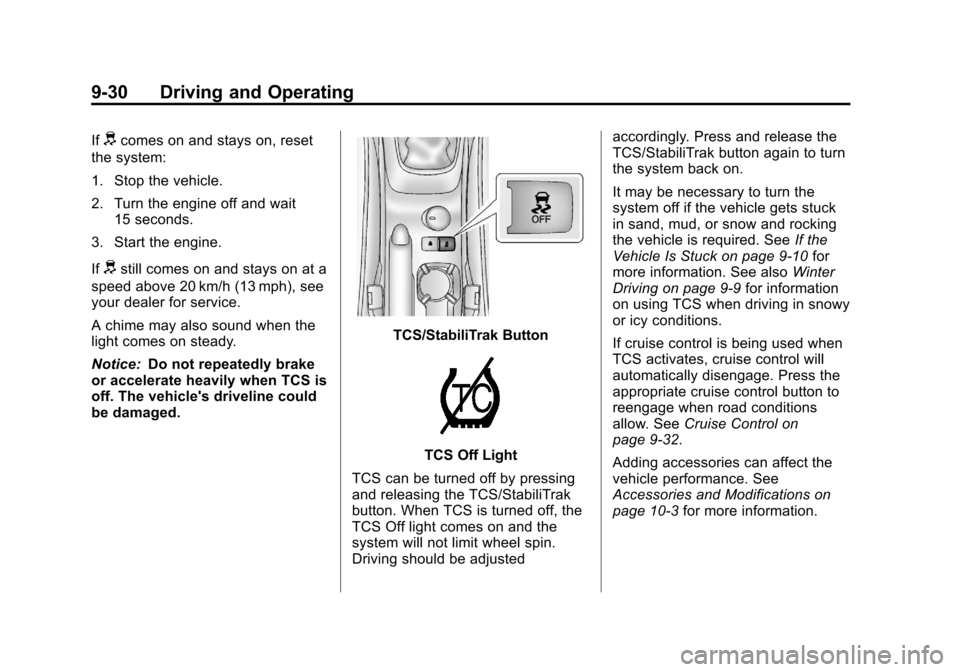
TCS/StabiliTrak Button
TCS Off Light
TCS can be turned off by pressing
and releasing the TCS/StabiliTrak
button. When TCS is turned off, the
TCS Off light comes on and the
system will not limit wheel spin.
Driving should be adjusted accordingly. Press and release the
TCS/StabiliTrak button again to turn
the system back on.
It may be necessary to turn the
system off if the vehicle gets stuck
in sand, mud, or snow and rocking
the vehicle is required. See
If the
Vehicle Is Stuck on page 9‑10 for
more information. See also Winter
Driving on page 9‑9 for information
on using TCS when driving in snowy
or icy conditions.
If cruise control is being used when
TCS activates, cruise control will
automatically disengage. Press the
appropriate cruise control button to
reengage when road conditions
allow. See Cruise Control on
page 9‑32.
Adding accessories can affect the
vehicle performance. See
Accessories and Modifications on
page 10‑3 for more information.
Page 200 of 352
Black plate (32,1)Chevrolet Sonic Owner Manual - 2012
9-32 Driving and Operating
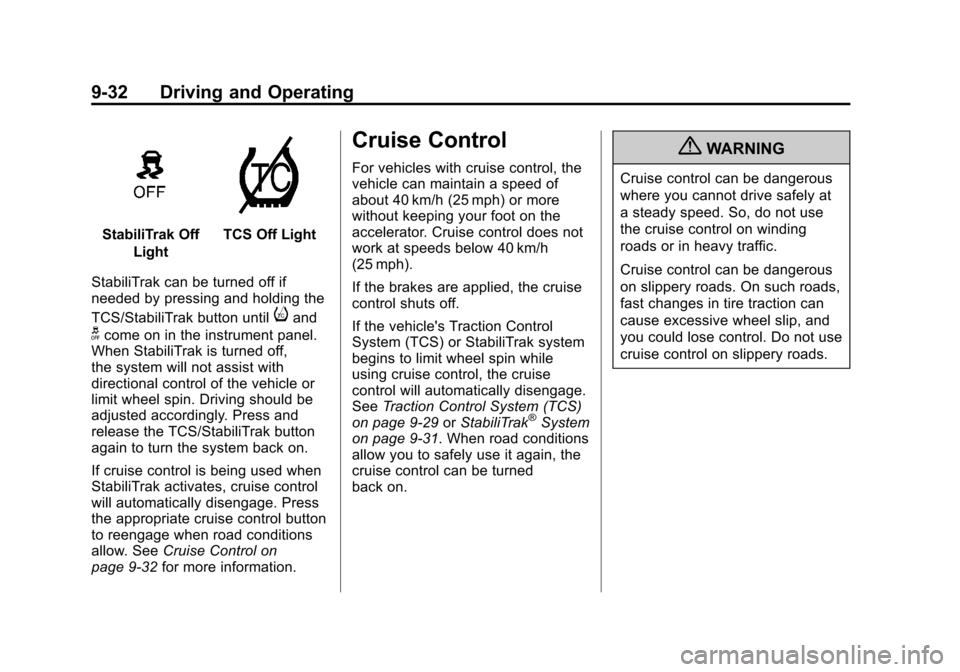
StabiliTrak OffLightTCS Off Light
StabiliTrak can be turned off if
needed by pressing and holding the
TCS/StabiliTrak button until
iand
gcome on in the instrument panel.
When StabiliTrak is turned off,
the system will not assist with
directional control of the vehicle or
limit wheel spin. Driving should be
adjusted accordingly. Press and
release the TCS/StabiliTrak button
again to turn the system back on.
If cruise control is being used when
StabiliTrak activates, cruise control
will automatically disengage. Press
the appropriate cruise control button
to reengage when road conditions
allow. See Cruise Control on
page 9‑32 for more information.
Cruise Control
For vehicles with cruise control, the
vehicle can maintain a speed of
about 40 km/h (25 mph) or more
without keeping your foot on the
accelerator. Cruise control does not
work at speeds below 40 km/h
(25 mph).
If the brakes are applied, the cruise
control shuts off.
If the vehicle's Traction Control
System (TCS) or StabiliTrak system
begins to limit wheel spin while
using cruise control, the cruise
control will automatically disengage.
SeeTraction Control System (TCS)
on page 9‑29 orStabiliTrak
®System
on page 9‑31. When road conditions
allow you to safely use it again, the
cruise control can be turned
back on.
{WARNING
Cruise control can be dangerous
where you cannot drive safely at
a steady speed. So, do not use
the cruise control on winding
roads or in heavy traffic.
Cruise control can be dangerous
on slippery roads. On such roads,
fast changes in tire traction can
cause excessive wheel slip, and
you could lose control. Do not use
cruise control on slippery roads.
Page 201 of 352
Black plate (33,1)Chevrolet Sonic Owner Manual - 2012
Driving and Operating 9-33
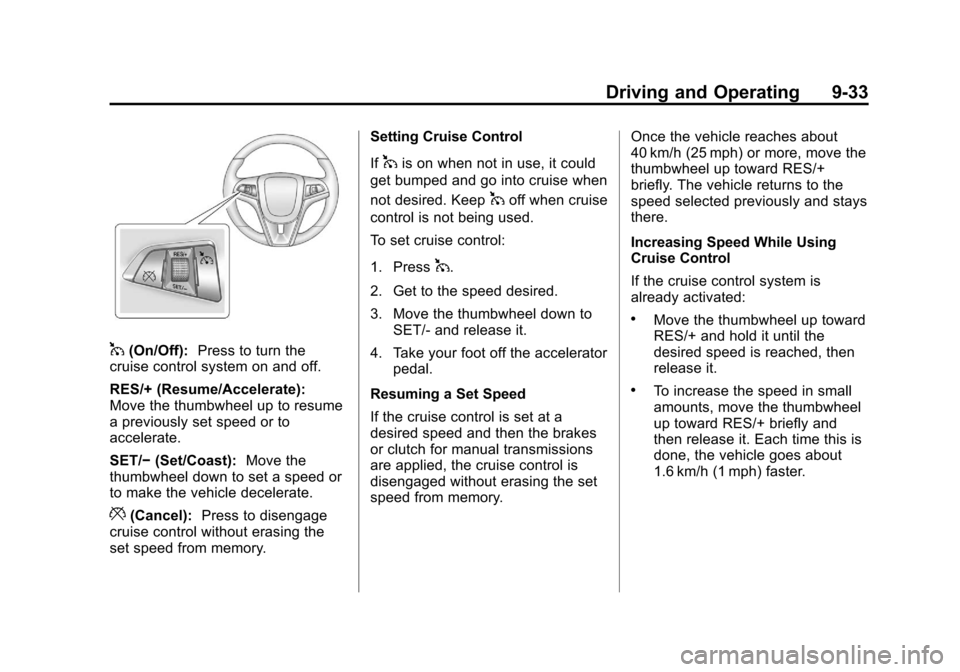
1(On/Off):Press to turn the
cruise control system on and off.
RES/+ (Resume/Accelerate):
Move the thumbwheel up to resume
a previously set speed or to
accelerate.
SET/− (Set/Coast): Move the
thumbwheel down to set a speed or
to make the vehicle decelerate.
*(Cancel): Press to disengage
cruise control without erasing the
set speed from memory. Setting Cruise Control
If
1is on when not in use, it could
get bumped and go into cruise when
not desired. Keep
1off when cruise
control is not being used.
To set cruise control:
1. Press
1.
2. Get to the speed desired.
3. Move the thumbwheel down to SET/‐ and release it.
4. Take your foot off the accelerator pedal.
Resuming a Set Speed
If the cruise control is set at a
desired speed and then the brakes
or clutch for manual transmissions
are applied, the cruise control is
disengaged without erasing the set
speed from memory. Once the vehicle reaches about
40 km/h (25 mph) or more, move the
thumbwheel up toward RES/+
briefly. The vehicle returns to the
speed selected previously and stays
there.
Increasing Speed While Using
Cruise Control
If the cruise control system is
already activated:
.Move the thumbwheel up toward
RES/+ and hold it until the
desired speed is reached, then
release it.
.To increase the speed in small
amounts, move the thumbwheel
up toward RES/+ briefly and
then release it. Each time this is
done, the vehicle goes about
1.6 km/h (1 mph) faster.
Page 202 of 352
Black plate (34,1)Chevrolet Sonic Owner Manual - 2012
9-34 Driving and Operating
Reducing Speed While Using
Cruise Control
If the cruise control system is
already activated:
.Move the thumbwheel toward
SET/−and hold until the desired
lower speed is reached, then
release it.
.To slow down in small amounts,
move the thumbwheel toward
SET/− briefly. Each time this is
done, the vehicle goes about
1.6 km/h (1 mph) slower. Passing Another Vehicle While
Using Cruise Control
Use the accelerator pedal to
increase the vehicle speed. When
you take your foot off the pedal, the
vehicle slows down to the previous
set cruise control speed.
Using Cruise Control on Hills
How well cruise control works on
hills depends on the vehicle speed,
load, and the steepness of the hills.
When going up steep hills, you
might have to step on the
accelerator pedal to maintain the
vehicle speed. When going
downhill, you might have to brake or
shift to a lower gear to maintain the
vehicle speed. When the brakes are
applied, cruise control is
disengaged. Ending Cruise Control
There are three ways to end cruise
control:
.To disengage cruise control,
step lightly on the brake pedal or
clutch for manual transmission.
.Press*on the steering wheel.
.To turn off cruise control, press5on the steering wheel.
Erasing Speed Memory
The cruise control set speed is
erased from memory if the
5button
is pressed or if the ignition is
turned off.
Page 343 of 352

Black plate (3,1)Chevrolet Sonic Owner Manual - 2012
INDEX i-3
Child RestraintsInfants and Young
Children . . . . . . . . . . . . . . . . . . . . . 3-35
Lower Anchors and Tethers for Children . . . . . . . . . 3-41
Older Children . . . . . . . . . . . . . . . . 3-33
Securing . . . . . . . . . . . . . . . . 3-47, 3-49
Systems . . . . . . . . . . . . . . . . . . . . . . 3-37
Cigarette Lighter . . . . . . . . . . . . . . . . 5-6
Circuit Breakers . . . . . . . . . . . . . . 10-34
Cleaning Exterior Care . . . . . . . . . . . . . . . 10-80
Interior Care . . . . . . . . . . . . . . . . 10-83
Climate Control Systems . . . . . . . 8-1 Air Conditioning . . . . . . . . . . . . . . . 8-1
Heating . . . . . . . . . . . . . . . . . . . . . . . . 8-1
Clock . . . . . . . . . . . . . . . . . . . . . . . . . . . 5-4
Cluster, Instrument . . . . . . . . . . . . . 5-8
Clutch, Hydraulic . . . . . . . . . . . . . 10-13
Code Set Indicator . . . . . . . . . . . . . 5-15 Collision Damage Repair . . . . . . 13-9
Compact Spare Tire . . . . . . . . . . 10-73
Compartment . . . . . . . . . . . . . . . . . . . 4-1
Load . . . . . . . . . . . . . . . . . . . . . . . . . . . 4-1
Compass . . . . . . . . . . . . . . . . . . . . . . . 5-4
Compressor Kit, Tire Sealant . . . . . . . . . . . . . . . . . . . . . . 10-60
Connections, OnStar
®. . . . . . . . . 14-4
Control of a Vehicle . . . . . . . . . . . . . 9-4
Convex Mirrors . . . . . . . . . . . . . . . . 2-12
Coolant Engine . . . . . . . . . . . . . . . . . . . . . . 10-16
Engine TemperatureWarning Light . . . . . . . . . . . . . . . 5-18
Cooling System . . . . . . . . . . . . . . . 10-15
Courtesy Lamps . . . . . . . . . . . . . . . . 6-5
Courtesy Transportation Program . . . . . . . . . . . . . . . . . . . . . . 13-8
Cover Cargo . . . . . . . . . . . . . . . . . . . . . . . . . . 4-2 Cruise Control . . . . . . . . . . . . . . . . . 9-32
Light . . . . . . . . . . . . . . . . . . . . . . . . . . 5-22
Customer Assistance . . . . . . . . . . 13-4 Offices . . . . . . . . . . . . . . . . . . . . . . . . 13-3
Text Telephone (TTY)Users . . . . . . . . . . . . . . . . . . . . . . . 13-4
Customer Information
Service PublicationsOrdering Information . . . . . . .13-11
Customer Satisfaction Procedure . . . . . . . . . . . . . . . . . . . . 13-1
D
Damage Repair, Collision . . . . . . 13-9
Danger, Warnings, and
Cautions . . . . . . . . . . . . . . . . . . . . . . . . iii
Data Recorders, Event . . . . . . . 13-14
Daytime Running Lamps (DRL) . . . . . . . . . . . . . . . . . . 6-2
Indicator Light . . . . . . . . . . . . . . . . 5-21
Defensive Driving . . . . . . . . . . . . . . . 9-3
Delayed Locking . . . . . . . . . . . . . . . . 2-7
Page 346 of 352

Black plate (6,1)Chevrolet Sonic Owner Manual - 2012
i-6 INDEX
Heated Front Seats . . . . . . . . . . . . . 3-7
Heated Mirrors . . . . . . . . . . . . . . . . . 2-13
HeaterEngine . . . . . . . . . . . . . . . . . . . . . . . . 9-19
Heating and Air Conditioning . . . 8-1
High-Beam On Light . . . . . . . . . . . 5-21
Highway Hypnosis . . . . . . . . . . . . . . 9-8
Hill and Mountain Roads . . . . . . . . 9-8
Hood . . . . . . . . . . . . . . . . . . . . . . . . . . 10-4
Horn . . . . . . . . . . . . . . . . . . . . . . . . . . . . 5-2
How to Wear Safety Belts Properly . . . . . . . . . . . . . . . . . . . . . . 3-11
Hydraulic Clutch . . . . . . . . . . . . . . 10-13
I
Ignition Positions . . . . . . . . . . . . . . 9-15
Ignition Transmission Lock Check . . . . . . . . . . . . . . . . . . . . . . . 10-26
Immobilizer . . . . . . . . . . . . . . . . . . . . 2-11 Light . . . . . . . . . . . . . . . . . . . . . . . . . . 5-20
Indicator Code Set . . . . . . . . . . . . . . . . . . . . . 5-15
Owner Manual . . . . . . . . . . . . . . . . 5-15
Infants and Young Children, Restraints . . . . . . . . . . . . . . . . . . . . 3-35 Infotainment . . . . . . . . . . . . . . . . . . . . 7-1
Instrument Cluster . . . . . . . . . . . . . . 5-8
Instrument Panel
Storage Area . . . . . . . . . . . . . . . . . . 4-1
Introduction . . . . . . . . . . . . . . . . . . . . . . . iii
J
Jump Starting . . . . . . . . . . . . . . . . . 10-74
K
Keyless Entry Remote (RKE) System . . . . . . . . 2-3
Keys . . . . . . . . . . . . . . . . . . . . . . . . . . . . 2-2
L
Labeling, Tire Sidewall . . . . . . . . 10-40
Lamps Courtesy . . . . . . . . . . . . . . . . . . . . . . . 6-5
Daytime Running (DRL) . . . . . . . 6-2
Dome . . . . . . . . . . . . . . . . . . . . . . . . . . 6-5
Exterior Controls . . . . . . . . . . . . . . . 6-1
Headlamps, Front Turn
Signal, and Parking
Lamps . . . . . . . . . . . . . . . . . . . . 10-29
License Plate . . . . . . . . . . . . . . . 10-31 Lamps (cont'd)
Malfunction Indicator . . . . . . . . . 5-13
On Reminder . . . . . . . . . . . . . . . . . 5-22
Reading . . . . . . . . . . . . . . . . . . . . . . . 6-5
Lap-Shoulder Belt . . . . . . . . . . . . . 3-12
LATCH System Replacing Parts after aCrash . . . . . . . . . . . . . . . . . . . . . . . 3-46
LATCH, Lower Anchors and
Tethers for Children . . . . . . . . . . 3-41
Liftgate Carbon Monoxide . . . . . . . . . . . . . 2-10
Light StabiliTrak
®OFF . . . . . . . . . . . . . 5-18
Lighter, Cigarette . . . . . . . . . . . . . . . 5-6
Lighting Illumination Control . . . . . . . . . . . . 6-5
Lights
Airbag Readiness . . . . . . . . . . . . . 5-11
Antilock Brake System(ABS) Warning . . . . . . . . . . . . . . 5-16
Brake System Warning . . . . . . . 5-16
Charging System . . . . . . . . . . . . . 5-12
Cruise Control . . . . . . . . . . . . . . . . 5-22
Daytime Running Lamps (DRL) . . . . . . . . . . . . . . . . 5-21
Door Ajar . . . . . . . . . . . . . . . . . . . . . 5-22