radio controls CHEVROLET SONIC 2012 2.G User Guide
[x] Cancel search | Manufacturer: CHEVROLET, Model Year: 2012, Model line: SONIC, Model: CHEVROLET SONIC 2012 2.GPages: 352, PDF Size: 6.32 MB
Page 140 of 352
Black plate (6,1)Chevrolet Sonic Owner Manual - 2012
7-6 Infotainment System
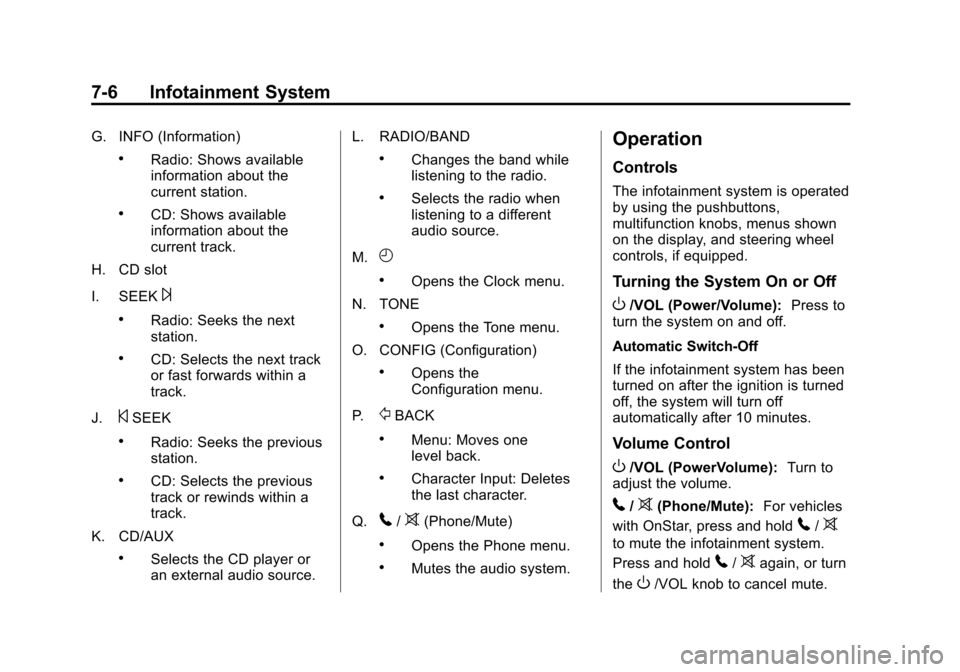
G. INFO (Information)
.Radio: Shows available
information about the
current station.
.CD: Shows available
information about the
current track.
H. CD slot
I. SEEK
¨
.Radio: Seeks the next
station.
.CD: Selects the next track
or fast forwards within a
track.
J.
©SEEK
.Radio: Seeks the previous
station.
.CD: Selects the previous
track or rewinds within a
track.
K. CD/AUX
.Selects the CD player or
an external audio source. L. RADIO/BAND
.Changes the band while
listening to the radio.
.Selects the radio when
listening to a different
audio source.
M.
H
.Opens the Clock menu.
N. TONE
.Opens the Tone menu.
O. CONFIG (Configuration)
.Opens the
Configuration menu.
P.
/BACK
.Menu: Moves one
level back.
.Character Input: Deletes
the last character.
Q.
5/>(Phone/Mute)
.Opens the Phone menu.
.Mutes the audio system.
Operation
Controls
The infotainment system is operated
by using the pushbuttons,
multifunction knobs, menus shown
on the display, and steering wheel
controls, if equipped.
Turning the System On or Off
O/VOL (Power/Volume): Press to
turn the system on and off.
Automatic Switch‐Off
If the infotainment system has been
turned on after the ignition is turned
off, the system will turn off
automatically after 10 minutes.
Volume Control
O/VOL (PowerVolume): Turn to
adjust the volume.
5/>(Phone/Mute): For vehicles
with OnStar, press and hold
5/>
to mute the infotainment system.
Press and hold
5/>again, or turn
the
O/VOL knob to cancel mute.
Page 146 of 352
Black plate (12,1)Chevrolet Sonic Owner Manual - 2012
7-12 Infotainment System
MENU/TUNE:Turn to go to the
next XM channel.
Storing an XM Channel
Drivers are encouraged to set up
XM channel favorites while the
vehicle is not moving. Tune to
favorite stations using the
pushbuttons, favorites button, and
steering wheel controls. See
Defensive Driving on page 9‑3.
A maximum of 36 stations can be
programmed as favorites using the
six pushbuttons positioned below
the radio station frequency labels
and by using the radio favorites
page button (FAV 1‐2‐3 button).
Press the FAV 1‐2‐3 button to go
through up to six pages of favorites,
each having six favorite stations
available per page. If Automatic
Store is used, then four pages of
favorites are available. Each page
of favorites can contain any
combination of AM, FM, or XM
channels. To store an XM channel
as a favorite:
1. Tune in the desired channel. 2. Press and release the FAV 1‐2‐3
button to display the page where
the channel is to be stored.
3. Press and hold one of the six numbered pushbuttons until a
beep sounds. When the
pushbutton is pressed and
released, the channel that was
set will return.
4. Repeat Steps 1 through 3 for each XM channel to be stored
as a favorite.
To set up the number of favorites
pages:
1. Press and hold FAV 1‐2‐3 until the radio setup menu displays.
2. Select the desired number of favorites pages by pressing the
pushbutton located below the
displayed page numbers.
3. Press FAV 1‐2‐3 to return to the original main radio screen
showing the radio frequency
tabs and to begin the process of programming favorites for the
chosen number of numbered
pages.XM Radio Messages
UPDATING:
The encryption code
in the receiver is being updated, and
no action is required. This process
should take no longer than
30 seconds.
NO SIGNAL: The system is
functioning correctly, but the vehicle
is in a location that is blocking the
XM signal. When the vehicle is
moved into an open area, the signal
should return.
LOADING: The audio system is
acquiring and processing audio and
text data. No action is needed. This
message should disappear shortly.
OFF AIR: This channel is not
currently in service. Tune in to
another channel.
CH UNAVAILABLE: This
previously assigned channel is no
longer assigned. Tune to another
Page 150 of 352
Black plate (16,1)Chevrolet Sonic Owner Manual - 2012
7-16 Infotainment System
Searching for MP3 Tracks
The search feature may take some
time to display the information after
reading the disc due to the amount
of information stored on the disc.
FM automatically plays while the
disc is being read.
Tracks can be searched by:
.Playlists
.Artists
.Albums
.Song Titles
.Genres
.Folder View
To search for tracks:
1. Turn the MENU/TUNE knob.
2. Select Search.
3. Select: Playlists, Artists, Albums, Song Titles, Genres,
or Folder View.
4. Select the track.
Auxiliary Devices
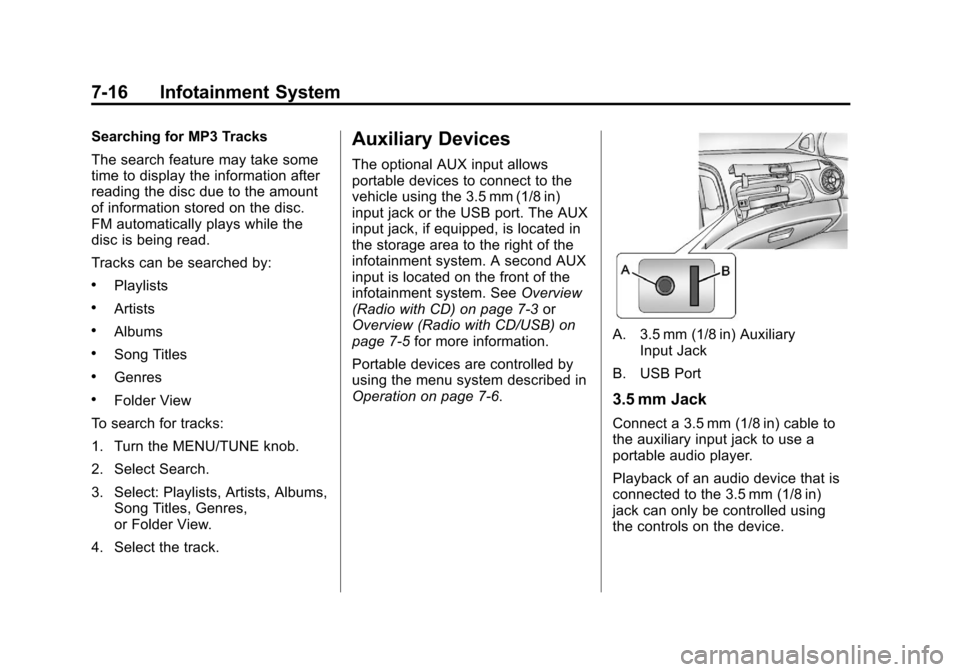
The optional AUX input allows
portable devices to connect to the
vehicle using the 3.5 mm (1/8 in)
input jack or the USB port. The AUX
input jack, if equipped, is located in
the storage area to the right of the
infotainment system. A second AUX
input is located on the front of the
infotainment system. See Overview
(Radio with CD) on page 7‑3 or
Overview (Radio with CD/USB) on
page 7‑5 for more information.
Portable devices are controlled by
using the menu system described in
Operation on page 7‑6.
A. 3.5 mm (1/8 in) Auxiliary Input Jack
B. USB Port
3.5 mm Jack
Connect a 3.5 mm (1/8 in) cable to
the auxiliary input jack to use a
portable audio player.
Playback of an audio device that is
connected to the 3.5 mm (1/8 in)
jack can only be controlled using
the controls on the device.
Page 155 of 352
Black plate (21,1)Chevrolet Sonic Owner Manual - 2012
Infotainment System 7-21
How to Speak:Speak clearly in a
calm and natural voice.
Audio System
When using the Bluetooth system,
sound comes through the vehicle's
front audio system speakers and
overrides the audio system. Use
the
O/VOL knob during a call to
change the volume level. The
adjusted volume level remains in
memory for later calls. The system
maintains a minimum volume level.
Other Information
The Bluetooth®word mark and
logos are owned by the Bluetooth®
SIG, Inc. and any use of such marks
by General Motors is under license.
Other trademarks and trade names
are those of their respective owners.
See Radio Frequency Statement on
page 13‑15 for information
regarding Part 15 of the Federal
Communications Commission (FCC)
rules and Industry Canada
Standards RSS-GEN/210/220/310.
Bluetooth (Infotainment
Controls)
For information about how to
navigate the menu system using the
infotainment controls, see Operation
on page 7‑6.
Pairing
A Bluetooth‐enabled cell phone
must be paired to the Bluetooth
system and then connected to the
vehicle before it can be used. See
your cell phone manufacturer's user
guide for Bluetooth functions before
pairing the cell phone. If a Bluetooth
phone is not connected, calls will be
made using OnStar Hands‐Free
Calling, if available. See OnStar
Overview on page 14‑1 for more
information. Pairing Information
.A Bluetooth phone with MP3
capability can be paired to the
vehicle as a phone and an MP3
player at the same time.
.Up to five cell phones can be
paired to the Bluetooth system.
.The pairing process is disabled
when the vehicle is moving.
.Pairing only needs to be
completed once, unless the
pairing information on the cell
phone changes or the cell phone
is deleted from the system.
.Only one paired cell phone can
be connected to the Bluetooth
system at a time.
.If multiple paired cell phones are
within range of the system, the
system connects to the first
available paired cell phone in the
order that they were first paired
to the system. To link to a
different paired phone, see
“Linking to a Different Phone”
later in this section.
Page 350 of 352

Black plate (10,1)Chevrolet Sonic Owner Manual - 2012
i-10 INDEX
Satellite Radio . . . . . . . . . . . . . . . . . 7-11
Scheduling Appointments . . . . . . 13-7
Sealant Kit, Tire . . . . . . . . . . . . . . 10-60
SeatsAdjustment, Front . . . . . . . . . . . . . . 3-4
Head Restraints . . . . . . . . . . . . . . . 3-2
Heated Front . . . . . . . . . . . . . . . . . . 3-7
Rear . . . . . . . . . . . . . . . . . . . . . . . . . . . 3-8
Reclining Seatbacks . . . . . . . . . . . 3-5
Securing Child Restraints . . . . . . . . . . . . . . 3-47, 3-49
Security Vehicle . . . . . . . . . . . . . . . . . . . . . . . 2-11
Security, OnStar
®. . . . . . . . . . . . . . 14-2
Service Accessories and
Modifications . . . . . . . . . . . . . . . . 10-3
Doing Your Own Work . . . . . . . . 10-4
Engine Soon Light . . . . . . . . . . . . 5-13
Maintenance Records . . . . . . .11-16
Maintenance, General Information . . . . . . . . . . . . . . . . . . 11-1
Parts Identification Label . . . . . 12-1 Service (cont'd)
Publications Ordering
Information . . . . . . . . . . . . . . . . .13-11
Scheduling Appointments . . . . . 13-7
Vehicle Soon Light . . . . . . . . . . . . 5-15
Servicing the Airbag . . . . . . . . . . . 3-30
Shift Lock Control Function Check, Automatic
Transmission . . . . . . . . . . . . . . . . 10-26
Shifting Into Park . . . . . . . . . . . . . . . . . . . . . . 9-20
Out of Park . . . . . . . . . . . . . . . . . . . 9-21
Signals, Turn and Lane-Change . . . . . . . . . . . . . . . . . 6-4
Spare Tire Compact . . . . . . . . . . . . . . . . . . . . 10-73
Specifications and Capacities . . . . . . . . . . . . . . . . . . . . 12-2
Speed Sensitive Power Steering (SSPS) Warning
Light . . . . . . . . . . . . . . . . . . . . . . . . . 5-17
Speedometer . . . . . . . . . . . . . . . . . . . 5-9 StabiliTrak
OFF Light . . . . . . . . . . . . . . . . . . . . . 5-18
System . . . . . . . . . . . . . . . . . . . . . . . 9-31
Start Vehicle, Remote . . . . . . . . . . 2-4
Starter Switch Check . . . . . . . . . 10-25
Starting the Engine . . . . . . . 1-3, 9-17
Steering . . . . . . . . . . . . . . . . . . . . . . . . 9-4 Wheel Adjustment . . . . . . . . . . . . . 5-2
Wheel Controls . . . . . . . . . . . . . . . . 5-2
Stoplamps and Back-up Lamps Bulb Replacement . . . . . . . . . . 10-31
Storage Load Compartment . . . . . . . . . . . . 4-1
Storage Areas Cargo Cover . . . . . . . . . . . . . . . . . . . 4-2
Glove Box . . . . . . . . . . . . . . . . . . . . . 4-1
Instrument Panel . . . . . . . . . . . . . . 4-1
Storing the Tire Sealant and Compressor Kit . . . . . . . . . 10-67
Stuck Vehicle . . . . . . . . . . . . . . . . . . 9-10
Sun Visors . . . . . . . . . . . . . . . . . . . . . 2-16
Sunroof . . . . . . . . . . . . . . . . . . . . . . . . 2-17
Symbols . . . . . . . . . . . . . . . . . . . . . . . . . . iv
System Infotainment . . . . . . . . . . . . . . . . . . . 7-1