steering wheel CHEVROLET SONIC 2012 2.G User Guide
[x] Cancel search | Manufacturer: CHEVROLET, Model Year: 2012, Model line: SONIC, Model: CHEVROLET SONIC 2012 2.GPages: 352, PDF Size: 6.32 MB
Page 99 of 352
Black plate (1,1)Chevrolet Sonic Owner Manual - 2012
Instruments and Controls 5-1
Instruments and
Controls
Controls
Steering Wheel Adjustment . . . 5-2
Steering Wheel Controls . . . . . . 5-2
Horn . . . . . . . . . . . . . . . . . . . . . . . . . . 5-2
Windshield Wiper/Washer . . . . . 5-3
Rear Window Wiper/Washer . . . . . . . . . . . . . . . . . . . . . . 5-4
Compass . . . . . . . . . . . . . . . . . . . . . 5-4
Clock . . . . . . . . . . . . . . . . . . . . . . . . . 5-4
Power Outlets . . . . . . . . . . . . . . . . . 5-5
Cigarette Lighter . . . . . . . . . . . . . . 5-6
Ashtrays . . . . . . . . . . . . . . . . . . . . . . 5-6
Warning Lights, Gauges, and
Indicators
Warning Lights, Gauges, and Indicators . . . . . . . . . . . . . . . . . . . . 5-7
Instrument Cluster . . . . . . . . . . . . 5-8
Speedometer . . . . . . . . . . . . . . . . . 5-9
Odometer . . . . . . . . . . . . . . . . . . . . . 5-9
Trip Odometer . . . . . . . . . . . . . . . . . 5-9 Tachometer . . . . . . . . . . . . . . . . . . . 5-9
Fuel Gauge . . . . . . . . . . . . . . . . . . . 5-9
Safety Belt Reminders . . . . . . . 5-10
Airbag Readiness Light . . . . . . 5-11
Passenger Airbag Status
Indicator . . . . . . . . . . . . . . . . . . . . 5-12
Charging System Light . . . . . . 5-12
Malfunction Indicator Lamp . . . . . . . . . . . . . 5-13
Service Vehicle Soon Light . . . . . . . . . . . . . . . . . . . . . . . 5-15
Owner Manual Indicator . . . . . 5-15
Code Set Indicator . . . . . . . . . . . 5-15
Brake System Warning Light . . . . . . . . . . . . . . . . . . . . . . . 5-16
Antilock Brake System (ABS) Warning Light . . . . . . . . . . . . . . 5-16
Up-Shift Light . . . . . . . . . . . . . . . . 5-17
Speed Sensitive Power Steering (SSPS) Warning
Light . . . . . . . . . . . . . . . . . . . . . . . 5-17
Traction Off Light . . . . . . . . . . . . 5-17
StabiliTrak
®OFF Light . . . . . . . 5-18
Traction Control System (TCS)/StabiliTrak
®Light . . . . 5-18 Engine Coolant Temperature
Warning Light . . . . . . . . . . . . . . 5-18
Tire Pressure Light . . . . . . . . . . 5-19
Engine Oil Pressure Light . . . . 5-19
Low Fuel Warning Light . . . . . . 5-20
Immobilizer Light . . . . . . . . . . . . 5-20
Reduced Engine Power Light . . . . . . . . . . . . . . . . . . . . . . . 5-21
High-Beam On Light . . . . . . . . . 5-21
Daytime Running Lamps (DRL) Indicator Light . . . . . . . 5-21
Front Fog Lamp Light . . . . . . . . 5-21
Lamps On Reminder . . . . . . . . . 5-22
Cruise Control Light . . . . . . . . . 5-22
Door Ajar Light . . . . . . . . . . . . . . 5-22
Information Displays
Driver Information Center (DIC) . . . . . . . . . . . . . . . 5-23
Vehicle Messages
Vehicle Messages . . . . . . . . . . . 5-26
Vehicle Personalization
Vehicle Personalization . . . . . . 5-27
Page 100 of 352
Black plate (2,1)Chevrolet Sonic Owner Manual - 2012
5-2 Instruments and Controls
Controls
Steering Wheel
Adjustment
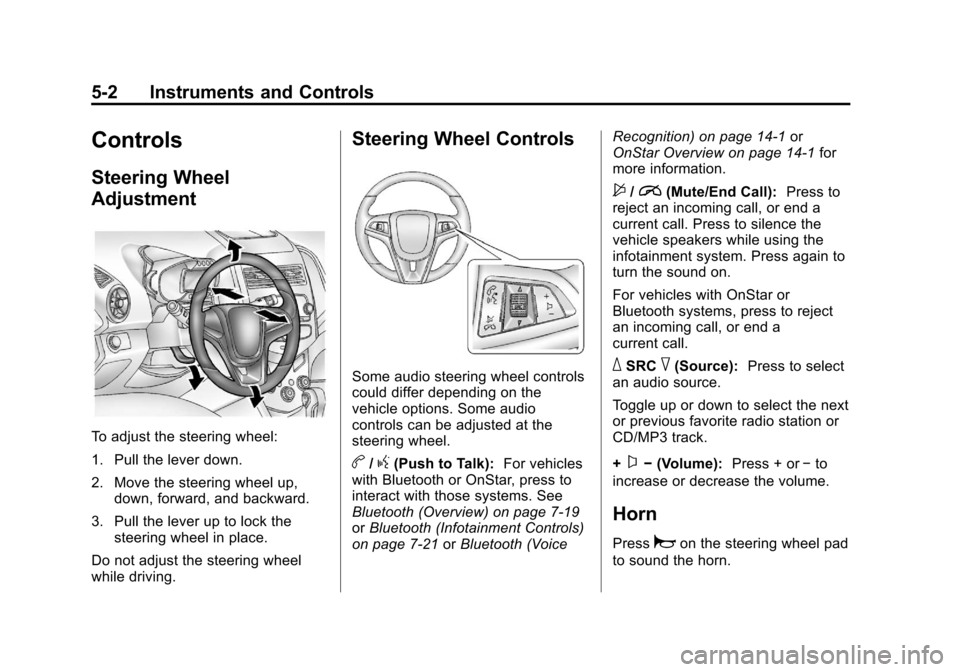
To adjust the steering wheel:
1. Pull the lever down.
2. Move the steering wheel up,down, forward, and backward.
3. Pull the lever up to lock the steering wheel in place.
Do not adjust the steering wheel
while driving.
Steering Wheel Controls
Some audio steering wheel controls
could differ depending on the
vehicle options. Some audio
controls can be adjusted at the
steering wheel.
b/g(Push to Talk): For vehicles
with Bluetooth or OnStar, press to
interact with those systems. See
Bluetooth (Overview) on page 7‑19
or Bluetooth (Infotainment Controls)
on page 7‑21 orBluetooth (Voice Recognition) on page 14‑1
or
OnStar Overview on page 14‑1 for
more information.
$/i(Mute/End Call): Press to
reject an incoming call, or end a
current call. Press to silence the
vehicle speakers while using the
infotainment system. Press again to
turn the sound on.
For vehicles with OnStar or
Bluetooth systems, press to reject
an incoming call, or end a
current call.
_SRC^(Source): Press to select
an audio source.
Toggle up or down to select the next
or previous favorite radio station or
CD/MP3 track.
+
x− (Volume): Press + or−to
increase or decrease the volume.
Horn
Pressaon the steering wheel pad
to sound the horn.
Page 112 of 352
Black plate (14,1)Chevrolet Sonic Owner Manual - 2012
5-14 Instruments and Controls
could damage the emission control
system on the vehicle. Diagnosis
and service might be required.
To prevent more serious damage to
the vehicle:
.Reduce vehicle speed.
.Avoid hard accelerations.
.Avoid steep uphill grades.
If the light continues to flash, stop
and park the vehicle. Turn the
vehicle off, wait at least 10 seconds,
and restart the engine. If the light is
still flashing, follow the previous
steps and see your dealer for
service as soon as possible.
Light On Steady: An emission
control system malfunction has
been detected on the vehicle.
Diagnosis and service might be
required.
The following may correct an
emission system malfunction:
.Check that the fuel cap is fully
installed. See Filling the Tank on
page 9‑37. The diagnostic system can determine if the fuel
cap has been left off or
improperly installed. A loose or
missing fuel cap allows fuel to
evaporate into the atmosphere.
A few driving trips with the cap
properly installed should turn the
light off.
.Check that good quality fuel is
used. Poor fuel quality causes
the engine not to run as
efficiently as designed and may
cause stalling after start-up,
stalling when the vehicle is
changed into gear, misfiring,
hesitation on acceleration,
or stumbling on acceleration.
These conditions might go away
once the engine is warmed up.
If one or more of these conditions
occurs, change the fuel brand used.
It will require at least one full tank of
the proper fuel to turn the light off.
See Recommended Fuel on
page 9‑35. If none of the above have made the
light turn off, your dealer can check
the vehicle. The dealer has the
proper test equipment and
diagnostic tools to fix any
mechanical or electrical problems
that might have developed.Emissions Inspection and
Maintenance Programs
Some local governments may have
programs to inspect the on-vehicle
emission control equipment. For the
inspection, the emission system test
equipment is connected to the
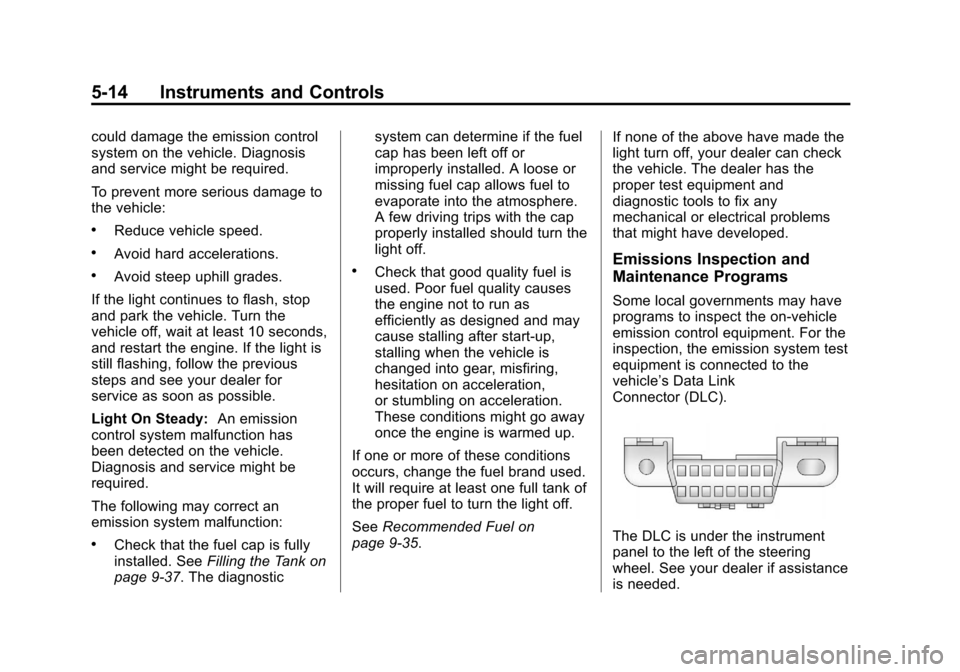
vehicle’s Data Link
Connector (DLC).
The DLC is under the instrument
panel to the left of the steering
wheel. See your dealer if assistance
is needed.
Page 115 of 352
Black plate (17,1)Chevrolet Sonic Owner Manual - 2012
Instruments and Controls 5-17
work. If the regular brake system
warning light is also on, the antilock
brakes will not work and there is a
problem with the regular brakes.
SeeBrake System Warning Light on
page 5‑16.
The ABS warning light will come on
briefly when the ignition is turned to
ON/RUN. This is normal. If the light
does not come on then, have it fixed
so it will be ready to warn if there is
a problem.
Up-Shift Light
For manual transmission vehicles,
there is an up-shift light that comes
on in the lower DIC area. It shows
when to shift to the next higher gear
for best fuel economy. See
Manual Transmission on
page 9‑26 for more information.
Speed Sensitive Power
Steering (SSPS) Warning
Light
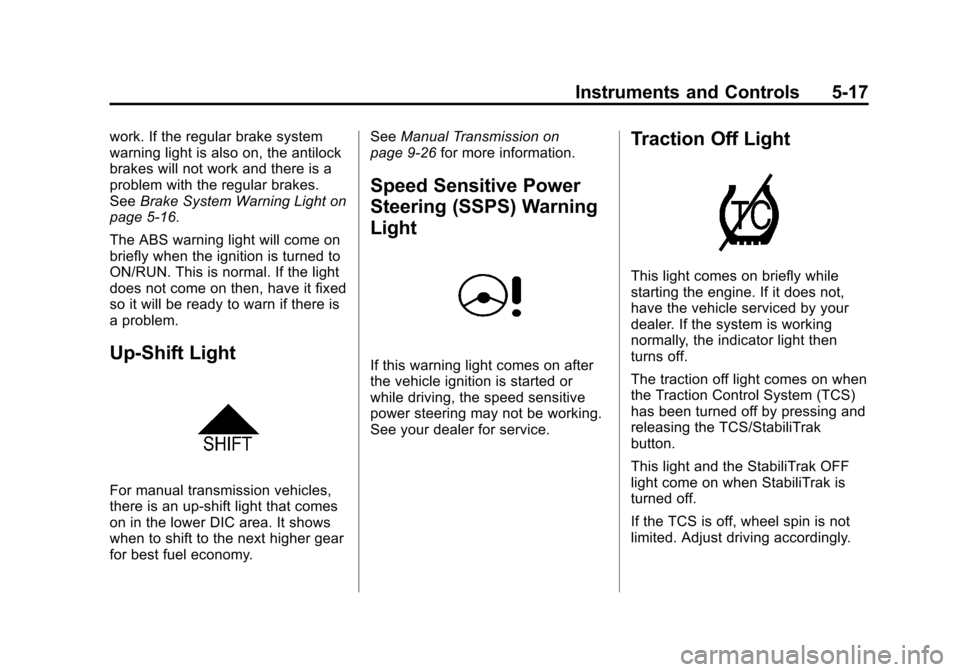
If this warning light comes on after
the vehicle ignition is started or
while driving, the speed sensitive
power steering may not be working.
See your dealer for service.
Traction Off Light
This light comes on briefly while
starting the engine. If it does not,
have the vehicle serviced by your
dealer. If the system is working
normally, the indicator light then
turns off.
The traction off light comes on when
the Traction Control System (TCS)
has been turned off by pressing and
releasing the TCS/StabiliTrak
button.
This light and the StabiliTrak OFF
light come on when StabiliTrak is
turned off.
If the TCS is off, wheel spin is not
limited. Adjust driving accordingly.
Page 121 of 352
Black plate (23,1)Chevrolet Sonic Owner Manual - 2012
Instruments and Controls 5-23
Information Displays
Driver Information
Center (DIC)
The DIC displays information about
your vehicle. It also displays
warning messages if a system
problem is detected. SeeVehicle
Messages on page 5‑26 for more
information. All messages appear in
the DIC display located in the center
of the instrument panel cluster.
DIC Operation and Displays
The DIC has different displays
which can be accessed by using the
DIC buttons on the turn signal lever
on the left side of the steering
wheel. The DIC displays trip, fuel,
and warning messages if a system
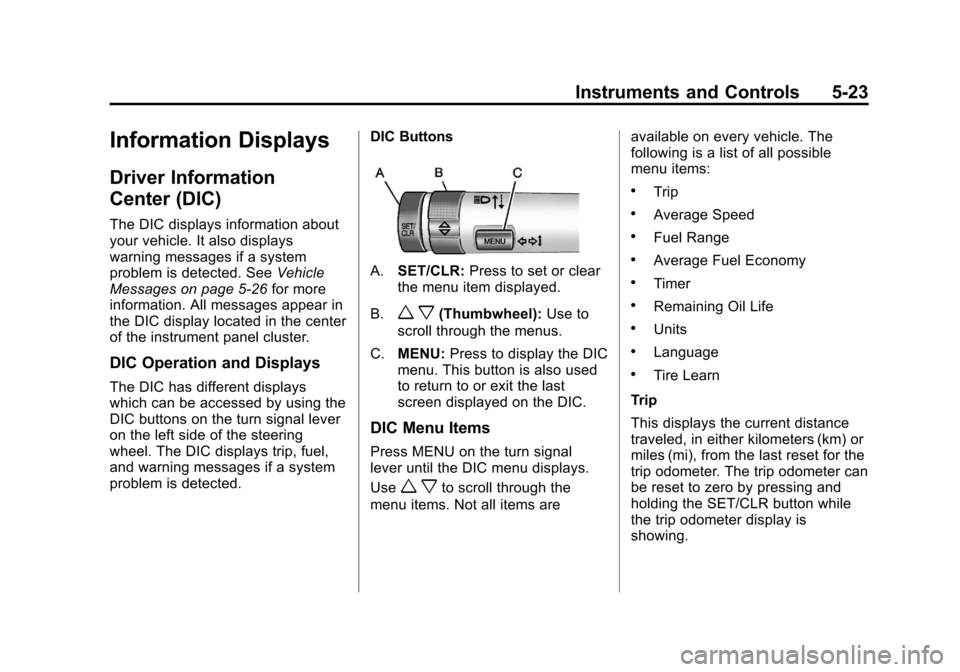
problem is detected. DIC Buttons
A.
SET/CLR: Press to set or clear
the menu item displayed.
B.
w x(Thumbwheel): Use to
scroll through the menus.
C. MENU: Press to display the DIC
menu. This button is also used
to return to or exit the last
screen displayed on the DIC.
DIC Menu Items
Press MENU on the turn signal
lever until the DIC menu displays.
Use
w xto scroll through the
menu items. Not all items are available on every vehicle. The
following is a list of all possible
menu items:
.Trip
.Average Speed
.Fuel Range
.Average Fuel Economy
.Timer
.Remaining Oil Life
.Units
.Language
.Tire Learn
Trip
This displays the current distance
traveled, in either kilometers (km) or
miles (mi), from the last reset for the
trip odometer. The trip odometer can
be reset to zero by pressing and
holding the SET/CLR button while
the trip odometer display is
showing.
Page 133 of 352
Black plate (5,1)Chevrolet Sonic Owner Manual - 2012
Lighting 6-5
Interior Lighting
Instrument Panel
Illumination Control
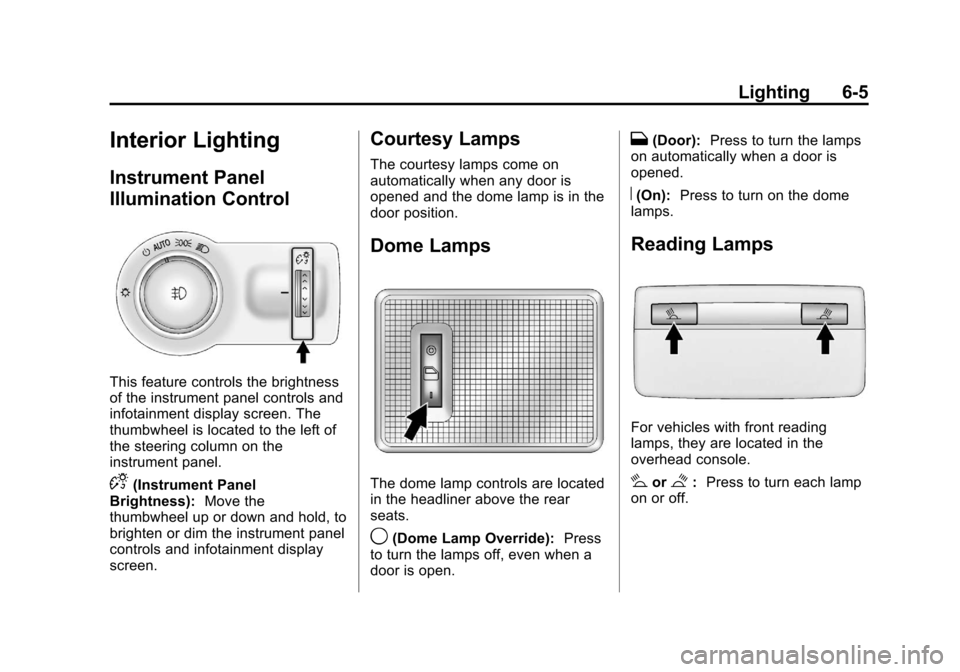
This feature controls the brightness
of the instrument panel controls and
infotainment display screen. The
thumbwheel is located to the left of
the steering column on the
instrument panel.
D(Instrument Panel
Brightness): Move the
thumbwheel up or down and hold, to
brighten or dim the instrument panel
controls and infotainment display
screen.
Courtesy Lamps
The courtesy lamps come on
automatically when any door is
opened and the dome lamp is in the
door position.
Dome Lamps
The dome lamp controls are located
in the headliner above the rear
seats.
9(Dome Lamp Override): Press
to turn the lamps off, even when a
door is open.
H(Door): Press to turn the lamps
on automatically when a door is
opened.
R(On): Press to turn on the dome
lamps.
Reading Lamps
For vehicles with front reading
lamps, they are located in the
overhead console.
#or$: Press to turn each lamp
on or off.
Page 140 of 352
Black plate (6,1)Chevrolet Sonic Owner Manual - 2012
7-6 Infotainment System
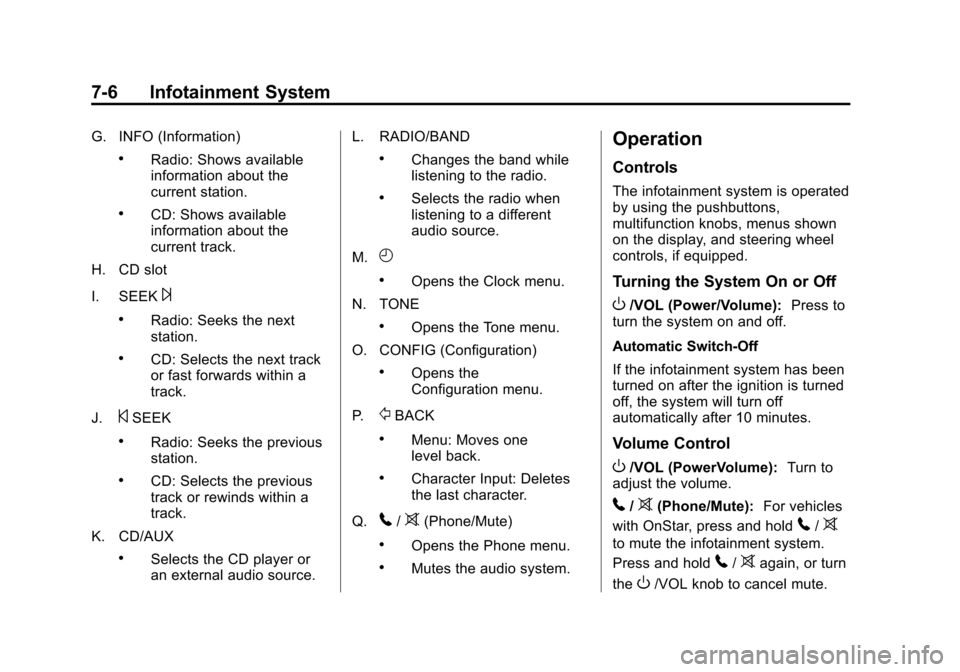
G. INFO (Information)
.Radio: Shows available
information about the
current station.
.CD: Shows available
information about the
current track.
H. CD slot
I. SEEK
¨
.Radio: Seeks the next
station.
.CD: Selects the next track
or fast forwards within a
track.
J.
©SEEK
.Radio: Seeks the previous
station.
.CD: Selects the previous
track or rewinds within a
track.
K. CD/AUX
.Selects the CD player or
an external audio source. L. RADIO/BAND
.Changes the band while
listening to the radio.
.Selects the radio when
listening to a different
audio source.
M.
H
.Opens the Clock menu.
N. TONE
.Opens the Tone menu.
O. CONFIG (Configuration)
.Opens the
Configuration menu.
P.
/BACK
.Menu: Moves one
level back.
.Character Input: Deletes
the last character.
Q.
5/>(Phone/Mute)
.Opens the Phone menu.
.Mutes the audio system.
Operation
Controls
The infotainment system is operated
by using the pushbuttons,
multifunction knobs, menus shown
on the display, and steering wheel
controls, if equipped.
Turning the System On or Off
O/VOL (Power/Volume): Press to
turn the system on and off.
Automatic Switch‐Off
If the infotainment system has been
turned on after the ignition is turned
off, the system will turn off
automatically after 10 minutes.
Volume Control
O/VOL (PowerVolume): Turn to
adjust the volume.
5/>(Phone/Mute): For vehicles
with OnStar, press and hold
5/>
to mute the infotainment system.
Press and hold
5/>again, or turn
the
O/VOL knob to cancel mute.
Page 146 of 352
Black plate (12,1)Chevrolet Sonic Owner Manual - 2012
7-12 Infotainment System
MENU/TUNE:Turn to go to the
next XM channel.
Storing an XM Channel
Drivers are encouraged to set up
XM channel favorites while the
vehicle is not moving. Tune to
favorite stations using the
pushbuttons, favorites button, and
steering wheel controls. See
Defensive Driving on page 9‑3.
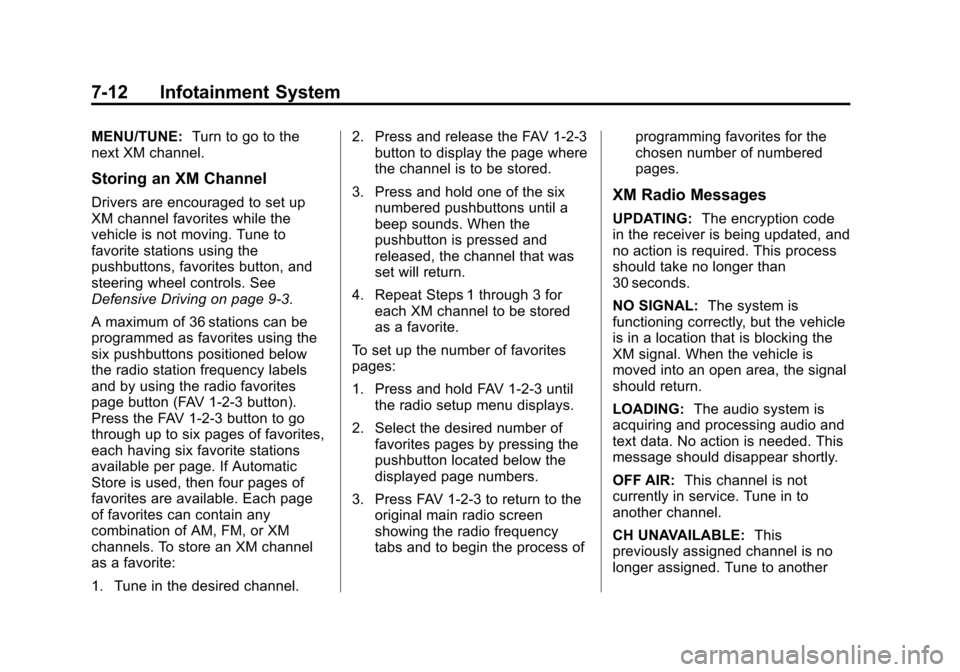
A maximum of 36 stations can be
programmed as favorites using the
six pushbuttons positioned below
the radio station frequency labels
and by using the radio favorites
page button (FAV 1‐2‐3 button).
Press the FAV 1‐2‐3 button to go
through up to six pages of favorites,
each having six favorite stations
available per page. If Automatic
Store is used, then four pages of
favorites are available. Each page
of favorites can contain any
combination of AM, FM, or XM
channels. To store an XM channel
as a favorite:
1. Tune in the desired channel. 2. Press and release the FAV 1‐2‐3
button to display the page where
the channel is to be stored.
3. Press and hold one of the six numbered pushbuttons until a
beep sounds. When the
pushbutton is pressed and
released, the channel that was
set will return.
4. Repeat Steps 1 through 3 for each XM channel to be stored
as a favorite.
To set up the number of favorites
pages:
1. Press and hold FAV 1‐2‐3 until the radio setup menu displays.
2. Select the desired number of favorites pages by pressing the
pushbutton located below the
displayed page numbers.
3. Press FAV 1‐2‐3 to return to the original main radio screen
showing the radio frequency
tabs and to begin the process of programming favorites for the
chosen number of numbered
pages.XM Radio Messages
UPDATING:
The encryption code
in the receiver is being updated, and
no action is required. This process
should take no longer than
30 seconds.
NO SIGNAL: The system is
functioning correctly, but the vehicle
is in a location that is blocking the
XM signal. When the vehicle is
moved into an open area, the signal
should return.
LOADING: The audio system is
acquiring and processing audio and
text data. No action is needed. This
message should disappear shortly.
OFF AIR: This channel is not
currently in service. Tune in to
another channel.
CH UNAVAILABLE: This
previously assigned channel is no
longer assigned. Tune to another
Page 154 of 352
Black plate (20,1)Chevrolet Sonic Owner Manual - 2012
7-20 Infotainment System
.Pair cell phone(s) to the vehicle.
The system may not work with
all cell phones. See“Pairing”in
this section for more information.
.If the cell phone has voice
dialing capability, learn to use
that feature to access the
address book or contact list. See
“Voice Pass-Thru” in this section
for more information.
.See “Storing and Deleting Phone
Numbers” in this section for
more information.
{WARNING
When using a cell phone, it can
be distracting to look too long or
too often at the screen of the
phone or the infotainment
(navigation) system. Taking your
eyes off the road too long or
too often could cause a crash
resulting in injury or death. Focus
your attention on driving. Vehicles with a Bluetooth system
can use a Bluetooth‐capable cell
phone with a Hands‐Free Profile to
make and receive phone calls. The
infotainment system and voice
recognition are used to control the
system. The system can be used
while in ON/RUN or ACC/
ACCESSORY. The range of the
Bluetooth system can be up to 9.1 m
(30 ft). Not all phones support all
functions and not all phones work
with the Bluetooth system. See
www.gm.com/bluetooth for more
information about compatible
phones.Bluetooth Controls
Use the buttons located on the
infotainment system and the
steering wheel to operate the
Bluetooth system.
Steering Wheel Controls
b/g(Push to Talk):
Press to
answer incoming calls, confirm
system information, and start voice
recognition.
$/i(Mute/End Call): Press to
end a call, reject a call, or cancel an
operation.
Infotainment System Controls
If equipped, the infotainment system
allows certain controls to be
selected on the infotainment display.
For information about how to
navigate the menu system using the
infotainment controls, see Operation
on page 7‑6.
5/>(Phone): Press to enter the
Phone main menu.
Voice Recognition
The voice recognition system uses
commands to control the system
and dial phone numbers.
Noise: The system may not
recognize voice commands if there
is too much background noise.
When to Speak: A tone sounds to
indicate that the system is ready for
a voice command. Wait for the tone
and then speak.
Page 158 of 352
Black plate (24,1)Chevrolet Sonic Owner Manual - 2012
7-24 Infotainment System
Declining a Call
Turn the MENU/TUNE knob to
“Decline”and press the MENU/
TUNE knob to decline the call.
Switching Between Calls (Call
Waiting Calls Only)
To switch between calls:
1. Turn or press the MENU/ TUNE knob.
2. Select Switch Call from the menu.
Conference Calling
Conference calling and three‐way
calling must be supported on the
Bluetooth phone and enabled by the
wireless service carrier to work.
To start a conference while in a
current call:
1. Turn or press the MENU/TUNE knob.
2. Select Enter Number. 3. Enter the character sequence
then select Call. See “Entering a
Character Sequence” in
Operation on page 7‑6 for more
information.
4. After the call has been placed, turn or press the MENU/TUNE
knob and choose Merge Calls.
5. To add more callers to the conference call, repeat Steps 1
through 4. The number of callers
that can be added is limited by
your wireless service carrier.Ending a Call
Turn or press the MENU/TUNE
knob and select Hang Up.
Muting a Call
To Mute a Call
Turn or press the MENU/TUNE
knob and select Mute Call.
To Cancel Mute
Turn or press the MENU/TUNE
knob and select Mute Call.
Dual Tone Multi-Frequency
(DTMF) Tones
The in‐vehicle Bluetooth system can
send numbers during a call. This is
used when calling a menu‐driven
phone system.
1. Turn or press the MENU/TUNEknob and select Enter Number.
2. Enter the character sequence. See “Entering a Character
Sequence” inOperation on
page 7‑6 for more information.
Bluetooth (Voice
Recognition)
Using Voice Recognition
To use voice recognition, press theb/gbutton located on the steering
wheel. Use the commands below
for the various voice features. For
additional information, say "Help"
while you are in a voice
recognition menu.