door lock CHEVROLET SONIC 2012 2.G Owner's Manual
[x] Cancel search | Manufacturer: CHEVROLET, Model Year: 2012, Model line: SONIC, Model: CHEVROLET SONIC 2012 2.GPages: 352, PDF Size: 6.32 MB
Page 126 of 352
Black plate (28,1)Chevrolet Sonic Owner Manual - 2012
5-28 Instruments and Controls
Language
Select the Language menu and the
following will be displayed:
.English
.French
.Spanish
Turn the MENU/TUNE knob to
select the language. Press MENU/
TUNE to confirm and go back to the
last menu.
Exterior Lighting
Select the Lighting menu and the
following will be displayed:
.Exterior Vehicle Locator Lights
.Exit Lighting
Exterior Vehicle Locator Lights
This allows selection of whether the
exterior lamps will turn on when
unlocking the vehicle.
Press MENU/TUNE when Exterior
Vehicle Locator Lights is
highlighted. Turn the MENU/TUNE knob to select On or Off. Press
MENU/TUNE to confirm and go
back to the last menu.
Exit Lighting
Press MENU/TUNE when Exit
Lighting is highlighted. Turn the
MENU/TUNE knob to select Off,
30 Seconds, 1 Minute, or 2 Minutes.
Press MENU/TUNE to confirm and
go back to the last menu.
Power Door Locks
Select Power Door Locks and the
following will be displayed:
.Auto Door Unlock
.Unlock Door Anti Lock Out
.Delayed Door Lock
Auto Door Unlock
This allows selection of which of the
doors will automatically unlock when
the vehicle is shifted into P (Park) or
the key is removed. Press MENU/TUNE when Auto
Door Unlock is highlighted. Turn the
MENU/TUNE knob to select All
Doors, Driver Door, or Off. Press
MENU/TUNE to confirm and go
back to the last menu.
Unlock Door Anti Lock Out
When on, this feature will keep the
driver door from locking when the
door is open. If off is selected, the
Unlock Door Anti Lock Out menu
will be available and the door will
lock as programmed through
this menu.
Press MENU/TUNE when Unlock
Door Anti Lock Out is highlighted.
Turn the MENU/TUNE knob to
select On or Off. Press MENU/
TUNE to confirm and go back to the
last menu.
Page 127 of 352
Black plate (29,1)Chevrolet Sonic Owner Manual - 2012
Instruments and Controls 5-29
Delayed Door Lock
When on, this feature will delay
the locking of the doors until
five seconds after the last door is
closed. Three chimes will signal that
delayed locking is in use. Pressing
either
QorKon the RKE
transmitter twice will override the
delayed locking feature and
immediately lock all of the doors.
Press MENU/TUNE when Delayed
Door Lock is highlighted. Turn the
MENU/TUNE knob to select On or
Off. Press MENU/TUNE to confirm
and go back to the last menu.
Remote Lock, Unlock, Start
Select Remote Lock, Unlock, Start
and the following will be displayed:
.Remote Unlock Feedback
.Remote Lock Feedback
.Remote Door Unlock Remote Unlock Feedback
When on, the exterior lamps will
flash when unlocking the vehicle
with the RKE transmitter.
Press MENU/TUNE when Remote
Unlock Feedback is highlighted.
Turn the MENU/TUNE knob to
select On or Off. Press MENU/
TUNE to confirm and go back to
the last menu.
Remote Lock Feedback
This allows selection of what type of
feedback is given when locking the
vehicle with the RKE transmitter.
Press MENU/TUNE when Remote
Lock Feedback is highlighted. Turn
the MENU/TUNE knob to select
Lights and Horn, Lights Only, Horn
Only, or Off. Press MENU/TUNE to
confirm and go back to the
last menu.
Remote Door Unlock
This allows selection of which doors
will unlock when pressing
Kon the
RKE transmitter.
Press MENU/TUNE when Remote
Door Unlock is highlighted. Turn the
MENU/TUNE knob to select All
Doors or Driver Door Only. When
set to Driver Door Only, the driver
door will unlock the first time
Kis
pressed and all doors will unlock
when
Kis pressed a second time.
When set to All Doors, all of the
doors will unlock at the first press of
K. Press MENU/TUNE to confirm
and go back to the last menu.
Return to Factory Settings
Select Return to Factory Settings
to return all of the vehicle
personalization to the default
settings. Turn the MENU/TUNE
knob to select Yes or No. Press
MENU/TUNE to confirm and go
back to the last menu.
Page 185 of 352
Black plate (17,1)Chevrolet Sonic Owner Manual - 2012
Driving and Operating 9-17
If you leave the key in the ACC/
ACCESSORY or ON/RUN position
with the engine off, the battery could
be drained. You may not be able to
start the vehicle if the battery is
allowed to drain for an extended
period of time.
D (START):This is the position that
starts the engine. When the engine
starts, release the key. The ignition
switch returns to ON/RUN for
driving.
A warning tone will sound when the
driver door is opened, the ignition is
in ACC/ACCESSORY or LOCK/
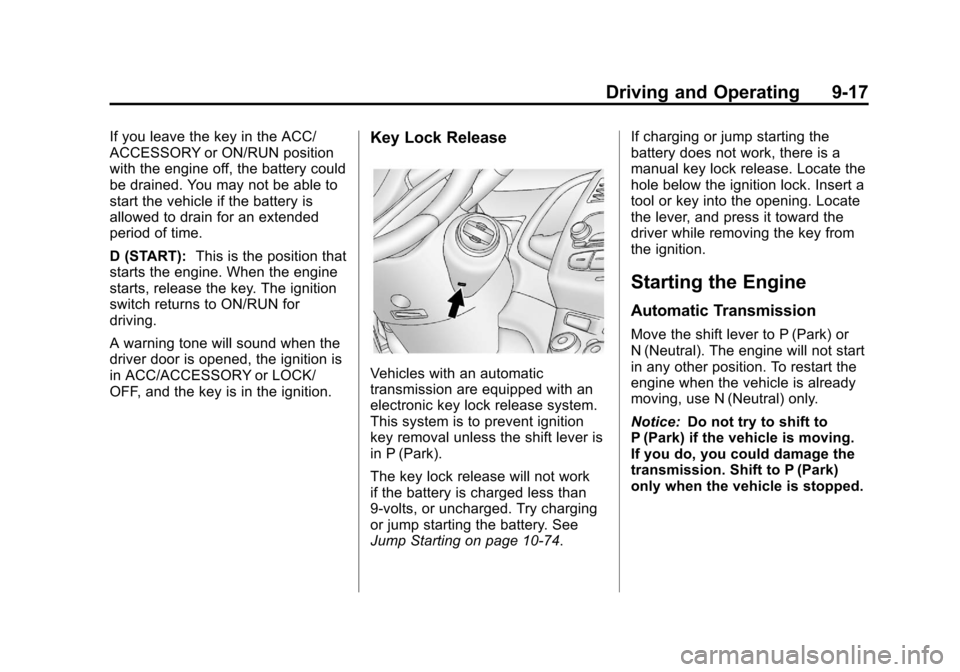
OFF, and the key is in the ignition.Key Lock Release
Vehicles with an automatic
transmission are equipped with an
electronic key lock release system.
This system is to prevent ignition
key removal unless the shift lever is
in P (Park).
The key lock release will not work
if the battery is charged less than
9‐volts, or uncharged. Try charging
or jump starting the battery. See
Jump Starting on page 10‑74. If charging or jump starting the
battery does not work, there is a
manual key lock release. Locate the
hole below the ignition lock. Insert a
tool or key into the opening. Locate
the lever, and press it toward the
driver while removing the key from
the ignition.
Starting the Engine
Automatic Transmission
Move the shift lever to P (Park) or
N (Neutral). The engine will not start
in any other position. To restart the
engine when the vehicle is already
moving, use N (Neutral) only.
Notice:
Do not try to shift to
P (Park) if the vehicle is moving.
If you do, you could damage the
transmission. Shift to P (Park)
only when the vehicle is stopped.
Page 187 of 352
Black plate (19,1)Chevrolet Sonic Owner Manual - 2012
Driving and Operating 9-19
Engine Heater
The engine heater can provide
easier starting and better fuel
economy during engine warm-up in
cold weather conditions at or below
−18°C (0°F). Vehicles with an
engine heater should be plugged in
at least four hours before starting.
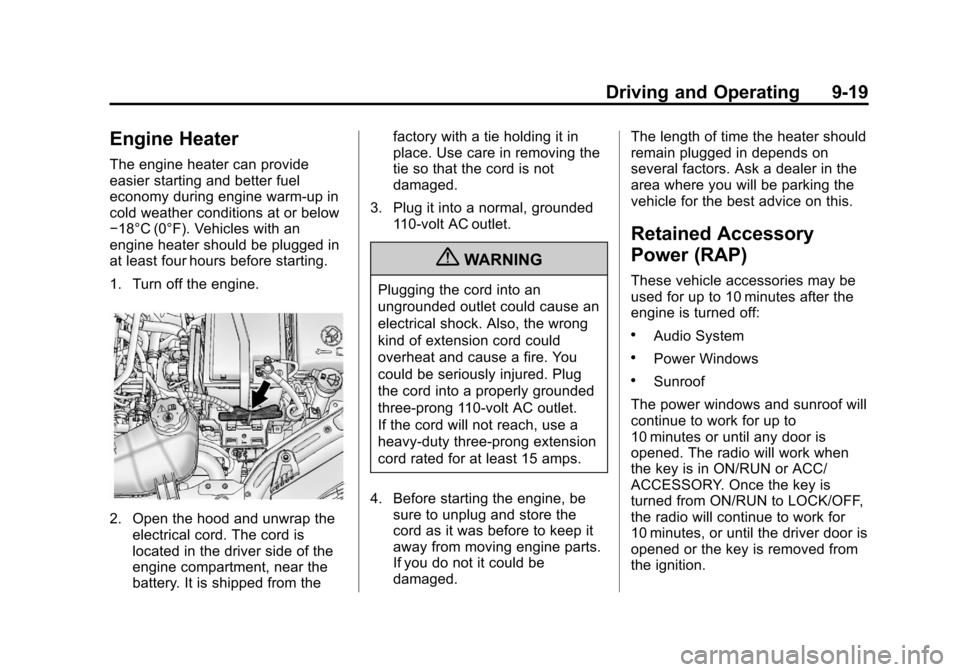
1. Turn off the engine.
2. Open the hood and unwrap theelectrical cord. The cord is
located in the driver side of the
engine compartment, near the
battery. It is shipped from the factory with a tie holding it in
place. Use care in removing the
tie so that the cord is not
damaged.
3. Plug it into a normal, grounded 110-volt AC outlet.
{WARNING
Plugging the cord into an
ungrounded outlet could cause an
electrical shock. Also, the wrong
kind of extension cord could
overheat and cause a fire. You
could be seriously injured. Plug
the cord into a properly grounded
three-prong 110-volt AC outlet.
If the cord will not reach, use a
heavy-duty three-prong extension
cord rated for at least 15 amps.
4. Before starting the engine, be sure to unplug and store the
cord as it was before to keep it
away from moving engine parts.
If you do not it could be
damaged. The length of time the heater should
remain plugged in depends on
several factors. Ask a dealer in the
area where you will be parking the
vehicle for the best advice on this.
Retained Accessory
Power (RAP)
These vehicle accessories may be
used for up to 10 minutes after the
engine is turned off:
.Audio System
.Power Windows
.Sunroof
The power windows and sunroof will
continue to work for up to
10 minutes or until any door is
opened. The radio will work when
the key is in ON/RUN or ACC/
ACCESSORY. Once the key is
turned from ON/RUN to LOCK/OFF,
the radio will continue to work for
10 minutes, or until the driver door is
opened or the key is removed from
the ignition.
Page 189 of 352
Black plate (21,1)Chevrolet Sonic Owner Manual - 2012
Driving and Operating 9-21
the driver seat. To find out how, see
“Shifting Into Park (Automatic
Transmission)”in this section.
When you are ready to drive, move
the shift lever out of P (Park) before
you release the parking brake.
If torque lock does occur, you may
need to have another vehicle push
yours a little uphill to take some of
the pressure from the parking pawl
in the transmission, so you can pull
the shift lever out of P (Park).
Shifting out of Park
(Automatic Transmission)
This vehicle is equipped with a shift
lock control. The shift lock control is
designed to:
.Prevent ignition key removal
unless the shift lever is in
P (Park) with the shift lever
button fully released.
.Prevent movement of the shift
lever out of P (Park) unless the
ignition is in ON/RUN and the
brake pedal is applied. The shift lock control is always
functional except in the case of an
uncharged or low voltage (less than
9‐volt) battery.
If the vehicle has an uncharged
battery or a battery with low voltage,
try charging or jump starting the
battery. See
Jump Starting on
page 10‑74.
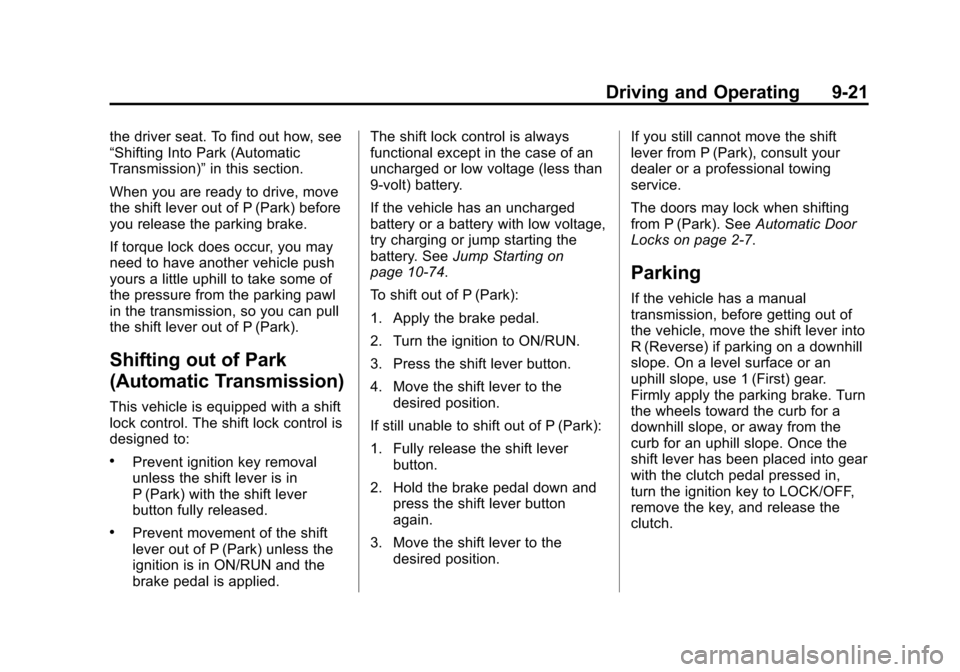
To shift out of P (Park):
1. Apply the brake pedal.
2. Turn the ignition to ON/RUN.
3. Press the shift lever button.
4. Move the shift lever to the
desired position.
If still unable to shift out of P (Park):
1. Fully release the shift lever button.
2. Hold the brake pedal down and press the shift lever button
again.
3. Move the shift lever to the desired position. If you still cannot move the shift
lever from P (Park), consult your
dealer or a professional towing
service.
The doors may lock when shifting
from P (Park). See
Automatic Door
Locks on page 2‑7.
Parking
If the vehicle has a manual
transmission, before getting out of
the vehicle, move the shift lever into
R (Reverse) if parking on a downhill
slope. On a level surface or an
uphill slope, use 1 (First) gear.
Firmly apply the parking brake. Turn
the wheels toward the curb for a
downhill slope, or away from the
curb for an uphill slope. Once the
shift lever has been placed into gear
with the clutch pedal pressed in,
turn the ignition key to LOCK/OFF,
remove the key, and release the
clutch.
Page 205 of 352
Black plate (37,1)Chevrolet Sonic Owner Manual - 2012
Driving and Operating 9-37
Notice:This vehicle was not
designed for fuel that contains
methanol. Do not use fuel
containing methanol. It can
corrode metal parts in the fuel
system and also damage plastic
and rubber parts. That damage
would not be covered under the
vehicle warranty.
Some gasolines that are
not reformulated for low
emissions can contain an
octane-enhancing additive called
methylcyclopentadienyl manganese
tricarbonyl (MMT); ask the attendant
where you buy gasoline whether the
fuel contains MMT. We recommend
against the use of such gasolines.
Fuels containing MMT can reduce
spark plug life and affect emission
control system performance. The
malfunction indicator lamp might
turn on. If this occurs, return to your
dealer for service.Filling the Tank
{WARNING
Fuel vapor burns violently and a
fuel fire can cause bad injuries.
To help avoid injuries to you and
others, read and follow all the
instructions on the fuel pump
island. Turn off the engine when
refueling. Do not smoke near fuel
or when refueling the vehicle. Do
not use cellular phones. Keep
sparks, flames, and smoking
materials away from fuel. Do not
leave the fuel pump unattended
when refueling the vehicle. This is
against the law in some places.
Do not re-enter the vehicle while
pumping fuel. Keep children away
from the fuel pump; never let
children pump fuel.
The tethered fuel cap is located
behind a hinged fuel door on the
passenger side of the vehicle. To remove the fuel cap, turn it
slowly counterclockwise. The fuel
cap has a spring in it; if the cap is
released too soon, it will spring back
to the right.
{WARNING
Fuel can spray out on you if you
open the fuel cap too quickly.
If you spill fuel and then
something ignites it, you could be
badly burned. This spray can
happen if the tank is nearly full,
and is more likely in hot weather.
Open the fuel cap slowly and wait
for any hiss noise to stop. Then
unscrew the cap all the way.
Be careful not to spill fuel. Do not
top off or overfill the tank. Wait a
few seconds after you have finished
pumping before removing the
nozzle. Clean fuel from painted
surfaces as soon as possible. See
“Washing the Vehicle” inExterior
Care on page 10‑80.
Page 271 of 352
Black plate (63,1)Chevrolet Sonic Owner Manual - 2012
Vehicle Care 10-63
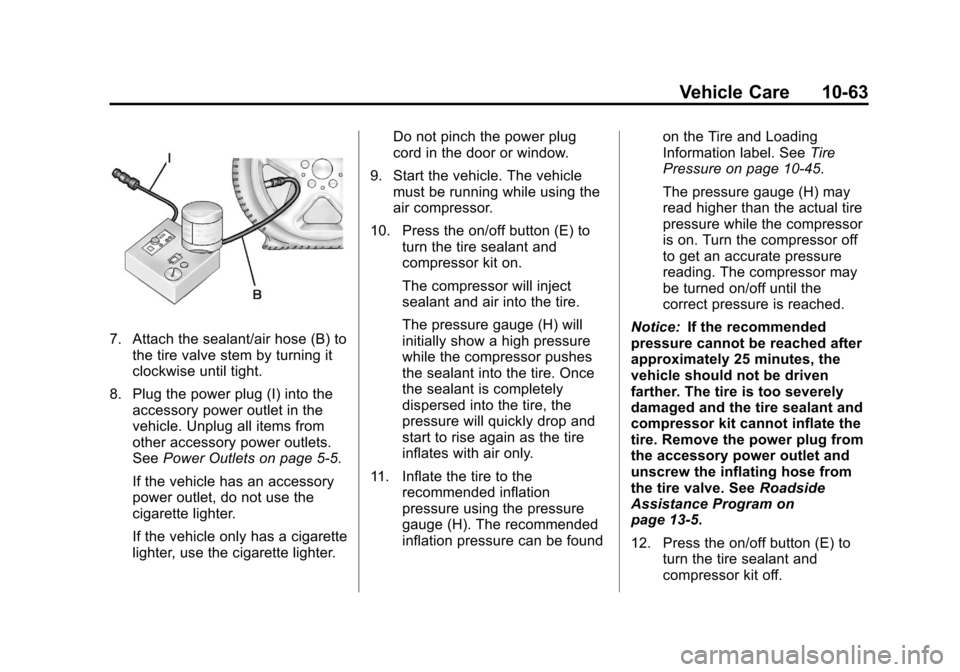
7. Attach the sealant/air hose (B) tothe tire valve stem by turning it
clockwise until tight.
8. Plug the power plug (I) into the accessory power outlet in the
vehicle. Unplug all items from
other accessory power outlets.
See Power Outlets on page 5‑5.
If the vehicle has an accessory
power outlet, do not use the
cigarette lighter.
If the vehicle only has a cigarette
lighter, use the cigarette lighter. Do not pinch the power plug
cord in the door or window.
9. Start the vehicle. The vehicle must be running while using the
air compressor.
10. Press the on/off button (E) to turn the tire sealant and
compressor kit on.
The compressor will inject
sealant and air into the tire.
The pressure gauge (H) will
initially show a high pressure
while the compressor pushes
the sealant into the tire. Once
the sealant is completely
dispersed into the tire, the
pressure will quickly drop and
start to rise again as the tire
inflates with air only.
11. Inflate the tire to the recommended inflation
pressure using the pressure
gauge (H). The recommended
inflation pressure can be found on the Tire and Loading
Information label. See
Tire
Pressure on page 10‑45.
The pressure gauge (H) may
read higher than the actual tire
pressure while the compressor
is on. Turn the compressor off
to get an accurate pressure
reading. The compressor may
be turned on/off until the
correct pressure is reached.
Notice: If the recommended
pressure cannot be reached after
approximately 25 minutes, the
vehicle should not be driven
farther. The tire is too severely
damaged and the tire sealant and
compressor kit cannot inflate the
tire. Remove the power plug from
the accessory power outlet and
unscrew the inflating hose from
the tire valve. See Roadside
Assistance Program on
page 13‑5.
12. Press the on/off button (E) to turn the tire sealant and
compressor kit off.
Page 274 of 352
Black plate (66,1)Chevrolet Sonic Owner Manual - 2012
10-66 Vehicle Care
SeeIf a Tire Goes Flat on
page 10‑58 for other important
safety warnings.
1. Remove the compressor from its storage location. See Storing the
Tire Sealant and Compressor Kit
on page 10‑67.
2. Remove the air only hose (J) and the power plug (I) from the
bottom of the compressor.
3. Place the compressor on the ground near the flat tire.
Make sure the tire valve stem is
positioned close to the ground
so the hose will reach it.
4. Remove the valve stem cap from the flat tire by turning it
counterclockwise.
5. Attach the air only hose (J) to the tire valve stem by turning it
clockwise until tight.
6. Plug the power plug (I) into the accessory power outlet in the
vehicle. Unplug all items from
other accessory power outlets.
See Power Outlets on page 5‑5. If the vehicle has an accessory
power outlet, do not use the
cigarette lighter.
If the vehicle only has a cigarette
lighter, use the cigarette lighter.
Do not pinch the power plug
cord in the door or window.
7. Start the vehicle. The vehicle must be running while using the
air compressor.
8. Press the on/off button (E) to turn the tire sealant and
compressor kit on.
The compressor will inflate the
tire with air only.
9. Inflate the tire to the recommended inflation pressure
using the pressure gauge (H).
The recommended inflation
pressure can be found on the
Tire and Loading Information
label. See Tire Pressure on
page 10‑45.
The pressure gauge (H) may
read higher than the actual tire
pressure while the compressor is on. Turn the compressor off to
get an accurate pressure
reading. The compressor may
be turned on/off until the correct
pressure is reached.
Notice: If the recommended
pressure cannot be reached after
approximately 25 minutes, the
vehicle should not be driven
farther. The tire is too severely
damaged and the tire sealant and
compressor kit cannot inflate the
tire. Remove the power plug from
the accessory power outlet and
unscrew the inflating hose from
the tire valve. See Roadside
Assistance Program on
page 13‑5.
10. Press the on/off button (E) to turn the tire sealant and
compressor kit off.
Be careful while handling the
compressor as it could be
warm after usage.
11. Unplug the power plug (I) from the accessory power outlet in
the vehicle.
Page 290 of 352
Black plate (82,1)Chevrolet Sonic Owner Manual - 2012
10-82 Vehicle Care
Tires
Use a stiff brush with tire cleaner to
clean the tires.
Notice:Using petroleum-based
tire dressing products on the
vehicle may damage the paint
finish and/or tires. When applying
a tire dressing, always wipe off
any overspray from all painted
surfaces on the vehicle.
Wheels and Trim —Aluminum
or Chrome
Use a soft, clean cloth with mild
soap and water to clean the wheels.
After rinsing thoroughly with clean
water, dry with a soft, clean towel.
A wax may then be applied.
Keep the wheels clean using a soft,
clean cloth with mild soap and
water. Rinse with clean water. After
rinsing thoroughly, dry with a soft,
clean towel. A wax may then be
applied. Notice:
Chrome wheels and other
chrome trim may be damaged if
the vehicle is not washed after
driving on roads that have been
sprayed with magnesium,
calcium, or sodium chloride.
These chlorides are used on
roads for conditions such as ice
and dust. Always wash the
chrome with soap and water after
exposure.
Notice: To avoid surface damage,
do not use strong soaps,
chemicals, abrasive polishes,
cleaners, brushes, or cleaners
that contain acid on aluminum or
chrome-plated wheels. Use only
approved cleaners. Also, never
drive a vehicle with aluminum or
chrome-plated wheels through an
automatic car wash that uses
silicone carbide tire cleaning
brushes. Damage could occur
and the repairs would not be
covered by the vehicle warranty.
Steering, Suspension, and
Chassis Components
Visually inspect front and rear
suspension and steering system for
damaged, loose, or missing parts or
signs of wear. Inspect hoses for
proper hook-up, binding, leaks,
cracks, chafing, etc. Visually check
constant velocity joints, rubber
boots, and axle seals for leaks.
Body Component Lubrication
Lubricate all key lock cylinders,
hood hinges, liftgate hinges, and the
steel fuel door hinge unless the
components are plastic. Applying
silicone grease on weatherstrips
with a clean cloth will make them
last longer, seal better, and not stick
or squeak.
Underbody Maintenance
Use plain water to flush dirt and
debris from the vehicle's underbody.
Your dealer or an underbody car
washing system can do this. If not
removed, rust and corrosion can
develop.
Page 331 of 352
Black plate (15,1)Chevrolet Sonic Owner Manual - 2012
Customer Information 13-15
GM will not access this data or
share it with others except: with the
consent of the vehicle owner or,
if the vehicle is leased, with the
consent of the lessee; in response
to an official request by police or
similar government office; as part of
GM's defense of litigation through
the discovery process; or, as
required by law. Data that GM
collects or receives may also be
used for GM research needs or may
be made available to others for
research purposes, where a need is
shown and the data is not tied to a
specific vehicle or vehicle owner.
OnStar®
If the vehicle is equipped with an
active OnStar system, that system
may also record data in crash or
near crash‐like situations. The
OnStar Terms and Conditions
provides information on datacollection and use and is available
at www.onstar.com (U.S.) or
www.onstar.ca (Canada), or by
pressing the
Qbutton and
speaking to an advisor. See OnStar
Overview on page 14‑1 for more
information.
Radio Frequency
Identification (RFID)
RFID technology is used in some
vehicles for functions such as tire
pressure monitoring and ignition
system security, as well as in
connection with conveniences such
as key fobs for remote door locking/
unlocking and starting, and
in-vehicle transmitters for garage
door openers. RFID technology in
GM vehicles does not use or record
personal information or link with any
other GM system containing
personal information.
Radio Frequency
Statement
This vehicle has systems that
operate on a radio frequency that
comply with Part 15 of the Federal
Communications Commission (FCC)
rules and with Industry Canada
Standards RSS‐GEN/210/220/310.
Operation is subject to the following
two conditions:
1. The device may not cause harmful interference.
2. The device must accept any interference received, including
interference that may cause
undesired operation of the
device.
Changes or modifications to any of
these systems by other than an
authorized service facility could void
authorization to use this equipment.