wheel CHEVROLET SONIC 2013 2.G Owners Manual
[x] Cancel search | Manufacturer: CHEVROLET, Model Year: 2013, Model line: SONIC, Model: CHEVROLET SONIC 2013 2.GPages: 382, PDF Size: 6.71 MB
Page 2 of 382

Black plate (2,1)Chevrolet Sonic Owner Manual - 2013 - 2nd PrintReady - 10/11/12
2013 Chevrolet Sonic Owner ManualM
Vehicle Care. . . . . . . . . . . . . . . . . 10-1
General Information . . . . . . . . . . 10-2
Vehicle Checks . . . . . . . . . . . . . . . 10-3
Headlamp Aiming . . . . . . . . . . . 10-27
Bulb Replacement . . . . . . . . . . 10-27
Electrical System . . . . . . . . . . . . 10-32
Wheels and Tires . . . . . . . . . . . 10-39
Jump Starting . . . . . . . . . . . . . . . 10-74
Towing . . . . . . . . . . . . . . . . . . . . . . 10-77
Appearance Care . . . . . . . . . . . 10-80
Service and Maintenance . . . 11-1
General Information . . . . . . . . . . 11-1
Maintenance Schedule . . . . . . . 11-2
Special Application
Services . . . . . . . . . . . . . . . . . . . . 11-8
Additional Maintenance
and Care . . . . . . . . . . . . . . . . . . . . 11-9
Recommended Fluids . . . . . . . 11-12
Maintenance Records . . . . . . . 11-15 Technical Data
. . . . . . . . . . . . . . . 12-1
Vehicle Identification . . . . . . . . . 12-1
Vehicle Data . . . . . . . . . . . . . . . . . . 12-2
Customer Information . . . . . . . 13-1
Customer Information . . . . . . . . 13-1
Reporting Safety Defects . . . . 13-12
Vehicle Data Recording and
Privacy . . . . . . . . . . . . . . . . . . . . 13-13
OnStar . . . . . . . . . . . . . . . . . . . . . . . 14-1
OnStar Overview . . . . . . . . . . . . . 14-1
OnStar Services . . . . . . . . . . . . . . 14-2
OnStar Additional Information . . . . . . . . . . . . . . . . . . 14-5
Index . . . . . . . . . . . . . . . . . . . . . i-1
Page 4 of 382
Black plate (4,1)Chevrolet Sonic Owner Manual - 2013 - 2nd PrintReady - 10/11/12
iv Introduction
{WARNING
These mean there is something
that could hurt you or other
people.
Notice: This means there is
something that could result in
property or vehicle damage. This
would not be covered by the
vehicle's warranty.
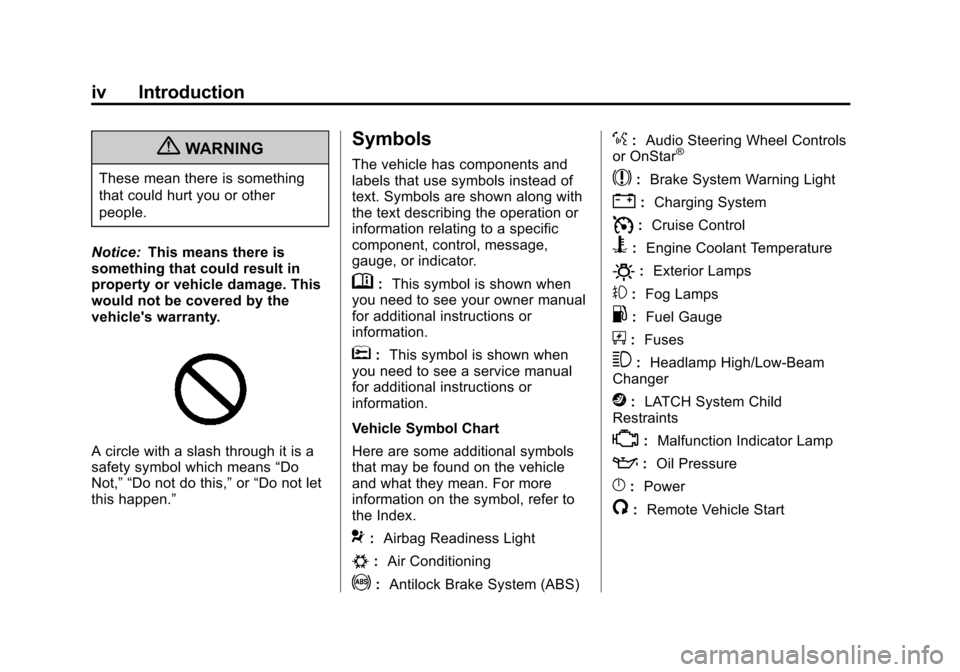
A circle with a slash through it is a
safety symbol which means “Do
Not,” “Do not do this,” or“Do not let
this happen.”
Symbols
The vehicle has components and
labels that use symbols instead of
text. Symbols are shown along with
the text describing the operation or
information relating to a specific
component, control, message,
gauge, or indicator.
M: This symbol is shown when
you need to see your owner manual
for additional instructions or
information.
*: This symbol is shown when
you need to see a service manual
for additional instructions or
information.
Vehicle Symbol Chart
Here are some additional symbols
that may be found on the vehicle
and what they mean. For more
information on the symbol, refer to
the Index.
9: Airbag Readiness Light
#:Air Conditioning
!:Antilock Brake System (ABS)
%:Audio Steering Wheel Controls
or OnStar®
$: Brake System Warning Light
":Charging System
I:Cruise Control
B: Engine Coolant Temperature
O:Exterior Lamps
#:Fog Lamps
.: Fuel Gauge
+:Fuses
3: Headlamp High/Low-Beam
Changer
j: LATCH System Child
Restraints
*: Malfunction Indicator Lamp
::Oil Pressure
}:Power
/:Remote Vehicle Start
Page 7 of 382
Black plate (1,1)Chevrolet Sonic Owner Manual - 2013 - 2nd PrintReady - 10/18/12
In Brief 1-1
In Brief
Instrument Panel
Instrument Panel . . . . . . . . . . . . . . 1-2
Initial Drive Information
Initial Drive Information . . . . . . . . 1-4
Starting the Engine . . . . . . . . . . . 1-4
Remote Keyless Entry (RKE)System . . . . . . . . . . . . . . . . . . . . . . 1-4
Remote Vehicle Start . . . . . . . . . 1-4
Door Locks . . . . . . . . . . . . . . . . . . . 1-5
Liftgate . . . . . . . . . . . . . . . . . . . . . . . . 1-6
Trunk Release . . . . . . . . . . . . . . . . 1-6
Windows . . . . . . . . . . . . . . . . . . . . . . 1-6
Seat Adjustment . . . . . . . . . . . . . . 1-7
Second Row Seats . . . . . . . . . . . 1-8
Head Restraint Adjustment . . . . 1-8
Safety Belts . . . . . . . . . . . . . . . . . . . 1-8
Passenger Sensing System . . . 1-9
Mirror Adjustment . . . . . . . . . . . . . 1-9
Steering Wheel Adjustment . . . . . . . . . . . . . . . . . 1-10
Interior Lighting . . . . . . . . . . . . . . 1-10
Exterior Lighting . . . . . . . . . . . . . 1-11
Windshield Wiper/Washer . . . . 1-11
Climate Controls . . . . . . . . . . . . . 1-12
Transmission . . . . . . . . . . . . . . . . 1-13
Vehicle Features
Radio(s) . . . . . . . . . . . . . . . . . . . . . 1-14
Satellite Radio . . . . . . . . . . . . . . . 1-15
Portable Audio Devices . . . . . . 1-15
Bluetooth
®. . . . . . . . . . . . . . . . . . . 1-15
Steering Wheel Controls . . . . . 1-16
Cruise Control . . . . . . . . . . . . . . . 1-16
Driver Information
Center (DIC) . . . . . . . . . . . . . . . 1-17
Power Outlets . . . . . . . . . . . . . . . 1-17
Sunroof . . . . . . . . . . . . . . . . . . . . . . 1-17
Performance and Maintenance
Traction Control System (TCS) . . . . . . . . . . . . . . 1-18
StabiliTrak
®System . . . . . . . . . 1-18
Tire Pressure Monitor . . . . . . . . 1-18
Tire Sealant and Compressor Kit . . . . . . . . . . . . . 1-19
Engine Oil Life System . . . . . . 1-19
Driving for Better Fuel Economy . . . . . . . . . . . . . . . . . . . 1-19
Roadside Assistance Program . . . . . . . . . . . . . . . . . . . . 1-20
OnStar
®. . . . . . . . . . . . . . . . . . . . . 1-20
Page 9 of 382

Black plate (3,1)Chevrolet Sonic Owner Manual - 2013 - 2nd PrintReady - 10/18/12
In Brief 1-3
1.Air Vents on page 8‑3.
2. Exterior Lamp Controls on
page 6‑1.
3. Instrument Panel Illumination
Control on page 6‑5.
4. Turn and Lane-Change Lever. See Turn and Lane-Change
Signals on page 6‑4.
5. Instrument Cluster on page 5‑8.
6. Horn on page 5‑2.
7. Windshield Wiper/Washer on
page 5‑3.
8. Display Screen.
9. Infotainment on page 7‑1.
10. Instrument Panel Storage on
page 4‑1.
USB Port on page 7‑20 (Inside
IP Storage) (If Equipped).
Auxiliary Devices on page 7‑24
(Inside IP Storage)
(If Equipped).
11. Hood Release. See Hood on
page 10‑4. 12. Data Link Connector (DLC)
(Out of View). See Malfunction
Indicator Lamp on page 5‑12.
13. Cruise Control on page 9‑31.
14. Steering Wheel Adjustment on
page 5‑2.
15. Steering Wheel Controls on
page 5‑2.
16. Ignition Switch. See Ignition
Positions on page 9‑14.
17. Central Locking System on
page 2‑7.
18. Climate Control Systems on
page 8‑1.
19. Power Outlets on page 5‑6.
20. Safety Locks on page 2‑7.
21. Traction Control System (TCS)
on page 9‑28/StabiliTrak
®
System on page 9‑29.
22. Shift Lever. See Automatic
Transmission on page 9‑21
(If Equipped) or Manual
Transmission on page 9‑24
(If Equipped). 23.
Hazard Warning Flashers on
page 6‑3.
24. Passenger Sensing System on
page 3‑24.
Page 16 of 382
Black plate (10,1)Chevrolet Sonic Owner Manual - 2013 - 2nd PrintReady - 10/18/12
1-10 In Brief
Interior Mirror
Hold the inside rearview mirror in
the center to move it for a clearer
view behind your vehicle. Adjust the
mirror to avoid glare from the
headlamps behind you. Push the
tab forward for daytime use and pull
it for nighttime use.
SeeManual Rearview Mirror on
page 2‑15.
Steering Wheel
Adjustment
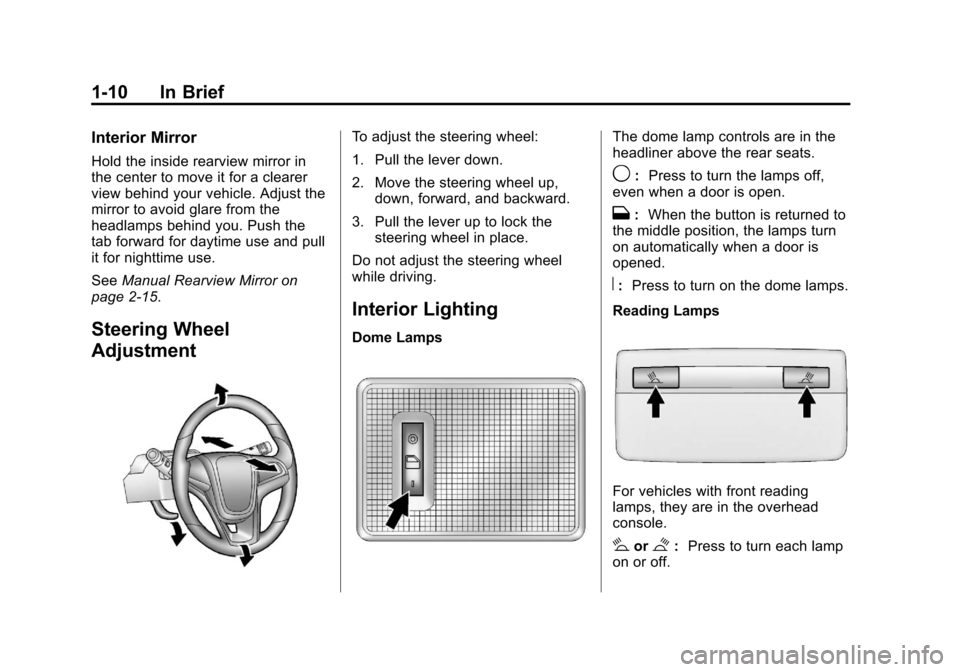
To adjust the steering wheel:
1. Pull the lever down.
2. Move the steering wheel up, down, forward, and backward.
3. Pull the lever up to lock the steering wheel in place.
Do not adjust the steering wheel
while driving.
Interior Lighting
Dome Lamps
The dome lamp controls are in the
headliner above the rear seats.
9: Press to turn the lamps off,
even when a door is open.
H: When the button is returned to
the middle position, the lamps turn
on automatically when a door is
opened.
R: Press to turn on the dome lamps.
Reading Lamps
For vehicles with front reading
lamps, they are in the overhead
console.
#or$: Press to turn each lamp
on or off.
Page 22 of 382
Black plate (16,1)Chevrolet Sonic Owner Manual - 2013 - 2nd PrintReady - 10/18/12
1-16 In Brief
Steering Wheel Controls
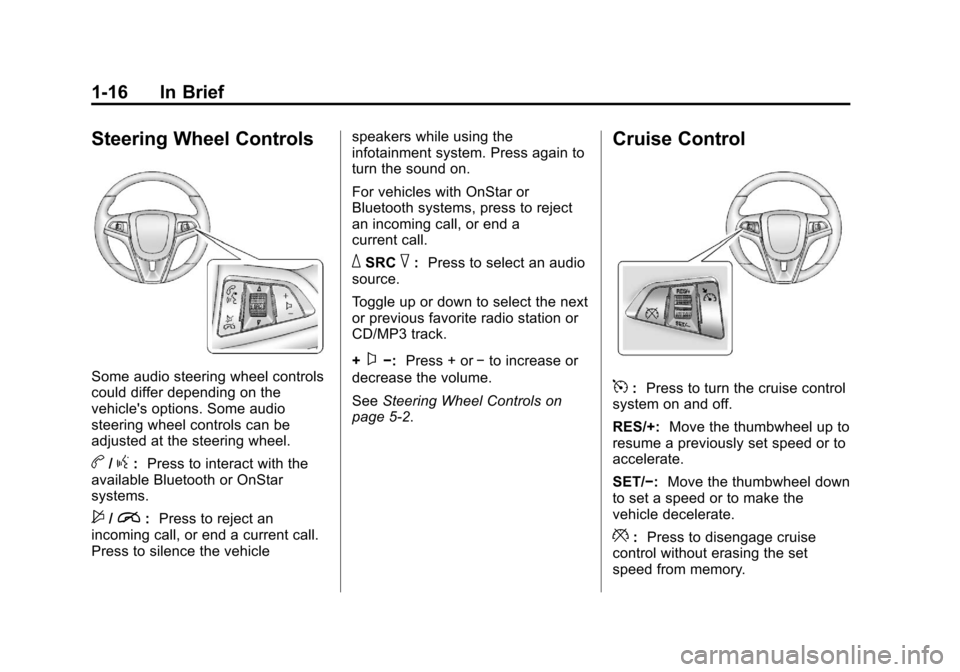
Some audio steering wheel controls
could differ depending on the
vehicle's options. Some audio
steering wheel controls can be
adjusted at the steering wheel.
b/g:Press to interact with the
available Bluetooth or OnStar
systems.
$/i: Press to reject an
incoming call, or end a current call.
Press to silence the vehicle speakers while using the
infotainment system. Press again to
turn the sound on.
For vehicles with OnStar or
Bluetooth systems, press to reject
an incoming call, or end a
current call.
_SRC^:
Press to select an audio
source.
Toggle up or down to select the next
or previous favorite radio station or
CD/MP3 track.
+
x−: Press + or −to increase or
decrease the volume.
See Steering Wheel Controls on
page 5‑2.
Cruise Control
5: Press to turn the cruise control
system on and off.
RES/+: Move the thumbwheel up to
resume a previously set speed or to
accelerate.
SET/−: Move the thumbwheel down
to set a speed or to make the
vehicle decelerate.
*: Press to disengage cruise
control without erasing the set
speed from memory.
Page 23 of 382
Black plate (17,1)Chevrolet Sonic Owner Manual - 2013 - 2nd PrintReady - 10/18/12
In Brief 1-17
SeeCruise Control on page 9‑31.
Driver Information
Center (DIC)
The DIC display is in the instrument
cluster. It shows the status of many
vehicle systems. The controls for
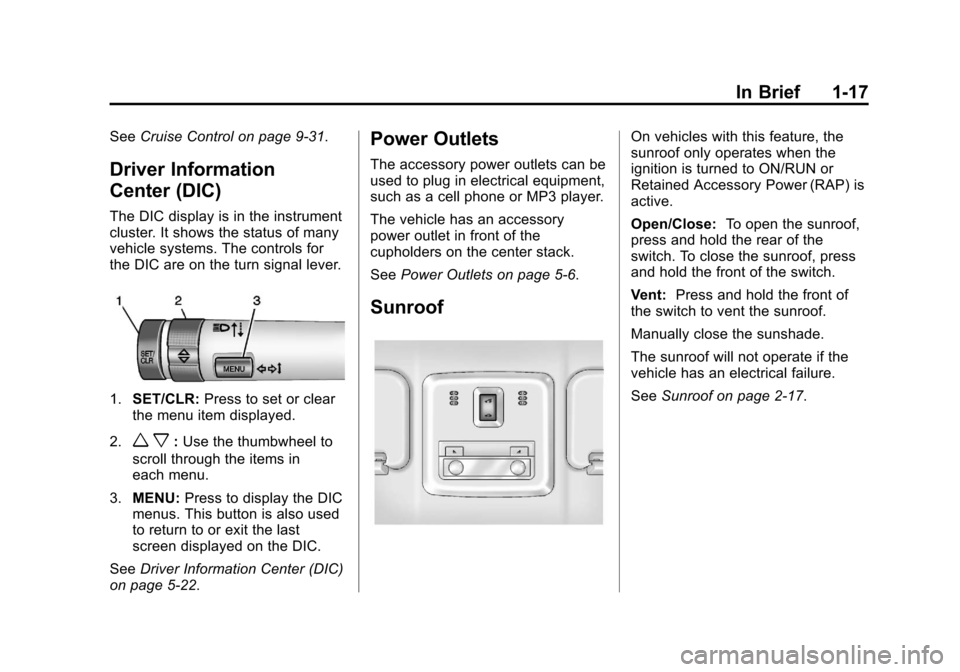
the DIC are on the turn signal lever.
1.SET/CLR: Press to set or clear
the menu item displayed.
2.
w x: Use the thumbwheel to
scroll through the items in
each menu.
3. MENU: Press to display the DIC
menus. This button is also used
to return to or exit the last
screen displayed on the DIC.
See Driver Information Center (DIC)
on page 5‑22.
Power Outlets
The accessory power outlets can be
used to plug in electrical equipment,
such as a cell phone or MP3 player.
The vehicle has an accessory
power outlet in front of the
cupholders on the center stack.
See Power Outlets on page 5‑6.
Sunroof
On vehicles with this feature, the
sunroof only operates when the
ignition is turned to ON/RUN or
Retained Accessory Power (RAP) is
active.
Open/Close: To open the sunroof,
press and hold the rear of the
switch. To close the sunroof, press
and hold the front of the switch.
Vent: Press and hold the front of
the switch to vent the sunroof.
Manually close the sunshade.
The sunroof will not operate if the
vehicle has an electrical failure.
See Sunroof on page 2‑17.
Page 24 of 382
Black plate (18,1)Chevrolet Sonic Owner Manual - 2013 - 2nd PrintReady - 10/18/12
1-18 In Brief
Performance and
Maintenance
Traction Control
System (TCS)
The Traction Control System (TCS)
limits wheel spin. The system is on
when the vehicle is started.
.To turn off traction control, press
and release the TCS/StabiliTrak
button
gon the center console.
The Traction Off light
i
illuminates.
.Press and release the TCS/
StabiliTrak button
gagain to
turn traction control back on.
See Traction Control System (TCS)
on page 9‑28.
StabiliTrak®System
The StabiliTrak system assists with
directional control of the vehicle in
difficult driving conditions. The
system is on when the vehicle is
started.
.To turn off both traction control
and StabiliTrak, press and hold
the TCS/StabiliTrak button
g
until the Traction Off lightiand
the StabiliTrak Off light
g
illuminate.
.Press the TCS/StabiliTrak buttongagain to turn on both systems.
See StabiliTrak
®System on
page 9‑29.
Tire Pressure Monitor
This vehicle may have a Tire
Pressure Monitor System (TPMS).
The low tire pressure warning light
alerts to a significant loss in
pressure of one of the vehicle's
tires. If the warning light comes on,
stop as soon as possible and inflate
the tires to the recommended
pressure shown on the Tire and
Loading Information label. See
Vehicle Load Limits on page 9‑9.
The warning light will remain on until
the tire pressure is corrected.
The low tire pressure warning light
may come on in cool weather when
the vehicle is first started, and then
turn off as the vehicle is driven. This
may be an early indicator that the
tire pressures are getting low and
the tires need to be inflated to the
proper pressure.
Page 61 of 382
Black plate (17,1)Chevrolet Sonic Owner Manual - 2013 - 2nd PrintReady - 10/11/12
Seats and Restraints 3-17
Airbag System
The vehicle has the following
airbags except where noted below:
.A frontal airbag for the driver.
.A frontal airbag for the front
outboard passenger.
.A knee airbag for the driver.
.A knee airbag for the front
outboard passenger.
.A seat-mounted side impact
airbag for the driver.
.A seat-mounted side impact
airbag for the front outboard
passenger.
.Seat-mounted side impact
airbags for the second row
outboard passengers.
.A roof-rail airbag for the driver
and the passenger seated
directly behind the driver.
.A roof-rail airbag for the front
outboard passenger and the
passenger seated directly
behind the front outboard
passenger.
The vehicle may have the following
airbags on models sold in Canada:
.A knee airbag for the driver.
.A knee airbag for the front
outboard passenger.
.Seat-mounted side impact
airbags for the second row
outboard passengers.
All vehicle airbags have the word
AIRBAG on the trim or on a label
near the deployment opening.
For frontal airbags, the word
AIRBAG is on the center of the
steering wheel for the driver and on
the instrument panel for the front
outboard passenger.
For knee airbags, the word AIRBAG
is on the lower part of the
instrument panel. For seat-mounted side impact
airbags, the word AIRBAG is on the
side of the seatback closest to
the door.
For roof-rail airbags, the word
AIRBAG is on the ceiling or trim.
Airbags are designed to supplement
the protection provided by safety
belts. Even though today's airbags
are also designed to help reduce
the risk of injury from the force of an
inflating bag, all airbags must inflate
very quickly to do their job.
Here are the most important things
to know about the airbag system:
{WARNING
You can be severely injured or
killed in a crash if you are not
wearing your safety belt, even
with airbags. Airbags are
designed to work with safety
belts, not replace them. Also,
airbags are not designed to inflate
(Continued)
Page 63 of 382
Black plate (19,1)Chevrolet Sonic Owner Manual - 2013 - 2nd PrintReady - 10/11/12
Seats and Restraints 3-19
There is an airbag readiness light
on the instrument panel cluster,
which shows the airbag symbol. The
system checks the airbag electrical
system for malfunctions. The light
tells you if there is an electrical
problem. SeeAirbag Readiness
Light on page 5‑11 for more
information.
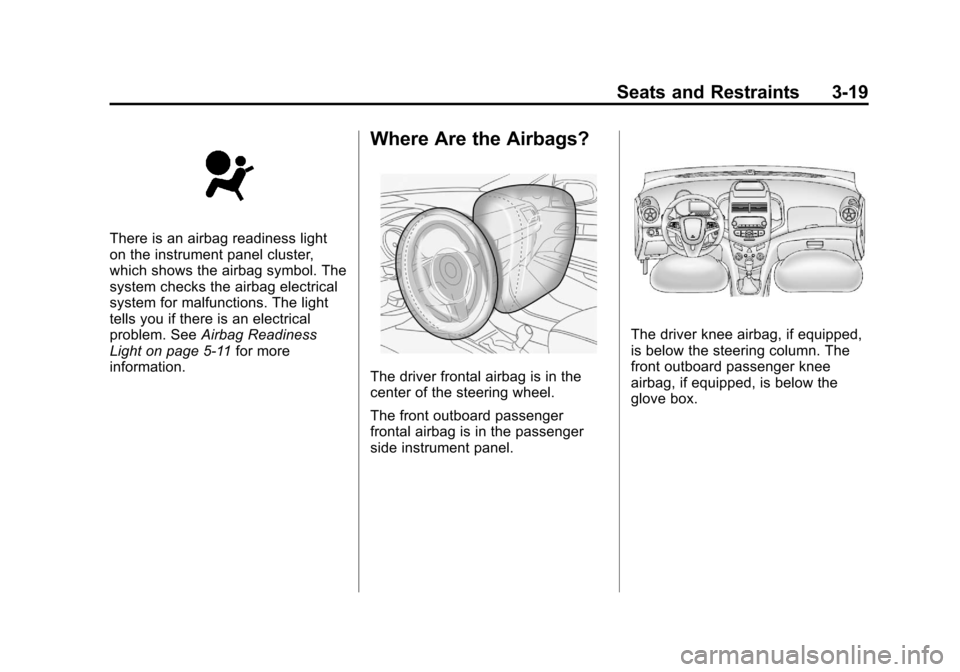
Where Are the Airbags?
The driver frontal airbag is in the
center of the steering wheel.
The front outboard passenger
frontal airbag is in the passenger
side instrument panel.
The driver knee airbag, if equipped,
is below the steering column. The
front outboard passenger knee
airbag, if equipped, is below the
glove box.