remote start CHEVROLET SONIC 2014 2.G User Guide
[x] Cancel search | Manufacturer: CHEVROLET, Model Year: 2014, Model line: SONIC, Model: CHEVROLET SONIC 2014 2.GPages: 400, PDF Size: 5.57 MB
Page 54 of 400
Black plate (6,1)Chevrolet Sonic Owner Manual (GMNA-Localizing-U.S./Canada-6081473) -
2014 - 2nd Edition - 8/19/13
3-6 Seats and Restraints
Heated Front Seats
{Warning
If you cannot feel temperature
change or pain to the skin, the
seat heater may cause burns. To
reduce the risk of burns, people
with such a condition should use
care when using the seat heater,
especially for long periods of
time. Do not place anything on
the seat that insulates against
heat, such as a blanket, cushion,
cover, or similar item. This may
cause the seat heater to
overheat. An overheated seat
heater may cause a burn or may
damage the seat.
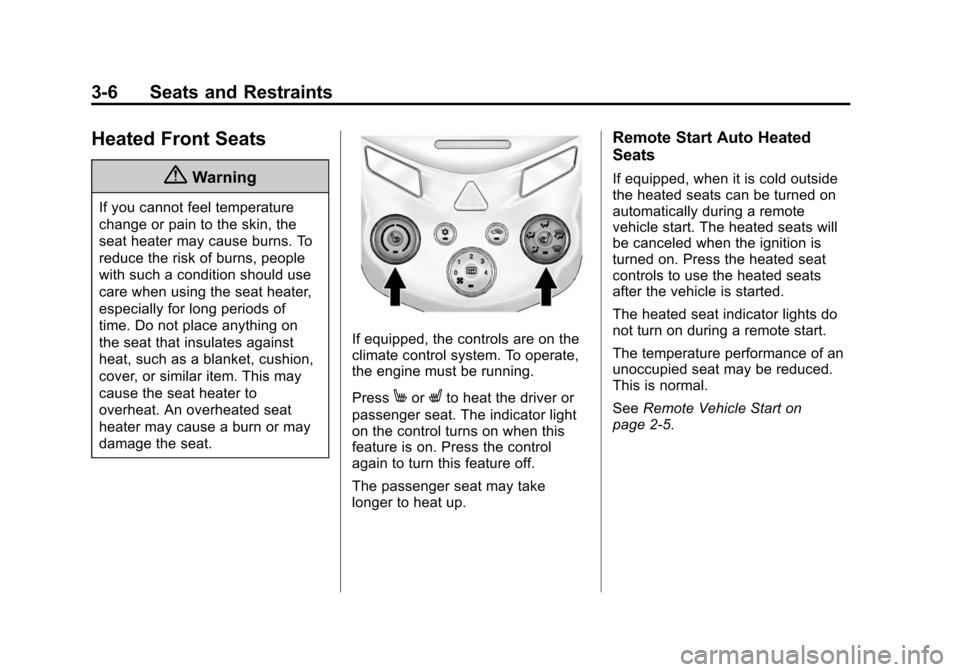
If equipped, the controls are on the
climate control system. To operate,
the engine must be running.
Press
MorLto heat the driver or
passenger seat. The indicator light
on the control turns on when this
feature is on. Press the control
again to turn this feature off.
The passenger seat may take
longer to heat up.
Remote Start Auto Heated
Seats
If equipped, when it is cold outside
the heated seats can be turned on
automatically during a remote
vehicle start. The heated seats will
be canceled when the ignition is
turned on. Press the heated seat
controls to use the heated seats
after the vehicle is started.
The heated seat indicator lights do
not turn on during a remote start.
The temperature performance of an
unoccupied seat may be reduced.
This is normal.
See Remote Vehicle Start on
page 2-5.
Page 127 of 400
Black plate (27,1)Chevrolet Sonic Owner Manual (GMNA-Localizing-U.S./Canada-6081473) -
2014 - 2nd Edition - 8/19/13
Instruments and Controls 5-27
the average fuel economy, press
and hold the SET/CLR button while
the average fuel economy is
displayed.
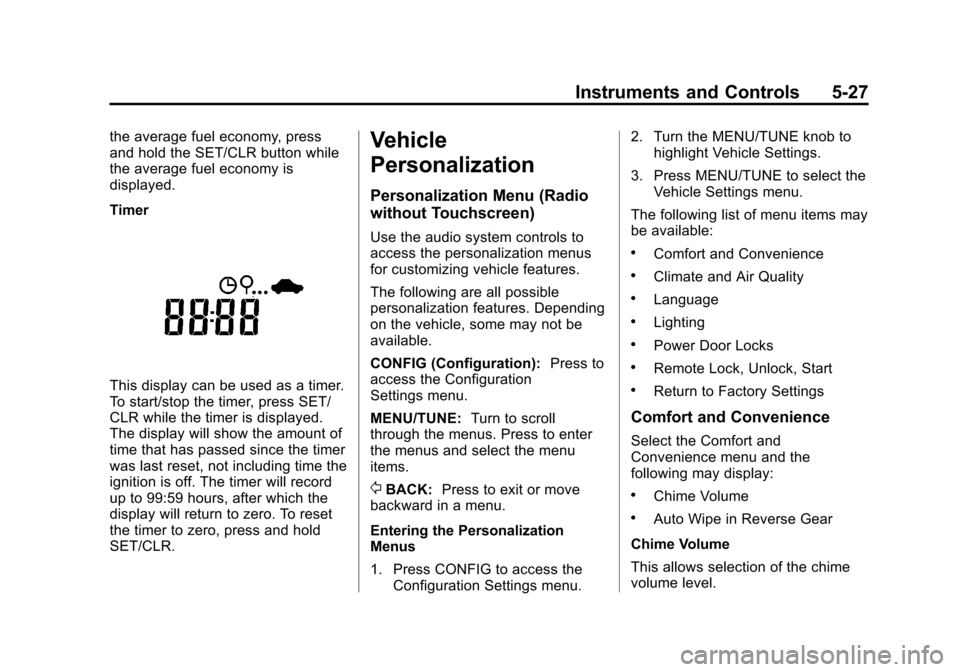
Timer
This display can be used as a timer.
To start/stop the timer, press SET/
CLR while the timer is displayed.
The display will show the amount of
time that has passed since the timer
was last reset, not including time the
ignition is off. The timer will record
up to 99:59 hours, after which the
display will return to zero. To reset
the timer to zero, press and hold
SET/CLR.
Vehicle
Personalization
Personalization Menu (Radio
without Touchscreen)
Use the audio system controls to
access the personalization menus
for customizing vehicle features.
The following are all possible
personalization features. Depending
on the vehicle, some may not be
available.
CONFIG (Configuration):Press to
access the Configuration
Settings menu.
MENU/TUNE: Turn to scroll
through the menus. Press to enter
the menus and select the menu
items.
/BACK: Press to exit or move
backward in a menu.
Entering the Personalization
Menus
1. Press CONFIG to access the Configuration Settings menu. 2. Turn the MENU/TUNE knob to
highlight Vehicle Settings.
3. Press MENU/TUNE to select the Vehicle Settings menu.
The following list of menu items may
be available:
.Comfort and Convenience
.Climate and Air Quality
.Language
.Lighting
.Power Door Locks
.Remote Lock, Unlock, Start
.Return to Factory Settings
Comfort and Convenience
Select the Comfort and
Convenience menu and the
following may display:
.Chime Volume
.Auto Wipe in Reverse Gear
Chime Volume
This allows selection of the chime
volume level.
Page 128 of 400
Black plate (28,1)Chevrolet Sonic Owner Manual (GMNA-Localizing-U.S./Canada-6081473) -
2014 - 2nd Edition - 8/19/13
5-28 Instruments and Controls
Select Normal or High.
Auto Wipe in Reverse Gear
When on and the vehicle on, this
feature will turn the rear wipers on
when the vehicle is placed in
R (Reverse) when the front wipers
are on.
Select On or Off.
Language
Select Language, then select from
the available language(s).
Exterior Lighting
Select the Lighting menu and the
following may display:
.Exterior Vehicle Locator Lights
.Exit Lighting
Exterior Vehicle Locator Lights
This allows selection of whether the
exterior lamps will turn on when
unlocking the vehicle.
Select On or Off. Exit Lighting
Select Off, 30 Seconds, 1 Minute,
or 2 Minutes.
Power Door Locks
Select Power Door Locks and the
following may display:
.Auto Door Unlock
.Unlock Door Anti Lock Out
.Delayed Door Lock
Auto Door Unlock
This allows selection of which of the
doors will automatically unlock when
the vehicle is shifted into P (Park) or
the key is removed.
Select All Doors, Driver Door, or Off.
Unlock Door Anti Lock Out
When on, this feature will keep the
driver door from locking when the
door is open. If off is selected, the
Unlock Door Anti Lock Out menu
will be available and the door will
lock as programmed through
this menu. Select On or Off.
Delayed Door Lock
When on, this feature will delay the
locking of the doors until
five seconds after the last door is
closed. Three chimes will signal that
delayed locking is in use. Pressing
will override the delayed locking
feature and immediately lock all of
the doors.
Select On or Off.
Remote Lock, Unlock, Start
Select Remote Lock, Unlock, Start
and the following may display:
.Remote Unlock Feedback
.Remote Lock Feedback
.Remote Door Unlock
Remote Unlock Feedback
When on, the exterior lamps will
flash when unlocking the vehicle
with the RKE transmitter.
Select On or Off.
Page 129 of 400
Black plate (29,1)Chevrolet Sonic Owner Manual (GMNA-Localizing-U.S./Canada-6081473) -
2014 - 2nd Edition - 8/19/13
Instruments and Controls 5-29
Remote Lock Feedback
This allows selection of what type of
feedback is given when locking the
vehicle with the RKE transmitter.
Select Lights and Horn, Lights Only,
Horn Only, or Off.
Remote Door Unlock
This allows selection of which doors
will unlock when pressing
Kon the
RKE transmitter.
Select All Doors or Driver Door
Only. When set to Driver Door Only,
the driver door will unlock the first
time
Kis pressed and all doors will
unlock when
Kis pressed a second
time. When set to All Doors, all of
the doors will unlock at the first
press of
K.
Return to Factory Settings
Select Return to Factory Settings to
return all of the vehicle
personalization to the default
settings.
Select Yes or No.
Personalization Menu (Radio
with Touchscreen)
Settings can be made with the
ignition ON and the vehicle not
moving.
Use the audio system controls to
access the personalization menus
for customizing vehicle features.
The following are all possible
personalization features. Depending
on the vehicle, some may not be
available.
D(Home): Press to access the
Home Page Menu.
QorR: Press to scroll through the
menus or setup items.
4: Press to exit, or return to the
previous screen or menu.
To access the menu:
1. Press
D.
2. Press Settings. The following list of menu items may
be available:
.Time & Date Settings
.Radio Settings
.Connection Settings
.Vehicle Settings
.Language
.Text Scroll
.Touch Beep Sound
.Max Startup Volume
.System Version
.DivX®VOD
Press the menu item to select it.
Each of the menus is detailed in the
following information.
Settings menus and functions may
vary depending on vehicle option.
Time & Date Settings
Select to change the settings:
.Set Time Format: Select 12h
or 24h.
Page 131 of 400
Black plate (31,1)Chevrolet Sonic Owner Manual (GMNA-Localizing-U.S./Canada-6081473) -
2014 - 2nd Edition - 8/19/13
Instruments and Controls 5-31
Vehicle Settings
Select and the following may
display:
.Climate & Air Quality
.Comfort & Convenience
.Collision/Detection
.Lighting
.Power Door Locks
.Lock, Unlock Settings
.Rear Camera Option
.Vehicle Factory Settings
Climate & Air Quality
Select and Remote Start Heated
Seats may display.
Select On or Off.
Comfort and Convenience
Select the and the following may
display:
.Chime Volume
.Auto Wipe in Reverse GearChime Volume
Select to set the chime volume
level.
Select Normal or High.
Auto Wipe in Reverse Gear
Select to set this feature on or off.
When on, and the front wipers are
on, the rear window wiper will turn
on automatically when the vehicle is
shifted into R (Reverse).
Select On or Off.
Collision/Detection
Select and Park Assist may display.
Select On or Off.
Lighting
Select and the following may
display:
.Exit Lighting
.Vehicle Locator Lights
Exit Lighting
Select to set how long the exterior
lamps stay on when leaving the
vehicle and it is dark outside.
Select Off, 30 Sec, 60 Sec,
or 120 Sec.
Vehicle Locator Lights
This allows selection of how long
the exterior lamps stay on when
leaving the vehicle and it is dark
outside.
Select On or Off.
Power Door Locks
Select and the following may
display:
.Auto Door Unlock
.Unlocked Door Anti Lock Out
.Delayed Door Lock
Auto Door Unlock
Select to set which of the doors will
automatically unlock when the
vehicle is shifted into P (Park).
Select All Doors, Driver Door, or Off.
Page 368 of 400
Black plate (6,1)Chevrolet Sonic Owner Manual (GMNA-Localizing-U.S./Canada-6081473) -
2014 - 2nd Edition - 8/19/13
13-6 Customer Information
.Model, year, color, and license
plate number of the vehicle.
.Odometer reading, Vehicle
Identification Number (VIN), and
delivery date of the vehicle.
.Description of the problem.
Coverage
Services are provided up to 5 years/
160 000 km (100,000 mi), whichever
comes first.
In the U.S., anyone driving the
vehicle is covered. In Canada, a
person driving the vehicle without
permission from the owner is not
covered.
Roadside Assistance is not a part of
the New Vehicle Limited Warranty.
Chevrolet and General Motors of
Canada Limited reserve the right to
make any changes or discontinue
the Roadside Assistance program at
any time without notification.
Chevrolet and General Motors of
Canada Limited reserve the right to
limit services or payment to an
owner or driver if they decide theclaims are made too often, or the
same type of claim is made many
times.
Services Provided
.Emergency Fuel Delivery:
Delivery of enough fuel for the
vehicle to get to the nearest
service station.
.Lock-Out Service:
Service to
unlock the vehicle if you are
locked out. A remote unlock may
be available if you have OnStar.
For security reasons, the driver
must present identification
before this service is given.
.Emergency Tow from a Public
Road or Highway: Tow to the
nearest Chevrolet dealer for
warranty service, or if the vehicle
was in a crash and cannot be
driven. Assistance is also given
when the vehicle is stuck in the
sand, mud, or snow.
.Flat Tire Change: Service to
change a flat tire with the spare
tire. The spare tire, if equipped, must be in good condition and
properly inflated. It is the owner's
responsibility for the repair or
replacement of the tire if it is not
covered by the warranty.
.Battery Jump Start:
Service to
jump start a dead battery.
Services Not Included in
Roadside Assistance
.Impound towing caused by
violation of any laws.
.Legal fines.
.Mounting, dismounting,
or changing of snow tires,
chains, or other traction devices.
.Towing or services for vehicles
driven on a non-public road or
highway.
Services Specific to
Canadian-Purchased Vehicles
.Fuel Delivery: Reimbursement
is approximately $5 Canadian.
Diesel fuel delivery may be
Page 377 of 400
Black plate (15,1)Chevrolet Sonic Owner Manual (GMNA-Localizing-U.S./Canada-6081473) -
2014 - 2nd Edition - 8/19/13
Customer Information 13-15
OnStar Terms and Conditions and
Privacy Statement on the OnStar
website.
Radio Frequency
Identification (RFID)
RFID technology is used in some
vehicles for functions such as tire
pressure monitoring and ignition
system security, as well as in
connection with conveniences such
as Remote Keyless Entry (RKE)
transmitters for remote door locking/
unlocking and starting, and
in-vehicle transmitters for garage
door openers. RFID technology in
GM vehicles does not use or record
personal information or link with any
other GM system containing
personal information.
Radio Frequency
Statement
This vehicle has systems that
operate on a radio frequency that
comply with Part 15 of the Federal
Communications Commission (FCC)
rules and with Industry Canada
Standards RSS‐GEN/210/220/310.
Operation is subject to the following
two conditions:
1. The device may not causeharmful interference.
2. The device must accept any interference received, including
interference that may cause
undesired operation of the
device.
Changes or modifications to any of
these systems by other than an
authorized service facility could void
authorization to use this equipment.
Page 382 of 400
Black plate (4,1)Chevrolet Sonic Owner Manual (GMNA-Localizing-U.S./Canada-6081473) -
2014 - 2nd Edition - 8/19/13
14-4 OnStar
OnStar Mobile App
Download the OnStar RemoteLink
mobile app to select Apple
®,
Android™, and BlackBerry®devices
to check vehicle fuel level, oil life,
or tire pressure; to start the vehicle
(if equipped) or unlock it; or to
connect to an OnStar Advisor. For
OnStar RemoteLink information and
compatibility, see www.onstar.com
(U.S.) or www.onstar.ca (Canada).
Hands-Free Calling
1. Press=. System responds:
“OnStar ready.”
2. Say “Call.”System responds:
“Please say the name or number
to call.”
3. Say the entire number without pausing, including a “1”and the
area code. System responds:
“OK calling.”
Calling 911 Emergency
1. Press=. System responds:
“OnStar ready,” followed by
a tone.
2. Say “Call.”System responds:
“Please say the name or number
to call.”
3. Say “911”without pausing.
System responds: “911.”
4. Say “Call.”System responds:
“OK, dialing 911.”
Retrieve My Number
1. Press=. System responds:
“OnStar ready.”
2. Say “My number.” System
responds: “Your OnStar
Hands-Free Calling number is,”
then says the number.
End a Call
Press=. System responds: “Call
ended.”
Store a Name Tag for Speed
Dialing
1. Press=. System responds:
“OnStar ready.”
2. Say “Store.” System responds:
“Please say the number you
would like to store.”
3. Say the entire number without pausing. System responds:
“Please say the name tag.”
4. Pick a name tag. System responds: “About to store
5. Say “Yes”or say “No”to try
again. System responds: “OK,
storing
Place a Call Using a Stored
Number
1. Press=. System responds:
“OnStar ready.”
2. Say “Call
responds: “OK, calling
Page 394 of 400

Black plate (6,1)Chevrolet Sonic Owner Manual (GMNA-Localizing-U.S./Canada-6081473) -
2014 - 2nd Edition - 8/19/13
i-6 INDEX
J
Jump Starting . . . . . . . . . . . . . . . . . 10-75
K
Keyless EntryRemote (RKE) System . . . . . . . . 2-3
Keys . . . . . . . . . . . . . . . . . . . . . . . . . . . . 2-1
L
Labeling, Tire Sidewall . . . . . . . . 10-42
Lamps Courtesy . . . . . . . . . . . . . . . . . . . . . . . 6-5
Daytime Running (DRL) . . . . . . . 6-2
Dome . . . . . . . . . . . . . . . . . . . . . . . . . . 6-5
Exterior Controls . . . . . . . . . . . . . . . 6-1
Headlamps, Front TurnSignal, and Parking
Lamps . . . . . . . . . . . . . . . . . . . . 10-28
License Plate . . . . . . . . . . . . . . . 10-31 Lamps (cont'd)
Malfunction Indicator . . . . . . . . . 5-12
On Reminder . . . . . . . . . . . . . . . . . 5-21
Reading . . . . . . . . . . . . . . . . . . . . . . . 6-6
Lane Departure Warning (LDW) . . . . . . . . . . . . . . . 9-36
Lane Departure Warning Light . . . . . . . . . . . . . . . . . . . . . . . . . 5-17
Lap-Shoulder Belt . . . . . . . . . . . . . 3-11
LATCH System
Replacing Parts after aCrash . . . . . . . . . . . . . . . . . . . . . . . 3-43
LATCH, Lower Anchors and Tethers for Children . . . . . . . . . . 3-37
Liftgate Carbon Monoxide . . . . . . . . . . . . . 2-12
Lighting Illumination Control . . . . . . . . . . . . 6-5
Lights Airbag Readiness . . . . . . . . . . . . . 5-11
Antilock Brake System(ABS) Warning . . . . . . . . . . . . . . 5-16
Brake System Warning . . . . . . . 5-15
Charging System . . . . . . . . . . . . . 5-12
Cruise Control . . . . . . . . . . . . . . . . 5-21
Daytime Running
Lamps (DRL) . . . . . . . . . . . . . . . . 5-21 Lights (cont'd)
Door Ajar . . . . . . . . . . . . . . . . . . . . . 5-22
Engine Coolant
Temperature Warning . . . . . . . 5-18
Engine Oil Pressure . . . . . . . . . . 5-19
Flash-to-Pass . . . . . . . . . . . . . . . . . . 6-2
Front Fog Lamp . . . . . . . . . . . . . . 5-21
High-Beam On . . . . . . . . . . . . . . . . 5-21
High/Low Beam Changer . . . . . . 6-2
Immobilizer . . . . . . . . . . . . . . . . . . . 5-20
Lane Departure Warning . . . . . . 5-17
Low Fuel Warning . . . . . . . . . . . . 5-20
Reduced Engine Power . . . . . . 5-20
Safety Belt Reminders . . . . . . . . 5-10
Service Vehicle Soon . . . . . . . . . 5-15
StabiliTrak
®OFF . . . . . . . . . . . . . 5-18
Tire Pressure . . . . . . . . . . . . . . . . . 5-19
Traction Control System (TCS)/StabiliTrak
®. . . . . . . . . . 5-18
Traction Off . . . . . . . . . . . . . . . . . . . 5-17
Up-Shift . . . . . . . . . . . . . . . . . . . . . . 5-16
Warning, Power Steering . . . . . 5-16
Link
Smartphone . . . . . . 7-45, 7-47, 7-49
Load Compartment . . . . . . . . . . . . . 4-2
Page 397 of 400

Black plate (9,1)Chevrolet Sonic Owner Manual (GMNA-Localizing-U.S./Canada-6081473) -
2014 - 2nd Edition - 8/19/13
INDEX i-9
Remote Keyless Entry(RKE) System . . . . . . . . . . . . . 2-2, 2-3
Remote Vehicle Start . . . . . . . . . . . 2-5
Replacement Bulbs . . . . . . . . . . . 10-32
Replacement Parts Airbags . . . . . . . . . . . . . . . . . . . . . . . 3-29
Maintenance . . . . . . . . . . . . . . . . .11-14
Replacing Airbag System . . . . . . 3-29
Replacing LATCH System Parts after a Crash . . . . . . . . . . . 3-43
Replacing Safety Belt
System Parts after a Crash . . . 3-16
Reporting Safety Defects Canadian Government . . . . . . 13-13
General Motors . . . . . . . . . . . . . 13-13
U.S. Government . . . . . . . . . . . 13-12
Restraints Where to Put . . . . . . . . . . . . . . . . . 3-36
Retained Accessory Power (RAP) . . . . . . . . . . . . . . . . . 9-17
Roads
Driving, Wet . . . . . . . . . . . . . . . . . . . 9-5
Roadside Assistance Program . . . . . . . . . . . . . . . . . . . . . . 13-5
Roof
Sunroof . . . . . . . . . . . . . . . . . . . . . . . 2-20 Rotation, Tires . . . . . . . . . . . . . . . . 10-53
Routing, Engine Drive Belt . . . . . 12-3
Running the Vehicle While
Parked . . . . . . . . . . . . . . . . . . . . . . . 9-21
S
Safety Belts . . . . . . . . . . . . . . . . . . . . 3-8Care . . . . . . . . . . . . . . . . . . . . . . . . . . 3-16
Extender . . . . . . . . . . . . . . . . . . . . . . 3-15
How to Wear Safety BeltsProperly . . . . . . . . . . . . . . . . . . . . . 3-10
Lap-Shoulder Belt . . . . . . . . . . . . 3-11
Reminders . . . . . . . . . . . . . . . . . . . . 5-10
Replacing after a Crash . . . . . . 3-16
Use During Pregnancy . . . . . . . . 3-15
Safety Defects Reporting Canadian Government . . . . . . 13-13
General Motors . . . . . . . . . . . . . 13-13
U.S. Government . . . . . . . . . . . 13-12
Safety Locks . . . . . . . . . . . . . . . . . . . . 2-9
Safety System Check . . . . . . . . . . 3-16
Satellite Radio . . . . . . . . . . . . . . . . . 7-16
Scheduling Appointments . . . . . . 13-7
Sealant Kit, Tire . . . . . . . . . . . . . . 10-62 Seats
Adjustment, Front . . . . . . . . . . . . . . 3-3
Head Restraints . . . . . . . . . . . . . . . 3-2
Heated Front . . . . . . . . . . . . . . . . . . 3-6
Rear . . . . . . . . . . . . . . . . . . . . . . . . . . . 3-7
Reclining Seatbacks . . . . . . . . . . . 3-4
Securing Child
Restraints . . . . . . . . . . . . . . 3-44, 3-46
Security OnStar
®. . . . . . . . . . . . . . . . . . . . . . 14-2
Vehicle . . . . . . . . . . . . . . . . . . . . . . . 2-13
Vehicle Alarm . . . . . . . . . . . . . . . . . 2-13
Service Accessories andModifications . . . . . . . . . . . . . . . . 10-3
Doing Your Own Work . . . . . . . . 10-3
Engine Soon Light . . . . . . . . . . . . 5-12
Maintenance Records . . . . . . .11-15
Maintenance, General
Information . . . . . . . . . . . . . . . . . . 11-1
Parts Identification Label . . . . . 12-1
Publications Ordering
Information . . . . . . . . . . . . . . . . .13-11
Scheduling Appointments . . . . . 13-7
Vehicle Soon Light . . . . . . . . . . . . 5-15
Servicing the Airbag . . . . . . . . . . . 3-28