stop start CHEVROLET SONIC 2014 2.G User Guide
[x] Cancel search | Manufacturer: CHEVROLET, Model Year: 2014, Model line: SONIC, Model: CHEVROLET SONIC 2014 2.GPages: 400, PDF Size: 5.57 MB
Page 127 of 400
Black plate (27,1)Chevrolet Sonic Owner Manual (GMNA-Localizing-U.S./Canada-6081473) -
2014 - 2nd Edition - 8/19/13
Instruments and Controls 5-27
the average fuel economy, press
and hold the SET/CLR button while
the average fuel economy is
displayed.
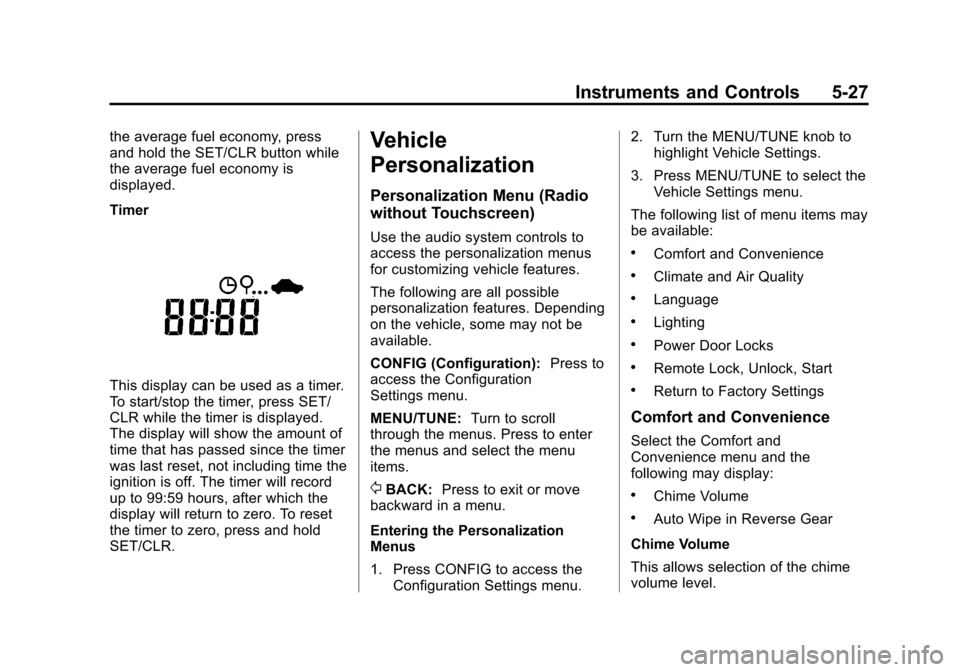
Timer
This display can be used as a timer.
To start/stop the timer, press SET/
CLR while the timer is displayed.
The display will show the amount of
time that has passed since the timer
was last reset, not including time the
ignition is off. The timer will record
up to 99:59 hours, after which the
display will return to zero. To reset
the timer to zero, press and hold
SET/CLR.
Vehicle
Personalization
Personalization Menu (Radio
without Touchscreen)
Use the audio system controls to
access the personalization menus
for customizing vehicle features.
The following are all possible
personalization features. Depending
on the vehicle, some may not be
available.
CONFIG (Configuration):Press to
access the Configuration
Settings menu.
MENU/TUNE: Turn to scroll
through the menus. Press to enter
the menus and select the menu
items.
/BACK: Press to exit or move
backward in a menu.
Entering the Personalization
Menus
1. Press CONFIG to access the Configuration Settings menu. 2. Turn the MENU/TUNE knob to
highlight Vehicle Settings.
3. Press MENU/TUNE to select the Vehicle Settings menu.
The following list of menu items may
be available:
.Comfort and Convenience
.Climate and Air Quality
.Language
.Lighting
.Power Door Locks
.Remote Lock, Unlock, Start
.Return to Factory Settings
Comfort and Convenience
Select the Comfort and
Convenience menu and the
following may display:
.Chime Volume
.Auto Wipe in Reverse Gear
Chime Volume
This allows selection of the chime
volume level.
Page 188 of 400

Black plate (46,1)Chevrolet Sonic Owner Manual (GMNA-Localizing-U.S./Canada-6081473) -
2014 - 2nd Edition - 8/19/13
7-46 Infotainment System
.Connect Andriod™phones
through Bluetooth.
iPod/iPhone Error Messages and
Solution
If the system fails to activate the
application on the iPod/iPhone
connected, an error message is
displayed as, “Unable to start
application, possible reasons.”
.Your iPhone is locked. To
resolve, unlock the iPhone.
.You have another active
application open. To resolve,
close the other active
application.
.You have not installed the
application on your iPhone. To
resolve, install the application on
the iPhone.
iOS Version Error
If the iOS version of the iPhone is
less than 4.0, the error message is
displayed as, “Your iPhone does not allow this application to be
opened on a USB connection.
Please refer to owner
’s manual.”
.Activate the application on your
iPhone, then press the desired
application menu on the
infotainment system.
Connecting Application Error
If the infotainment system fails to
activate the application on the
smartphone connected through
Bluetooth wireless technology, the
error message is displayed as,
“Connecting application error.”
.Reset all settings related to the
phone, then press the desired
application menu on the
infotainment system.
.Reconnect the smartphone and
infotainment system through
Bluetooth wireless technology,
then press the desired
application menu on the
infotainment system.
.When the application is stopped
on the smartphone, it usually
takes time to return to normal
operation. Try to activate the
application after 10–20 seconds.
To switch to another application
while playing an application and
connected through the USB port,
press the HOME button on the iPod/
iPhone, then press the application
icon on the infotainment system.
Switching Between a USB
Connected Device and a
Bluetooth Device
When the iPhone is connected to
the infotainment system through the
USB port, and the infotainment
system is connected to another
phone through Bluetooth wireless
technology, press iPhone or
bluetooth phone on the smartphone
list menu to switch between the two
applications.
Page 194 of 400
Black plate (52,1)Chevrolet Sonic Owner Manual (GMNA-Localizing-U.S./Canada-6081473) -
2014 - 2nd Edition - 8/19/13
7-52 Infotainment System
.When the iPod/iPhone is
connected to the USB port by
using the iPod/iPhone cable, the
Bluetooth music is not
supported.
.Connect the iPod/iPhone to the
USB port by using the iPod/
iPhone cable to play the music
files. When the iPod/iPhone is
connected to the AUX input
terminal, the music file will
not play.
.The iPod/iPhone playback
functions and the information
displayed may be different when
played on the infotainment
system.
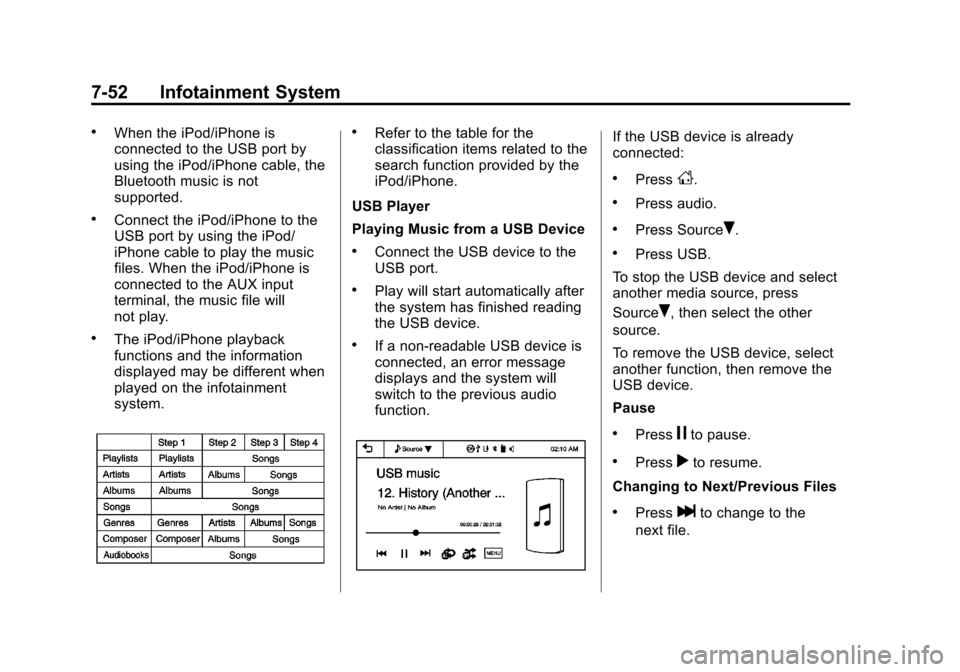
.Refer to the table for the
classification items related to the
search function provided by the
iPod/iPhone.
USB Player
Playing Music from a USB Device
.Connect the USB device to the
USB port.
.Play will start automatically after
the system has finished reading
the USB device.
.If a non-readable USB device is
connected, an error message
displays and the system will
switch to the previous audio
function.
If the USB device is already
connected:
.PressD.
.Press audio.
.Press SourceR.
.Press USB.
To stop the USB device and select
another media source, press
Source
R, then select the other
source.
To remove the USB device, select
another function, then remove the
USB device.
Pause
.Pressjto pause.
.Pressrto resume.
Changing to Next/Previous Files
.Presslto change to the
next file.
Page 196 of 400
Black plate (54,1)Chevrolet Sonic Owner Manual (GMNA-Localizing-U.S./Canada-6081473) -
2014 - 2nd Edition - 8/19/13
7-54 Infotainment System
.Play will start from the previously
played point after the system
has finished reading the USB
device.
.If a non-readable USB device is
connected, an error message
displays and the system will
switch to the previous audio
function.
If the iPod/iPhone is already
connected:
1. Press
D.
2. Press
eaudio.
3. Press Source
R.
4. Press iPod.
To stop the device and select
another media source, press
Source
R, then select the other
source.
To remove the device, select
another function, then remove the
device. Pause
.Pressjto pause.
.Pressrto resume.
Changing to Next/Previous Song
.Presslto change to the
next song.
.Pressgwithin two seconds of
the playback time to play the
previous file.
Returning to the Beginning of the
Current File
Press
gafter two seconds of the
playback time.
Scanning Forward or Backward
Press and hold
gorlduring
playback to rewind or fast forward.
Release the button to resume
playback at normal speed. Playing a File Repeatedly
Press
vduring playback.
.1: Plays the current file
repeatedly.
.ALL: Plays all files repeatedly.
.OFF: Returns to normal
playback.
Playing a File Randomly
Press
uduring playback.
.NO: Plays all files randomly.
.OFF: Returns to normal
playback.
Viewing Information on the
Currently Playing Song
Press the title during playback to
display information about the current
song playing.
.The information displayed
includes the title, file name,
folder name, and artist/album
saved with the song.
Page 213 of 400
Black plate (5,1)Chevrolet Sonic Owner Manual (GMNA-Localizing-U.S./Canada-6081473) -
2014 - 2nd Edition - 8/19/13
Driving and Operating 9-5
.Steering or Cornering
Skid—too much speed or
steering in a curve causes tires
to slip and lose cornering force.
.Acceleration Skid —too much
throttle causes the driving
wheels to spin.
Defensive drivers avoid most skids
by taking reasonable care suited to
existing conditions, and by not
overdriving those conditions. But
skids are always possible.
If the vehicle starts to slide, follow
these suggestions:
.Ease your foot off the
accelerator pedal and steer the
way you want the vehicle to go.
The vehicle may straighten out.
Be ready for a second skid if it
occurs.
.Slow down and adjust your
driving according to weather
conditions. Stopping distance
can be longer and vehicle
control can be affected when
traction is reduced by water,
snow, ice, gravel, or other material on the road. Learn to
recognize warning clues
—such
as enough water, ice, or packed
snow on the road to make a
mirrored surface —and slow
down when you have any doubt.
.Try to avoid sudden steering,
acceleration, or braking,
including reducing vehicle speed
by shifting to a lower gear. Any
sudden changes could cause
the tires to slide.
Remember: Antilock brakes help
avoid only the braking skid.
Driving on Wet Roads
Rain and wet roads can reduce
vehicle traction and affect your
ability to stop and accelerate.
Always drive slower in these types
of driving conditions and avoid
driving through large puddles and
deep‐standing or flowing water.
{Warning
Wet brakes can cause crashes.
They might not work as well in a
quick stop and could cause
pulling to one side. You could
lose control of the vehicle.
After driving through a large
puddle of water or a car/vehicle
wash, lightly apply the brake
pedal until the brakes work
normally.
Flowing or rushing water creates
strong forces. Driving through
flowing water could cause the
vehicle to be carried away. If this
happens, you and other vehicle
occupants could drown. Do not
ignore police warnings and be
very cautious about trying to drive
through flowing water.
Page 221 of 400
Black plate (13,1)Chevrolet Sonic Owner Manual (GMNA-Localizing-U.S./Canada-6081473) -
2014 - 2nd Edition - 8/19/13
Driving and Operating 9-13
If you put things inside the
vehicle—like suitcases, tools,
packages, or anything
else —they will go as fast as the
vehicle goes. If you have to stop
or turn quickly, or if there is a
crash, they will keep going.
{Warning
Things inside the vehicle can
strike and injure people in a
sudden stop or turn, or in a
crash.
.Put things in the cargo
area of the vehicle. In the
cargo area, put them as
far forward as possible.
Try to spread the weight
evenly.
(Continued)
Warning (Continued)
.Never stack heavier
things, like suitcases,
inside the vehicle so that
some of them are above
the tops of the seats.
.Do not leave an
unsecured child restraint
in the vehicle.
.Secure loose items in the
vehicle.
.Do not leave a seat folded
down unless needed.
Starting and
Operating
New Vehicle Break-In
{Caution
The vehicle does not need an
elaborate break-in. But it will
perform better in the long run if
you follow these guidelines:
.Do not drive at any one
constant speed, fast or slow,
for the first 805 km (500 mi).
Do not make full-throttle
starts. Avoid downshifting to
brake or slow the vehicle.
.Avoid making hard stops for
the first 322 km (200 mi) or
so. During this time the new
brake linings are not yet
broken in. Hard stops with
new linings can mean
premature wear and earlier
replacement. Follow this (Continued)
Page 223 of 400
Black plate (15,1)Chevrolet Sonic Owner Manual (GMNA-Localizing-U.S./Canada-6081473) -
2014 - 2nd Edition - 8/19/13
Driving and Operating 9-15
{Caution
Using a tool to force the key to
turn in the ignition could cause
damage to the switch or break the
key. Use the correct key, make
sure it is all the way in, and turn it
only with your hand. If the key
cannot be turned by hand, see
your dealer.
2 (ACC/ACCESSORY): This is the
position in which things like the
radio and the windshield wipers can
be operated when the engine is off.
3 (ON/RUN): This position can be
used to operate the electrical
accessories and to display some
instrument cluster warning and
indicator lights. This position can
also be used for service and
diagnostics, and to verify the proper
operation of the malfunction
indicator lamp as may be required
for emission inspection purposes.
The switch stays in this position
when the engine is running. If you leave the key in the ACC/
ACCESSORY or ON/RUN position
with the engine off, the battery could
be drained. You may not be able to
start the vehicle if the battery is
allowed to drain for an extended
period of time.
4 (START):
This is the position that
starts the engine. When the engine
starts, release the key. The ignition
switch returns to ON/RUN for
driving.
A warning tone will sound when the
driver door is opened, the ignition is
in ACC/ACCESSORY or LOCK/
OFF, and the key is in the ignition.
If the ignition becomes difficult to
turn, see Keys on page 2-1.
Starting the Engine
Automatic Transmission
Move the shift lever to P (Park) or
N (Neutral). The engine will not start
in any other position. To restart the
engine when the vehicle is already
moving, use N (Neutral) only.
{Caution
Do not try to shift to P (Park) if the
vehicle is moving. If you do, you
could damage the transmission.
Shift to P (Park) only when the
vehicle is stopped.
{Caution
If the steering wheel is turned
until it reaches the end of its
travel, and is held in that position
while starting the vehicle, damage
may occur to the hydraulic power
steering system and there may be
loss of power steering assist.
Manual Transmission
The shift lever should be in Neutral
and the parking brake engaged.
Hold the clutch pedal to the floor
and start the engine. The vehicle
will not start if the clutch pedal is not
all the way down.
Page 224 of 400

Black plate (16,1)Chevrolet Sonic Owner Manual (GMNA-Localizing-U.S./Canada-6081473) -
2014 - 2nd Edition - 8/19/13
9-16 Driving and Operating
Starting Procedure
1. With your foot off the acceleratorpedal, turn the ignition to START.
When the engine cranks, let go
of the key. The idle speed will go
down as the engine gets warm.
The vehicle has a
Computer-Controlled Cranking
System. It assists in starting the
engine and protects
components. If the ignition key is
turned to START and then
released when the engine
begins cranking, the engine will
continue cranking for a
few seconds or until the engine
starts. If the engine does not
start and the key is held in
START, cranking will be stopped
after 15 seconds to prevent
damage. To prevent gear
damage, cranking is not allowed
if the engine is running. Engine
cranking can be stopped by
turning the ignition key to ACC/
ACCESSORY or LOCK/OFF.{Caution
Holding the key in START for
longer than 15 seconds at a time
will cause the battery to be
drained much sooner. And the
excessive heat can damage the
starter motor. Wait about
15 seconds between each try to
help avoid draining the battery or
damaging the starter.
2. If the engine does not start, wait about 15 seconds and try again.
Wait about 15 seconds between
each try.
When the engine has run about
10 seconds to warm up, the
vehicle is ready to be driven. Do
not run the engine at high speed
when it is cold.
If the weather is below freezing
(0°C or 32°F), let the engine run
for a few minutes to warm up. 3. If the engine still will not start,
or starts but then stops, it could
be flooded with too much
gasoline. Try pushing the
accelerator pedal all the way to
the floor and holding it there as
you hold the key in START for
about three seconds. If the
vehicle starts briefly but then
stops again, do the same thing,
but this time keep the pedal
down for five or six seconds.
This clears the extra gasoline
from the engine.
{Caution
If you add electrical parts or
accessories, you could change
the way the engine operates. Any
resulting damage would not be
covered by the vehicle warranty.
See Add-On Electrical Equipment
on page 9-42.
Page 230 of 400
Black plate (22,1)Chevrolet Sonic Owner Manual (GMNA-Localizing-U.S./Canada-6081473) -
2014 - 2nd Edition - 8/19/13
9-22 Driving and Operating
ease pressure on the shift lever and
push the shift lever all the way into
P (Park) as you maintain brake
application. Then move the shift
lever into another gear. SeeShifting
out of Park (Automatic
Transmission) on page 9-19.
R (Reverse): Use this gear to
back up.
{Caution
Shifting to R (Reverse) while the
vehicle is moving forward could
damage the transmission. The
repairs would not be covered by
the vehicle warranty. Shift to
R (Reverse) only after the vehicle
is stopped.
To rock the vehicle back and forth to
get out of snow, ice, or sand without
damaging the transmission, see If
the Vehicle Is Stuck on page 9-8.
N (Neutral): In this position, the
engine does not connect with the
wheels. To restart the engine when the vehicle is already moving, use
N (Neutral) only. Also, use
N (Neutral) when the vehicle is
being towed.
{Warning
Shifting into a drive gear while the
engine is running at high speed is
dangerous. Unless your foot is
firmly on the brake pedal, the
vehicle could move very rapidly.
You could lose control and hit
people or objects. Do not shift
into a drive gear while the engine
is running at high speed.
{Caution
Shifting out of P (Park) or
N (Neutral) with the engine
running at high speed may
damage the transmission. The
repairs would not be covered by
(Continued)
Caution (Continued)
the vehicle warranty. Be sure the
engine is not running at high
speed when shifting the vehicle.
D (Drive): This position is for
normal driving. It provides the best
fuel economy. If you need more
power for passing, and you are:
.Going less than 56 km/h
(35 mph), push the accelerator
pedal about halfway down.
.Going about 56 km/h (35 mph) or
more, push the accelerator all
the way down.
M (Manual Mode): This position,
allows you to change gears similar
to a manual transmission. If the
vehicle has this feature, see
“Manual Mode” following.
Page 232 of 400
Black plate (24,1)Chevrolet Sonic Owner Manual (GMNA-Localizing-U.S./Canada-6081473) -
2014 - 2nd Edition - 8/19/13
9-24 Driving and Operating
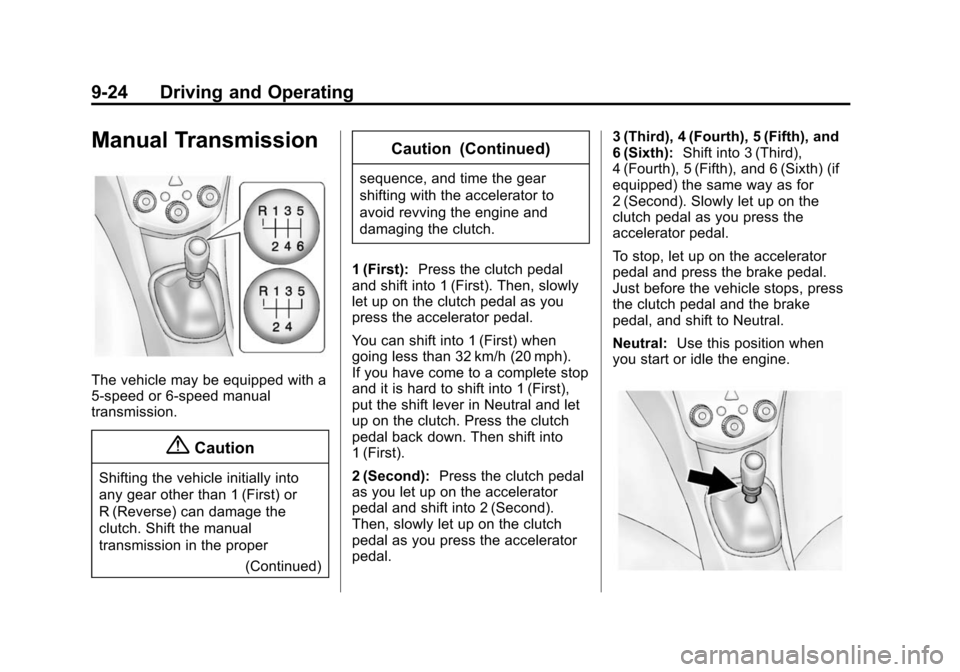
Manual Transmission
The vehicle may be equipped with a
5-speed or 6-speed manual
transmission.
{Caution
Shifting the vehicle initially into
any gear other than 1 (First) or
R (Reverse) can damage the
clutch. Shift the manual
transmission in the proper(Continued)
Caution (Continued)
sequence, and time the gear
shifting with the accelerator to
avoid revving the engine and
damaging the clutch.
1 (First): Press the clutch pedal
and shift into 1 (First). Then, slowly
let up on the clutch pedal as you
press the accelerator pedal.
You can shift into 1 (First) when
going less than 32 km/h (20 mph).
If you have come to a complete stop
and it is hard to shift into 1 (First),
put the shift lever in Neutral and let
up on the clutch. Press the clutch
pedal back down. Then shift into
1 (First).
2 (Second): Press the clutch pedal
as you let up on the accelerator
pedal and shift into 2 (Second).
Then, slowly let up on the clutch
pedal as you press the accelerator
pedal. 3 (Third), 4 (Fourth), 5 (Fifth), and
6 (Sixth):
Shift into 3 (Third),
4 (Fourth), 5 (Fifth), and 6 (Sixth) (if
equipped) the same way as for
2 (Second). Slowly let up on the
clutch pedal as you press the
accelerator pedal.
To stop, let up on the accelerator
pedal and press the brake pedal.
Just before the vehicle stops, press
the clutch pedal and the brake
pedal, and shift to Neutral.
Neutral: Use this position when
you start or idle the engine.