side mirror CHEVROLET SONIC 2015 2.G Owners Manual
[x] Cancel search | Manufacturer: CHEVROLET, Model Year: 2015, Model line: SONIC, Model: CHEVROLET SONIC 2015 2.GPages: 403, PDF Size: 5.68 MB
Page 8 of 403
Black plate (1,1)Chevrolet Sonic Owner Manual (GMNA-Localizing-U.S./Canada-7707487) -
2015 - crc - 10/31/14
In Brief 1-1
In Brief
Instrument Panel
Instrument Panel . . . . . . . . . . . . . . 1-2
Initial Drive Information
Initial Drive Information . . . . . . . . 1-4
Starting the Engine . . . . . . . . . . . 1-4
Remote Keyless Entry (RKE)System . . . . . . . . . . . . . . . . . . . . . . 1-4
Remote Vehicle Start . . . . . . . . . 1-5
Door Locks . . . . . . . . . . . . . . . . . . . 1-5
Liftgate . . . . . . . . . . . . . . . . . . . . . . . . 1-6
Trunk Release . . . . . . . . . . . . . . . . 1-6
Windows . . . . . . . . . . . . . . . . . . . . . . 1-7
Seat Adjustment . . . . . . . . . . . . . . 1-7
Second Row Seats . . . . . . . . . . . 1-8
Head Restraint Adjustment . . . . 1-8
Safety Belts . . . . . . . . . . . . . . . . . . . 1-8
Passenger Sensing System . . . 1-9
Mirror Adjustment . . . . . . . . . . . . . 1-9
Steering Wheel Adjustment . . . . . . . . . . . . . . . . . 1-10
Interior Lighting . . . . . . . . . . . . . . 1-10
Exterior Lighting . . . . . . . . . . . . . 1-11
Windshield Wiper/Washer . . . . 1-11
Climate Controls . . . . . . . . . . . . . 1-12
Transmission . . . . . . . . . . . . . . . . 1-13
Vehicle Features
Radio(s) . . . . . . . . . . . . . . . . . . . . . 1-14
Satellite Radio . . . . . . . . . . . . . . . 1-15
Portable Audio Devices . . . . . . 1-16
Bluetooth
®. . . . . . . . . . . . . . . . . . . 1-16
Steering Wheel Controls . . . . . 1-16
Cruise Control . . . . . . . . . . . . . . . 1-17
Driver Information
Center (DIC) . . . . . . . . . . . . . . . 1-17
Forward Collision Alert (FCA) System . . . . . . . . . . . . . . . . . . . . . 1-17
Lane Departure Warning (LDW) . . . . . . . . . . . . . 1-18
Rear Vision Camera (RVC) . . . . . . . . . . . . . 1-18
Power Outlets . . . . . . . . . . . . . . . 1-18
Sunroof . . . . . . . . . . . . . . . . . . . . . . 1-18
Performance and Maintenance
Traction Control/Electronic Stability Control . . . . . . . . . . . . 1-19
Tire Pressure Monitor . . . . . . . . 1-19
Engine Oil Life System . . . . . . 1-20
Driving for Better Fuel Economy . . . . . . . . . . . . . . . . . . . 1-20
Roadside Assistance Program . . . . . . . . . . . . . . . . . . . . 1-21
OnStar
®. . . . . . . . . . . . . . . . . . . . . 1-21
Page 16 of 403
Black plate (9,1)Chevrolet Sonic Owner Manual (GMNA-Localizing-U.S./Canada-7707487) -
2015 - crc - 10/31/14
In Brief 1-9
.Lap-Shoulder Belt on page 3-11.
.Lower Anchors and Tethers for
Children (LATCH System) on
page 3-38.
Passenger Sensing
System
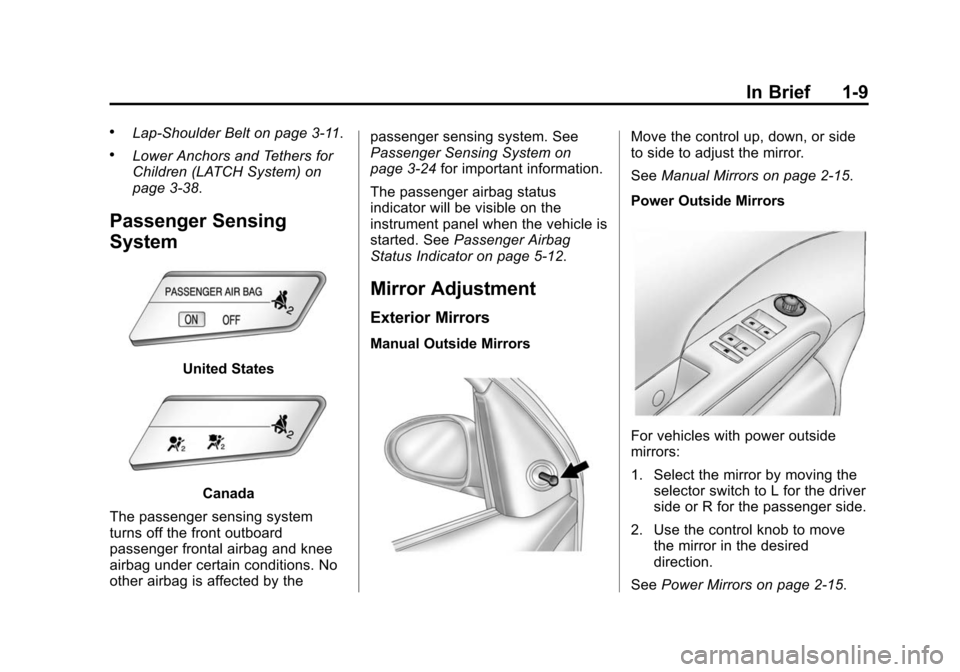
United States
Canada
The passenger sensing system
turns off the front outboard
passenger frontal airbag and knee
airbag under certain conditions. No
other airbag is affected by the passenger sensing system. See
Passenger Sensing System on
page 3-24
for important information.
The passenger airbag status
indicator will be visible on the
instrument panel when the vehicle is
started. See Passenger Airbag
Status Indicator on page 5-12.
Mirror Adjustment
Exterior Mirrors
Manual Outside Mirrors
Move the control up, down, or side
to side to adjust the mirror.
See Manual Mirrors on page 2-15.
Power Outside Mirrors
For vehicles with power outside
mirrors:
1. Select the mirror by moving the selector switch to L for the driver
side or R for the passenger side.
2. Use the control knob to move the mirror in the desired
direction.
See Power Mirrors on page 2-15.
Page 17 of 403
Black plate (10,1)Chevrolet Sonic Owner Manual (GMNA-Localizing-U.S./Canada-7707487) -
2015 - crc - 10/31/14
1-10 In Brief
Interior Mirror
Hold the inside rearview mirror in
the center to move it for a clearer
view behind your vehicle. Adjust the
mirror to avoid glare from the
headlamps behind you. Push the
tab forward for daytime use and pull
it for nighttime use.
SeeManual Rearview Mirror on
page 2-16.
Steering Wheel
Adjustment
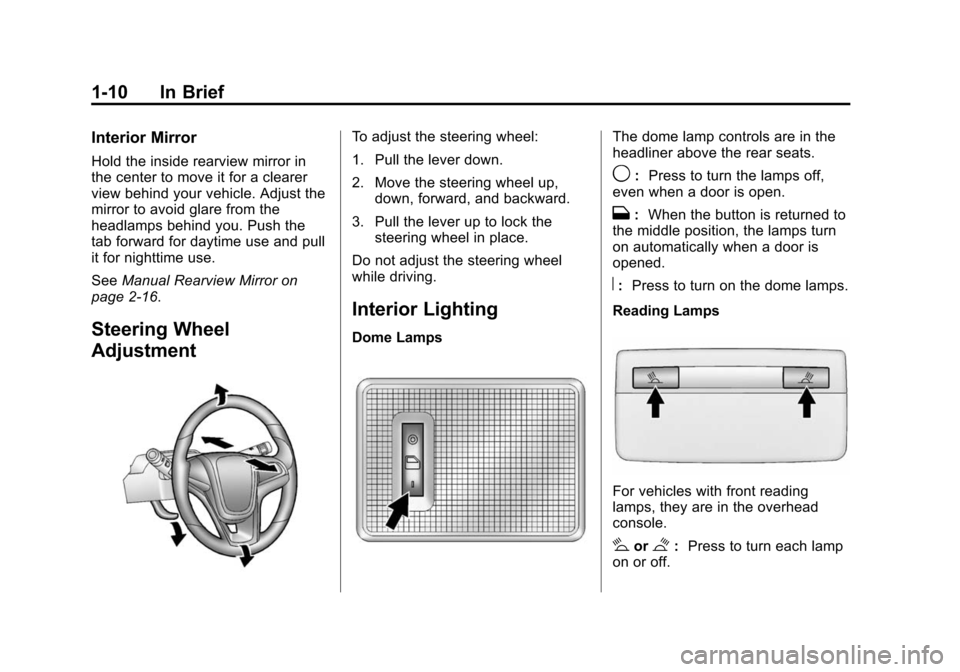
To adjust the steering wheel:
1. Pull the lever down.
2. Move the steering wheel up, down, forward, and backward.
3. Pull the lever up to lock the steering wheel in place.
Do not adjust the steering wheel
while driving.
Interior Lighting
Dome Lamps
The dome lamp controls are in the
headliner above the rear seats.
9: Press to turn the lamps off,
even when a door is open.
H: When the button is returned to
the middle position, the lamps turn
on automatically when a door is
opened.
R: Press to turn on the dome lamps.
Reading Lamps
For vehicles with front reading
lamps, they are in the overhead
console.
#or$: Press to turn each lamp
on or off.
Page 44 of 403
Black plate (15,1)Chevrolet Sonic Owner Manual (GMNA-Localizing-U.S./Canada-7707487) -
2015 - crc - 10/31/14
Keys, Doors, and Windows 2-15
Exterior Mirrors
Convex Mirrors
{Warning
A convex mirror can make things,
like other vehicles, look farther
away than they really are. If you
cut too sharply into the right lane,
you could hit a vehicle on the
right. Check the inside mirror or
glance over your shoulder before
changing lanes.
The passenger side mirror is convex
shaped. A convex mirror's surface is
curved so more can be seen from
the driver seat.
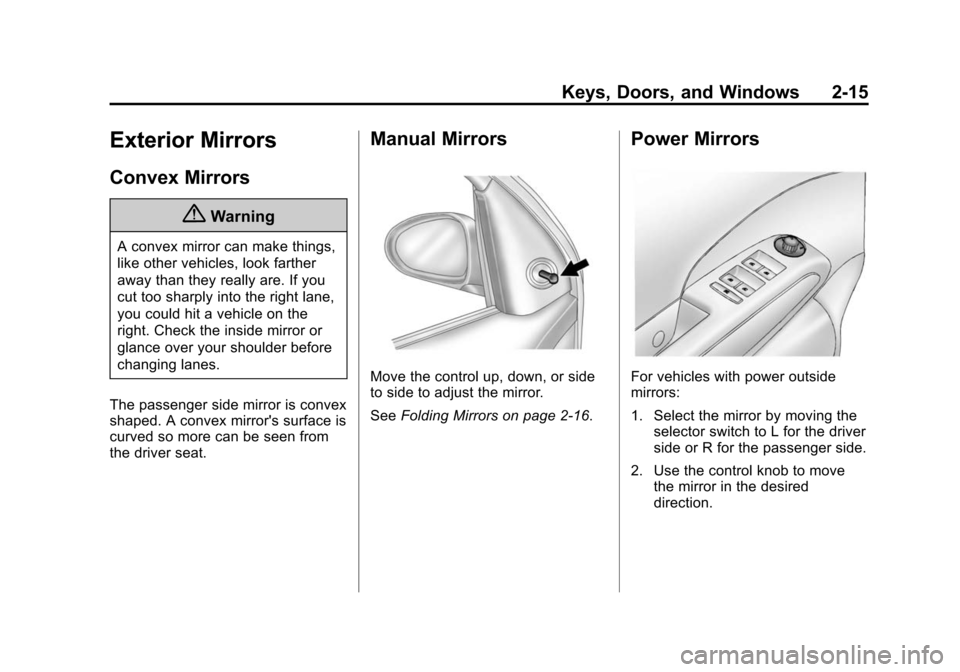
Manual Mirrors
Move the control up, down, or side
to side to adjust the mirror.
See Folding Mirrors on page 2-16.
Power Mirrors
For vehicles with power outside
mirrors:
1. Select the mirror by moving the
selector switch to L for the driver
side or R for the passenger side.
2. Use the control knob to move the mirror in the desired
direction.
Page 45 of 403
Black plate (16,1)Chevrolet Sonic Owner Manual (GMNA-Localizing-U.S./Canada-7707487) -
2015 - crc - 10/31/14
2-16 Keys, Doors, and Windows
Folding Mirrors
Manual Folding Mirrors
The vehicle has manual folding
mirrors. These mirrors can be folded
inward to prevent damage when
going through an automatic car
wash. To fold, pull the mirror toward
the vehicle. Push the mirror outward
to return it to the original position.
Heated Mirrors
For vehicles with this feature:
1(Rear Window Defogger):
Press to heat the mirrors. See “Rear
Window and Outside Mirror
Defogger” underClimate Control
Systems on page 8-1.
Interior Mirrors
Manual Rearview Mirror
Hold the inside rearview mirror in
the center to move it for a clearer
view behind your vehicle. Adjust the
mirror to avoid glare from the
headlamps behind you. Push the
tab forward for daytime use and pull
it for nighttime use.
Vehicles with OnStar
®have three
control buttons at the bottom of the
mirror. See your dealer for more
information about OnStar and how
to subscribe to it. See OnStar
Overview on page 14-1.
Windows
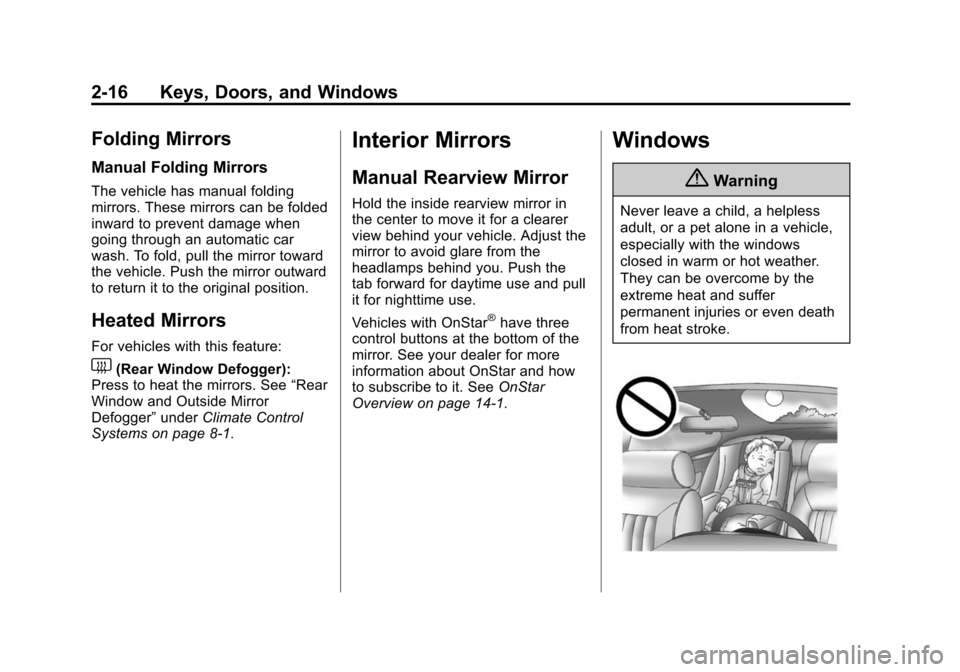
{Warning
Never leave a child, a helpless
adult, or a pet alone in a vehicle,
especially with the windows
closed in warm or hot weather.
They can be overcome by the
extreme heat and suffer
permanent injuries or even death
from heat stroke.
Page 47 of 403
Black plate (18,1)Chevrolet Sonic Owner Manual (GMNA-Localizing-U.S./Canada-7707487) -
2015 - crc - 10/31/14
2-18 Keys, Doors, and Windows
Safety Function
If any object is in the path of the
window when the express-up
feature is active, the window will
stop and auto-reverse to a preset
position. Weather conditions may
cause the window to auto-reverse.
The window switch may be held up
to the second position to close the
window. The window will return to
normal operation once the
obstruction or condition is removed.
Safety Function Override
If the battery on the vehicle has
been recharged or disconnected,
or is not working, the windows will
need to be reprogrammed for the
express-up feature to work. Before
reprogramming, replace or recharge
the vehicle's battery.
To program the driver window:
1. With the ignition in ACC/ACCESSORY or ON/RUN,
or when RAP is active, close all
doors. 2. Press and hold the power
window switch until the window
is fully open.
3. Pull the power window switch up until the window is fully closed.
4. Continue holding the switch up for approximately two seconds
after the window is completely
closed.
The window is now reprogrammed.
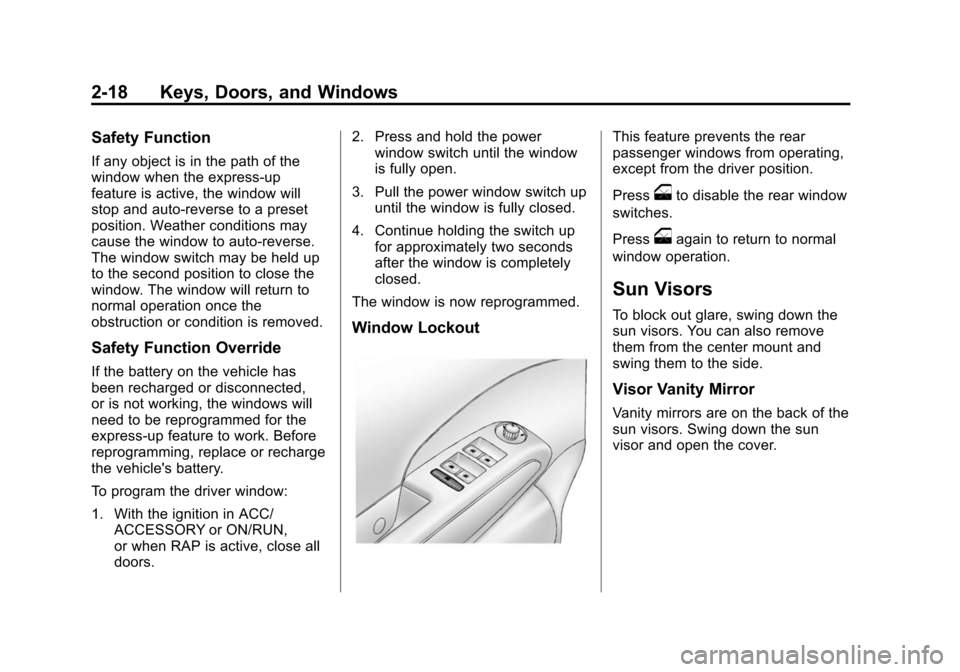
Window Lockout
This feature prevents the rear
passenger windows from operating,
except from the driver position.
Press
oto disable the rear window
switches.
Press
oagain to return to normal
window operation.
Sun Visors
To block out glare, swing down the
sun visors. You can also remove
them from the center mount and
swing them to the side.
Visor Vanity Mirror
Vanity mirrors are on the back of the
sun visors. Swing down the sun
visor and open the cover.
Page 145 of 403
Black plate (6,1)Chevrolet Sonic Owner Manual (GMNA-Localizing-U.S./Canada-7707487) -
2015 - crc - 10/31/14
6-6 Lighting
Courtesy Lamps
The courtesy lamps come on
automatically when any door is
opened and the dome lamp is in the
door position.
Dome Lamps
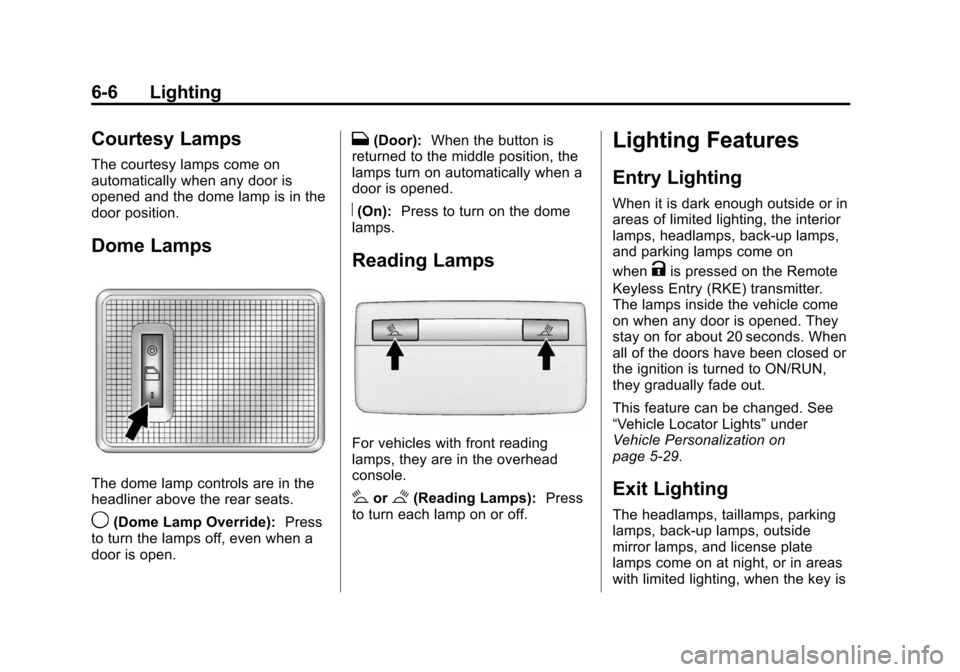
The dome lamp controls are in the
headliner above the rear seats.
9(Dome Lamp Override):Press
to turn the lamps off, even when a
door is open.
H(Door): When the button is
returned to the middle position, the
lamps turn on automatically when a
door is opened.
R(On): Press to turn on the dome
lamps.
Reading Lamps
For vehicles with front reading
lamps, they are in the overhead
console.
#or$(Reading Lamps): Press
to turn each lamp on or off.
Lighting Features
Entry Lighting
When it is dark enough outside or in
areas of limited lighting, the interior
lamps, headlamps, back-up lamps,
and parking lamps come on
when
Kis pressed on the Remote
Keyless Entry (RKE) transmitter.
The lamps inside the vehicle come
on when any door is opened. They
stay on for about 20 seconds. When
all of the doors have been closed or
the ignition is turned to ON/RUN,
they gradually fade out.
This feature can be changed. See
“Vehicle Locator Lights” under
Vehicle Personalization on
page 5-29.
Exit Lighting
The headlamps, taillamps, parking
lamps, back-up lamps, outside
mirror lamps, and license plate
lamps come on at night, or in areas
with limited lighting, when the key is
Page 210 of 403
Black plate (3,1)Chevrolet Sonic Owner Manual (GMNA-Localizing-U.S./Canada-7707487) -
2015 - crc - 10/31/14
Climate Controls 8-3
Press the button to turn the
recirculation mode on. An indicator
light comes on to show that the
recirculation is on. Press the button
again to return to outside air mode.
Using the recirculation mode for
extended periods may cause the
windows to fog. If this happens,
select the defrost mode.
Max
#is available when the air
conditioning is selected and the
temperature is set to the coolest
setting while the outside air
temperature is warm. When Max
#
is activated, the air inside the
vehicle is automatically recirculated,
which helps to quickly cool the
vehicle. The recirculation indicator
will not be lit.
To allow outside air to enter in these
conditions, press the recirculation
button twice. The recirculation
indicator will not be lit.
MorL(Heated Seats, If
Equipped): Press to heat the driver
or passenger seat. See Heated
Front Seats on page 3-6.
Rear Window and Outside
Mirror Defogger
1(Rear Window Defogger):
Press to turn the rear window and
outside mirror defogger on or off. An
indicator light comes on to show
that the feature is on.
The rear window defogger can be
turned off by pressing
1again or
by turning the ignition to ACC/
ACCESSORY or LOCK/OFF.
If equipped with heated outside
rearview mirrors, they turn on with
the rear window defogger and help
to clear fog or frost from the surface
of the mirror. See Heated Mirrors on
page 2-16.
{Caution
Using a razor blade or sharp
object on the inside rear window
can damage the antenna or
defogger. Repairs would not be
covered by the vehicle warranty.
Do not stick anything to the rear
window.
Page 218 of 403
Black plate (5,1)Chevrolet Sonic Owner Manual (GMNA-Localizing-U.S./Canada-7707487) -
2015 - crc - 10/31/14
Driving and Operating 9-5
.Steering or Cornering Skid—
too much speed or steering in a
curve causes tires to slip and
lose cornering force.
.Acceleration Skid —too much
throttle causes the driving
wheels to spin.
Defensive drivers avoid most skids
by taking reasonable care suited to
existing conditions, and by not
overdriving those conditions. But
skids are always possible.
If the vehicle starts to slide, follow
these suggestions:
.Ease your foot off the
accelerator pedal and steer the
way you want the vehicle to go.
The vehicle may straighten out.
Be ready for a second skid if it
occurs.
.Slow down and adjust your
driving according to weather
conditions. Stopping distance
can be longer and vehicle
control can be affected when
traction is reduced by water,
snow, ice, gravel, or other material on the road. Learn to
recognize warning clues
—such
as enough water, ice, or packed
snow on the road to make a
mirrored surface —and slow
down when you have any doubt.
.Try to avoid sudden steering,
acceleration, or braking,
including reducing vehicle speed
by shifting to a lower gear. Any
sudden changes could cause
the tires to slide.
Remember: Antilock brakes help
avoid only the braking skid.
Driving on Wet Roads
Rain and wet roads can reduce
vehicle traction and affect your
ability to stop and accelerate.
Always drive slower in these types
of driving conditions and avoid
driving through large puddles and
deep‐standing or flowing water.
{Warning
Wet brakes can cause crashes.
They might not work as well in a
quick stop and could cause
pulling to one side. You could
lose control of the vehicle.
After driving through a large
puddle of water or a car/vehicle
wash, lightly apply the brake
pedal until the brakes work
normally.
Flowing or rushing water creates
strong forces. Driving through
flowing water could cause the
vehicle to be carried away. If this
happens, you and other vehicle
occupants could drown. Do not
ignore police warnings and be
very cautious about trying to drive
through flowing water.
Page 220 of 403
Black plate (7,1)Chevrolet Sonic Owner Manual (GMNA-Localizing-U.S./Canada-7707487) -
2015 - crc - 10/31/14
Driving and Operating 9-7
Winter Driving
Driving on Snow or Ice
Drive carefully when there is snow
or ice between the tires and the
road, creating less traction or grip.
Wet ice can occur at about 0°C (32°
F) when freezing rain begins to fall,
resulting in even less traction. Avoid
driving on wet ice or in freezing rain
until roads can be treated with salt
or sand.
Drive with caution, whatever the
condition. Accelerate gently so
traction is not lost. Accelerating too
quickly causes the wheels to spin
and makes the surface under the
tires slick, so there is even less
traction.
Traction Control should be turned
on. SeeTraction Control/Electronic
Stability Control on page 9-28.
The Antilock Brake System (ABS)
improves vehicle stability during
hard stops on slippery roads, but apply the brakes sooner than when
on dry pavement. See
Antilock
Brake System (ABS) on page 9-25.
Allow greater following distance on
any slippery road and watch for
slippery spots. Icy patches can
occur on otherwise clear roads in
shaded areas. The surface of a
curve or an overpass can remain icy
when the surrounding roads are
clear. Avoid sudden steering
maneuvers and braking while
on ice.
Turn off cruise control on slippery
surfaces.
Blizzard Conditions
Being stuck in snow can be a
serious situation. Stay with the
vehicle unless there is help nearby.
If possible, use Roadside
Assistance. See Roadside
Assistance Program on page 13-5.
To get help and keep everyone in
the vehicle safe:
.Turn on the hazard warning
flashers.
.Tie a red cloth to an outside
mirror.
{Warning
Snow can trap engine exhaust
under the vehicle. This may
cause exhaust gases to get
inside. Engine exhaust contains
carbon monoxide (CO) which
cannot be seen or smelled. It can
cause unconsciousness and even
death.
If the vehicle is stuck in the snow:
.Clear away snow from around
the base of your vehicle,
especially any that is blocking
the exhaust pipe.
.Check again from time to
time to be sure snow does
not collect there.
.Open a window about 5 cm
(2 in) on the side of the
vehicle that is away from the
wind to bring in fresh air.
(Continued)