warning CHEVROLET SONIC 2016 2.G User Guide
[x] Cancel search | Manufacturer: CHEVROLET, Model Year: 2016, Model line: SONIC, Model: CHEVROLET SONIC 2016 2.GPages: 353, PDF Size: 7.74 MB
Page 31 of 353
Chevrolet Sonic Owner Manual (GMNA-Localizing-U.S/Canada-9085902) -
2016 - CRC - 5/27/15
30 Keys, Doors, and Windows
When the engine starts, the parking
lamps will turn on and remain on as
long as the engine is running. The
doors will be locked and the climate
control system may come on.
The engine will continue to run for
10 minutes. After 30 seconds,
repeat the steps if a 10-minute
extension is desired. Remote start
can be extended only once.
Insert the key and turn it to ON/RUN
before driving.
Extending Engine Run Time
The engine run time can also be
extended by another 10 minutes,
if during the first 10 minutes
Steps 1–2 are repeated while the
engine is still running. An extension
can be requested, 30 seconds after
starting. This provides a total of
20 minutes.
When the remote start is extended,
the second 10-minute period is
added on to the first 10 minutes for
a total of 20 minutes.
A maximum of two remote starts,
or a single start with an extension,
are allowed between ignition cycles.After this, the vehicle's ignition
switch must be turned to ON/RUN
and then back to LOCK/OFF using
the key, before the remote start
procedure can be used again.
Canceling a Remote Start
To cancel a remote start, do one of
the following:
.
Press and hold
/until the
parking lamps turn off.
. Turn on the hazard warning
flashers.
. Turn the vehicle on and then off.
Conditions in Which Remote Start
Will Not Work
The remote vehicle start feature will
not operate if:
. The key is in the ignition.
. The hood is not closed.
. The hazard warning flashers
are on.
. The malfunction indicator lamp
is on.
. The engine coolant temperature
is too high. .
The oil pressure is low.
. Two remote vehicle starts, or a
single remote start with an
extension, have already
been used.
. The vehicle is not in P (Park).
Door Locks
{Warning
Unlocked doors can be
dangerous.
. Passengers, especially
children, can easily open
the doors and fall out of a
moving vehicle. When a
door is locked, the handle
will not open it. The chance
of being thrown out of the
vehicle in a crash is
increased if the doors are
not locked. So, all
passengers should wear
safety belts properly and the
(Continued)
Page 32 of 353
Chevrolet Sonic Owner Manual (GMNA-Localizing-U.S/Canada-9085902) -
2016 - CRC - 5/27/15
Keys, Doors, and Windows 31
Warning (Continued)
doors should be locked
whenever the vehicle is
driven.
. Young children who get into
unlocked vehicles may be
unable to get out. A child
can be overcome by
extreme heat and can suffer
permanent injuries or even
death from heat stroke.
Always lock the vehicle
whenever leaving it.
. Outsiders can easily enter
through an unlocked door
when you slow down or stop
the vehicle. Locking the
doors can help prevent this
from happening.
To lock or unlock the doors from
outside the vehicle:
. Use the key in the driver door to
lock all doors or unlock the
driver door only. .
Press
QorKon the Remote
Keyless Entry (RKE) transmitter.
See Remote Keyless Entry
(RKE) System Operation 027.
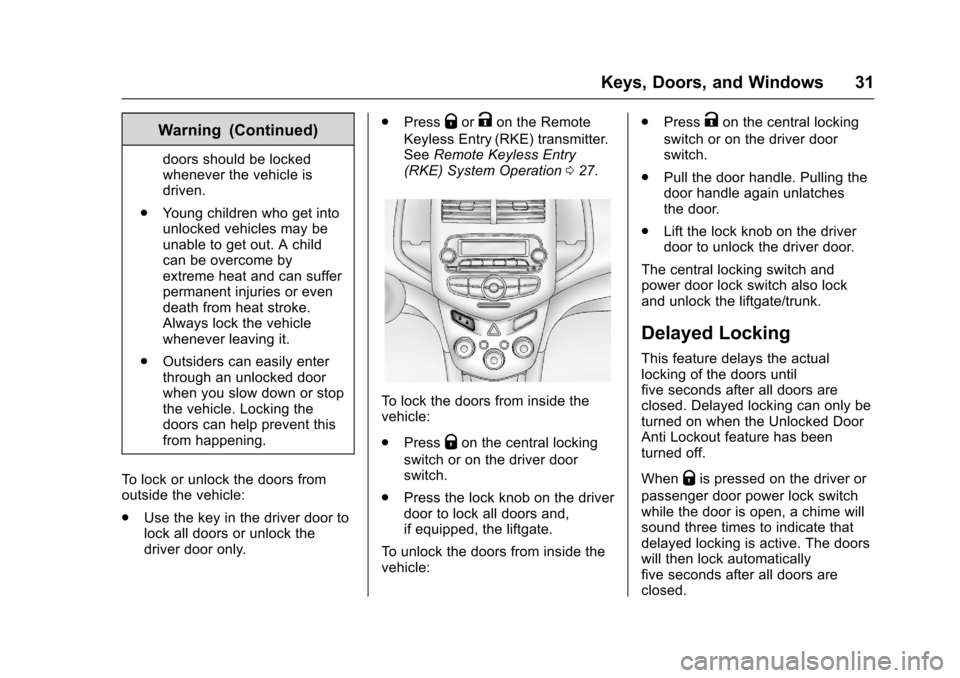
To lock the doors from inside the
vehicle:
.
Press
Qon the central locking
switch or on the driver door
switch.
. Press the lock knob on the driver
door to lock all doors and,
if equipped, the liftgate.
To unlock the doors from inside the
vehicle: .
Press
Kon the central locking
switch or on the driver door
switch.
. Pull the door handle. Pulling the
door handle again unlatches
the door.
. Lift the lock knob on the driver
door to unlock the driver door.
The central locking switch and
power door lock switch also lock
and unlock the liftgate/trunk.
Delayed Locking
This feature delays the actual
locking of the doors until
five seconds after all doors are
closed. Delayed locking can only be
turned on when the Unlocked Door
Anti Lockout feature has been
turned off.
When
Qis pressed on the driver or
passenger door power lock switch
while the door is open, a chime will
sound three times to indicate that
delayed locking is active. The doors
will then lock automatically
five seconds after all doors are
closed.
Page 34 of 353
Chevrolet Sonic Owner Manual (GMNA-Localizing-U.S/Canada-9085902) -
2016 - CRC - 5/27/15
Keys, Doors, and Windows 33
To open a rear door when the safety
lock is on:1. Unlock the door by activating the inside handle, by using the
power door lock switch, or by
using the Remote Keyless
Entry (RKE) transmitter.
2. Open the door from the outside.
To cancel the safety lock: 1. Unlock the door and open it from the outside.
2. Insert the key into the safety lock slot and turn it so the slot
is in the vertical position. Do
the same for the other door.Doors
Trunk (Sedan)
{Warning
Exhaust gases can enter the
vehicle if it is driven with the
liftgate, hatch/trunk open, or with
any objects that pass through the
seal between the body and the
hatch/trunk or liftgate. Engine
exhaust contains carbon
monoxide (CO) which cannot be
seen or smelled. It can cause
unconsciousness and even death.
If the vehicle must be driven with
the liftgate or hatch/trunk open:
. Close all of the windows.
. Fully open the air outlets on
or under the instrument
panel.
. Adjust the climate control
system to a setting that
brings in only outside air
and set the fan speed to the
(Continued)
Warning (Continued)
highest setting. See
“Climate Control Systems”
in the Index.
. If the vehicle is equipped
with a power liftgate, disable
the power liftgate function.
For more information about
carbon monoxide, see Engine
Exhaust 0197.
To lock or unlock the trunk from the
inside, press
QorKon the central
locking switch or the driver door lock
switch.
Page 36 of 353
Chevrolet Sonic Owner Manual (GMNA-Localizing-U.S/Canada-9085902) -
2016 - CRC - 5/27/15
Keys, Doors, and Windows 35
Liftgate (Hatchback)
{Warning
Exhaust gases can enter the
vehicle if it is driven with the
liftgate, hatch/trunk open, or with
any objects that pass through the
seal between the body and the
hatch/trunk or liftgate. Engine
exhaust contains carbon
monoxide (CO) which cannot be
seen or smelled. It can cause
unconsciousness and even death.
If the vehicle must be driven with
the liftgate or hatch/trunk open:. Close all of the windows.
. Fully open the air outlets on
or under the instrument
panel.
. Adjust the climate control
system to a setting that
brings in only outside air
and set the fan speed to the
(Continued)
Warning (Continued)
highest setting. See
“Climate Control Systems”
in the Index.
. If the vehicle is equipped
with a power liftgate, disable
the power liftgate function.
For more information about
carbon monoxide, see Engine
Exhaust 0197.
To lock or unlock the liftgate from
the inside, press
QorKon the
central locking switch or on the
driver door.
The vehicle must be in P (Park) for
automatic transmissions. For
manual transmissions the parking
brake must be engaged.
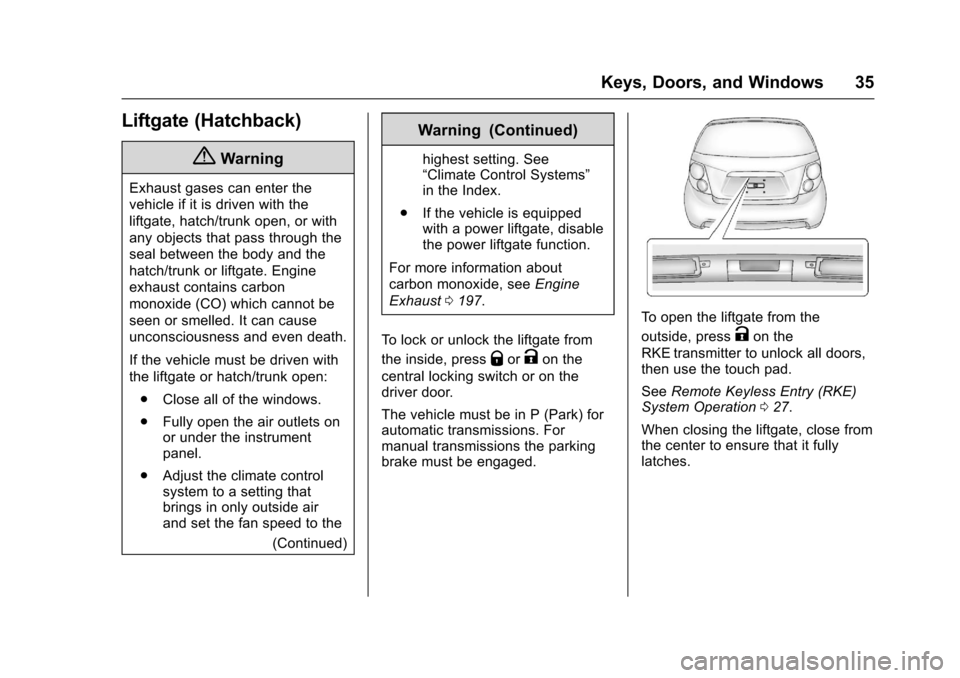
To open the liftgate from the
outside, press
Kon the
RKE transmitter to unlock all doors,
then use the touch pad.
See Remote Keyless Entry (RKE)
System Operation 027.
When closing the liftgate, close from
the center to ensure that it fully
latches.
Page 39 of 353
Chevrolet Sonic Owner Manual (GMNA-Localizing-U.S/Canada-9085902) -
2016 - CRC - 5/27/15
38 Keys, Doors, and Windows
Exterior Mirrors
Convex Mirrors
{Warning
A convex mirror can make things,
like other vehicles, look farther
away than they really are. If you
cut too sharply into the right lane,
you could hit a vehicle on the
right. Check the inside mirror or
glance over your shoulder before
changing lanes.
The passenger side mirror is convex
shaped. A convex mirror's surface is
curved so more can be seen from
the driver seat.
Manual Mirrors
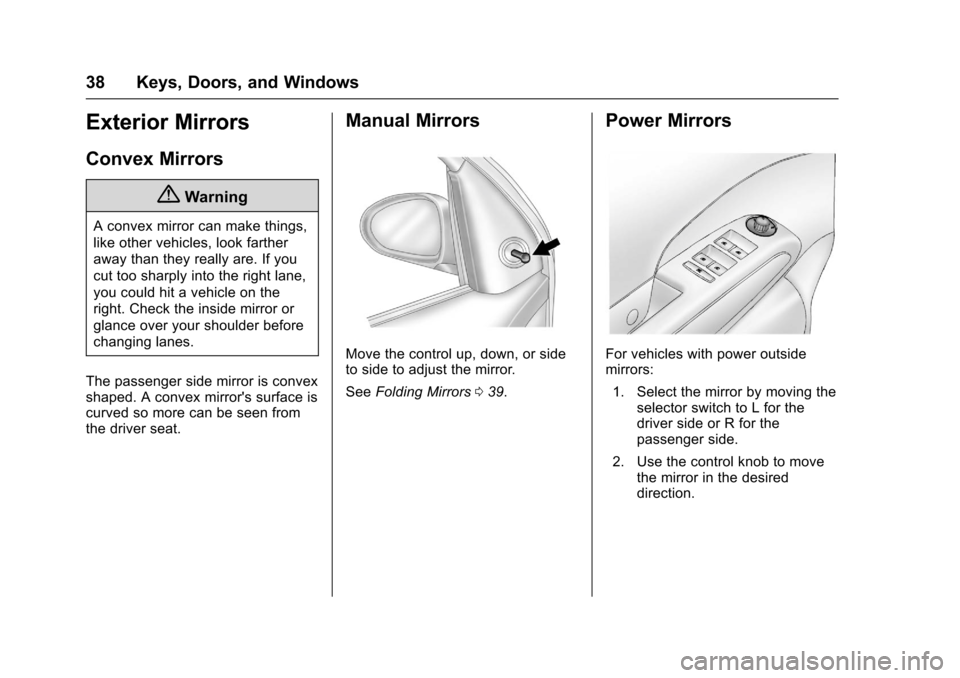
Move the control up, down, or side
to side to adjust the mirror.
See Folding Mirrors 039.
Power Mirrors
For vehicles with power outside
mirrors:
1. Select the mirror by moving the selector switch to L for the
driver side or R for the
passenger side.
2. Use the control knob to move the mirror in the desired
direction.
Page 40 of 353
Chevrolet Sonic Owner Manual (GMNA-Localizing-U.S/Canada-9085902) -
2016 - CRC - 5/27/15
Keys, Doors, and Windows 39
Folding Mirrors
Manual Folding Mirrors
The vehicle has manual folding
mirrors. These mirrors can be folded
inward to prevent damage when
going through an automatic car
wash. To fold, pull the mirror toward
the vehicle. Push the mirror outward
to return it to the original position.
Heated Mirrors
For vehicles with this feature:
1(Rear Window Defogger) :
Press to heat the mirrors. See “Rear
Window and Outside Mirror
Defogger” underClimate Control
Systems 0176.
Interior Mirrors
Manual Rearview Mirror
Hold the inside rearview mirror in
the center to move it for a clearer
view behind your vehicle. Adjust the
mirror to avoid glare from the
headlamps behind you. Push the
tab forward for daytime use and pull
it for nighttime use.
Vehicles with OnStar
®have three
control buttons at the bottom of the
mirror. See your dealer for more
information about OnStar and how
to subscribe to it. See OnStar
Overview 0332.
Windows
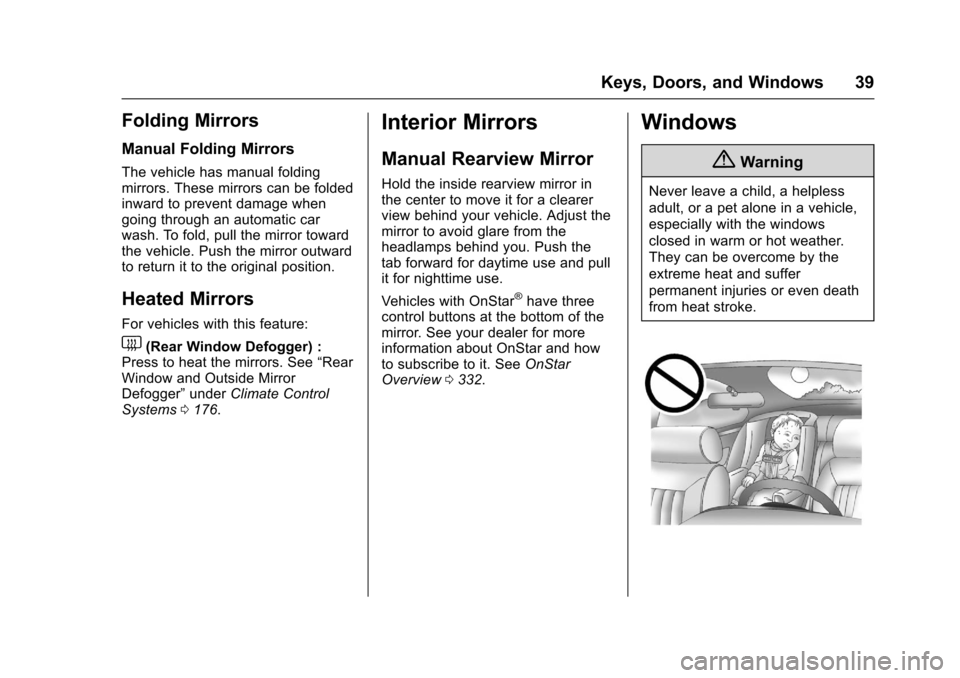
{Warning
Never leave a child, a helpless
adult, or a pet alone in a vehicle,
especially with the windows
closed in warm or hot weather.
They can be overcome by the
extreme heat and suffer
permanent injuries or even death
from heat stroke.
Page 41 of 353
Chevrolet Sonic Owner Manual (GMNA-Localizing-U.S/Canada-9085902) -
2016 - CRC - 5/27/15
40 Keys, Doors, and Windows
The vehicle aerodynamics are
designed to improve fuel economy
performance. This may result in a
pulsing sound when either rear
window is down and the front
windows are up. To reduce the
sound, open either a front window
or the sunroof, if equipped.
Manual Windows
If equipped, use the window crank
to open and close each window.
The rear windows do not open fully.
Power Windows
{Warning
Leaving children in a vehicle with
the keys is dangerous for many
reasons. Children or others could
be badly injured or even killed.
They could operate the power
windows or other controls or even
make the vehicle move. The
windows will function and they
could be seriously injured or killed(Continued)
Warning (Continued)
if caught in the path of a closing
window. Do not leave keys in a
vehicle with children.
When there are children in the
rear seat use the window lockout
button to prevent unintentional
operation of the windows.
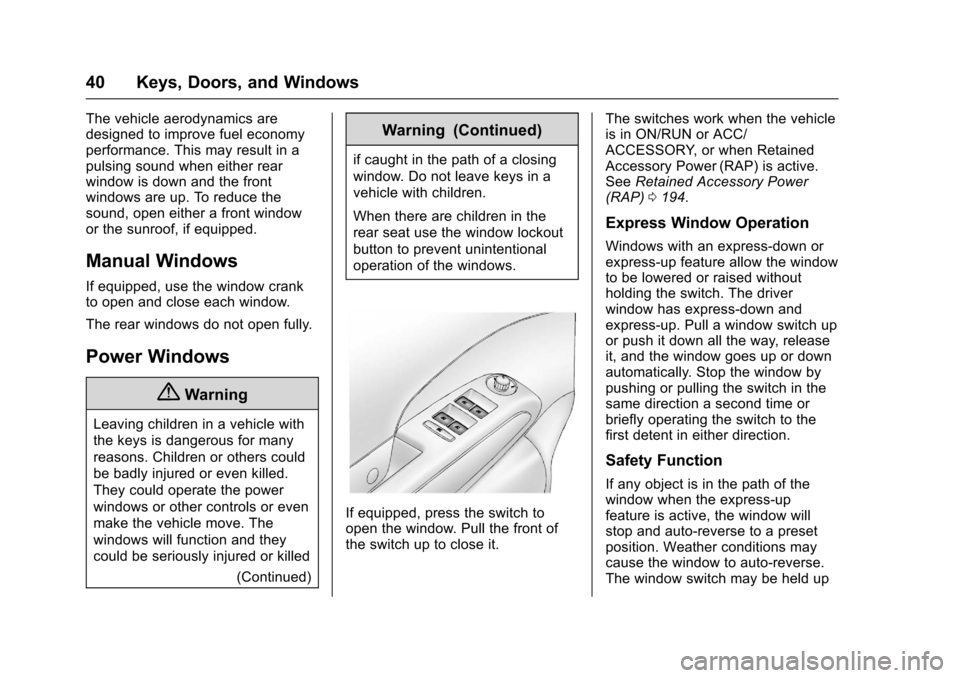
If equipped, press the switch to
open the window. Pull the front of
the switch up to close it. The switches work when the vehicle
is in ON/RUN or ACC/
ACCESSORY, or when Retained
Accessory Power (RAP) is active.
See
Retained Accessory Power
(RAP) 0194.
Express Window Operation
Windows with an express-down or
express-up feature allow the window
to be lowered or raised without
holding the switch. The driver
window has express-down and
express-up. Pull a window switch up
or push it down all the way, release
it, and the window goes up or down
automatically. Stop the window by
pushing or pulling the switch in the
same direction a second time or
briefly operating the switch to the
first detent in either direction.
Safety Function
If any object is in the path of the
window when the express-up
feature is active, the window will
stop and auto-reverse to a preset
position. Weather conditions may
cause the window to auto-reverse.
The window switch may be held up
Page 44 of 353
Chevrolet Sonic Owner Manual (GMNA-Localizing-U.S/Canada-9085902) -
2016 - CRC - 5/27/15
Seats and Restraints 43
Seats and
Restraints
Head Restraints
Head Restraints . . . . . . . . . . . . . . . 43
Front Seats
Seat Adjustment . . . . . . . . . . . . . . . 45
Reclining Seatbacks . . . . . . . . . . . 46
Front Seat Armrest . . . . . . . . . . . . 47
Heated Front Seats . . . . . . . . . . . . 47
Rear Seats
Rear Seats . . . . . . . . . . . . . . . . . . . . 48
Safety Belts
Safety Belts . . . . . . . . . . . . . . . . . . . . 50
How to Wear Safety BeltsProperly . . . . . . . . . . . . . . . . . . . . . . 51
Lap-Shoulder Belt . . . . . . . . . . . . . 52
Safety Belt Use During Pregnancy . . . . . . . . . . . . . . . . . . . . 54
Safety Belt Extender . . . . . . . . . . . 55
Safety System Check . . . . . . . . . . 55
Safety Belt Care . . . . . . . . . . . . . . . 55
Replacing Safety Belt System Parts after a Crash . . . . . . . . . . . 55
Airbag System
Airbag System . . . . . . . . . . . . . . . . . 56 Where Are the Airbags? . . . . . . . 58
When Should an Airbag
Inflate? . . . . . . . . . . . . . . . . . . . . . . . 59
What Makes an Airbag Inflate? . . . . . . . . . . . . . . . . . . . . . . . 60
How Does an Airbag Restrain? . . . . . . . . . . . . . . . . . . . . . 60
What Will You See after an Airbag Inflates? . . . . . . . . . . . . . . 61
Passenger Sensing System . . . 62
Servicing the Airbag-Equipped Vehicle . . . . . . . . . . . . . . . . . . . . . . . 66
Adding Equipment to the Airbag-Equipped Vehicle . . . . . 66
Airbag System Check . . . . . . . . . . 67
Replacing Airbag System Parts after a Crash . . . . . . . . . . . . . . . . . 67
Child Restraints
Older Children . . . . . . . . . . . . . . . . . 68
Infants and Young Children . . . . 69
Child Restraint Systems . . . . . . . 72
Where to Put the Restraint . . . . . 73
Lower Anchors and Tethers forChildren (LATCH System) . . . . 74
Replacing LATCH System Parts After a Crash . . . . . . . . . . . . . . . . . 80
Securing Child Restraints (Rear Seat) . . . . . . . . . . . . . . . . . . . 80
Securing Child Restraints (Front Passenger Seat) . . . . . . . . . . . . . 82
Head Restraints
{Warning
With head restraints that are not
installed and adjusted properly,
there is a greater chance that
occupants will suffer a neck/
spinal injury in a crash. Do not
drive until the head restraints for
all occupants are installed and
adjusted properly.
Front Seats
The front seats have adjustable
head restraints in the outboard
seating positions.
Page 46 of 353
Chevrolet Sonic Owner Manual (GMNA-Localizing-U.S/Canada-9085902) -
2016 - CRC - 5/27/15
Seats and Restraints 45
To lower the head restraint, press
the button, located on the top of the
seatback, and push the head
restraint down. Try to move the
head restraint after the button is
released to make sure that it is
locked in place.
Rear outboard head restraints are
not removable.Front Seats
Seat Adjustment
Manual Seats
{Warning
You can lose control of the
vehicle if you try to adjust a driver
seat while the vehicle is moving.
Adjust the driver seat only when
the vehicle is not moving.
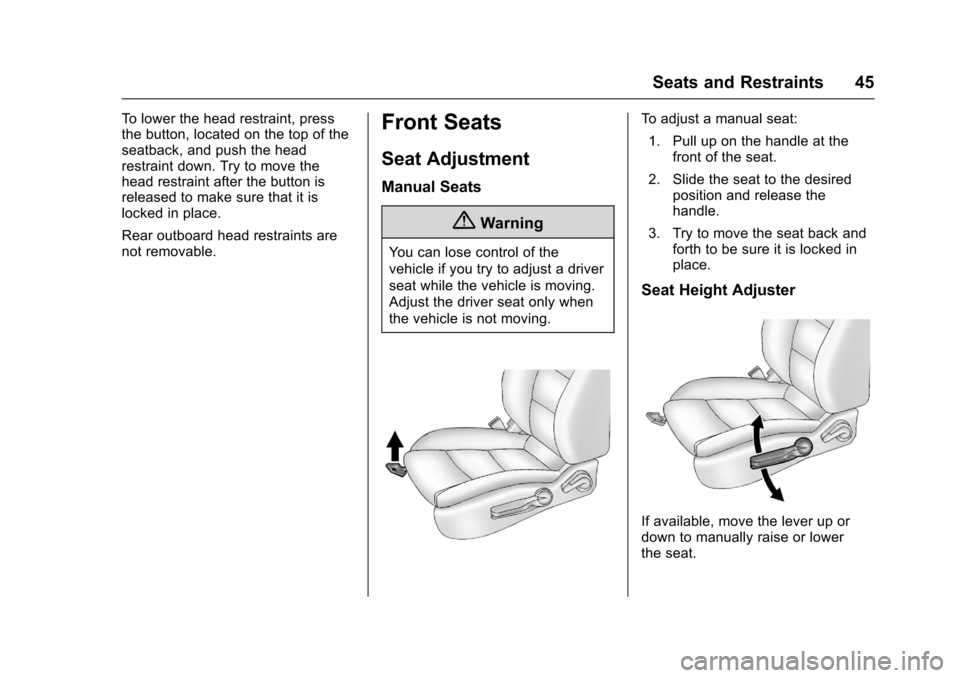
To adjust a manual seat:1. Pull up on the handle at the front of the seat.
2. Slide the seat to the desired position and release the
handle.
3. Try to move the seat back and forth to be sure it is locked in
place.
Seat Height Adjuster
If available, move the lever up or
down to manually raise or lower
the seat.
Page 47 of 353
Chevrolet Sonic Owner Manual (GMNA-Localizing-U.S/Canada-9085902) -
2016 - CRC - 5/27/15
46 Seats and Restraints
Reclining Seatbacks
{Warning
If either seatback is not locked, it
could move forward in a sudden
stop or crash. That could cause
injury to the person sitting there.
Always push and pull on the
seatbacks to be sure they are
locked.
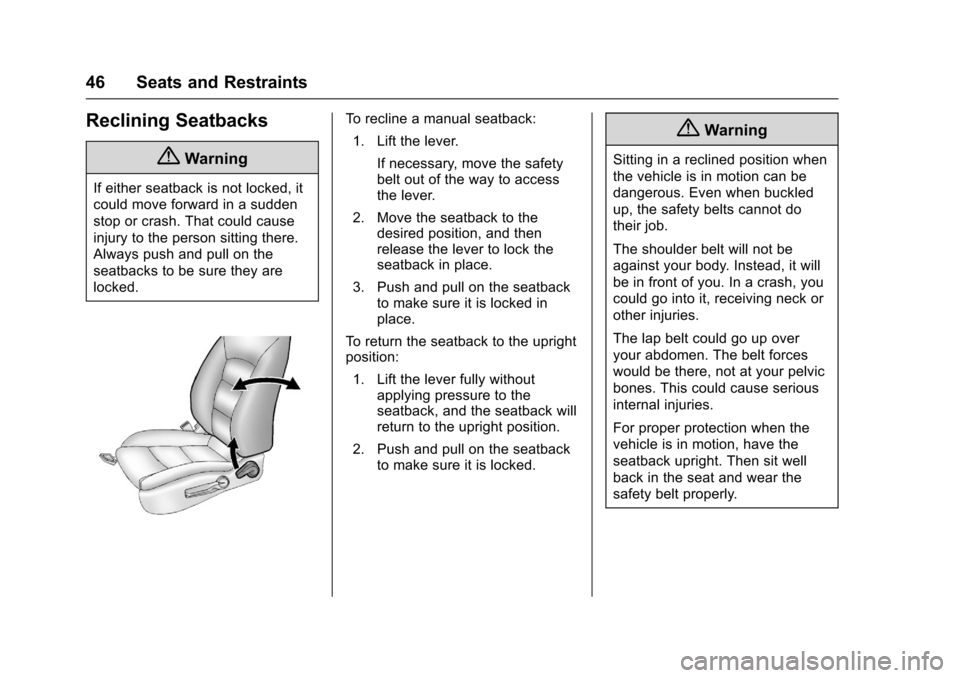
To recline a manual seatback:1. Lift the lever.
If necessary, move the safety
belt out of the way to access
the lever.
2. Move the seatback to the desired position, and then
release the lever to lock the
seatback in place.
3. Push and pull on the seatback to make sure it is locked in
place.
To return the seatback to the upright
position:
1. Lift the lever fully without applying pressure to the
seatback, and the seatback will
return to the upright position.
2. Push and pull on the seatback to make sure it is locked.{Warning
Sitting in a reclined position when
the vehicle is in motion can be
dangerous. Even when buckled
up, the safety belts cannot do
their job.
The shoulder belt will not be
against your body. Instead, it will
be in front of you. In a crash, you
could go into it, receiving neck or
other injuries.
The lap belt could go up over
your abdomen. The belt forces
would be there, not at your pelvic
bones. This could cause serious
internal injuries.
For proper protection when the
vehicle is in motion, have the
seatback upright. Then sit well
back in the seat and wear the
safety belt properly.