warning CHEVROLET SONIC 2017 2.G Owners Manual
[x] Cancel search | Manufacturer: CHEVROLET, Model Year: 2017, Model line: SONIC, Model: CHEVROLET SONIC 2017 2.GPages: 342, PDF Size: 7.2 MB
Page 269 of 342
Chevrolet Sonic Owner Manual (GMNA-Localizing-U.S./Canada-10122660) -2017 - crc - 5/13/16
268 Vehicle Care
{Warning
Driving on a flat tire will cause
permanent damage to the tire.
Re-inflating a tire after it has been
driven on while severely
underinflated or flat may cause a
blowout and a serious crash.
Never attempt to re-inflate a tire
that has been driven on while
severely underinflated or flat.
Have your dealer or an authorized
tire service center repair or
replace the flat tire as soon as
possible.
{Warning
Lifting a vehicle and getting under
it to do maintenance or repairs is
dangerous without the
appropriate safety equipment and
training. If a jack is provided with
the vehicle, it is designed only for
changing a flat tire. If it is used for
anything else, you or others could
(Continued)
Warning (Continued)
be badly injured or killed if the
vehicle slips off the jack. If a jack
is provided with the vehicle, only
use it for changing a flat tire.
If a tire goes flat, avoid further tireand wheel damage by driving slowlyto a level place, well off the road,if possible. Turn on the hazardwarning flashers. SeeHazardWarning Flashers0136.
{Warning
Changing a tire can be
dangerous. The vehicle can slip
off the jack and roll over or fall
causing injury or death. Find a
level place to change the tire. To
help prevent the vehicle from
moving:
1. Set the parking brake firmly.
(Continued)
Warning (Continued)
2. Put an automatictransmission in P (Park) or amanual transmission in1(First) or R(Reverse).
3. Turn off the engine and donot restart while the vehicleis raised.
4. Do not allow passengers toremain in the vehicle.
5. Place wheel blocks,if equipped, on both sides ofthe tire at the oppositecorner of the tire beingchanged.
When the vehicle has a flat tire (2),use the following example as aguide to assist in the placement ofthe wheel blocks (1), if equipped.
Page 272 of 342
Chevrolet Sonic Owner Manual (GMNA-Localizing-U.S./Canada-10122660) -2017 - crc - 5/13/16
Vehicle Care 271
6. Insert the jack handle into thejack and the wheel wrenchonto the end of the jack handle.
7. Turn the wheel wrenchclockwise until the lift head isfirmly contacting the properlifting point nearest the flat tire.
{Warning
Getting under a vehicle when it is
lifted on a jack is dangerous.
If the vehicle slips off the jack,
you could be badly injured or
killed. Never get under a vehicle
when it is supported only by
ajack.
{Warning
Raising the vehicle with the jack
improperly positioned can
damage the vehicle and even
make the vehicle fall. To help
avoid personal injury and vehicle
(Continued)
Warning (Continued)
damage, be sure to fit the jack lift
head into the proper location
before raising the vehicle.
8. Turn the wheel wrenchclockwise to raise the vehicle.Raise the vehicle far enoughoff the ground so there isenough room for the compactspare tire to fit underneath thewheel well.
9. Turn the wheel nutscounterclockwise toremove them.
10. Remove the flat tire.
{Warning
Rust or dirt on a wheel, or on the
parts to which it is fastened, can
make wheel nuts become loose
after time. The wheel could come
off and cause an accident. When
changing a wheel, remove any
(Continued)
Warning (Continued)
rust or dirt from places where the
wheel attaches to the vehicle. In
an emergency, a cloth or a paper
towel can be used; however, use
ascraperorwirebrushlaterto
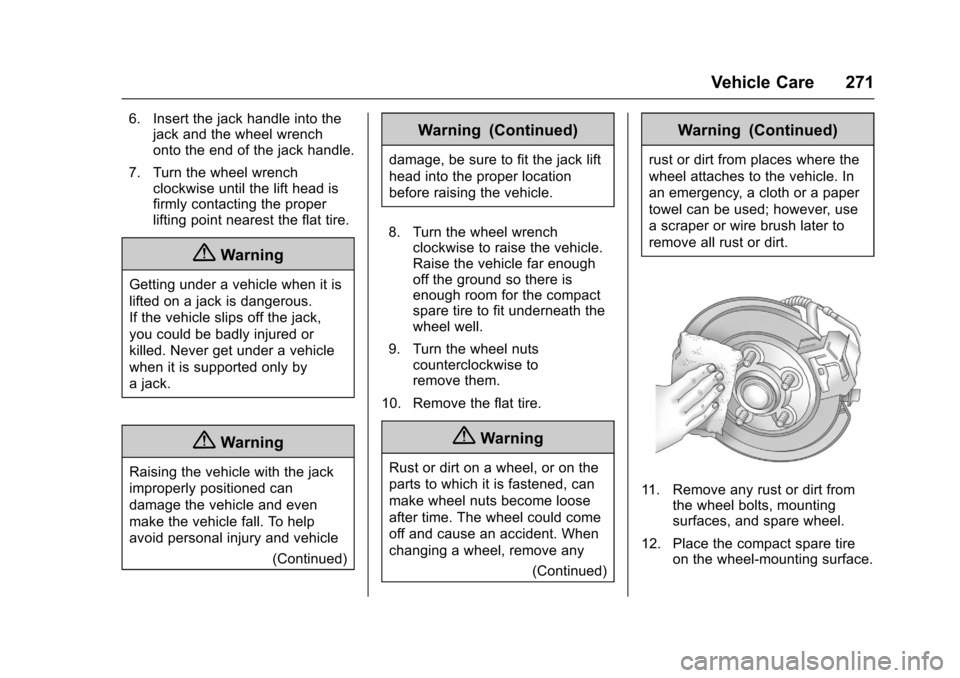
remove all rust or dirt.
11 . R e m o v e a n y r u s t o r d i r t f r o mthe wheel bolts, mountingsurfaces, and spare wheel.
12. Place the compact spare tireon the wheel-mounting surface.
Page 273 of 342
Chevrolet Sonic Owner Manual (GMNA-Localizing-U.S./Canada-10122660) -2017 - crc - 5/13/16
272 Vehicle Care
{Warning
Never use oil or grease on bolts
or nuts because the nuts might
come loose. The vehicle's wheel
could fall off, causing a crash.
13. Reinstall the wheel nuts.Tighten each nut by hand untilthe wheel is held againstthe hub.
14. Lower the vehicle by turningthe wheel wrenchcounterclockwise. Lower thejack completely.
{Warning
Wheel nuts that are improperly or
incorrectly tightened can cause
the wheels to become loose or
come off. The wheel nuts should
be tightened with a torque wrench
to the proper torque specification
after replacing. Follow the torque
specification supplied by the
aftermarket manufacturer when
(Continued)
Warning (Continued)
using accessory locking wheel
nuts. SeeCapacities and
Specifications0304for original
equipment wheel nut torque
specifications.
Caution
Improperly tightened wheel nuts
can lead to brake pulsation and
rotor damage. To avoid expensive
brake repairs, evenly tighten the
wheel nuts in the proper
sequence and to the proper
torque specification. See
Capacities and Specifications
0304for the wheel nut torque
specification.
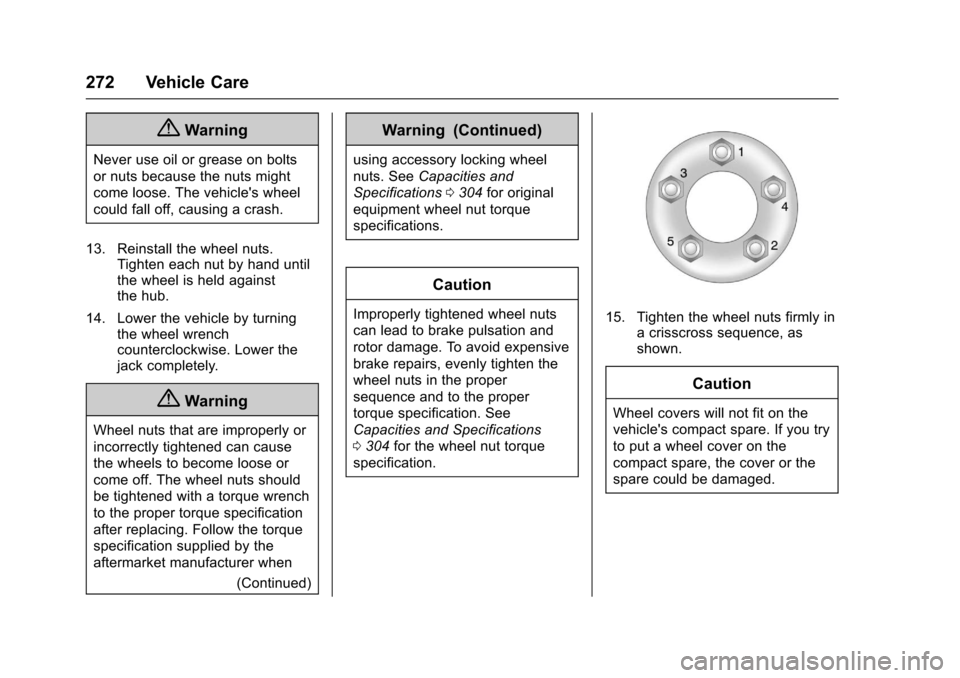
15. Tighten the wheel nuts firmly inacrisscrosssequence,asshown.
Caution
Wheel covers will not fit on the
vehicle's compact spare. If you try
to put a wheel cover on the
compact spare, the cover or the
spare could be damaged.
Page 274 of 342
Chevrolet Sonic Owner Manual (GMNA-Localizing-U.S./Canada-10122660) -2017 - crc - 5/13/16
Vehicle Care 273
Storing a Flat or Spare Tire
and Tools
{Warning
Storing a jack, a tire, or other
equipment in the passenger
compartment of the vehicle could
cause injury. In a sudden stop or
collision, loose equipment could
strike someone. Store all these in
the proper place.
Storing the Flat Tire and Tools
1. Return the jack and tools totheir original storage location.
2. Replace the trim cover.
3. Place the flat tire, lying flat, inthe rear storage compartment.
If the vehicle is a sedan the flattire should be against the backof the rear seats.
If the vehicle is a hatchbackthe flat tire should be againstthe back of the trunk.
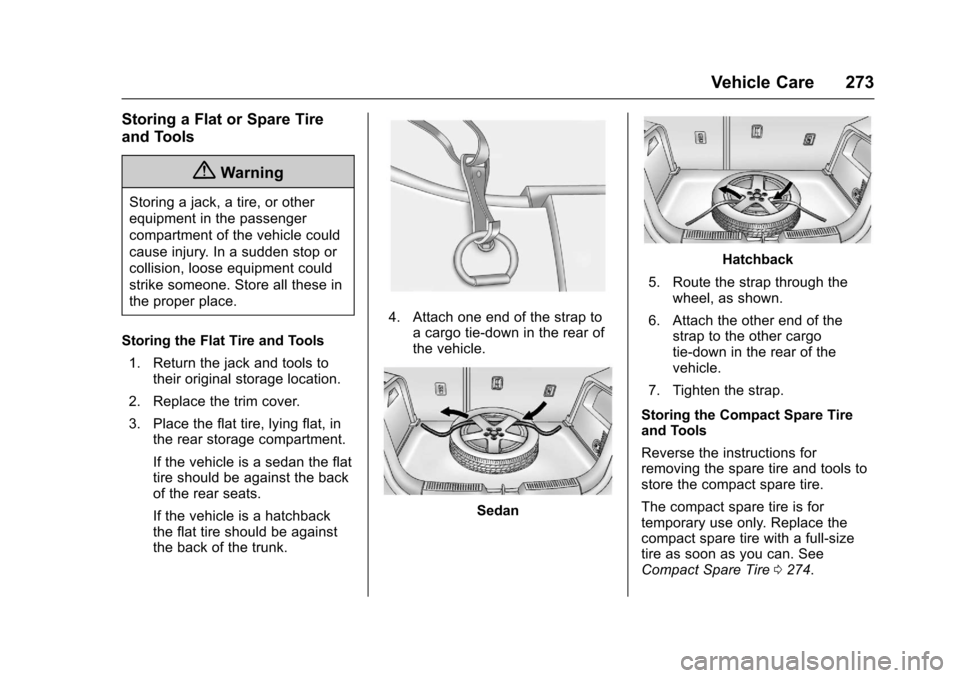
4. Attach one end of the strap toacargotie-downintherearofthe vehicle.
Sedan
Hatchback
5. Route the strap through thewheel, as shown.
6. Attach the other end of thestrap to the other cargotie-down in the rear of thevehicle.
7. Tighten the strap.
Storing the Compact Spare Tireand Tools
Reverse the instructions forremoving the spare tire and tools tostore the compact spare tire.
The compact spare tire is fortemporary use only. Replace thecompact spare tire with a full-sizetire as soon as you can. SeeCompact Spare Tire0274.
Page 275 of 342
Chevrolet Sonic Owner Manual (GMNA-Localizing-U.S./Canada-10122660) -2017 - crc - 5/13/16
274 Vehicle Care
Compact Spare Tire
{Warning
Driving with more than one
compact spare tire at a time could
result in loss of braking and
handling. This could lead to a
crash and you or others could be
injured. Use only one compact
spare tire at a time.
If this vehicle has a compact sparetire, it was fully inflated when new;however, it can lose air over time.Check the inflation pressureregularly. It should be 420 kPa(60 psi).
Stop as soon as possible and checkthat the spare tire is correctlyinflated after being installed on thevehicle. The compact spare tire isdesigned for temporary use only.The vehicle will perform differentlywith the spare tire installed and it isrecommended that the vehiclespeed be limited to 80 km/h(50 mph). To conserve the tread ofthe spare tire, have the standard tire
repaired or replaced as soon asconvenient and return the spare tireto the storage area.
When using a compact spare tire,the AWD (if equipped), ABS, andTraction Control systems mayengage until the spare tire isrecognized by the vehicle,especially on slippery roads. Adjustdriving to reduce possiblewheel slip.
Caution
When the compact spare is
installed, do not take the vehicle
through an automatic car wash
with guide rails. The compact
spare can get caught on the rails
which can damage the tire, wheel,
and other parts of the vehicle.
Do not use the compact spare onother vehicles.
Do not mix the compact spare tire orwheel with other wheels or tires.They will not fit. Keep the spare tireand its wheel together.
Caution
Tire chains will not fit the compact
spare. Using them can damage
the vehicle and the chains. Do not
use tire chains on the compact
spare.
Page 276 of 342
Chevrolet Sonic Owner Manual (GMNA-Localizing-U.S./Canada-10122660) -2017 - crc - 5/13/16
Vehicle Care 275
Jump Starting
Jump Starting - North
America
For more information about thevehicle battery, seeBattery - NorthAmerica0234.
If the battery has run down, try touse another vehicle and somejumper cables to start your vehicle.Be sure to use the following steps todo it safely.
{Warning
WA R N I N G :Battery posts,
terminals, and related
accessories contain lead and lead
compounds, chemicals known to
the State of California to cause
cancer and birth defects or other
reproductive harm. Batteries also
contain other chemicals known to
the State of California to cause
cancer.WASH HANDS AFTER
HANDLING.
(Continued)
Warning (Continued)
SeeCalifornia Proposition
65 Warning0213.
{Warning
Batteries can hurt you. They can
be dangerous because:
.They contain acid that canburn you.
.They contain gas that canexplode or ignite.
.They contain enoughelectricity to burn you.
If you do not follow these steps
exactly, some or all of these
things can hurt you.
Caution
Ignoring these steps could result
in costly damage to the vehicle
that would not be covered by the
vehicle warranty. Trying to start
the vehicle by pushing or pulling it
will not work, and it could damage
the vehicle.
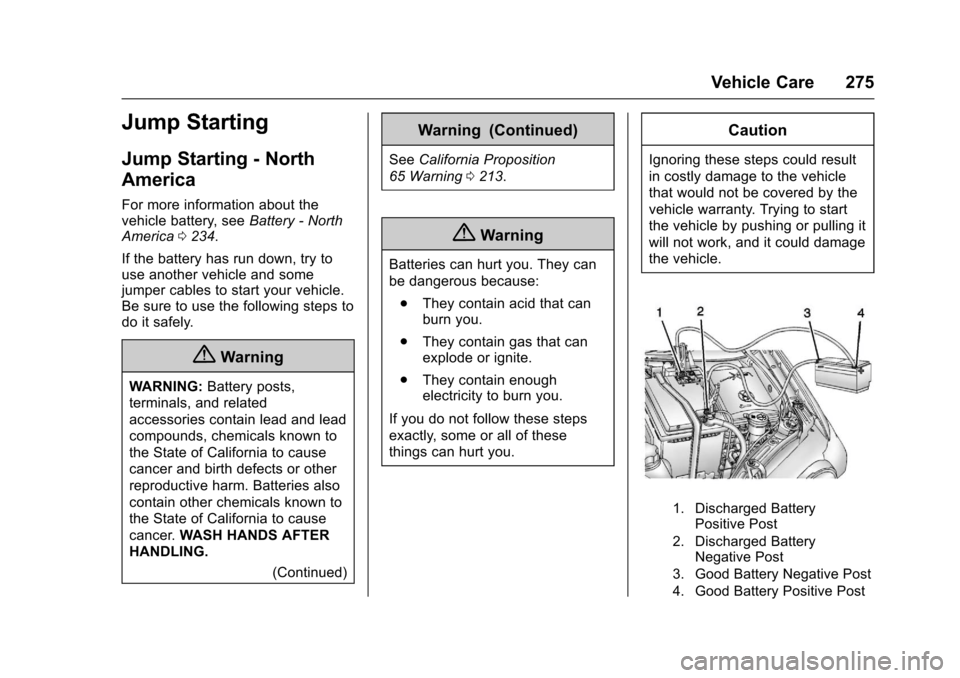
1. Discharged BatteryPositive Post
2. Discharged BatteryNegative Post
3. Good Battery Negative Post
4. Good Battery Positive Post
Page 277 of 342
Chevrolet Sonic Owner Manual (GMNA-Localizing-U.S./Canada-10122660) -2017 - crc - 5/13/16
276 Vehicle Care
The jump start negative post andpositive post are on the dischargedbattery on the driver side of thevehicle.
The jump start positive post andnegative post are on the battery ofthe vehicle providing the jump start.
The positive jump start connectionfor the discharged battery is under atrim cover. Open the cover toexpose the terminal.
1. Check the other vehicle.It must have a 12-volt batterywith a negative ground system.
Caution
If the other vehicle does not have
a12-voltsystemwithanegative
ground, both vehicles can be
damaged. Only use a vehicle that
has a 12-volt system with a
negative ground for jump starting.
2. Position the two vehicles sothat they are not touching.
3. Set the parking brake firmlyand put the shift lever inP(Park) with an automatictransmission, or Neutral with amanual transmission. SeeShifting Into Park (AutomaticTr a n s m i s s i o n )0187with anautomatic transmission, orParking0189with a manualtransmission.
Caution
If any accessories are left on or
plugged in during the jump
starting procedure, they could be
damaged. The repairs would not
be covered by the vehicle
warranty. Whenever possible, turn
off or unplug all accessories on
either vehicle when jump starting.
4. Turn the ignition to LOCK/OFF.Turn off all lights andaccessories in both vehicles,except the hazard warningflashers if needed.
{Warning
An electric fan can start up even
when the engine is not running
and can injure you. Keep hands,
clothing, and tools away from any
underhood electric fan.
{Warning
Using a match near a battery can
cause battery gas to explode.
People have been hurt doing this,
and some have been blinded.
Use a flashlight if you need more
light.
Battery fluid contains acid that
can burn you. Do not get it on
you. If you accidentally get it in
your eyes or on your skin, flush
the place with water and get
medical help immediately.
Page 278 of 342
Chevrolet Sonic Owner Manual (GMNA-Localizing-U.S./Canada-10122660) -2017 - crc - 5/13/16
Vehicle Care 277
{Warning
Fans or other moving engine
parts can injure you badly. Keep
your hands away from moving
parts once the engine is running.
5. Connect one end of the redpositive (+) cable to thepositive (+) terminal on thedischarged battery.
6. Connect the other end of thered positive (+) cable to thepositive (+) terminal of the goodbattery.
7. Connect one end of the blacknegative (–)cabletothenegative (–)terminalofthegood battery.
8. Connect the other end of theblack negative (–)cabletothenegative (–)postforthedischarged battery.
9. Start the engine in the vehiclewith the good battery and runthe engine at idle speed for atleast four minutes.
10. Try to start the vehicle that hadthe dead battery. If it will notstart after a few tries, itprobably needs service.
Caution
If the jumper cables are
connected or removed in the
wrong order, electrical shorting
may occur and damage the
vehicle. The repairs would not be
covered by the vehicle warranty.
Always connect and remove the
jumper cables in the correct order,
making sure that the cables do
not touch each other or other
metal.
Jumper Cable Removal
Reverse the sequence exactly whenremoving the jumper cables.
After starting the disabled vehicleand removing the jumper cables,allow it to idle for several minutes.
Towing the Vehicle
Caution
Incorrectly towing a disabled
vehicle may cause damage. The
damage would not be covered by
the vehicle warranty.
Do not lash or hook to
suspension components. Use the
proper straps around the tires to
secure the vehicle.
Have the vehicle towed on a flatbedcar carrier. A wheel lift tow truckcould damage the vehicle.
Consult your dealer or aprofessional towing service if thedisabled vehicle must be towed.
Recreational Vehicle
Towing
Recreational vehicle towing meanstowing the vehicle behind anothervehicle, such as a motor home. Thetwo most common types ofrecreational vehicle towing are
Page 288 of 342
Chevrolet Sonic Owner Manual (GMNA-Localizing-U.S./Canada-10122660) -2017 - crc - 5/13/16
Vehicle Care 287
Instrument Panel, Leather,
Vinyl, Other Plastic Surfaces,
Low Gloss Paint Surfaces, and
Natural Open Pore Wood
Surfaces
Use a soft microfiber clothdampened with water to removedust and loose dirt. For a morethorough cleaning, use a softmicrofiber cloth dampened with amild soap solution.
Caution
Soaking or saturating leather,
especially perforated leather, as
well as other interior surfaces,
may cause permanent damage.
Wipe excess moisture from these
surfaces after cleaning and allow
them to dry naturally. Never use
heat, steam, or spot removers. Do
not use cleaners that contain
silicone or wax-based products.
Cleaners containing these
solvents can permanently change
(Continued)
Caution (Continued)
the appearance and feel of
leather or soft trim, and are not
recommended.
Do not use cleaners that increasegloss, especially on the instrumentpanel. Reflected glare can decreasevisibility through the windshieldunder certain conditions.
Caution
Use of air fresheners may cause
permanent damage to plastics
and painted surfaces. If an air
freshener comes in contact with
any plastic or painted surface in
the vehicle, blot immediately and
clean with a soft cloth dampened
with a mild soap solution.
Damage caused by air fresheners
would not be covered by the
vehicle warranty.
Cargo Cover and
Convenience Net
Wash with warm water and milddetergent. Do not use chlorinebleach. Rinse with cold water, andthen dry completely.
Care of Safety Belts
Keep belts clean and dry.
{Warning
Do not bleach or dye safety belt
webbing. It may severely weaken
the webbing. In a crash, they
might not be able to provide
adequate protection. Clean and
rinse safety belt webbing only
with mild soap and lukewarm
water. Allow the webbing to dry.
Page 289 of 342
Chevrolet Sonic Owner Manual (GMNA-Localizing-U.S./Canada-10122660) -2017 - crc - 5/13/16
288 Vehicle Care
Floor Mats
{Warning
If a floor mat is the wrong size or
is not properly installed, it can
interfere with the pedals.
Interference with the pedals can
cause unintended acceleration
and/or increased stopping
distance which can cause a crash
and injury. Make sure the floor
mat does not interfere with the
pedals.
Use the following guidelines forproper floor mat usage:
.The original equipment floormats were designed for yourvehicle. If the floor mats needreplacing, it is recommendedthat GM certified floor mats bepurchased. Non-GM floor matsmay not fit properly and mayinterfere with the pedals. Alwayscheck that the floor mats do notinterfere with the pedals.
.Do not use a floor mat if thevehicle is not equipped with afloor mat retainer on the driverside floor.
.Use the floor mat with thecorrect side up. Do not turnit over.
.Do not place anything on top ofthe driver side floor mat.
.Use only a single floor mat onthe driver side.
.Do not place one floor mat ontop of another.
Removing and Replacing the
Floor Mats
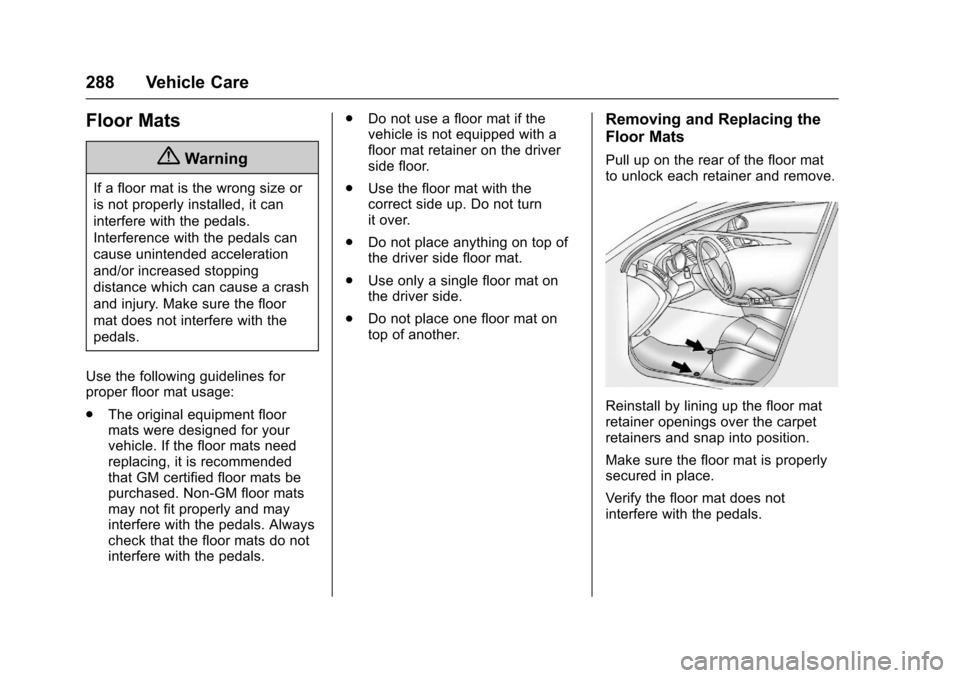
Pull up on the rear of the floor matto unlock each retainer and remove.
Reinstall by lining up the floor matretainer openings over the carpetretainers and snap into position.
Make sure the floor mat is properlysecured in place.
Verify the floor mat does notinterfere with the pedals.