Code 4 CHEVROLET SONIC 2017 2.G User Guide
[x] Cancel search | Manufacturer: CHEVROLET, Model Year: 2017, Model line: SONIC, Model: CHEVROLET SONIC 2017 2.GPages: 342, PDF Size: 7.2 MB
Page 256 of 342
Chevrolet Sonic Owner Manual (GMNA-Localizing-U.S./Canada-10122660) -2017 - crc - 5/13/16
Vehicle Care 255
contains a whitewall, bears
white lettering, or bears
manufacturer, brand, and/or
model name molding that is
higher or deeper than the same
moldings on the other sidewall
of the tire.
Passenger (P-Metric) Tire:A
tire used on passenger cars and
some light duty trucks and
multipurpose vehicles.
Recommended Inflation
Pressure:Vehicle
manufacturer's recommended
tire inflation pressure as shown
on the tire placard. SeeTire
Pressure0256andVehicle
Load Limits0178.
Radial Ply Tire:Apneumatic
tire in which the ply cords that
extend to the beads are laid at
90 degrees to the centerline of
the tread.
Rim:Ametalsupportforatire
and upon which the tire beads
are seated.
Sidewall:The portion of a tire
between the tread and the bead.
Speed Rating:An
alphanumeric code assigned to
atireindicatingthemaximum
speed at which a tire can
operate.
Traction:The friction between
the tire and the road surface.
The amount of grip provided.
Tread:The portion of a tire that
comes into contact with
the road.
Treadwear Indicators:Narrow
bands, sometimes called wear
bars, that show across the tread
of a tire when only 1.6 mm
(1/16 in) of tread remains. See
When It Is Time for New
Tires0262.
UTQGS (Uniform Tire Quality
Grading Standards):Atire
information system that provides
consumers with ratings for a
tire's traction, temperature, and
treadwear. Ratings are
determined by tire
manufacturers using
government testing procedures.
The ratings are molded into the
sidewall of the tire. SeeUniform
Tire Quality Grading0264.
Vehicle Capacity Weight:The
number of designated seating
positions multiplied by
68 kg (150 lb) plus the rated
cargo load. SeeVehicle Load
Limits0178.
Vehicle Maximum Load on the
Tire:Load on an individual tire
due to curb weight, accessory
weight, occupant weight, and
cargo weight.
Vehicle Placard:Alabel
permanently attached to a
vehicle showing the vehicle
capacity weight and the original
equipment tire size and
recommended inflation pressure.
See“Tire and Loading
Information Label”underVehicle
Load Limits0178.
Page 260 of 342
Chevrolet Sonic Owner Manual (GMNA-Localizing-U.S./Canada-10122660) -2017 - crc - 5/13/16
Vehicle Care 259
Caution (Continued)
the GM approved tire sealant
available through your dealer or
included in the vehicle.
TPMS Malfunction Light
The TPMS will not function properlyif one or more of the TPMS sensorsare missing or inoperable. When thesystem detects a malfunction, thelow tire warning light flashes forabout one minute and then stays onfor the remainder of the ignitioncycle. The malfunction light comeson at each ignition cycle until theproblem is corrected. Some of theconditions that can cause this tocome on are:
.One of the road tires has beenreplaced with the spare tire. Thespare tire does not have aTPMS sensor. The malfunctionlight should go off after the roadtire is replaced and the sensormatching process is performed
successfully. See "TPMS SensorMatching Process" later in thissection.
.The TPMS sensor matchingprocess was not done or notcompleted successfully afterrotating the tires. Themalfunction light should go offafter successfully completing thesensor matching process. See"TPMS Sensor MatchingProcess" later in this section.
.One or more TPMS sensors aremissing or damaged. Themalfunction light should go offwhen the TPMS sensors areinstalled and the sensormatching process is performedsuccessfully. See your dealer forservice.
.Replacement tires or wheels donot match the original equipmenttires or wheels. Tires and wheelsother than those recommendedcould prevent the TPMS fromfunctioning properly. SeeBuyingNew Tires0263.
.Operating electronic devices orbeing near facilities using radiowave frequencies similar to theTPMS could cause the TPMSsensors to malfunction.
If the TPMS is not functioningproperly, it cannot detect or signal alow tire condition. See your dealerfor service if the TPMS malfunctionlight comes on and stays on.
TPMS Sensor Matching
Process
Each TPMS sensor has a uniqueidentification code. The identificationcode needs to be matched to a newtire/wheel position after rotating thetires or replacing one or more of theTPMS sensors. The TPMS sensormatching process should also beperformed after replacing a sparetire with a road tire containing theTPMS sensor. The malfunction lightshould go off at the next ignitioncycle. The sensors are matched tothe tire/wheel positions, using aTPMS relearn tool, in the followingorder: driver side front tire,passenger side front tire, passengerside rear tire, and driver side rear.
Page 261 of 342
Chevrolet Sonic Owner Manual (GMNA-Localizing-U.S./Canada-10122660) -2017 - crc - 5/13/16
260 Vehicle Care
See your dealer for service or topurchase a relearn tool. A TPMSrelearn tool can also be purchased.See Tire Pressure Monitor SensorActivation Tool atwww.gmtoolsandequipment.com orcall 1-800-GM TOOLS(1-800-468-6657).
There are two minutes to match thefirst tire/wheel position, andfive minutes overall to match all fourtire/wheel positions. If it takeslonger, the matching process stopsand must be restarted.
The TPMS sensor matchingprocess is:
1. Set the parking brake.
2. Turn the ignition to ON/RUNwith the engine off or place thevehicle power mode in ON/RUN/START. SeeIgnitionPositions (Key Access)0182orIgnition Positions (KeylessAccess)0183.
3. Press the MENU button todisplay the menu items in theDriver InformationCenter (DIC).
4. Use the thumbwheel to scroll tothe Tire Learn menu itemscreen.
5. Press and hold the SET/CLRbutton to begin the sensormatching process.
Amessagerequestingacceptance of the process maydisplay.
6. The horn sounds twice tosignal the receiver is in relearnmode and the TIRE LEARNmessage may display on theDIC screen.
7. Start with the driver sidefront tire.
8. Place the relearn tool againstthe tire sidewall, near the valvestem. Then press the button toactivate the TPMS sensor.Ahornchirpconfirmsthatthesensor identification code hasbeen matched to this tire andwheel position.
9. Proceed to the passenger sidefront tire, and repeat theprocedure in Step 8.
10. Proceed to the passenger siderear tire, and repeat theprocedure in Step 8.
11 . P r o c e e d t o t h e d r i v e r s i d e r e a rtire, and repeat the procedurein Step 8. The horn sounds twotimes to indicate the sensoridentification code has beenmatched to the driver side reartire, and the TPMS sensormatching process is no longeractive. The TIRE LEARNmessage on the DIC displayscreen goes off.
12. Turn the vehicle off.
13. Set all four tires to therecommended air pressurelevel as indicated on the Tireand Loading Information label.
Tire Inspection
We recommend that the tires,
including the spare tire, if the
vehicle has one, be inspected
for signs of wear or damage at
least once a month.
Page 304 of 342
Chevrolet Sonic Owner Manual (GMNA-Localizing-U.S./Canada-10122660) -2017 - crc - 5/13/16
Technical Data 303
Technical Data
Vehicle Identification
Vehicle IdentificationNumber (VIN) . . . . . . . . . . . . . . . 303Service Parts IdentificationLabel . . . . . . . . . . . . . . . . . . . . . . . . 303
Vehicle Data
Capacities andSpecifications . . . . . . . . . . . . . . . 304Engine Drive Belt Routing . . . . 306
Vehicle Identification
Vehicle Identification
Number (VIN)
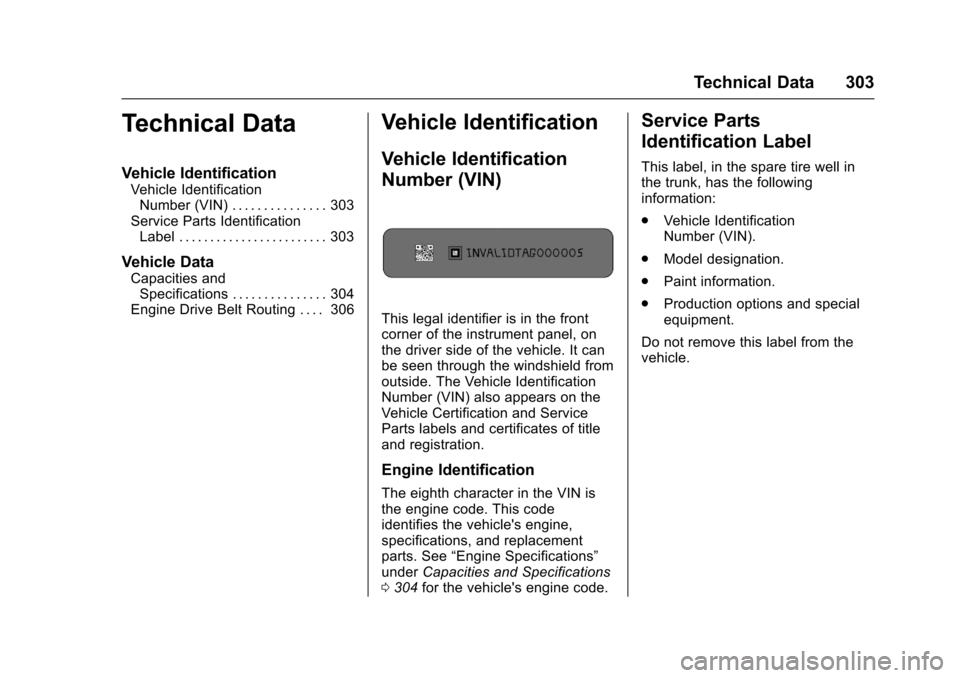
This legal identifier is in the frontcorner of the instrument panel, onthe driver side of the vehicle. It canbe seen through the windshield fromoutside. The Vehicle IdentificationNumber (VIN) also appears on theVehicle Certification and ServiceParts labels and certificates of titleand registration.
Engine Identification
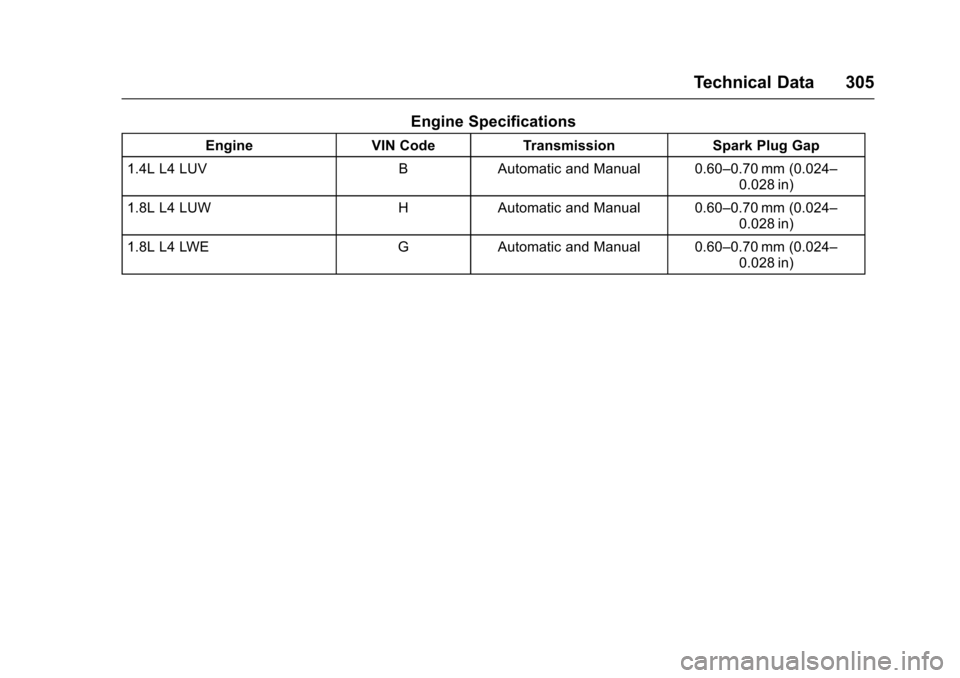
The eighth character in the VIN isthe engine code. This codeidentifies the vehicle's engine,specifications, and replacementparts. See“Engine Specifications”underCapacities and Specifications0304for the vehicle's engine code.
Service Parts
Identification Label
This label, in the spare tire well inthe trunk, has the followinginformation:
.Vehicle IdentificationNumber (VIN).
.Model designation.
.Paint information.
.Production options and specialequipment.
Do not remove this label from thevehicle.
Page 306 of 342
Chevrolet Sonic Owner Manual (GMNA-Localizing-U.S./Canada-10122660) -2017 - crc - 5/13/16
Technical Data 305
Engine Specifications
EngineVIN CodeTr a n s m i s s i o nSpark Plug Gap
1.4L L4 LUVBAutomatic and Manual 0.60–0.70 mm (0.024–0.028 in)
1.8L L4 LUWHAutomatic and Manual 0.60–0.70 mm (0.024–0.028 in)
1.8L L4 LWEGAutomatic and Manual 0.60–0.70 mm (0.024–0.028 in)
Page 310 of 342
Chevrolet Sonic Owner Manual (GMNA-Localizing-U.S./Canada-10122660) -2017 - crc - 5/13/16
Customer Information 309
Company wants you to be aware ofits participation in a no-chargeMediation/Arbitration Program.General Motors of CanadaCompany has committed to bindingarbitration of owner disputesinvolving factory-related vehicleservice claims. The programprovides for the review of the factsinvolved by an impartial third partyarbiter, and may include an informalhearing before the arbiter. Theprogram is designed so that theentire dispute settlement process,from the time you file your complaintto the final decision, should becompleted in about 70 days. Webelieve our impartial program offersadvantages over courts in mostjurisdictions because it is informal,quick, and free of charge.
For further information concerningeligibility in the Canadian MotorVehicle Arbitration Plan (CAMVAP),call toll-free 1-800-207-0685, or callthe General Motors Customer CareCentre, 1-800-263-3777 (English),1-800-263-7854 (French),or write to:
The Mediation/Arbitration Programc/o Customer Care CentreGeneral Motors of CanadaCompanyMail Code: CA1-163-0051908 Colonel Sam DriveOshawa, Ontario L1H 8P7
Yo u r i n q u i r y s h o u l d b e a c c o m p a n i e dby the Vehicle IdentificationNumber (VIN).
Customer Assistance
Offices
Chevrolet encourages customers tocall the toll-free number forassistance. However, if a customerwishes to write or e-mail Chevrolet,the letter should be addressed to:
United States and Puerto Rico
Chevrolet Motor DivisionChevrolet Customer AssistanceCenterP. O . B o x 3 3 1 7 0Detroit, MI 48232-5170www.Chevrolet.com
1-800-222-10201-800-833-2438 (For TextTe l e p h o n e D e v i c e s ( T T Y s ) )Roadside Assistance:1-800-243-8872
From U.S. Virgin Islands:
1-800-496-9994
Canada
General Motors of CanadaCompanyCustomer Care Centre, Mail Code:CA1-163-0051908 Colonel Sam DriveOshawa, Ontario L1H 8P7www.gm.ca
1-800-263-3777 (English)1-800-263-7854 (French)1-800-263-3830 (For Text
Page 319 of 342
Chevrolet Sonic Owner Manual (GMNA-Localizing-U.S./Canada-10122660) -2017 - crc - 5/13/16
318 Customer Information
To c o n t a c t N H T S A , y o u m a y c a l l
the Vehicle Safety Hotline
toll-free at 1-888-327-4236
(TTY: 1-800-424-9153); go tohttp://www.safercar.gov;or
write to:
Administrator, NHTSA
1200 New Jersey Avenue, S.E.
Washington, D.C. 20590
Yo u c a n a l s o o b t a i n o t h e r
information about
motor vehicle safety fromhttp://www.safercar.gov.
Reporting Safety Defects
to the Canadian
Government
If you live in Canada, and you
believe that the vehicle has a
safety defect, notify Transport
Canada immediately, and notify
General Motors of Canada
Company. Call Transport
Canada at 1-800-333-0510 or
write to:
Transport Canada
Road Safety Branch
80 rue Noel
Gatineau,QC J8Z 0A1
Reporting Safety Defects
to General Motors
In addition to notifying NHTSA (orTransport Canada) in a situation likethis, notify General Motors.
Call 1-800-222-1020, or write:
Chevrolet Motor DivisionChevrolet Customer AssistanceCenterP. O . B o x 3 3 1 7 0Detroit, MI 48232-5170
In Canada, call 1-800-263-3777(English) or 1-800-263-7854(French), or write:
General Motors of CanadaCompanyCustomer Care Centre, Mail Code:CA1-163-0051908 Colonel Sam DriveOshawa, Ontario L1H 8P7
Vehicle Data
Recording and
Privacy
The vehicle has a number ofcomputers that record informationabout the vehicle’sperformanceandhow it is driven. For example, thevehicle uses computer modules tomonitor and control engine andtransmission performance, tomonitor the conditions for airbagdeployment and deploy them in acrash, and, if equipped, to provideantilock braking to help the drivercontrol the vehicle. These modulesmay store data to help the dealertechnician service the vehicle.Some modules may also store dataabout how the vehicle is operated,such as rate of fuel consumption oraverage speed. These modules mayretain personal preferences, such asradio presets, seat positions, andtemperature settings.
Page 326 of 342
Chevrolet Sonic Owner Manual (GMNA-Localizing-U.S./Canada-10122660) -2017 - crc - 5/13/16
OnStar 325
OnStar AtYourService
OnStar Advisors can provide offersfrom restaurants and retailers onyour route, help locate hotels,or book a room. These servicesvary by market.
OnStar Hands-Free Calling
Make and receive calls with thebuilt-in wireless calling service,which requires available minutes.
Make a Call
1. Press=.Systemresponds:
“OnStar ready.”
2. Say“Call.”System responds:“Call. Please say the name ornumber to call.”
3. Say the entire number withoutpausing, including a“1”and thearea code. System responds:“OK, calling.”
Calling 911 Emergency
1. Press=.Systemresponds:
“OnStar ready.”
2. Say“Call.”System responds:“Call. Please say the name ornumber to call.”
3. Say“911”without pausing.System responds:“911.”
4. Say“Call.”System responds:“OK, dialing 911.”
Retrieve My Number
1. Press=.Systemresponds:
“OnStar ready.”
2. Say“My number.”Systemresponds:“Yo u r O n S t a rHands-Free Calling number is,”then says the number.
End a Call
Press=.Systemresponds:“Call
ended.”
Verify Minutes and Expiration
Press=and say“Minutes”then
“Ve r i f y”to check how many minutesremain and their expiration date.
Diagnostics
Advanced Diagnostics provides astatus of the vehicle’skeysystemswith a monthly e-mail, or by
pressingQ.Ifequipped,Diagnostic
Alerts can be received in real-timevia e-mail or text. The ProactiveAlerts feature (if available) can helppredict and alert of potentialupcoming maintenance issues withselect components on the vehicle,before they become a problem.
OnStar can also monitor and reporttire pressure, if the vehicle isequipped with a Tire PressureMonitoring System.
Page 331 of 342
Chevrolet Sonic Owner Manual (GMNA-Localizing-U.S./Canada-10122660) -2017 - crc - 5/13/16
330 OnStar
Christian Spieler, Cosmin Truta,Antoine Verheijen, Paul von Behren,Rich Wales, Mike White.
This software is provided“as is,”without warranty of any kind,express or implied. In no event shallInfo-ZIP or its contributors be heldliable for any direct, indirect,incidental, special or consequentialdamages arising out of the use of orinability to use this software.
Permission is granted to anyone touse this software for any purpose,including commercial applications,and to alter it and redistribute itfreely, subject to the followingrestrictions:
1. Redistributions of source codemust retain the above copyrightnotice, definition, disclaimer,and this list of conditions.
2. Redistributions in binary form(compiled executables) mustreproduce the above copyrightnotice, definition, disclaimer,and this list of conditions indocumentation and/or othermaterials provided with thedistribution. The sole exception
to this condition is redistributionof a standard UnZipSFX binary(including SFXWiz) as part of aself-extracting archive; that ispermitted without inclusion ofthis license, as long as thenormal SFX banner has notbeen removed from the binaryor disabled.
3. Altered versions–including, butnot limited to, ports to newoperating systems, existingports with new graphicalinterfaces, and dynamic,shared, or static libraryversions–must be plainlymarked as such and must notbe misrepresented as beingthe original source. Suchaltered versions also must notbe misrepresented as beingInfo-ZIP releases–including,but not limited to, labeling ofthe altered versions with thenames“Info-ZIP”(or anyvariation thereof, including, butnot limited to, differentcapitalizations),“PocketUnZip,”“WiZ”or“MacZip”without the explicit permission
of Info-ZIP. Such alteredversions are further prohibitedfrom misrepresentative use ofthe Zip-Bugs or Info-ZIP e-mailaddresses or of theInfo-ZIP URL(s).
4. Info-ZIP retains the right to usethe names“Info-ZIP,”“Zip,”“UnZip,”“UnZipSFX,”“WiZ,”“Pocket UnZip,”“Pocket Zip,”and“MacZip”for its ownsource and binary releases.