change time CHEVROLET SONIC 2017 2.G User Guide
[x] Cancel search | Manufacturer: CHEVROLET, Model Year: 2017, Model line: SONIC, Model: CHEVROLET SONIC 2017 2.GPages: 342, PDF Size: 7.2 MB
Page 137 of 342
Chevrolet Sonic Owner Manual (GMNA-Localizing-U.S./Canada-10122660) -2017 - crc - 5/13/16
136 Lighting
Lights On with Wipers
If the windshield wipers areactivated in daylight with the engineon, and the exterior lamp control isin AUTO, the headlamps, parkinglamps, and other exterior lampscome on. The transition time for thelamps coming on varies based onwiper speed. When the wipers arenot operating, these lamps turn off.
Move the exterior lamp control toP
or;to disable this feature.
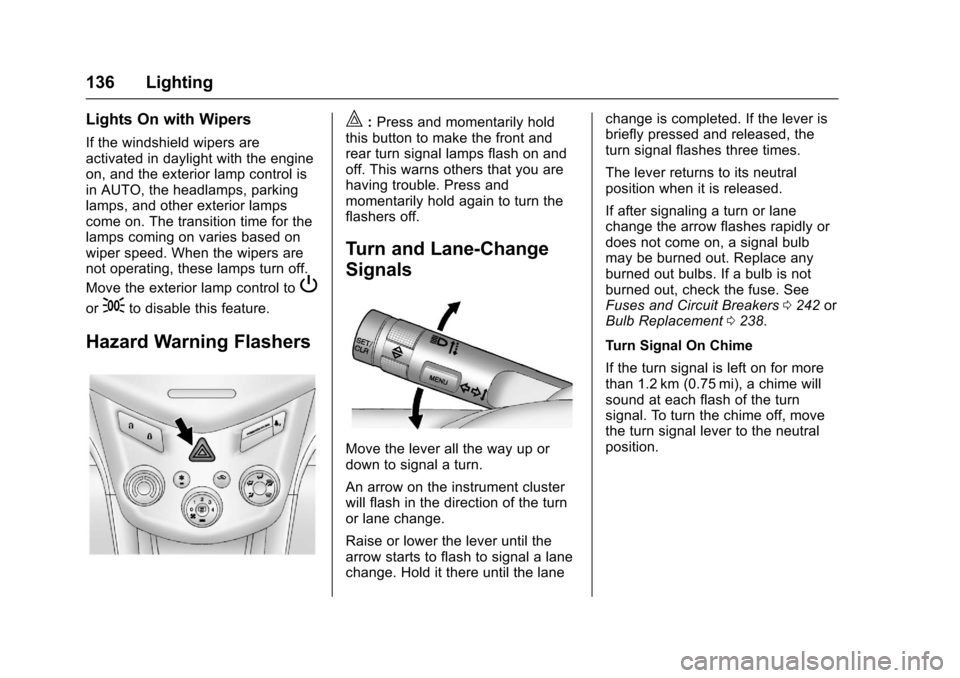
Hazard Warning Flashers
|:Press and momentarily holdthis button to make the front andrear turn signal lamps flash on andoff. This warns others that you arehaving trouble. Press andmomentarily hold again to turn theflashers off.
Turn and Lane-Change
Signals
Move the lever all the way up ordown to signal a turn.
An arrow on the instrument clusterwill flash in the direction of the turnor lane change.
Raise or lower the lever until thearrow starts to flash to signal a lanechange. Hold it there until the lane
change is completed. If the lever isbriefly pressed and released, theturn signal flashes three times.
The lever returns to its neutralposition when it is released.
If after signaling a turn or lanechange the arrow flashes rapidly ordoes not come on, a signal bulbmay be burned out. Replace anyburned out bulbs. If a bulb is notburned out, check the fuse. SeeFuses and Circuit Breakers0242orBulb Replacement0238.
Turn Signal On Chime
If the turn signal is left on for morethan 1.2 km (0.75 mi), a chime willsound at each flash of the turnsignal. To turn the chime off, movethe turn signal lever to the neutralposition.
Page 139 of 342
Chevrolet Sonic Owner Manual (GMNA-Localizing-U.S./Canada-10122660) -2017 - crc - 5/13/16
138 Lighting
Courtesy Lamps
The courtesy lamps come onautomatically when any door isopened and the dome lamp is in thedoor position.
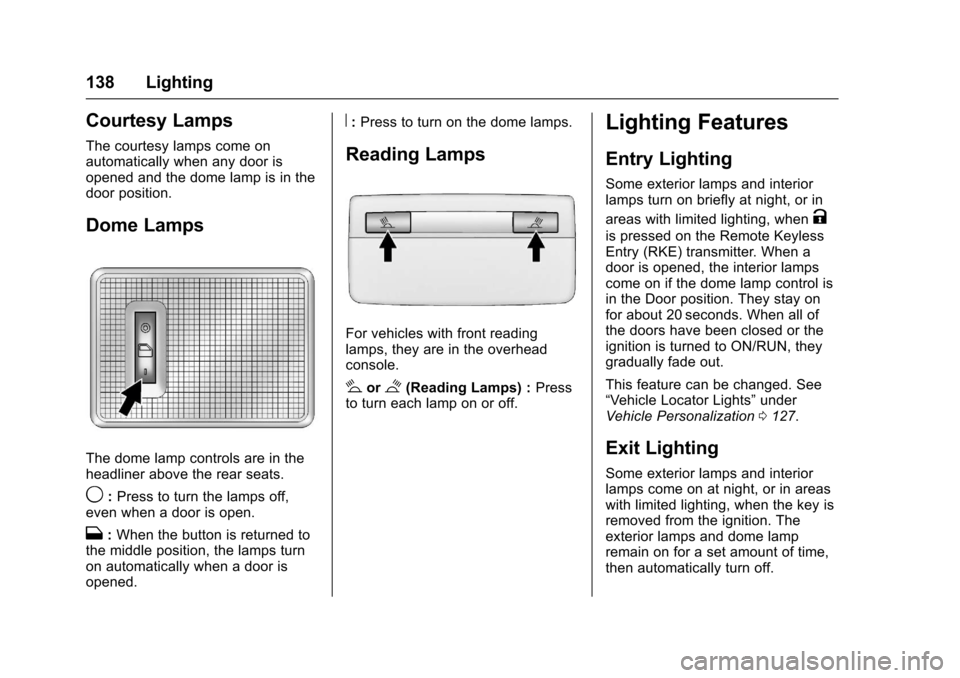
Dome Lamps
The dome lamp controls are in theheadliner above the rear seats.
9:Press to turn the lamps off,even when a door is open.
H:When the button is returned tothe middle position, the lamps turnon automatically when a door isopened.
R:Press to turn on the dome lamps.
Reading Lamps
For vehicles with front readinglamps, they are in the overheadconsole.
#or$(Reading Lamps) :Pressto turn each lamp on or off.
Lighting Features
Entry Lighting
Some exterior lamps and interiorlamps turn on briefly at night, or in
areas with limited lighting, whenK
is pressed on the Remote KeylessEntry (RKE) transmitter. When adoor is opened, the interior lampscome on if the dome lamp control isin the Door position. They stay onfor about 20 seconds. When all ofthe doors have been closed or theignition is turned to ON/RUN, theygradually fade out.
This feature can be changed. See“Ve h i c l e L o c a t o r L i g h t s”underVehicle Personalization0127.
Exit Lighting
Some exterior lamps and interiorlamps come on at night, or in areaswith limited lighting, when the key isremoved from the ignition. Theexterior lamps and dome lampremain on for a set amount of time,then automatically turn off.
Page 140 of 342
Chevrolet Sonic Owner Manual (GMNA-Localizing-U.S./Canada-10122660) -2017 - crc - 5/13/16
Lighting 139
If equipped with Keyless Access,the exterior lamps automatically turnon when a door is opened after theignition is changed to the OFFposition. The dome lamps alsocome on after the ignition ischanged to the OFF position. SeeIgnition Positions (Key Access)0182orIgnition Positions (KeylessAccess)0183.
The exterior lamps turn offimmediately by turning the exteriorlamps control off.
This feature can be changed. SeeVehicle Personalization0127.
Battery Load
Management
The vehicle has Electric PowerManagement (EPM) that estimatesthe battery's temperature and stateof charge. It then adjusts the voltagefor best performance and extendedlife of the battery.
When the battery's state of chargeis low, the voltage is raised slightlyto quickly bring the charge back up.When the state of charge is high,
the voltage is lowered slightly toprevent overcharging. If the vehiclehas a voltmeter gauge or a voltagedisplay on the Driver InformationCenter (DIC), you may see thevoltage move up or down. This isnormal. If there is a problem, analert will be displayed.
The battery can be discharged atidle if the electrical loads are veryhigh. This is true for all vehicles.This is because the generator(alternator) may not be spinning fastenough at idle to produce all thepower needed for very highelectrical loads.
Ahighelectricalloadoccurswhenseveral of the following are on, suchas: headlamps, high beams, foglamps, rear window defogger,climate control fan at high speed,heated seats, engine cooling fans,trailer loads, and loads plugged intoaccessory power outlets.
EPM works to prevent excessivedischarge of the battery. It does thisby balancing the generator's outputand the vehicle's electrical needs.It can increase engine idle speed to
generate more power, wheneverneeded. It can temporarily reducethe power demands of someaccessories.
Normally, these actions occur insteps or levels, without beingnoticeable. In rare cases at thehighest levels of corrective action,this action may be noticeable to thedriver.
Battery Power Protection
The battery saver feature isdesigned to protect the vehicle'sbattery.
If some interior lamps are left onand the ignition is turned off, thebattery rundown protection systemautomatically turns the lamp off aftersome time.
Exterior Lighting Battery
Saver
The exterior lamps turn off about10 minutes after the ignition isturned off, if the parking lamps orheadlamps have been manually lefton. This protects against draining
Page 153 of 342
Chevrolet Sonic Owner Manual (GMNA-Localizing-U.S./Canada-10122660) -2017 - crc - 5/13/16
152 Infotainment System
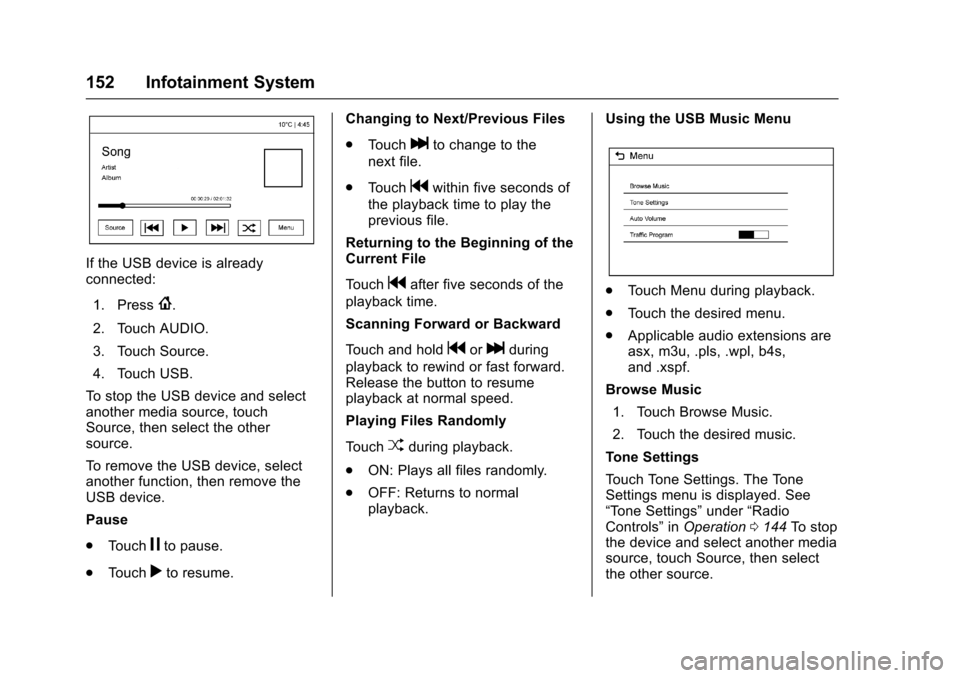
If the USB device is alreadyconnected:
1. Press{.
2. Touch AUDIO.
3. Touch Source.
4. Touch USB.
To s t o p t h e U S B d e v i c e a n d s e l e c tanother media source, touchSource, then select the othersource.
To r e m o v e t h e U S B d e v i c e , s e l e c tanother function, then remove theUSB device.
Pause
.To u c hjto pause.
.To u c hrto resume.
Changing to Next/Previous Files
.To u c hlto change to the
next file.
.To u c hgwithin five seconds of
the playback time to play theprevious file.
Returning to the Beginning of theCurrent File
To u c hgafter five seconds of the
playback time.
Scanning Forward or Backward
To u c h a n d h o l dgorlduring
playback to rewind or fast forward.Release the button to resumeplayback at normal speed.
Playing Files Randomly
To u c hZduring playback.
.ON: Plays all files randomly.
.OFF: Returns to normalplayback.
Using the USB Music Menu
.To u c h M e n u d u r i n g p l a y b a c k .
.To u c h t h e d e s i r e d m e n u .
.Applicable audio extensions areasx, m3u, .pls, .wpl, b4s,and .xspf.
Browse Music
1. Touch Browse Music.
2. Touch the desired music.
To n e S e t t i n g s
To u c h To n e S e t t i n g s . T h e To n eSettings menu is displayed. See“To n e S e t t i n g s”under“RadioControls”inOperation0144To s t o pthe device and select another mediasource, touch Source, then selectthe other source.
Page 154 of 342
Chevrolet Sonic Owner Manual (GMNA-Localizing-U.S./Canada-10122660) -2017 - crc - 5/13/16
Infotainment System 153
Auto Volume
To u c h A u t o V o l u m e . T h e A u t oVolume menu is displayed. See“Auto Volume”under“RadioControls”inOperation0144
Tr a f f i c P r o g r a m(If Equipped)
To u c h O n o r O f f .
MTP (Media Transfer Protocol)
.Connect an MTP supporteddevice.
.Play will start automatically afterthe system has finished readingthe MTP device.
.If a non-readable MTP device isconnected, an error messagedisplays and the system willswitch to the previous audiofunction.
iPod/iPhone Player
This feature is limited to modelssupporting the iPod/iPhoneconnection.
Playing Music Files
.Connect the iPod/iPhone to theUSB port.
.Play will start from the previouslyplayed point after the systemhas finished reading the USBdevice.
.If a non-readable USB device isconnected, an error messagedisplays and the system willswitch to the previous audiofunction.
If the iPod/iPhone is alreadyconnected:
1. Press{.
2. Touch AUDIO.
3. Touch Source.
4. Touch iPod.
To s t o p t h e d e v i c e a n d s e l e c tanother media source, touchSource, then select the othersource.
To r e m o v e t h e d e v i c e , s e l e c tanother function, then remove thedevice.
Pause
.To u c hjto pause.
.To u c hrto resume.
Changing to Next/Previous Song
.To u c hlto change to the
next song.
.To u c hgwithin two seconds of
the playback time to play theprevious file.
Returning to the Beginning of theCurrent File
To u c hgafter two seconds of the
playback time.
Scanning Forward or Backward
To u c h a n d h o l dgorlduring
playback to rewind or fast forward.Release the button to resumeplayback at normal speed.
Playing Files Randomly
To u c hZduring playback.
.ON: Plays all files randomly.
.OFF: Returns to normalplayback.
Using the iPod Menu
.To u c h M e n u d u r i n g p l a y b a c k .
.To u c h t h e a p p r o p r i a t eplay mode.
Page 158 of 342
Chevrolet Sonic Owner Manual (GMNA-Localizing-U.S./Canada-10122660) -2017 - crc - 5/13/16
Infotainment System 157
change the volume level. Theadjusted volume level remains inmemory for later calls. The systemmaintains a minimum volume level.
Other Information
SeeRadio FrequencyStatement0317.
Bluetooth (Infotainment
Controls)
To u s e i n f o t a i n m e n t c o n t r o l s t oaccess the menu system, seeOverview0143.
Pairing
ABluetooth-enabledcellphonemust be paired to the Bluetoothsystem and then connected to thevehicle before it can be used. Seeyour cell phone manufacturer's userguide for Bluetooth functions beforepairing the cell phone. If a Bluetoothphone is not connected, calls will bemade using OnStar Hands-FreeCalling, if available. SeeOnStarOverview0321.
Pairing Information
.ABluetoothphonewithMP3capability cannot be paired tothe vehicle as a phone and anMP3 player at the same time.
.Up to 10 cell phones can bepaired to the Bluetooth system.
.The pairing process is disabledwhen the vehicle is moving.
.Pairing only needs to becompleted once, unless thepairing information on the cellphone changes or the cell phoneis deleted from the system.
.Only one paired cell phone canbe connected to the Bluetoothsystem at a time.
.If multiple paired cell phones arewithin range of the system, thesystem connects to the firstavailable paired cell phone in theorder that they were first paired.
When the Bluetooth device andinfotainment system aresuccessfully paired, the phone bookis downloaded automatically. This isdependent on the type of phonepaired. If the automatic download
does not occur, proceed with thephone book download on thephone.
Pairing a Phone–SSP and NoPaired Device
When there is no paired device onthe infotainment system and SimpleSecure Pairing (SSP) is supported:
1. Press{.
2. Touch PHONE, press5on the
faceplate, or pressgon the
steering wheel without OnStar.
3. Touch Search Device.
4. Touch the desired device topair on the searched listscreen.
5. Touch Yes on the pop-upscreen of the Bluetooth deviceand infotainment system.
6. When the Bluetooth device andinfotainment system aresuccessfully paired, the phonescreen is displayed on theinfotainment system.
Page 161 of 342
Chevrolet Sonic Owner Manual (GMNA-Localizing-U.S./Canada-10122660) -2017 - crc - 5/13/16
160 Infotainment System
.ewill appear on the screen if
the stereo headset issuccessfully connected.
.The sound played by theBluetooth device is deliveredthrough the infotainment system.
.Bluetooth music can be playedonly when a Bluetooth devicehas been connected. To playBluetooth music, connect theBluetooth phone to theinfotainment system.
.If the Bluetooth device isdisconnected while playingphone music, the music isdiscontinued. The audiostreaming function may not besupported in some Bluetoothphones. Only one function canbe used at a time between theBluetooth hands-free or Phonemusic function. For example,if you convert to Bluetoothhands-free while playing Phonemusic, the music isdiscontinued. Playing music fromthe car is not possible whenthere are no music files stored inthe cell phone.
Playing Bluetooth Music
1. Press{.
2. Touch AUDIO.
3. Touch Source.
4. Touch Bluetooth.
Pause
To u c hjto pause.
To u c hrto resume.
Playing the Next Song
To u c hl.
Playing the Previous Song
To u c hgwithin two seconds of
playback time to play theprevious song.
Returning to the Beginning of theCurrent Song
To u c hgafter two seconds of
playback time.
Search
To u c h a n d h o l dgorlto rewind
or fast forward.
Playing Music Randomly
To u c hZduring playback. Touch
again to return to normal play.
This function may not be supporteddepending on the Bluetooth device.
Do not change the track too quicklywhen playing Bluetooth music.
Conditions that may occur whenplaying Bluetooth music:
.It takes time to transmit datafrom the Bluetooth device to theinfotainment system.
.If the cell phone or Bluetoothdevice is not in the waitingscreen mode, it may notautomatically play.
.The infotainment systemtransmits the order to play fromthe Bluetooth device in theBluetooth music play mode.If this is done in a differentmode, then the device transmitsthe order to stop. Depending onthe Bluetooth device options,this order to play/stop may taketime to activate.
Page 162 of 342
Chevrolet Sonic Owner Manual (GMNA-Localizing-U.S./Canada-10122660) -2017 - crc - 5/13/16
Infotainment System 161
.If the Bluetooth music playbackis not functioning, then check tosee if the Bluetooth device is inthe waiting screen mode.
.Sounds may be cut off duringthe Bluetooth music playback.
.The infotainment system outputsthe audio from the cell phone orBluetooth device as it istransmitted.
Apple CarPlay and
Android Auto
If equipped, Android Auto™and/orApple CarPlay™capability may beavailable through a compatiblesmartphone. If available, aPROJECTION icon will appear asAndroid Auto or Car Play on theHome Page of the infotainmentdisplay.
To u s e A n d r o i d A u t o a n d / o r A p p l eCarPlay:
1. Download the Android Autoapp to your phone from theGoogle™Play store. There is
no app required for AppleCarPlay. Use the latestavailable operation system.
2. Connect your Android phone orApple iPhone by using thecompatible phone USB cableand plugging into a USB dataport. For best performance, usethe device’sfactory-providedUSB cable. Aftermarket orthird-party cables maynot work.
The PROJECTION icon on theHome Page will change to AndroidAuto or Apple CarPlay dependingon the phone. Android Auto and/orApple CarPlay may automaticallylaunch upon USB connection. If not,touch the ANDROID AUTO and/orAPPLE CARPLAY icon on theHome Page to launch.
For further information on how to setup Android Auto and Apple CarPlayin the vehicle, seewww.my.chevrolet.com for the U.S.and www.chevroletowner.ca forCanada only orCustomerAssistance Offices0309.
Android Auto is provided by Googleand is subject to Google’stermsand privacy policy. CarPlay isprovided by Apple and is subject toApple’stermsandprivacypolicy.For Android Auto support seehttps://support.google.com/androidauto or Apple CarPlaysupport at https://www.apple.com/ios/carplay/. Apple or Google maychange or suspend availability atany time. Android Auto is atrademark of Google Inc.; AppleCarPlay is a trademark of Apple Inc.
Hands-Free Phone
General Information
Vehicles with a Hands-Free Phonesystem can use a Bluetooth-capablecell phone with a hands-free profileto make and receive phone calls.The infotainment system and voicecontrol are used to operate thesystem. Not all phones support allfunctions and not all phones workwith the Hands-Free Phone system.
Page 165 of 342
Chevrolet Sonic Owner Manual (GMNA-Localizing-U.S./Canada-10122660) -2017 - crc - 5/13/16
164 Infotainment System
Trademarks and
License Agreements
FCC Information
SeeRadio FrequencyStatement0317.
Bluetooth®
The Bluetooth word mark and logosare owned by the Bluetooth®SIG,Inc. and any use of such marks byGeneral Motors is under license.Other trademarks and trade namesare those of their respective owners.
DivX Certified®to play DivX®video,including premium content.
Covered by one or more of thefollowing U.S. patents: 7,295,673;7,460,668; 7,515,710; 7,519,274.
DivX®,DivXCertified®andassociated logos are trademarks ofRovi Corporation or its subsidiariesand are used under license.
“Made for iPod”and“Made foriPhone”mean that an electronicaccessory has been designed toconnect specifically to iPod oriPhone and has been certified bythe developer to meet Appleperformance standards.
iPod and iPhone are trademarks ofApple Computer, Inc., registered inthe U.S. and other countries.
Fees and Taxes: Subscription fee,taxes, one time activation fee, andother fees may apply. Subscriptionfee is consumer only. All fees andprogramming subject to change.Subscriptions subject to CustomerAgreement available atwww.siriusxm.com orwww.siriusxm.ca. SiriusXM®serviceonly available in the 48 contiguousUnited States and Canada.
In Canada: Some deterioration ofservice may occur in extremenorthern latitudes. This is beyondthe control of SiriusXM®SatelliteRadio.
It is prohibited to copy, decompile,disassemble, reverse engineer,hack, manipulate, or otherwisemake available any technology orsoftware incorporated in receiverscompatible with the SiriusXMSatellite Radio System or thatsupport the SiriusXM website, theOnline Service or any of its content.Furthermore, the AMBER voicecompression software included inthis product is protected byintellectual property rights including
Page 168 of 342
Chevrolet Sonic Owner Manual (GMNA-Localizing-U.S./Canada-10122660) -2017 - crc - 5/13/16
Climate Controls 167
fan control to 0 turns the fan off. Thefan must be turned on to run the airconditioning compressor.
Air Delivery Mode Control :Turnclockwise or counterclockwise tochange the current airflow mode.
Select from the following air deliverymodes:
Y:Air is directed to the instrumentpanel outlets.
\:Air is divided between theinstrument panel and floor outlets.
[:Air is directed to the flooroutlets, with some air directed to therear outlets.
W:This mode clears the windowsof fog or moisture. Air is directed tothe floor, windshield, and sidewindow outlets.
1:This mode clears thewindshield of fog or frost morequickly. Air is directed to thewindshield and side window outlets.
Do not drive the vehicle until allwindows are clear.
In defrost or defog mode, excessiveair conditioning use can cause thewindows to fog. If this happens,
change the air delivery mode toY
and reduce the fan speed.
#:If equipped with airconditioning, follow these steps to
use the system. TurnAto the
desired speed. The air conditioningdoes not operate when the fancontrol knob is in the off position.
Press#to turn the air conditioning
on and off. When#is pressed, an
indicator light comes on to showthat the air conditioning is on.
For quick cool down on hot days:
1. Open the windows to let hot airescape.
2. PressM.
3. Press#.
4. Select the coolest temperature.
5. Select the highestAspeed.
Using these settings together forlong periods of time may cause theair inside the vehicle to become too
dry. To prevent this from happening,after the air in the vehicle hascooled, turn the recirculationmode off.
M:This mode recirculates andhelps to quickly cool the air insidethe vehicle. It can be used to reducethe entry of outside air and odors.
Press the button to turn therecirculation mode on. An indicatorlight comes on to show that therecirculation is on. Press the buttonagain to return to outside air mode.
Using the recirculation mode forextended periods may cause thewindows to fog. If this happens,select the defrost mode.
Max#is available when the air
conditioning is selected and thetemperature is set to the coolestsetting while the outside air
temperature is warm. When Max#
is activated, the air inside thevehicle is automatically recirculated,which helps to quickly cool thevehicle. The recirculation indicatorwill not be lit.