ignition CHEVROLET SONIC 2017 2.G User Guide
[x] Cancel search | Manufacturer: CHEVROLET, Model Year: 2017, Model line: SONIC, Model: CHEVROLET SONIC 2017 2.GPages: 342, PDF Size: 7.2 MB
Page 33 of 342
Chevrolet Sonic Owner Manual (GMNA-Localizing-U.S./Canada-10122660) -2017 - crc - 5/13/16
32 Keys, Doors, and Windows
K:Press to unlock the driver doorand the liftgate or trunk. Press againto unlock all doors.
The turn signal indicators may flashto indicate unlocking has occurred.SeeVehicle Personalization0127.
PressingKwill disarm the alarm
system. SeeVehicle AlarmSystem044.
X:If equipped, press twice torelease the trunk.
7:Press and release one time toinitiate vehicle locator. The exteriorlamps flash and the horn chirpsthree times.
Press and hold7for at least
three seconds to sound the panicalarm. The horn sounds and theturn signals flash for about
30 seconds until7is pressed again
or ignition is turned to ON/RUN.
/:If equipped, pressQand then
immediately press and hold/for at
least four seconds or until the turnsignal lamps flash to start the
engine from outside the vehicleusing the RKE transmitter. SeeRemote Vehicle Start037.
Keyless Access Operation
Some vehicles have a KeylessAccess system that lets you lockand unlock the doors withoutremoving the RKE transmitter fromyour pocket, purse, briefcase, etc.The RKE transmitter should bewithin 1 m (3 ft) of the door beingopened. If the vehicle has thisfeature, there will be buttons on theoutside door handles.
Keyless Access can beprogrammed to unlock all doors onthe first unlock/lock button pressfrom the driver door. SeeVehiclePersonalization0127.
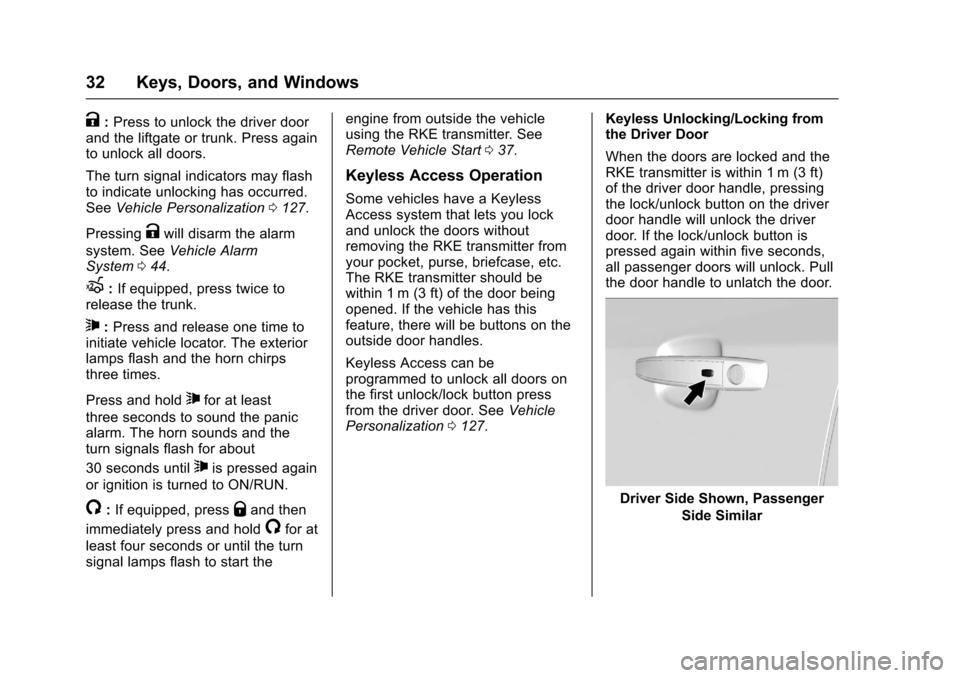
Keyless Unlocking/Locking fromthe Driver Door
When the doors are locked and theRKE transmitter is within 1 m (3 ft)of the driver door handle, pressingthe lock/unlock button on the driverdoor handle will unlock the driverdoor. If the lock/unlock button ispressed again within five seconds,all passenger doors will unlock. Pullthe door handle to unlatch the door.
Driver Side Shown, Passenger
Side Similar
Page 38 of 342
Chevrolet Sonic Owner Manual (GMNA-Localizing-U.S./Canada-10122660) -2017 - crc - 5/13/16
Keys, Doors, and Windows 37
3. Lift the battery with a flatobject.
4. Remove the battery.
5. Insert the new battery, positiveside toward the back cover.Replace with a CR2032 orequivalent battery.
6. Push the transmitter together.
Remote Vehicle Start
If equipped, this feature allows theengine to be started from outsidethe vehicle.
/:This button will be on the RKEtransmitter if the vehicle has remotestart.
The climate control system will usethe previous settings during aremote start. The rear defog maycome on during remote start basedon cold ambient conditions. Therear fog indicator light does notcome on during remote start.
If the vehicle has heated seats, theymay come on during a remote start.SeeHeated Front Seats056.
Laws in some local communitiesmay restrict the use of remotestarters. For example, some lawsrequire a person using remote startto have the vehicle in view. Checklocal regulations for anyrequirements.
Other conditions can affect theperformance of the transmitter. SeeRemote Keyless Entry (RKE)System028.
Starting the Vehicle
To s t a r t t h e e n g i n e u s i n g t h e r e m o t estart feature:
1. Press and releaseQ.
2. Immediately after completing
Step 1, press and hold/for at
least four seconds or until theturn signal lamps flash. Theturn signal lamps flashingconfirms the request to remotestart the vehicle has beenreceived.
When the engine starts, the parkinglamps will turn on and remain on aslong as the engine is running. Thedoors will be locked and the climatecontrol system may come on.
The engine will continue to run for10 minutes. After 30 seconds,repeat the steps if a 10-minuteextension is desired. Remote startcan be extended only once.
Insert the key and turn it to ON/RUNbefore driving.
Extending Engine Run Time
The engine run time can also beextended by another 10 minutes,if during the first 10 minutesSteps 1 and 2 are repeated whilethe engine is still running. Anextension can be requested,30 seconds after starting. Thisprovides a total of 20 minutes.
When the remote start is extended,the second 10-minute period isadded on to the first 10 minutes foratotalof20minutes.
Amaximumoftworemotestarts,or a single start with an extension,are allowed between ignition cycles.
Page 39 of 342
Chevrolet Sonic Owner Manual (GMNA-Localizing-U.S./Canada-10122660) -2017 - crc - 5/13/16
38 Keys, Doors, and Windows
After this, the vehicle's ignitionswitch must be turned to ON/RUNand then back to LOCK/OFF usingthe key, before the remote startprocedure can be used again.
Canceling a Remote Start
To c a n c e l a r e m o t e s t a r t , d o o n e o fthe following:
.Press and hold/until the
parking lamps turn off.
.Turn on the hazard warningflashers.
.Turn the vehicle on and then off.
Conditions in Which Remote StartWill Not Work
The remote vehicle start feature willnot operate if:
.The key is in the ignition.
.The hood is not closed.
.The hazard warning flashersare on.
.The malfunction indicator lampis on.
.The engine coolant temperatureis too high.
.The oil pressure is low.
.Tw o r e m o t e v e h i c l e s t a r t s , o r asingle remote start with anextension, have alreadybeen used.
.The vehicle is not in P (Park).
Door Locks
{Warning
Unlocked doors can be
dangerous.
.Passengers, especiallychildren, can easily openthe doors and fall out of amoving vehicle. When adoor is locked, the handlewill not open it. The chanceof being thrown out of thevehicle in a crash isincreased if the doors arenot locked. So, allpassengers should wearsafety belts properly and the
(Continued)
Warning (Continued)
doors should be lockedwhenever the vehicle isdriven.
.Yo u n g c h i l d r e n w h o g e t i n t ounlocked vehicles may beunable to get out. A childcan be overcome byextreme heat and can sufferpermanent injuries or evendeath from heat stroke.Always lock the vehiclewhenever leaving it.
.Outsiders can easily enterthrough an unlocked doorwhen you slow down or stopthe vehicle. Locking thedoors can help prevent thisfrom happening.
To l o c k o r u n l o c k t h e d o o r s f r o moutside the vehicle:
.Use the key in the driver door tolock all doors or unlock thedriver door only.
Page 41 of 342
Chevrolet Sonic Owner Manual (GMNA-Localizing-U.S./Canada-10122660) -2017 - crc - 5/13/16
40 Keys, Doors, and Windows
Automatic Door Locks
The vehicle is programmed so thatwhen the doors are closed, theignition is on, and the shift lever ismoved out of P (Park) for automatictransmissions, or when the vehiclespeed is above 13 km/h (8 mph) formanual transmissions, the doorsand the trunk/liftgate will lock.
To u n l o c k t h e d o o r s a n d t h e t r u n k /liftgate:
.PressKon the center stack or
the driver door switch.
.If equipped with an automatictransmission the vehicle must bein P (Park).
.If equipped with a manualtransmission the vehicle must bein Neutral with the parkingbrake set.
This feature can be programmed.SeeVehicle Personalization0127.
Lockout Protection
If the driver side power door lockswitch is pressed when the driverdoor is open and the key is in theignition, all of the doors will lock andthen the driver door will unlock.
Lockout Protection can be manuallyoverridden with the driver door open
by pressing and holdingQon the
power door lock switch.
If Unlocked Door Anti Lockout isturned on and the vehicle is off, thedriver door is open, and doorlocking is requested using a doorlock switch or the RKE transmitter,then all the doors will lock and onlythe driver door will unlock. TheUnlocked Door Anti Lockout featurecan be turned on or off throughvehicle personalization. SeeVehiclePersonalization0127.
Safety Locks
The rear door safety locks preventpassengers from opening the reardoors from inside the vehicle.
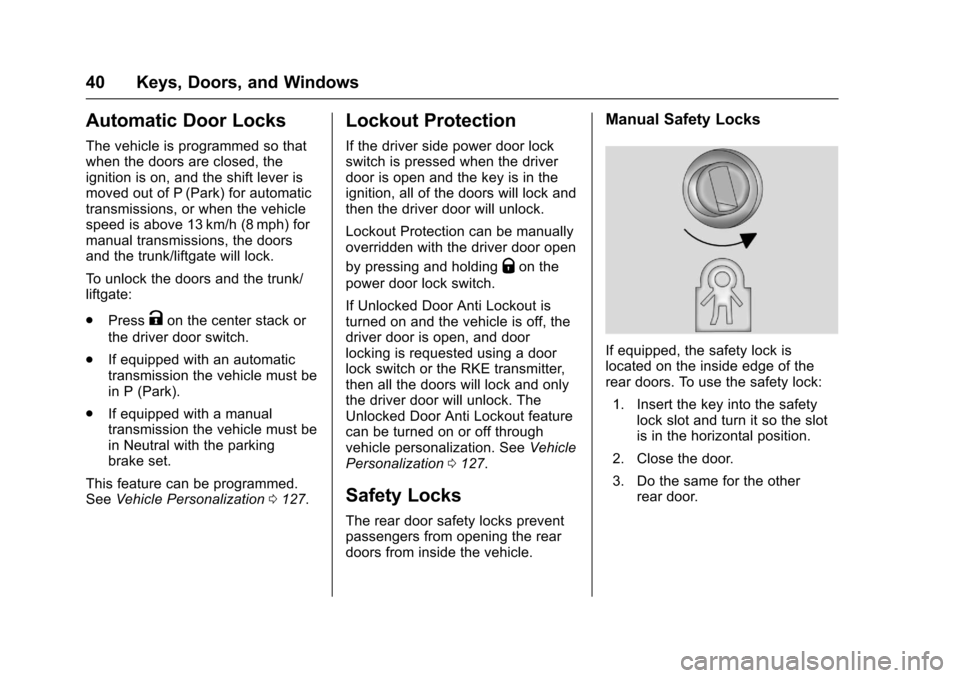
Manual Safety Locks
If equipped, the safety lock islocated on the inside edge of therear doors. To use the safety lock:
1. Insert the key into the safetylock slot and turn it so the slotis in the horizontal position.
2. Close the door.
3. Do the same for the otherrear door.
Page 46 of 342
Chevrolet Sonic Owner Manual (GMNA-Localizing-U.S./Canada-10122660) -2017 - crc - 5/13/16
Keys, Doors, and Windows 45
To a v o i d s e t t i n g o f f t h e a l a r m b yaccident:
.Lock the vehicle after alloccupants have left the vehicleand all doors are closed.
.Always unlock a door with theRKE transmitter.
Unlocking the driver door with thekey will not disarm the system orturn off the alarm.
How to Detect a Tamper
Condition
IfKis pressed on the transmitter
and the horn chirps and the lightsflash three times, an alarm occurredpreviously while the alarm systemwas armed.
Immobilizer
SeeRadio FrequencyStatement0317.
Immobilizer Operation
This vehicle has a passivetheft-deterrent system.
The system does not have to bemanually armed or disarmed.
The vehicle is automaticallyimmobilized when the key isremoved from the ignition.
The system is automaticallydisarmed when the vehicle isstarted with the correct key. The keyuses a transponder that matches animmobilizer control unit in thevehicle and automatically disarmsthe system. Only an authorized keystarts the vehicle. The vehicle maynot start if the key is damaged.
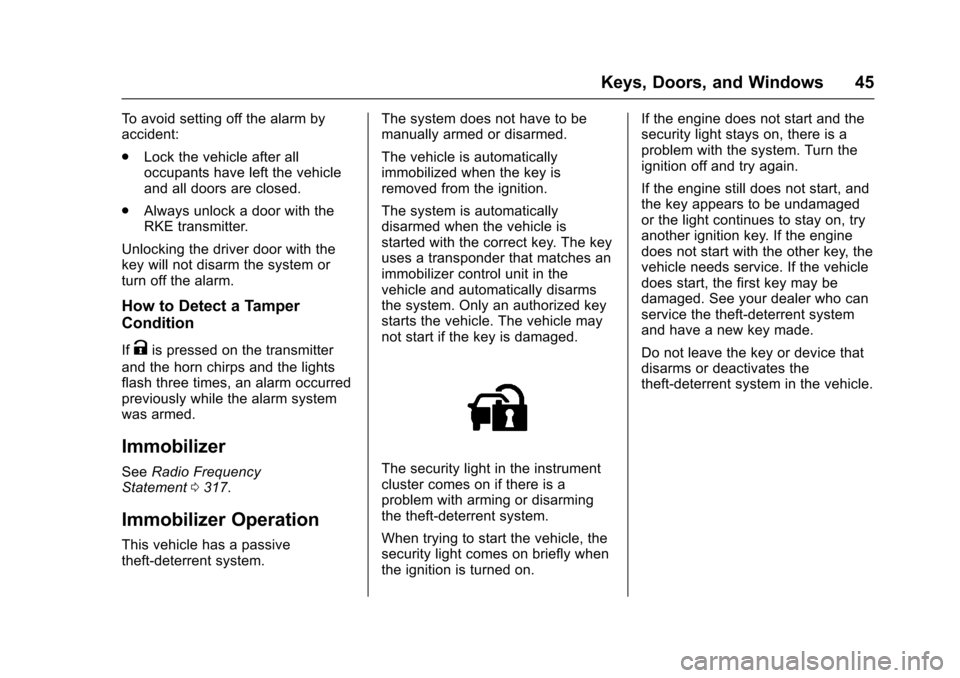
The security light in the instrumentcluster comes on if there is aproblem with arming or disarmingthe theft-deterrent system.
When trying to start the vehicle, thesecurity light comes on briefly whenthe ignition is turned on.
If the engine does not start and thesecurity light stays on, there is aproblem with the system. Turn theignition off and try again.
If the engine still does not start, andthe key appears to be undamagedor the light continues to stay on, tryanother ignition key. If the enginedoes not start with the other key, thevehicle needs service. If the vehicledoes start, the first key may bedamaged. See your dealer who canservice the theft-deterrent systemand have a new key made.
Do not leave the key or device thatdisarms or deactivates thetheft-deterrent system in the vehicle.
Page 50 of 342
Chevrolet Sonic Owner Manual (GMNA-Localizing-U.S./Canada-10122660) -2017 - crc - 5/13/16
Keys, Doors, and Windows 49
Window Express Movement
Express-down allows the windowsto be opened without holding thewindow switch. Express-up,if equipped, allows the windows tobe closed without holding thewindow switch. Press the windowswitch fully down or pull it up, andquickly release it to engage. Brieflypress or pull the same switch tostop window movement.
Express Window Obstacle
Detection
The express-up feature will reversewindow movement if it comes incontact with an object. Extreme coldor ice could cause the window toauto-reverse. The window willoperate as normal after the object orcondition is removed.
Obstacle Detection Override
{Warning
If obstacle detection override is
activated, the window will not
reverse automatically. You or
others could be injured and the
window could be damaged.
Before you use obstacle detection
override, make sure that all
people and obstructions are clear
of the window path.
The window can be closed byholding the window switch in the upposition if conditions prevent it fromexpress closing.
Programming the Power
Windows
Programming may be necessary ifthe vehicle's battery has beendisconnected or discharged. If thewindow is unable to express-up,program the window:
1. Close all doors.
2. Place the ignition in ACC/ACCESSORY or ON/RUN.
3. Partially open the window to beprogrammed, then close it andcontinue to pull the switchbriefly after the window hasfully closed.
4. Press the power window switchuntil the window is fully openand briefly hold.
Sun Visors
To b l o c k o u t g l a r e , s w i n g d o w n t h esun visors. You can also removethem from the center mount andswing them to the side.
Visor Vanity Mirror
Va n i t y m i r r o r s a r e o n t h e b a c k o f t h esun visors. Swing down the sunvisor and open the cover.
Page 51 of 342
Chevrolet Sonic Owner Manual (GMNA-Localizing-U.S./Canada-10122660) -2017 - crc - 5/13/16
50 Keys, Doors, and Windows
Roof
Sunroof
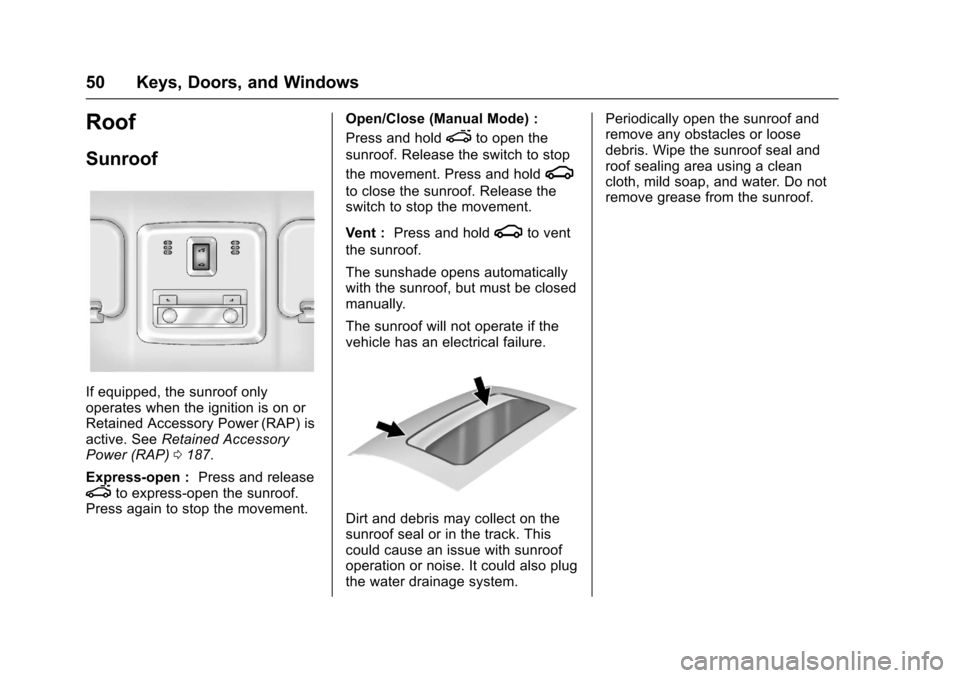
If equipped, the sunroof onlyoperates when the ignition is on orRetained Accessory Power (RAP) isactive. SeeRetained AccessoryPower (RAP)0187.
Express-open :Press and releaseeto express-open the sunroof.Press again to stop the movement.
Open/Close (Manual Mode) :
Press and holdeto open the
sunroof. Release the switch to stop
the movement. Press and holdg
to close the sunroof. Release theswitch to stop the movement.
Vent :Press and holdgto vent
the sunroof.
The sunshade opens automaticallywith the sunroof, but must be closedmanually.
The sunroof will not operate if thevehicle has an electrical failure.
Dirt and debris may collect on thesunroof seal or in the track. Thiscould cause an issue with sunroofoperation or noise. It could also plugthe water drainage system.
Periodically open the sunroof andremove any obstacles or loosedebris. Wipe the sunroof seal androof sealing area using a cleancloth, mild soap, and water. Do notremove grease from the sunroof.
Page 58 of 342
Chevrolet Sonic Owner Manual (GMNA-Localizing-U.S./Canada-10122660) -2017 - crc - 5/13/16
Seats and Restraints 57
Remote Start Auto Heated
Seats
If equipped, when it is cold outsidethe heated seats can be turned onautomatically during a remotevehicle start. The heated seats willbe canceled when the ignition isturned on. Press the heated seatcontrols to use the heated seatsafter the vehicle is started.
The heated seat indicator lights donot turn on during a remote start.
The temperature performance of anunoccupied seat may be reduced.This is normal.
SeeRemote Vehicle Start037.
Rear Seats
Folding the Seatback
Either side of the seatback can befolded down for more cargo space.Fold a seatback only when thevehicle is not moving.
Caution
Folding a rear seat with the safety
belts still fastened may cause
damage to the seat or the safety
belts. Always unbuckle the safety
belts and return them to their
normal stowed position before
folding a rear seat.
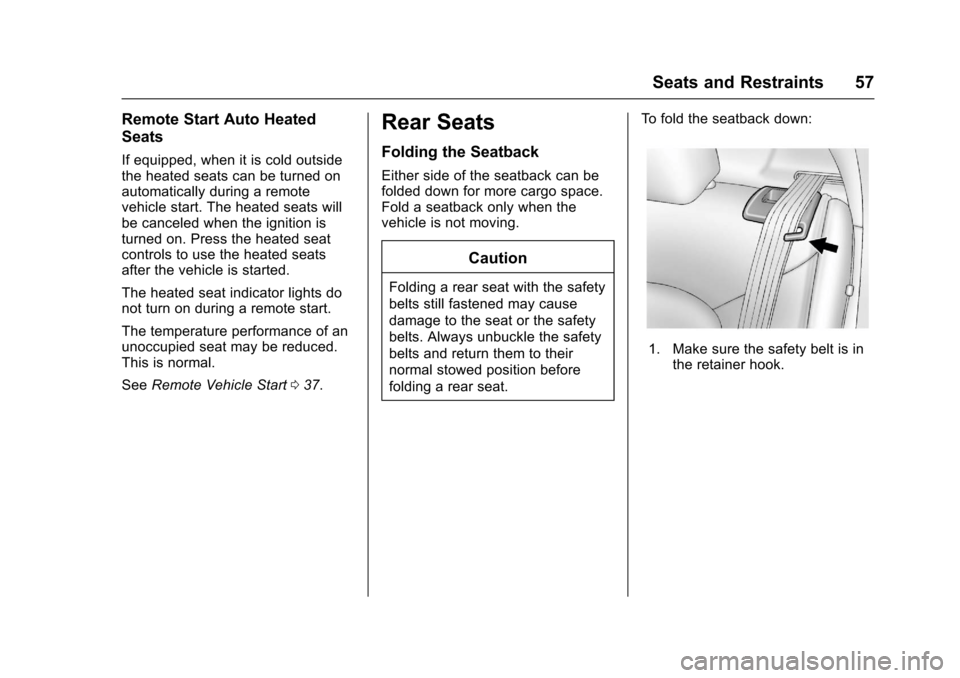
To f o l d t h e s e a t b a c k d o w n :
1. Make sure the safety belt is inthe retainer hook.
Page 103 of 342
Chevrolet Sonic Owner Manual (GMNA-Localizing-U.S./Canada-10122660) -2017 - crc - 5/13/16
102 Instruments and Controls
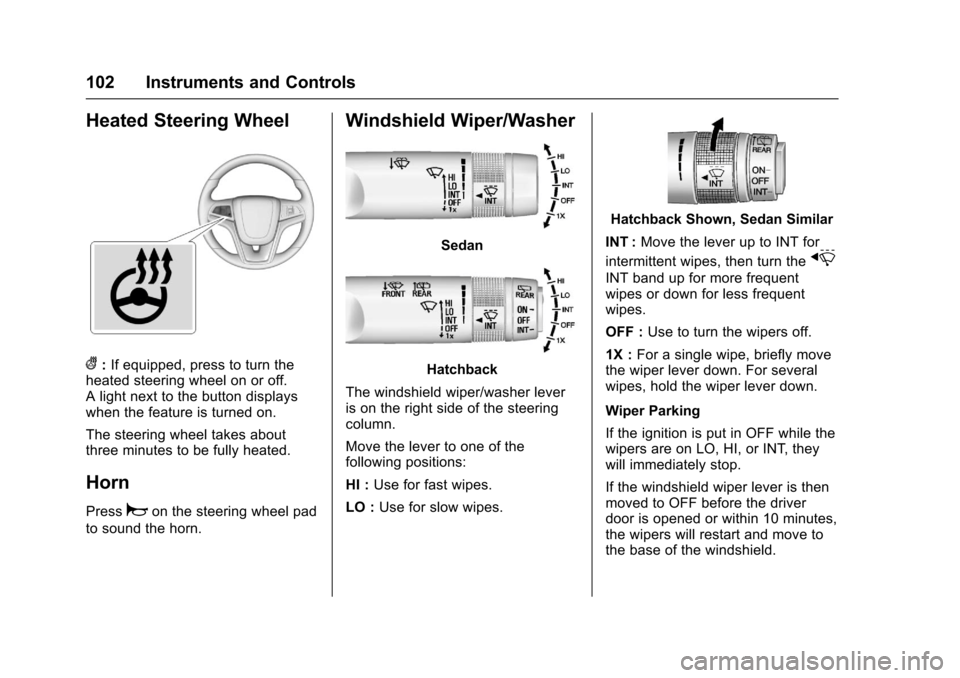
Heated Steering Wheel
(:If equipped, press to turn theheated steering wheel on or off.Alightnexttothebuttondisplayswhen the feature is turned on.
The steering wheel takes aboutthree minutes to be fully heated.
Horn
Pressaon the steering wheel pad
to sound the horn.
Windshield Wiper/Washer
Sedan
Hatchback
The windshield wiper/washer leveris on the right side of the steeringcolumn.
Move the lever to one of thefollowing positions:
HI :Use for fast wipes.
LO :Use for slow wipes.
Hatchback Shown, Sedan Similar
INT :Move the lever up to INT for
intermittent wipes, then turn thex
INT band up for more frequentwipes or down for less frequentwipes.
OFF :Use to turn the wipers off.
1X :For a single wipe, briefly movethe wiper lever down. For severalwipes, hold the wiper lever down.
Wiper Parking
If the ignition is put in OFF while thewipers are on LO, HI, or INT, theywill immediately stop.
If the windshield wiper lever is thenmoved to OFF before the driverdoor is opened or within 10 minutes,the wipers will restart and move tothe base of the windshield.
Page 104 of 342
Chevrolet Sonic Owner Manual (GMNA-Localizing-U.S./Canada-10122660) -2017 - crc - 5/13/16
Instruments and Controls 103
If the ignition is put in OFF while thewipers are performing wipes due towindshield washing, the wiperscontinue to run until they reach thebase of the windshield.
nL:Pull the windshield wiperlever toward you to spray windshieldwasher fluid and activate the wipers.The wipers will continue until thelever is released or the maximumwash time is reached. When thewindshield wiper lever is released,additional wipes may occurdepending on how long thewindshield washer had beenactivated. SeeWasher Fluid0231for information on filling thewindshield washer fluid reservoir.
{Warning
In freezing weather, do not use
the washer until the windshield is
warmed. Otherwise the washer
fluid can form ice on the
windshield, blocking your vision.
Clear snow and ice from the wiperblades before using them. If frozento the windshield, carefully loosen orthaw them. Damaged wiper bladesshould be replaced. SeeWiperBlade Replacement0236.
Heavy snow or ice can overload thewiper motor. A circuit breaker willstop the motor until it cools down.
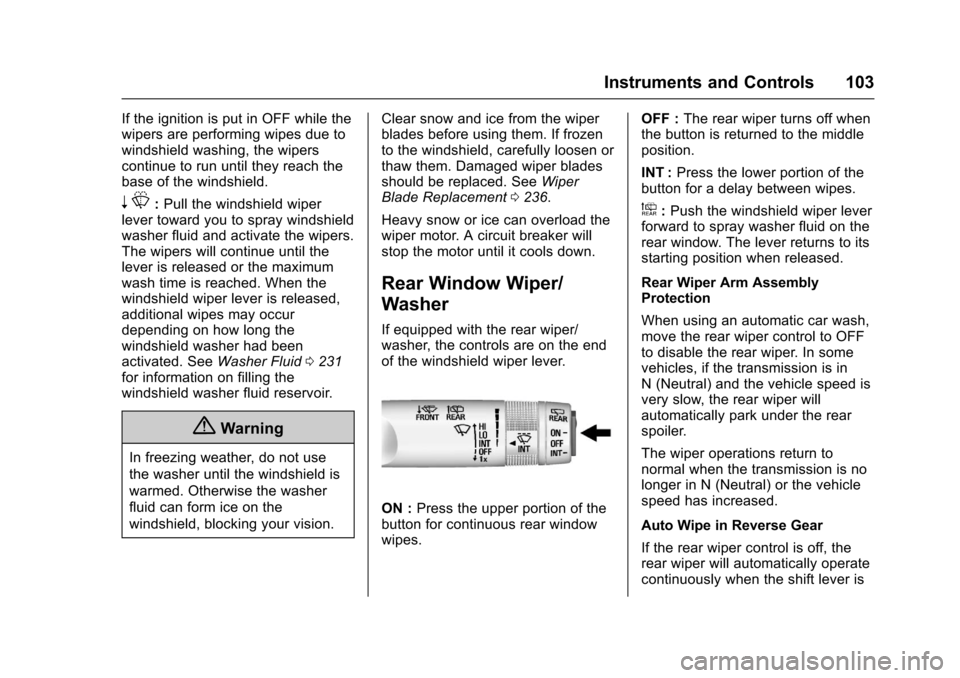
Rear Window Wiper/
Washer
If equipped with the rear wiper/washer, the controls are on the endof the windshield wiper lever.
ON :Press the upper portion of thebutton for continuous rear windowwipes.
OFF :The rear wiper turns off whenthe button is returned to the middleposition.
INT :Press the lower portion of thebutton for a delay between wipes.
a:Push the windshield wiper leverforward to spray washer fluid on therear window. The lever returns to itsstarting position when released.
Rear Wiper Arm AssemblyProtection
When using an automatic car wash,move the rear wiper control to OFFto disable the rear wiper. In somevehicles, if the transmission is inN(Neutral)andthevehiclespeedisvery slow, the rear wiper willautomatically park under the rearspoiler.
The wiper operations return tonormal when the transmission is nolonger in N (Neutral) or the vehiclespeed has increased.
Auto Wipe in Reverse Gear
If the rear wiper control is off, therear wiper will automatically operatecontinuously when the shift lever is