radio controls CHEVROLET SONIC 2017 2.G User Guide
[x] Cancel search | Manufacturer: CHEVROLET, Model Year: 2017, Model line: SONIC, Model: CHEVROLET SONIC 2017 2.GPages: 342, PDF Size: 7.2 MB
Page 142 of 342
Chevrolet Sonic Owner Manual (GMNA-Localizing-U.S./Canada-10122660) -2017 - crc - 5/19/16
Infotainment System 141
Infotainment
System
Introduction
Infotainment . . . . . . . . . . . . . . . . . . 141Theft-Deterrent Feature . . . . . . 142Overview . . . . . . . . . . . . . . . . . . . . . 143Home Page . . . . . . . . . . . . . . . . . . 144Operation . . . . . . . . . . . . . . . . . . . . . 144
Radio
AM-FM Radio . . . . . . . . . . . . . . . . 145Satellite Radio . . . . . . . . . . . . . . . . 146Radio Reception . . . . . . . . . . . . . . 148Multi-Band Antenna . . . . . . . . . . 148
Audio Players
Avoiding Untrusted MediaDevices . . . . . . . . . . . . . . . . . . . . . 149USB Port . . . . . . . . . . . . . . . . . . . . . 149Auxiliary Devices . . . . . . . . . . . . . 155
Phone
Bluetooth (Overview) . . . . . . . . . 155Bluetooth (InfotainmentControls) . . . . . . . . . . . . . . . . . . . . 157Apple CarPlay andAndroid Auto . . . . . . . . . . . . . . . . 161Hands-Free Phone . . . . . . . . . . . 161
Trademarks and License
Agreements
Trademarks and LicenseAgreements . . . . . . . . . . . . . . . . . 164
Introduction
Infotainment
Read the following pages tobecome familiar with the features.
{Warning
Ta k i n g y o u r e y e s o f f t h e r o a d f o r
too long or too often while using
any infotainment feature can
cause a crash. You or others
could be injured or killed. Do not
give extended attention to
infotainment tasks while driving.
Limit your glances at the vehicle
displays and focus your attention
on driving. Use voice commands
whenever possible.
The infotainment system has built-infeatures intended to help avoiddistraction by disabling somefunctions when driving. Thesefunctions may gray out when theyare unavailable. Many infotainment
Page 145 of 342
Chevrolet Sonic Owner Manual (GMNA-Localizing-U.S./Canada-10122660) -2017 - crc - 5/13/16
144 Infotainment System
.USB/Music/Pictures: Pressto go to the next content.Press and hold to fastforward.
5.5
.Press and release toaccess the phone screen,answer an incoming call,or access the device homescreen.
Home Page
Touchscreen Buttons
To u c h s c r e e n b u t t o n s s h o w o n t h escreen when available. When afunction is unavailable, the buttonmay gray out. When a function isselected, the button may highlight.
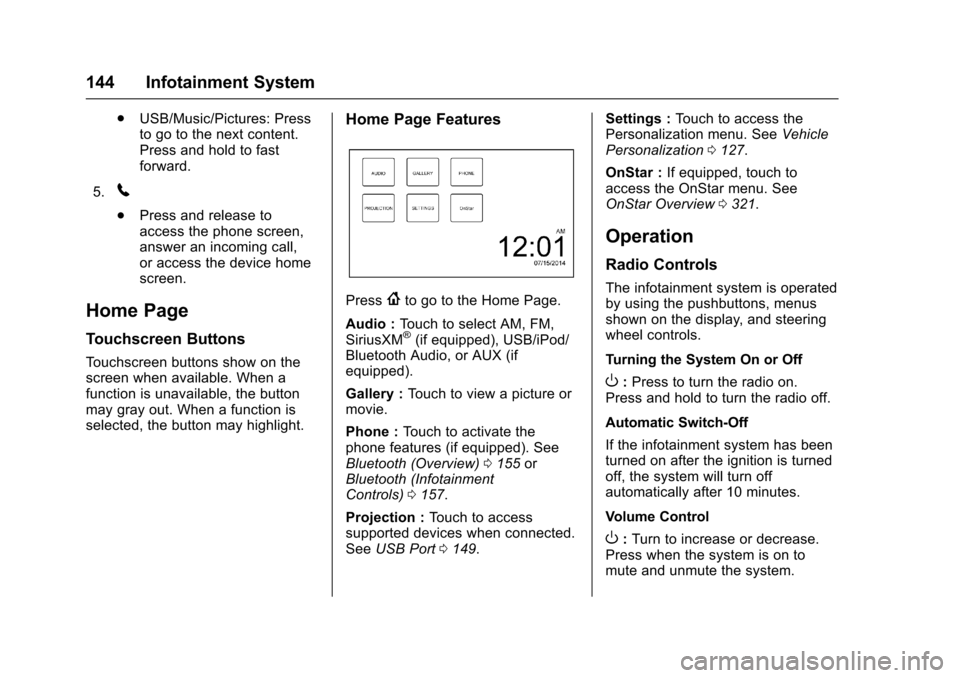
Home Page Features
Press{to go to the Home Page.
Audio :To u c h t o s e l e c t A M , F M ,SiriusXM®(if equipped), USB/iPod/Bluetooth Audio, or AUX (ifequipped).
Gallery :To u c h t o v i e w a p i c t u r e o rmovie.
Phone :To u c h t o a c t i v a t e t h ephone features (if equipped). SeeBluetooth (Overview)0155orBluetooth (InfotainmentControls)0157.
Projection :To u c h t o a c c e s ssupported devices when connected.SeeUSB Port0149.
Settings :To u c h t o a c c e s s t h ePersonalization menu. SeeVehiclePersonalization0127.
OnStar :If equipped, touch toaccess the OnStar menu. SeeOnStar Overview0321.
Operation
Radio Controls
The infotainment system is operatedby using the pushbuttons, menusshown on the display, and steeringwheel controls.
Turning the System On or Off
O:Press to turn the radio on.Press and hold to turn the radio off.
Automatic Switch-Off
If the infotainment system has beenturned on after the ignition is turnedoff, the system will turn offautomatically after 10 minutes.
Volume Control
O:Turn to increase or decrease.Press when the system is on tomute and unmute the system.
Page 153 of 342
Chevrolet Sonic Owner Manual (GMNA-Localizing-U.S./Canada-10122660) -2017 - crc - 5/13/16
152 Infotainment System
If the USB device is alreadyconnected:
1. Press{.
2. Touch AUDIO.
3. Touch Source.
4. Touch USB.
To s t o p t h e U S B d e v i c e a n d s e l e c tanother media source, touchSource, then select the othersource.
To r e m o v e t h e U S B d e v i c e , s e l e c tanother function, then remove theUSB device.
Pause
.To u c hjto pause.
.To u c hrto resume.
Changing to Next/Previous Files
.To u c hlto change to the
next file.
.To u c hgwithin five seconds of
the playback time to play theprevious file.
Returning to the Beginning of theCurrent File
To u c hgafter five seconds of the
playback time.
Scanning Forward or Backward
To u c h a n d h o l dgorlduring
playback to rewind or fast forward.Release the button to resumeplayback at normal speed.
Playing Files Randomly
To u c hZduring playback.
.ON: Plays all files randomly.
.OFF: Returns to normalplayback.
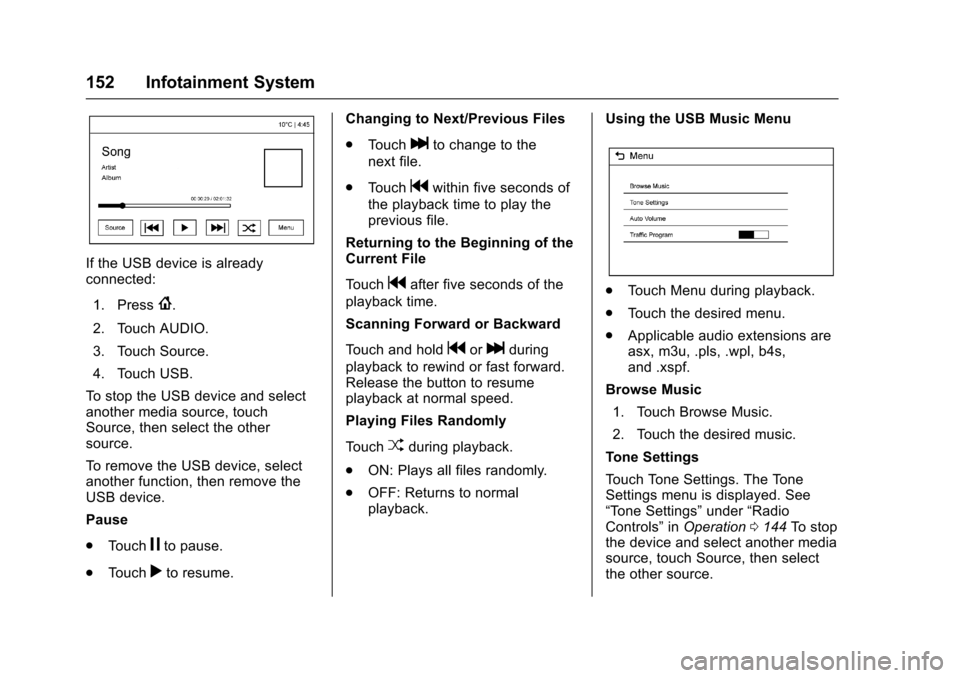
Using the USB Music Menu
.To u c h M e n u d u r i n g p l a y b a c k .
.To u c h t h e d e s i r e d m e n u .
.Applicable audio extensions areasx, m3u, .pls, .wpl, b4s,and .xspf.
Browse Music
1. Touch Browse Music.
2. Touch the desired music.
To n e S e t t i n g s
To u c h To n e S e t t i n g s . T h e To n eSettings menu is displayed. See“To n e S e t t i n g s”under“RadioControls”inOperation0144To s t o pthe device and select another mediasource, touch Source, then selectthe other source.
Page 154 of 342
Chevrolet Sonic Owner Manual (GMNA-Localizing-U.S./Canada-10122660) -2017 - crc - 5/13/16
Infotainment System 153
Auto Volume
To u c h A u t o V o l u m e . T h e A u t oVolume menu is displayed. See“Auto Volume”under“RadioControls”inOperation0144
Tr a f f i c P r o g r a m(If Equipped)
To u c h O n o r O f f .
MTP (Media Transfer Protocol)
.Connect an MTP supporteddevice.
.Play will start automatically afterthe system has finished readingthe MTP device.
.If a non-readable MTP device isconnected, an error messagedisplays and the system willswitch to the previous audiofunction.
iPod/iPhone Player
This feature is limited to modelssupporting the iPod/iPhoneconnection.
Playing Music Files
.Connect the iPod/iPhone to theUSB port.
.Play will start from the previouslyplayed point after the systemhas finished reading the USBdevice.
.If a non-readable USB device isconnected, an error messagedisplays and the system willswitch to the previous audiofunction.
If the iPod/iPhone is alreadyconnected:
1. Press{.
2. Touch AUDIO.
3. Touch Source.
4. Touch iPod.
To s t o p t h e d e v i c e a n d s e l e c tanother media source, touchSource, then select the othersource.
To r e m o v e t h e d e v i c e , s e l e c tanother function, then remove thedevice.
Pause
.To u c hjto pause.
.To u c hrto resume.
Changing to Next/Previous Song
.To u c hlto change to the
next song.
.To u c hgwithin two seconds of
the playback time to play theprevious file.
Returning to the Beginning of theCurrent File
To u c hgafter two seconds of the
playback time.
Scanning Forward or Backward
To u c h a n d h o l dgorlduring
playback to rewind or fast forward.Release the button to resumeplayback at normal speed.
Playing Files Randomly
To u c hZduring playback.
.ON: Plays all files randomly.
.OFF: Returns to normalplayback.
Using the iPod Menu
.To u c h M e n u d u r i n g p l a y b a c k .
.To u c h t h e a p p r o p r i a t eplay mode.
Page 155 of 342
Chevrolet Sonic Owner Manual (GMNA-Localizing-U.S./Canada-10122660) -2017 - crc - 5/13/16
154 Infotainment System
Browse Music
1. Touch Browse Music.
2. Touch the desired music.
To n e S e t t i n g s
To u c h To n e S e t t i n g s . T h e To n eSettings menu is displayed. See“To n e S e t t i n g s”under“RadioControls”inOperation0144
Auto Volume
To u c h A u t o V o l u m e . T h e A u t oVolume menu is displayed. See“Auto Volume”under“RadioControls”inOperation0144.
Picture System Information
The infotainment system can viewpicture files stored on a USBstorage device and devices thatsupport Media TransferProtocol (MTP).
.Supported file extensions: .jpg,.bmp, .png, .gif.
.Animated GIF files are notsupported.
.Some files may not operate dueto a different recording format orthe condition of the file.
Viewing Pictures
1. Connect the USB device to theUSB port.
2. Touch the screen to open to fullscreen. Touch the screen againto return to the previousscreen.
If the USB device is alreadyconnected:
1. Press{.
2. Touch GALLERY.
Some features are disabled whilethe vehicle is in motion.
Viewing a Slide Show
1. Touchzfrom the picture
screen.
2. Touch the screen to cancel theslide show during the slideshow playback.
Viewing a Previous or NextPicture
To u c hSorTfrom the picture
screen.
Rotating a Picture
To u c hwfrom the picture screen.
Enlarging a Picture
To u c hxfrom the picture screen.
Using the USB Picture Menu
1. Touch MENU from the picturescreen.
2. Touch the appropriate menu:
.Slide Show Time: Allowsselection of the slide showinterval.
.Clock, Temp. Display:Allows selection of On orOff to show the clock andtemperature on the fullscreen.
.Display Settings: Adjustsfor Brightness and Contrast.
3. Touch0to exit.
Page 156 of 342
Chevrolet Sonic Owner Manual (GMNA-Localizing-U.S./Canada-10122660) -2017 - crc - 5/13/16
Infotainment System 155
Auxiliary Devices
Using the Auxiliary Input Jack
Settings menus and functions mayvary depending on vehicle options.
If equipped, the auxiliary input jackcan be used to connect externalaudio devices such as an iPod®,iPhone®,MP3player,CDplayer,and other supported devices for useas another source for audiolistening. This input jack is not anaudio output; do not plugheadphones into the front auxiliaryinput jack.
If equipped, the auxiliary input jackis located on the center consolebelow the climate controls. Theinfotainment system can play musicconnected by the auxiliary device.
Play will begin when the system hasfinished reading the information onthe device.
Playing Music
To p l a y m u s i c f r o m t h e d e v i c e , i f t h edevice is already connected:
1. Press{.
2. Touch AUDIO.
3. Touch Source.
4. Touch AUX.
5. Touch0.
To a d j u s t t h e t o n e s e t t i n g s , S e e“To n e S e t t i n g s”under“RadioControls”inOperation0144.
Phone
Bluetooth (Overview)
For vehicles equipped withBluetooth capability, the system caninteract with many cell phones,allowing:
.Placement and receipt of calls inahands-freemode.
.Sharing of the cell phone’saddress book or contact list withthe vehicle.
To m i n i m i z e d r i v e r d i s t r a c t i o n ,before driving, and with the vehicleparked:
.Become familiar with thefeatures of the cell phone.Organize the phone book andcontact lists clearly and deleteduplicate or rarely used entries.If possible, program speed dialor other shortcuts.
.Review the controls andoperation of the infotainmentsystem.
Page 158 of 342
Chevrolet Sonic Owner Manual (GMNA-Localizing-U.S./Canada-10122660) -2017 - crc - 5/13/16
Infotainment System 157
change the volume level. Theadjusted volume level remains inmemory for later calls. The systemmaintains a minimum volume level.
Other Information
SeeRadio FrequencyStatement0317.
Bluetooth (Infotainment
Controls)
To u s e i n f o t a i n m e n t c o n t r o l s t oaccess the menu system, seeOverview0143.
Pairing
ABluetooth-enabledcellphonemust be paired to the Bluetoothsystem and then connected to thevehicle before it can be used. Seeyour cell phone manufacturer's userguide for Bluetooth functions beforepairing the cell phone. If a Bluetoothphone is not connected, calls will bemade using OnStar Hands-FreeCalling, if available. SeeOnStarOverview0321.
Pairing Information
.ABluetoothphonewithMP3capability cannot be paired tothe vehicle as a phone and anMP3 player at the same time.
.Up to 10 cell phones can bepaired to the Bluetooth system.
.The pairing process is disabledwhen the vehicle is moving.
.Pairing only needs to becompleted once, unless thepairing information on the cellphone changes or the cell phoneis deleted from the system.
.Only one paired cell phone canbe connected to the Bluetoothsystem at a time.
.If multiple paired cell phones arewithin range of the system, thesystem connects to the firstavailable paired cell phone in theorder that they were first paired.
When the Bluetooth device andinfotainment system aresuccessfully paired, the phone bookis downloaded automatically. This isdependent on the type of phonepaired. If the automatic download
does not occur, proceed with thephone book download on thephone.
Pairing a Phone–SSP and NoPaired Device
When there is no paired device onthe infotainment system and SimpleSecure Pairing (SSP) is supported:
1. Press{.
2. Touch PHONE, press5on the
faceplate, or pressgon the
steering wheel without OnStar.
3. Touch Search Device.
4. Touch the desired device topair on the searched listscreen.
5. Touch Yes on the pop-upscreen of the Bluetooth deviceand infotainment system.
6. When the Bluetooth device andinfotainment system aresuccessfully paired, the phonescreen is displayed on theinfotainment system.
Page 335 of 342

Chevrolet Sonic Owner Manual (GMNA-Localizing-U.S./Canada-10122660) -2017 - crc - 5/13/16
334 Index
Driving (cont'd)
If the Vehicle is Stuck . . . . . . . . . 178
Loss of Control . . . . . . . . . . . . . . . 174
Off-Road Recovery . . . . . . . . . . . 174
Vehicle Load Limits . . . . . . . . . . . 178
Wet Roads . . . . . . . . . . . . . . . . . . . 175
Winter . . . . . . . . . . . . . . . . . . . . . . . . 176
E
Electrical Equipment,
Add-On . . . . . . . . . . . . . . . . . . . . . . . 211
Electrical System
Engine Compartment Fuse
Block . . . . . . . . . . . . . . . . . . . . . . . . 243
Fuses and Circuit Breakers . . . 242
Instrument Panel Fuse
Block . . . . . . . . . . . . . . . . . . . . . . . . 246
Overload . . . . . . . . . . . . . . . . . . . . . 242
Emergency
OnStar®...................... 322
Engine
Air Cleaner/Filter . . . . . . . . . . . . . 224
Check and Service Engine
Soon Light . . . . . . . . . . . . . . . . . . .112
Compartment Overview . . . . . . . 217
Coolant . . . . . . . . . . . . . . . . . . . . . . . 227
Coolant Temperature
Warning Light . . . . . . . . . . . . . . . . 118
Cooling System . . . . . . . . . . . . . . . 226
Engine (cont'd)
Drive Belt Routing . . . . . . . . . . . . 306
Exhaust . . . . . . . . . . . . . . . . . . . . . . 190
Heater . . . . . . . . . . . . . . . . . . . . . . . . 186
Oil Life System . . . . . . . . . . . . . . . 222
Oil Messages . . . . . . . . . . . . . . . . . 127
Oil Pressure Light . . . . . . . . . . . . .118
Overheating . . . . . . . . . . . . . . . . . . 230
Reduced Power Light . . . . . . . . . 120
Running While Parked . . . . . . . . 190
Starting . . . . . . . . . . . . . . . . . . . . . . . 185
Entry Lighting . . . . . . . . . . . . . . . . . . . 138
Event Data Recorders . . . . . . . . . . 319
Exit Lighting . . . . . . . . . . . . . . . . . . . . 138
Extended Parking . . . . . . . . . . . . . . . 189
Extender, Safety Belt . . . . . . . . . . . . 64
Exterior Lamp Controls . . . . . . . . . 134
Exterior Lighting Battery
Saver . . . . . . . . . . . . . . . . . . . . . . . . . 139
F
Filter,
Engine Air Cleaner . . . . . . . . . . . 224
Flash-to-Pass . . . . . . . . . . . . . . . . . . . 135
Flashers, Hazard Warning . . . . . . 136
Flat Tire . . . . . . . . . . . . . . . . . . . . . . . . 267
Changing . . . . . . . . . . . . . . . . . . . . . 269
Floor Mats . . . . . . . . . . . . . . . . . . . . . . 288
Fluid
Automatic Transmission . . . . . . 223
Brakes . . . . . . . . . . . . . . . . . . . . . . . . 233
Washer . . . . . . . . . . . . . . . . . . . . . . . 231
Fog Lamps . . . . . . . . . . . . . . . . . . . . . 137
Bulb Replacement . . . . . . . . . . . . 239
Folding Mirrors . . . . . . . . . . . . . . . . . . 47
Forward Collision Alert
(FCA) System . . . . . . . . . . . . . . . . . 204
Forward Collision Alert (FCA)
Warning Light . . . . . . . . . . . . . . . . . 116
Frequency Statement
Radio . . . . . . . . . . . . . . . . . . . . . . . . . 317
Front Fog Lamp
Light . . . . . . . . . . . . . . . . . . . . . . . . . . 120
Front Seat Armrest . . . . . . . . . . . . . . 56
Front Seats
Adjustment . . . . . . . . . . . . . . . . . . . . . 53
Heated . . . . . . . . . . . . . . . . . . . . . . . . . 56
Fuel . . . . . . . . . . . . . . . . . . . . . . . . . . . . 207
Additives . . . . . . . . . . . . . . . . . . . . . 208
Economy Driving . . . . . . . . . . . . . . . 24
Filling a Portable Fuel
Container . . . . . . . . . . . . . . . . . . . 210
Filling the Tank . . . . . . . . . . . . . . . 209
Foreign Countries . . . . . . . . . . . . 208
Gauge . . . . . . . . . . . . . . . . . . . . . . . . 109
Low Fuel Warning Light . . . . . . . .119
Page 340 of 342

Chevrolet Sonic Owner Manual (GMNA-Localizing-U.S./Canada-10122660) -2017 - crc - 5/13/16
Index 339
Safety Belts (cont'd)
Lap-Shoulder Belt . . . . . . . . . . . . . . 61
Reminders . . . . . . . . . . . . . . . . . . . . .110
Replacing after a Crash . . . . . . . . 65
Use During Pregnancy . . . . . . . . . . 63
Safety Defects Reporting
Canadian Government . . . . . . . . 318
General Motors . . . . . . . . . . . . . . . 318
U.S. Government . . . . . . . . . . . . . 317
Safety Locks . . . . . . . . . . . . . . . . . . . . . 40
Safety System Check . . . . . . . . . . . . 64
Satellite Radio . . . . . . . . . . . . . . . . . . 146
Scheduling Appointments . . . . . . . 313
Seats
Adjustment, Front . . . . . . . . . . . . . . . 53
Head Restraints . . . . . . . . . . . . . . . . 52
Heated Front . . . . . . . . . . . . . . . . . . . 56
Lumbar Adjustment, Front . . . . . . 54
Power Adjustment, Front . . . . . . . 54
Rear . . . . . . . . . . . . . . . . . . . . . . . . . . . . 57
Reclining Seatbacks . . . . . . . . . . . . 55
Securing Child Restraints . . . . 91, 93
Security
OnStar®...................... 322
Vehicle . . . . . . . . . . . . . . . . . . . . . . . . . 44
Vehicle Alarm . . . . . . . . . . . . . . . . . . . 44
Service . . . . . . . . . . . . . . . . . . . . . . . . . 169
Service (cont'd)
Accessories and
Modifications . . . . . . . . . . . . . . . . 214
Climate Control System . . . . . . . 166
Doing Your Own Work . . . . . . . . 214
Engine Soon Light . . . . . . . . . . . . .112
Maintenance Records . . . . . . . . 302
Maintenance, General
Information . . . . . . . . . . . . . . . . . . 289
Parts Identification Label . . . . . 303
Publications Ordering
Information . . . . . . . . . . . . . . . . . . 316
Scheduling Appointments . . . . . 313
Vehicle Soon Light . . . . . . . . . . . . . 114
Services
Special Application . . . . . . . . . . . 296
Servicing the Airbag . . . . . . . . . . . . . 75
Shift Lock Control Function
Check, Automatic
Transmission . . . . . . . . . . . . . . . . . . 235
Shifting
Into Park . . . . . . . . . . . . . . . . . . . . . . 187
Out of Park . . . . . . . . . . . . . . . . . . . 188
Signals, Turn and
Lane-Change . . . . . . . . . . . . . . . . . 136
Spare Tire
Compact . . . . . . . . . . . . . . . . . . . . . . 274
Special Application Services . . . . 296
Specifications and
Capacities . . . . . . . . . . . . . . . . . . . . . 304
Speedometer . . . . . . . . . . . . . . . . . . . 109
StabiliTrak
OFF Light . . . . . . . . . . . . . . . . . . . . . .117
Start Assist, Hill . . . . . . . . . . . . . . . . . 197
Start Vehicle, Remote . . . . . . . . . . . 37
Starter Switch Check . . . . . . . . . . . 234
Starting the Engine . . . . . . . . . . . . . 185
Steering . . . . . . . . . . . . . . . . . . . . . . . . 173
Heated Wheel . . . . . . . . . . . . . . . . 102
Power, Warning Lights . . . . . . . . .115
Wheel Adjustment . . . . . . . . . . . . 101
Wheel Controls . . . . . . . . . . . . . . . 101
Stoplamps and Back-up Lamps
Bulb Replacement . . . . . . . . . . . . 240
Storage
Load Compartment . . . . . . . . . . . . . 98
Storage Areas
Cargo Cover . . . . . . . . . . . . . . . . . . . . 98
Glove Box . . . . . . . . . . . . . . . . . . . . . . 97
Instrument Panel . . . . . . . . . . . . . . . 97
Storage Compartments . . . . . . . . . . 97
Stuck Vehicle . . . . . . . . . . . . . . . . . . . 178
Summer Tires . . . . . . . . . . . . . . . . . . 250
Sun Visors . . . . . . . . . . . . . . . . . . . . . . . 49
Sunroof . . . . . . . . . . . . . . . . . . . . . . . . . . 50
Symbols . . . . . . . . . . . . . . . . . . . . . . . . . . 3