remote start CHEVROLET SONIC 2017 2.G User Guide
[x] Cancel search | Manufacturer: CHEVROLET, Model Year: 2017, Model line: SONIC, Model: CHEVROLET SONIC 2017 2.GPages: 342, PDF Size: 7.2 MB
Page 35 of 342
Chevrolet Sonic Owner Manual (GMNA-Localizing-U.S./Canada-10122660) -2017 - crc - 5/13/16
34 Keys, Doors, and Windows
Programming Transmitters to
the Vehicle
Only RKE transmitters programmedto the vehicle will work. If atransmitter is lost or stolen, areplacement can be purchased andprogrammed through your dealer.The vehicle can be reprogrammedso that lost or stolen transmitters nolonger work. Any remainingtransmitters will need to bereprogrammed. Each vehicle canhave up to eight transmittersmatched to it.
Programming with RecognizedTransmitters
Anewtransmittercanbeprogrammed to the vehicle whenthere are two recognizedtransmitters. To program, the vehiclemust be off and all of thetransmitters, both currentlyrecognized and new, must bewith you.
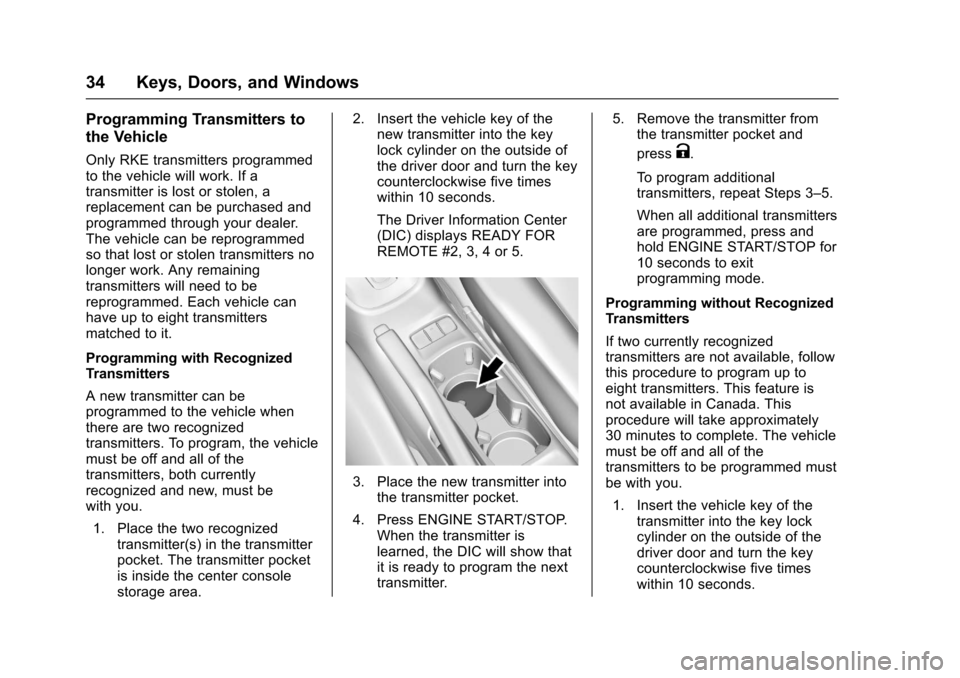
1. Place the two recognizedtransmitter(s) in the transmitterpocket. The transmitter pocketis inside the center consolestorage area.
2. Insert the vehicle key of thenew transmitter into the keylock cylinder on the outside ofthe driver door and turn the keycounterclockwise five timeswithin 10 seconds.
The Driver Information Center(DIC) displays READY FORREMOTE #2, 3, 4 or 5.
3. Place the new transmitter intothe transmitter pocket.
4. Press ENGINE START/STOP.When the transmitter islearned, the DIC will show thatit is ready to program the nexttransmitter.
5. Remove the transmitter fromthe transmitter pocket and
pressK.
To p r o g r a m a d d i t i o n a ltransmitters, repeat Steps 3–5.
When all additional transmittersare programmed, press andhold ENGINE START/STOP for10 seconds to exitprogramming mode.
Programming without RecognizedTransmitters
If two currently recognizedtransmitters are not available, followthis procedure to program up toeight transmitters. This feature isnot available in Canada. Thisprocedure will take approximately30 minutes to complete. The vehiclemust be off and all of thetransmitters to be programmed mustbe with you.
1. Insert the vehicle key of thetransmitter into the key lockcylinder on the outside of thedriver door and turn the keycounterclockwise five timeswithin 10 seconds.
Page 36 of 342
Chevrolet Sonic Owner Manual (GMNA-Localizing-U.S./Canada-10122660) -2017 - crc - 5/13/16
Keys, Doors, and Windows 35
The Driver Information Center(DIC) displays REMOTELEARN PENDING,PLEASE WAIT.
2. Wait for 10 minutes until theDIC displays PRESS ENGINESTART BUTTON TO LEARNand then press ENGINESTART/STOP.
The DIC displays will againshow REMOTE LEARNPENDING, PLEASE WAIT.
3. Repeat Step 2 two additionaltimes. After the third time, allpreviously known transmitterswill no longer work with thevehicle. Remaining transmitterscan be relearned during thenext steps.
The DIC display should nowshow READY FOR REMOTE#1.
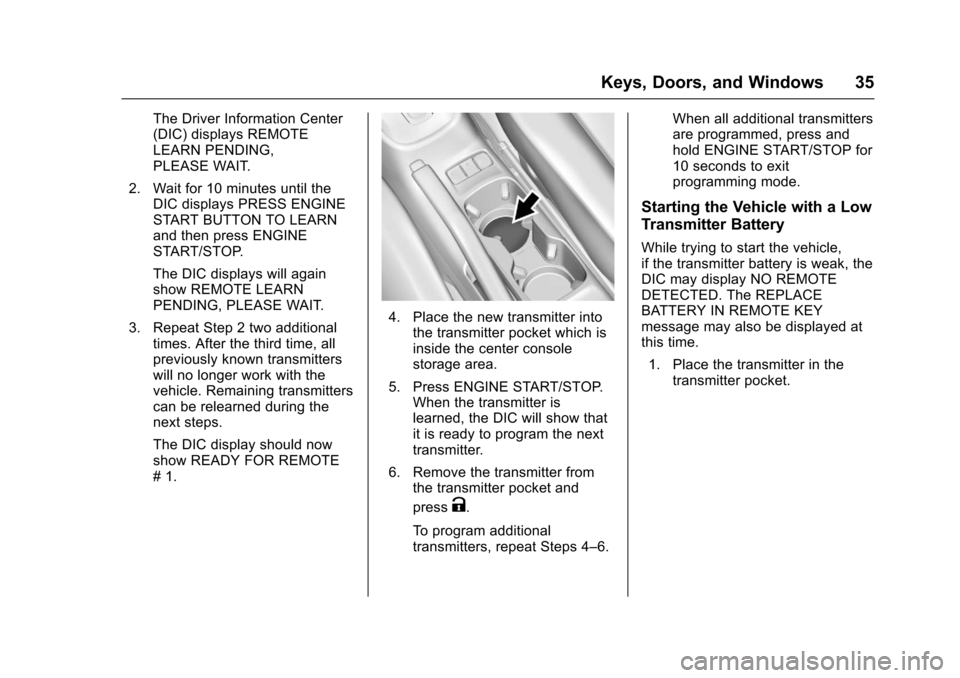
4. Place the new transmitter intothe transmitter pocket which isinside the center consolestorage area.
5. Press ENGINE START/STOP.When the transmitter islearned, the DIC will show thatit is ready to program the nexttransmitter.
6. Remove the transmitter fromthe transmitter pocket and
pressK.
To p r o g r a m a d d i t i o n a ltransmitters, repeat Steps 4–6.
When all additional transmittersare programmed, press andhold ENGINE START/STOP for10 seconds to exitprogramming mode.
Starting the Vehicle with a Low
Transmitter Battery
While trying to start the vehicle,if the transmitter battery is weak, theDIC may display NO REMOTEDETECTED. The REPLACEBATTERY IN REMOTE KEYmessage may also be displayed atthis time.
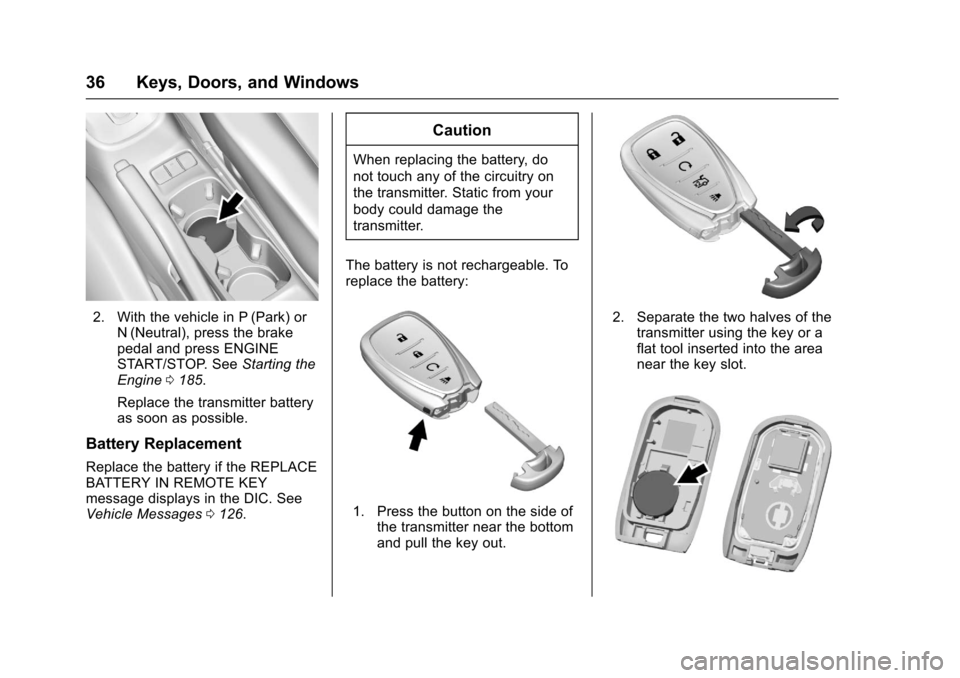
1. Place the transmitter in thetransmitter pocket.
Page 37 of 342
Chevrolet Sonic Owner Manual (GMNA-Localizing-U.S./Canada-10122660) -2017 - crc - 5/13/16
36 Keys, Doors, and Windows
2. With the vehicle in P (Park) orN(Neutral), press the brakepedal and press ENGINESTART/STOP. SeeStarting theEngine0185.
Replace the transmitter batteryas soon as possible.
Battery Replacement
Replace the battery if the REPLACEBATTERY IN REMOTE KEYmessage displays in the DIC. SeeVehicle Messages0126.
Caution
When replacing the battery, do
not touch any of the circuitry on
the transmitter. Static from your
body could damage the
transmitter.
The battery is not rechargeable. Toreplace the battery:
1. Press the button on the side ofthe transmitter near the bottomand pull the key out.
2. Separate the two halves of thetransmitter using the key or aflat tool inserted into the areanear the key slot.
Page 38 of 342
Chevrolet Sonic Owner Manual (GMNA-Localizing-U.S./Canada-10122660) -2017 - crc - 5/13/16
Keys, Doors, and Windows 37
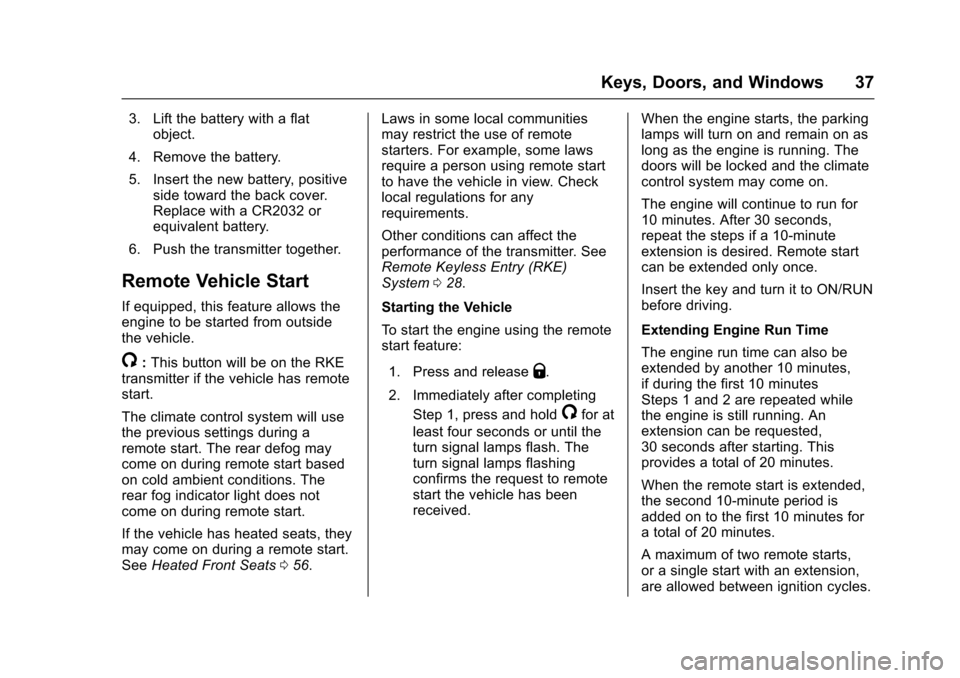
3. Lift the battery with a flatobject.
4. Remove the battery.
5. Insert the new battery, positiveside toward the back cover.Replace with a CR2032 orequivalent battery.
6. Push the transmitter together.
Remote Vehicle Start
If equipped, this feature allows theengine to be started from outsidethe vehicle.
/:This button will be on the RKEtransmitter if the vehicle has remotestart.
The climate control system will usethe previous settings during aremote start. The rear defog maycome on during remote start basedon cold ambient conditions. Therear fog indicator light does notcome on during remote start.
If the vehicle has heated seats, theymay come on during a remote start.SeeHeated Front Seats056.
Laws in some local communitiesmay restrict the use of remotestarters. For example, some lawsrequire a person using remote startto have the vehicle in view. Checklocal regulations for anyrequirements.
Other conditions can affect theperformance of the transmitter. SeeRemote Keyless Entry (RKE)System028.
Starting the Vehicle
To s t a r t t h e e n g i n e u s i n g t h e r e m o t estart feature:
1. Press and releaseQ.
2. Immediately after completing
Step 1, press and hold/for at
least four seconds or until theturn signal lamps flash. Theturn signal lamps flashingconfirms the request to remotestart the vehicle has beenreceived.
When the engine starts, the parkinglamps will turn on and remain on aslong as the engine is running. Thedoors will be locked and the climatecontrol system may come on.
The engine will continue to run for10 minutes. After 30 seconds,repeat the steps if a 10-minuteextension is desired. Remote startcan be extended only once.
Insert the key and turn it to ON/RUNbefore driving.
Extending Engine Run Time
The engine run time can also beextended by another 10 minutes,if during the first 10 minutesSteps 1 and 2 are repeated whilethe engine is still running. Anextension can be requested,30 seconds after starting. Thisprovides a total of 20 minutes.
When the remote start is extended,the second 10-minute period isadded on to the first 10 minutes foratotalof20minutes.
Amaximumoftworemotestarts,or a single start with an extension,are allowed between ignition cycles.
Page 39 of 342
Chevrolet Sonic Owner Manual (GMNA-Localizing-U.S./Canada-10122660) -2017 - crc - 5/13/16
38 Keys, Doors, and Windows
After this, the vehicle's ignitionswitch must be turned to ON/RUNand then back to LOCK/OFF usingthe key, before the remote startprocedure can be used again.
Canceling a Remote Start
To c a n c e l a r e m o t e s t a r t , d o o n e o fthe following:
.Press and hold/until the
parking lamps turn off.
.Turn on the hazard warningflashers.
.Turn the vehicle on and then off.
Conditions in Which Remote StartWill Not Work
The remote vehicle start feature willnot operate if:
.The key is in the ignition.
.The hood is not closed.
.The hazard warning flashersare on.
.The malfunction indicator lampis on.
.The engine coolant temperatureis too high.
.The oil pressure is low.
.Tw o r e m o t e v e h i c l e s t a r t s , o r asingle remote start with anextension, have alreadybeen used.
.The vehicle is not in P (Park).
Door Locks
{Warning
Unlocked doors can be
dangerous.
.Passengers, especiallychildren, can easily openthe doors and fall out of amoving vehicle. When adoor is locked, the handlewill not open it. The chanceof being thrown out of thevehicle in a crash isincreased if the doors arenot locked. So, allpassengers should wearsafety belts properly and the
(Continued)
Warning (Continued)
doors should be lockedwhenever the vehicle isdriven.
.Yo u n g c h i l d r e n w h o g e t i n t ounlocked vehicles may beunable to get out. A childcan be overcome byextreme heat and can sufferpermanent injuries or evendeath from heat stroke.Always lock the vehiclewhenever leaving it.
.Outsiders can easily enterthrough an unlocked doorwhen you slow down or stopthe vehicle. Locking thedoors can help prevent thisfrom happening.
To l o c k o r u n l o c k t h e d o o r s f r o moutside the vehicle:
.Use the key in the driver door tolock all doors or unlock thedriver door only.
Page 58 of 342
Chevrolet Sonic Owner Manual (GMNA-Localizing-U.S./Canada-10122660) -2017 - crc - 5/13/16
Seats and Restraints 57
Remote Start Auto Heated
Seats
If equipped, when it is cold outsidethe heated seats can be turned onautomatically during a remotevehicle start. The heated seats willbe canceled when the ignition isturned on. Press the heated seatcontrols to use the heated seatsafter the vehicle is started.
The heated seat indicator lights donot turn on during a remote start.
The temperature performance of anunoccupied seat may be reduced.This is normal.
SeeRemote Vehicle Start037.
Rear Seats
Folding the Seatback
Either side of the seatback can befolded down for more cargo space.Fold a seatback only when thevehicle is not moving.
Caution
Folding a rear seat with the safety
belts still fastened may cause
damage to the seat or the safety
belts. Always unbuckle the safety
belts and return them to their
normal stowed position before
folding a rear seat.
To f o l d t h e s e a t b a c k d o w n :
1. Make sure the safety belt is inthe retainer hook.
Page 127 of 342
Chevrolet Sonic Owner Manual (GMNA-Localizing-U.S./Canada-10122660) -2017 - crc - 5/13/16
126 Instruments and Controls
Vehicle Messages
Messages displayed on the DICindicate the status of the vehicle orsome action that may be needed tocorrect a condition. Multiplemessages appear one after another.All messages should be takenseriously.
Base Level Cluster
On the base level cluster, vehiclemessages appear as code numbers.Some of these codes may appearwith the Service Vehicle Soon lightin the DIC display.
2:No Remote Detected. PressClutch to Restart
4:A/C Off Due to HighEngine Temp
5:Steering Column Is Locked
7:Turn Steering Wheel, Turn KeyOff, Then On
9:Turn Steering Wheel, StartVehicle Again
10 :Brakes Overheated
15 :Check High MountedBrake Lamp
16 :Check Brake Lamps
18 :Left Low Beam Failure
20 :Right Low Beam Failure
21 :Check Left Position Lamp
22 :Check Right Position Lamp
23 :Reversing Lamp Failure
24 :License Plate Lamp Failure
25 :Left Front Turn Indicator Failure
26 :Left Rear Turn Indicator Failure
27 :Right Front Turn IndicatorFailure
28 :Right Rear Turn Signal Failure
35 :Replace Battery In Remote Key
49 :Lane Departure WarningUnavailable
52 :Change Timing Belt
53 :Tighten Gas Cap
59 :Open, Then Close DriverWindow
65 :Theft Attempted
66 :Service Theft Alarm
67 :Service Steering Column Lock
68 :Service Power Steering, Drivewith Care
77 :Service Front Camera System
79 :Engine Oil Low–Add Oil
81 :Service Transmission
84 :Engine Power Is Reduced
88 :Use Transmitter Pocket to Start
89 :Service Vehicle Soon
91 :No Remote Detected
92 :No Remote Detected, PressBrake To Restart
93 :Press Button Again To TurnEngine Off
94 :Shift to Park
95 :Service Airbag
174 :Low Battery
258 :Park Assist Off
Uplevel Cluster
Messages that do not requireimmediate action can beacknowledged and cleared bypressing SET/CLR.
Page 130 of 342
Chevrolet Sonic Owner Manual (GMNA-Localizing-U.S./Canada-10122660) -2017 - crc - 5/13/16
Instruments and Controls 129
Text Scroll
Select to see text scroll on thescreen.
Select Off or On.
Tone Settings
Select to adjust the radio tone. SeeOperation0144.
Auto Volume
This feature adjusts the volumebased on vehicle speed andambient noise.
Select Off, Low, Medium-Low,Medium, Medium-High, or High.
Maximum Startup Volume
This feature sets the maximumstartup volume. If the vehicle isstarted and the volume is greaterthan this level, the volume isadjusted to this level. To set themaximum startup volume, turn theMENU knob or press + or✓toincrease or decrease.
Audio Cue Volume
This feature sets the volume ofaudio files played at system startupand shutdown.
Select On, then press + or✓toincrease or decrease the volume.
Vehicle
Select and the following maydisplay:
.Collision/Detection Systems
.Comfort and Convenience
.Lighting
.Power Door Locks
.Remote Lock, Unlock, Start
Collision/Detection Systems
Select and the following maydisplay:
.Park Assist
Park Assist
If equipped, this feature can assistin backing up and parking thevehicle. SeeParking Assist0203.
Select On or Off.
Comfort and Convenience
Select and the following maydisplay:
.Chime Volume
.Auto Wipe in Reverse Gear
Chime Volume
This allows the selection of thechime volume level.
Turn the MENU knob, touch + or✓to adjust the volume, or selectNormal or High.
Auto Wipe in Reverse Gear
When on and the front wiper is on,the rear wiper will automaticallyactivate when the vehicle is shiftedto R (Reverse).
Select Off or On.
Lighting
Select and the following maydisplay:
.Vehicle Locator Lights
.Exit Lighting
Page 131 of 342

Chevrolet Sonic Owner Manual (GMNA-Localizing-U.S./Canada-10122660) -2017 - crc - 5/13/16
130 Instruments and Controls
Vehicle Locator Lights
This feature will flash the exteriorlamps and allows some of theexterior lamps and most of theinterior lamps to turn on briefly whenKon the Remote Keyless Entry(RKE) transmitter is pressed tolocate the vehicle.
Select Off or On.
Exit Lighting
This allows the selection of howlong the exterior lamps stay onwhen leaving the vehicle when it isdark outside.
Select Off, 30 Seconds, 60Seconds, or 120 Seconds.
Power Door Locks
Select and the following maydisplay:
.Unlocked Door Anti Lock Out
.Auto Door Unlock
.Delayed Door Lock
Unlocked Door Anti Lock Out
When on, this feature will keep thedriver door from locking until thedoor is closed. If this feature isturned on, the Delayed Door Lockmenu will not be available.
Select Off or On.
Auto Door Unlock
This allows selection of which of thedoors will automatically unlock whenthe vehicle is shifted into P with anautomatic transmission or when thevehicle is turned off with a manualtransmission.
Select Off, All Doors, or Driver Door.
Delayed Door Lock
When on, this feature will delay thelocking of the doors. To override thedelay, press the power door lockswitch on the door.
Select Off or On.
Remote Lock, Unlock, Start
Select and the following maydisplay:
.Remote Unlock Light Feedback
.Remote Lock Feedback
.Remote Door Unlock
.Remote Start Auto Heat Seats
.Passive Door Unlock
.Passive Door Lock
.Remote Left in Vehicle Alert
Remote Unlock Light Feedback
When on, the exterior lamps willflash when unlocking the vehiclewith the RKE transmitter.
Select Off or Flash Lights.
Remote Lock Feedback
This allows selection of what type offeedback is given when locking thevehicle with the RKE transmitter.
Select Off, Lights and Horn, LightsOnly, or Horn Only.
Remote Door Unlock
This allows selection of which doors
will unlock when pressingKon the
RKE transmitter.
Select All Doors or Driver Door.
Page 132 of 342
Chevrolet Sonic Owner Manual (GMNA-Localizing-U.S./Canada-10122660) -2017 - crc - 5/13/16
Instruments and Controls 131
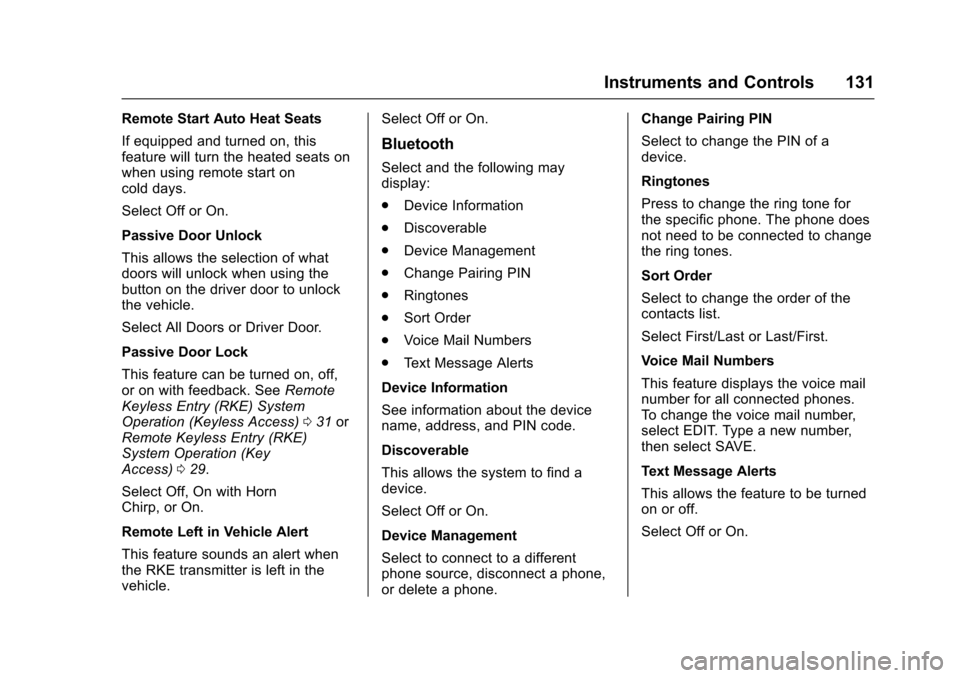
Remote Start Auto Heat Seats
If equipped and turned on, thisfeature will turn the heated seats onwhen using remote start oncold days.
Select Off or On.
Passive Door Unlock
This allows the selection of whatdoors will unlock when using thebutton on the driver door to unlockthe vehicle.
Select All Doors or Driver Door.
Passive Door Lock
This feature can be turned on, off,or on with feedback. SeeRemoteKeyless Entry (RKE) SystemOperation (Keyless Access)031orRemote Keyless Entry (RKE)System Operation (KeyAccess)029.
Select Off, On with HornChirp, or On.
Remote Left in Vehicle Alert
This feature sounds an alert whenthe RKE transmitter is left in thevehicle.
Select Off or On.
Bluetooth
Select and the following maydisplay:
.Device Information
.Discoverable
.Device Management
.Change Pairing PIN
.Ringtones
.Sort Order
.Voice Mail Numbers
.Te x t M e s s a g e A l e r t s
Device Information
See information about the devicename, address, and PIN code.
Discoverable
This allows the system to find adevice.
Select Off or On.
Device Management
Select to connect to a differentphone source, disconnect a phone,or delete a phone.
Change Pairing PIN
Select to change the PIN of adevice.
Ringtones
Press to change the ring tone forthe specific phone. The phone doesnot need to be connected to changethe ring tones.
Sort Order
Select to change the order of thecontacts list.
Select First/Last or Last/First.
Voice Mail Numbers
This feature displays the voice mailnumber for all connected phones.To c h a n g e t h e v o i c e m a i l n u m b e r ,select EDIT. Type a new number,then select SAVE.
Text Message Alerts
This allows the feature to be turnedon or off.
Select Off or On.