reset CHEVROLET SONIC 2017 2.G User Guide
[x] Cancel search | Manufacturer: CHEVROLET, Model Year: 2017, Model line: SONIC, Model: CHEVROLET SONIC 2017 2.GPages: 342, PDF Size: 7.2 MB
Page 128 of 342
Chevrolet Sonic Owner Manual (GMNA-Localizing-U.S./Canada-10122660) -2017 - crc - 5/13/16
Instruments and Controls 127
Messages that require immediateaction cannot be cleared until thataction is performed. Clearingmessages does not correct theproblem.
Engine Oil Messages
:% CHANGE
This message displays when theengine oil needs to be changed.When changing the engine oil, besure to reset the Oil Life System.SeeEngine Oil Life System0222,Engine Oil0220,andMaintenanceSchedule0290.
Tire Messages
LF XX, RF XX, LR XX,
or RR XX
Amessagedisplayswhenthetirepressure is low. It shows thelocation of the low tire and theapproximate pressure of the low tire.
If a tire pressure message appears,stop as soon as you can. Inflate thetires by adding air until the tirepressure is equal to the valuesshown on the Tire and LoadingInformation label. SeeTires0248,Vehicle Load Limits0178,andTirePressure0256.
Vehicle
Personalization
Use the audio system controls toaccess the personalization menusfor customizing vehicle features.
The following are all possiblepersonalization features. Dependingon the vehicle, some may not beavailable.
Radio Audio System Controls
1. Touch the desired feature todisplay a list of availableoptions.
2. Touch to select the desiredfeature setting.
3. PressoBACK on the
faceplate or touch0to return
to the previous menu or exit.
Turn the vehicle to ON/RUN toaccess the Settings menu, thenselect SETTINGS from the HomePage on the infotainment systemdisplay.
Page 133 of 342
Chevrolet Sonic Owner Manual (GMNA-Localizing-U.S./Canada-10122660) -2017 - crc - 5/13/16
132 Instruments and Controls
Apple CarPlay™
Select and the following maydisplay:
.Apple CarPlay
.Manage Apple CarPlay Devices
Apple CarPlay
This feature allows Apple devices tobe connected to the infotainmentsystem through a USB port.
Select Off or On.
Manage Apple CarPlay Devices
Select to manage Apple devices.Apple CarPlay must be on for thisfeature to be accessed.
Android Auto™
Select and the following maydisplay:
.Android Auto
.Manage Android Auto Devices
Android Auto
This feature allows Android devicesto be connected to the infotainmentsystem through a USB port.
Select Off or On.
Manage Android Auto Devices
Select to manage Android devices.Android Auto must be on for thisfeature to be accessed.
USB Auto Launch
This allows Android and AppleCarPlay devices to automaticallyconnect when plugged into theUSB port.
Select Off or On.
Turn Display Off
Select to turn the display off. Pressanywhere on the display area or anyfaceplate button to turn thedisplay on.
Calibrate Touchscreen
Select to calibrate the touchscreen,then follow the prompts.
Turn Display Off
Select to turn the display off. Pressanywhere on the display area or anyfaceplate button to turn thedisplay on.
Rear Camera
Select and the following maydisplay:
.Guidance Lines
.Rear Park Assist Symbols
Guidance Lines
Select to turn Off or On. SeeRearVision Camera (RVC)0201.
Rear Park Assist Symbols
Select to turn Off or On. SeeParking Assist0203.
Return to Factory Settings
Select and the following maydisplay:
.Reset Vehicle Settings
.Clear All Private Data
.Restore Radio Settings
Reset Vehicle Settings
This allows selection of restoringvehicle settings.
Select Continue or Cancel.
Page 143 of 342
Chevrolet Sonic Owner Manual (GMNA-Localizing-U.S./Canada-10122660) -2017 - crc - 5/13/16
142 Infotainment System
features are also available throughthe instrument cluster and steeringwheel controls.
Before driving:
.Become familiar with theoperation, faceplate buttons, andscreen buttons.
.Set up the audio by presettingfavorite stations, setting thetone, and adjusting thespeakers.
.Set up phone numbers inadvance so they can be calledeasily by pressing a singlebutton or by using a single voicecommand if equipped withBluetooth phone capability.
SeeDefensive Driving0172.
To p l a y t h e i n f o t a i n m e n t s y s t e m w i t hthe ignition off, seeRetainedAccessory Power (RAP)0187.
Theft-Deterrent Feature
The infotainment system has anelectronic security system installedto prevent theft.
The infotainment system only worksin the vehicle in which it was firstinstalled, and cannot be used inanother vehicle.
Page 147 of 342
Chevrolet Sonic Owner Manual (GMNA-Localizing-U.S./Canada-10122660) -2017 - crc - 5/13/16
146 Infotainment System
Direct Tune
From the AM or FM menu:
1. Touch Tune.
2. Enter the station number.
3. Touch Go.
Favorites
1. TouchSorTto scroll through
the favorite pages.
2. Touch the station to select it.
Update Station List
.From the AM or FM menu, touchMenu, then touch Update StationList. The broadcasting listupdating will begin.
.During the AM or FMbroadcasting list update, touchCancel to stop the updates.
Station List
1. From the AM or FM menu,touch Menu.
2. Select Station List.
3. TouchQorRto scroll through
the list. Touch the station toselect it.
Menu
To u c h t o c h o o s e b e t w e e n a v a i l a b l emenus for the current source.
Storing a Station as a Favorite
Stations from all bands can bestored in any order in the favoritepages.
Up to 25 stations can be stored.
Storing Stations
To s t o r e t h e s t a t i o n t o a p o s i t i o n i nthe list, touch the correspondingbutton 1✓5untilabeepisheard.
1. Select the desired station.
2. TouchSorTto select the
desired page of savedfavorites.
3. Touch and hold any of thepreset buttons to save thecurrent radio station to thatbutton of the selectedfavorites page.
To c h a n g e a p r e s e t b u t t o n , t u n e t othe new desired radio station andtouch and hold the preset button.
Satellite Radio
If equipped, vehicles with anSiriusXM®Satellite Radio tuner andavalidSiriusXMSatelliteRadiosubscription can receive SiriusXMprogramming.
SiriusXM Satellite Radio
Service
SiriusXM is a satellite radio servicebased in the 48 contiguous UnitedStates and 10 Canadian provinces.SiriusXM Satellite Radio has a widevariety of programming andcommercial-free music, coast tocoast, and in digital-quality sound.During your trial or when yousubscribe, you will get unlimitedaccess to SiriusXM Radio Online forwhen you are not in the vehicle.Aservicefeeisrequiredtoreceivethe SiriusXM service. If SiriusXMservice needs to be reactivated, theradio will display "No SubscriptionPlease Renew" on channel SXM1.For more information, contactSiriusXM at www.siriusxm.com or1-888-601-6296 (U.S.), andwww.siriusxm.ca or 1-877-438-9677(Canada).
Page 148 of 342
Chevrolet Sonic Owner Manual (GMNA-Localizing-U.S./Canada-10122660) -2017 - crc - 5/13/16
Infotainment System 147
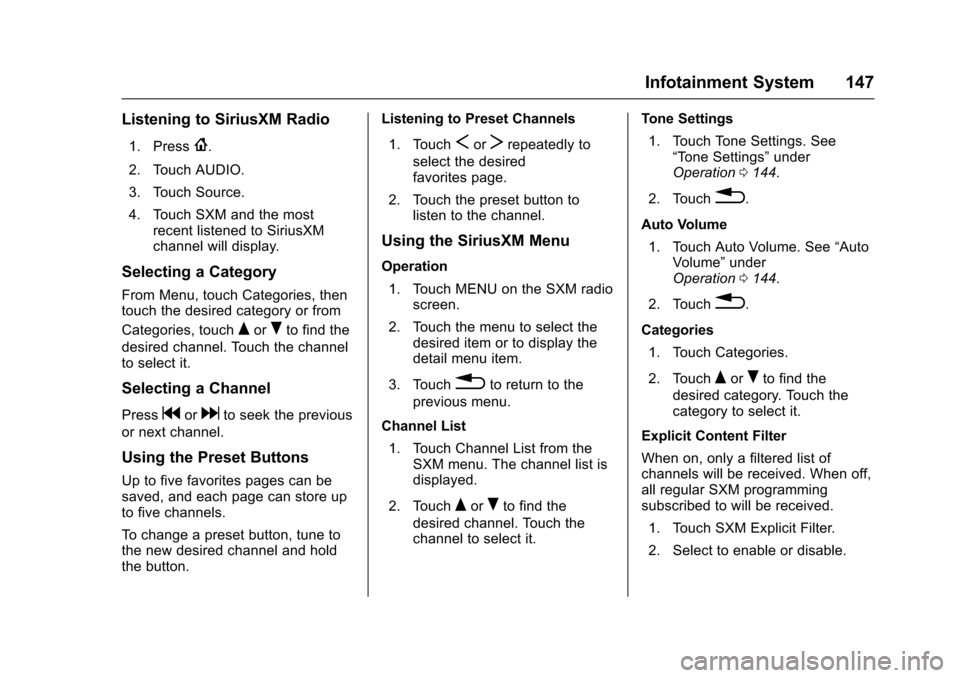
Listening to SiriusXM Radio
1. Press{.
2. Touch AUDIO.
3. Touch Source.
4. Touch SXM and the mostrecent listened to SiriusXMchannel will display.
Selecting a Category
From Menu, touch Categories, thentouch the desired category or from
Categories, touchQorRto find the
desired channel. Touch the channelto select it.
Selecting a Channel
Pressgordto seek the previous
or next channel.
Using the Preset Buttons
Up to five favorites pages can besaved, and each page can store upto five channels.
To c h a n g e a p r e s e t b u t t o n , t u n e t othe new desired channel and holdthe button.
Listening to Preset Channels
1. TouchSorTrepeatedly to
select the desiredfavorites page.
2. Touch the preset button tolisten to the channel.
Using the SiriusXM Menu
Operation
1. Touch MENU on the SXM radioscreen.
2. Touch the menu to select thedesired item or to display thedetail menu item.
3. Touch0to return to the
previous menu.
Channel List
1. Touch Channel List from theSXM menu. The channel list isdisplayed.
2. TouchQorRto find the
desired channel. Touch thechannel to select it.
Tone Settings
1. Touch Tone Settings. See“To n e S e t t i n g s”underOperation0144.
2. Touch0.
Auto Volume
1. Touch Auto Volume. See“AutoVolume”underOperation0144.
2. Touch0.
Categories
1. Touch Categories.
2. TouchQorRto find the
desired category. Touch thecategory to select it.
Explicit Content Filter
When on, only a filtered list ofchannels will be received. When off,all regular SXM programmingsubscribed to will be received.
1. Touch SXM Explicit Filter.
2. Select to enable or disable.
Page 190 of 342
Chevrolet Sonic Owner Manual (GMNA-Localizing-U.S./Canada-10122660) -2017 - crc - 5/13/16
Driving and Operating 189
If the vehicle has an unchargedbattery or a battery with low voltage,try charging or jump starting thebattery. SeeJump Starting - NorthAmerica0275.
To s h i f t o u t o f P ( P a r k ) :
1. Apply the brake pedal.
2. Turn the ignition to ON/RUN.
3. Press the shift lever button.
4. Move the shift lever to thedesired position.
If still unable to shift out of P (Park):
1. Fully release the shift leverbutton.
2. Hold the brake pedal down andpress the shift lever buttonagain.
3. Move the shift lever to thedesired position.
If you still cannot move the shiftlever from P (Park), consult yourdealer or a professional towingservice.
The doors may lock when shiftingfrom P (Park). SeeAutomatic DoorLocks040.
Parking
If the vehicle has a manualtransmission, before getting out ofthe vehicle, move the shift lever intoR(Reverse) if parking on a downhillslope. On a level surface or anuphill slope, use 1 (First) gear.Firmly apply the parking brake. Turnthe wheels toward the curb for adownhill slope, or away from thecurb for an uphill slope. Once theshift lever has been placed into gearwith the clutch pedal pressed in,turn the ignition key to LOCK/OFF,remove the key, and release theclutch.
Parking over Things
That Burn
{Warning
Things that can burn could touch
hot exhaust parts under the
vehicle and ignite. Do not park
over papers, leaves, dry grass,
or other things that can burn.
Extended Parking
It is better not to park with thevehicle running. If the vehicle is leftwhile running, follow the propersteps to be sure the vehicle will notmove and there is adequateventilation. SeeShifting Into Park(Automatic Transmission)0187andEngine Exhaust0190.
If the vehicle is left in P (Park) whilerunning and the Remote KeylessEntry (RKE) transmitter is outsidethe vehicle, the vehicle will turn offafter one hour.
If the vehicle is left in P (Park) whilerunning and the RKE transmitter isinside, the vehicle will run for twohours. At the end of the secondhour, the vehicle will turn off.
The timer will reset if the vehicle istaken out of P (Park) while it isrunning.
Page 224 of 342
Chevrolet Sonic Owner Manual (GMNA-Localizing-U.S./Canada-10122660) -2017 - crc - 5/13/16
Vehicle Care 223
the oil life system to work properly,the system must be reset every timethe oil is changed.
When the system has calculatedthat oil life has been diminished, itindicates that an oil change is
necessary. A:%CHANGE
message in the DIC comes on. SeeEngine Oil Messages0127.Change the oil as soon as possiblewithin the next 1 000 km (600 mi).It is possible that, if driving underthe best conditions, the oil lifesystem might indicate that an oilchange is not necessary for up to ayear. The engine oil and filter mustbe changed at least once a yearand, at this time, the system mustbe reset. Your dealer has trainedservice people who will perform thiswork and reset the system. It is alsoimportant to check the oil regularlyover the course of an oil draininterval and keep it at the properlevel.
If the system is ever resetaccidentally, the oil must bechanged at 5 000 km (3,000 mi)
since the last oil change.Remember to reset the oil lifesystem whenever the oil is changed.
How to Reset the Engine Oil
Life System
Reset the system whenever theengine oil is changed so that thesystem can calculate the nextengine oil change. To reset thesystem:
1. Press MENU to showRemaining Oil Life on thedisplay. This display shows anestimate of the oil’sremaininguseful life. If 99% is displayed,that means that 99% of thecurrent oil life remains.
2. To reset the engine oil lifesystem, press SET/CLR whilethe oil life display is active.Select YES and press and holdSET/CLR. After a few seconds,there will be a single chime andthe oil life will be resetto 100%.
Be careful not to reset the oil lifedisplay accidentally at any timeother than after the oil is changed.It cannot be reset accurately.
If the:%CHANGE message in
the DIC comes back on when thevehicle is started, the engine oil lifesystem has not reset. Repeat theprocedure.
Automatic Transmission
Fluid
How to Check Automatic
Transmission Fluid
It is not necessary to check thetransmission fluid level.Atransmissionfluidleakistheonlyreason for fluid loss. If a leakoccurs, take the vehicle to yourdealer and have it repaired as soonas possible.
There is a special procedure forchecking and changing thetransmission fluid. Because thisprocedure is difficult, you shouldhave this done at your dealer.
Page 238 of 342
Chevrolet Sonic Owner Manual (GMNA-Localizing-U.S./Canada-10122660) -2017 - crc - 5/13/16
Vehicle Care 237
3. Install the new blade onto thearm and make sure the tabsare fully set in the lockedposition.
4. Repeat the steps for the otherwiper.
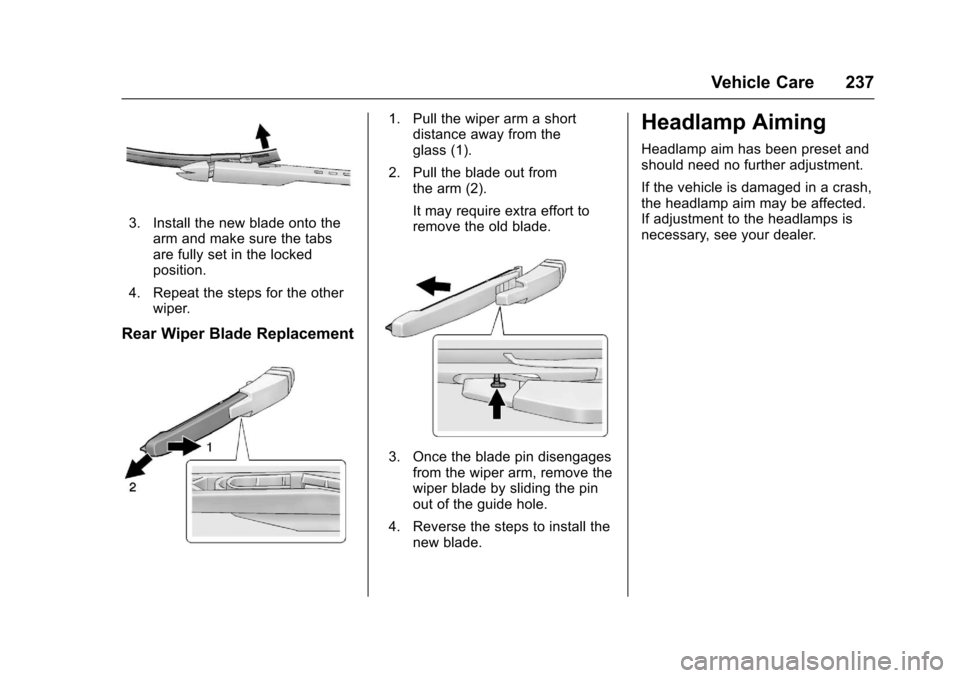
Rear Wiper Blade Replacement
1. Pull the wiper arm a shortdistance away from theglass (1).
2. Pull the blade out fromthe arm (2).
It may require extra effort toremove the old blade.
3. Once the blade pin disengagesfrom the wiper arm, remove thewiper blade by sliding the pinout of the guide hole.
4. Reverse the steps to install thenew blade.
Headlamp Aiming
Headlamp aim has been preset andshould need no further adjustment.
If the vehicle is damaged in a crash,the headlamp aim may be affected.If adjustment to the headlamps isnecessary, see your dealer.
Page 262 of 342
Chevrolet Sonic Owner Manual (GMNA-Localizing-U.S./Canada-10122660) -2017 - crc - 5/13/16
Vehicle Care 261
Replace the tire if:
.The indicators at three or
more places around the tire
can be seen.
.There is cord or fabric
showing through the tire's
rubber.
.The tread or sidewall is
cracked, cut, or snagged
deep enough to show cord or
fabric.
.The tire has a bump, bulge,
or split.
.The tire has a puncture, cut,
or other damage that cannot
be repaired well because of
the size or location of the
damage.
Tire Rotation
Tires should be rotated every
12 000 km (7,500 mi). See
Maintenance Schedule0290.
Tires are rotated to achieve a
more uniform wear for all tires.
The first rotation is the most
important.
Anytime unusual wear is
noticed, rotate the tires as soon
as possible, check for proper tire
inflation pressure, and check for
damaged tires or wheels. If the
unusual wear continues after the
rotation, check the wheel
alignment. SeeWhen It Is Time
for New Tires0262andWheel
Replacement0266.
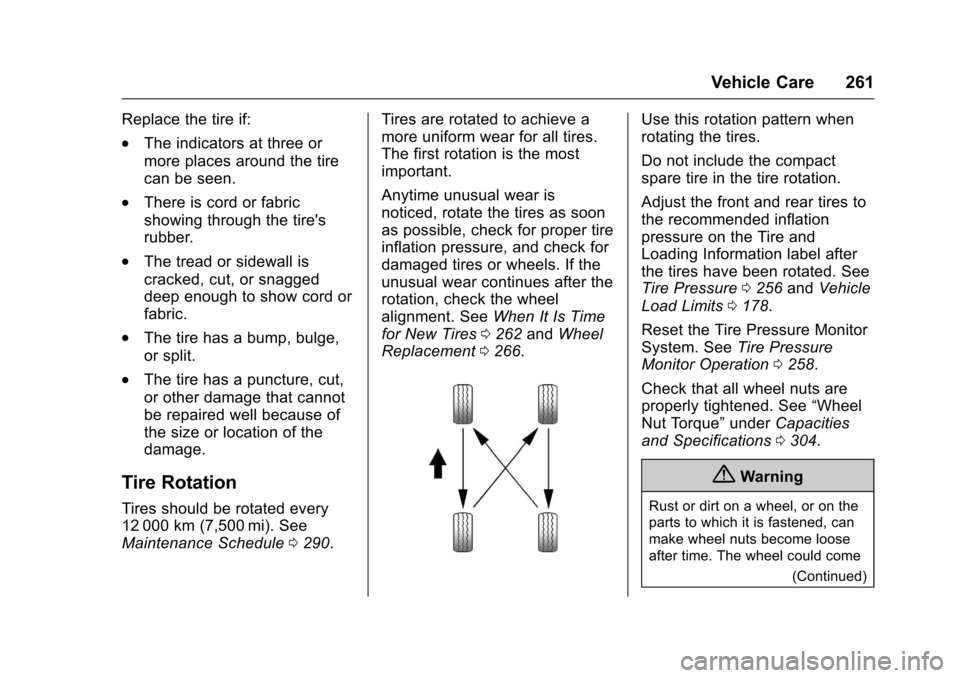
Use this rotation pattern when
rotating the tires.
Do not include the compact
spare tire in the tire rotation.
Adjust the front and rear tires to
the recommended inflation
pressure on the Tire and
Loading Information label after
the tires have been rotated. See
Tire Pressure0256andVehicle
Load Limits0178.
Reset the Tire Pressure Monitor
System. SeeTire Pressure
Monitor Operation0258.
Check that all wheel nuts are
properly tightened. See“Wheel
Nut Torque”underCapacities
and Specifications0304.
{Warning
Rust or dirt on a wheel, or on the
parts to which it is fastened, can
make wheel nuts become loose
after time. The wheel could come
(Continued)
Page 292 of 342
Chevrolet Sonic Owner Manual (GMNA-Localizing-U.S./Canada-10122660) -2017 - crc - 5/13/16
Service and Maintenance 291
the oil life system must be reset.Yo u r t r a i n e d d e a l e r t e c h n i c i a n c a nperform this work. If the engine oillife system is reset accidentally,service the vehicle within 5 000 km/3,000 mi since the last service.Reset the oil life system when theoil is changed. SeeEngine Oil LifeSystem0222.
Tire Rotation and Required
Services Every 12 000 km/
7,500 mi
Rotate the tires, if recommended forthe vehicle, and perform thefollowing services. SeeTireRotation0261.
.Check engine oil level and oillife percentage. If needed,change engine oil and filter, andreset oil life system. SeeEngineOil0220andEngine Oil LifeSystem0222.
.Check engine coolant level. SeeEngine Coolant0227.
.Check windshield washer fluidlevel. SeeWasher Fluid0231.
.Visually inspect windshield wiperblades for wear, cracking,or contamination. SeeExteriorCare0280.Replacewornordamaged wiper blades. SeeWiper BladeReplacement0236.
.Check tire inflation pressures.SeeTire Pressure0256.
.Inspect tire wear. SeeTireInspection0260.
.Visually check for fluid leaks.
.Inspect engine air cleaner filter.SeeEngine Air Cleaner/Filter0224.
.Inspect brake system. SeeExterior Care0280.
.Visually inspect steering,suspension, and chassiscomponents for damaged, loose,or missing parts or signs ofwear. SeeExterior Care0280.
.Check restraint systemcomponents. SeeSafety SystemCheck064.
.Visually inspect fuel system fordamage or leaks.
.Visually inspect exhaust systemand nearby heat shields forloose or damaged parts.
.Lubricate body components. SeeExterior Care0280.
.Check starter switch. SeeStarterSwitch Check0234.
.Check automatic transmissionshift lock control function. SeeAutomatic Transmission ShiftLock Control FunctionCheck0235.
.Check ignition transmission lock.SeeIgnition Transmission LockCheck0235.
.Check parking brake andautomatic transmission parkmechanism. SeePark Brake andP(Park)MechanismCheck0236.