roof CHEVROLET SONIC 2017 2.G User Guide
[x] Cancel search | Manufacturer: CHEVROLET, Model Year: 2017, Model line: SONIC, Model: CHEVROLET SONIC 2017 2.GPages: 342, PDF Size: 7.2 MB
Page 77 of 342
Chevrolet Sonic Owner Manual (GMNA-Localizing-U.S./Canada-10122660) -2017 - crc - 5/13/16
76 Seats and Restraints
from working properly. Theoperation of the airbag system canalso be affected by changing anyparts of the front seats, safety belts,the airbag sensing and diagnosticmodule, steering wheel, instrumentpanel, any of the airbag modules,ceiling or pillar garnish trim, frontsensors, side impact sensors,or airbag wiring.
Yo u r d e a l e r a n d t h e s e r v i c e m a n u a lhave information about the locationof the airbag sensors, sensing anddiagnostic module, and airbagwiring.
In addition, the vehicle has apassenger sensing system for thefront outboard passenger position,which includes sensors that are partof the passenger seat. Thepassenger sensing system may notoperate properly if the original seattrim is replaced with non-GMcovers, upholstery, or trim; or withGM covers, upholstery, or trimdesigned for a different vehicle. Anyobject, such as an aftermarket seatheater or a comfort-enhancing pador device, installed under or on topof the seat fabric, could also
interfere with the operation of thepassenger sensing system. Thiscould either prevent properdeployment of the passengerairbag(s) or prevent the passengersensing system from properlyturning off the passenger airbag(s).SeePassenger SensingSystem071.
If the vehicle has rollover roof-railairbags, seeDifferent Size Tiresand Wheels0264for additionalimportant information.
If you have to modify your vehiclebecause you have a disability andhave questions about whether themodifications will affect the vehicle'sairbag system, or if you havequestions about whether the airbagsystem will be affected if the vehicleis modified for any other reason, callCustomer Assistance. SeeCustomer Assistance Offices0309.
Airbag System Check
The airbag system does not needregularly scheduled maintenance orreplacement. Make sure the airbagreadiness light is working. SeeAirbag Readiness Light011 0.
Caution
If an airbag covering is damaged,
opened, or broken, the airbag
may not work properly. Do not
open or break the airbag
coverings. If there are any
opened or broken airbag
coverings, have the airbag
covering and/or airbag module
replaced. For the location of the
airbags, seeWhere Are the
Airbags?067.Seeyourdealer
for service.
Page 105 of 342
Chevrolet Sonic Owner Manual (GMNA-Localizing-U.S./Canada-10122660) -2017 - crc - 5/13/16
104 Instruments and Controls
in R (Reverse), and the frontwindshield wiper is performing lowor high speed wipes. If the rearwiper control is off, the shift lever isin R (Reverse), and the frontwindshield wiper is performinginterval wipes, then the rear wiperautomatically performs intervalwipes.
This feature can be changed. SeeVehicle Personalization0127.
The windshield washer reservoir isused for the windshield and the rearwindow. Check the fluid level in thereservoir if either washer is notworking. SeeWasher Fluid0231.
Compass
The vehicle may have a compassdisplay in the Driver InformationCenter (DIC). The compass receivesits heading and other informationfrom the Global PositioningSystem (GPS) antenna, StabiliTrak,and vehicle speed information.
Avoid covering the GPS antenna,located on the roof, for long periodsof time with objects that mayinterfere with the antenna's ability to
receive a satellite signal. Thecompass system is designed tooperate for a certain number ofmiles or degrees of turn beforeneeding a signal from the GPSsatellites. When the compassdisplay shows CAL, drive thevehicle for a short distance in anopen area where it can receive aGPS signal. The compass systemwill automatically determine whenthe GPS signal is restored andprovide a heading again.
Clock
The infotainment system controlsare used to access the time anddate settings through the menusystem. SeeOperation0144onhow to use the menu system.
Setting the Time and Date
When Auto Set is enabled the timecannot be manually set.
1. Press{,thentouch
SETTINGS.
2. Touch Time and Date, then SetTime or Set Date.
3. Touch + or✓to adjust thevalue.
4. TouchRorQto adjust AM or
PM for 12 hour format.
5. Touch0.
Using Auto Set
Auto Set requires an OnStarsubscription.
1. Press{,thentouch
SETTINGS.
2. Touch Time and Date, thenAuto Set.
3. Select from the availableselections.
4. Touch0.
Setting the 12/24 Hour Format
1. Press{,thentouch
SETTINGS.
2. Touch Time and Date, then SetTime Format.
3. Select 12h or 24h format.
4. Touch0.
Page 149 of 342
Chevrolet Sonic Owner Manual (GMNA-Localizing-U.S./Canada-10122660) -2017 - crc - 5/13/16
148 Infotainment System
Radio Reception
Frequency interference and staticcan occur during normal radioreception if items such as mobilephone chargers, vehicleconvenience accessories, andexternal electronic devices areplugged into the accessory poweroutlet. If there is interference orstatic, unplug the item from theaccessory power outlet.
FM
FM signals only reach about 16 to65 km (10 to 40 mi). Although theradio has a built-in electronic circuitthat automatically works to reduceinterference, some static can occur,especially around tall buildings orhills, causing the sound to fade inand out.
AM
The range for most AM stations isgreater than for FM, especially atnight. The longer range can causestation frequencies to interfere witheach other. Static can occur whenthings like storms and power lines
interfere with radio reception. Whenthis happens, try reducing the trebleon the radio.
SiriusXM®Satellite Radio
Service
SiriusXM Satellite Radio Servicegives digital radio reception fromcoast to coast in the 48 contiguousUnited States, and in Canada. Justas with FM, tall buildings or hills caninterfere with satellite radio signals,causing the sound to fade in andout. In addition, traveling or standingunder heavy foliage, bridges,garages, or tunnels may cause lossof the SiriusXM signal for a periodof time.
Cell Phone Usage
Cell phone usage, such as makingor receiving phone calls, charging,or just having the phone on maycause static interference in theradio. Unplug the phone or turn it offif this happens.
Multi-Band Antenna
The multi-band antenna is on theroof of the vehicle. The antenna isused for OnStar, the SiriusXMSatellite Radio Service System, andGPS (Global Positioning System),if the vehicle has these features.Keep the antenna clear ofobstructions for clear reception.
If the vehicle has a sunroof, and it isopen, reception can also beaffected.
Page 187 of 342
Chevrolet Sonic Owner Manual (GMNA-Localizing-U.S./Canada-10122660) -2017 - crc - 5/13/16
186 Driving and Operating
2. If the engine does not start,wait about 15 seconds and tryagain. Wait about 15 secondsbetween each try.
When the engine has run about10 seconds to warm up, thevehicle is ready to be driven.Do not run the engine at highspeed when it is cold.
If the weather is below freezing(0 °C or 32 °F), let the enginerun for a few minutes towarm up.
3. If the engine still will not start,or starts but then stops, it couldbe flooded with too muchgasoline. Try pushing theaccelerator pedal all the way tothe floor and holding it there asyou hold the key in START forabout three seconds. If thevehicle starts briefly but thenstops again, do the same thing,but this time keep the pedaldown for five or six seconds.This clears the extra gasolinefrom the engine.
Engine Heater
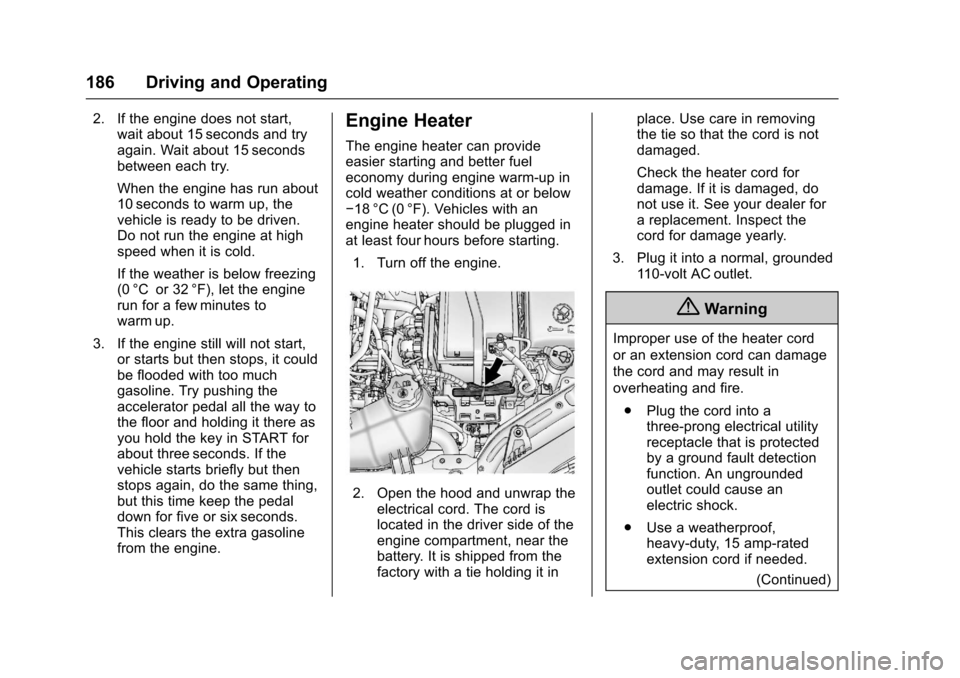
The engine heater can provideeasier starting and better fueleconomy during engine warm-up incold weather conditions at or below✓18 °C (0 °F). Vehicles with anengine heater should be plugged inat least four hours before starting.
1. Turn off the engine.
2. Open the hood and unwrap theelectrical cord. The cord islocated in the driver side of theengine compartment, near thebattery. It is shipped from thefactory with a tie holding it in
place. Use care in removingthe tie so that the cord is notdamaged.
Check the heater cord fordamage. If it is damaged, donot use it. See your dealer forareplacement.Inspectthecord for damage yearly.
3. Plug it into a normal, grounded11 0 - v o l t A C o u t l e t .
{Warning
Improper use of the heater cord
or an extension cord can damage
the cord and may result in
overheating and fire.
.Plug the cord into athree-prong electrical utilityreceptacle that is protectedby a ground fault detectionfunction. An ungroundedoutlet could cause anelectric shock.
.Use a weatherproof,heavy-duty, 15 amp-ratedextension cord if needed.
(Continued)
Page 188 of 342
Chevrolet Sonic Owner Manual (GMNA-Localizing-U.S./Canada-10122660) -2017 - crc - 5/13/16
Driving and Operating 187
Warning (Continued)
Failure to use therecommended extensioncord in good operatingcondition, or using adamaged heater orextension cord, could makeit overheat and cause a fire,property damage, electricshock, and injury.
.Do not operate the vehiclewith the heater cordpermanently attached to thevehicle. Possible heatercord and thermostatdamage could occur.
.While in use, do not let theheater cord touch vehicleparts or sharp edges. Neverclose the hood on theheater cord.
.Before starting the vehicle,unplug the cord, reattachthe cover to the plug, andsecurely fasten the cord.Keep the cord away fromany moving parts.
4. Before starting the engine, besure to unplug and store thecord as it was before to keep itaway from moving engineparts. If you do not it could bedamaged.
The length of time the heater shouldremain plugged in depends onseveral factors. Ask a dealer in thearea where you will be parking thevehicle for the best advice on this.
Retained Accessory
Power (RAP)
These vehicle accessories may beused for up to 10 minutes after theengine is turned off:
.Audio System
.Power Windows
.Sunroof
The power windows and sunroof willcontinue to work for up to10 minutes or until any door isopened.
The radio will work when the key isin ON/RUN or ACC/ACCESSORY.Once the ignition is turned from on
to off, the radio will continue to workfor 10 minutes after the last input(button press, knob turn) to theradio is detected.
It is possible to turn the radio backon at any time after it has timed outusing the Power knob. The radio willbe functional for 10 minutes after thelast input (button press, knob turn)to the radio is detected.
Shifting Into Park
(Automatic Transmission)
1. Hold the brake pedal down andset the parking brake. SeeParking Brake0196.
2. Move the shift lever intoP(Park) by pressing the buttonon the shift lever and pushingthe lever all the way toward thefront of the vehicle.
3. Turn the ignition key toLOCK/OFF.
4. Remove the key and take itwith you. If you can leave thevehicle with the ignition key inyour hand, the vehicle is inP(Park).
Page 244 of 342
Chevrolet Sonic Owner Manual (GMNA-Localizing-U.S./Canada-10122660) -2017 - crc - 5/13/16
Vehicle Care 243
Engine Compartment
Fuse Block
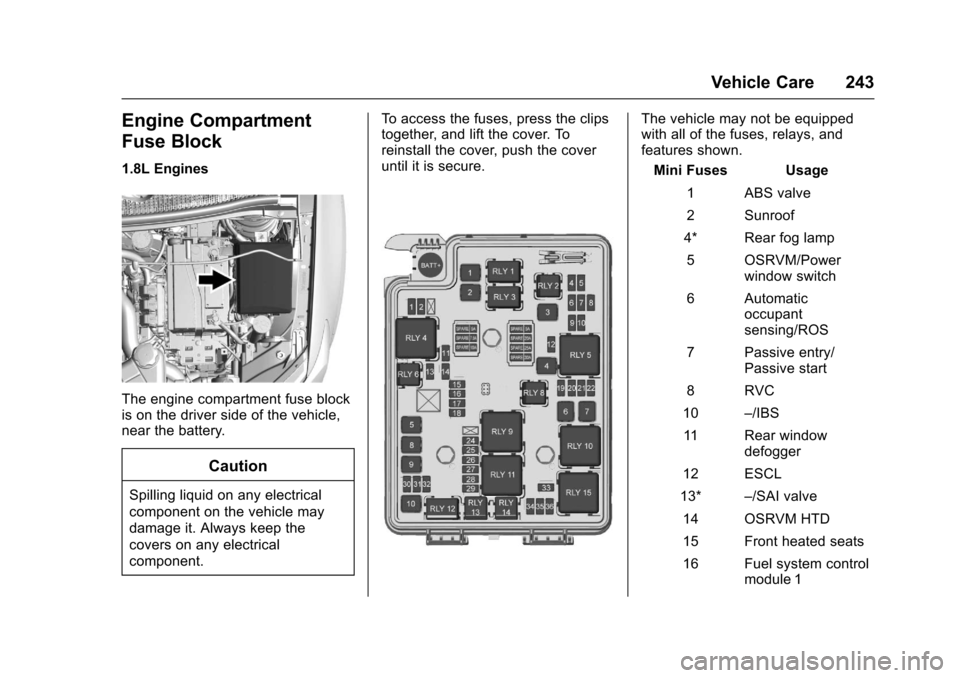
1.8L Engines
The engine compartment fuse blockis on the driver side of the vehicle,near the battery.
Caution
Spilling liquid on any electrical
component on the vehicle may
damage it. Always keep the
covers on any electrical
component.
To a c c e s s t h e f u s e s , p r e s s t h e c l i p stogether, and lift the cover. Toreinstall the cover, push the coveruntil it is secure.
The vehicle may not be equippedwith all of the fuses, relays, andfeatures shown.
Mini Fuses Usage
1ABSvalve
2Sunroof
4* Rear fog lamp
5OSRVM/Powerwindow switch
6Automaticoccupantsensing/ROS
7Passiveentry/Passive start
8RVC
10–/IBS
11 R e a r w i n d o wdefogger
12 ESCL
13*–/SAI valve
14 OSRVM HTD
15 Front heated seats
16 Fuel system controlmodule 1
Page 246 of 342
Chevrolet Sonic Owner Manual (GMNA-Localizing-U.S./Canada-10122660) -2017 - crc - 5/13/16
Vehicle Care 245
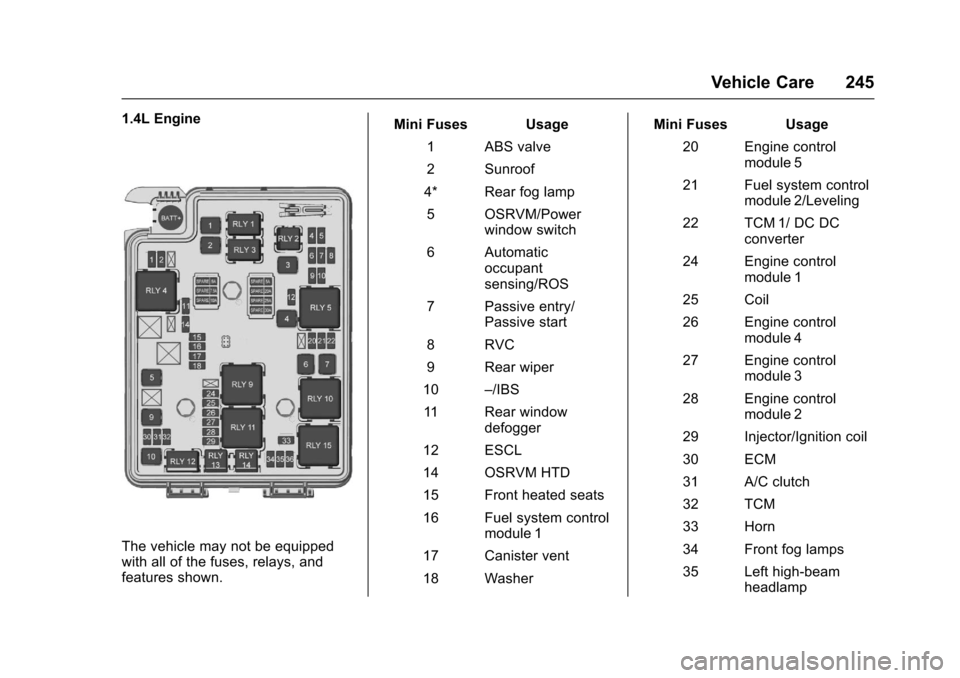
1.4L Engine
The vehicle may not be equippedwith all of the fuses, relays, andfeatures shown.
Mini Fuses Usage
1ABSvalve
2Sunroof
4* Rear fog lamp
5OSRVM/Powerwindow switch
6Automaticoccupantsensing/ROS
7Passiveentry/Passive start
8RVC
9Rearwiper
10–/IBS
11 R e a r w i n d o wdefogger
12 ESCL
14 OSRVM HTD
15 Front heated seats
16 Fuel system controlmodule 1
17 Canister vent
18 Washer
Mini Fuses Usage
20 Engine controlmodule 5
21 Fuel system controlmodule 2/Leveling
22 TCM 1/ DC DCconverter
24 Engine controlmodule 1
25 Coil
26 Engine controlmodule 4
27 Engine controlmodule 3
28 Engine controlmodule 2
29 Injector/Ignition coil
30 ECM
31 A/C clutch
32 TCM
33 Horn
34 Front fog lamps
35 Left high-beamheadlamp
Page 249 of 342
Chevrolet Sonic Owner Manual (GMNA-Localizing-U.S./Canada-10122660) -2017 - crc - 5/19/16
248 Vehicle Care
FusesUsage
IPC/AOS Instrument panelcluster/Automaticoccupant sensingdisplay
SPARE–
RUN RELAY Run relay
L/GATERELAYLiftgate relay
IRAP RELAY IRAP Relay
TRAILER2 Trailer hitch 2
CLOCK-SPRINGClock spring
HVAC2 HVAC 2
HTDSTR WHLHeated steeringwheel
SPARE–
S/ROOF SW Sunroof switch
CIGAR APO Cigar auxiliarypower outlet
FusesUsage
ESCL Electric steeringcolumn lock
RAP/ACCYRELAYRetainedaccessory power/Accessory Relay
PWR WNDWFRONTFront powerwindows
IRAP ACCY IRAP accessory
BATTCON-NECTOR
Battery connector
Wheels and Tires
Tires
Every new GM vehicle has
high-quality tires made by a
leading tire manufacturer. See
the warranty manual for
information regarding the tire
warranty and where to get
service. For additional
information refer to the tire
manufacturer.
{Warning
.Poorly maintained and
improperly used tires are
dangerous.
.Overloading the tires can
cause overheating as a
result of too much
flexing. There could be a
blowout and a serious
crash. SeeVehicle Load
Limits0178.
(Continued)
Page 293 of 342

Chevrolet Sonic Owner Manual (GMNA-Localizing-U.S./Canada-10122660) -2017 - crc - 5/13/16
292 Service and Maintenance
.Check accelerator pedal fordamage, high effort, or binding.Replace if needed.
.Visually inspect gas strut forsigns of wear, cracks, or otherdamage. Check the hold openability of the strut. See yourdealer if service is required.
.Inspect sunroof track and seal,if equipped. SeeSunroof050.
Page 339 of 342

Chevrolet Sonic Owner Manual (GMNA-Localizing-U.S./Canada-10122660) -2017 - crc - 5/13/16
338 Index
Personalization
Vehicle . . . . . . . . . . . . . . . . . . . . . . . 127
Phone
Apple CarPlay and
Android Auto . . . . . . . . . . . . . . . . 161
Bluetooth . . . . . . . . . . . . . . . . 155, 157
Hands-Free . . . . . . . . . . . . . . . . . . . 161
Port
USB . . . . . . . . . . . . . . . . . . . . . . . . . . 149
Power
Mirrors . . . . . . . . . . . . . . . . . . . . . . . . . . 46
Outlets . . . . . . . . . . . . . . . . . . . . . . . 105
Protection, Battery . . . . . . . . . . . . 139
Reduced Engine Light . . . . . . . . 120
Retained Accessory (RAP) . . . 187
Seat Adjustment . . . . . . . . . . . . . . . . 54
Windows . . . . . . . . . . . . . . . . . . . . . . . 48
Power Steering Warning
Lights . . . . . . . . . . . . . . . . . . . . . . . . . 115
Pregnancy, Using Safety Belts . . . 63
Privacy
Vehicle Data Recording . . . . . . . 318
Program
Courtesy Transportation . . . . . . 313
Proposition
65 Warning,
California . . . . . . . . . . . .213, 234, 275
R
Radio Frequency Statement . . . . 317
Radio Reception . . . . . . . . . . . . . . . . 148
Radios
AM-FM Radio . . . . . . . . . . . . . . . . . 145
Satellite . . . . . . . . . . . . . . . . . . . . . . . 146
Reading Lamps . . . . . . . . . . . . . . . . . 138
Rear Seats . . . . . . . . . . . . . . . . . . . . . . 57
Rear Vision Camera (RVC) . . . . . 201
Rear Window Washer/Wiper . . . . 103
Rearview Mirrors . . . . . . . . . . . . . . . . 47
Reclining Seatbacks . . . . . . . . . . . . . 55
Recommended Fluids and
Lubricants . . . . . . . . . . . . . . . . . . . . . 300
Records
Maintenance . . . . . . . . . . . . . . . . . . 302
Recreational Vehicle Towing . . . . 277
Reduced Engine Power Light . . . 120
Reimbursement Program,
GM Mobility . . . . . . . . . . . . . . . . . . . 311
Remote Keyless Entry
(RKE) System . . . . . . . . . . 28, 29, 31
Remote Vehicle Start . . . . . . . . . . . . 37
Replacement Bulbs . . . . . . . . . . . . . 241
Replacement Parts
Airbags . . . . . . . . . . . . . . . . . . . . . . . . . 77
Maintenance . . . . . . . . . . . . . . . . . . 301
Replacing Airbag System . . . . . . . . 77
Replacing LATCH System
Parts after a Crash . . . . . . . . . . . . . 91
Replacing Safety Belt System
Parts after a Crash . . . . . . . . . . . . . 65
Reporting Safety Defects
Canadian Government . . . . . . . . 318
General Motors . . . . . . . . . . . . . . . 318
U.S. Government . . . . . . . . . . . . . 317
Restraints
Where to Put . . . . . . . . . . . . . . . . . . . 83
Retained Accessory
Power (RAP) . . . . . . . . . . . . . . . . . . 187
Roads
Driving, Wet . . . . . . . . . . . . . . . . . . 175
Roadside Assistance
Program . . . . . . . . . . . . . . . . . . . . . . . 311
Roof
Sunroof . . . . . . . . . . . . . . . . . . . . . . . . . 50
Rotation, Tires . . . . . . . . . . . . . . . . . . 261
Routing, Engine Drive Belt . . . . . . 306
Running the Vehicle While
Parked . . . . . . . . . . . . . . . . . . . . . . . . 190
S
Safety Belts . . . . . . . . . . . . . . . . . . . . . 59
Care . . . . . . . . . . . . . . . . . . . . . . . . . . . . 64
Extender . . . . . . . . . . . . . . . . . . . . . . . . 64
How to Wear Safety Belts
Properly . . . . . . . . . . . . . . . . . . . . . . . 60