instrument panel CHEVROLET SONIC 2017 2.G Owner's Manual
[x] Cancel search | Manufacturer: CHEVROLET, Model Year: 2017, Model line: SONIC, Model: CHEVROLET SONIC 2017 2.GPages: 342, PDF Size: 7.2 MB
Page 135 of 342
Chevrolet Sonic Owner Manual (GMNA-Localizing-U.S./Canada-10122660) -2017 - crc - 5/13/16
134 Lighting
Lighting
Exterior Lighting
Exterior Lamp Controls . . . . . . . 134Headlamp High/Low-BeamChanger . . . . . . . . . . . . . . . . . . . . 134Flash-to-Pass . . . . . . . . . . . . . . . . 135Daytime RunningLamps (DRL) . . . . . . . . . . . . . . . 135Automatic HeadlampSystem . . . . . . . . . . . . . . . . . . . . . . 135Hazard Warning Flashers . . . . . 136Turn and Lane-ChangeSignals . . . . . . . . . . . . . . . . . . . . . . 136Fog Lamps . . . . . . . . . . . . . . . . . . . 137
Interior Lighting
Instrument Panel IlluminationControl . . . . . . . . . . . . . . . . . . . . . . 137Courtesy Lamps . . . . . . . . . . . . . . 138Dome Lamps . . . . . . . . . . . . . . . . . 138Reading Lamps . . . . . . . . . . . . . . 138
Lighting Features
Entry Lighting . . . . . . . . . . . . . . . . 138Exit Lighting . . . . . . . . . . . . . . . . . . 138Battery Load Management . . . 139Battery Power Protection . . . . . 139Exterior Lighting BatterySaver . . . . . . . . . . . . . . . . . . . . . . . 139
Exterior Lighting
Exterior Lamp Controls
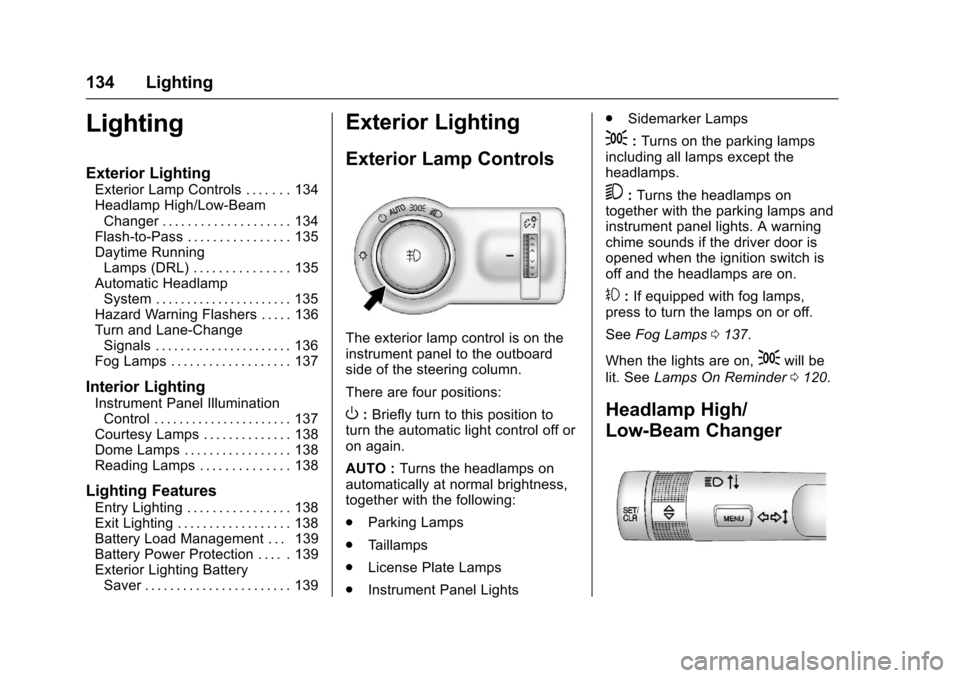
The exterior lamp control is on theinstrument panel to the outboardside of the steering column.
There are four positions:
O:Briefly turn to this position toturn the automatic light control off oron again.
AUTO :Turns the headlamps onautomatically at normal brightness,together with the following:
.Parking Lamps
.Ta i l l a m p s
.License Plate Lamps
.Instrument Panel Lights
.Sidemarker Lamps
;:Turns on the parking lampsincluding all lamps except theheadlamps.
5:Turns the headlamps ontogether with the parking lamps andinstrument panel lights. A warningchime sounds if the driver door isopened when the ignition switch isoff and the headlamps are on.
#:If equipped with fog lamps,press to turn the lamps on or off.
SeeFog Lamps0137.
When the lights are on,;will be
lit. SeeLamps On Reminder0120.
Headlamp High/
Low-Beam Changer
Page 136 of 342
Chevrolet Sonic Owner Manual (GMNA-Localizing-U.S./Canada-10122660) -2017 - crc - 5/13/16
Lighting 135
3:Push the turn signal lever awayfrom you to turn the high beams on.
Push the lever again or pull thelever toward you to return to lowbeams.
This indicator light turns on in theinstrument cluster when thehigh-beam headlamps are on.
Flash-to-Pass
To f l a s h t h e h i g h b e a m s , p u l l t h eturn signal lever all the way towardyou. Then release it.
Daytime Running
Lamps (DRL)
DRL can make it easier for others tosee the front of your vehicle duringthe day. Fully functional DRL arerequired on all vehicles first sold inCanada.
The DRL system makes thelow-beam headlamps come on at areduced brightness when thefollowing conditions are met:
.The ignition is in the ON/RUN mode.
.The exterior lamp control isin AUTO.
.The engine is running.
When the DRL are on, only thelow-beam headlamps, at a reducedlevel of brightness, will be on. Thetaillamps, sidemarker, instrumentpanel, and other lamps will notbe on.
The headlamps automaticallychange from DRL to the regularheadlamps depending on thedarkness of the surroundings. Theother lamps that come on with theheadlamps will also come on.
When it is bright enough outside,the headlamps go off and the DRLcome on.
To t u r n t h e D R L l a m p s o f f o r o nagain, turn the exterior lamp control
toOand then release. For vehicles
first sold in Canada, the DRL canonly be turned off when thetransmission is in P (Park).
Automatic Headlamp
System
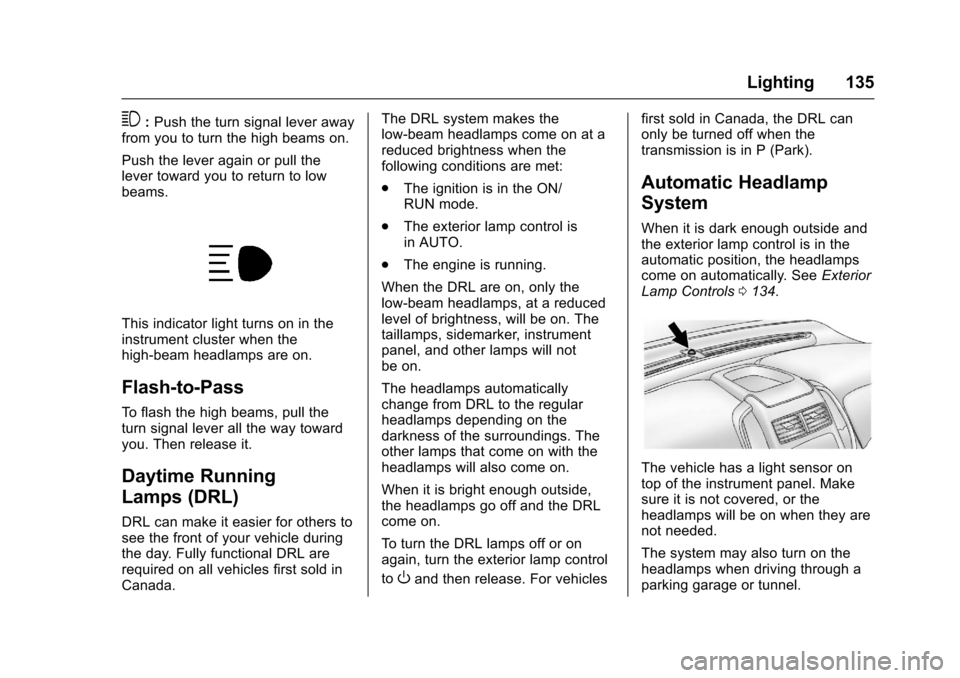
When it is dark enough outside andthe exterior lamp control is in theautomatic position, the headlampscome on automatically. SeeExteriorLamp Controls0134.
The vehicle has a light sensor ontop of the instrument panel. Makesure it is not covered, or theheadlamps will be on when they arenot needed.
The system may also turn on theheadlamps when driving through aparking garage or tunnel.
Page 138 of 342
Chevrolet Sonic Owner Manual (GMNA-Localizing-U.S./Canada-10122660) -2017 - crc - 5/13/16
Lighting 137
Fog Lamps
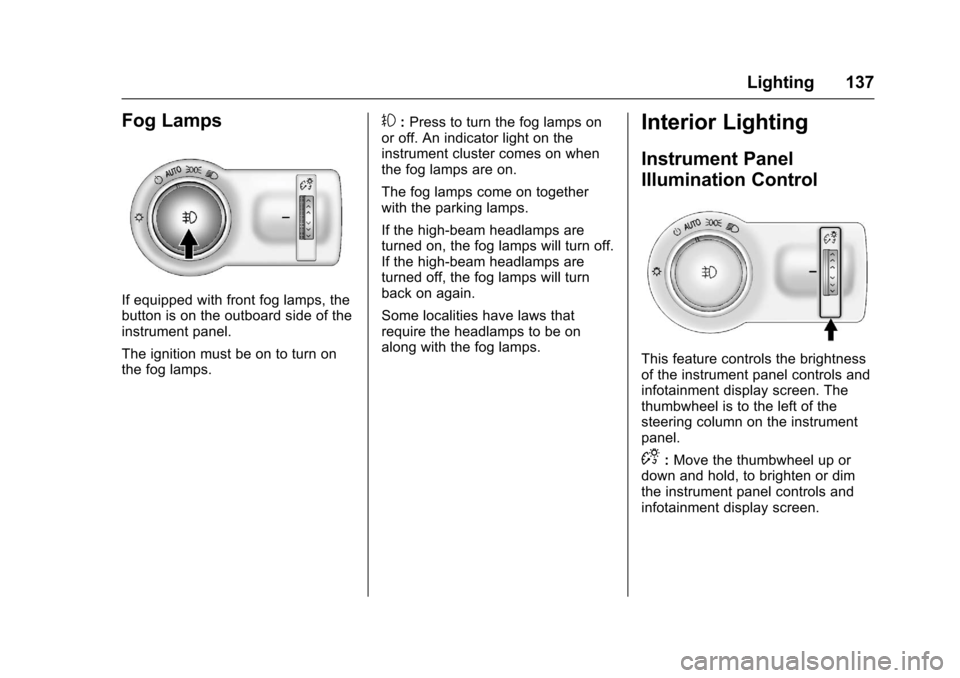
If equipped with front fog lamps, thebutton is on the outboard side of theinstrument panel.
The ignition must be on to turn onthe fog lamps.
#:Press to turn the fog lamps onor off. An indicator light on theinstrument cluster comes on whenthe fog lamps are on.
The fog lamps come on togetherwith the parking lamps.
If the high-beam headlamps areturned on, the fog lamps will turn off.If the high-beam headlamps areturned off, the fog lamps will turnback on again.
Some localities have laws thatrequire the headlamps to be onalong with the fog lamps.
Interior Lighting
Instrument Panel
Illumination Control
This feature controls the brightnessof the instrument panel controls andinfotainment display screen. Thethumbwheel is to the left of thesteering column on the instrumentpanel.
D:Move the thumbwheel up ordown and hold, to brighten or dimthe instrument panel controls andinfotainment display screen.
Page 168 of 342
Chevrolet Sonic Owner Manual (GMNA-Localizing-U.S./Canada-10122660) -2017 - crc - 5/13/16
Climate Controls 167
fan control to 0 turns the fan off. Thefan must be turned on to run the airconditioning compressor.
Air Delivery Mode Control :Turnclockwise or counterclockwise tochange the current airflow mode.
Select from the following air deliverymodes:
Y:Air is directed to the instrumentpanel outlets.
\:Air is divided between theinstrument panel and floor outlets.
[:Air is directed to the flooroutlets, with some air directed to therear outlets.
W:This mode clears the windowsof fog or moisture. Air is directed tothe floor, windshield, and sidewindow outlets.
1:This mode clears thewindshield of fog or frost morequickly. Air is directed to thewindshield and side window outlets.
Do not drive the vehicle until allwindows are clear.
In defrost or defog mode, excessiveair conditioning use can cause thewindows to fog. If this happens,
change the air delivery mode toY
and reduce the fan speed.
#:If equipped with airconditioning, follow these steps to
use the system. TurnAto the
desired speed. The air conditioningdoes not operate when the fancontrol knob is in the off position.
Press#to turn the air conditioning
on and off. When#is pressed, an
indicator light comes on to showthat the air conditioning is on.
For quick cool down on hot days:
1. Open the windows to let hot airescape.
2. PressM.
3. Press#.
4. Select the coolest temperature.
5. Select the highestAspeed.
Using these settings together forlong periods of time may cause theair inside the vehicle to become too
dry. To prevent this from happening,after the air in the vehicle hascooled, turn the recirculationmode off.
M:This mode recirculates andhelps to quickly cool the air insidethe vehicle. It can be used to reducethe entry of outside air and odors.
Press the button to turn therecirculation mode on. An indicatorlight comes on to show that therecirculation is on. Press the buttonagain to return to outside air mode.
Using the recirculation mode forextended periods may cause thewindows to fog. If this happens,select the defrost mode.
Max#is available when the air
conditioning is selected and thetemperature is set to the coolestsetting while the outside air
temperature is warm. When Max#
is activated, the air inside thevehicle is automatically recirculated,which helps to quickly cool thevehicle. The recirculation indicatorwill not be lit.
Page 169 of 342
Chevrolet Sonic Owner Manual (GMNA-Localizing-U.S./Canada-10122660) -2017 - crc - 5/13/16
168 Climate Controls
To a l l o w o u t s i d e a i r t o e n t e r i n t h e s econditions, press the recirculationbutton twice. The recirculationindicator will not be lit.
MorL:If equipped, press to heatthe driver or passenger seat. SeeHeated Front Seats056.
Rear Window and Outside
Mirror Defogger
1:Press to turn the rear windowand outside mirror defogger on oroff. An indicator light comes on toshow that the feature is on.
The rear window defogger can be
turned off by pressing1again or
by turning the ignition to ACC/ACCESSORY or LOCK/OFF.
If equipped with heated outsiderearview mirrors, they turn on withthe rear window defogger and helpto clear fog or frost from the surfaceof the mirror. SeeHeatedMirrors047.
Caution
Using a razor blade or sharp
object on the inside rear window
can damage the antenna or
defogger. Repairs would not be
covered by the vehicle warranty.
Do not stick anything to the rear
window.
Air Vents
Use the air vents located in thecenter and on the side of theinstrument panel to direct theairflow. Move the slats on the centerair vents to direct airflow.
Turn the knobs on the side air ventscounterclockwise or clockwise toopen or close off the airflow.
Operation Tips
.Clear away any ice, snow,or leaves from the air inlets atthe base of the windshield thatmay block the flow of air into thevehicle.
.Use of non-GM approved hooddeflectors may adversely affectthe performance of the system.
.Keep the path under the frontseats clear of objects to helpcirculate the air inside thevehicle more effectively.
Page 178 of 342
Chevrolet Sonic Owner Manual (GMNA-Localizing-U.S./Canada-10122660) -2017 - crc - 5/13/16
Driving and Operating 177
clear roads in shaded areas.The surface of a curve or anoverpass can remain icy whenthe surrounding roads are clear.Avoid sudden steeringmaneuvers and braking whileon ice.
.Turn off cruise control.
Blizzard Conditions
Stop the vehicle in a safe place andsignal for help. Stay with the vehicleunless there is help nearby.If possible, use RoadsideAssistance. SeeRoadsideAssistance Program0311.Togethelp and keep everyone in thevehicle safe:
.Turn on the hazard warningflashers.
.Tie a red cloth to an outsidemirror.
{Warning
Snow can trap engine exhaust
under the vehicle. This may
cause exhaust gases to get
inside. Engine exhaust contains
carbon monoxide (CO), which
cannot be seen or smelled. It can
cause unconsciousness and even
death.
If the vehicle is stuck in snow:
.Clear snow from the base ofthe vehicle, especially anyblocking the exhaust pipe.
.Open a window about 5 cm(2 in) on the vehicle sidethat is away from the wind,to bring in fresh air.
.Fully open the air outlets onor under the instrumentpanel.
.Adjust the climate controlsystem to circulate the airinside the vehicle and set
(Continued)
Warning (Continued)
the fan speed to the highestsetting. See“ClimateControl Systems.”
For more information about CO,
seeEngine Exhaust0190.
To s a v e f u e l , r u n t h e e n g i n e f o rshort periods to warm the vehicleand then shut the engine off andpartially close the window. Movingabout to keep warm also helps.
If it takes time for help to arrive,when running the engine, push theaccelerator pedal slightly so theengine runs faster than the idlespeed. This keeps the batterycharged to restart the vehicle and tosignal for help with the headlamps.Do this as little as possible, tosave fuel.
Page 206 of 342
Chevrolet Sonic Owner Manual (GMNA-Localizing-U.S./Canada-10122660) -2017 - crc - 5/13/16
Driving and Operating 205
Warning (Continued)
closely, FCA may not provide a
warning with enough time to help
avoid a crash. It also may not
provide any warning at all. FCA
does not warn of pedestrians,
animals, signs, guardrails,
bridges, construction barrels,
or other objects. Be ready to take
action and apply the brakes. See
Defensive Driving0172.
FCA can be disabled with the FCAsteering wheel control.
Detecting the Vehicle Ahead
FCA warnings will not occur unlessthe FCA system detects a vehicleahead. When a vehicle is detected,the vehicle ahead indicator willdisplay green. Vehicles may not be
detected on curves, highway exitramps, or hills, due to poor visibility;or if a vehicle ahead is partiallyblocked by pedestrians or otherobjects. FCA will not detect anothervehicle ahead until it is completelyin the driving lane.
{Warning
FCA does not provide a warning
to help avoid a crash, unless it
detects a vehicle. FCA may not
detect a vehicle ahead if the FCA
sensor is blocked by dirt, snow,
or ice, or if the windshield is
damaged. It may also not detect a
vehicle on winding or hilly roads,
or in conditions that can limit
visibility such as fog, rain,
or snow, or if the headlamps or
windshield are not cleaned or in
proper condition. Keep the
windshield, headlamps, and FCA
sensors clean and in good repair.
Collision Alert
When your vehicle approachesanother detected vehicle too rapidly,the red FCA display on top of theinstrument panel to the right of thesteering wheel will flash. Also,several rapid high-pitched beeps willsound from the front. When thisCollision Alert occurs, the brakesystem may prepare for driverbraking to occur more rapidly whichcan cause a brief, mild deceleration.Continue to apply the brake pedalas needed. Cruise control may bedisengaged when the Collision Alertoccurs.
Tailgating Alert
The red FCA display will staycontinuously illuminated when youare following a detected vehicleahead much too closely.
Page 213 of 342
Chevrolet Sonic Owner Manual (GMNA-Localizing-U.S./Canada-10122660) -2017 - crc - 5/13/16
212 Vehicle Care
Vehicle Care
General Information
General Information . . . . . . . . . . 213California Proposition65 Warning . . . . . . . . . . . . . . . . . 213California PerchlorateMaterials Requirements . . . . . 213Accessories andModifications . . . . . . . . . . . . . . . . 214
Vehicle Checks
Doing Your OwnService Work . . . . . . . . . . . . . . . 214Hood . . . . . . . . . . . . . . . . . . . . . . . . . 215Engine CompartmentOverview . . . . . . . . . . . . . . . . . . . . 217Engine Oil . . . . . . . . . . . . . . . . . . . . 220Engine Oil Life System . . . . . . . 222Automatic TransmissionFluid . . . . . . . . . . . . . . . . . . . . . . . . 223Manual Transmission Fluid . . . 224Hydraulic Clutch . . . . . . . . . . . . . . 224Engine Air Cleaner/Filter . . . . . . 224Cooling System . . . . . . . . . . . . . . 226Engine Coolant . . . . . . . . . . . . . . . 227Engine Overheating . . . . . . . . . . 230Washer Fluid . . . . . . . . . . . . . . . . . 231Brakes . . . . . . . . . . . . . . . . . . . . . . . 232Brake Fluid . . . . . . . . . . . . . . . . . . . 233
Battery - North America . . . . . . 234Starter Switch Check . . . . . . . . . 234Automatic Transmission ShiftLock Control FunctionCheck . . . . . . . . . . . . . . . . . . . . . . . 235Ignition Transmission LockCheck . . . . . . . . . . . . . . . . . . . . . . . 235Park Brake and P (Park)Mechanism Check . . . . . . . . . . 236Wiper Blade Replacement . . . . 236
Headlamp Aiming
Headlamp Aiming . . . . . . . . . . . . 237
Bulb Replacement
Bulb Replacement . . . . . . . . . . . . 238Halogen Bulbs . . . . . . . . . . . . . . . . 238Headlamps and Front TurnSignal . . . . . . . . . . . . . . . . . . . . . . . 238Fog Lamps . . . . . . . . . . . . . . . . . . . 239Ta i l l a m p s , T u r n S i g n a l ,Stoplamps, and Back-UpLamps . . . . . . . . . . . . . . . . . . . . . . 240License Plate Lamp . . . . . . . . . . 241Replacement Bulbs . . . . . . . . . . . 241
Electrical System
Electrical System Overload . . . 242Fuses and Circuit Breakers . . . 242Engine Compartment FuseBlock . . . . . . . . . . . . . . . . . . . . . . . . 243
Instrument Panel FuseBlock . . . . . . . . . . . . . . . . . . . . . . . . 246
Wheels and Tires
Tires . . . . . . . . . . . . . . . . . . . . . . . . . . 248All-Season Tires . . . . . . . . . . . . . . 249Winter Tires . . . . . . . . . . . . . . . . . . 249Summer Tires . . . . . . . . . . . . . . . . 250Tire Sidewall Labeling . . . . . . . . 250Tire Designations . . . . . . . . . . . . . 252Tire Terminology andDefinitions . . . . . . . . . . . . . . . . . . 253Tire Pressure . . . . . . . . . . . . . . . . . 256Tire Pressure MonitorSystem . . . . . . . . . . . . . . . . . . . . . . 257Tire Pressure MonitorOperation . . . . . . . . . . . . . . . . . . . 258Tire Inspection . . . . . . . . . . . . . . . . 260Tire Rotation . . . . . . . . . . . . . . . . . 261When It Is Time for NewTires . . . . . . . . . . . . . . . . . . . . . . . . 262Buying New Tires . . . . . . . . . . . . . 263Different Size Tires andWheels . . . . . . . . . . . . . . . . . . . . . . 264Uniform Tire QualityGrading . . . . . . . . . . . . . . . . . . . . . 264Wheel Alignment and TireBalance . . . . . . . . . . . . . . . . . . . . . 266Wheel Replacement . . . . . . . . . . 266Tire Chains . . . . . . . . . . . . . . . . . . . 267If a Tire Goes Flat . . . . . . . . . . . . 267
Page 216 of 342
Chevrolet Sonic Owner Manual (GMNA-Localizing-U.S./Canada-10122660) -2017 - crc - 5/13/16
Vehicle Care 215
Keep a record with all parts receiptsand list the mileage and the date ofany service work performed. SeeMaintenance Records0302.
Caution
Even small amounts of
contamination can cause damage
to vehicle systems. Do not allow
contaminants to contact the fluids,
reservoir caps, or dipsticks.
Hood
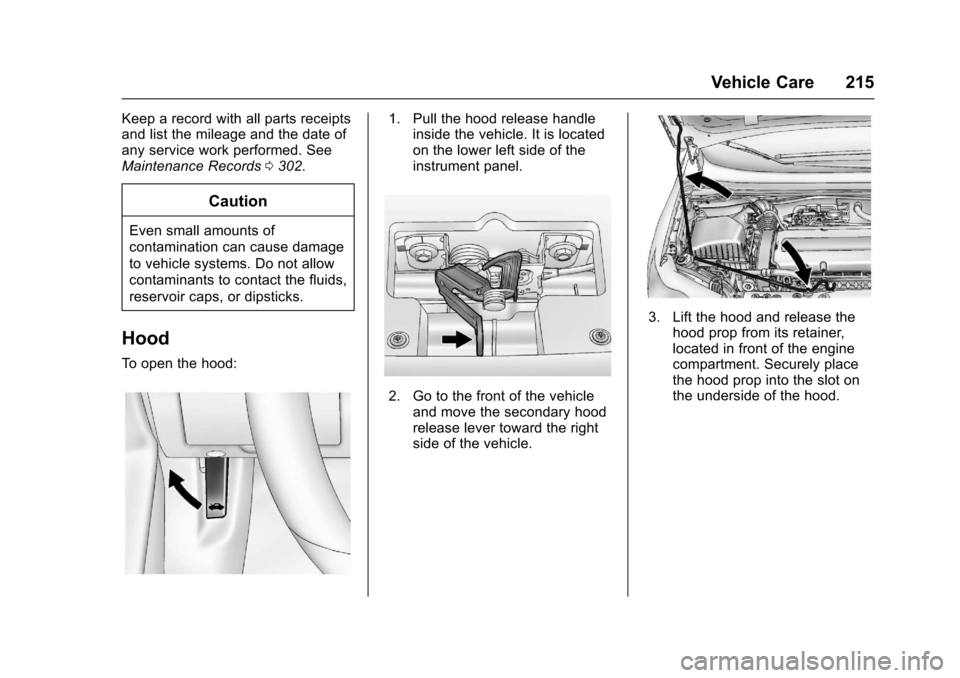
To o p e n t h e h o o d :
1. Pull the hood release handleinside the vehicle. It is locatedon the lower left side of theinstrument panel.
2. Go to the front of the vehicleand move the secondary hoodrelease lever toward the rightside of the vehicle.
3. Lift the hood and release thehood prop from its retainer,located in front of the enginecompartment. Securely placethe hood prop into the slot onthe underside of the hood.
Page 247 of 342
Chevrolet Sonic Owner Manual (GMNA-Localizing-U.S./Canada-10122660) -2017 - crc - 5/13/16
246 Vehicle Care
Mini Fuses Usage
36 Right high-beamheadlamp
*=Ifequipped
J-CaseFusesUsage
1Frontwipers
2ABSpump
3Blower
4Run/CrankIEC
5Powerseat
6CoolingfanK4
7CoolingfanK5
9EVP
10 Start
*=Ifequipped
Relays Usage
RLY 1 Front wiper control
RLY 2* Rear fog lamp
RLY 3 Front wiper speed
RLY 4 Rear defogger
Relays Usage
RLY 5 Run/Crank
RLY 9 Cooling fan K2
RLY 10 Cooling fan K3
RLY 11 P/T
RLY 12 Start
RLY 13 A/C clutch
RLY 14 High-beamheadlamps
RLY 15 Cooling fan K1
*=Ifequipped
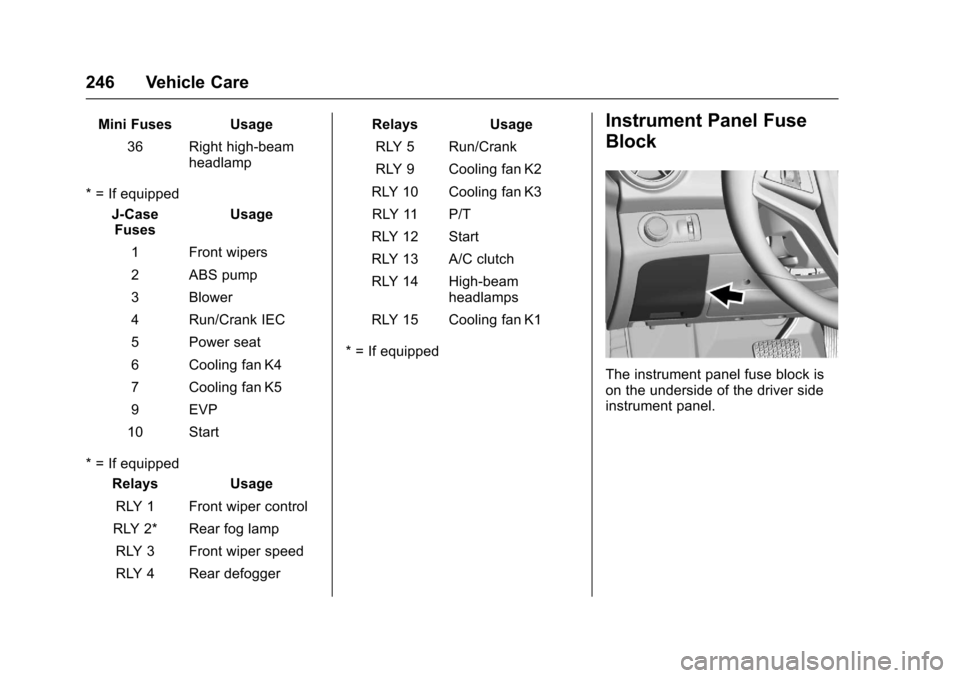
Instrument Panel Fuse
Block
The instrument panel fuse block ison the underside of the driver sideinstrument panel.