phone CHEVROLET SONIC 2017 2.G Owner's Manual
[x] Cancel search | Manufacturer: CHEVROLET, Model Year: 2017, Model line: SONIC, Model: CHEVROLET SONIC 2017 2.GPages: 342, PDF Size: 7.2 MB
Page 163 of 342
Chevrolet Sonic Owner Manual (GMNA-Localizing-U.S./Canada-10122660) -2017 - crc - 5/13/16
162 Infotainment System
Hands-Free Phone Controls
Use the buttons on the infotainmentsystem and the steering wheel tooperate the Hands-Free Phonesystem.
Steering Wheel Controls
Steering wheel controls can beused to:
.Answer incoming calls.
.Confirm system information.
.End a call.
.Decline a call.
.Cancel an operation.
.Make outgoing calls using thecall list.
g:Press to answer incoming calls.
i:Press to end a call, decline acall, or cancel an operation.
Making a Call by Entering a PhoneNumber
.Press5on the faceplate.
.Press{,thentouchPHONEon
the screen.
.Pressgon the steering wheel.
If a wrong number is entered, touch}to delete the number one digit at
atime,ortouchandhold}to
delete all digits of the number.
Switching a Call to the Cell Phone(Private Mode)
To s w i t c h t h e c a l l f r o m t h e c e l lphone to hands-free:
1. Touch0.
2. Touch0again to switch back
to hands-free.
Turning the Microphone Onand Off
To u c h3to turn the microphone on
or off.
Calling by Redial
To c a l l b y u s i n g r e d i a l :
.Pression the steering wheel
controls to display the redialguidance screen.
.To u c h5on the screen.
Redialing is not possible when thereis no call history.
Taking Calls
When a phone call comes throughthe connected Bluetooth cell phone,the audio system will be muted orpaused and the phone will ring withthe relevant information displayed.
Pression the steering wheel
controls, touch5on the screen,
or press5on the faceplate.
To d e c l i n e t h e c a l l , p r e s sion the
steering wheel controls or touchReject on the screen.
Using the Contacts Menu
1. Touch contacts on the phonescreen.
2. TouchQorRto scroll through
the list.
3. Touch the phone book entryto call.
4. If there is more than onenumber associated with thename, touch the numberto dial.
Page 164 of 342
Chevrolet Sonic Owner Manual (GMNA-Localizing-U.S./Canada-10122660) -2017 - crc - 5/13/16
Infotainment System 163
Searching for Contacts Entries
1. Touch contacts on the phonescreen.
2. Touch9on the contacts
screen.
3. Use the keypad to input thename to search. For details,see“Searching for a Name”following.
4. Touch the phone book entryto call.
5. If there is more than onenumber associated with thename, touch the numberto dial.
When the Bluetooth device andinfotainment system aresuccessfully paired, the phone bookwill download. Some phones maynot download automatically. If thishappens, connect it again orproceed with the phone bookdownload on the phone.
Searching for a Name
Select characters by using thekeypad on the phone book screen.As characters are selected, the
names that include those characterswill display on the phone bookscreen. As more characters of thename are entered, the list ofpossible names is shortened.
To s e a r c h f o r t h e n a m e A l e x :
1. Touch (abc) to select the firstcharacter.
2. Touch (jkl) three times to selectthe second character.
3. Touch (def) two times to selectthe third character.
4. Touch (wxy) two times to selectthe fourth character.
Making a Call from Call History
1. Touch Call History on thephone screen.
2. Touch one of the following for:
.WAll calls history.
.[Dialed calls.
.YMissed calls.
.XReceived calls.
3. Select the contact entry to call.
Making a Call with Speed DialNumbers
To u c h a n d h o l d t h e s p e e d d i a lnumber using the keypad on thephone screen.
Only speed dial numbers alreadystored on the cell phone can beused for speed dial calls. Up totwo-digit speed dial numbers aresupported.
For two-digit speed dial numbers,touch and hold the second digit tomake a call to the speed dialnumber.
Page 165 of 342
Chevrolet Sonic Owner Manual (GMNA-Localizing-U.S./Canada-10122660) -2017 - crc - 5/13/16
164 Infotainment System
Trademarks and
License Agreements
FCC Information
SeeRadio FrequencyStatement0317.
Bluetooth®
The Bluetooth word mark and logosare owned by the Bluetooth®SIG,Inc. and any use of such marks byGeneral Motors is under license.Other trademarks and trade namesare those of their respective owners.
DivX Certified®to play DivX®video,including premium content.
Covered by one or more of thefollowing U.S. patents: 7,295,673;7,460,668; 7,515,710; 7,519,274.
DivX®,DivXCertified®andassociated logos are trademarks ofRovi Corporation or its subsidiariesand are used under license.
“Made for iPod”and“Made foriPhone”mean that an electronicaccessory has been designed toconnect specifically to iPod oriPhone and has been certified bythe developer to meet Appleperformance standards.
iPod and iPhone are trademarks ofApple Computer, Inc., registered inthe U.S. and other countries.
Fees and Taxes: Subscription fee,taxes, one time activation fee, andother fees may apply. Subscriptionfee is consumer only. All fees andprogramming subject to change.Subscriptions subject to CustomerAgreement available atwww.siriusxm.com orwww.siriusxm.ca. SiriusXM®serviceonly available in the 48 contiguousUnited States and Canada.
In Canada: Some deterioration ofservice may occur in extremenorthern latitudes. This is beyondthe control of SiriusXM®SatelliteRadio.
It is prohibited to copy, decompile,disassemble, reverse engineer,hack, manipulate, or otherwisemake available any technology orsoftware incorporated in receiverscompatible with the SiriusXMSatellite Radio System or thatsupport the SiriusXM website, theOnline Service or any of its content.Furthermore, the AMBER voicecompression software included inthis product is protected byintellectual property rights including
Page 173 of 342
Chevrolet Sonic Owner Manual (GMNA-Localizing-U.S./Canada-10122660) -2017 - crc - 5/13/16
172 Driving and Operating
Driving Information
Distracted Driving
Distraction comes in many formsand can take your focus from thetask of driving. Exercise goodjudgment and do not let otheractivities divert your attention awayfrom the road. Many localgovernments have enacted lawsregarding driver distraction. Becomefamiliar with the local laws inyour area.
To a v o i d d i s t r a c t e d d r i v i n g , k e e pyour eyes on the road, keep yourhands on the steering wheel, andfocus your attention on driving.
.Do not use a phone indemanding driving situations.Use a hands-free method toplace or receive necessaryphone calls.
.Watch the road. Do not read,take notes, or look upinformation on phones or otherelectronic devices.
.Designate a front seatpassenger to handle potentialdistractions.
.Become familiar with vehiclefeatures before driving, such asprogramming favorite radiostations and adjusting climatecontrol and seat settings.Program all trip information intoany navigation device prior todriving.
.Wait until the vehicle is parkedto retrieve items that have fallento the floor.
.Stop or park the vehicle to tendto children.
.Keep pets in an appropriatecarrier or restraint.
.Avoid stressful conversationswhile driving, whether with apassenger or on a cell phone.
{Warning
Ta k i n g y o u r e y e s o f f t h e r o a d t o o
long or too often could cause a
crash resulting in injury or death.
Focus your attention on driving.
Refer to the Infotainment section formore information on using thatsystem, including pairing and usingacellphone.
Defensive Driving
Defensive driving means“alwaysexpect the unexpected.”The firststep in driving defensively is to wearthe safety belt. SeeSafetyBelts059.
.Assume that other road users(pedestrians, bicyclists, andother drivers) are going to becareless and make mistakes.Anticipate what they might doand be ready.
.Allow enough following distancebetween you and the driver infront of you.
.Focus on the task of driving.
Drunk Driving
Death and injury associated withdrinking and driving is a globaltragedy.
Page 210 of 342
Chevrolet Sonic Owner Manual (GMNA-Localizing-U.S./Canada-10122660) -2017 - crc - 5/13/16
Driving and Operating 209
gasoline additive recommended byGeneral Motors. It is available atyour dealer.
Filling the Tank
{Warning
Fuel vapors and fuel fires burn
violently and can cause injury or
death.
.To h e l p a v o i d i n j u r i e s t o y o uand others, read and followall the instructions on thefuel pump island.
.Turn off the engine whenrefueling.
.Keep sparks, flames, andsmoking materials awayfrom fuel.
.Do not leave the fuel pumpunattended.
.Do not use a cell phonewhile refueling.
.Do not re-enter the vehiclewhile pumping fuel.
(Continued)
Warning (Continued)
.Keep children away fromthe fuel pump and never letchildren pump fuel.
.Fuel can spray out if the fuelcap is opened too quickly.This spray can happen if thetank is nearly full, and ismore likely in hot weather.Open the fuel cap slowlyand wait for any hiss noiseto stop, then unscrew thecap all the way.
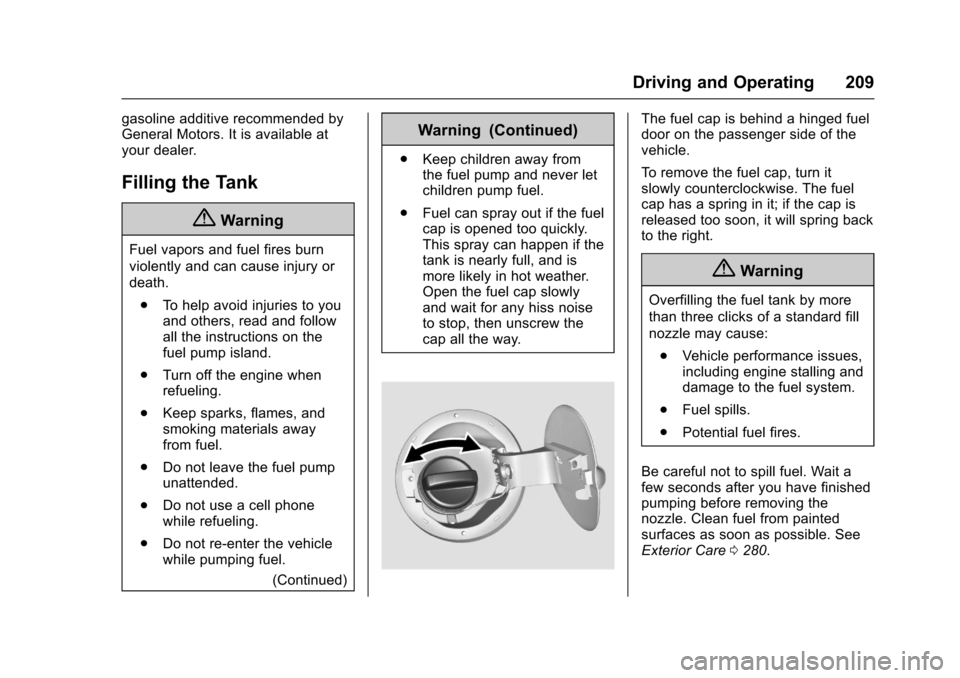
The fuel cap is behind a hinged fueldoor on the passenger side of thevehicle.
To r e m o v e t h e f u e l c a p , t u r n i tslowly counterclockwise. The fuelcap has a spring in it; if the cap isreleased too soon, it will spring backto the right.
{Warning
Overfilling the fuel tank by more
than three clicks of a standard fill
nozzle may cause:
.Vehicle performance issues,including engine stalling anddamage to the fuel system.
.Fuel spills.
.Potential fuel fires.
Be careful not to spill fuel. Wait afew seconds after you have finishedpumping before removing thenozzle. Clean fuel from paintedsurfaces as soon as possible. SeeExterior Care0280.
Page 211 of 342
Chevrolet Sonic Owner Manual (GMNA-Localizing-U.S./Canada-10122660) -2017 - crc - 5/13/16
210 Driving and Operating
When replacing the fuel cap, turn itclockwise until it clicks. Make surethe cap is fully installed. Thediagnostic system can determine ifthe fuel cap has been left off orimproperly installed. This wouldallow fuel to evaporate into theatmosphere. SeeMalfunctionIndicator Lamp (Check EngineLight)011 2.
{Warning
If a fire starts while you are
refueling, do not remove the
nozzle. Shut off the flow of fuel by
shutting off the pump or by
notifying the station attendant.
Leave the area immediately.
Caution
If a new fuel cap is needed, be
sure to get the right type of cap
from your dealer. The wrong type
of fuel cap may not fit properly,
may cause the malfunction
(Continued)
Caution (Continued)
indicator lamp to light, and could
damage the fuel tank and
emissions system. See
Malfunction Indicator Lamp
(Check Engine Light)011 2.
Filling a Portable Fuel
Container
{Warning
Filling a portable fuel container
while it is in the vehicle can cause
fuel vapors that can ignite either
by static electricity or other
means. You or others could be
badly burned and the vehicle
could be damaged. Always:
.Use approved fuelcontainers.
.Remove the container fromthe vehicle, trunk, or pickupbed before filling.
(Continued)
Warning (Continued)
.Place the container on theground.
.Place the nozzle inside thefill opening of the containerbefore dispensing fuel, andkeep it in contact with the fillopening until filling iscomplete.
.Fill the container no morethan 95% full to allow forexpansion.
.Do not smoke, lightmatches, or use lighterswhile pumping fuel.
.Avoid using cell phones orother electronic devices.
Page 309 of 342
Chevrolet Sonic Owner Manual (GMNA-Localizing-U.S./Canada-10122660) -2017 - crc - 5/13/16
308 Customer Information
resolved by your dealership withoutfurther help, in the U.S., call theChevrolet Customer AssistanceCenter at 1-800-222-1020. InCanada, call General Motors ofCanada Customer Care Centre at1-800-263-3777 (English),or 1-800-263-7854 (French).
We encourage you to call thetoll-free number in order to give yourinquiry prompt attention. Have thefollowing information available togive the Customer Assistancerepresentative:
.Vehicle IdentificationNumber (VIN). This is availablefrom the vehicle registration ortitle, or the plate at the top left ofthe instrument panel and visiblethrough the windshield.
.Dealership name and location.
.Vehicle delivery date andpresent mileage.
When contacting Chevrolet,remember that your concern willlikely be resolved at a dealer'sfacility. That is why we suggestfollowing Step One first.
STEP THREE—U.S. Owners :Both General Motors and yourdealer are committed to makingsure you are completely satisfiedwith your new vehicle. However,if you continue to remain unsatisfiedafter following the procedureoutlined in Steps One and Two, youcan file with the Better BusinessBureau (BBB) Auto Line®Programto enforce your rights.
The BBB Auto Line Program is anout-of-court program administeredby the Council of Better BusinessBureaus to settle automotivedisputes regarding vehicle repairs orthe interpretation of the New VehicleLimited Warranty. Although you maybe required to resort to this informaldispute resolution program prior tofiling a court action, use of theprogram is free of charge and yourcase will generally be heard within40 days. If you do not agree with thedecision given in your case, youmay reject it and proceed with anyother venue for relief availableto you.
Yo u m a y c o n t a c t t h e B B B A u t o L i n eProgram using the toll-freetelephone number or write them atthe following address:
BBB Auto Line ProgramCouncil of Better Business Bureaus,Inc.3033 Wilson BoulevardSuite 600Arlington, VA 22201
Te l e p h o n e : 1 - 8 0 0 - 9 5 5 - 5 1 0 0http://www.bbb.org/council/programs-services/dispute-handling-and-resolution/bbb-auto-line
This program is available in all50 states and the District ofColumbia. Eligibility is limited byvehicle age, mileage, and otherfactors. General Motors reservesthe right to change eligibilitylimitations and/or discontinue itsparticipation in this program.
STEP THREE—CanadianOwners :In the event that you donot feel your concerns have beenaddressed after following theprocedure outlined in Steps Oneand Two, General Motors of Canada
Page 311 of 342
Chevrolet Sonic Owner Manual (GMNA-Localizing-U.S./Canada-10122660) -2017 - crc - 5/13/16
310 Customer Information
Te l e p h o n e d e v i c e s ( T T Y s ) )Roadside Assistance:1-800-268-6800
Overseas
Please contact the local GeneralMotors Business Unit.
Customer Assistance for
Text Telephone (TTY)
Users
To a s s i s t c u s t o m e r s w h o a r e d e a f ,hard of hearing, or speech-impairedand who use Text Telephones(TTYs), Chevrolet has TTYequipment available at its CustomerAssistance Center. Any TTY user inthe U.S. can communicate withChevrolet by dialing:1-800-833-2438. TTY users inCanada can dial 1-800-263-3830.
Online Owner Center
Online Owner Experience
(U.S.) my.chevrolet.com
The Chevrolet online ownerexperience allows interaction withChevrolet and keeps importantvehicle-specific information in oneplace.
Membership Benefits
E:Download owner manuals andview vehicle-specific how-to videos.
G:View maintenance schedules,alerts, and OnStar VehicleDiagnostic Information. Scheduleservice appointments.
I:View and print dealer-recordedservice records and self-recordedservice records.
D:Select a preferred dealer andview locations, maps, phonenumbers, and hours.
r:Track your vehicle’swarrantyinformation.
J:View active recalls by VehicleIdentification Number (VIN). SeeVehicle Identification Number(VIN)0303.
H:View GM Card, SiriusXMSatellite radio (if equipped), andOnStar account information (ifequipped).
F:Chat with online helprepresentatives.
See my.chevrolet.com to registeryour vehicle.
Chevrolet Owner Centre
(Canada) chevroletowner.ca
Visit the Chevrolet Owner Centre:
.Chat live with online helprepresentatives.
.Locate owner resources such aslease-end, financing, andwarranty information.
.Retrieve your favorite articles,quizzes, tips, and multimediagalleries organized into theFeatured Articles and Auto CareSections.
.Download owner manuals.
Page 312 of 342
Chevrolet Sonic Owner Manual (GMNA-Localizing-U.S./Canada-10122660) -2017 - crc - 5/13/16
Customer Information 311
.Find theChevrolet-recommendedmaintenance services.
GM Mobility
Reimbursement Program
This program is available toqualified applicants for costreimbursement of eligibleaftermarket adaptive equipmentrequired for the vehicle, such ashand controls or a wheelchair/scooter lift for the vehicle.
For more information on the limitedoffer, visit www.gmmobility.com orcall the GM Mobility AssistanceCenter at 1-800-323-9935. TextTe l e p h o n e ( T T Y ) u s e r s , c a l l1-800-833-9935.
General Motors of Canada also hasaMobilityProgram.Visitwww.gm.caor call 1-800-GM-DRIVE (463-7483)for details. TTY users call1-800-263-3830.
Roadside Assistance
Program
For U.S.-purchased vehicles, call1-800-243-8872. (Text Telephone(TTY): 1-888-889-2438.)
For Canadian-purchased vehicles,call 1-800-268-6800.
Service is available 24 hours a day,365 days a year.
Calling for Assistance
When calling Roadside Assistance,have the following informationready:
.Yo u r n a m e , h o m e a d d r e s s , a n dhome telephone number.
.Te l e p h o n e n u m b e r o f y o u rlocation.
.Location of the vehicle.
.Model, year, color, and licenseplate number of the vehicle.
.Odometer reading, VehicleIdentification Number (VIN), anddelivery date of the vehicle.
.Description of the problem.
Coverage
Services are provided for theduration of the vehicle’spowertrainwarranty.
In the U.S., anyone driving thevehicle is covered. In Canada, aperson driving the vehicle withoutpermission from the owner is notcovered.
Roadside Assistance is not a part ofthe New Vehicle Limited Warranty.General Motors North America andChevrolet reserve the right to makeany changes or discontinue theRoadside Assistance program atany time without notification.
General Motors North America andChevrolet reserve the right to limitservices or payment to an owner ordriver if they decide the claims aremade too often, or the same type ofclaim is made many times.
Page 316 of 342
Chevrolet Sonic Owner Manual (GMNA-Localizing-U.S./Canada-10122660) -2017 - crc - 5/13/16
Customer Information 315
Aftermarket collision parts are alsoavailable. These are made bycompanies other than GM and maynot have been tested for the vehicle.As a result, these parts may fitpoorly, exhibit premature durability/corrosion problems, and may notperform properly in subsequentcollisions. Aftermarket parts are notcovered by the GM New VehicleLimited Warranty, and any vehiclefailure related to such parts is notcovered by that warranty.
Repair Facility
GM also recommends that youchoose a collision repair facility thatmeets your needs before you everneed collision repairs. Your dealermay have a collision repair centerwith GM-trained technicians andstate-of-the-art equipment, or beable to recommend a collision repaircenter that has GM-trainedtechnicians and comparableequipment.
Insuring the Vehicle
Protect your investment in the GMvehicle with comprehensive andcollision insurance coverage. Thereare significant differences in thequality of coverage afforded byvarious insurance policy terms.Many insurance policies providereduced protection to the GMvehicle by limiting compensation fordamage repairs through the use ofaftermarket collision parts. Someinsurance companies will notspecify aftermarket collision parts.When purchasing insurance, werecommend that you ensure that thevehicle will be repaired with GMoriginal equipment collision parts.If such insurance coverage is notavailable from your currentinsurance carrier, consider switchingto another insurance carrier.
If the vehicle is leased, the leasingcompany may require you to haveinsurance that ensures repairs withGenuine GM Original EquipmentManufacturer (OEM) parts orGenuine Manufacturer replacement
parts. Read the lease carefully, asyou may be charged at the end ofthe lease for poor quality repairs.
If a Crash Occurs
If there has been an injury, callemergency services for help. Do notleave the scene of a crash until allmatters have been taken care of.Move the vehicle only if its positionputs you in danger, or you areinstructed to move it by a policeofficer.
Give only the necessary informationto police and other parties involvedin the crash.
For emergency towing seeRoadside AssistanceProgram0311.
Gather the following information:
.Driver name, address, andtelephone number.
.Driver license number.
.Owner name, address, andtelephone number.
.Vehicle license plate number.