light CHEVROLET SONIC 2017 2.G Workshop Manual
[x] Cancel search | Manufacturer: CHEVROLET, Model Year: 2017, Model line: SONIC, Model: CHEVROLET SONIC 2017 2.GPages: 342, PDF Size: 7.2 MB
Page 138 of 342
Chevrolet Sonic Owner Manual (GMNA-Localizing-U.S./Canada-10122660) -2017 - crc - 5/13/16
Lighting 137
Fog Lamps
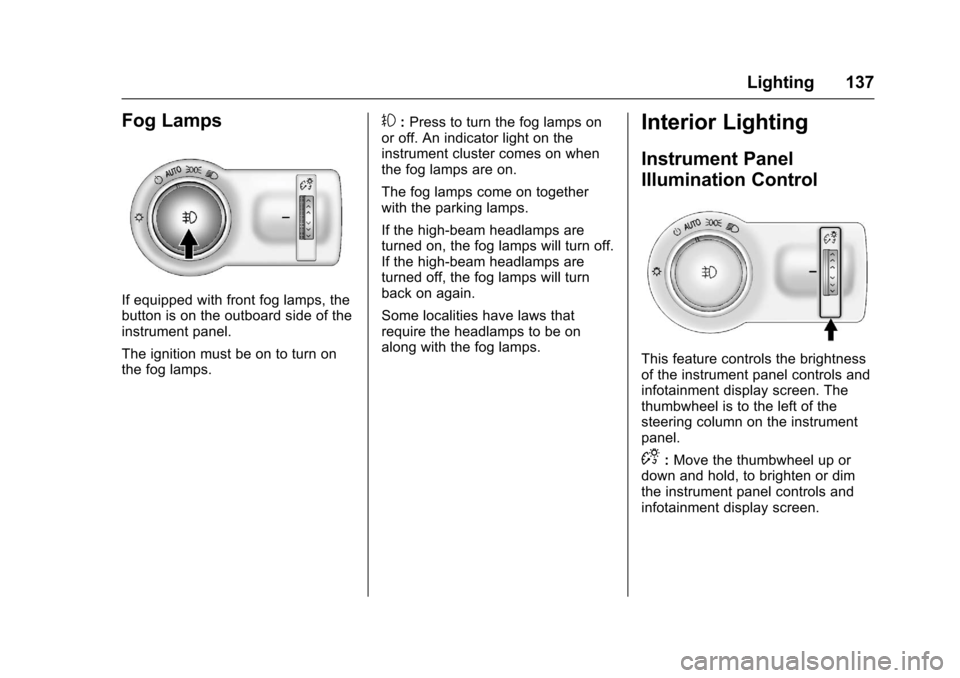
If equipped with front fog lamps, thebutton is on the outboard side of theinstrument panel.
The ignition must be on to turn onthe fog lamps.
#:Press to turn the fog lamps onor off. An indicator light on theinstrument cluster comes on whenthe fog lamps are on.
The fog lamps come on togetherwith the parking lamps.
If the high-beam headlamps areturned on, the fog lamps will turn off.If the high-beam headlamps areturned off, the fog lamps will turnback on again.
Some localities have laws thatrequire the headlamps to be onalong with the fog lamps.
Interior Lighting
Instrument Panel
Illumination Control
This feature controls the brightnessof the instrument panel controls andinfotainment display screen. Thethumbwheel is to the left of thesteering column on the instrumentpanel.
D:Move the thumbwheel up ordown and hold, to brighten or dimthe instrument panel controls andinfotainment display screen.
Page 139 of 342
Chevrolet Sonic Owner Manual (GMNA-Localizing-U.S./Canada-10122660) -2017 - crc - 5/13/16
138 Lighting
Courtesy Lamps
The courtesy lamps come onautomatically when any door isopened and the dome lamp is in thedoor position.
Dome Lamps
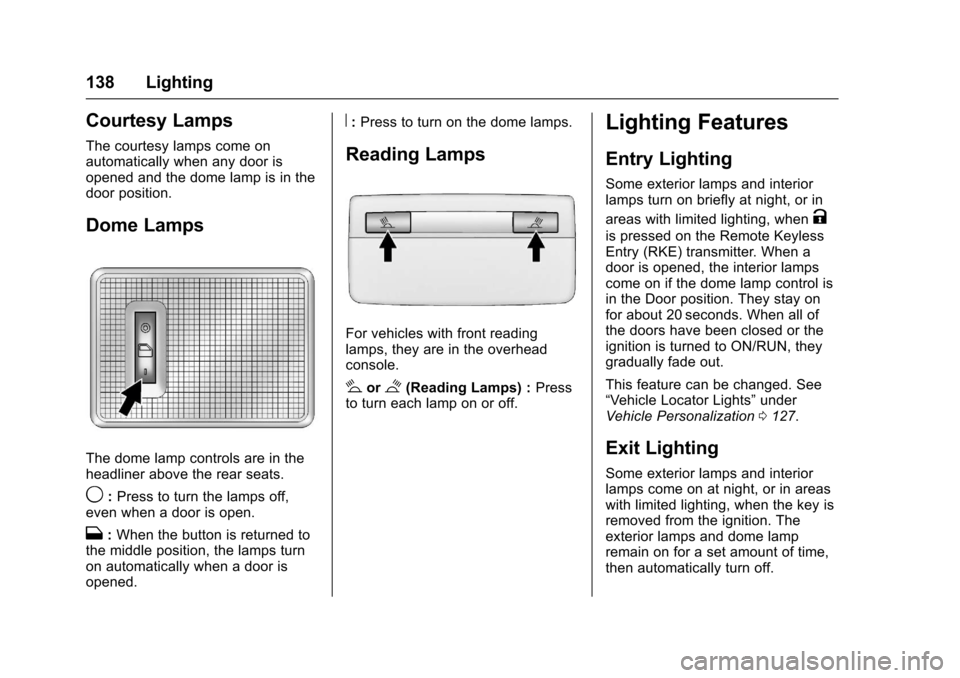
The dome lamp controls are in theheadliner above the rear seats.
9:Press to turn the lamps off,even when a door is open.
H:When the button is returned tothe middle position, the lamps turnon automatically when a door isopened.
R:Press to turn on the dome lamps.
Reading Lamps
For vehicles with front readinglamps, they are in the overheadconsole.
#or$(Reading Lamps) :Pressto turn each lamp on or off.
Lighting Features
Entry Lighting
Some exterior lamps and interiorlamps turn on briefly at night, or in
areas with limited lighting, whenK
is pressed on the Remote KeylessEntry (RKE) transmitter. When adoor is opened, the interior lampscome on if the dome lamp control isin the Door position. They stay onfor about 20 seconds. When all ofthe doors have been closed or theignition is turned to ON/RUN, theygradually fade out.
This feature can be changed. See“Ve h i c l e L o c a t o r L i g h t s”underVehicle Personalization0127.
Exit Lighting
Some exterior lamps and interiorlamps come on at night, or in areaswith limited lighting, when the key isremoved from the ignition. Theexterior lamps and dome lampremain on for a set amount of time,then automatically turn off.
Page 140 of 342
Chevrolet Sonic Owner Manual (GMNA-Localizing-U.S./Canada-10122660) -2017 - crc - 5/13/16
Lighting 139
If equipped with Keyless Access,the exterior lamps automatically turnon when a door is opened after theignition is changed to the OFFposition. The dome lamps alsocome on after the ignition ischanged to the OFF position. SeeIgnition Positions (Key Access)0182orIgnition Positions (KeylessAccess)0183.
The exterior lamps turn offimmediately by turning the exteriorlamps control off.
This feature can be changed. SeeVehicle Personalization0127.
Battery Load
Management
The vehicle has Electric PowerManagement (EPM) that estimatesthe battery's temperature and stateof charge. It then adjusts the voltagefor best performance and extendedlife of the battery.
When the battery's state of chargeis low, the voltage is raised slightlyto quickly bring the charge back up.When the state of charge is high,
the voltage is lowered slightly toprevent overcharging. If the vehiclehas a voltmeter gauge or a voltagedisplay on the Driver InformationCenter (DIC), you may see thevoltage move up or down. This isnormal. If there is a problem, analert will be displayed.
The battery can be discharged atidle if the electrical loads are veryhigh. This is true for all vehicles.This is because the generator(alternator) may not be spinning fastenough at idle to produce all thepower needed for very highelectrical loads.
Ahighelectricalloadoccurswhenseveral of the following are on, suchas: headlamps, high beams, foglamps, rear window defogger,climate control fan at high speed,heated seats, engine cooling fans,trailer loads, and loads plugged intoaccessory power outlets.
EPM works to prevent excessivedischarge of the battery. It does thisby balancing the generator's outputand the vehicle's electrical needs.It can increase engine idle speed to
generate more power, wheneverneeded. It can temporarily reducethe power demands of someaccessories.
Normally, these actions occur insteps or levels, without beingnoticeable. In rare cases at thehighest levels of corrective action,this action may be noticeable to thedriver.
Battery Power Protection
The battery saver feature isdesigned to protect the vehicle'sbattery.
If some interior lamps are left onand the ignition is turned off, thebattery rundown protection systemautomatically turns the lamp off aftersome time.
Exterior Lighting Battery
Saver
The exterior lamps turn off about10 minutes after the ignition isturned off, if the parking lamps orheadlamps have been manually lefton. This protects against draining
Page 141 of 342
Chevrolet Sonic Owner Manual (GMNA-Localizing-U.S./Canada-10122660) -2017 - crc - 5/13/16
140 Lighting
the battery. To restart the 10-minutetimer, turn the exterior lamp controlto the off position and then back tothe parking lamp or headlampposition.
To k e e p t h e l a m p s o n f o r m o r e t h a n10 minutes, the ignition must be inthe ACC/ACCESSORY or ON/RUNposition.
Page 145 of 342
Chevrolet Sonic Owner Manual (GMNA-Localizing-U.S./Canada-10122660) -2017 - crc - 5/13/16
144 Infotainment System
.USB/Music/Pictures: Pressto go to the next content.Press and hold to fastforward.
5.5
.Press and release toaccess the phone screen,answer an incoming call,or access the device homescreen.
Home Page
Touchscreen Buttons
To u c h s c r e e n b u t t o n s s h o w o n t h escreen when available. When afunction is unavailable, the buttonmay gray out. When a function isselected, the button may highlight.
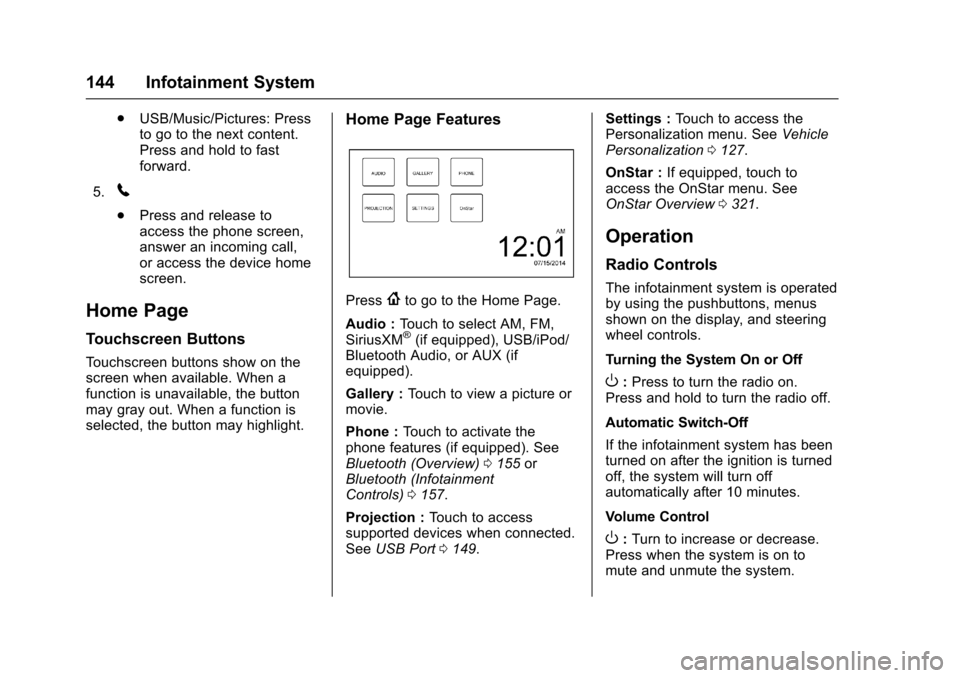
Home Page Features
Press{to go to the Home Page.
Audio :To u c h t o s e l e c t A M , F M ,SiriusXM®(if equipped), USB/iPod/Bluetooth Audio, or AUX (ifequipped).
Gallery :To u c h t o v i e w a p i c t u r e o rmovie.
Phone :To u c h t o a c t i v a t e t h ephone features (if equipped). SeeBluetooth (Overview)0155orBluetooth (InfotainmentControls)0157.
Projection :To u c h t o a c c e s ssupported devices when connected.SeeUSB Port0149.
Settings :To u c h t o a c c e s s t h ePersonalization menu. SeeVehiclePersonalization0127.
OnStar :If equipped, touch toaccess the OnStar menu. SeeOnStar Overview0321.
Operation
Radio Controls
The infotainment system is operatedby using the pushbuttons, menusshown on the display, and steeringwheel controls.
Turning the System On or Off
O:Press to turn the radio on.Press and hold to turn the radio off.
Automatic Switch-Off
If the infotainment system has beenturned on after the ignition is turnedoff, the system will turn offautomatically after 10 minutes.
Volume Control
O:Turn to increase or decrease.Press when the system is on tomute and unmute the system.
Page 159 of 342
Chevrolet Sonic Owner Manual (GMNA-Localizing-U.S./Canada-10122660) -2017 - crc - 5/13/16
158 Infotainment System
Pairing a Phone–SSP and PairedDevice
When a paired device is on theinfotainment system and SSP issupported:
1. Press{.
2. Touch SETTINGS.
3. Touch Bluetooth, then DeviceManagement.
4. Touch the desired device topair. When the Bluetoothdevice and infotainment system
are successfully paired,Z/5
is displayed on the pair devicescreen. If no desired device isavailable go to Step 5.
5. Touch Search Device to searchfor the desired device.
6. Touch the desired device topair on the searched listscreen.
7. Touch Yes on the pop-upscreen of the Bluetooth deviceand infotainment system.
.The connected phone is
highlighted by5.
.Z/5indicates the hands-free
and phone music functions areenabled.
.5indicates only the hands-free
function is enabled.
.Zindicates only Bluetooth
music is enabled.
Pairing a Phone–No SSP and NoPaired Device
When there is no paired device onthe infotainment system and SSP isnot supported:
1. Press{.
2. Touch PHONE, press5on the
faceplate, or pressgon the
steering wheel without OnStar.
3. Touch Search Device.
4. Touch the desired device topair on the searched listscreen.
5. Input the PersonalIdentification Number (PIN)code (default: 1234) to theBluetooth device. When theBluetooth device and
infotainment system aresuccessfully paired, thePHONE screen is displayed onthe infotainment system.
When the connection fails, a failuremessage is displayed on theinfotainment system.
If a Bluetooth device was previouslyconnected, the infotainment systemexecutes the auto connection.However, if the Bluetooth setting onthe Bluetooth device is turned off, afailure message is displayed on theinfotainment system.
Pairing a Phone–No SSP andPaired Device
When a paired device is on theinfotainment system and SSP is notsupported:
1. Press{.
2. Touch SETTINGS.
3. Touch Bluetooth, then DeviceManagement.
4. Touch the desired device topair. When the Bluetoothdevice and infotainment system
Page 160 of 342
Chevrolet Sonic Owner Manual (GMNA-Localizing-U.S./Canada-10122660) -2017 - crc - 5/13/16
Infotainment System 159
are successfully paired,Z/5
is displayed on the pair devicescreen. If no desired device isavailable go to Step 5.
5. Touch Search Device to searchfor the desired device.
6. Touch the desired device topair on the searched listscreen.
7. Input the PersonalIdentification Number (PIN)code (default: 1234) to theBluetooth device. When theBluetooth device andinfotainment system are
successfully paired,Z/5is
displayed on the pair devicescreen.
.The connected phone is
highlighted by5.
.Z/5indicates the hands-free
and phone music functions areenabled.
.5indicates only the hands-free
function is enabled.
.Zindicates only Bluetooth
music is enabled.
Connecting a Paired BluetoothDevice
1. Press{.
2. Touch SETTINGS.
3. Touch Bluetooth, then DeviceManagement.
4. Touch the device to beconnected.
Checking the BluetoothConnection
1. Press{.
2. Touch SETTINGS.
3. Touch Bluetooth, then DeviceManagement.
4. The paired device will show.
Disconnecting a Bluetooth Device
1. Press{.
2. Touch SETTINGS.
3. Touch Bluetooth, then DeviceManagement.
4. Touch the name of the deviceto be disconnected.
5. Touch Disconnect.
Deleting a Bluetooth Device
1. Press{.
2. Touch SETTINGS.
3. Touch Bluetooth, then DeviceManagement.
4. Touch the device to delete.
5. TouchY.
6. Touch Delete.
Bluetooth Music
Before playing Bluetooth music,read the following information:
.AcellphoneorBluetoothdevicethat supports Advanced AudioDistribution Profile (A2DP)versions over 1.2 must beregistered and connected to theproduct.
.From the cell phone or Bluetoothdevice, find the Bluetooth devicetype to set/connect the item as astereo headset.
Page 168 of 342
Chevrolet Sonic Owner Manual (GMNA-Localizing-U.S./Canada-10122660) -2017 - crc - 5/13/16
Climate Controls 167
fan control to 0 turns the fan off. Thefan must be turned on to run the airconditioning compressor.
Air Delivery Mode Control :Turnclockwise or counterclockwise tochange the current airflow mode.
Select from the following air deliverymodes:
Y:Air is directed to the instrumentpanel outlets.
\:Air is divided between theinstrument panel and floor outlets.
[:Air is directed to the flooroutlets, with some air directed to therear outlets.
W:This mode clears the windowsof fog or moisture. Air is directed tothe floor, windshield, and sidewindow outlets.
1:This mode clears thewindshield of fog or frost morequickly. Air is directed to thewindshield and side window outlets.
Do not drive the vehicle until allwindows are clear.
In defrost or defog mode, excessiveair conditioning use can cause thewindows to fog. If this happens,
change the air delivery mode toY
and reduce the fan speed.
#:If equipped with airconditioning, follow these steps to
use the system. TurnAto the
desired speed. The air conditioningdoes not operate when the fancontrol knob is in the off position.
Press#to turn the air conditioning
on and off. When#is pressed, an
indicator light comes on to showthat the air conditioning is on.
For quick cool down on hot days:
1. Open the windows to let hot airescape.
2. PressM.
3. Press#.
4. Select the coolest temperature.
5. Select the highestAspeed.
Using these settings together forlong periods of time may cause theair inside the vehicle to become too
dry. To prevent this from happening,after the air in the vehicle hascooled, turn the recirculationmode off.
M:This mode recirculates andhelps to quickly cool the air insidethe vehicle. It can be used to reducethe entry of outside air and odors.
Press the button to turn therecirculation mode on. An indicatorlight comes on to show that therecirculation is on. Press the buttonagain to return to outside air mode.
Using the recirculation mode forextended periods may cause thewindows to fog. If this happens,select the defrost mode.
Max#is available when the air
conditioning is selected and thetemperature is set to the coolestsetting while the outside air
temperature is warm. When Max#
is activated, the air inside thevehicle is automatically recirculated,which helps to quickly cool thevehicle. The recirculation indicatorwill not be lit.
Page 169 of 342
Chevrolet Sonic Owner Manual (GMNA-Localizing-U.S./Canada-10122660) -2017 - crc - 5/13/16
168 Climate Controls
To a l l o w o u t s i d e a i r t o e n t e r i n t h e s econditions, press the recirculationbutton twice. The recirculationindicator will not be lit.
MorL:If equipped, press to heatthe driver or passenger seat. SeeHeated Front Seats056.
Rear Window and Outside
Mirror Defogger
1:Press to turn the rear windowand outside mirror defogger on oroff. An indicator light comes on toshow that the feature is on.
The rear window defogger can be
turned off by pressing1again or
by turning the ignition to ACC/ACCESSORY or LOCK/OFF.
If equipped with heated outsiderearview mirrors, they turn on withthe rear window defogger and helpto clear fog or frost from the surfaceof the mirror. SeeHeatedMirrors047.
Caution
Using a razor blade or sharp
object on the inside rear window
can damage the antenna or
defogger. Repairs would not be
covered by the vehicle warranty.
Do not stick anything to the rear
window.
Air Vents
Use the air vents located in thecenter and on the side of theinstrument panel to direct theairflow. Move the slats on the centerair vents to direct airflow.
Turn the knobs on the side air ventscounterclockwise or clockwise toopen or close off the airflow.
Operation Tips
.Clear away any ice, snow,or leaves from the air inlets atthe base of the windshield thatmay block the flow of air into thevehicle.
.Use of non-GM approved hooddeflectors may adversely affectthe performance of the system.
.Keep the path under the frontseats clear of objects to helpcirculate the air inside thevehicle more effectively.
Page 176 of 342
Chevrolet Sonic Owner Manual (GMNA-Localizing-U.S./Canada-10122660) -2017 - crc - 5/13/16
Driving and Operating 175
The vehicle may straighten out.Be ready for a second skid if itoccurs.
.Slow down and adjust yourdriving according to weatherconditions. Stopping distancecan be longer and vehiclecontrol can be affected whentraction is reduced by water,snow, ice, gravel, or othermaterial on the road. Learn torecognize warning clues—suchas enough water, ice, or packedsnow on the road to make amirrored surface—and slowdown when you have any doubt.
.Try to avoid sudden steering,acceleration, or braking,including reducing vehicle speedby shifting to a lower gear. Anysudden changes could causethe tires to slide.
Remember: Antilock brakes helpavoid only the braking skid.
Driving on Wet Roads
Rain and wet roads can reducevehicle traction and affect yourability to stop and accelerate.
Always drive slower in these typesof driving conditions and avoiddriving through large puddles anddeep-standing or flowing water.
{Warning
Wet brakes can cause crashes.
They might not work as well in a
quick stop and could cause
pulling to one side. You could
lose control of the vehicle.
After driving through a large
puddle of water or a car/vehicle
wash, lightly apply the brake
pedal until the brakes work
normally.
Flowing or rushing water creates
strong forces. Driving through
flowing water could cause the
vehicle to be carried away. If this
happens, you and other vehicle
occupants could drown. Do not
ignore police warnings and be
very cautious about trying to drive
through flowing water.
Hydroplaning
Hydroplaning is dangerous. Watercan build up under the vehicle'stires so they actually ride on thewater. This can happen if the road iswet enough and you are going fastenough. When the vehicle ishydroplaning, it has little or nocontact with the road.
There is no hard and fast rule abouthydroplaning. The best advice is toslow down when the road is wet.
Other Rainy Weather Tips
Besides slowing down, other wetweather driving tips include:
.Allow extra following distance.
.Pass with caution.
.Keep windshield wipingequipment in good shape.
.Keep the windshield washer fluidreservoir filled.
.Have good tires with propertread depth. SeeTires0248.
.Turn off cruise control.