M on drive CHEVROLET SONIC 2017 2.G Owners Manual
[x] Cancel search | Manufacturer: CHEVROLET, Model Year: 2017, Model line: SONIC, Model: CHEVROLET SONIC 2017 2.GPages: 342, PDF Size: 7.2 MB
Page 3 of 342
Chevrolet Sonic Owner Manual (GMNA-Localizing-U.S./Canada-10122660) -2017 - crc - 5/13/16
2 Introduction
Introduction
The names, logos, emblems,slogans, vehicle model names, andvehicle body designs appearing inthis manual including, but not limitedto, GM, the GM logo, CHEVROLET,the CHEVROLET Emblem, andSONIC are trademarks and/orservice marks of General MotorsLLC, its subsidiaries, affiliates,or licensors.
For vehicles first sold in Canada,substitute the name“GeneralMotors of Canada Company”forChevrolet Motor Division wherever itappears in this manual.
This manual describes features thatmay or may not be on the vehiclebecause of optional equipment thatwas not purchased on the vehicle,model variants, countryspecifications, features/applicationsthat may not be available in yourregion, or changes subsequent tothe printing of this owner manual.
Refer to the purchasedocumentation relating to yourspecific vehicle to confirm thefeatures.
Keep this manual in the vehicle forquick reference.
Canadian Vehicle Owners
AFrenchlanguagemanualcanbeobtained from your dealer, atwww.helminc.com, or from:
Propriétaires Canadiens
On peut obtenir un exemplaire dece guide en français auprès duconcessionnaire ou à l'adressesuivante:
Helm, IncorporatedAttention: Customer Service47911 Halyard DrivePlymouth, MI 48170USA
Using this Manual
To q u i c k l y l o c a t e i n f o r m a t i o n a b o u tthe vehicle, use the Index in theback of the manual. It is analphabetical list of what is in themanual and the page number whereit can be found.
Litho in U.S.A.Part No. 23229855 A First Printing©2016 General Motors LLC. All Rights Reserved.
Page 6 of 342
Chevrolet Sonic Owner Manual (GMNA-Localizing-U.S./Canada-10122660) -2017 - crc - 5/13/16
In Brief 5
In Brief
Instrument Panel
Instrument Panel . . . . . . . . . . . . . . . . 6
Initial Drive Information
Initial Drive Information . . . . . . . . . . 8Remote Keyless Entry (RKE)System . . . . . . . . . . . . . . . . . . . . . . . . 8Remote Vehicle Start . . . . . . . . . . . 9Door Locks . . . . . . . . . . . . . . . . . . . . . 9Liftgate (Hatchback) . . . . . . . . . . . 10Trunk Release (Sedan) . . . . . . . . 10Windows . . . . . . . . . . . . . . . . . . . . . . . 11Seat Adjustment . . . . . . . . . . . . . . . 11Second Row Seats . . . . . . . . . . . . 13Head Restraint Adjustment . . . . 13Safety Belts . . . . . . . . . . . . . . . . . . . . 13Passenger Sensing System . . . 13Mirror Adjustment . . . . . . . . . . . . . . 14Steering Wheel Adjustment . . . . 14Interior Lighting . . . . . . . . . . . . . . . . 15Exterior Lighting . . . . . . . . . . . . . . . 15Windshield Wiper/Washer . . . . . . 16Climate Controls . . . . . . . . . . . . . . . 16Transmission . . . . . . . . . . . . . . . . . . 17
Vehicle Features
Infotainment System . . . . . . . . . . . 18Radio(s) . . . . . . . . . . . . . . . . . . . . . . . 19
Satellite Radio . . . . . . . . . . . . . . . . . 19Portable Audio Devices . . . . . . . . 20Bluetooth®..................... 20Steering Wheel Controls . . . . . . . 20Cruise Control . . . . . . . . . . . . . . . . . 21Driver InformationCenter (DIC) . . . . . . . . . . . . . . . . . 21Forward Collision Alert (FCA)System . . . . . . . . . . . . . . . . . . . . . . . 21Lane DepartureWarning (LDW) . . . . . . . . . . . . . . . 21Rear Vision Camera (RVC) . . . . 22Power Outlets . . . . . . . . . . . . . . . . . 22Sunroof . . . . . . . . . . . . . . . . . . . . . . . . 22
Performance and Maintenance
Traction Control/ElectronicStability Control . . . . . . . . . . . . . . 23Tire Pressure Monitor . . . . . . . . . . 23Fuel . . . . . . . . . . . . . . . . . . . . . . . . . . . 23E85 or FlexFuel . . . . . . . . . . . . . . . . 24Engine Oil Life System . . . . . . . . 24Driving for Better FuelEconomy . . . . . . . . . . . . . . . . . . . . . 24Roadside AssistanceProgram . . . . . . . . . . . . . . . . . . . . . . 25
Page 9 of 342
Chevrolet Sonic Owner Manual (GMNA-Localizing-U.S./Canada-10122660) -2017 - crc - 5/13/16
8 In Brief
Initial Drive
Information
This section provides a briefoverview about some of theimportant features that may or maynot be on your specific vehicle.
For more detailed information, referto each of the features which can befound later in this owner manual.
Remote Keyless Entry
(RKE) System
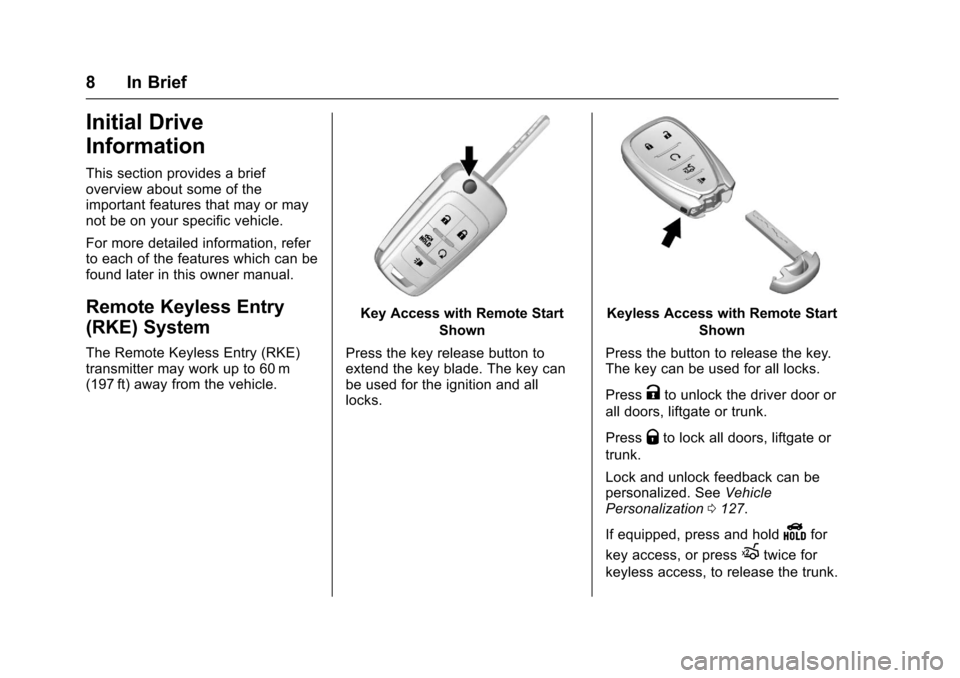
The Remote Keyless Entry (RKE)transmitter may work up to 60 m(197 ft) away from the vehicle.
Key Access with Remote Start
Shown
Press the key release button toextend the key blade. The key canbe used for the ignition and alllocks.
Keyless Access with Remote Start
Shown
Press the button to release the key.The key can be used for all locks.
PressKto unlock the driver door or
all doors, liftgate or trunk.
PressQto lock all doors, liftgate or
trunk.
Lock and unlock feedback can bepersonalized. SeeVehiclePersonalization0127.
If equipped, press and holdYfor
key access, or pressXtwice for
keyless access, to release the trunk.
Page 10 of 342
Chevrolet Sonic Owner Manual (GMNA-Localizing-U.S./Canada-10122660) -2017 - crc - 5/13/16
In Brief 9
Press and release7to initiate
vehicle locator.
Press and hold7for at least
three seconds to sound the panicalarm.
Press7again to cancel the panic
alarm.
SeeKeys026andRemote KeylessEntry (RKE) System Operation(Keyless Access)031orRemoteKeyless Entry (RKE) SystemOperation (Key Access)029.
Remote Vehicle Start
If equipped, the engine can bestarted from outside of the vehicle.
Starting the Vehicle
1. Press and releaseQon the
RKE transmitter.
2. Immediately press and hold/
for at least four seconds or untilthe turn signal lamps flash.
Start the vehicle normally afterentering.
When the vehicle starts, the parkinglamps will turn on.
Remote start can be extended.
Canceling a Remote Start
To c a n c e l a r e m o t e s t a r t , d o o n e o fthe following:
.Press and hold/until the
parking lamps turn off.
.Turn on the hazard warningflashers.
.Turn the vehicle on and then off.
SeeRemote Vehicle Start037.
Door Locks
To l o c k o r u n l o c k t h e d o o r s f r o moutside the vehicle:
.Use the key in the driver door tolock all doors or unlock thedriver door only.
.PressQorKon the Remote
Keyless Entry (RKE) transmitter.SeeRemote Keyless Entry(RKE) System Operation(Keyless Access)031or
Remote Keyless Entry (RKE)System Operation (KeyAccess)029.
To l o c k t h e d o o r s f r o m i n s i d e t h evehicle:
.PressQon the central locking
switch or on the driver doorswitch.
.Press the lock knob on the driverdoor to lock all doors and,if equipped, the liftgate.
To u n l o c k t h e d o o r s f r o m i n s i d e t h evehicle:
.PressKon the central locking
switch or on the driver doorswitch.
.Pull the door handle. Pulling thedoor handle again unlatchesthe door.
.Lift the lock knob on the driverdoor to unlock the driver door.
SeeDoor Locks038.
Page 11 of 342
Chevrolet Sonic Owner Manual (GMNA-Localizing-U.S./Canada-10122660) -2017 - crc - 5/13/16
10 In Brief
Keyless Access
The RKE transmitter must be within1m (3ft) of the door being opened.
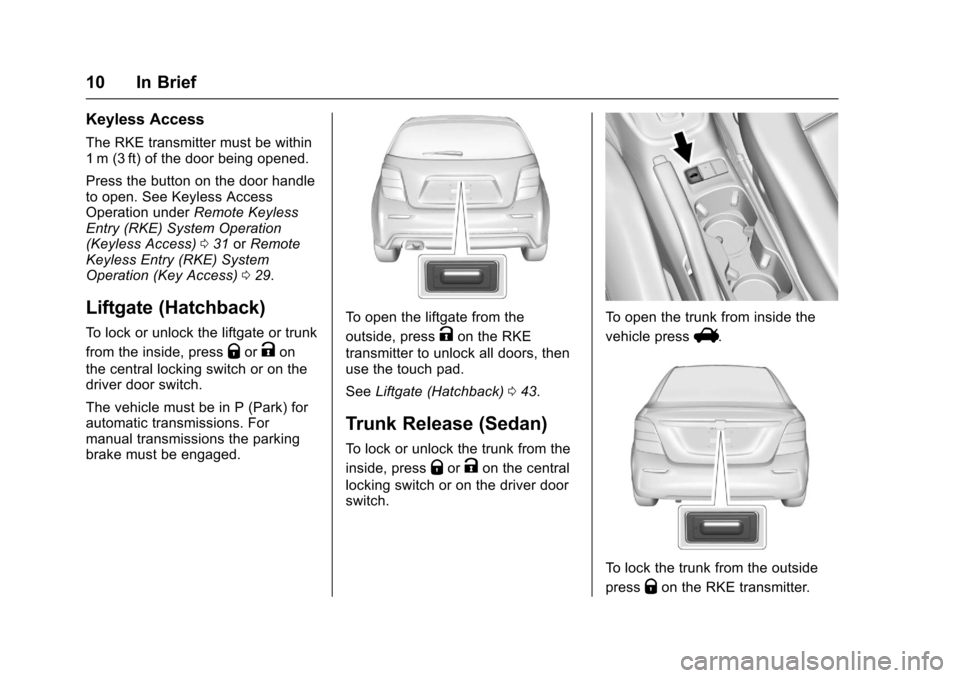
Press the button on the door handleto open. See Keyless AccessOperation underRemote KeylessEntry (RKE) System Operation(Keyless Access)031orRemoteKeyless Entry (RKE) SystemOperation (Key Access)029.
Liftgate (Hatchback)
To l o c k o r u n l o c k t h e l i f t g a t e o r t r u n k
from the inside, pressQorKon
the central locking switch or on thedriver door switch.
The vehicle must be in P (Park) forautomatic transmissions. Formanual transmissions the parkingbrake must be engaged.
To o p e n t h e l i f t g a t e f r o m t h e
outside, pressKon the RKE
transmitter to unlock all doors, thenuse the touch pad.
SeeLiftgate (Hatchback)043.
Trunk Release (Sedan)
To l o c k o r u n l o c k t h e t r u n k f r o m t h e
inside, pressQorKon the central
locking switch or on the driver doorswitch.
To o p e n t h e t r u n k f r o m i n s i d e t h e
vehicle pressV.
To l o c k t h e t r u n k f r o m t h e o u t s i d e
pressQon the RKE transmitter.
Page 14 of 342
Chevrolet Sonic Owner Manual (GMNA-Localizing-U.S./Canada-10122660) -2017 - crc - 5/13/16
In Brief 13
To r e t u r n t h e s e a t b a c k t o a n u p r i g h tposition:
1. Lift the lever fully withoutapplying pressure to theseatback, and the seatbackreturns to the upright position.
2. Push and pull on the seatbackto make sure it is locked.
SeeReclining Seatbacks055.
Second Row Seats
The rear seatbacks can be foldeddown to increase cargo space.
SeeRear Seats057.
Head Restraint
Adjustment
Do not drive until the head restraintsfor all occupants are installed andadjusted properly.
To a c h i e v e a c o m f o r t a b l e s e a t i n gposition, change the seatbackrecline angle as little as necessarywhile keeping the seat and the headrestraint height in the properposition.
SeeHead Restraints052andSeatAdjustment053.
Safety Belts
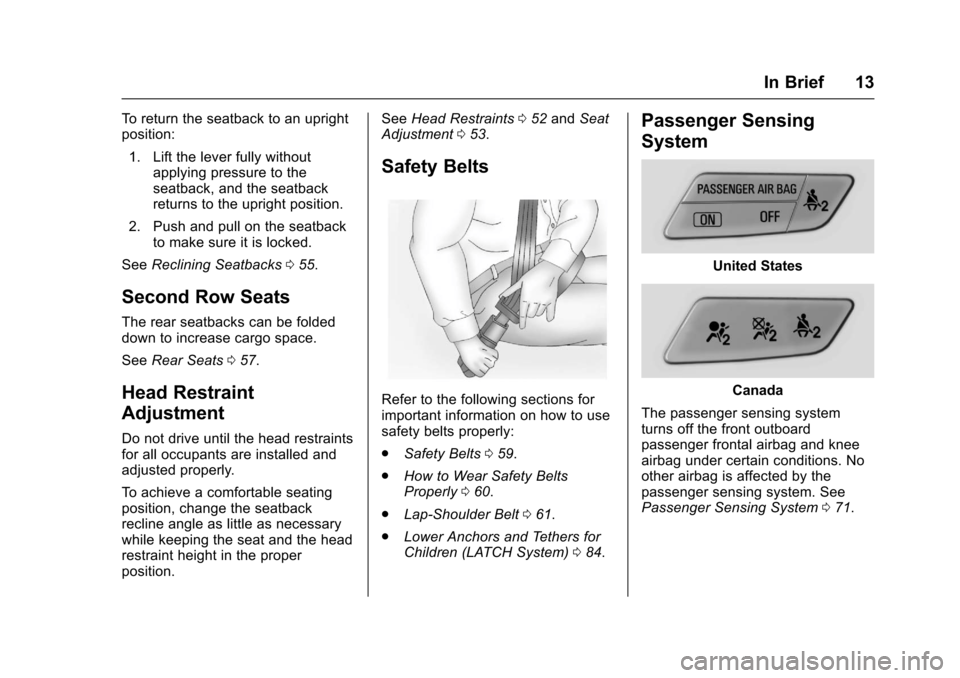
Refer to the following sections forimportant information on how to usesafety belts properly:
.Safety Belts059.
.How to Wear Safety BeltsProperly060.
.Lap-Shoulder Belt061.
.Lower Anchors and Tethers forChildren (LATCH System)084.
Passenger Sensing
System
United States
Canada
The passenger sensing systemturns off the front outboardpassenger frontal airbag and kneeairbag under certain conditions. Noother airbag is affected by thepassenger sensing system. SeePassenger Sensing System071.
Page 15 of 342
Chevrolet Sonic Owner Manual (GMNA-Localizing-U.S./Canada-10122660) -2017 - crc - 5/13/16
14 In Brief
The passenger airbag statusindicator will be visible on theinstrument panel when the vehicle isstarted. SeePassenger AirbagStatus Indicator0111.
Mirror Adjustment
Exterior Mirrors
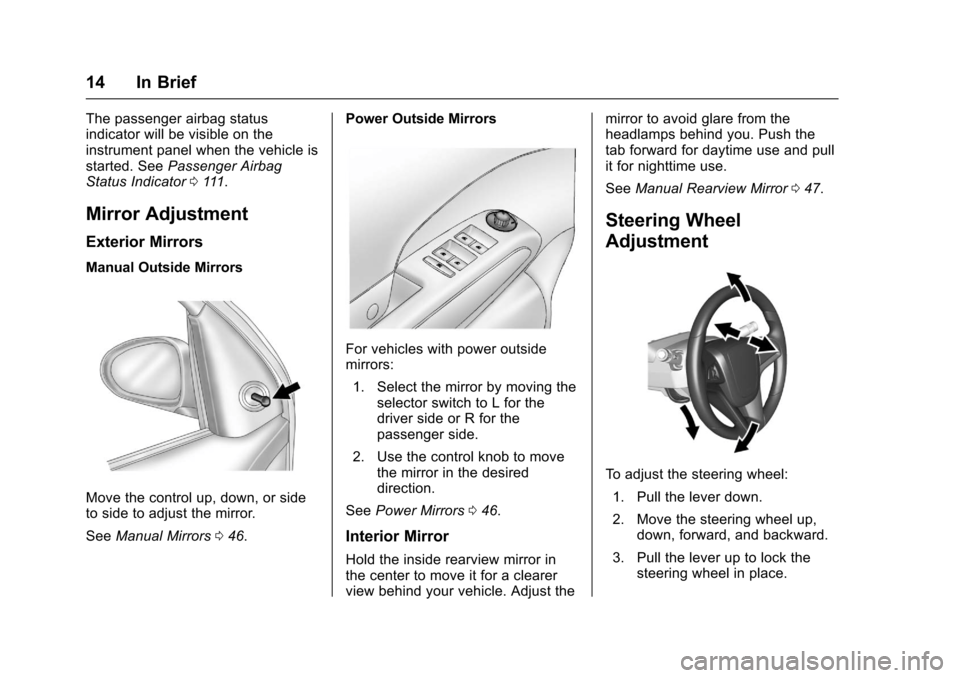
Manual Outside Mirrors
Move the control up, down, or sideto side to adjust the mirror.
SeeManual Mirrors046.
Power Outside Mirrors
For vehicles with power outsidemirrors:
1. Select the mirror by moving theselector switch to L for thedriver side or R for thepassenger side.
2. Use the control knob to movethe mirror in the desireddirection.
SeePower Mirrors046.
Interior Mirror
Hold the inside rearview mirror inthe center to move it for a clearerview behind your vehicle. Adjust the
mirror to avoid glare from theheadlamps behind you. Push thetab forward for daytime use and pullit for nighttime use.
SeeManual Rearview Mirror047.
Steering Wheel
Adjustment
To a d j u s t t h e s t e e r i n g w h e e l :
1. Pull the lever down.
2. Move the steering wheel up,down, forward, and backward.
3. Pull the lever up to lock thesteering wheel in place.
Page 17 of 342
Chevrolet Sonic Owner Manual (GMNA-Localizing-U.S./Canada-10122660) -2017 - crc - 5/13/16
16 In Brief
;:Turns on the parking lampsincluding all lamps except theheadlamps.
5:Turns the headlamps ontogether with the parking lamps andinstrument panel lights. A warningchime sounds if the driver door isopened when the ignition switch isoff and the headlamps are on.
#:For vehicles with fog lamps,press to turn the lamps on or off.
See:
.Exterior Lamp Controls0134
.Daytime Running Lamps(DRL)0135
.Fog Lamps0137
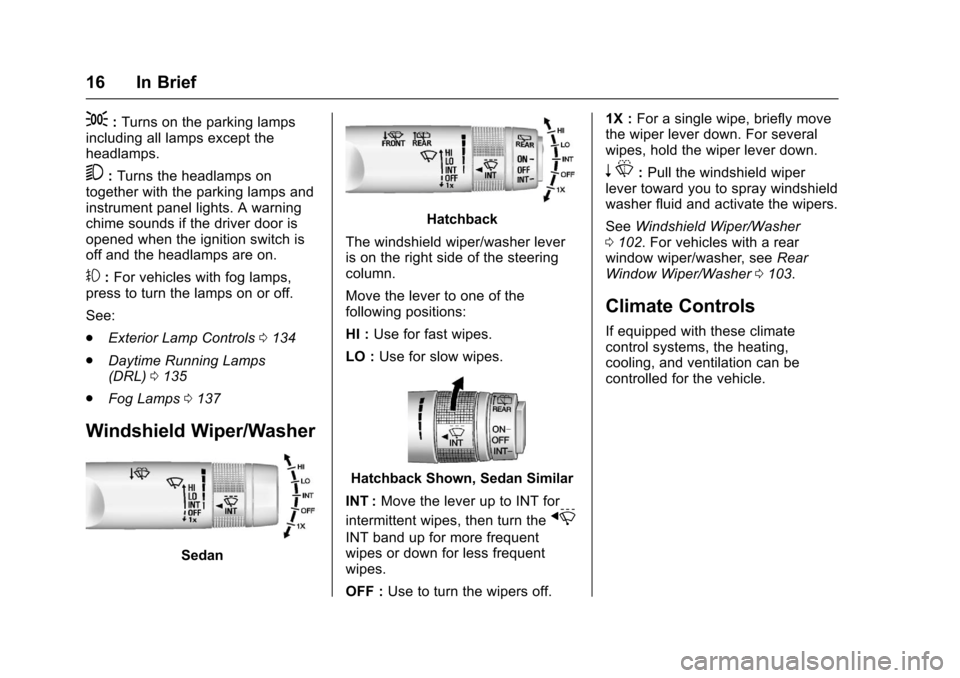
Windshield Wiper/Washer
Sedan
Hatchback
The windshield wiper/washer leveris on the right side of the steeringcolumn.
Move the lever to one of thefollowing positions:
HI :Use for fast wipes.
LO :Use for slow wipes.
Hatchback Shown, Sedan Similar
INT :Move the lever up to INT for
intermittent wipes, then turn thex
INT band up for more frequentwipes or down for less frequentwipes.
OFF :Use to turn the wipers off.
1X :For a single wipe, briefly movethe wiper lever down. For severalwipes, hold the wiper lever down.
nL:Pull the windshield wiperlever toward you to spray windshieldwasher fluid and activate the wipers.
SeeWindshield Wiper/Washer0102.Forvehicleswitharearwindow wiper/washer, seeRearWindow Wiper/Washer0103.
Climate Controls
If equipped with these climatecontrol systems, the heating,cooling, and ventilation can becontrolled for the vehicle.
Page 18 of 342
Chevrolet Sonic Owner Manual (GMNA-Localizing-U.S./Canada-10122660) -2017 - crc - 5/13/16
In Brief 17
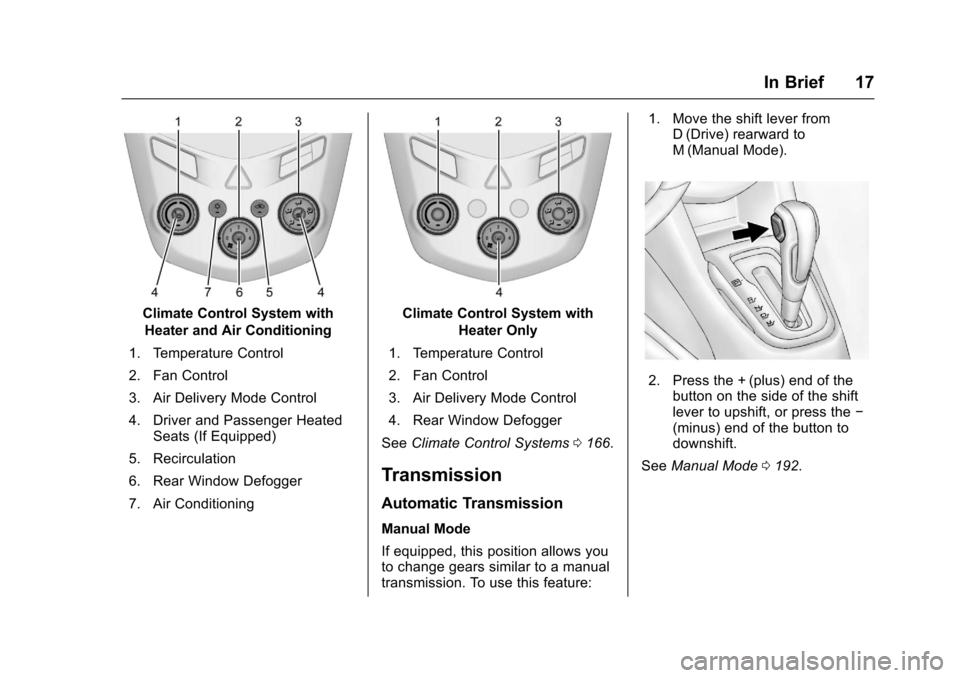
Climate Control System with
Heater and Air Conditioning
1. Temperature Control
2. Fan Control
3. Air Delivery Mode Control
4. Driver and Passenger HeatedSeats (If Equipped)
5. Recirculation
6. Rear Window Defogger
7. Air Conditioning
Climate Control System with
Heater Only
1. Temperature Control
2. Fan Control
3. Air Delivery Mode Control
4. Rear Window Defogger
SeeClimate Control Systems0166.
Transmission
Automatic Transmission
Manual Mode
If equipped, this position allows youto change gears similar to a manualtransmission. To use this feature:
1. Move the shift lever fromD(Drive) rearward toM(Manual Mode).
2. Press the + (plus) end of thebutton on the side of the shiftlever to upshift, or press the✓(minus) end of the button todownshift.
SeeManual Mode0192.
Page 22 of 342
Chevrolet Sonic Owner Manual (GMNA-Localizing-U.S./Canada-10122660) -2017 - crc - 5/13/16
In Brief 21
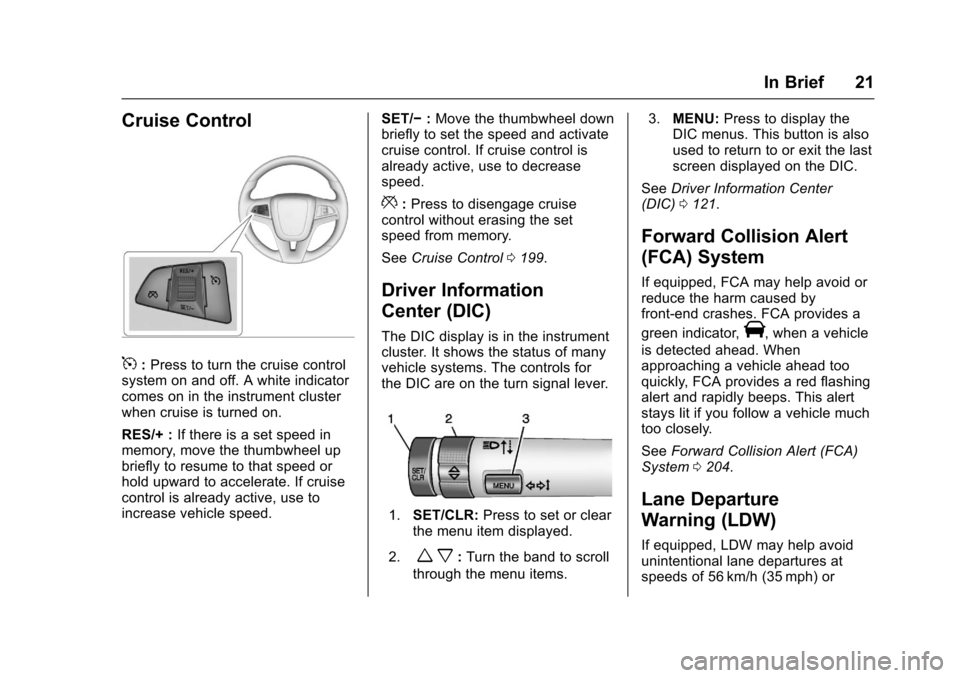
Cruise Control
5:Press to turn the cruise controlsystem on and off. A white indicatorcomes on in the instrument clusterwhen cruise is turned on.
RES/+ :If there is a set speed inmemory, move the thumbwheel upbriefly to resume to that speed orhold upward to accelerate. If cruisecontrol is already active, use toincrease vehicle speed.
SET/✓:Move the thumbwheel downbriefly to set the speed and activatecruise control. If cruise control isalready active, use to decreasespeed.
*:Press to disengage cruisecontrol without erasing the setspeed from memory.
SeeCruise Control0199.
Driver Information
Center (DIC)
The DIC display is in the instrumentcluster. It shows the status of manyvehicle systems. The controls forthe DIC are on the turn signal lever.
1.SET/CLR:Press to set or clearthe menu item displayed.
2.wx:Turn the band to scroll
through the menu items.
3.MENU:Press to display theDIC menus. This button is alsoused to return to or exit the lastscreen displayed on the DIC.
SeeDriver Information Center(DIC)0121.
Forward Collision Alert
(FCA) System
If equipped, FCA may help avoid orreduce the harm caused byfront-end crashes. FCA provides a
green indicator,V,whenavehicle
is detected ahead. Whenapproaching a vehicle ahead tooquickly, FCA provides a red flashingalert and rapidly beeps. This alertstays lit if you follow a vehicle muchtoo closely.
SeeForward Collision Alert (FCA)System0204.
Lane Departure
Warning (LDW)
If equipped, LDW may help avoidunintentional lane departures atspeeds of 56 km/h (35 mph) or