key battery CHEVROLET SONIC 2017 2.G Owners Manual
[x] Cancel search | Manufacturer: CHEVROLET, Model Year: 2017, Model line: SONIC, Model: CHEVROLET SONIC 2017 2.GPages: 342, PDF Size: 7.2 MB
Page 29 of 342
Chevrolet Sonic Owner Manual (GMNA-Localizing-U.S./Canada-10122660) -2017 - crc - 5/13/16
28 Keys, Doors, and Windows
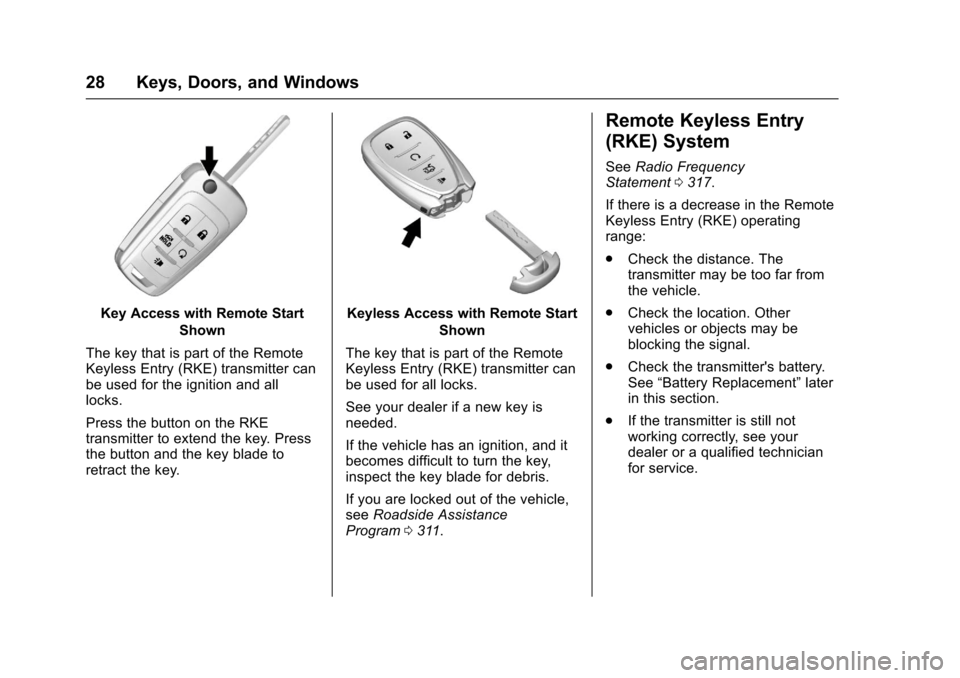
Key Access with Remote Start
Shown
The key that is part of the RemoteKeyless Entry (RKE) transmitter canbe used for the ignition and alllocks.
Press the button on the RKEtransmitter to extend the key. Pressthe button and the key blade toretract the key.
Keyless Access with Remote Start
Shown
The key that is part of the RemoteKeyless Entry (RKE) transmitter canbe used for all locks.
See your dealer if a new key isneeded.
If the vehicle has an ignition, and itbecomes difficult to turn the key,inspect the key blade for debris.
If you are locked out of the vehicle,seeRoadside AssistanceProgram0311.
Remote Keyless Entry
(RKE) System
SeeRadio FrequencyStatement0317.
If there is a decrease in the RemoteKeyless Entry (RKE) operatingrange:
.Check the distance. Thetransmitter may be too far fromthe vehicle.
.Check the location. Othervehicles or objects may beblocking the signal.
.Check the transmitter's battery.See“Battery Replacement”laterin this section.
.If the transmitter is still notworking correctly, see yourdealer or a qualified technicianfor service.
Page 32 of 342
Chevrolet Sonic Owner Manual (GMNA-Localizing-U.S./Canada-10122660) -2017 - crc - 5/13/16
Keys, Doors, and Windows 31
Battery Replacement
The battery is not rechargeable. Toreplace the battery:
Caution
When replacing the battery, do
not touch any of the circuitry on
the transmitter. Static from your
body could damage the
transmitter.
1. Press the button on thetransmitter to extend the key.
2. Remove the battery cover byprying with a finger.
3. Remove the old battery.
4. Insert the new battery, positiveside facing up. Replace with aCR2032 or equivalent battery.
5. Snap the battery cover back onto the transmitter.
Remote Keyless Entry
(RKE) System Operation
(Keyless Access)
The Keyless Access system allowsfor vehicle entry when thetransmitter is within range. See“Keyless Access Operation”following.
The transmitter functions may workup to 60 m (197 ft) away from thevehicle.
Other conditions can impact theperformance of the transmitter.
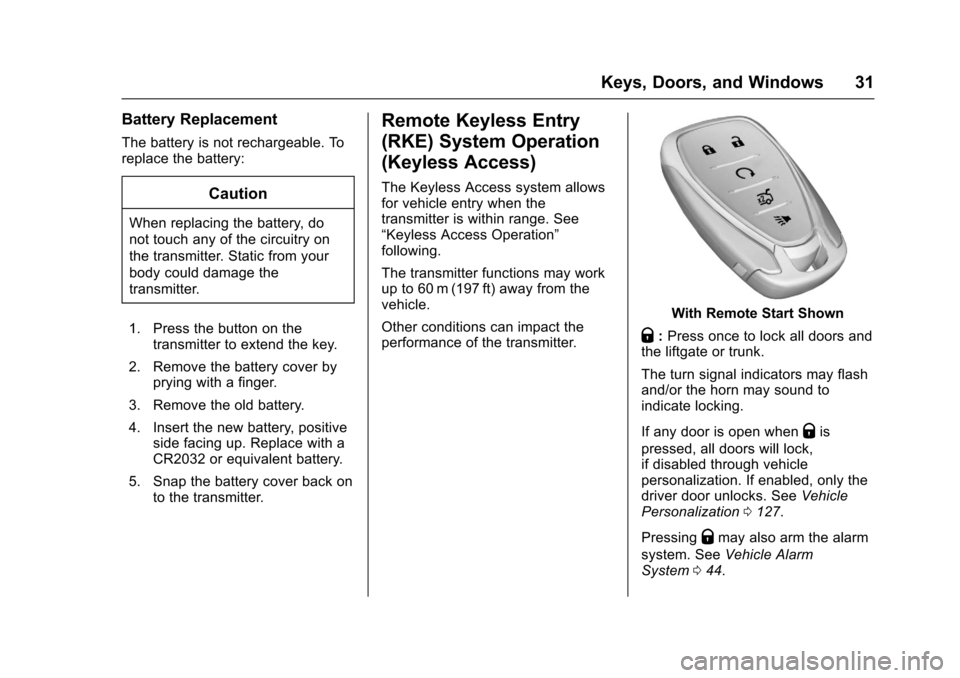
With Remote Start Shown
Q:Press once to lock all doors andthe liftgate or trunk.
The turn signal indicators may flashand/or the horn may sound toindicate locking.
If any door is open whenQis
pressed, all doors will lock,if disabled through vehiclepersonalization. If enabled, only thedriver door unlocks. SeeVehiclePersonalization0127.
PressingQmay also arm the alarm
system. SeeVehicle AlarmSystem044.
Page 36 of 342
Chevrolet Sonic Owner Manual (GMNA-Localizing-U.S./Canada-10122660) -2017 - crc - 5/13/16
Keys, Doors, and Windows 35
The Driver Information Center(DIC) displays REMOTELEARN PENDING,PLEASE WAIT.
2. Wait for 10 minutes until theDIC displays PRESS ENGINESTART BUTTON TO LEARNand then press ENGINESTART/STOP.
The DIC displays will againshow REMOTE LEARNPENDING, PLEASE WAIT.
3. Repeat Step 2 two additionaltimes. After the third time, allpreviously known transmitterswill no longer work with thevehicle. Remaining transmitterscan be relearned during thenext steps.
The DIC display should nowshow READY FOR REMOTE#1.
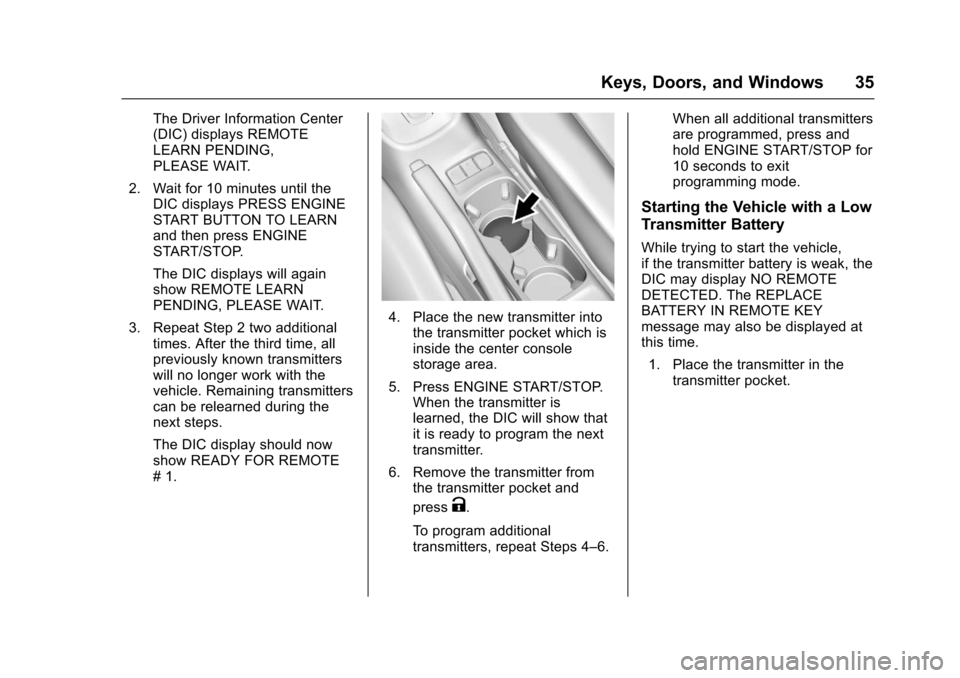
4. Place the new transmitter intothe transmitter pocket which isinside the center consolestorage area.
5. Press ENGINE START/STOP.When the transmitter islearned, the DIC will show thatit is ready to program the nexttransmitter.
6. Remove the transmitter fromthe transmitter pocket and
pressK.
To p r o g r a m a d d i t i o n a ltransmitters, repeat Steps 4–6.
When all additional transmittersare programmed, press andhold ENGINE START/STOP for10 seconds to exitprogramming mode.
Starting the Vehicle with a Low
Transmitter Battery
While trying to start the vehicle,if the transmitter battery is weak, theDIC may display NO REMOTEDETECTED. The REPLACEBATTERY IN REMOTE KEYmessage may also be displayed atthis time.
1. Place the transmitter in thetransmitter pocket.
Page 37 of 342
Chevrolet Sonic Owner Manual (GMNA-Localizing-U.S./Canada-10122660) -2017 - crc - 5/13/16
36 Keys, Doors, and Windows
2. With the vehicle in P (Park) orN(Neutral), press the brakepedal and press ENGINESTART/STOP. SeeStarting theEngine0185.
Replace the transmitter batteryas soon as possible.
Battery Replacement
Replace the battery if the REPLACEBATTERY IN REMOTE KEYmessage displays in the DIC. SeeVehicle Messages0126.
Caution
When replacing the battery, do
not touch any of the circuitry on
the transmitter. Static from your
body could damage the
transmitter.
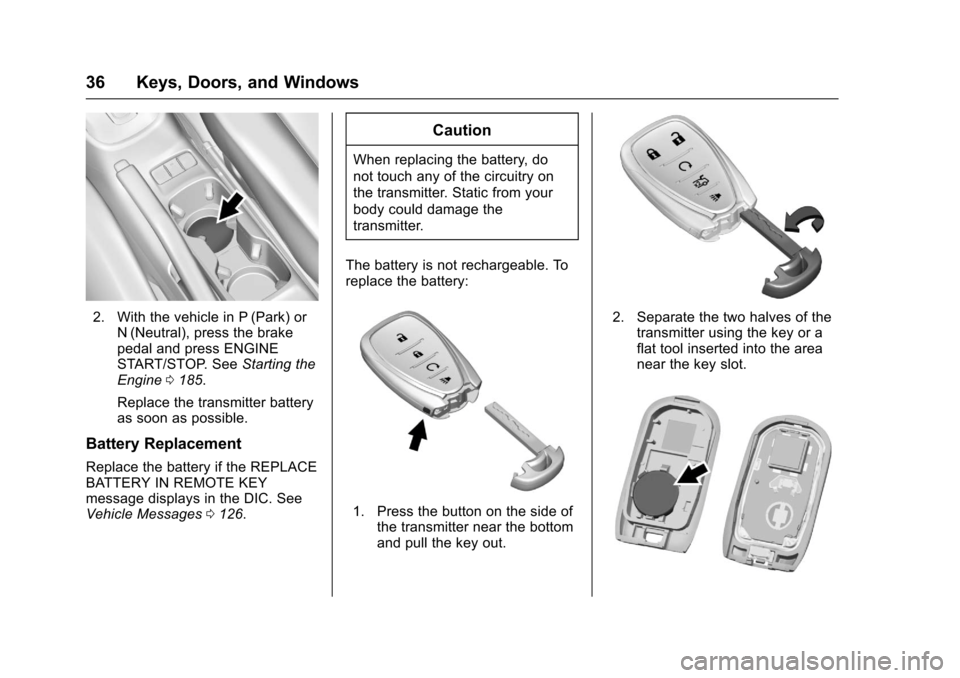
The battery is not rechargeable. Toreplace the battery:
1. Press the button on the side ofthe transmitter near the bottomand pull the key out.
2. Separate the two halves of thetransmitter using the key or aflat tool inserted into the areanear the key slot.
Page 38 of 342
Chevrolet Sonic Owner Manual (GMNA-Localizing-U.S./Canada-10122660) -2017 - crc - 5/13/16
Keys, Doors, and Windows 37
3. Lift the battery with a flatobject.
4. Remove the battery.
5. Insert the new battery, positiveside toward the back cover.Replace with a CR2032 orequivalent battery.
6. Push the transmitter together.
Remote Vehicle Start
If equipped, this feature allows theengine to be started from outsidethe vehicle.
/:This button will be on the RKEtransmitter if the vehicle has remotestart.
The climate control system will usethe previous settings during aremote start. The rear defog maycome on during remote start basedon cold ambient conditions. Therear fog indicator light does notcome on during remote start.
If the vehicle has heated seats, theymay come on during a remote start.SeeHeated Front Seats056.
Laws in some local communitiesmay restrict the use of remotestarters. For example, some lawsrequire a person using remote startto have the vehicle in view. Checklocal regulations for anyrequirements.
Other conditions can affect theperformance of the transmitter. SeeRemote Keyless Entry (RKE)System028.
Starting the Vehicle
To s t a r t t h e e n g i n e u s i n g t h e r e m o t estart feature:
1. Press and releaseQ.
2. Immediately after completing
Step 1, press and hold/for at
least four seconds or until theturn signal lamps flash. Theturn signal lamps flashingconfirms the request to remotestart the vehicle has beenreceived.
When the engine starts, the parkinglamps will turn on and remain on aslong as the engine is running. Thedoors will be locked and the climatecontrol system may come on.
The engine will continue to run for10 minutes. After 30 seconds,repeat the steps if a 10-minuteextension is desired. Remote startcan be extended only once.
Insert the key and turn it to ON/RUNbefore driving.
Extending Engine Run Time
The engine run time can also beextended by another 10 minutes,if during the first 10 minutesSteps 1 and 2 are repeated whilethe engine is still running. Anextension can be requested,30 seconds after starting. Thisprovides a total of 20 minutes.
When the remote start is extended,the second 10-minute period isadded on to the first 10 minutes foratotalof20minutes.
Amaximumoftworemotestarts,or a single start with an extension,are allowed between ignition cycles.
Page 50 of 342
Chevrolet Sonic Owner Manual (GMNA-Localizing-U.S./Canada-10122660) -2017 - crc - 5/13/16
Keys, Doors, and Windows 49
Window Express Movement
Express-down allows the windowsto be opened without holding thewindow switch. Express-up,if equipped, allows the windows tobe closed without holding thewindow switch. Press the windowswitch fully down or pull it up, andquickly release it to engage. Brieflypress or pull the same switch tostop window movement.
Express Window Obstacle
Detection
The express-up feature will reversewindow movement if it comes incontact with an object. Extreme coldor ice could cause the window toauto-reverse. The window willoperate as normal after the object orcondition is removed.
Obstacle Detection Override
{Warning
If obstacle detection override is
activated, the window will not
reverse automatically. You or
others could be injured and the
window could be damaged.
Before you use obstacle detection
override, make sure that all
people and obstructions are clear
of the window path.
The window can be closed byholding the window switch in the upposition if conditions prevent it fromexpress closing.
Programming the Power
Windows
Programming may be necessary ifthe vehicle's battery has beendisconnected or discharged. If thewindow is unable to express-up,program the window:
1. Close all doors.
2. Place the ignition in ACC/ACCESSORY or ON/RUN.
3. Partially open the window to beprogrammed, then close it andcontinue to pull the switchbriefly after the window hasfully closed.
4. Press the power window switchuntil the window is fully openand briefly hold.
Sun Visors
To b l o c k o u t g l a r e , s w i n g d o w n t h esun visors. You can also removethem from the center mount andswing them to the side.
Visor Vanity Mirror
Va n i t y m i r r o r s a r e o n t h e b a c k o f t h esun visors. Swing down the sunvisor and open the cover.
Page 113 of 342
Chevrolet Sonic Owner Manual (GMNA-Localizing-U.S./Canada-10122660) -2017 - crc - 5/13/16
112 Instruments and Controls
Charging System Light
This light will come on briefly whenthe ignition is turned on, and theengine is not running, as a check toshow it is working.
It should go out when the engine isstarted. If it stays on, or comes onwhile driving, there may be aproblem with the electrical chargingsystem. Have it checked by yourdealer. Driving while this light is oncould drain the battery. If a shortdistance must be driven with thelight on, turn off all accessories,such as the radio and airconditioner, to help reduce the drainon the battery.
Malfunction Indicator
Lamp (Check Engine
Light)
This light is part of the vehicle’semission control on-boarddiagnostic system. If this light is onwhile the engine is running, amalfunction has been detected andthe vehicle may require service. Thelight should come on to show that itis working when the ignition is inON/RUN with the engine notrunning. SeeIgnition Positions (KeyAccess)0182orIgnition Positions(Keyless Access)0183.
Malfunctions are often indicated bythe system before any problem isnoticeable. Being aware of the lightand seeking service promptly whenit comes on may prevent damage.
Caution
If the vehicle is driven continually
with this light on, the emission
control system may not work as
well, the fuel economy may be
lower, and the vehicle may not
run smoothly. This could lead to
costly repairs that might not be
covered by the vehicle warranty.
Caution
Modifications to the engine,
transmission, exhaust, intake,
or fuel system, or the use of
replacement tires that do not
meet the original tire
specifications, can cause this light
to come on. This could lead to
costly repairs not covered by the
vehicle warranty. This could also
affect the vehicle’sabilitytopass
an Emissions Inspection/
Maintenance test. See
Accessories and
Modifications0214.
Page 127 of 342
Chevrolet Sonic Owner Manual (GMNA-Localizing-U.S./Canada-10122660) -2017 - crc - 5/13/16
126 Instruments and Controls
Vehicle Messages
Messages displayed on the DICindicate the status of the vehicle orsome action that may be needed tocorrect a condition. Multiplemessages appear one after another.All messages should be takenseriously.
Base Level Cluster
On the base level cluster, vehiclemessages appear as code numbers.Some of these codes may appearwith the Service Vehicle Soon lightin the DIC display.
2:No Remote Detected. PressClutch to Restart
4:A/C Off Due to HighEngine Temp
5:Steering Column Is Locked
7:Turn Steering Wheel, Turn KeyOff, Then On
9:Turn Steering Wheel, StartVehicle Again
10 :Brakes Overheated
15 :Check High MountedBrake Lamp
16 :Check Brake Lamps
18 :Left Low Beam Failure
20 :Right Low Beam Failure
21 :Check Left Position Lamp
22 :Check Right Position Lamp
23 :Reversing Lamp Failure
24 :License Plate Lamp Failure
25 :Left Front Turn Indicator Failure
26 :Left Rear Turn Indicator Failure
27 :Right Front Turn IndicatorFailure
28 :Right Rear Turn Signal Failure
35 :Replace Battery In Remote Key
49 :Lane Departure WarningUnavailable
52 :Change Timing Belt
53 :Tighten Gas Cap
59 :Open, Then Close DriverWindow
65 :Theft Attempted
66 :Service Theft Alarm
67 :Service Steering Column Lock
68 :Service Power Steering, Drivewith Care
77 :Service Front Camera System
79 :Engine Oil Low–Add Oil
81 :Service Transmission
84 :Engine Power Is Reduced
88 :Use Transmitter Pocket to Start
89 :Service Vehicle Soon
91 :No Remote Detected
92 :No Remote Detected, PressBrake To Restart
93 :Press Button Again To TurnEngine Off
94 :Shift to Park
95 :Service Airbag
174 :Low Battery
258 :Park Assist Off
Uplevel Cluster
Messages that do not requireimmediate action can beacknowledged and cleared bypressing SET/CLR.
Page 140 of 342
Chevrolet Sonic Owner Manual (GMNA-Localizing-U.S./Canada-10122660) -2017 - crc - 5/13/16
Lighting 139
If equipped with Keyless Access,the exterior lamps automatically turnon when a door is opened after theignition is changed to the OFFposition. The dome lamps alsocome on after the ignition ischanged to the OFF position. SeeIgnition Positions (Key Access)0182orIgnition Positions (KeylessAccess)0183.
The exterior lamps turn offimmediately by turning the exteriorlamps control off.
This feature can be changed. SeeVehicle Personalization0127.
Battery Load
Management
The vehicle has Electric PowerManagement (EPM) that estimatesthe battery's temperature and stateof charge. It then adjusts the voltagefor best performance and extendedlife of the battery.
When the battery's state of chargeis low, the voltage is raised slightlyto quickly bring the charge back up.When the state of charge is high,
the voltage is lowered slightly toprevent overcharging. If the vehiclehas a voltmeter gauge or a voltagedisplay on the Driver InformationCenter (DIC), you may see thevoltage move up or down. This isnormal. If there is a problem, analert will be displayed.
The battery can be discharged atidle if the electrical loads are veryhigh. This is true for all vehicles.This is because the generator(alternator) may not be spinning fastenough at idle to produce all thepower needed for very highelectrical loads.
Ahighelectricalloadoccurswhenseveral of the following are on, suchas: headlamps, high beams, foglamps, rear window defogger,climate control fan at high speed,heated seats, engine cooling fans,trailer loads, and loads plugged intoaccessory power outlets.
EPM works to prevent excessivedischarge of the battery. It does thisby balancing the generator's outputand the vehicle's electrical needs.It can increase engine idle speed to
generate more power, wheneverneeded. It can temporarily reducethe power demands of someaccessories.
Normally, these actions occur insteps or levels, without beingnoticeable. In rare cases at thehighest levels of corrective action,this action may be noticeable to thedriver.
Battery Power Protection
The battery saver feature isdesigned to protect the vehicle'sbattery.
If some interior lamps are left onand the ignition is turned off, thebattery rundown protection systemautomatically turns the lamp off aftersome time.
Exterior Lighting Battery
Saver
The exterior lamps turn off about10 minutes after the ignition isturned off, if the parking lamps orheadlamps have been manually lefton. This protects against draining
Page 150 of 342
Chevrolet Sonic Owner Manual (GMNA-Localizing-U.S./Canada-10122660) -2017 - crc - 5/13/16
Infotainment System 149
Audio Players
Avoiding Untrusted Media
Devices
When using media devices such asCDs, DVDs, Blu-ray Discs®,SDcards, USB drives, and mobiledevices, consider the source.Untrusted media devices couldcontain files that affect systemoperation or performance. Avoid useif the content or origin cannot betrusted.
USB Port
Using the USB Port
The infotainment system can playmusic by connecting an auxiliarydevice to the USB port.
USB Support
The vehicle is equipped with eitherasingleUSBportordualUSBportslocated in the center stack for dataand charging, and uses theUSB 2.1A standard.
USB Supported Devices
.USB Flash Drives
.iPods/iPhones
.Portable USB Hard Drives
Not all iPods and USB drives arecompatible with the USB port.
Make sure the iPod has the latestfirmware from Apple®for properoperation. iPod firmware can beupdated using the latest iTunes®
application. See www.apple.com/itunes.
For help with identifying your iPod,go to www.apple.com/support.
The USB port can play both lowerand upper case .mp3, .wma, .ogg,and .wav files stored on a USBstorage device.
Supported Apple®Devices
To v i e w s u p p o r t e d d e v i c e s i n t h eU.S., see www.my.chevrolet.com\learned.
To v i e w s u p p o r t e d d e v i c e s i nCanada, seewww.chevroletowner.ca.
To v i e w s u p p o r t e d d e v i c e s i nMexico, see your dealer.
USB Supported File and FolderStructure
The infotainment system supports:
.FAT 1 6 .
.FAT 3 2 .
.exFAT.
Connecting a USB Storage
Device or iPod/iPhone
To c o n n e c t a U S B s t o r a g e d e v i c e ,connect the device to the USB port.
To c o n n e c t a n i P o d / i P h o n e , c o n n e c tone end of the device’scabletotheiPod/iPhone and the other end tothe USB port.
The iPod/iPhone charges while it isconnected to the vehicle if thevehicle is in ACC/ACCESSORY orON/RUN. SeeIgnition Positions(Key Access)0182orIgnitionPositions (Keyless Access)0183.When the vehicle is turned off, theiPod/iPhone automatically powersoff and will not charge or drawpower from the vehicle's battery.