lights CHEVROLET SONIC 2017 2.G Owners Manual
[x] Cancel search | Manufacturer: CHEVROLET, Model Year: 2017, Model line: SONIC, Model: CHEVROLET SONIC 2017 2.GPages: 342, PDF Size: 7.2 MB
Page 16 of 342
Chevrolet Sonic Owner Manual (GMNA-Localizing-U.S./Canada-10122660) -2017 - crc - 5/13/16
In Brief 15
Do not adjust the steering wheelwhile driving.
Interior Lighting
Dome Lamps
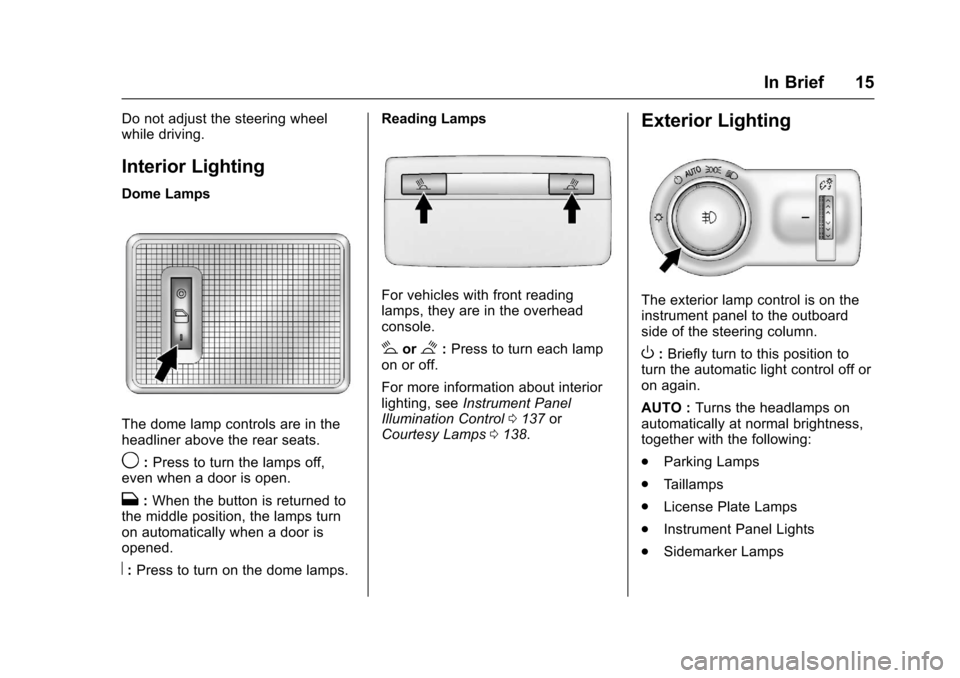
The dome lamp controls are in theheadliner above the rear seats.
9:Press to turn the lamps off,even when a door is open.
H:When the button is returned tothe middle position, the lamps turnon automatically when a door isopened.
R:Press to turn on the dome lamps.
Reading Lamps
For vehicles with front readinglamps, they are in the overheadconsole.
#or$:Press to turn each lampon or off.
For more information about interiorlighting, seeInstrument PanelIllumination Control0137orCourtesy Lamps0138.
Exterior Lighting
The exterior lamp control is on theinstrument panel to the outboardside of the steering column.
O:Briefly turn to this position toturn the automatic light control off oron again.
AUTO :Turns the headlamps onautomatically at normal brightness,together with the following:
.Parking Lamps
.Ta i l l a m p s
.License Plate Lamps
.Instrument Panel Lights
.Sidemarker Lamps
Page 17 of 342
Chevrolet Sonic Owner Manual (GMNA-Localizing-U.S./Canada-10122660) -2017 - crc - 5/13/16
16 In Brief
;:Turns on the parking lampsincluding all lamps except theheadlamps.
5:Turns the headlamps ontogether with the parking lamps andinstrument panel lights. A warningchime sounds if the driver door isopened when the ignition switch isoff and the headlamps are on.
#:For vehicles with fog lamps,press to turn the lamps on or off.
See:
.Exterior Lamp Controls0134
.Daytime Running Lamps(DRL)0135
.Fog Lamps0137
Windshield Wiper/Washer
Sedan
Hatchback
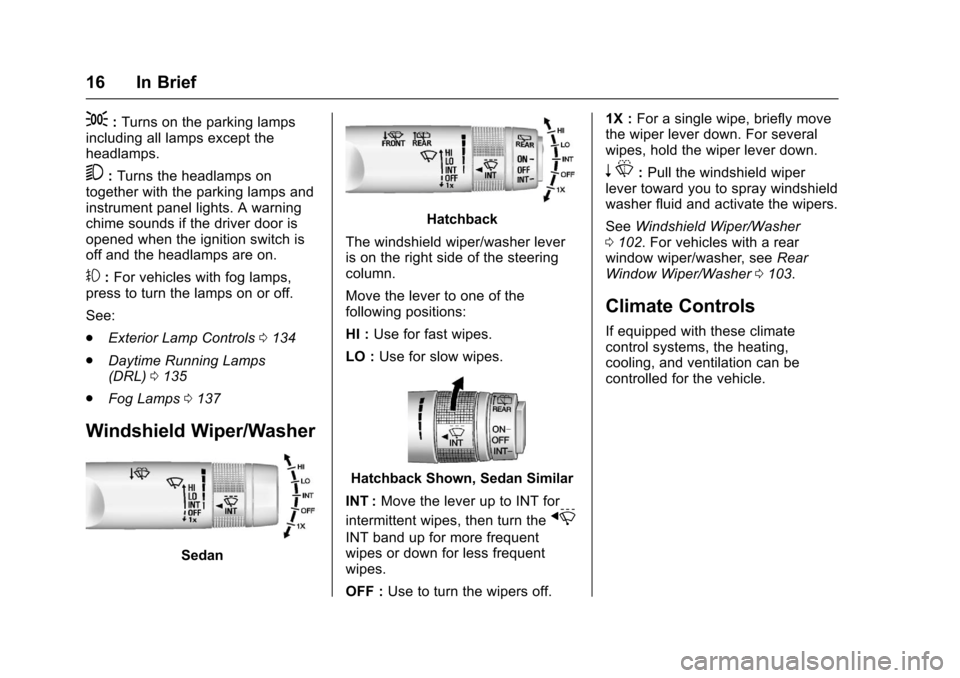
The windshield wiper/washer leveris on the right side of the steeringcolumn.
Move the lever to one of thefollowing positions:
HI :Use for fast wipes.
LO :Use for slow wipes.
Hatchback Shown, Sedan Similar
INT :Move the lever up to INT for
intermittent wipes, then turn thex
INT band up for more frequentwipes or down for less frequentwipes.
OFF :Use to turn the wipers off.
1X :For a single wipe, briefly movethe wiper lever down. For severalwipes, hold the wiper lever down.
nL:Pull the windshield wiperlever toward you to spray windshieldwasher fluid and activate the wipers.
SeeWindshield Wiper/Washer0102.Forvehicleswitharearwindow wiper/washer, seeRearWindow Wiper/Washer0103.
Climate Controls
If equipped with these climatecontrol systems, the heating,cooling, and ventilation can becontrolled for the vehicle.
Page 45 of 342
Chevrolet Sonic Owner Manual (GMNA-Localizing-U.S./Canada-10122660) -2017 - crc - 5/13/16
44 Keys, Doors, and Windows
Vehicle Security
This vehicle has theft-deterrentfeatures; however, they do not makethe vehicle impossible to steal.
Vehicle Alarm System
This vehicle has an anti-theft alarmsystem.
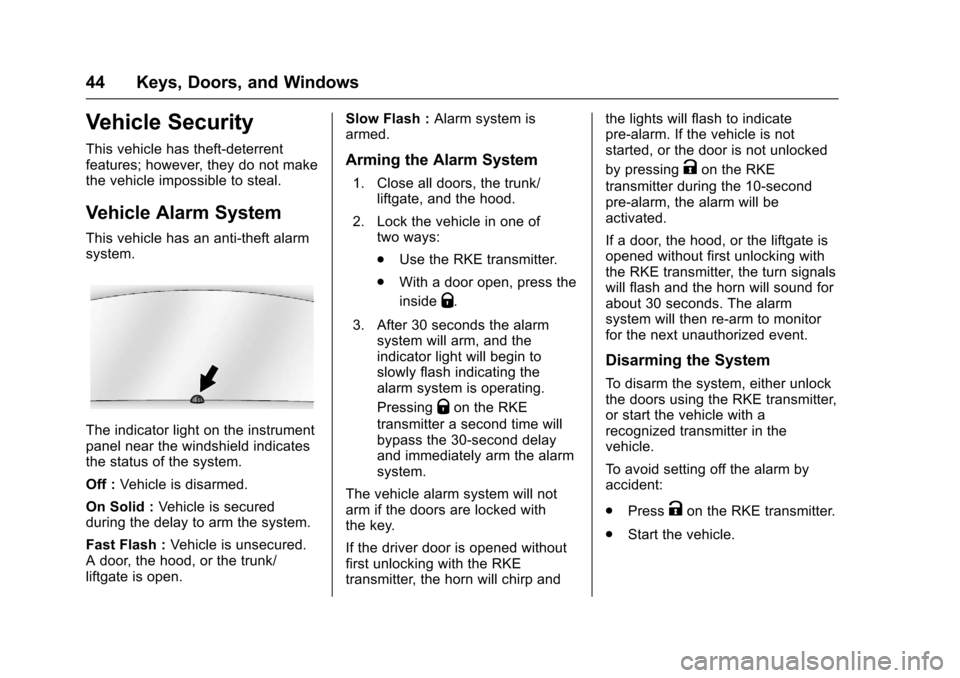
The indicator light on the instrumentpanel near the windshield indicatesthe status of the system.
Off :Vehicle is disarmed.
On Solid :Ve h i c l e i s s e c u r e dduring the delay to arm the system.
Fast Flash :Vehicle is unsecured.Adoor,thehood,orthetrunk/liftgate is open.
Slow Flash :Alarm system isarmed.
Arming the Alarm System
1. Close all doors, the trunk/liftgate, and the hood.
2. Lock the vehicle in one oftwo ways:
.Use the RKE transmitter.
.With a door open, press the
insideQ.
3. After 30 seconds the alarmsystem will arm, and theindicator light will begin toslowly flash indicating thealarm system is operating.
PressingQon the RKE
transmitter a second time willbypass the 30-second delayand immediately arm the alarmsystem.
The vehicle alarm system will notarm if the doors are locked withthe key.
If the driver door is opened withoutfirst unlocking with the RKEtransmitter, the horn will chirp and
the lights will flash to indicatepre-alarm. If the vehicle is notstarted, or the door is not unlocked
by pressingKon the RKE
transmitter during the 10-secondpre-alarm, the alarm will beactivated.
If a door, the hood, or the liftgate isopened without first unlocking withthe RKE transmitter, the turn signalswill flash and the horn will sound forabout 30 seconds. The alarmsystem will then re-arm to monitorfor the next unauthorized event.
Disarming the System
To d i s a r m t h e s y s t e m , e i t h e r u n l o c kthe doors using the RKE transmitter,or start the vehicle with arecognized transmitter in thevehicle.
To a v o i d s e t t i n g o f f t h e a l a r m b yaccident:
.PressKon the RKE transmitter.
.Start the vehicle.
Page 46 of 342
Chevrolet Sonic Owner Manual (GMNA-Localizing-U.S./Canada-10122660) -2017 - crc - 5/13/16
Keys, Doors, and Windows 45
To a v o i d s e t t i n g o f f t h e a l a r m b yaccident:
.Lock the vehicle after alloccupants have left the vehicleand all doors are closed.
.Always unlock a door with theRKE transmitter.
Unlocking the driver door with thekey will not disarm the system orturn off the alarm.
How to Detect a Tamper
Condition
IfKis pressed on the transmitter
and the horn chirps and the lightsflash three times, an alarm occurredpreviously while the alarm systemwas armed.
Immobilizer
SeeRadio FrequencyStatement0317.
Immobilizer Operation
This vehicle has a passivetheft-deterrent system.
The system does not have to bemanually armed or disarmed.
The vehicle is automaticallyimmobilized when the key isremoved from the ignition.
The system is automaticallydisarmed when the vehicle isstarted with the correct key. The keyuses a transponder that matches animmobilizer control unit in thevehicle and automatically disarmsthe system. Only an authorized keystarts the vehicle. The vehicle maynot start if the key is damaged.
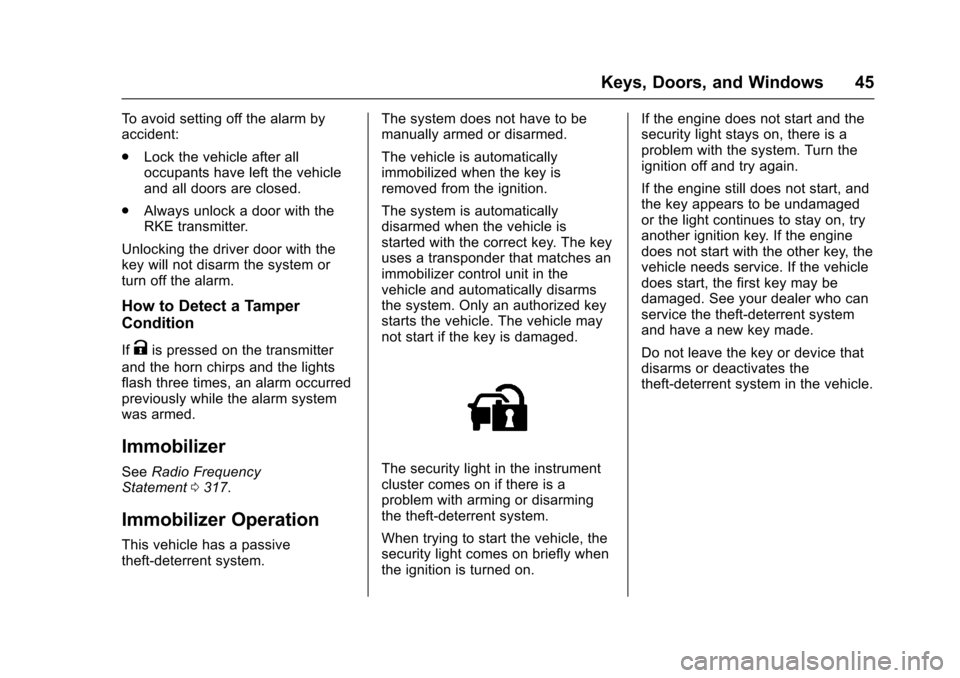
The security light in the instrumentcluster comes on if there is aproblem with arming or disarmingthe theft-deterrent system.
When trying to start the vehicle, thesecurity light comes on briefly whenthe ignition is turned on.
If the engine does not start and thesecurity light stays on, there is aproblem with the system. Turn theignition off and try again.
If the engine still does not start, andthe key appears to be undamagedor the light continues to stay on, tryanother ignition key. If the enginedoes not start with the other key, thevehicle needs service. If the vehicledoes start, the first key may bedamaged. See your dealer who canservice the theft-deterrent systemand have a new key made.
Do not leave the key or device thatdisarms or deactivates thetheft-deterrent system in the vehicle.
Page 58 of 342
Chevrolet Sonic Owner Manual (GMNA-Localizing-U.S./Canada-10122660) -2017 - crc - 5/13/16
Seats and Restraints 57
Remote Start Auto Heated
Seats
If equipped, when it is cold outsidethe heated seats can be turned onautomatically during a remotevehicle start. The heated seats willbe canceled when the ignition isturned on. Press the heated seatcontrols to use the heated seatsafter the vehicle is started.
The heated seat indicator lights donot turn on during a remote start.
The temperature performance of anunoccupied seat may be reduced.This is normal.
SeeRemote Vehicle Start037.
Rear Seats
Folding the Seatback
Either side of the seatback can befolded down for more cargo space.Fold a seatback only when thevehicle is not moving.
Caution
Folding a rear seat with the safety
belts still fastened may cause
damage to the seat or the safety
belts. Always unbuckle the safety
belts and return them to their
normal stowed position before
folding a rear seat.
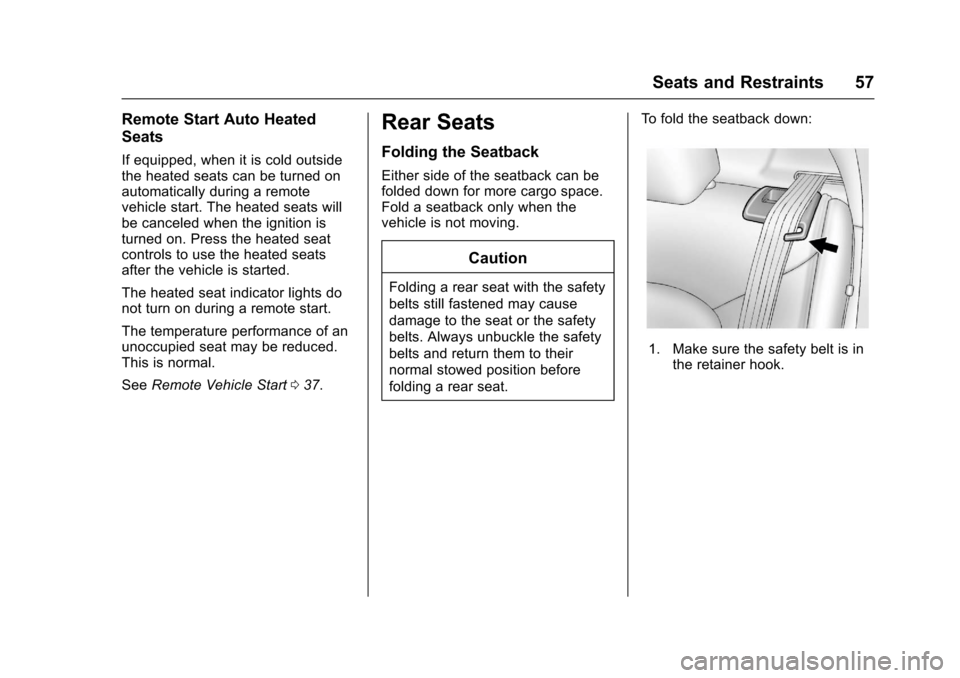
To f o l d t h e s e a t b a c k d o w n :
1. Make sure the safety belt is inthe retainer hook.
Page 101 of 342
Chevrolet Sonic Owner Manual (GMNA-Localizing-U.S./Canada-10122660) -2017 - crc - 5/13/16
100 Instruments and Controls
Instruments and
Controls
Controls
Steering Wheel Adjustment . . . 101Steering Wheel Controls . . . . . . 101Heated Steering Wheel . . . . . . . 102Horn . . . . . . . . . . . . . . . . . . . . . . . . . . 102Windshield Wiper/Washer . . . . 102Rear Window Wiper/Washer . . . . . . . . . . . . . . . . . . . . . 103Compass . . . . . . . . . . . . . . . . . . . . . 104Clock . . . . . . . . . . . . . . . . . . . . . . . . . 104Power Outlets . . . . . . . . . . . . . . . . 105
Warning Lights, Gauges, and
Indicators
Warning Lights, Gauges, andIndicators . . . . . . . . . . . . . . . . . . . 106Instrument Cluster . . . . . . . . . . . . 107Speedometer . . . . . . . . . . . . . . . . . 109Odometer . . . . . . . . . . . . . . . . . . . . . 109Trip Odometer . . . . . . . . . . . . . . . . 109Ta c h o m e t e r . . . . . . . . . . . . . . . . . . . 1 0 9Fuel Gauge . . . . . . . . . . . . . . . . . . . 109Safety Belt Reminders . . . . . . . . 110Airbag Readiness Light . . . . . . . 110Passenger Airbag StatusIndicator . . . . . . . . . . . . . . . . . . . . . 111
Charging System Light . . . . . . . 112Malfunction Indicator Lamp(Check Engine Light) . . . . . . . . 112Service Vehicle Soon Light . . . 114Owner Manual Indicator . . . . . . 114Brake System WarningLight . . . . . . . . . . . . . . . . . . . . . . . . 114Antilock Brake System (ABS)Warning Light . . . . . . . . . . . . . . . 115Operate Pedal Light . . . . . . . . . . 115Up-Shift Light . . . . . . . . . . . . . . . . . 115Power Steering WarningLight . . . . . . . . . . . . . . . . . . . . . . . . 115Lane Departure Warning(LDW) Light . . . . . . . . . . . . . . . . . 116Forward Collision Alert (FCA)Warning Light . . . . . . . . . . . . . . . 116Vehicle Ahead Indicator . . . . . . . 116Ultrasonic Parking SensorLight . . . . . . . . . . . . . . . . . . . . . . . . 116Traction Off Light . . . . . . . . . . . . . 117StabiliTrak®OFF Light . . . . . . . . 117Traction Control System (TCS)/StabiliTrak®Light . . . . . . . . . . . . 117Engine Coolant TemperatureWarning Light . . . . . . . . . . . . . . . 118Tire Pressure Light . . . . . . . . . . . 118Engine Oil Pressure Light . . . . . 118Low Fuel Warning Light . . . . . . . 119Immobilizer Light . . . . . . . . . . . . . 119
Reduced Engine PowerLight . . . . . . . . . . . . . . . . . . . . . . . . 120High-Beam On Light . . . . . . . . . . 120Front Fog Lamp Light . . . . . . . . . 120Lamps On Reminder . . . . . . . . . 120Cruise Control Light . . . . . . . . . . 120Door Ajar Light . . . . . . . . . . . . . . . 121Trunk Ajar Light . . . . . . . . . . . . . . 121
Information Displays
Driver InformationCenter (DIC) . . . . . . . . . . . . . . . . 121
Vehicle Messages
Vehicle Messages . . . . . . . . . . . . 126Engine Oil Messages . . . . . . . . . 127Tire Messages . . . . . . . . . . . . . . . . 127
Vehicle Personalization
Vehicle Personalization . . . . . . . 127
Page 107 of 342
Chevrolet Sonic Owner Manual (GMNA-Localizing-U.S./Canada-10122660) -2017 - crc - 5/13/16
106 Instruments and Controls
Warning Lights,
Gauges, and
Indicators
Warning lights and gauges cansignal that something is wrongbefore it becomes serious enoughto cause an expensive repair orreplacement. Paying attention to thewarning lights and gauges couldprevent injury.
Some warning lights come on brieflywhen the engine is started toindicate they are working. Whenone of the warning lights comes onand stays on while driving, or whenone of the gauges shows there maybe a problem, check the section thatexplains what to do. Waiting to dorepairs can be costly and evendangerous.
Page 112 of 342
Chevrolet Sonic Owner Manual (GMNA-Localizing-U.S./Canada-10122660) -2017 - crc - 5/13/16
Instruments and Controls 111
{Warning
If the airbag readiness light stays
on after the vehicle is started or
comes on while driving, it means
the airbag system might not be
working properly. The airbags in
the vehicle might not inflate in a
crash, or they could even inflate
without a crash. To help avoid
injury, have the vehicle serviced
right away.
Passenger Airbag Status
Indicator
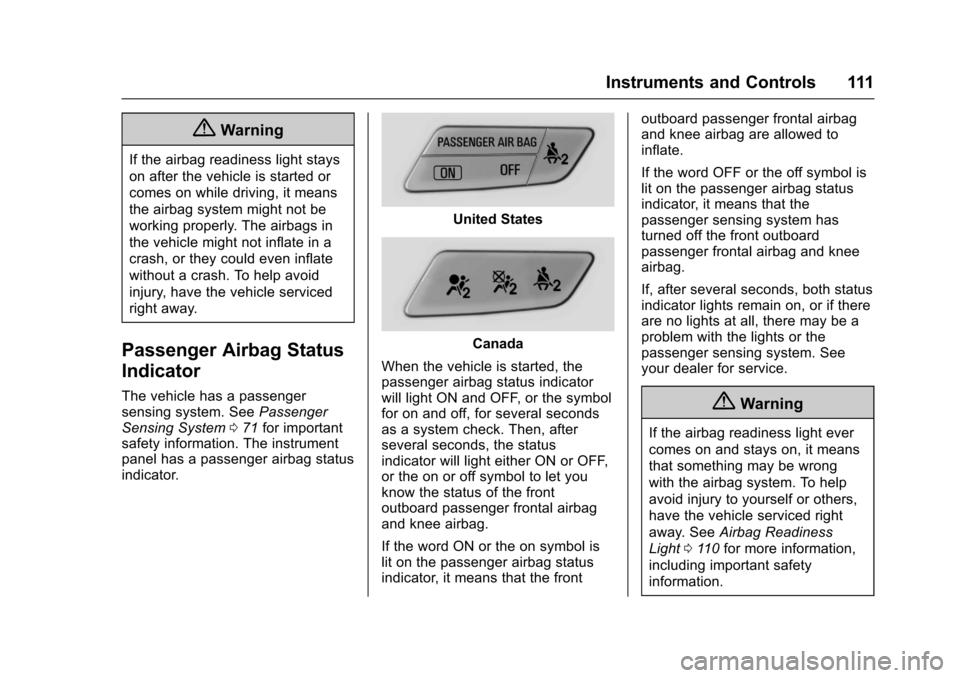
The vehicle has a passengersensing system. SeePassengerSensing System071for importantsafety information. The instrumentpanel has a passenger airbag statusindicator.
United States
Canada
When the vehicle is started, thepassenger airbag status indicatorwill light ON and OFF, or the symbolfor on and off, for several secondsas a system check. Then, afterseveral seconds, the statusindicator will light either ON or OFF,or the on or off symbol to let youknow the status of the frontoutboard passenger frontal airbagand knee airbag.
If the word ON or the on symbol islit on the passenger airbag statusindicator, it means that the front
outboard passenger frontal airbagand knee airbag are allowed toinflate.
If the word OFF or the off symbol islit on the passenger airbag statusindicator, it means that thepassenger sensing system hasturned off the front outboardpassenger frontal airbag and kneeairbag.
If, after several seconds, both statusindicator lights remain on, or if thereare no lights at all, there may be aproblem with the lights or thepassenger sensing system. Seeyour dealer for service.
{Warning
If the airbag readiness light ever
comes on and stays on, it means
that something may be wrong
with the airbag system. To help
avoid injury to yourself or others,
have the vehicle serviced right
away. SeeAirbag Readiness
Light011 0for more information,
including important safety
information.
Page 121 of 342
Chevrolet Sonic Owner Manual (GMNA-Localizing-U.S./Canada-10122660) -2017 - crc - 5/13/16
120 Instruments and Controls
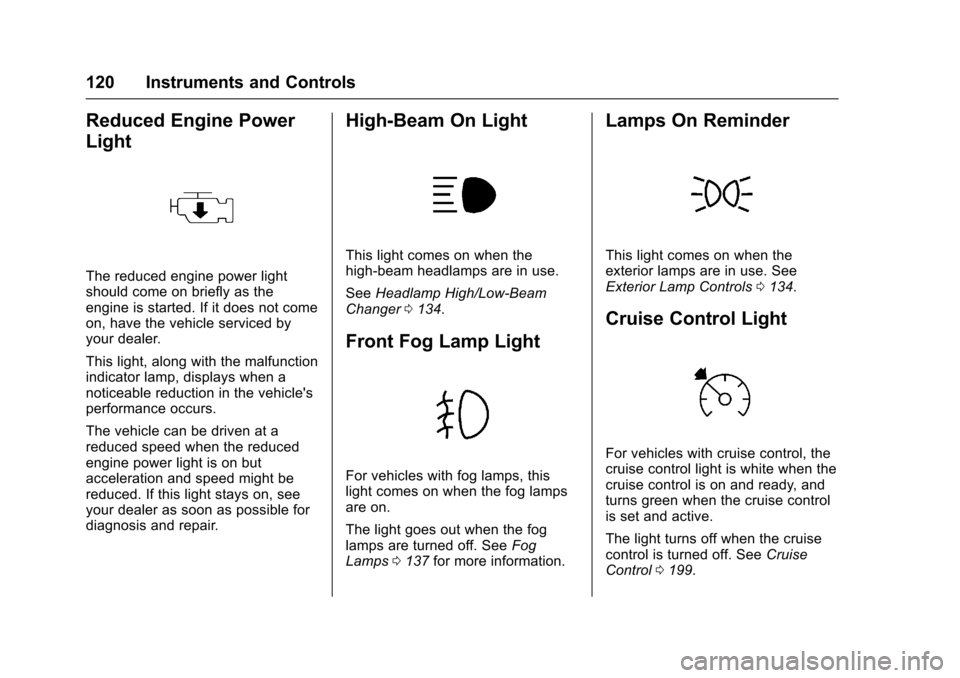
Reduced Engine Power
Light
The reduced engine power lightshould come on briefly as theengine is started. If it does not comeon, have the vehicle serviced byyour dealer.
This light, along with the malfunctionindicator lamp, displays when anoticeable reduction in the vehicle'sperformance occurs.
The vehicle can be driven at areduced speed when the reducedengine power light is on butacceleration and speed might bereduced. If this light stays on, seeyour dealer as soon as possible fordiagnosis and repair.
High-Beam On Light
This light comes on when thehigh-beam headlamps are in use.
SeeHeadlamp High/Low-BeamChanger0134.
Front Fog Lamp Light
For vehicles with fog lamps, thislight comes on when the fog lampsare on.
The light goes out when the foglamps are turned off. SeeFogLamps0137for more information.
Lamps On Reminder
This light comes on when theexterior lamps are in use. SeeExterior Lamp Controls0134.
Cruise Control Light
For vehicles with cruise control, thecruise control light is white when thecruise control is on and ready, andturns green when the cruise controlis set and active.
The light turns off when the cruisecontrol is turned off. SeeCruiseControl0199.
Page 130 of 342
Chevrolet Sonic Owner Manual (GMNA-Localizing-U.S./Canada-10122660) -2017 - crc - 5/13/16
Instruments and Controls 129
Text Scroll
Select to see text scroll on thescreen.
Select Off or On.
Tone Settings
Select to adjust the radio tone. SeeOperation0144.
Auto Volume
This feature adjusts the volumebased on vehicle speed andambient noise.
Select Off, Low, Medium-Low,Medium, Medium-High, or High.
Maximum Startup Volume
This feature sets the maximumstartup volume. If the vehicle isstarted and the volume is greaterthan this level, the volume isadjusted to this level. To set themaximum startup volume, turn theMENU knob or press + or✓toincrease or decrease.
Audio Cue Volume
This feature sets the volume ofaudio files played at system startupand shutdown.
Select On, then press + or✓toincrease or decrease the volume.
Vehicle
Select and the following maydisplay:
.Collision/Detection Systems
.Comfort and Convenience
.Lighting
.Power Door Locks
.Remote Lock, Unlock, Start
Collision/Detection Systems
Select and the following maydisplay:
.Park Assist
Park Assist
If equipped, this feature can assistin backing up and parking thevehicle. SeeParking Assist0203.
Select On or Off.
Comfort and Convenience
Select and the following maydisplay:
.Chime Volume
.Auto Wipe in Reverse Gear
Chime Volume
This allows the selection of thechime volume level.
Turn the MENU knob, touch + or✓to adjust the volume, or selectNormal or High.
Auto Wipe in Reverse Gear
When on and the front wiper is on,the rear wiper will automaticallyactivate when the vehicle is shiftedto R (Reverse).
Select Off or On.
Lighting
Select and the following maydisplay:
.Vehicle Locator Lights
.Exit Lighting