cooling CHEVROLET SONIC 2018 User Guide
[x] Cancel search | Manufacturer: CHEVROLET, Model Year: 2018, Model line: SONIC, Model: CHEVROLET SONIC 2018Pages: 349, PDF Size: 5.49 MB
Page 232 of 349
Chevrolet Sonic Owner Manual (GMNA-Localizing-U.S./Canada-11373973) -
2018 - crc - 10/9/17
Vehicle Care 231
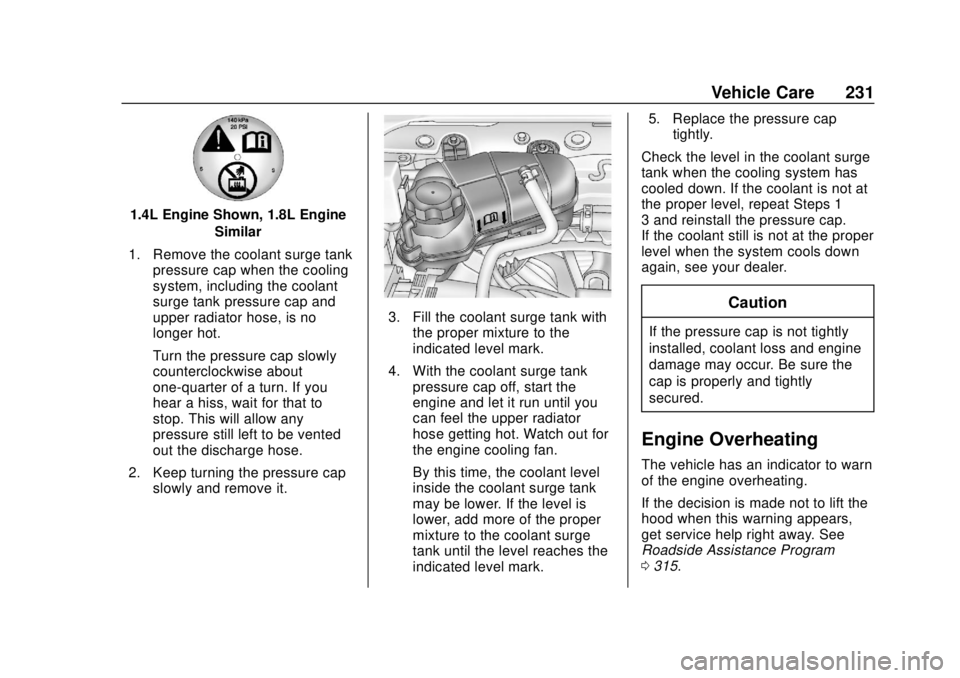
1.4L Engine Shown, 1.8L EngineSimilar
1. Remove the coolant surge tank pressure cap when the cooling
system, including the coolant
surge tank pressure cap and
upper radiator hose, is no
longer hot.
Turn the pressure cap slowly
counterclockwise about
one-quarter of a turn. If you
hear a hiss, wait for that to
stop. This will allow any
pressure still left to be vented
out the discharge hose.
2. Keep turning the pressure cap slowly and remove it.
3. Fill the coolant surge tank withthe proper mixture to the
indicated level mark.
4. With the coolant surge tank pressure cap off, start the
engine and let it run until you
can feel the upper radiator
hose getting hot. Watch out for
the engine cooling fan.
By this time, the coolant level
inside the coolant surge tank
may be lower. If the level is
lower, add more of the proper
mixture to the coolant surge
tank until the level reaches the
indicated level mark. 5. Replace the pressure cap
tightly.
Check the level in the coolant surge
tank when the cooling system has
cooled down. If the coolant is not at
the proper level, repeat Steps 1–
3 and reinstall the pressure cap.
If the coolant still is not at the proper
level when the system cools down
again, see your dealer.Caution
If the pressure cap is not tightly
installed, coolant loss and engine
damage may occur. Be sure the
cap is properly and tightly
secured.
Engine Overheating
The vehicle has an indicator to warn
of the engine overheating.
If the decision is made not to lift the
hood when this warning appears,
get service help right away. See
Roadside Assistance Program
0 315.
Page 233 of 349
Chevrolet Sonic Owner Manual (GMNA-Localizing-U.S./Canada-11373973) -
2018 - crc - 10/9/17
232 Vehicle Care
If the decision is made to lift the
hood, make sure the vehicle is
parked on a level surface.
Then check to see if the engine
cooling fan is running. If the engine
is overheating, the fan should be
running. If it is not, do not continue
to run the engine. Have the vehicle
serviced.
Caution
Do not run the engine if there is a
leak in the engine cooling system.
This can cause a loss of all
coolant and can damage the
system and vehicle. Have any
leaks fixed right away.
If Steam Is Coming from the
Engine Compartment
{Warning
Steam and scalding liquids from a
hot cooling system are under
pressure. Turning the pressure(Continued)
Warning (Continued)
cap, even a little, can cause them
to come out at high speed and
you could be burned. Never turn
the cap when the cooling system,
including the pressure cap, is hot.
Wait for the cooling system and
pressure cap to cool.
If No Steam Is Coming from
the Engine Compartment
If an engine overheat warning is
displayed but no steam can be seen
or heard, the problem may not be
too serious. Sometimes the engine
can get a little too hot when the
vehicle:
.Climbs a long hill on a hot day.
. Stops after high-speed driving.
. Idles for long periods in traffic.
If the overheat warning is displayed
with no sign of steam: 1. Turn the air conditioning off. 2. Turn the heater on to the
highest temperature and to the
highest fan speed. Open the
windows as necessary.
3. When it is safe to do so, pull off the road, shift to P (Park) or
N (Neutral) for an automatic
transmission or Neutral for a
manual transmission, and let
the engine idle.
If the overheat warning no longer
displays, the vehicle can be driven.
Continue to drive the vehicle slowly
for about 10 minutes. Keep a safe
vehicle distance from the vehicle in
front. If the warning does not come
back on, continue to drive normally
and have the cooling system
checked for proper fill and function.
If the warning continues, pull over,
stop, and park the vehicle
right away.
If there is no sign of steam, idle the
engine for three minutes while
parked. If the warning is still
displayed, turn off the engine until it
cools down.
Page 247 of 349
Chevrolet Sonic Owner Manual (GMNA-Localizing-U.S./Canada-11373973) -
2018 - crc - 10/9/17
246 Vehicle Care
Mini Fuses Usage15 Front heated seats
16 Fuel system control module 1
17 Canister vent
18 Washer
19* Fuel pump 20 Engine control module 5
21 Fuel system control module 2/Leveling
22 Transmission control module 1/
DC DC converter
24 Engine control module 1
25 Coil
26 Engine control module 4
27 Engine control module 3
28 Engine control module 2 Mini Fuses Usage
29 Injector/Ignition coil
30 Engine control module
31 Air conditioning clutch
32 Transmission control module
33 Horn
34 Front fog lamps
35 Left high-beam headlamp
36 Right high-beam headlamp
* = If equipped J-CaseFuses Usage
1 Front wipers
2 Antilock brake system pump
3 Blower
4 Run/Crank IEC
6 Cooling fan K4 J-Case
Fuses Usage
7 Cooling fan K5
8* SAI pump 9 Electric vacuum pump
10 Start
* = If equipped Relays Usage
RLY 1 Front wiper control
RLY 2* Rear fog lamp RLY 3 Front wiper speed
RLY 4 Rear window defogger
RLY 5 Run/Crank
RLY 6* –/SAI valve
RLY 8* Fuel pump
RLY 9* SAI pump
RLY 10 Cooling fan K3 RLY 11 P/T
RLY 12 Start
Page 248 of 349

Chevrolet Sonic Owner Manual (GMNA-Localizing-U.S./Canada-11373973) -
2018 - crc - 10/9/17
Vehicle Care 247
RelaysUsage
RLY 13 Air conditioning clutch
RLY 14 High-beam headlamps
RLY 15 Cooling fan K1
* = If equipped 1.4L Engine
The vehicle may not be equipped
with all of the fuses, relays, and
features shown. Mini Fuses Usage
1 Antilock brake system valve
2 Sunroof
4* Rear fog lamp 5 Exterior rearview mirror/Power
window switch
6 Automatic occupant
sensing/ROS
7 Passive entry/ Passive start
8 Regulated voltage control
9 Rear wiper
10 –/Intelligent battery
sensor
11 Rear window defogger
12 Electric steering column lock
14 Heated Exterior rearview mirror
Page 249 of 349

Chevrolet Sonic Owner Manual (GMNA-Localizing-U.S./Canada-11373973) -
2018 - crc - 10/9/17
248 Vehicle Care
Mini Fuses Usage15 Front heated seats
16 Fuel system control module 1
17 Canister vent
18 Washer
20 Engine control module 5
21 Fuel system control module 2/Leveling
22 Transmission control module 1/
DC DC converter
24 Engine control module 1
25 Coil
26 Engine control module 4
27 Engine control module 3
28 Engine control module 2
29 Injector/Ignition coil Mini Fuses Usage
30 Engine control module
31 Air conditioning clutch
32 Transmission control module
33 Horn
34 Front fog lamps
35 Left high-beam headlamp
36 Right high-beam headlamp
* = If equipped J-CaseFuses Usage
1 Front wipers
2 Antilock brake system pump
3 Blower
4 Run/Crank IEC
5 Power seat
6 Cooling fan K4 J-Case
Fuses Usage
7 Cooling fan K5
9 Electric vacuum pump
10 Start
* = If equipped Relays Usage
RLY 1 Front wiper control
RLY 2* Rear fog lamp
RLY 3 Front wiper speed
RLY 4 Rear defogger
RLY 5 Run/Crank
RLY 9 Cooling fan K2
RLY 10 Cooling fan K3 RLY 11 P/T
RLY 12 Start
RLY 13 Air conditioning clutch
Page 250 of 349
Chevrolet Sonic Owner Manual (GMNA-Localizing-U.S./Canada-11373973) -
2018 - crc - 10/9/17
Vehicle Care 249
RelaysUsage
RLY 14 High-beam headlamps
RLY 15 Cooling fan K1
* = If equipped
Instrument Panel Fuse
Block
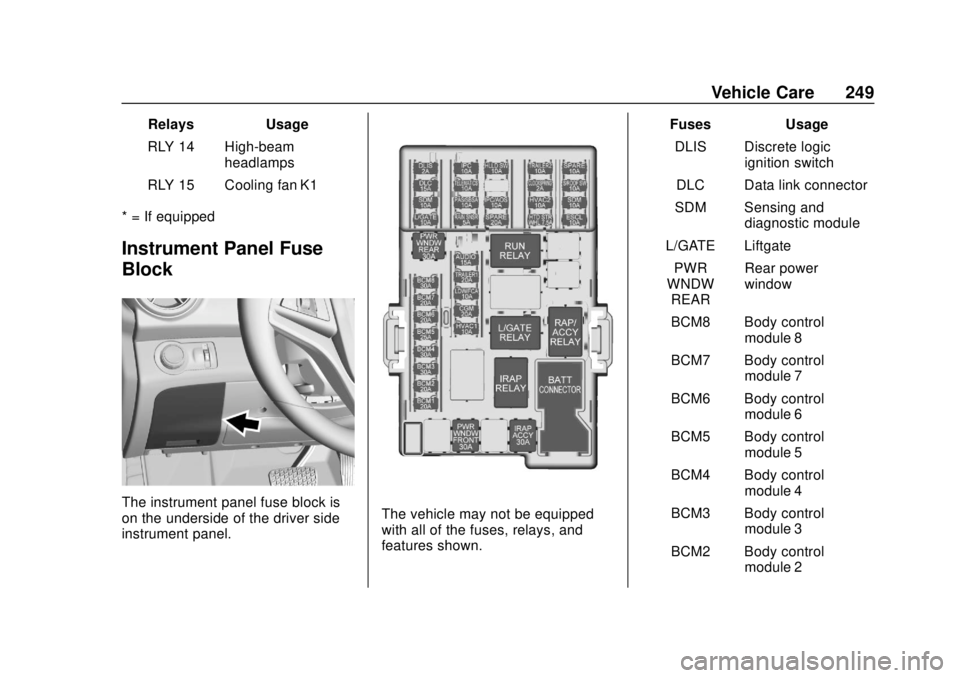
The instrument panel fuse block is
on the underside of the driver side
instrument panel.The vehicle may not be equipped
with all of the fuses, relays, and
features shown. Fuses Usage
DLIS Discrete logic ignition switch
DLC Data link connector
SDM Sensing and diagnostic module
L/GATE Liftgate PWR
WNDW REAR Rear power
window
BCM8 Body control module 8
BCM7 Body control module 7
BCM6 Body control module 6
BCM5 Body control module 5
BCM4 Body control module 4
BCM3 Body control module 3
BCM2 Body control module 2
Page 270 of 349
Chevrolet Sonic Owner Manual (GMNA-Localizing-U.S./Canada-11373973) -
2018 - crc - 10/9/17
Vehicle Care 269
underinflation, or excessive
loading, either separately or in
combination, can cause heat
buildup and possible tire failure.
Wheel Alignment and Tire
Balance
The tires and wheels were aligned
and balanced at the factory to
provide the longest tire life and best
overall performance. Adjustments to
wheel alignment and tire balancing
are not necessary on a regular
basis. Consider an alignment check
if there is unusual tire wear or the
vehicle is significantly pulling to one
side or the other. Some slight pull to
the left or right, depending on the
crown of the road and/or other road
surface variations such as troughs
or ruts, is normal. If the vehicle is
vibrating when driving on a smooth
road, the tires and wheels may need
to be rebalanced. See your dealer
for proper diagnosis.
Wheel Replacement
Replace any wheel that is bent,
cracked, or badly rusted or
corroded. If wheel nuts keep coming
loose, the wheel, wheel bolts, and
wheel nuts should be replaced.
If the wheel leaks air, replace it.
Some aluminum wheels can be
repaired. See your dealer if any of
these conditions exist.
Your dealer will know the kind of
wheel that is needed.
Each new wheel should have the
same load-carrying capacity,
diameter, width, offset, and be
mounted the same way as the one it
replaces.
Replace wheels, wheel bolts, wheel
nuts, or Tire Pressure Monitor
System (TPMS) sensors with new
GM original equipment parts.{Warning
Using the wrong replacement
wheels, wheel bolts, or wheel
nuts can be dangerous. It could
affect the braking and handling of
the vehicle. Tires can lose air,
and cause loss of control, causing
a crash. Always use the correct
wheel, wheel bolts, and wheel
nuts for replacement.
Caution
The wrong wheel can also cause
problems with bearing life, brake
cooling, speedometer or
odometer calibration, headlamp
aim, bumper height, vehicle
ground clearance, and tire or tire
chain clearance to the body and
chassis.
Page 296 of 349
Chevrolet Sonic Owner Manual (GMNA-Localizing-U.S./Canada-11373973) -
2018 - crc - 10/9/17
Service and Maintenance 295
Maintenance
Schedule
Owner Checks and Services
At Each Fuel Stop
.Check the engine oil level. See
Engine Oil 0222.
Once a Month
. Check the tire inflation
pressures. See Tire Pressure
0 258.
. Inspect the tires for wear. See
Tire Inspection 0263.
. Check the windshield washer
fluid level. See Washer Fluid
0 233.
Engine Oil Change
When a:% CHANGE message
displays in the DIC, have the engine
oil and filter changed within the next
1 000 km/600 mi. If driven under the
best conditions, the engine oil life
system may not indicate the need
for vehicle service for up to a year.
The engine oil and filter must be changed at least once a year and
the oil life system must be reset.
Your trained dealer technician can
perform this work. If the engine oil
life system is reset accidentally,
service the vehicle within 5 000 km/
3,000 mi since the last service.
Reset the oil life system when the
oil is changed. See
Engine Oil Life
System 0224.
Tire Rotation and Required
Services Every 12 000 km/
7,500 mi
Rotate the tires, if recommended for
the vehicle, and perform the
following services. See Tire
Rotation 0264.
. Check engine oil level and oil
life percentage. If needed,
change engine oil and filter, and
reset oil life system.
See Engine Oil 0222 and
Engine Oil Life System 0224.
. Check engine coolant level. See
Cooling System 0228.
. Check windshield washer fluid
level. See Washer Fluid 0233. .
Visually inspect windshield wiper
blades for wear, cracking,
or contamination. See Exterior
Care 0283. Replace worn or
damaged wiper blades. See
Wiper Blade Replacement
0 237.
. Check tire inflation pressures.
See Tire Pressure 0258.
. Inspect tire wear. See Tire
Inspection 0263.
. Visually check for fluid leaks.
. Inspect engine air cleaner filter.
See Engine Air Cleaner/Filter
0 226.
. Inspect brake system. See
Exterior Care 0283.
. Visually inspect steering,
suspension, and chassis
components for damaged, loose,
or missing parts or signs of
wear. See Exterior Care 0283.
. Check restraint system
components. See Safety System
Check 066.
. Visually inspect fuel system for
damage or leaks.
Page 298 of 349
Chevrolet Sonic Owner Manual (GMNA-Localizing-U.S./Canada-11373973) -
2018 - crc - 10/9/17
Service and Maintenance 297
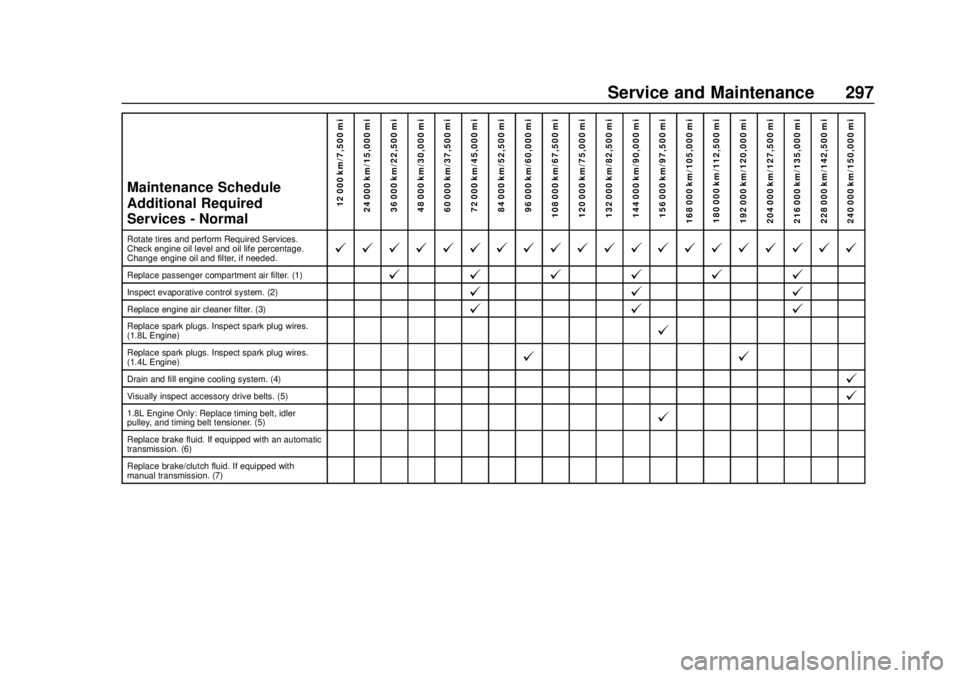
Maintenance Schedule
Additional Required
Services - Normal12 000 km/7,500 mi
24 000 km/15,000 mi
36 000 km/22,500 mi
48 000 km/30,000 mi
60 000 km/37,500 mi
72 000 km/45,000 mi
84 000 km/52,500 mi
96 000 km/60,000 mi
108 000 km/67,500 mi
120 000 km/75,000 mi
132 000 km/82,500 mi
144 000 km/90,000 mi
156 000 km/97,500 mi
168 000 km/105,000 mi 180 000 km/112,500 mi
192 000 km/120,000 mi
204 000 km/127,500 mi
216 000 km/135,000 mi
228 000 km/142,500 mi
240 000 km/150,000 mi
Rotate tires and perform Required Services.
Check engine oil level and oil life percentage.
Change engine oil and filter, if needed.@ @ @ @ @ @ @ @ @ @ @ @ @ @ @ @ @ @ @ @
Replace passenger compartment air filter. (1)@ @@@@@
Inspect evaporative control system. (2)@ @@
Replace engine air cleaner filter. (3)@@@
Replace spark plugs. Inspect spark plug wires.
(1.8L Engine)@
Replace spark plugs. Inspect spark plug wires.
(1.4L Engine)@ @
Drain and fill engine cooling system. (4)@
Visually inspect accessory drive belts. (5)@
1.8L Engine Only: Replace timing belt, idler
pulley, and timing belt tensioner. (5)@
Replace brake fluid. If equipped with an automatic
transmission. (6)
Replace brake/clutch fluid. If equipped with
manual transmission. (7)
Page 299 of 349
Chevrolet Sonic Owner Manual (GMNA-Localizing-U.S./Canada-11373973) -
2018 - crc - 10/9/17
298 Service and Maintenance
Footnotes—Maintenance
Schedule Additional Required
Services - Normal
(1) Or every two years, whichever
comes first. More frequent
passenger compartment air filter
replacement may be needed if
driving in areas with heavy traffic,
poor air quality, high dust levels,
or environmental allergens.
Passenger compartment air filter
replacement may also be needed if
there is reduced airflow, window
fogging, or odors. Your GM dealer
can help determine when to replace
the filter.
(2) Visually check all fuel and vapor
lines and hoses for proper
attachment, connection, routing, and
condition.
(3) Or every four years, whichever
comes first. If driving in dusty
conditions, inspect the filter at each
oil change or more often as needed.
(4) Or every five years, whichever
comes first. See Cooling System
0 228. (5)
Or every 10 years, whichever
comes first. Inspect for fraying,
excessive cracking, or damage;
replace, if needed.
(6) If equipped with an automatic
transmission, replace brake fluid
every five years. See Brake Fluid
0 234.
(7) If equipped with a manual
transmission, replace brake/clutch
fluid every three years. See Brake
Fluid 0234.