horn CHEVROLET SONIC 2018 User Guide
[x] Cancel search | Manufacturer: CHEVROLET, Model Year: 2018, Model line: SONIC, Model: CHEVROLET SONIC 2018Pages: 349, PDF Size: 5.49 MB
Page 247 of 349
Chevrolet Sonic Owner Manual (GMNA-Localizing-U.S./Canada-11373973) -
2018 - crc - 10/9/17
246 Vehicle Care
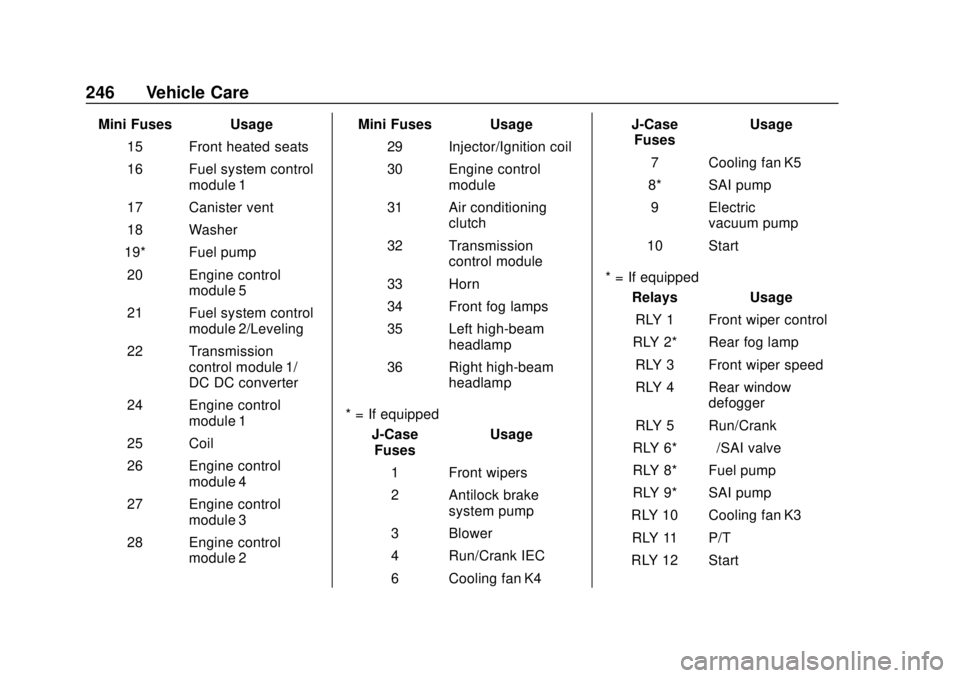
Mini Fuses Usage15 Front heated seats
16 Fuel system control module 1
17 Canister vent
18 Washer
19* Fuel pump 20 Engine control module 5
21 Fuel system control module 2/Leveling
22 Transmission control module 1/
DC DC converter
24 Engine control module 1
25 Coil
26 Engine control module 4
27 Engine control module 3
28 Engine control module 2 Mini Fuses Usage
29 Injector/Ignition coil
30 Engine control module
31 Air conditioning clutch
32 Transmission control module
33 Horn
34 Front fog lamps
35 Left high-beam headlamp
36 Right high-beam headlamp
* = If equipped J-CaseFuses Usage
1 Front wipers
2 Antilock brake system pump
3 Blower
4 Run/Crank IEC
6 Cooling fan K4 J-Case
Fuses Usage
7 Cooling fan K5
8* SAI pump 9 Electric vacuum pump
10 Start
* = If equipped Relays Usage
RLY 1 Front wiper control
RLY 2* Rear fog lamp RLY 3 Front wiper speed
RLY 4 Rear window defogger
RLY 5 Run/Crank
RLY 6* –/SAI valve
RLY 8* Fuel pump
RLY 9* SAI pump
RLY 10 Cooling fan K3 RLY 11 P/T
RLY 12 Start
Page 249 of 349

Chevrolet Sonic Owner Manual (GMNA-Localizing-U.S./Canada-11373973) -
2018 - crc - 10/9/17
248 Vehicle Care
Mini Fuses Usage15 Front heated seats
16 Fuel system control module 1
17 Canister vent
18 Washer
20 Engine control module 5
21 Fuel system control module 2/Leveling
22 Transmission control module 1/
DC DC converter
24 Engine control module 1
25 Coil
26 Engine control module 4
27 Engine control module 3
28 Engine control module 2
29 Injector/Ignition coil Mini Fuses Usage
30 Engine control module
31 Air conditioning clutch
32 Transmission control module
33 Horn
34 Front fog lamps
35 Left high-beam headlamp
36 Right high-beam headlamp
* = If equipped J-CaseFuses Usage
1 Front wipers
2 Antilock brake system pump
3 Blower
4 Run/Crank IEC
5 Power seat
6 Cooling fan K4 J-Case
Fuses Usage
7 Cooling fan K5
9 Electric vacuum pump
10 Start
* = If equipped Relays Usage
RLY 1 Front wiper control
RLY 2* Rear fog lamp
RLY 3 Front wiper speed
RLY 4 Rear defogger
RLY 5 Run/Crank
RLY 9 Cooling fan K2
RLY 10 Cooling fan K3 RLY 11 P/T
RLY 12 Start
RLY 13 Air conditioning clutch
Page 264 of 349
Chevrolet Sonic Owner Manual (GMNA-Localizing-U.S./Canada-11373973) -
2018 - crc - 10/9/17
Vehicle Care 263
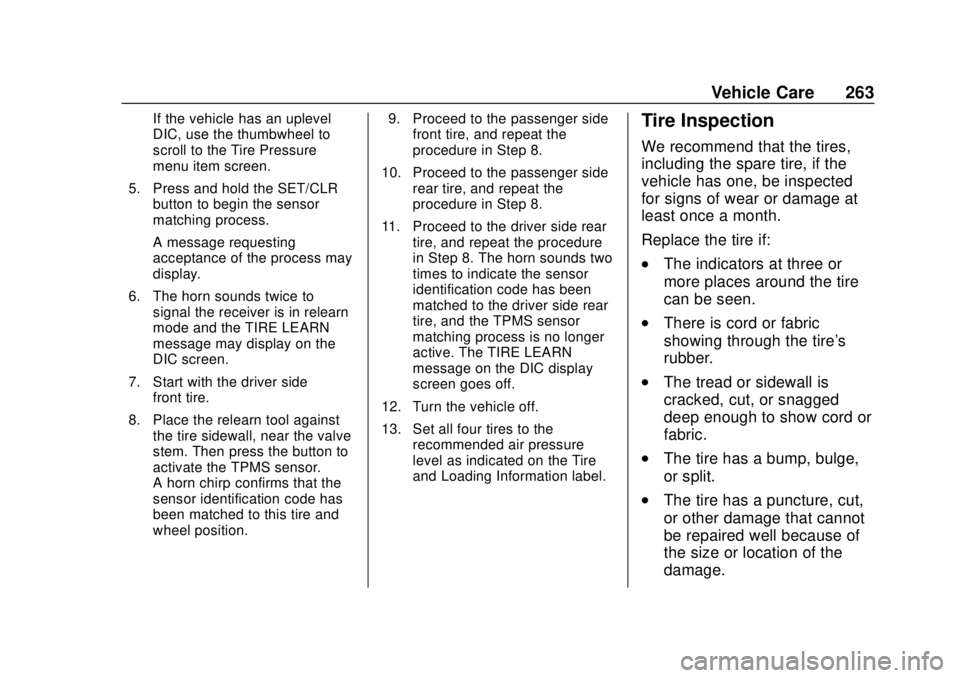
If the vehicle has an uplevel
DIC, use the thumbwheel to
scroll to the Tire Pressure
menu item screen.
5. Press and hold the SET/CLR button to begin the sensor
matching process.
A message requesting
acceptance of the process may
display.
6. The horn sounds twice to signal the receiver is in relearn
mode and the TIRE LEARN
message may display on the
DIC screen.
7. Start with the driver side front tire.
8. Place the relearn tool against the tire sidewall, near the valve
stem. Then press the button to
activate the TPMS sensor.
A horn chirp confirms that the
sensor identification code has
been matched to this tire and
wheel position. 9. Proceed to the passenger side
front tire, and repeat the
procedure in Step 8.
10. Proceed to the passenger side rear tire, and repeat the
procedure in Step 8.
11. Proceed to the driver side rear tire, and repeat the procedure
in Step 8. The horn sounds two
times to indicate the sensor
identification code has been
matched to the driver side rear
tire, and the TPMS sensor
matching process is no longer
active. The TIRE LEARN
message on the DIC display
screen goes off.
12. Turn the vehicle off.
13. Set all four tires to the recommended air pressure
level as indicated on the Tire
and Loading Information label.Tire Inspection
We recommend that the tires,
including the spare tire, if the
vehicle has one, be inspected
for signs of wear or damage at
least once a month.
Replace the tire if:
.The indicators at three or
more places around the tire
can be seen.
.There is cord or fabric
showing through the tire's
rubber.
.The tread or sidewall is
cracked, cut, or snagged
deep enough to show cord or
fabric.
.The tire has a bump, bulge,
or split.
.The tire has a puncture, cut,
or other damage that cannot
be repaired well because of
the size or location of the
damage.
Page 330 of 349
Chevrolet Sonic Owner Manual (GMNA-Localizing-U.S./Canada-11373973) -
2018 - crc - 10/12/17
OnStar 329
contacting an OnStar Advisor. On
some vehicles, Wi-Fi can also be
managed from the Wi-Fi
Hotspot menu.
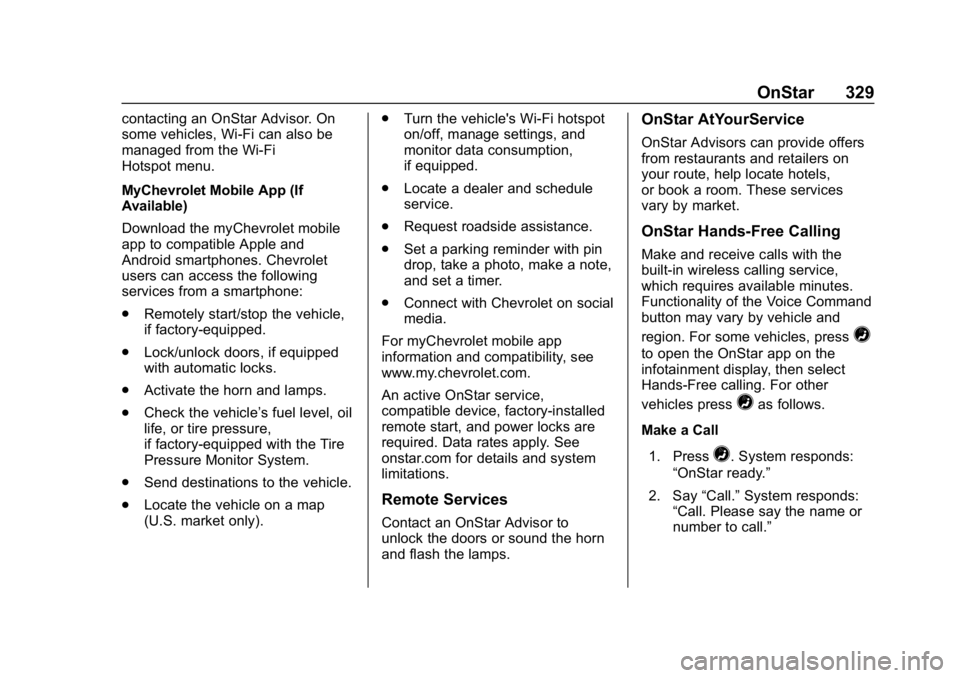
MyChevrolet Mobile App (If
Available)
Download the myChevrolet mobile
app to compatible Apple and
Android smartphones. Chevrolet
users can access the following
services from a smartphone:
.Remotely start/stop the vehicle,
if factory-equipped.
. Lock/unlock doors, if equipped
with automatic locks.
. Activate the horn and lamps.
. Check the vehicle’s fuel level, oil
life, or tire pressure,
if factory-equipped with the Tire
Pressure Monitor System.
. Send destinations to the vehicle.
. Locate the vehicle on a map
(U.S. market only). .
Turn the vehicle's Wi-Fi hotspot
on/off, manage settings, and
monitor data consumption,
if equipped.
. Locate a dealer and schedule
service.
. Request roadside assistance.
. Set a parking reminder with pin
drop, take a photo, make a note,
and set a timer.
. Connect with Chevrolet on social
media.
For myChevrolet mobile app
information and compatibility, see
www.my.chevrolet.com.
An active OnStar service,
compatible device, factory-installed
remote start, and power locks are
required. Data rates apply. See
onstar.com for details and system
limitations.
Remote Services
Contact an OnStar Advisor to
unlock the doors or sound the horn
and flash the lamps.
OnStar AtYourService
OnStar Advisors can provide offers
from restaurants and retailers on
your route, help locate hotels,
or book a room. These services
vary by market.
OnStar Hands-Free Calling
Make and receive calls with the
built-in wireless calling service,
which requires available minutes.
Functionality of the Voice Command
button may vary by vehicle and
region. For some vehicles, press
=
to open the OnStar app on the
infotainment display, then select
Hands-Free calling. For other
vehicles press
=as follows.
Make a Call
1. Press
=. System responds:
“OnStar ready.”
2. Say “Call.”System responds:
“Call. Please say the name or
number to call.”
Page 342 of 349

Chevrolet Sonic Owner Manual (GMNA-Localizing-U.S./Canada-11373973) -
2018 - crc - 10/9/17
Index 341
Fuses (cont'd)Instrument Panel Fuse
Block . . . . . . . . . . . . . . . . . . . . . . . . 249
G
Gas Strut(s) . . . . . . . . . . . . . . . . . . . . 239
GaugesFuel . . . . . . . . . . . . . . . . . . . . . . . . . . .110
Odometer . . . . . . . . . . . . . . . . . . . . . .110
Speedometer . . . . . . . . . . . . . . . . . .110
Tachometer . . . . . . . . . . . . . . . . . . . .110
Trip Odometer . . . . . . . . . . . . . . . . .110
Warning Lights andIndicators . . . . . . . . . . . . . . . . . . . 107
General Information Service and Maintenance . . . . . 293
Towing . . . . . . . . . . . . . . . . . . . . . . . . 212
Vehicle Care . . . . . . . . . . . . . . . . . . 215
Glove Box . . . . . . . . . . . . . . . . . . . . . . . 99
GM Mobility Reimbursement
Program . . . . . . . . . . . . . . . . . . . . . . . 315
H
Halogen Bulbs . . . . . . . . . . . . . . . . . . 240
Hazard Warning Flashers . . . . . . . 134
Head Restraints . . . . . . . . . . . . . . . . . 54
HeadlampsAiming . . . . . . . . . . . . . . . . . . . . . . . . 240
Automatic . . . . . . . . . . . . . . . . . . . . . 134 Headlamps (cont'd)
Bulb Replacement . . . . . . . 240, 241
Daytime Running
Lamps (DRL) . . . . . . . . . . . . . . . . 133
Flash-to-Pass . . . . . . . . . . . . . . . . . 133
High-Beam On Light . . . . . . . . . . 121
High/Low Beam Changer . . . . . 133
Lamps On Reminder . . . . . . . . . 122
Heated
Steering Wheel . . . . . . . . . . . . . . . 104
Heated Front Seats . . . . . . . . . . . . . . 58
Heated Mirrors . . . . . . . . . . . . . . . . . . . 48
Heater Engine . . . . . . . . . . . . . . . . . . . . . . . . 186
Heating . . . . . . . . . . . . . . . . . . . . . . . . . 165
High-Beam On Light . . . . . . . . . . . . 121
Hill and Mountain Roads . . . . . . . . 175
Hill Start Assist (HSA) . . . . . . . . . . 197
Hood . . . . . . . . . . . . . . . . . . . . . . . . . . . 217
Hood Ajar Light . . . . . . . . . . . . . . . . . 122
Horn . . . . . . . . . . . . . . . . . . . . . . . . . . . . 104
How to Wear Seat Belts Properly . . . . . . . . . . . . . . . . . . . . . . . . 62
HVAC . . . . . . . . . . . . . . . . . . . . . . . . . . . 165
Hydraulic Clutch . . . . . . . . . . . . . . . . 226
I
Ignition Positions . . . . . . . . . . 181, 183
Ignition Transmission Lock Check . . . . . . . . . . . . . . . . . . . . . . . . . 237
Immobilizer . . . . . . . . . . . . . . . . . . . . . . 45
Light . . . . . . . . . . . . . . . . . . . . . . . . . . 121
Indicator Owner Manual . . . . . . . . . . . . . . . . .115
Vehicle Ahead . . . . . . . . . . . . . . . . .118
Infants and Young Children,
Restraints . . . . . . . . . . . . . . . . . . . . . . 81
Instrument Cluster . . . . . . . . . . . . . . 108
Instrument Panel Storage Area . . . . . . . . . . . . . . . . . . . 99
Introduction . . . . . . . . . . . . . . . . . . 2, 139
J
Jack Auxiliary . . . . . . . . . . . . . . . . . . . . . . 150
Jump Starting - North
America . . . . . . . . . . . . . . . . . . . . . . . 277
K
Keyless EntryRemote (RKE) System . . . . . 29, 31
Keys . . . . . . . . . . . . . . . . . . . . . . . . . . . . . 26