Interior CHEVROLET SONIC 2018 Owner's Manual
[x] Cancel search | Manufacturer: CHEVROLET, Model Year: 2018, Model line: SONIC, Model: CHEVROLET SONIC 2018Pages: 349, PDF Size: 5.49 MB
Page 6 of 349
Chevrolet Sonic Owner Manual (GMNA-Localizing-U.S./Canada-11373973) -
2018 - crc - 10/9/17
In Brief 5
In Brief
Instrument Panel
Instrument Panel . . . . . . . . . . . . . . . . 6
Initial Drive Information
Initial Drive Information . . . . . . . . . . 8
Remote Keyless Entry (RKE)System . . . . . . . . . . . . . . . . . . . . . . . . 8
Remote Vehicle Start . . . . . . . . . . . 9
Door Locks . . . . . . . . . . . . . . . . . . . . . 9
Liftgate (Hatchback) . . . . . . . . . . . 10
Trunk Release (Sedan) . . . . . . . . 10
Windows . . . . . . . . . . . . . . . . . . . . . . . 11
Seat Adjustment . . . . . . . . . . . . . . . 12
Second Row Seats . . . . . . . . . . . . 13
Head Restraint Adjustment . . . . 13
Seat Belts . . . . . . . . . . . . . . . . . . . . . 13
Passenger Sensing System . . . 14
Mirror Adjustment . . . . . . . . . . . . . . 14
Steering Wheel Adjustment . . . . 15
Interior Lighting . . . . . . . . . . . . . . . . 15
Exterior Lighting . . . . . . . . . . . . . . . 16
Windshield Wiper/Washer . . . . . . 16
Climate Controls . . . . . . . . . . . . . . . 17
Transmission . . . . . . . . . . . . . . . . . . 17
Vehicle Features
Infotainment System . . . . . . . . . . . 19
Radio(s) . . . . . . . . . . . . . . . . . . . . . . . 19
Satellite Radio . . . . . . . . . . . . . . . . . 20
Portable Audio Devices . . . . . . . . 20
Bluetooth . . . . . . . . . . . . . . . . . . . . . . 20
Steering Wheel Controls . . . . . . . 20
Cruise Control . . . . . . . . . . . . . . . . . 21
Driver Information Center (DIC) . . . . . . . . . . . . . . . . . 21
Forward Collision Alert (FCA) System . . . . . . . . . . . . . . . . . . . . . . . 22
Lane Departure Warning (LDW) . . . . . . . . . . . . . . . 22
Rear Vision Camera (RVC) . . . . 22
Parking Assist . . . . . . . . . . . . . . . . . 22
Power Outlets . . . . . . . . . . . . . . . . . 22
Sunroof . . . . . . . . . . . . . . . . . . . . . . . . 23
Performance and Maintenance
Traction Control/Electronic Stability Control . . . . . . . . . . . . . . 23
Tire Pressure Monitor . . . . . . . . . . 24
Fuel . . . . . . . . . . . . . . . . . . . . . . . . . . . 24
E85 or FlexFuel . . . . . . . . . . . . . . . . 24
Engine Oil Life System . . . . . . . . 25
Driving for Better Fuel Economy . . . . . . . . . . . . . . . . . . . . . 25
Roadside Assistance Program . . . . . . . . . . . . . . . . . . . . . . 25
Page 16 of 349
Chevrolet Sonic Owner Manual (GMNA-Localizing-U.S./Canada-11373973) -
2018 - crc - 10/9/17
In Brief 15
Interior Mirror
Hold the inside rearview mirror in
the center to move it for a clearer
view behind your vehicle. Adjust the
mirror to avoid glare from the
headlamps behind you. Push the
tab forward for daytime use and pull
it for nighttime use.
SeeManual Rearview Mirror 049.
Steering Wheel
Adjustment
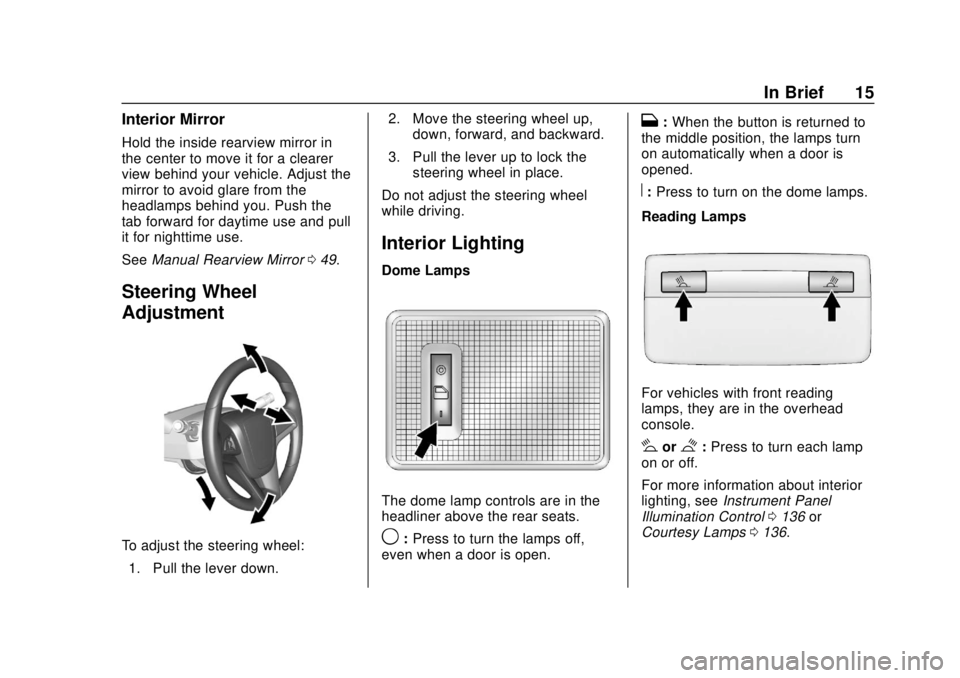
To adjust the steering wheel:
1. Pull the lever down. 2. Move the steering wheel up,
down, forward, and backward.
3. Pull the lever up to lock the steering wheel in place.
Do not adjust the steering wheel
while driving.
Interior Lighting
Dome Lamps
The dome lamp controls are in the
headliner above the rear seats.
9: Press to turn the lamps off,
even when a door is open.
H: When the button is returned to
the middle position, the lamps turn
on automatically when a door is
opened.
R: Press to turn on the dome lamps.
Reading Lamps
For vehicles with front reading
lamps, they are in the overhead
console.
#or$: Press to turn each lamp
on or off.
For more information about interior
lighting, see Instrument Panel
Illumination Control 0136 or
Courtesy Lamps 0136.
Page 27 of 349
Chevrolet Sonic Owner Manual (GMNA-Localizing-U.S./Canada-11373973) -
2018 - crc - 10/9/17
26 Keys, Doors, and Windows
Keys, Doors, and
Windows
Keys and Locks
Keys . . . . . . . . . . . . . . . . . . . . . . . . . . . 26
Remote Keyless Entry (RKE)System . . . . . . . . . . . . . . . . . . . . . . . 28
Remote Keyless Entry (RKE) System Operation (Key
Access) . . . . . . . . . . . . . . . . . . . . . . 29
Remote Keyless Entry (RKE) System Operation (Keyless
Access) . . . . . . . . . . . . . . . . . . . . . . 31
Remote Vehicle Start . . . . . . . . . . 37
Door Locks . . . . . . . . . . . . . . . . . . . . 38
Delayed Locking . . . . . . . . . . . . . . . 40
Automatic Door Locks . . . . . . . . . 40
Lockout Protection . . . . . . . . . . . . . 40
Safety Locks . . . . . . . . . . . . . . . . . . . 41
Doors
Trunk (Sedan) . . . . . . . . . . . . . . . . . 42
Liftgate (Hatchback) . . . . . . . . . . . 43
Vehicle Security
Vehicle Security . . . . . . . . . . . . . . . . 44
Vehicle Alarm System . . . . . . . . . 44
Immobilizer . . . . . . . . . . . . . . . . . . . . 45 Immobilizer Operation (Key
Access) . . . . . . . . . . . . . . . . . . . . . . 46
Immobilizer Operation (Keyless Access) . . . . . . . . . . . . . . . . . . . . . . 46
Exterior Mirrors
Convex Mirrors . . . . . . . . . . . . . . . . 47
Manual Mirrors . . . . . . . . . . . . . . . . . 48
Power Mirrors . . . . . . . . . . . . . . . . . . 48
Folding Mirrors . . . . . . . . . . . . . . . . . 48
Heated Mirrors . . . . . . . . . . . . . . . . . 48
Interior Mirrors
Manual Rearview Mirror . . . . . . . . 49
Windows
Windows . . . . . . . . . . . . . . . . . . . . . . . 49
Manual Windows . . . . . . . . . . . . . . 49
Power Windows . . . . . . . . . . . . . . . 49
Sun Visors . . . . . . . . . . . . . . . . . . . . . 51
Roof
Sunroof . . . . . . . . . . . . . . . . . . . . . . . . 51
Keys and Locks
Keys
{Warning
Leaving children in a vehicle with
an ignition key or Remote
Keyless Entry (RKE) transmitter is
dangerous and children or others
could be seriously injured or
killed. They could operate the
power window or other controls or
make the vehicle move. The
windows will function with the key
in the ignition or with the RKE
transmitter in the vehicle, and
children or others could be caught
in the path of a closing window.
Do not leave children in a vehicle
with the ignition key or an RKE
transmitter.
Page 34 of 349
Chevrolet Sonic Owner Manual (GMNA-Localizing-U.S./Canada-11373973) -
2018 - crc - 10/9/17
Keys, Doors, and Windows 33
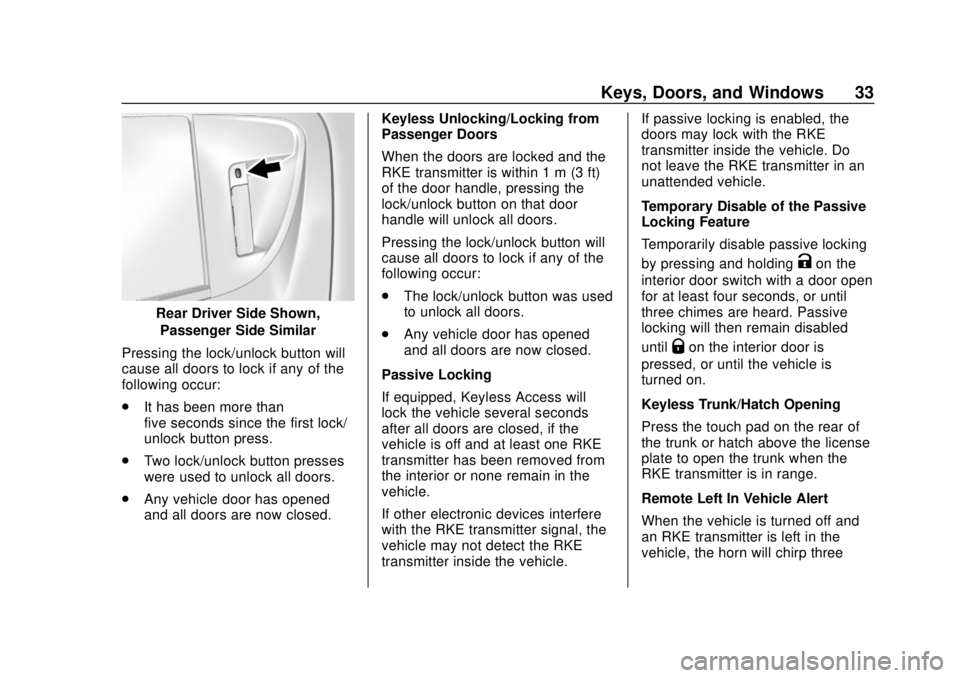
Rear Driver Side Shown,Passenger Side Similar
Pressing the lock/unlock button will
cause all doors to lock if any of the
following occur:
. It has been more than
five seconds since the first lock/
unlock button press.
. Two lock/unlock button presses
were used to unlock all doors.
. Any vehicle door has opened
and all doors are now closed. Keyless Unlocking/Locking from
Passenger Doors
When the doors are locked and the
RKE transmitter is within 1 m (3 ft)
of the door handle, pressing the
lock/unlock button on that door
handle will unlock all doors.
Pressing the lock/unlock button will
cause all doors to lock if any of the
following occur:
.
The lock/unlock button was used
to unlock all doors.
. Any vehicle door has opened
and all doors are now closed.
Passive Locking
If equipped, Keyless Access will
lock the vehicle several seconds
after all doors are closed, if the
vehicle is off and at least one RKE
transmitter has been removed from
the interior or none remain in the
vehicle.
If other electronic devices interfere
with the RKE transmitter signal, the
vehicle may not detect the RKE
transmitter inside the vehicle. If passive locking is enabled, the
doors may lock with the RKE
transmitter inside the vehicle. Do
not leave the RKE transmitter in an
unattended vehicle.
Temporary Disable of the Passive
Locking Feature
Temporarily disable passive locking
by pressing and holding
Kon the
interior door switch with a door open
for at least four seconds, or until
three chimes are heard. Passive
locking will then remain disabled
until
Qon the interior door is
pressed, or until the vehicle is
turned on.
Keyless Trunk/Hatch Opening
Press the touch pad on the rear of
the trunk or hatch above the license
plate to open the trunk when the
RKE transmitter is in range.
Remote Left In Vehicle Alert
When the vehicle is turned off and
an RKE transmitter is left in the
vehicle, the horn will chirp three
Page 50 of 349
Chevrolet Sonic Owner Manual (GMNA-Localizing-U.S./Canada-11373973) -
2018 - crc - 10/9/17
Keys, Doors, and Windows 49
Interior Mirrors
Manual Rearview Mirror
Hold the inside rearview mirror in
the center to move it for a clearer
view behind your vehicle. Adjust the
mirror to avoid glare from the
headlamps behind you. Push the
tab forward for daytime use and pull
it for nighttime use.
Vehicles with OnStar
®have three
control buttons at the bottom of the
mirror. See your dealer for more
information about OnStar and how
to subscribe to it. See OnStar
Overview 0325.
Windows
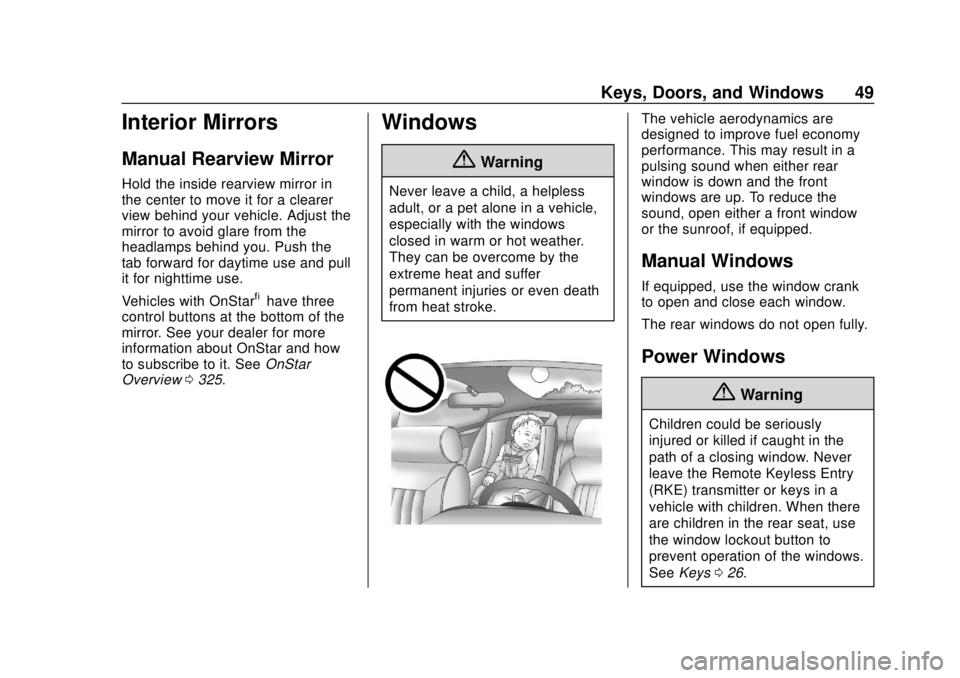
{Warning
Never leave a child, a helpless
adult, or a pet alone in a vehicle,
especially with the windows
closed in warm or hot weather.
They can be overcome by the
extreme heat and suffer
permanent injuries or even death
from heat stroke.
The vehicle aerodynamics are
designed to improve fuel economy
performance. This may result in a
pulsing sound when either rear
window is down and the front
windows are up. To reduce the
sound, open either a front window
or the sunroof, if equipped.
Manual Windows
If equipped, use the window crank
to open and close each window.
The rear windows do not open fully.
Power Windows
{Warning
Children could be seriously
injured or killed if caught in the
path of a closing window. Never
leave the Remote Keyless Entry
(RKE) transmitter or keys in a
vehicle with children. When there
are children in the rear seat, use
the window lockout button to
prevent operation of the windows.
See Keys 026.
Page 73 of 349
Chevrolet Sonic Owner Manual (GMNA-Localizing-U.S./Canada-11373973) -
2018 - crc - 10/9/17
72 Seats and Restraints
For airbag locations, seeWhere Are
the Airbags? 069.
How Does an Airbag
Restrain?
In moderate to severe frontal or
near frontal collisions, even belted
occupants can contact the steering
wheel or the instrument panel. In
moderate to severe side collisions,
even belted occupants can contact
the inside of the vehicle.
Airbags supplement the protection
provided by seat belts by
distributing the force of the impact
more evenly over the
occupant's body.
Rollover capable roof-rail airbags
are designed to help contain the
head and chest of occupants in the
outboard seating positions in the
first and second rows. The rollover
capable roof-rail airbags are
designed to help reduce the risk of
full or partial ejection in rollover
events, although no system can
prevent all such ejections. But airbags would not help in many
types of collisions, primarily
because the occupant's motion is
not toward those airbags. See
When
Should an Airbag Inflate? 070.
Airbags should never be regarded
as anything more than a supplement
to seat belts.
What Will You See after
an Airbag Inflates?
After frontal, knee, and
seat-mounted side impact airbags
inflate, they quickly deflate, so
quickly that some people may not
even realize the airbags inflated.
Roof-rail airbags may still be at least
partially inflated for some time after
they inflate. Some components of
the airbag module may be hot for
several minutes. For location of the
airbags, see Where Are the
Airbags? 069.
The parts of the airbag that come
into contact with you may be warm,
but not too hot to touch. There may
be some smoke and dust coming
from the vents in the deflated airbags. Airbag inflation does not
prevent the driver from seeing out of
the windshield or being able to steer
the vehicle, nor does it prevent
people from leaving the vehicle.
{Warning
When an airbag inflates, there
may be dust in the air. This dust
could cause breathing problems
for people with a history of
asthma or other breathing trouble.
To avoid this, everyone in the
vehicle should get out as soon as
it is safe to do so. If you have
breathing problems but cannot
get out of the vehicle after an
airbag inflates, then get fresh air
by opening a window or a door.
If you experience breathing
problems following an airbag
deployment, you should seek
medical attention.
The vehicle has a feature that may
automatically unlock the doors, turn
on the interior lamps and hazard
warning flashers, and shut off the
Page 74 of 349
Chevrolet Sonic Owner Manual (GMNA-Localizing-U.S./Canada-11373973) -
2018 - crc - 10/9/17
Seats and Restraints 73
fuel system after the airbags inflate.
The feature may also activate,
without airbag inflation, after an
event that exceeds a predetermined
threshold. After turning the ignition
off and then on again, the fuel
system will return to normal
operation; the doors can be locked,
the interior lamps can be turned off,
and the hazard warning flashers can
be turned off using the controls for
those features. If any of these
systems are damaged in the crash
they may not operate as normal.
{Warning
A crash severe enough to inflate
the airbags may have also
damaged important functions in
the vehicle, such as the fuel
system, brake and steering
systems, etc. Even if the vehicle
appears to be drivable after a
moderate crash, there may be
concealed damage that could
make it difficult to safely operate
the vehicle.(Continued)
Warning (Continued)
Use caution if you should attempt
to restart the engine after a crash
has occurred.
In many crashes severe enough to
inflate the airbag, windshields are
broken by vehicle deformation.
Additional windshield breakage may
also occur from the front outboard
passenger airbag.
. Airbags are designed to inflate
only once. After an airbag
inflates, you will need some new
parts for the airbag system.
If you do not get them, the
airbag system will not be there
to help protect you in another
crash. A new system will include
airbag modules and possibly
other parts. The service manual
for the vehicle covers the need
to replace other parts.
. The vehicle has a crash sensing
and diagnostic module which
records information after a
crash. See
Vehicle Data Recording and
Privacy 0323 andEvent Data
Recorders 0323.
. Let only qualified technicians
work on the airbag systems.
Improper service can mean that
an airbag system will not work
properly. See your dealer for
service.
Passenger Sensing
System
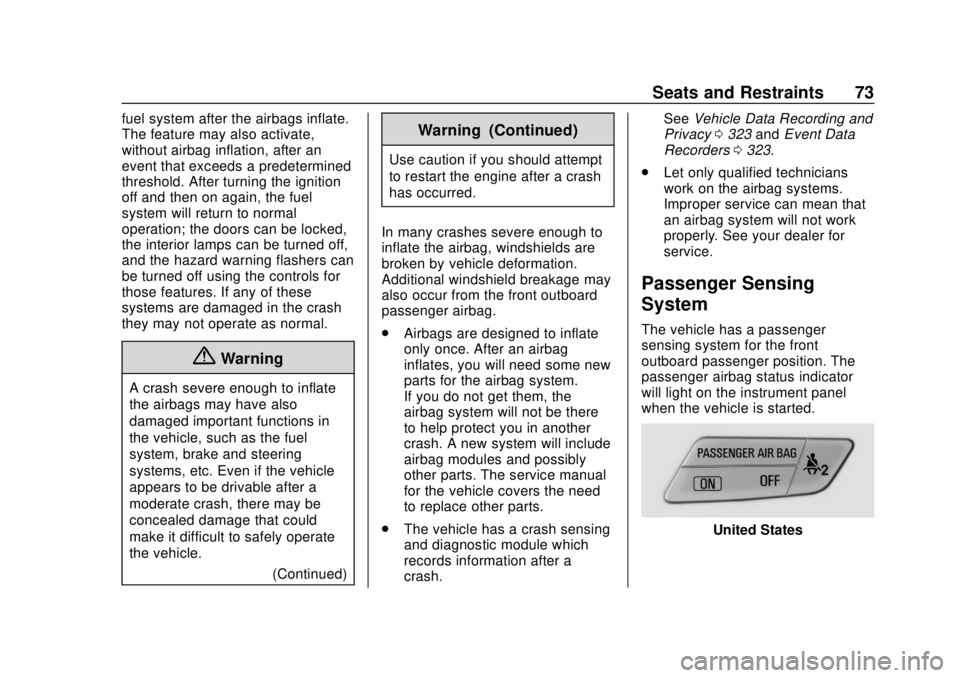
The vehicle has a passenger
sensing system for the front
outboard passenger position. The
passenger airbag status indicator
will light on the instrument panel
when the vehicle is started.
United States
Page 131 of 349
Chevrolet Sonic Owner Manual (GMNA-Localizing-U.S./Canada-11373973) -
2018 - crc - 10/9/17
130 Instruments and Controls
Comfort and Convenience
Touch and the following may
display:
.Chime Volume
. Auto Wipe in Reverse Gear
Chime Volume
This allows the selection of the
chime volume level.
Touch the controls on the
infotainment display to adjust the
volume.
Auto Wipe in Reverse Gear
When on and the front wiper is on,
the rear wiper will automatically
activate when the vehicle is shifted
to R (Reverse).
Touch Off or On.
Lighting
Touch and the following may
display:
. Vehicle Locator Lights
. Exit Lighting Vehicle Locator Lights
This feature will flash the exterior
lamps and allows some exterior
lamps and most interior lamps to
turn on briefly when
Kon the
Remote Keyless Entry (RKE)
transmitter is pressed to locate the
vehicle.
Touch Off or On.
Exit Lighting
This allows the selection of how
long the exterior lamps stay on
when leaving the vehicle when it is
dark outside.
Touch Off, 30 Seconds, 60 Seconds,
or 120 Seconds.
Power Door Locks
Touch and the following may
display:
. Open Door Anti Lock Out
. Auto Door Unlock
. Delayed Door Lock Open Door Anti Lock Out
When on, this feature will keep the
driver door from locking until the
door is closed. If this feature is
turned on, the Delayed Door Lock
menu will not be available.
Touch Off or On.
Auto Door Unlock
This allows selection of which of the
doors will automatically unlock when
the vehicle is shifted into P with an
automatic transmission or when the
vehicle is turned off with a manual
transmission.
Touch Off, All Doors, or Driver Door.
Delayed Door Lock
When on, this feature will delay the
locking of the doors. To override the
delay, press the power door lock
switch on the door.
Touch Off or On.
Remote Lock, Unlock, Start
Touch and the following may
display:
.
Remote Unlock Light Feedback
Page 133 of 349
Chevrolet Sonic Owner Manual (GMNA-Localizing-U.S./Canada-11373973) -
2018 - crc - 10/9/17
132 Lighting
Lighting
Exterior Lighting
Exterior Lamp Controls . . . . . . . 132
Headlamp High/Low-BeamChanger . . . . . . . . . . . . . . . . . . . . 133
Flash-to-Pass . . . . . . . . . . . . . . . . 133
Daytime Running Lamps (DRL) . . . . . . . . . . . . . . . 133
Automatic Headlamp System . . . . . . . . . . . . . . . . . . . . . . 134
Hazard Warning Flashers . . . . . 134
Turn and Lane-Change Signals . . . . . . . . . . . . . . . . . . . . . . 135
Fog Lamps . . . . . . . . . . . . . . . . . . . 135
Interior Lighting
Instrument Panel Illumination Control . . . . . . . . . . . . . . . . . . . . . . 136
Courtesy Lamps . . . . . . . . . . . . . . 136
Dome Lamps . . . . . . . . . . . . . . . . . 136
Reading Lamps . . . . . . . . . . . . . . 136
Lighting Features
Entry Lighting . . . . . . . . . . . . . . . . 137
Exit Lighting . . . . . . . . . . . . . . . . . . 137
Battery Load Management . . . 137
Battery Power Protection . . . . . 138
Exterior Lighting Battery Saver . . . . . . . . . . . . . . . . . . . . . . . 138Exterior Lighting
Exterior Lamp Controls
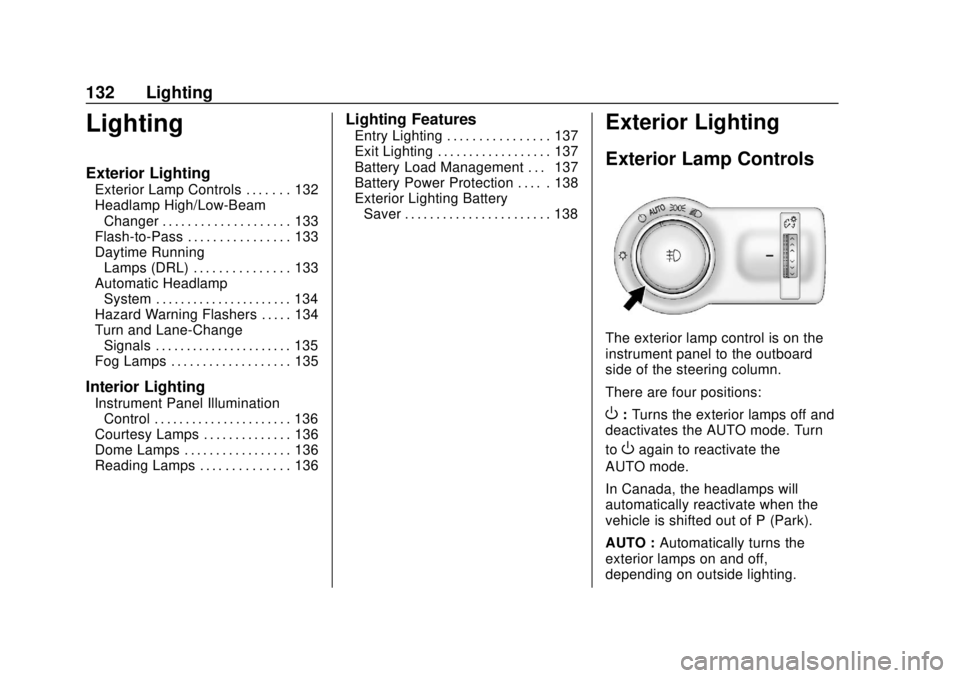
The exterior lamp control is on the
instrument panel to the outboard
side of the steering column.
There are four positions:
O: Turns the exterior lamps off and
deactivates the AUTO mode. Turn
to
Oagain to reactivate the
AUTO mode.
In Canada, the headlamps will
automatically reactivate when the
vehicle is shifted out of P (Park).
AUTO : Automatically turns the
exterior lamps on and off,
depending on outside lighting.
Page 137 of 349
Chevrolet Sonic Owner Manual (GMNA-Localizing-U.S./Canada-11373973) -
2018 - crc - 10/9/17
136 Lighting
Interior Lighting
Instrument Panel
Illumination Control
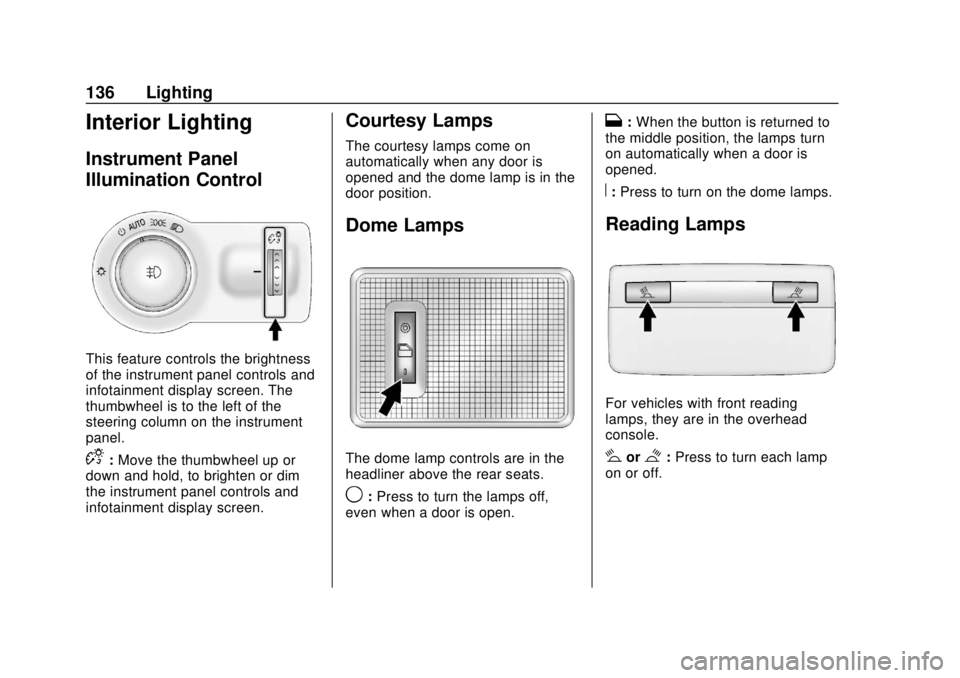
This feature controls the brightness
of the instrument panel controls and
infotainment display screen. The
thumbwheel is to the left of the
steering column on the instrument
panel.
D:Move the thumbwheel up or
down and hold, to brighten or dim
the instrument panel controls and
infotainment display screen.
Courtesy Lamps
The courtesy lamps come on
automatically when any door is
opened and the dome lamp is in the
door position.
Dome Lamps
The dome lamp controls are in the
headliner above the rear seats.
9: Press to turn the lamps off,
even when a door is open.
H: When the button is returned to
the middle position, the lamps turn
on automatically when a door is
opened.
R: Press to turn on the dome lamps.
Reading Lamps
For vehicles with front reading
lamps, they are in the overhead
console.
#or$:Press to turn each lamp
on or off.