clock CHEVROLET SONIC 2019 User Guide
[x] Cancel search | Manufacturer: CHEVROLET, Model Year: 2019, Model line: SONIC, Model: CHEVROLET SONIC 2019Pages: 351, PDF Size: 5.32 MB
Page 246 of 351
Chevrolet Sonic Owner Manual (GMNA-Localizing-U.S./Canada-12461769) -
2019 - crc - 5/21/18
Vehicle Care 245
Bulb Replacement
For the proper type of replacement
bulbs, or any bulb changing
procedure not listed in this section,
contact your dealer.
Caution
Do not replace incandescent
bulbs with aftermarket LED
replacement bulbs. This can
cause damage to the vehicle
electrical system.
Halogen Bulbs
{Warning
Halogen bulbs have pressurized
gas inside and can burst if you
drop or scratch the bulb. You or
others could be injured. Be sure
to read and follow the instructions
on the bulb package.
Headlamps and Front
Turn Signal
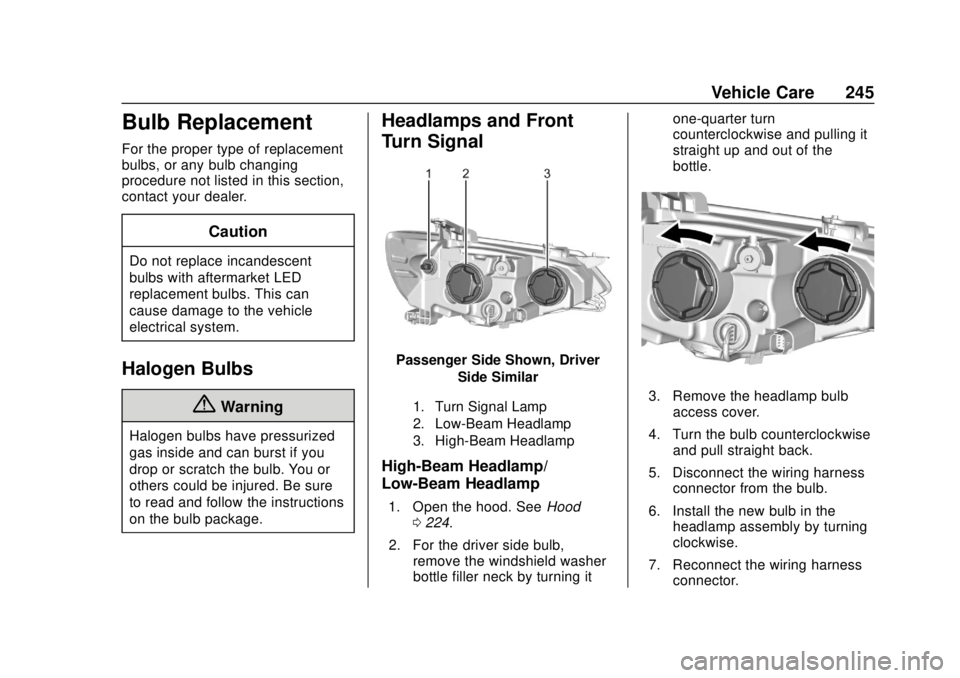
Passenger Side Shown, DriverSide Similar
1. Turn Signal Lamp
2. Low-Beam Headlamp
3. High-Beam Headlamp
High-Beam Headlamp/
Low-Beam Headlamp
1. Open the hood. See Hood
0 224.
2. For the driver side bulb, remove the windshield washer
bottle filler neck by turning it one-quarter turn
counterclockwise and pulling it
straight up and out of the
bottle.
3. Remove the headlamp bulb
access cover.
4. Turn the bulb counterclockwise and pull straight back.
5. Disconnect the wiring harness connector from the bulb.
6. Install the new bulb in the headlamp assembly by turning
clockwise.
7. Reconnect the wiring harness connector.
Page 247 of 351
Chevrolet Sonic Owner Manual (GMNA-Localizing-U.S./Canada-12461769) -
2019 - crc - 5/21/18
246 Vehicle Care
8. Install the headlamp bulbaccess cover.
9. For the driver side bulb, replace the windshield washer
bottle filler neck by turning it
one-quarter turn clockwise into
the bottle.
Turn Signal Lamp
1. Open the hood. See Hood
0 224.
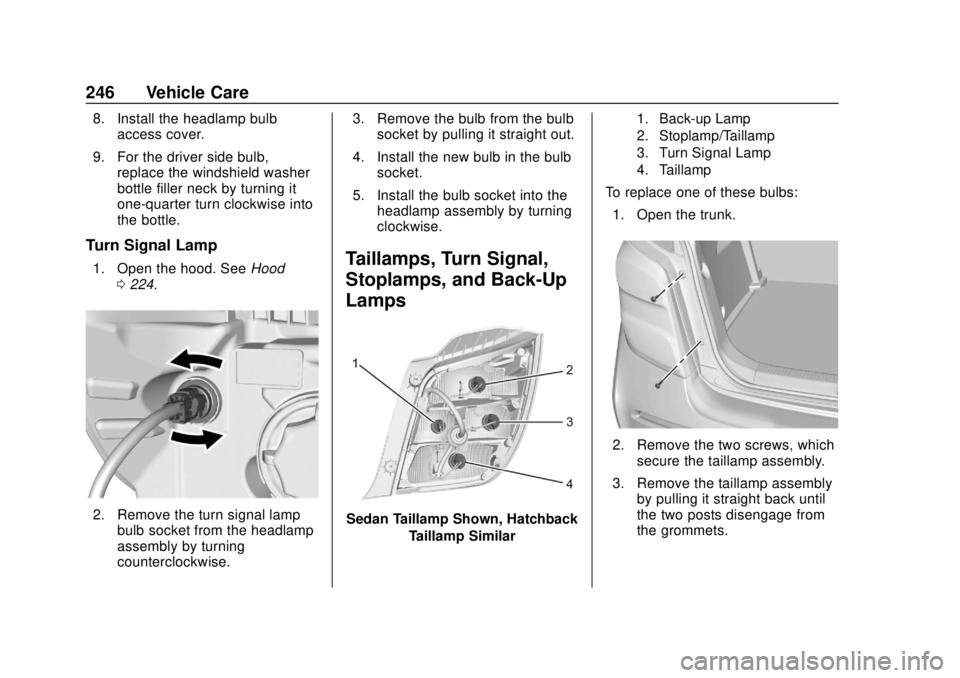
2. Remove the turn signal lamp
bulb socket from the headlamp
assembly by turning
counterclockwise. 3. Remove the bulb from the bulb
socket by pulling it straight out.
4. Install the new bulb in the bulb socket.
5. Install the bulb socket into the headlamp assembly by turning
clockwise.
Taillamps, Turn Signal,
Stoplamps, and Back-Up
Lamps
Sedan Taillamp Shown, Hatchback
Taillamp Similar
1. Back-up Lamp
2. Stoplamp/Taillamp
3. Turn Signal Lamp
4. Taillamp
To replace one of these bulbs:
1. Open the trunk.
2. Remove the two screws, which secure the taillamp assembly.
3. Remove the taillamp assembly by pulling it straight back until
the two posts disengage from
the grommets.
Page 248 of 351
Chevrolet Sonic Owner Manual (GMNA-Localizing-U.S./Canada-12461769) -
2019 - crc - 5/21/18
Vehicle Care 247
4. Remove the bulb socket fromthe taillamp assembly by
turning it counterclockwise.
5. Remove the bulb by pulling it straight out.
6. Install a new bulb into the bulb socket.
7. Install the bulb socket into the taillamp assembly by turning it
clockwise.
8. Install the taillamp assembly and tighten the two screws.License Plate Lamp
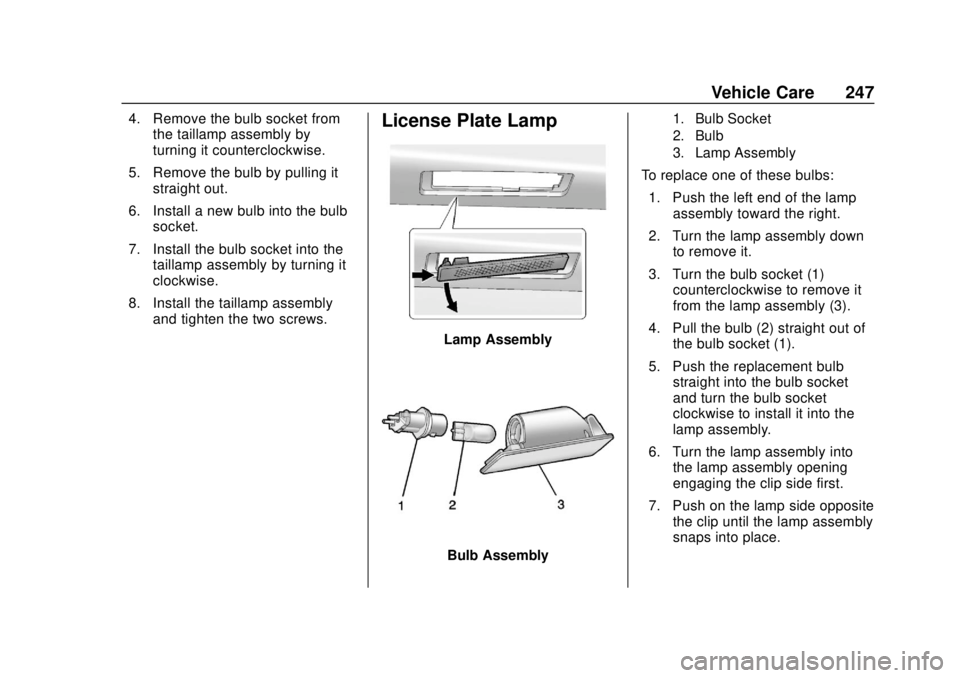
Lamp Assembly
Bulb Assembly
1. Bulb Socket
2. Bulb
3. Lamp Assembly
To replace one of these bulbs:
1. Push the left end of the lamp assembly toward the right.
2. Turn the lamp assembly down to remove it.
3. Turn the bulb socket (1) counterclockwise to remove it
from the lamp assembly (3).
4. Pull the bulb (2) straight out of the bulb socket (1).
5. Push the replacement bulb straight into the bulb socket
and turn the bulb socket
clockwise to install it into the
lamp assembly.
6. Turn the lamp assembly into the lamp assembly opening
engaging the clip side first.
7. Push on the lamp side opposite the clip until the lamp assembly
snaps into place.
Page 253 of 351
Chevrolet Sonic Owner Manual (GMNA-Localizing-U.S./Canada-12461769) -
2019 - crc - 5/21/18
252 Vehicle Care
FusesUsage
BCM1 Body control module 1
IPC Instrument panel cluster
TELEMATICS Telematics
PAS/SBSA Park assist system/ Side blind spot
alert system
RAIN SNSR Rain sensing wiper
AUDIO Audio
TRAILER1 Trailer 1 LDW/FCA Lane departure warning/Front
collision alert
CGM Central gateway module
HVAC1 Heating, ventilation, and air
conditioning 1
HLLD SW Automatic headlamp leveling
switch Fuses
Usage
IPC/AOS Instrument cluster/ Automatic
occupant sensing
display
SPARE –
TRAILER2 Trailer hitch 2 CLOCK
SPRING Clock spring
HVAC2 Heating, ventilation, and air
conditioning 2
HTD
STR WHL Heated steering
wheel
SPARE –
S/ROOF SW Sunroof switch CIGAR APO Cigar auxiliary power outlet
ESCL Electric steering column lock
PWR WNDW FRONT Front power
windows
IRAP ACCY IRAP accessory
BATT CONN Battery connector Relays
Usage
RUN RELAY Run L/GATERELAY Liftgate
IRAP RELAY IRAP RAP/ACCY RELAY Retained
accessory power/
Accessory
Page 275 of 351
Chevrolet Sonic Owner Manual (GMNA-Localizing-U.S./Canada-12461769) -
2019 - crc - 5/21/18
274 Vehicle Care
Tire Changing
Removing the Spare Tire and
Tools
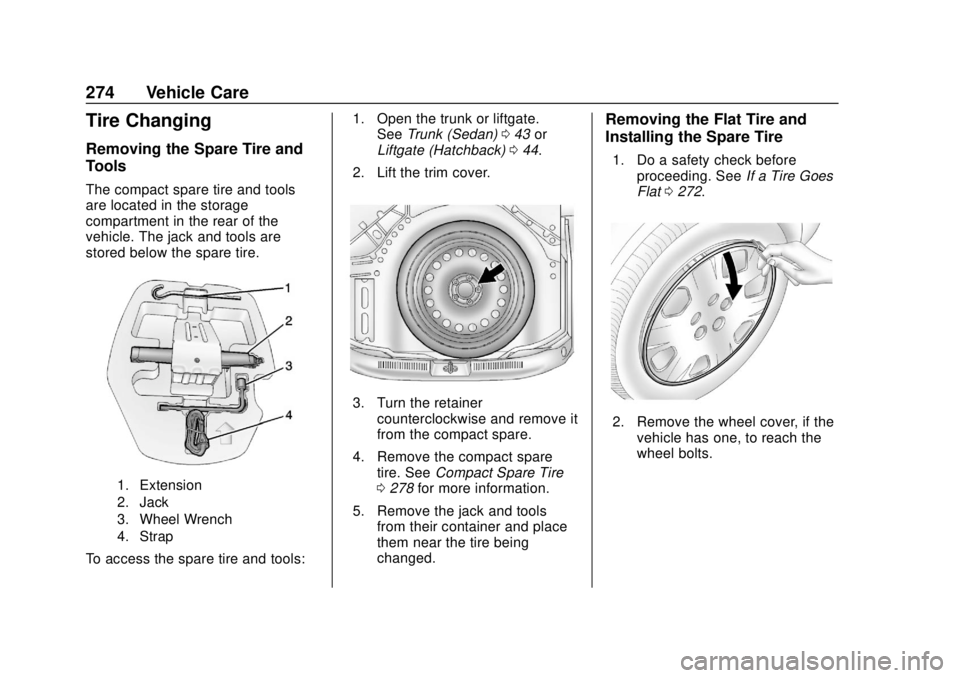
The compact spare tire and tools
are located in the storage
compartment in the rear of the
vehicle. The jack and tools are
stored below the spare tire.
1. Extension
2. Jack
3. Wheel Wrench
4. Strap
To access the spare tire and tools:1. Open the trunk or liftgate.
See Trunk (Sedan) 043 or
Liftgate (Hatchback) 044.
2. Lift the trim cover.
3. Turn the retainer counterclockwise and remove it
from the compact spare.
4. Remove the compact spare tire. See Compact Spare Tire
0 278 for more information.
5. Remove the jack and tools from their container and place
them near the tire being
changed.
Removing the Flat Tire and
Installing the Spare Tire
1. Do a safety check before
proceeding. See If a Tire Goes
Flat 0272.
2. Remove the wheel cover, if the
vehicle has one, to reach the
wheel bolts.
Page 276 of 351
Chevrolet Sonic Owner Manual (GMNA-Localizing-U.S./Canada-12461769) -
2019 - crc - 5/21/18
Vehicle Care 275
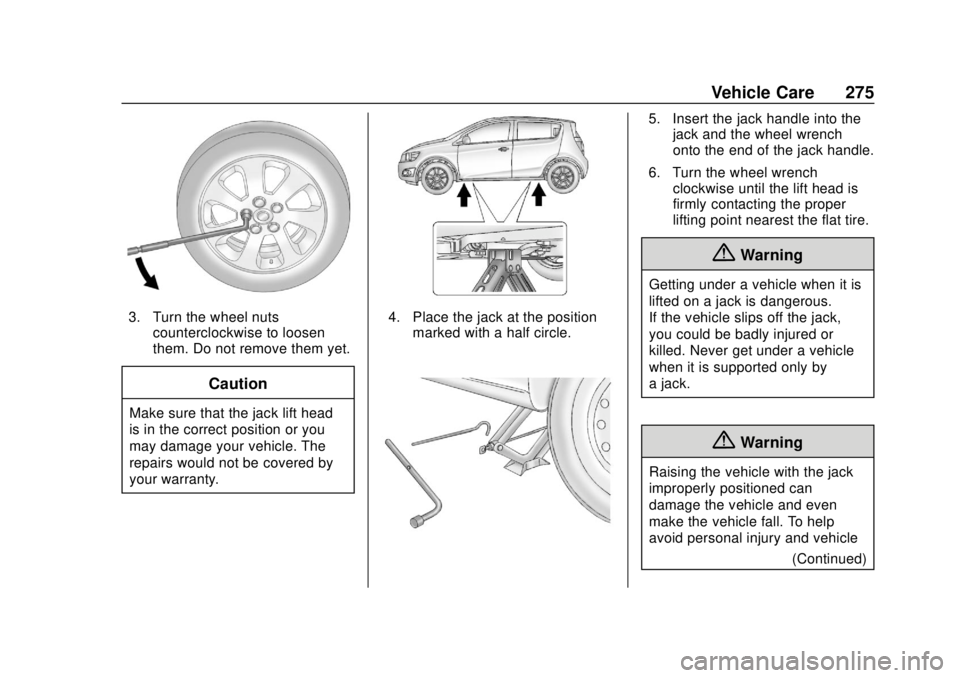
3. Turn the wheel nutscounterclockwise to loosen
them. Do not remove them yet.
Caution
Make sure that the jack lift head
is in the correct position or you
may damage your vehicle. The
repairs would not be covered by
your warranty.
4. Place the jack at the positionmarked with a half circle.
5. Insert the jack handle into thejack and the wheel wrench
onto the end of the jack handle.
6. Turn the wheel wrench clockwise until the lift head is
firmly contacting the proper
lifting point nearest the flat tire.
{Warning
Getting under a vehicle when it is
lifted on a jack is dangerous.
If the vehicle slips off the jack,
you could be badly injured or
killed. Never get under a vehicle
when it is supported only by
a jack.
{Warning
Raising the vehicle with the jack
improperly positioned can
damage the vehicle and even
make the vehicle fall. To help
avoid personal injury and vehicle
(Continued)
Page 277 of 351
Chevrolet Sonic Owner Manual (GMNA-Localizing-U.S./Canada-12461769) -
2019 - crc - 5/21/18
276 Vehicle Care
Warning (Continued)
damage, be sure to fit the jack lift
head into the proper location
before raising the vehicle.
7. Turn the wheel wrench clockwise to raise the vehicle.
Raise the vehicle far enough
off the ground so there is
enough room for the compact
spare tire to fit underneath the
wheel well.
8. Turn the wheel nuts counterclockwise to
remove them.
9. Remove the flat tire.
{Warning
Rust or dirt on a wheel, or on the
parts to which it is fastened, can
make wheel nuts become loose
after time. The wheel could come
off and cause a crash. When
changing a wheel, remove any (Continued)
Warning (Continued)
rust or dirt from places where the
wheel attaches to the vehicle. In
an emergency, a cloth or a paper
towel can be used; however, use
a scraper or wire brush later to
remove all rust or dirt.
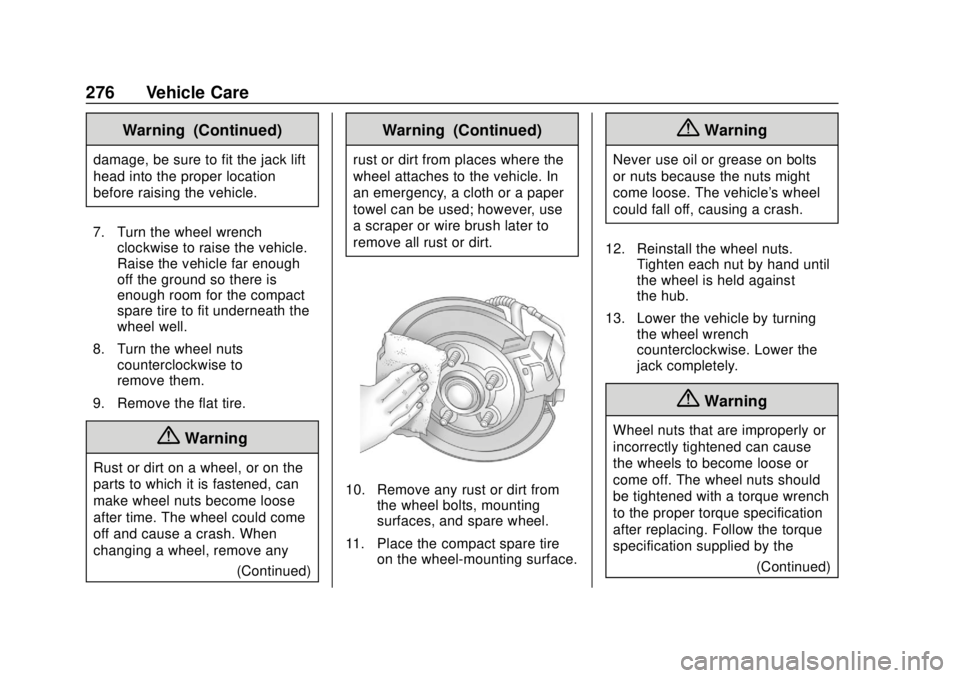
10. Remove any rust or dirt fromthe wheel bolts, mounting
surfaces, and spare wheel.
11. Place the compact spare tire on the wheel-mounting surface.
{Warning
Never use oil or grease on bolts
or nuts because the nuts might
come loose. The vehicle's wheel
could fall off, causing a crash.
12. Reinstall the wheel nuts. Tighten each nut by hand until
the wheel is held against
the hub.
13. Lower the vehicle by turning the wheel wrench
counterclockwise. Lower the
jack completely.
{Warning
Wheel nuts that are improperly or
incorrectly tightened can cause
the wheels to become loose or
come off. The wheel nuts should
be tightened with a torque wrench
to the proper torque specification
after replacing. Follow the torque
specification supplied by the
(Continued)
Page 342 of 351

Chevrolet Sonic Owner Manual (GMNA-Localizing-U.S./Canada-12461769) -
2019 - crc - 5/21/18
Index 341
Child Restraints (cont'd)Securing . . . . . . . . . . . . . . . . . . . . 96, 98
Systems . . . . . . . . . . . . . . . . . . . . . . . . 86
Circuit Breakers . . . . . . . . . . . . . . . . 248
Cleaning
Exterior Care . . . . . . . . . . . . . . . . . 286
Interior Care . . . . . . . . . . . . . . . . . . 290
Climate Control Systems . . . . . . . 169 Air Conditioning . . . . . . . . . . . . . . 169
Heating . . . . . . . . . . . . . . . . . . . . . . . 169
Clock . . . . . . . . . . . . . . . . . . . . . . . . . . . 109
Cluster, Instrument . . . . . . . . . . . . . 111
Clutch, Hydraulic . . . . . . . . . . . . . . . 231
Collision Damage Repair . . . . . . . 320
Compact Spare Tire . . . . . . . . . . . . 278
Compartment . . . . . . . . . . . . . . . . . . . 103 Load . . . . . . . . . . . . . . . . . . . . . . . . . . 103
Compartments
Storage . . . . . . . . . . . . . . . . . . . . . . . 102
Compass . . . . . . . . . . . . . . . . . . . . . . . 109
Connected Services Connections . . . . . . . . . . . . . . . . . . 336
Diagnostics . . . . . . . . . . . . . . . . . . . 338
Navigation . . . . . . . . . . . . . . . . . . . . 335
Connections Connected Services . . . . . . . . . . 336 Control
Traction and Electronic
Stability . . . . . . . . . . . . . . . . . . . . . 203
Control of a Vehicle . . . . . . . . . . . . . 176
Convex Mirrors . . . . . . . . . . . . . . . . . . 48
Coolant Engine Temperature
Warning Light . . . . . . . . . . . . . . . 122
Cooling . . . . . . . . . . . . . . . . . . . . . . . . . 169
Cooling System . . . . . . . . . . . . . . . . . 232
Courtesy Lamps . . . . . . . . . . . . . . . . 139
Courtesy Transportation Program . . . . . . . . . . . . . . . . . . . . . . . 319
Cover Cargo . . . . . . . . . . . . . . . . . . . . . . . . . 103
Cruise Control . . . . . . . . . . . . . . . . . . 205
Light . . . . . . . . . . . . . . . . . . . . . . . . . . 125
Customer Assistance . . . . . . . . . . . 316 Offices . . . . . . . . . . . . . . . . . . . . . . . . 315
Text Telephone (TTY)Users . . . . . . . . . . . . . . . . . . . . . . . 316
Customer Information Publications OrderingInformation . . . . . . . . . . . . . . . . . . 322
Customer Satisfaction
Procedure . . . . . . . . . . . . . . . . . . . . . 313D
Damage Repair, Collision . . . . . . . 320
Danger, Warning, and Caution . . . . 3
Data CollectionOnStar . . . . . . . . . . . . . . . . . . . . . . . 326
Data Recorders, Event . . . . . . . . . 325
Daytime Running Lamps (DRL) . . . . . . . . . . . . . . . . . . 136
Defensive Driving . . . . . . . . . . . . . . . 176
Delayed Locking . . . . . . . . . . . . . . . . . 41
Diagnostics Connected Services . . . . . . . . . . 338
Distracted Driving . . . . . . . . . . . . . . . 175
Dome Lamps . . . . . . . . . . . . . . . . . . . 139
Door Ajar Light . . . . . . . . . . . . . . . . . . . . . 125
Delayed Locking . . . . . . . . . . . . . . . . 41
Locks . . . . . . . . . . . . . . . . . . . . . . . . . . . 39
Drive Belt Routing, Engine . . . . . . 312
Driver Assistance Systems . . . . . 208
Driver Information
Center (DIC) . . . . . . . . . . . . . . . . . . 126
Driving Defensive . . . . . . . . . . . . . . . . . . . . . 176
Drunk . . . . . . . . . . . . . . . . . . . . . . . . . 176
For Better Fuel Economy . . . . . . . 25
Hill and Mountain Roads . . . . . . 179
If the Vehicle is Stuck . . . . . . . . . 181