AUX CHEVROLET SONIC 2019 Owner's Manual
[x] Cancel search | Manufacturer: CHEVROLET, Model Year: 2019, Model line: SONIC, Model: CHEVROLET SONIC 2019Pages: 351, PDF Size: 5.32 MB
Page 8 of 351

Chevrolet Sonic Owner Manual (GMNA-Localizing-U.S./Canada-12461769) -
2019 - crc - 5/21/18
In Brief 7
1.Air Vents 0171.
2. Exterior Lamp Controls 0135.
Instrument Panel Illumination
Control 0139.
3. Turn Signal Lever. See Turn
and Lane-Change Signals
0 138.
4. Instrument Cluster 0111.
5. Windshield Wiper/Washer
0107.
6. Card Holder. See “Card Holder”
under Instrument Panel
Storage 0102.
7. AM-FM Radio 0147.
8. Light Sensor. See Automatic
Headlamp System 0137.
9. Instrument Panel Storage
0102.
10. Passenger Sensing System
076.
11. Hazard Warning Flashers
0137.
12. USB Port 0150.
Auxiliary Jack 0153. 13. Shift Lever. See
Automatic
Transmission 0196 (If
Equipped) or Manual
Transmission 0199 (If
Equipped).
14. Trunk Release (Sedan). See Trunk (Sedan) 043.
Lane Departure Warning
(LDW) 0214 (If Equipped).
Traction Control/Electronic
Stability Control 0203.
15. Power Outlets 0109.
16. Climate Control Systems
0169.
17. Central Locking Switch. See Door Locks 039.
18. Ignition Switch. SeeIgnition Positions (Key
Access) 0185 orIgnition
Positions (Keyless Access)
0 188.
19. Steering Wheel Controls 0106.
20. Horn 0107.
21. Steering Wheel Adjustment
0106 (Out of View). 22.
Cruise Control 0205.
Forward Collision Alert (FCA)
System 0212 (If Equipped.
Heated Steering Wheel 0107
(If Equipped).
23. Data Link Connector (DLC) (Out of View). See Malfunction
Indicator Lamp (Check Engine
Light) 0116.
24. Hood Release. See Hood
0 224.
Page 21 of 351
Chevrolet Sonic Owner Manual (GMNA-Localizing-U.S./Canada-12461769) -
2019 - crc - 5/21/18
20 In Brief
SiriusXM Satellite Radio
Service
SiriusXM is a satellite radio service
based in the 48 contiguous United
States and 10 Canadian provinces.
SiriusXM satellite radio has a wide
variety of programming and
commercial-free music, coast to
coast, and in digital-quality sound.
A fee is required to receive the
SiriusXM service.
Refer to:
.www.siriusxm.com or call
1-888-601-6296 (U.S.).
. www.siriusxm.ca or call
1-877-438-9677 (Canada).
See Satellite Radio 0149.
Portable Audio Devices
This vehicle has a 3.5 mm (1/8 in)
auxiliary input and two USB ports on
the center stack. External devices
such as iPods, MP3 players, and
USB storage devices may be
connected.
See Auxiliary Jack 0153 andUSB
Port 0150.
Bluetooth
The Bluetooth system allows users
with a Bluetooth-enabled cell phone
to make and receive hands-free
calls using the vehicle audio system
and controls.
The Bluetooth-enabled cell phone
must be paired with the in-vehicle
Bluetooth system before it can be
used in the vehicle. Not all phones
will support all functions.
See Bluetooth (Overview) 0156 or
Bluetooth (Pairing and Using a
Phone) 0157.
Steering Wheel Controls
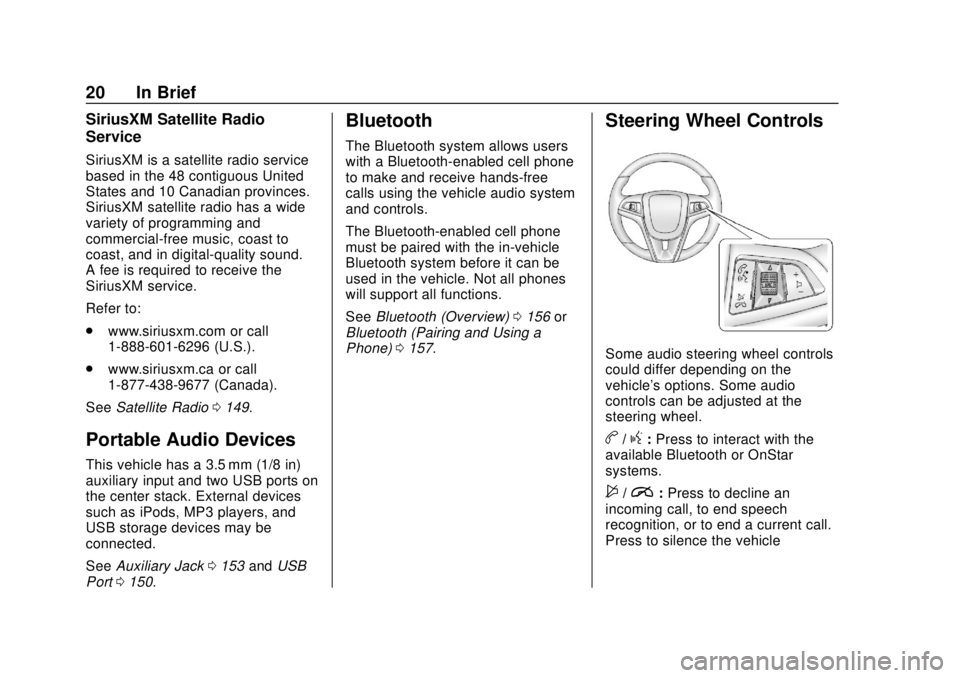
Some audio steering wheel controls
could differ depending on the
vehicle's options. Some audio
controls can be adjusted at the
steering wheel.
b/g:Press to interact with the
available Bluetooth or OnStar
systems.
$/i: Press to decline an
incoming call, to end speech
recognition, or to end a current call.
Press to silence the vehicle
Page 143 of 351
Chevrolet Sonic Owner Manual (GMNA-Localizing-U.S./Canada-12461769) -
2019 - crc - 5/21/18
142 Infotainment System
Infotainment
System
Introduction
Introduction . . . . . . . . . . . . . . . . . . . 142
Overview . . . . . . . . . . . . . . . . . . . . . 143
Using the System . . . . . . . . . . . . 145
Radio
AM-FM Radio . . . . . . . . . . . . . . . . 147
Satellite Radio . . . . . . . . . . . . . . . . 149
Radio Reception . . . . . . . . . . . . . . 149
Backglass Antenna . . . . . . . . . . . 150
Multi-Band Antenna . . . . . . . . . . 150
Audio Players
Avoiding Untrusted MediaDevices . . . . . . . . . . . . . . . . . . . . . 150
USB Port . . . . . . . . . . . . . . . . . . . . . 150
Auxiliary Jack . . . . . . . . . . . . . . . . 153
Bluetooth Audio . . . . . . . . . . . . . . 154
OnStar System
OnStar System . . . . . . . . . . . . . . . 155
Phone
Bluetooth (Overview) . . . . . . . . . 156
Bluetooth (Pairing and Using a Phone) . . . . . . . . . . . . . . . . . . . . . . 157 Apple CarPlay and
Android Auto . . . . . . . . . . . . . . . . 162
Settings
Settings . . . . . . . . . . . . . . . . . . . . . . 163
Trademarks and License
Agreements
Trademarks and LicenseAgreements . . . . . . . . . . . . . . . . . 167
Introduction
Read the following pages to
become familiar with the features.
{Warning
Taking your eyes off the road for
too long or too often while using
any infotainment feature can
cause a crash. You or others
could be injured or killed. Do not
give extended attention to
infotainment tasks while driving.
Limit your glances at the vehicle
displays and focus your attention
on driving. Use voice commands
whenever possible.
The infotainment system has built-in
features intended to help avoid
distraction by disabling some
functions when driving. These
functions may gray out when they
are unavailable. Many infotainment
features are also available through
the instrument cluster and steering
wheel controls.
Page 146 of 351
Chevrolet Sonic Owner Manual (GMNA-Localizing-U.S./Canada-12461769) -
2019 - crc - 5/21/18
Infotainment System 145
4.d
.Radio: Press and release to
go to the next strongest
station or channel. Press
and hold to fast seek the
next strongest station.
. USB/Music/Pictures: Press
to go to the next content.
Press and hold to fast
forward.
5.
5
. Press and release to
access the phone screen,
answer an incoming call,
or access the device home
screen.
Home Page
The Home Page is where
application icons are accessed.
Some features are disabled when
the vehicle is moving.
Slide a finger left/right across the
screen to access the pages of
icons. Managing Home Page Icons
1. Touch and hold any of the Home Page icons to edit
that icon.
2. Drag the icon to a new location on the Home Page.
Using the System
Infotainment Display Icons
Infotainment display icons show
when available. When a function is
unavailable, the icon may gray out.
When a function is selected, the
icon may highlight.
Audio
Touch the Audio icon to display the
active audio source page. Examples
of available sources are AM, FM,
SXM, MyMedia, USB, AUX, and
Bluetooth.
Phone
Touch the Phone icon to display the
Phone main page.
See Bluetooth (Overview) 0156 or
Bluetooth (Pairing and Using a
Phone) 0157.
Settings
Touch the Settings icon to display
the Settings menu. See Settings
0 163.
Apple CarPlay
Touch the Apple CarPlay icon to
activate Apple CarPlay (if equipped)
after a supported device is
connected. See Apple CarPlay and
Android Auto 0162.
Android Auto
Touch the Android Auto icon to
activate Android Auto (if equipped)
after a supported device is
connected. See Apple CarPlay and
Android Auto 0162.
OnStar Services
If equipped, touch the OnStar icon
to display the OnStar Services and
Account pages. See OnStar
Overview 0327.
Page 148 of 351
Chevrolet Sonic Owner Manual (GMNA-Localizing-U.S./Canada-12461769) -
2019 - crc - 5/21/18
Infotainment System 147
Fling or swipe is used to scroll
through a list, or change page
views. Do this by placing a finger on
the screen then moving it rapidly up
and down or right and left.
Cleaning High Gloss Surfaces
and Vehicle Information and
Radio Displays
For vehicles with high gloss
surfaces or vehicle displays, use a
microfiber cloth to wipe surfaces.
Before wiping the surface with the
microfiber cloth, use a soft bristle
brush to remove dirt that could
scratch the surface. Then use the
microfiber cloth by gently rubbing to
clean. Never use window cleaners
or solvents. Periodically hand wash
the microfiber cloth separately,
using mild soap. Do not use bleach
or fabric softener. Rinse thoroughly
and air dry before next use.
Radio
AM-FM Radio
Playing the Radio
From the Home Page, touch the
Audio icon to display the active
audio source page. Choose from a
list of the three most recently used
sources listed at the left side of the
screen. Choose More to display a
list of available resources.
Examples of available sources are
AM, FM, SXM, MyMedia, USB,
AUX, and Bluetooth.
Infotainment System
Sound Menu
From any of the audio source main
pages, touch Sound to display the
following:
Equalizer :Touch to adjust Bass,
Midrange, and Treble using the
controls on the infotainment display.
Fade/Balance : Touch to adjust
using the controls on the
infotainment display or by tapping/
dragging the crosshair.
Finding a Station
Seeking a Station
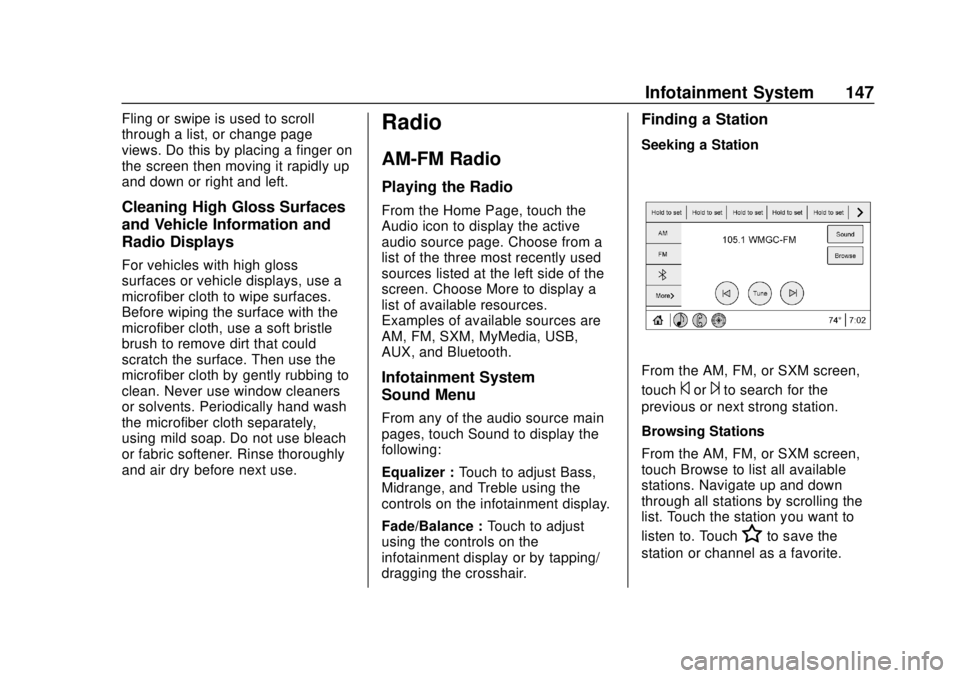
From the AM, FM, or SXM screen,
touch
©or¨to search for the
previous or next strong station.
Browsing Stations
From the AM, FM, or SXM screen,
touch Browse to list all available
stations. Navigate up and down
through all stations by scrolling the
list. Touch the station you want to
listen to. Touch
Hto save the
station or channel as a favorite.
Page 154 of 351
Chevrolet Sonic Owner Manual (GMNA-Localizing-U.S./Canada-12461769) -
2019 - crc - 5/21/18
Infotainment System 153
Supported Apple Devices
To view supported devices, see
my.chevrolet.com/learn.
Storing and Recalling Media
Favorites
To store media favorites, touch
Browse to display a list of media
types.
Select from one of the following
Browse options to save a favorite:
Playlists :Touch
Hnext to any
playlist to store the playlist as a
favorite. Touch a saved favorite to
recall a favorite playlist. The first
song in the playlist begins to play.
Artists : Touch
Hnext to any artist
to store the artist as a favorite.
Touch a saved favorite to recall a
favorite artist. The first song in the
artist list begins to play.
Songs : Touch
Hnext to any song
to store the song as a favorite.
Touch a saved favorite to recall a
favorite song. Albums :
Touch
Hnext to any
album to store the album as a
favorite. Touch a saved favorite to
recall a favorite album. The first
song in the album list begins to play.
Genres : Touch
Hnext to any
genre to store the genre as a
favorite. Touch a saved favorite to
recall a favorite genre. The first
song of the genre begins to play.
Podcasts : Touch
Hnext to any
podcast to store the podcast as a
favorite. Touch a saved favorite to
recall a favorite podcast. The
podcast begins to play.
Audiobooks : Touch
Hnext to
any audiobook to store the
audiobook as a favorite. Touch a
saved favorite to recall a favorite
audiobook. The first chapter in the
audiobook begins to play.
Media Playback and Mute
USB playback will be paused if the
system is muted. If the steering
wheel mute control is pressed
again, playback will resume. If the source is changed while in
mute, playback resumes and audio
will unmute.
Auxiliary Jack
This vehicle has an auxiliary input
jack in the center stack. Possible
auxiliary audio sources include:
.
Laptop computer
. Audio music player
This jack is not an audio output. Do
not plug headphones into the
auxiliary input jack. Set up an
auxiliary device while the vehicle is
parked.
Connect a 3.5 mm (1/8 in) cable
from the auxiliary device to the
auxiliary input jack. When a device
is connected, the system can play
audio from the device over the
vehicle speakers.
If an auxiliary device has already
been connected, but a different
source is currently active, touch
More and select AUX to make the
source active.
Page 155 of 351
Chevrolet Sonic Owner Manual (GMNA-Localizing-U.S./Canada-12461769) -
2019 - crc - 5/21/18
154 Infotainment System
Shuffle and Browse are not
available in the AUX source menu.
Bluetooth Audio
Music may be played from a paired
Bluetooth device.
SeeBluetooth (Overview) 0156 or
Bluetooth (Pairing and Using a
Phone) 0157.
Volume and song selection may be
controlled by using the infotainment
controls or the phone/device.
If Bluetooth is selected and no
volume is present, check the
volume setting on both your phone/
device and the infotainment system.
Music can be launched by touching
Bluetooth from the recent sources
list on the left of the screen or by
touching More and then selecting
the Bluetooth device.
To play music via Bluetooth: 1. Power on the device, and pair to connect the device. 2. Once paired, touch Audio from
the Home Page, then touch
Bluetooth from the recent
sources list on the left of the
display.
Bluetooth Sound Menu
See “Infotainment System Sound
Menu” underAM-FM Radio 0147.
Manage Bluetooth Devices
From the Home Page: 1. Touch Audio.
2. Touch More.
3. Touch Bluetooth.
4. Touch Devices to add or delete devices.
When selecting Bluetooth, the radio
may not be able to launch the audio
player on the connected device to
start playing. When the vehicle is
not moving, use the phone to begin
playback. All devices launch audio differently.
When selecting Bluetooth as a
source, the radio may show as
paused on the screen. Press play
on the device or touchpon the
display to begin playback.
Browse functionality will be provided
where supported by the Bluetooth
device. This media content will not
be part of the MyMedia
source mode.
Some phones support sending
Bluetooth music information to
display on the radio. When the radio
receives this information, it will
check to see if any is available and
display it. For more information
about supported Bluetooth features,
see my.chevrolet.com/learn.
Page 253 of 351
Chevrolet Sonic Owner Manual (GMNA-Localizing-U.S./Canada-12461769) -
2019 - crc - 5/21/18
252 Vehicle Care
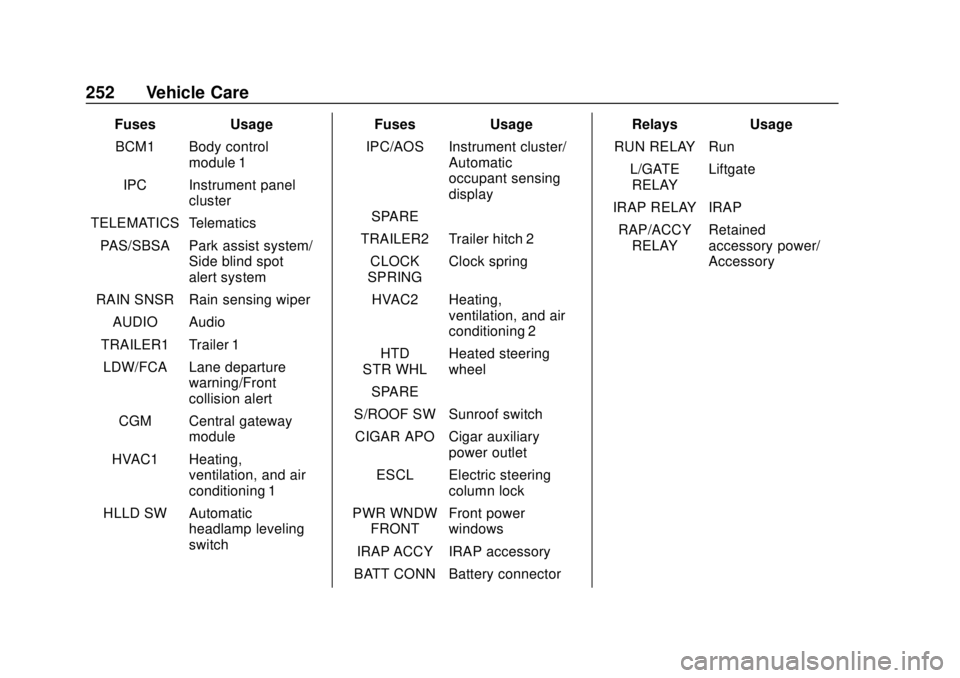
FusesUsage
BCM1 Body control module 1
IPC Instrument panel cluster
TELEMATICS Telematics
PAS/SBSA Park assist system/ Side blind spot
alert system
RAIN SNSR Rain sensing wiper
AUDIO Audio
TRAILER1 Trailer 1 LDW/FCA Lane departure warning/Front
collision alert
CGM Central gateway module
HVAC1 Heating, ventilation, and air
conditioning 1
HLLD SW Automatic headlamp leveling
switch Fuses
Usage
IPC/AOS Instrument cluster/ Automatic
occupant sensing
display
SPARE –
TRAILER2 Trailer hitch 2 CLOCK
SPRING Clock spring
HVAC2 Heating, ventilation, and air
conditioning 2
HTD
STR WHL Heated steering
wheel
SPARE –
S/ROOF SW Sunroof switch CIGAR APO Cigar auxiliary power outlet
ESCL Electric steering column lock
PWR WNDW FRONT Front power
windows
IRAP ACCY IRAP accessory
BATT CONN Battery connector Relays
Usage
RUN RELAY Run L/GATERELAY Liftgate
IRAP RELAY IRAP RAP/ACCY RELAY Retained
accessory power/
Accessory
Page 341 of 351

Chevrolet Sonic Owner Manual (GMNA-Localizing-U.S./Canada-12461769) -
2019 - crc - 5/21/18
340 Index
Assistance Program,Roadside . . . . . . . . . . . . . . . . . . . . . . 317
Audio Bluetooth . . . . . . . . . . . . . . . . . . . . . 154
Automatic Door Locks . . . . . . . . . . . . . . . . . . . . . 41
Headlamp System . . . . . . . . . . . . 137
Transmission . . . . . . . . . . . . . . . . . 196
Transmission Fluid . . . . . . . . . . . 230
Automatic Transmission Manual Mode . . . . . . . . . . . . . . . . . 198
Shift Lock Control Function
Check . . . . . . . . . . . . . . . . . . . . . . . 241
Auxiliary Jack . . . . . . . . . . . . . . . . . . . 153
Avoiding Untrusted Media Devices . . . . . . . . . . . . . . . . . . . . . . . 150
B
Backglass Antenna . . . . . . . . . . . . . 150
BatteryExterior Lighting Battery
Saver . . . . . . . . . . . . . . . . . . . . . . . 141
Load Management . . . . . . . . . . . . 140
Power Protection . . . . . . . . . . . . . 141
Battery - North America . . . . 239, 279
Blade Replacement, Wiper . . . . . 242
Bluetooth Overview . . . . . . . . . . . . . . . . 156, 157 Bluetooth Audio . . . . . . . . . . . . . . . . 154
Brake
System Warning Light . . . . . . . . .118
Brakes . . . . . . . . . . . . . . . . . . . . . . . . . . 237 Antilock . . . . . . . . . . . . . . . . . . . . . . . 201
Assist . . . . . . . . . . . . . . . . . . . . . . . . . 202
Fluid . . . . . . . . . . . . . . . . . . . . . . . . . . 238
Parking . . . . . . . . . . . . . . . . . . . . . . . 202
Braking . . . . . . . . . . . . . . . . . . . . . . . . . 176
Break-In, New Vehicle . . . . . . . . . . 185
Bulb Replacement Halogen Bulbs . . . . . . . . . . . . . . . . 245
Headlamp Aiming . . . . . . . . . . . . . 244
Headlamps . . . . . . . . . . . . . . . . . . . 245
Headlamps and Front TurnSignal . . . . . . . . . . . . . . . . . . . . . . . 245
License Plate Lamps . . . . . . . . . 247
Taillamps, Turn Signal, Stoplamps, and Back-up
Lamps . . . . . . . . . . . . . . . . . . . . . . 246
Buying New Tires . . . . . . . . . . . . . . . 267
C
Calibration . . . . . . . . . . . . . . . . . . . . . . 109
California Perchlorate Materials
Requirements . . . . . . . . . . . . . . . 223 California
Proposition
65 Warning . . . . . . . . . .222, 239, 279,
Back Cover
Camera Rear Vision (RVC) . . . . . . . . . . . . 209
Canadian Vehicle Owners . . . . . . . . 2
Capacities and
Specifications . . . . . . . . . . . . . . . . . 310
Carbon Monoxide Engine Exhaust . . . . . . . . . . . . . . . 195
Liftgate . . . . . . . . . . . . . . . . . . . . . . . . . 44
Trunk . . . . . . . . . . . . . . . . . . . . . . . . . . . 43
Winter Driving . . . . . . . . . . . . . . . . 180
Cargo Cover . . . . . . . . . . . . . . . . . . . . . . . . . 103
Caution, Danger, and Warning . . . . 3
Chains, Tire . . . . . . . . . . . . . . . . . . . . 271
Charging System Light . . . . . . . . . 116
Check Engine Light (Malfunction
Indicator) . . . . . . . . . . . . . . . . . . . . .116
Ignition Transmission Lock . . . 241
Child Restraints Infants and Young Children . . . . . 84
Lower Anchors and Tethers
for Children . . . . . . . . . . . . . . . . . . . 89
Older Children . . . . . . . . . . . . . . . . . . 82
Page 344 of 351

Chevrolet Sonic Owner Manual (GMNA-Localizing-U.S./Canada-12461769) -
2019 - crc - 5/21/18
Index 343
Fuel (cont'd)Recommended . . . . . . . . . . . . . . . 216
Top Tier . . . . . . . . . . . . . . . . . . . . . . 216
Fuses
Engine Compartment FuseBlock . . . . . . . . . . . . . . . . . . . . . . . . 249
Fuses and Circuit Breakers . . . 248
Instrument Panel Fuse Block . . . . . . . . . . . . . . . . . . . . . . . . 251
G
Gas Strut(s) . . . . . . . . . . . . . . . . . . . . 243
GaugesFuel . . . . . . . . . . . . . . . . . . . . . . . . . . .113
Odometer . . . . . . . . . . . . . . . . . . . . . .113
Speedometer . . . . . . . . . . . . . . . . . .113
Tachometer . . . . . . . . . . . . . . . . . . . .113
Trip Odometer . . . . . . . . . . . . . . . . .113
Warning Lights and
Indicators . . . . . . . . . . . . . . . . . . . .110
General Information Service and Maintenance . . . . . 295
Towing . . . . . . . . . . . . . . . . . . . . . . . . 219
Vehicle Care . . . . . . . . . . . . . . . . . . 222
Glove Box . . . . . . . . . . . . . . . . . . . . . . 102
GM Mobility Reimbursement Program . . . . . . . . . . . . . . . . . . . . . . . 317
H
Halogen Bulbs . . . . . . . . . . . . . . . . . . 245
Hazard Warning Flashers . . . . . . . 137
Head Restraints . . . . . . . . . . . . . . . . . 55
HeadlampsAiming . . . . . . . . . . . . . . . . . . . . . . . . 244
Automatic . . . . . . . . . . . . . . . . . . . . . 137
Bulb Replacement . . . . . . . . . . . . 245
Daytime RunningLamps (DRL) . . . . . . . . . . . . . . . . 136
Flash-to-Pass . . . . . . . . . . . . . . . . . 136
High-Beam On Light . . . . . . . . . . 124
High/Low Beam Changer . . . . . 136
Lamps On Reminder . . . . . . . . . 125
Heated Steering Wheel . . . . . . . . . . . . . . . 107
Heated Front Seats . . . . . . . . . . . . . . 59
Heated Mirrors . . . . . . . . . . . . . . . . . . . 49
Heater Engine . . . . . . . . . . . . . . . . . . . . . . . . 191
Heating . . . . . . . . . . . . . . . . . . . . . . . . . 169
High-Beam On Light . . . . . . . . . . . . 124
Hill and Mountain Roads . . . . . . . . 179
Hill Start Assist (HSA) . . . . . . . . . . 203
Hood . . . . . . . . . . . . . . . . . . . . . . . . . . . 224
Hood Ajar Light . . . . . . . . . . . . . . . . . 125
Horn . . . . . . . . . . . . . . . . . . . . . . . . . . . . 107 How to Wear Seat Belts
Properly . . . . . . . . . . . . . . . . . . . . . . . . 63
HVAC . . . . . . . . . . . . . . . . . . . . . . . . . . . 169
Hydraulic Clutch . . . . . . . . . . . . . . . . 231
I
Ignition Positions . . . . . . . . . . 185, 188
Ignition Transmission Lock Check . . . . . . . . . . . . . . . . . . . . . . . . . 241
Immobilizer . . . . . . . . . . . . . . . . . . . . . . 46 Light . . . . . . . . . . . . . . . . . . . . . . . . . . 124
Indicator
Owner Manual . . . . . . . . . . . . . . . . .118
Vehicle Ahead . . . . . . . . . . . . . . . . 121
Infants and Young Children, Restraints . . . . . . . . . . . . . . . . . . . . . . 84
Information
Publication Ordering . . . . . . . . . . 322
Instrument Cluster . . . . . . . . . . . . . . 111
Instrument Panel Storage Area . . . . . . . . . . . . . . . . . 102
Introduction . . . . . . . . . . . . . . . . . . 2, 142
J
Jack Auxiliary . . . . . . . . . . . . . . . . . . . . . . 153
Jump Starting - North
America . . . . . . . . . . . . . . . . . . . . . . . 279