window CHEVROLET SONIC 2019 Owner's Manual
[x] Cancel search | Manufacturer: CHEVROLET, Model Year: 2019, Model line: SONIC, Model: CHEVROLET SONIC 2019Pages: 351, PDF Size: 5.32 MB
Page 2 of 351

Chevrolet Sonic Owner Manual (GMNA-Localizing-U.S./Canada-12461769) -
2019 - crc - 5/21/18
ContentsIntroduction . . . . . . . . . . . . . . . . . . . . . . 2
In Brief . . . . . . . . . . . . . . . . . . . . . . . . . . . 5
Keys, Doors, and Windows . . . . . 26
Seats and Restraints . . . . . . . . . . . 54
Storage . . . . . . . . . . . . . . . . . . . . . . . 102
Instruments and Controls . . . . . . 105
Lighting . . . . . . . . . . . . . . . . . . . . . . . 135
Infotainment System . . . . . . . . . . 142
Climate Controls . . . . . . . . . . . . . . 169
Driving and Operating . . . . . . . . . 174
Vehicle Care . . . . . . . . . . . . . . . . . . 221
Service and Maintenance . . . . . 295
Technical Data . . . . . . . . . . . . . . . . 309
Customer Information . . . . . . . . . 313
Reporting Safety Defects . . . . . . 323
OnStar . . . . . . . . . . . . . . . . . . . . . . . . 327
Connected Services . . . . . . . . . . . 335
Index . . . . . . . . . . . . . . . . . . . . 339
Page 6 of 351
Chevrolet Sonic Owner Manual (GMNA-Localizing-U.S./Canada-12461769) -
2019 - crc - 5/21/18
In Brief 5
In Brief
Instrument Panel
Instrument Panel . . . . . . . . . . . . . . . . 6
Initial Drive Information
Initial Drive Information . . . . . . . . . . 8
Remote Keyless Entry (RKE)System . . . . . . . . . . . . . . . . . . . . . . . . 8
Remote Vehicle Start . . . . . . . . . . . 9
Door Locks . . . . . . . . . . . . . . . . . . . . . 9
Liftgate (Hatchback) . . . . . . . . . . . 10
Trunk Release (Sedan) . . . . . . . . 10
Windows . . . . . . . . . . . . . . . . . . . . . . . 11
Seat Adjustment . . . . . . . . . . . . . . . 12
Second Row Seats . . . . . . . . . . . . 13
Head Restraint Adjustment . . . . 13
Seat Belts . . . . . . . . . . . . . . . . . . . . . 13
Passenger Sensing System . . . 14
Mirror Adjustment . . . . . . . . . . . . . . 14
Steering Wheel Adjustment . . . . 15
Interior Lighting . . . . . . . . . . . . . . . . 15
Exterior Lighting . . . . . . . . . . . . . . . 16
Windshield Wiper/Washer . . . . . . 16
Climate Controls . . . . . . . . . . . . . . . 17
Transmission . . . . . . . . . . . . . . . . . . 18
Vehicle Features
Infotainment System . . . . . . . . . . . 19
Radio(s) . . . . . . . . . . . . . . . . . . . . . . . 19
Satellite Radio . . . . . . . . . . . . . . . . . 19
Portable Audio Devices . . . . . . . . 20
Bluetooth . . . . . . . . . . . . . . . . . . . . . . 20
Steering Wheel Controls . . . . . . . 20
Cruise Control . . . . . . . . . . . . . . . . . 21
Driver Information Center (DIC) . . . . . . . . . . . . . . . . . 21
Forward Collision Alert (FCA) System . . . . . . . . . . . . . . . . . . . . . . . 22
Lane Departure Warning (LDW) . . . . . . . . . . . . . . . 22
Rear Vision Camera (RVC) . . . . 22
Park Assist . . . . . . . . . . . . . . . . . . . . 22
Power Outlets . . . . . . . . . . . . . . . . . 22
Sunroof . . . . . . . . . . . . . . . . . . . . . . . . 23
Performance and Maintenance
Traction Control/Electronic Stability Control . . . . . . . . . . . . . . 23
Tire Pressure Monitor . . . . . . . . . . 24
Fuel . . . . . . . . . . . . . . . . . . . . . . . . . . . 24
E85 or FlexFuel . . . . . . . . . . . . . . . . 24
Engine Oil Life System . . . . . . . . 25
Driving for Better Fuel Economy . . . . . . . . . . . . . . . . . . . . . 25
Roadside Assistance Program . . . . . . . . . . . . . . . . . . . . . . 25
Page 12 of 351
Chevrolet Sonic Owner Manual (GMNA-Localizing-U.S./Canada-12461769) -
2019 - crc - 5/21/18
In Brief 11
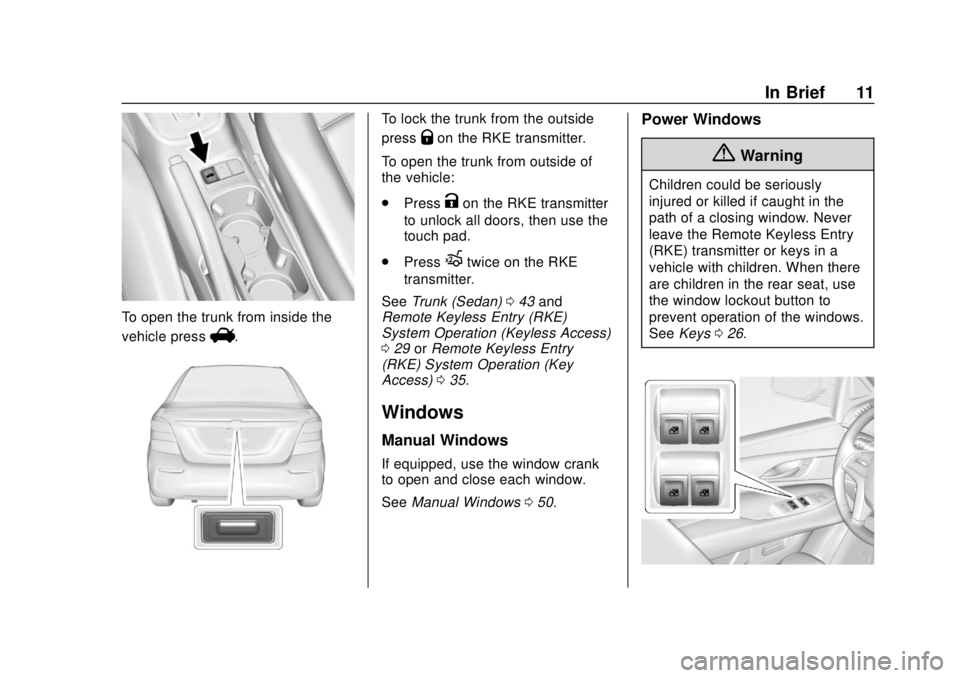
To open the trunk from inside the
vehicle press
V.
To lock the trunk from the outside
press
Qon the RKE transmitter.
To open the trunk from outside of
the vehicle:
. Press
Kon the RKE transmitter
to unlock all doors, then use the
touch pad.
. Press
Xtwice on the RKE
transmitter.
See Trunk (Sedan) 043 and
Remote Keyless Entry (RKE)
System Operation (Keyless Access)
0 29 orRemote Keyless Entry
(RKE) System Operation (Key
Access) 035.
Windows
Manual Windows
If equipped, use the window crank
to open and close each window.
See Manual Windows 050.
Power Windows
{Warning
Children could be seriously
injured or killed if caught in the
path of a closing window. Never
leave the Remote Keyless Entry
(RKE) transmitter or keys in a
vehicle with children. When there
are children in the rear seat, use
the window lockout button to
prevent operation of the windows.
See Keys 026.
Page 13 of 351
Chevrolet Sonic Owner Manual (GMNA-Localizing-U.S./Canada-12461769) -
2019 - crc - 5/21/18
12 In Brief
Power windows work when the
ignition is on, in ACC/ACCESSORY,
or when Retained Accessory Power
(RAP) is active. SeeRetained
Accessory Power (RAP) 0192.
Using the window switch, press to
open or pull to close the window.
The windows may be temporarily
disabled if they are used repeatedly
within a short time.
Seat Adjustment
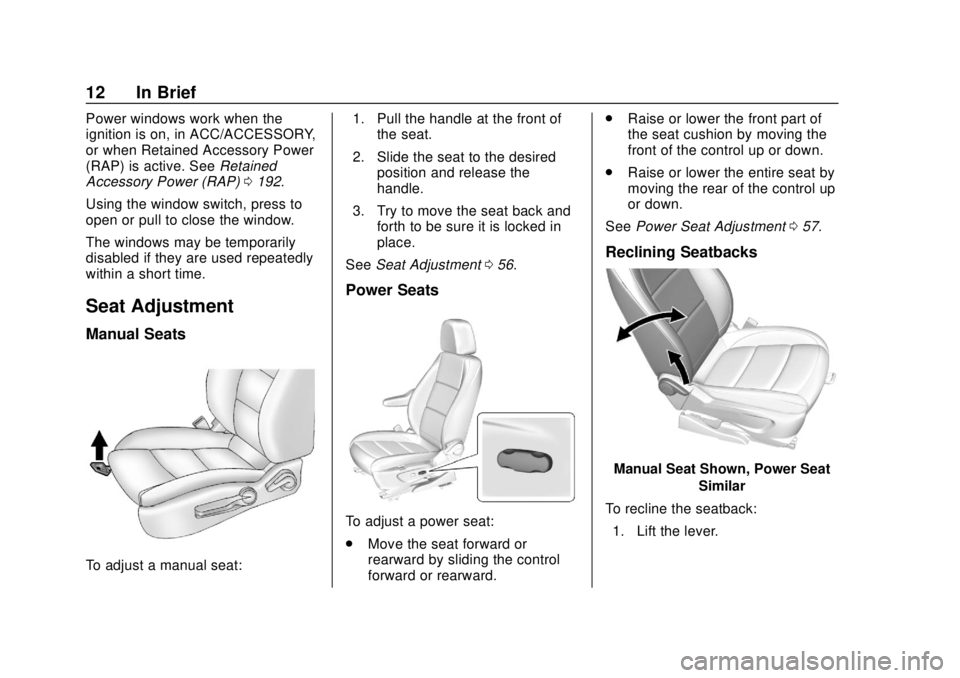
Manual Seats
To adjust a manual seat: 1. Pull the handle at the front of
the seat.
2. Slide the seat to the desired position and release the
handle.
3. Try to move the seat back and forth to be sure it is locked in
place.
See Seat Adjustment 056.
Power Seats
To adjust a power seat:
.
Move the seat forward or
rearward by sliding the control
forward or rearward. .
Raise or lower the front part of
the seat cushion by moving the
front of the control up or down.
. Raise or lower the entire seat by
moving the rear of the control up
or down.
See Power Seat Adjustment 057.
Reclining Seatbacks
Manual Seat Shown, Power Seat
Similar
To recline the seatback: 1. Lift the lever.
Page 18 of 351
Chevrolet Sonic Owner Manual (GMNA-Localizing-U.S./Canada-12461769) -
2019 - crc - 5/21/18
In Brief 17
OFF :Use to turn the wipers off.
1X : For a single wipe, briefly move
the wiper lever down. For several
wipes, hold the wiper lever down.
n L: Pull the windshield wiper
lever toward you to spray windshield
washer fluid and activate the wipers.
See Windshield Wiper/Washer
0 107. For vehicles with a rear
window wiper/washer, see Rear
Window Wiper/Washer 0108.
Climate Controls
If equipped with these climate
control systems, the heating,
cooling, and ventilation can be
controlled for the vehicle.
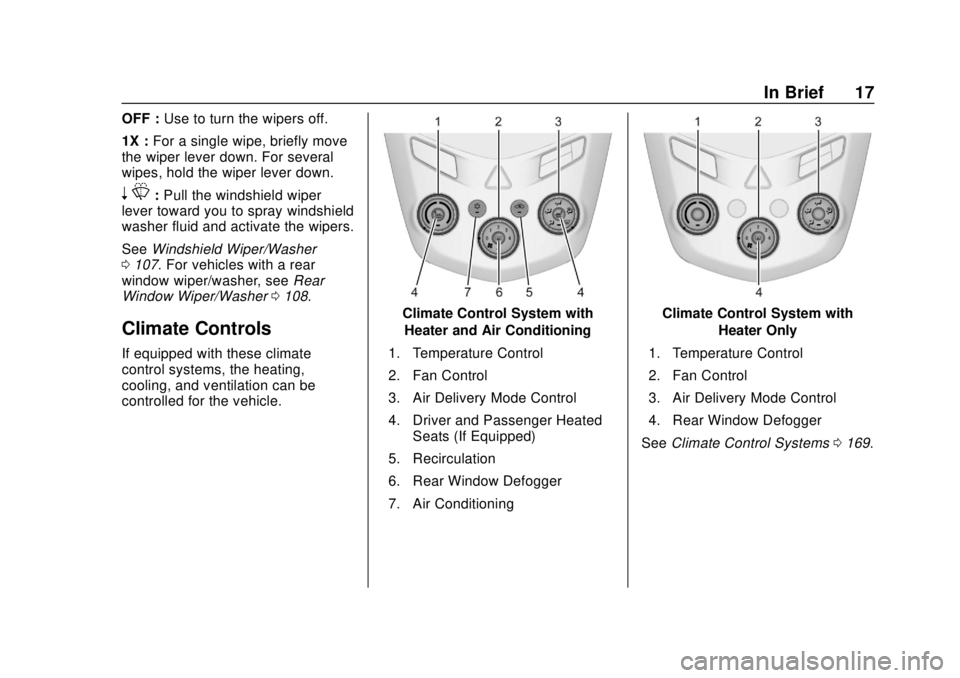
Climate Control System with
Heater and Air Conditioning
1. Temperature Control
2. Fan Control
3. Air Delivery Mode Control
4. Driver and Passenger Heated Seats (If Equipped)
5. Recirculation
6. Rear Window Defogger
7. Air ConditioningClimate Control System with Heater Only
1. Temperature Control
2. Fan Control
3. Air Delivery Mode Control
4. Rear Window Defogger
See Climate Control Systems 0169.
Page 27 of 351
Chevrolet Sonic Owner Manual (GMNA-Localizing-U.S./Canada-12461769) -
2019 - crc - 5/21/18
26 Keys, Doors, and Windows
Keys, Doors, and
Windows
Keys and Locks
Keys . . . . . . . . . . . . . . . . . . . . . . . . . . . 26
Remote Keyless Entry (RKE)System . . . . . . . . . . . . . . . . . . . . . . . 29
Remote Keyless Entry (RKE) System Operation (Keyless
Access) . . . . . . . . . . . . . . . . . . . . . . 29
Remote Keyless Entry (RKE) System Operation (Key
Access) . . . . . . . . . . . . . . . . . . . . . . 35
Remote Vehicle Start . . . . . . . . . . 38
Door Locks . . . . . . . . . . . . . . . . . . . . 39
Delayed Locking . . . . . . . . . . . . . . . 41
Automatic Door Locks . . . . . . . . . 41
Lockout Protection . . . . . . . . . . . . . 41
Safety Locks . . . . . . . . . . . . . . . . . . . 42
Doors
Trunk (Sedan) . . . . . . . . . . . . . . . . . 43
Liftgate (Hatchback) . . . . . . . . . . . 44
Vehicle Security
Vehicle Security . . . . . . . . . . . . . . . . 45
Vehicle Alarm System . . . . . . . . . 45
Immobilizer . . . . . . . . . . . . . . . . . . . . 46 Immobilizer Operation (Key
Access) . . . . . . . . . . . . . . . . . . . . . . 47
Immobilizer Operation (Keyless Access) . . . . . . . . . . . . . . . . . . . . . . 47
Exterior Mirrors
Convex Mirrors . . . . . . . . . . . . . . . . 48
Manual Mirrors . . . . . . . . . . . . . . . . . 49
Power Mirrors . . . . . . . . . . . . . . . . . . 49
Folding Mirrors . . . . . . . . . . . . . . . . . 49
Heated Mirrors . . . . . . . . . . . . . . . . . 49
Interior Mirrors
Manual Rearview Mirror . . . . . . . . 50
Windows
Windows . . . . . . . . . . . . . . . . . . . . . . . 50
Manual Windows . . . . . . . . . . . . . . 50
Power Windows . . . . . . . . . . . . . . . 50
Sun Visors . . . . . . . . . . . . . . . . . . . . . 52
Roof
Sunroof . . . . . . . . . . . . . . . . . . . . . . . . 52
Keys and Locks
Keys
{Warning
Leaving children in a vehicle with
an ignition key or Remote
Keyless Entry (RKE) transmitter is
dangerous and children or others
could be seriously injured or
killed. They could operate the
power window or other controls or
make the vehicle move. The
windows will function with the key
in the ignition or with the RKE
transmitter in the vehicle, and
children or others could be caught
in the path of a closing window.
Do not leave children in a vehicle
with the ignition key or an RKE
transmitter.
Page 28 of 351
Chevrolet Sonic Owner Manual (GMNA-Localizing-U.S./Canada-12461769) -
2019 - crc - 5/21/18
Keys, Doors, and Windows 27
{Warning
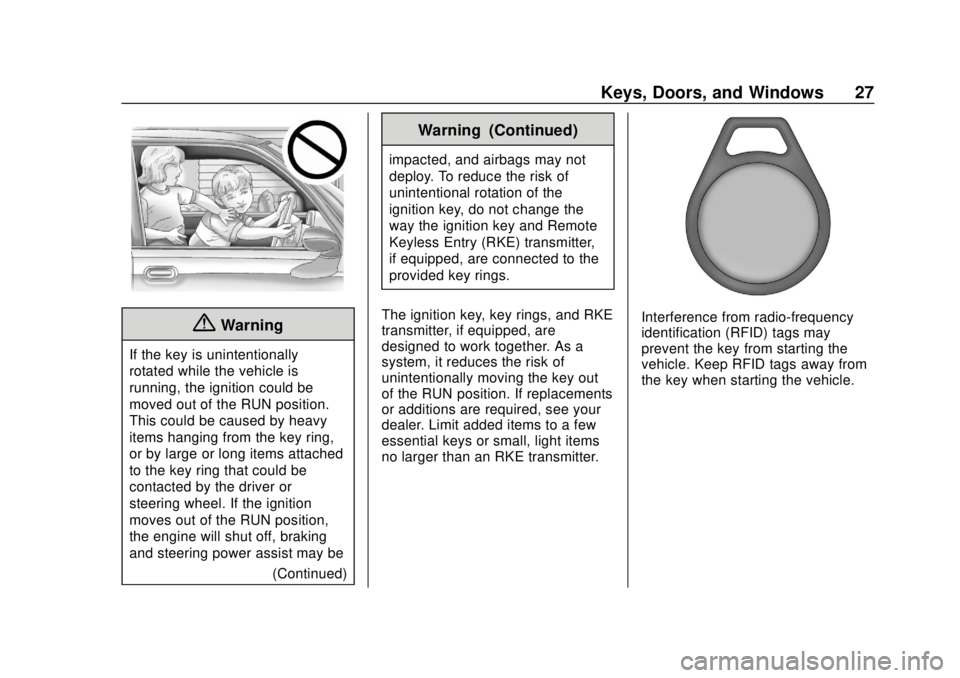
If the key is unintentionally
rotated while the vehicle is
running, the ignition could be
moved out of the RUN position.
This could be caused by heavy
items hanging from the key ring,
or by large or long items attached
to the key ring that could be
contacted by the driver or
steering wheel. If the ignition
moves out of the RUN position,
the engine will shut off, braking
and steering power assist may be(Continued)
Warning (Continued)
impacted, and airbags may not
deploy. To reduce the risk of
unintentional rotation of the
ignition key, do not change the
way the ignition key and Remote
Keyless Entry (RKE) transmitter,
if equipped, are connected to the
provided key rings.
The ignition key, key rings, and RKE
transmitter, if equipped, are
designed to work together. As a
system, it reduces the risk of
unintentionally moving the key out
of the RUN position. If replacements
or additions are required, see your
dealer. Limit added items to a few
essential keys or small, light items
no larger than an RKE transmitter.
Interference from radio-frequency
identification (RFID) tags may
prevent the key from starting the
vehicle. Keep RFID tags away from
the key when starting the vehicle.
Page 29 of 351
Chevrolet Sonic Owner Manual (GMNA-Localizing-U.S./Canada-12461769) -
2019 - crc - 5/21/18
28 Keys, Doors, and Windows
Key Access with Remote StartShown (Hatchback)Key Access with Power Trunk Shown (Sedan)
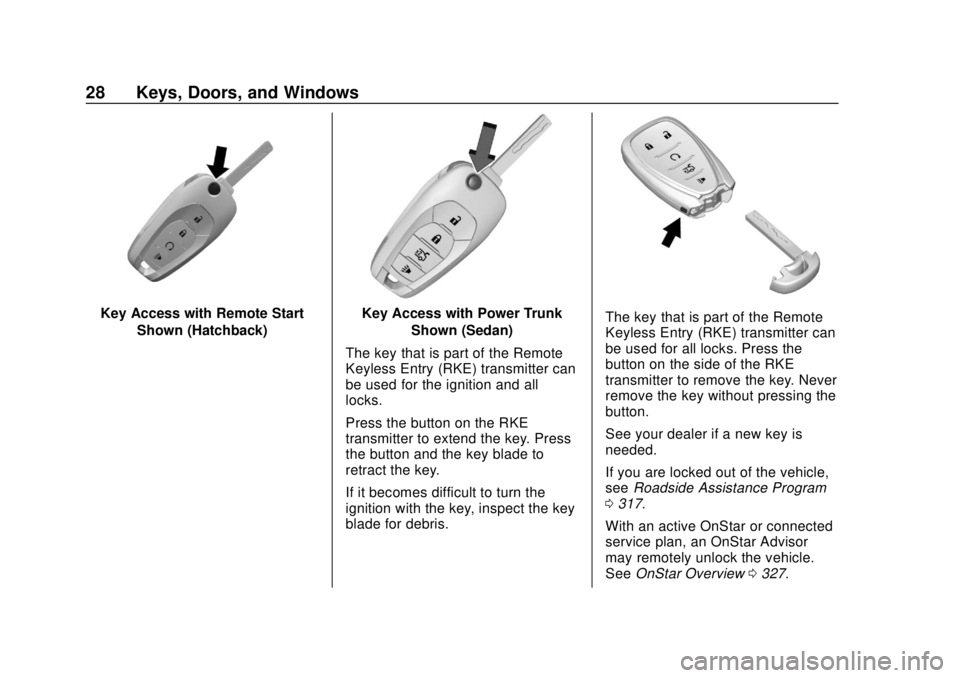
The key that is part of the Remote
Keyless Entry (RKE) transmitter can
be used for the ignition and all
locks.
Press the button on the RKE
transmitter to extend the key. Press
the button and the key blade to
retract the key.
If it becomes difficult to turn the
ignition with the key, inspect the key
blade for debris.The key that is part of the Remote
Keyless Entry (RKE) transmitter can
be used for all locks. Press the
button on the side of the RKE
transmitter to remove the key. Never
remove the key without pressing the
button.
See your dealer if a new key is
needed.
If you are locked out of the vehicle,
see Roadside Assistance Program
0 317.
With an active OnStar or connected
service plan, an OnStar Advisor
may remotely unlock the vehicle.
See OnStar Overview 0327.
Page 30 of 351
Chevrolet Sonic Owner Manual (GMNA-Localizing-U.S./Canada-12461769) -
2019 - crc - 5/21/18
Keys, Doors, and Windows 29
Remote Keyless Entry
(RKE) System
SeeRadio Frequency Statement
0 323.
If there is a decrease in the Remote
Keyless Entry (RKE) operating
range:
. Check the distance. The
transmitter may be too far from
the vehicle.
. Check the location. Other
vehicles or objects may be
blocking the signal.
. Check the transmitter's battery.
See “Battery Replacement” later
in this section.
. If the transmitter is still not
working correctly, see your
dealer or a qualified technician
for service.
Remote Keyless Entry
(RKE) System Operation
(Keyless Access)
The Keyless Access system allows
for vehicle entry when the Remote
Keyless Entry (RKE) transmitter is
within 1 m (3 ft). See “Keyless
Access Operation” following.
The RKE transmitter functions may
work up to 60 m (197 ft) away from
the vehicle.
Other conditions can impact the
performance of the transmitter. See
Remote Keyless Entry (RKE)
System 029.
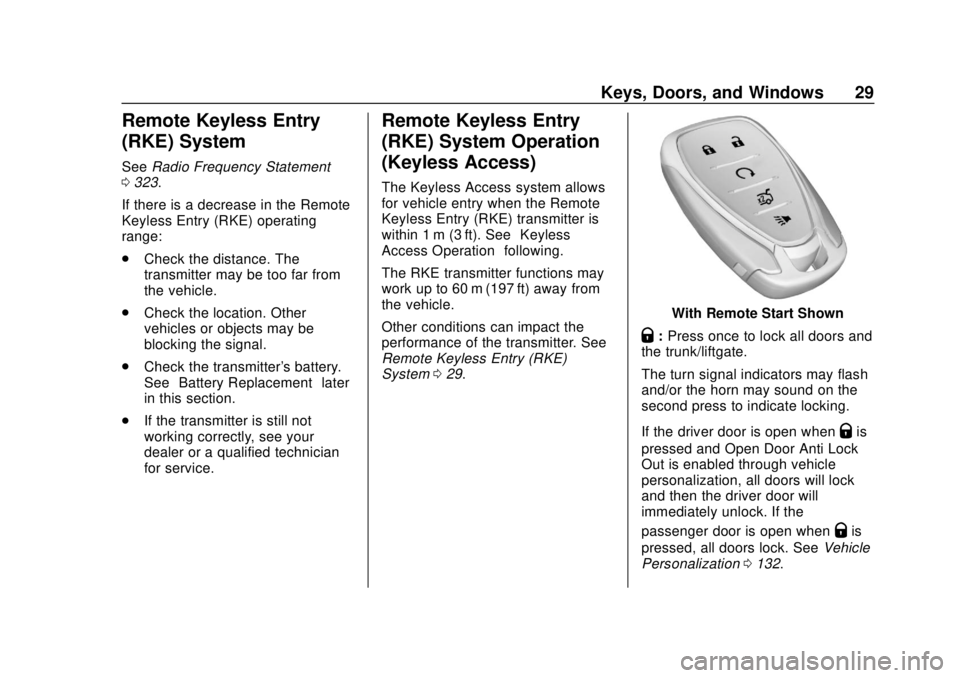
With Remote Start Shown
Q:Press once to lock all doors and
the trunk/liftgate.
The turn signal indicators may flash
and/or the horn may sound on the
second press to indicate locking.
If the driver door is open when
Qis
pressed and Open Door Anti Lock
Out is enabled through vehicle
personalization, all doors will lock
and then the driver door will
immediately unlock. If the
passenger door is open when
Qis
pressed, all doors lock. See Vehicle
Personalization 0132.
Page 31 of 351
Chevrolet Sonic Owner Manual (GMNA-Localizing-U.S./Canada-12461769) -
2019 - crc - 5/21/18
30 Keys, Doors, and Windows
PressingQmay also arm the alarm
system. See Vehicle Alarm System
0 45.
K:Press to unlock the driver door
and the trunk/liftgate. Press again to
unlock all doors.
The turn signal indicators may flash
to indicate unlocking has occurred.
See Vehicle Personalization 0132.
Pressing
Kwill disarm the alarm
system. See Vehicle Alarm System
0 45.
X:If equipped, press twice to
release the trunk.
7: Press and release one time to
initiate vehicle locator. The exterior
lamps flash and the horn chirps
three times.
Press and hold
7for at least
three seconds to sound the panic
alarm. The horn sounds and the
turn signals flash for about
30 seconds, or until
7is pressed
again or the ignition is turned on.
/: If equipped, pressQand then
immediately press and hold
/for at
least four seconds or until the turn
signal lamps flash to start the
engine from outside the vehicle
using the RKE transmitter. See
Remote Vehicle Start 038.
Keyless Access Operation
If equipped, the Keyless Access
system lets you lock and unlock the
front doors or access the trunk/
liftgate without removing the RKE
transmitter from your pocket, purse,
briefcase, etc. The RKE transmitter
should be within 1 m (3 ft) of the
trunk/liftgate or door being opened.
If the vehicle has this feature, there
will be buttons on the outside front
door handles.
Keyless Access can be
programmed to unlock both front
doors on the first unlock/lock button
press from the driver door. See
Vehicle Personalization 0132. Keyless Unlocking/Locking from
the Driver Door
When the doors are locked and the
RKE transmitter is within 1 m (3 ft)
of the driver door handle, pressing
the lock/unlock button on the driver
door handle will unlock the driver
door. If the lock/unlock button is
pressed again within five seconds,
the front passenger door will unlock.
Pull the door handle to unlatch
the door.