lock CHEVROLET SPARK 2013 3.G Service Manual
[x] Cancel search | Manufacturer: CHEVROLET, Model Year: 2013, Model line: SPARK, Model: CHEVROLET SPARK 2013 3.GPages: 350, PDF Size: 5.89 MB
Page 93 of 350
Black plate (3,1)Chevrolet Spark Owner Manual - 2013 - crc - 9/11/12
Instruments and Controls 5-3
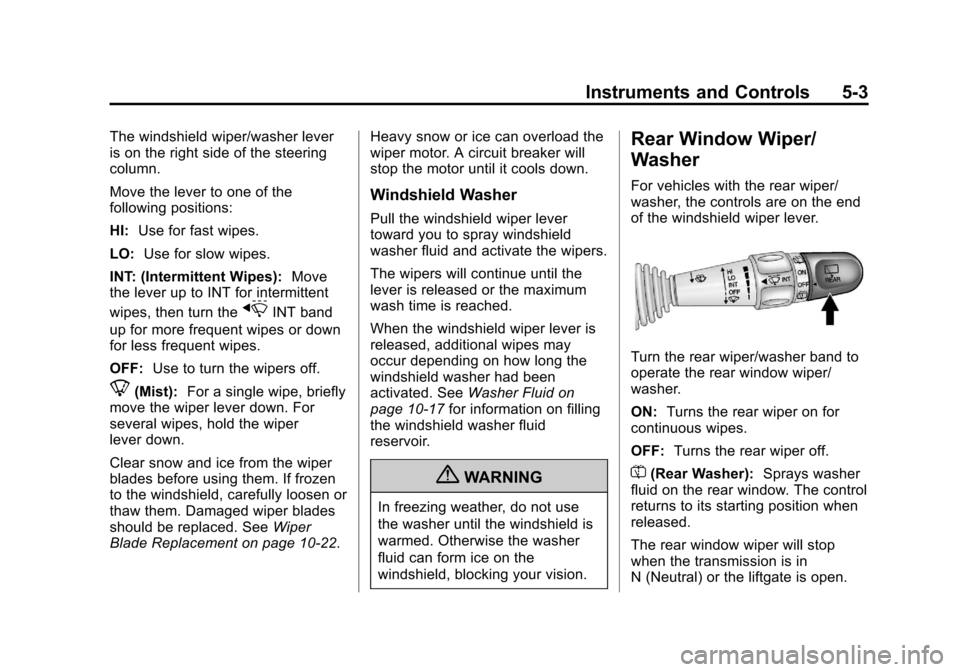
The windshield wiper/washer lever
is on the right side of the steering
column.
Move the lever to one of the
following positions:
HI:Use for fast wipes.
LO: Use for slow wipes.
INT: (Intermittent Wipes): Move
the lever up to INT for intermittent
wipes, then turn the
xINT band
up for more frequent wipes or down
for less frequent wipes.
OFF: Use to turn the wipers off.
8(Mist): For a single wipe, briefly
move the wiper lever down. For
several wipes, hold the wiper
lever down.
Clear snow and ice from the wiper
blades before using them. If frozen
to the windshield, carefully loosen or
thaw them. Damaged wiper blades
should be replaced. See Wiper
Blade Replacement on page 10‑22. Heavy snow or ice can overload the
wiper motor. A circuit breaker will
stop the motor until it cools down.
Windshield Washer
Pull the windshield wiper lever
toward you to spray windshield
washer fluid and activate the wipers.
The wipers will continue until the
lever is released or the maximum
wash time is reached.
When the windshield wiper lever is
released, additional wipes may
occur depending on how long the
windshield washer had been
activated. See
Washer Fluid on
page 10‑17 for information on filling
the windshield washer fluid
reservoir.
{WARNING
In freezing weather, do not use
the washer until the windshield is
warmed. Otherwise the washer
fluid can form ice on the
windshield, blocking your vision.
Rear Window Wiper/
Washer
For vehicles with the rear wiper/
washer, the controls are on the end
of the windshield wiper lever.
Turn the rear wiper/washer band to
operate the rear window wiper/
washer.
ON: Turns the rear wiper on for
continuous wipes.
OFF: Turns the rear wiper off.
=(Rear Washer): Sprays washer
fluid on the rear window. The control
returns to its starting position when
released.
The rear window wiper will stop
when the transmission is in
N (Neutral) or the liftgate is open.
Page 94 of 350
Black plate (4,1)Chevrolet Spark Owner Manual - 2013 - crc - 9/11/12
5-4 Instruments and Controls
It also stops for 10 seconds when
the transmission is shifted from
N (Neutral) to other gears.
The windshield washer reservoir is
used for the windshield and the rear
window. Check the fluid level in the
reservoir if either washer is not
working. SeeWasher Fluid on
page 10‑17.
Clock
Radio without Touchscreen
The infotainment system controls
are used to access the time and
date settings through the menu
system. See Operation on page 7‑6
for information about how to use the
menu system.
Setting the Time and Date
1. PressHor CONFIG button and
select Time and Data Settings.
2. Select Set Time or Set Date.
3. Turn the Menu/Tune knob to the desired value. 4. Press the Menu/Tune knob to
select the value.
5. Turn the Menu/Tune knob to change the desired value.
6. To save and return to the Time Settings menu, press
/BACK
button at any time.
Setting the 12/24 Hour Format
1. Press theHor CONFIG button
and select Time and Date
Settings.
2. Select Set Time Format.
3. Press the Menu/Tune knob to select the 12 hour or 24 hour
display format.
Setting the Month and Day
Format
1. Press theHor CONFIG button
and select Time and Date
Settings.
2. Select Set Date Format.
3. Turn the Menu/Tune knob to the desired setting. 4. Press the Menu/Tune knob to
select the DD/MM/YYYY (day/
month/year), MM/DD/YYYY
(month/day/year), or YYYY/MM/
DD (year/month/day) display
format.
Radio with Touchscreen
The infotainment system controls
are used to access the time and
date settings through the menu
system. See Operation on page 7‑6
for information about how to use the
menu system.
Setting the Time and Date
1. PressD, and then press
settings.
2. Press time and date settings, and then set time and date.
3. Press
yorzto adjust the
value.
4. Press OK.
Page 105 of 350
Black plate (15,1)Chevrolet Spark Owner Manual - 2013 - crc - 9/11/12
Instruments and Controls 5-15
stays on after the parking brake is
fully released, it means there is a
brake problem.
If the light comes on while driving,
carefully pull off the road and stop.
The pedal may be harder to push or
may go closer to the floor. It may
take longer to stop. If the light is still
on, have the vehicle towed for
service. SeeTowing the Vehicle on
page 10‑65.
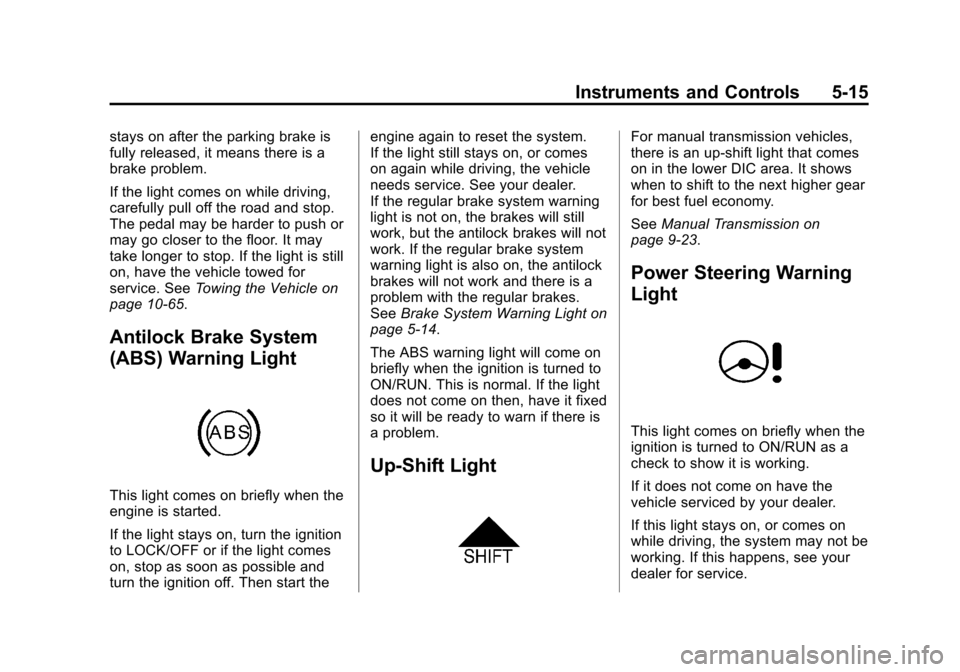
Antilock Brake System
(ABS) Warning Light
This light comes on briefly when the
engine is started.
If the light stays on, turn the ignition
to LOCK/OFF or if the light comes
on, stop as soon as possible and
turn the ignition off. Then start the engine again to reset the system.
If the light still stays on, or comes
on again while driving, the vehicle
needs service. See your dealer.
If the regular brake system warning
light is not on, the brakes will still
work, but the antilock brakes will not
work. If the regular brake system
warning light is also on, the antilock
brakes will not work and there is a
problem with the regular brakes.
See
Brake System Warning Light on
page 5‑14.
The ABS warning light will come on
briefly when the ignition is turned to
ON/RUN. This is normal. If the light
does not come on then, have it fixed
so it will be ready to warn if there is
a problem.
Up-Shift Light
For manual transmission vehicles,
there is an up-shift light that comes
on in the lower DIC area. It shows
when to shift to the next higher gear
for best fuel economy.
See Manual Transmission on
page 9‑23.
Power Steering Warning
Light
This light comes on briefly when the
ignition is turned to ON/RUN as a
check to show it is working.
If it does not come on have the
vehicle serviced by your dealer.
If this light stays on, or comes on
while driving, the system may not be
working. If this happens, see your
dealer for service.
Page 117 of 350
Black plate (27,1)Chevrolet Spark Owner Manual - 2013 - crc - 9/11/12
Instruments and Controls 5-27
wind noise as the vehicle speeds up
or slows down, so that the volume
level is consistent.
1. Turn the MENU/TUNE knob tothe desired value.
2. Press the MENU/TUNE knob to select the value.
Maximum Startup Volume
Select to manually set the startup
volume of the radio.
1. Turn the MENU/TUNE knob to increase or decrease the value.
2. To save press the MENU/TUNE or
/BACK button.
Radio Favorites
Select to manually set the number
of favorite pages.
1. Turn the MENU/TUNE knob to select 1-6.
2. Press the MENU/TUNE knob to select the value.
Vehicle Settings
Select the Radio Settings menu and
the following may be displayed:
.Comfort and Convenience
.Lighting
.Power Door Locks
.Lock, Unlock, Settings
.Vehicle Factory Settings
Comfort and Convenience
Select the Comfort and
Convenience menu and the
following may be displayed:
.Chime Volume
.Auto Wipe in Reverse Gear
Chime Volume
Select to set the chime volume level
to Normal or High.
1. Turn the MENU/TUNE knob to select Chime Volume.
2. Press the MENU/TUNE knob to select. 3. Turn the MENU/TUNE knob to
the desired level.
4. Press the MENU/TUNE knob to select the level.
Auto Wipe in Reverse Gear
Select to set the Auto Wipe in
Reverse Gear feature on or off.
When on, and the front wipers are
on, the rear window wiper will turn
on automatically when the vehicle is
shifted into R (Reverse).
1. Turn the MENU/TUNE knob to select Auto Wipe in
Reverse Gear.
2. Press the MENU/TUNE knob to turn On or Off.
Lighting
Select the Lighting menu and the
following may be displayed:
.Exit Lighting
Exit Lighting
Select to set how long the exterior
lamps stay on when leaving the
vehicle and it is dark outside.
Page 118 of 350
Black plate (28,1)Chevrolet Spark Owner Manual - 2013 - crc - 9/11/12
5-28 Instruments and Controls
1. Turn the MENU/TUNE knob tothe desired time.
2. Press the MENU/TUNE knob to select.
Power Door Locks
Select Power Door Locks and the
following may be displayed:
.Auto Door Unlock
.Unlocked Door Anti Lock Out
.Delayed Door Lock
Auto Door Unlock
Select to set which of the doors will
automatically unlock when the
vehicle is shifted into P (Park),
select All Doors, Driver Door, or Off.
1. Turn the MENU/TUNE knob to the desired selection.
2. Press the MENU/TUNE knob to select.
Unlocked Door Anti Lock Out
When on, this feature will keep the
driver door from locking when the
door is open. If Off is selected, the Delayed Door Lock menu will be
available and the door will lock as
programmed through this menu.
1. Turn the MENU/TUNE knob to
On or Off.
2. Press the MENU/TUNE knob to select.
Delayed Door Lock
When on, this feature will delay the
locking of the doors after the last
door is closed.
1. Turn the MENU/TUNE knob to On or Off.
2. Press the MENU/TUNE knob to select.
Lock, Unlock, Settings
Select Power Door Locks and the
following may be displayed:
.Remote Unlock Light Feedback
.Remote Lock Light and Horn
Feedback
.Remote Door Unlock Remote Unlock Light Feedback
When on, the exterior lamps will
flash when unlocking the vehicle
with the Remote Keyless Entry
(RKE) transmitter, select Flash
Lights or Lights Off.
1. Turn the MENU/TUNE knob to
the desired selection.
2. Press the MENU/TUNE knob to select.
Remote Lock Light and Horn
Feedback
Select to set which type of feedback
is given when pressing
Qon the
RKE transmitter, select Lights and
Horn, Lights only, Horn Only, or Off.
1. Turn the MENU/TUNE knob to the desired selection.
2. Press the MENU/TUNE knob to select.
Page 119 of 350
Black plate (29,1)Chevrolet Spark Owner Manual - 2013 - crc - 9/11/12
Instruments and Controls 5-29
Remote Door Unlock
Select to set which doors will unlock
when pressing
Kon the RKE
transmitter, select All Doors or
Driver Door.
When set to Driver Door, the driver
door will unlock the first time
Kis
pressed and all doors will unlock
when the button is pressed a
second time. When set to All Doors,
all of the doors will unlock at the first
press of
K.
1. Turn the MENU/TUNE knob to the desired selection.
2. Press the MENU/TUNE knob to select.
Vehicle Factory Settings
Select Vehicle Factory Settings to
return all of the vehicle
personalization to the default
settings. Press MENU/TUNE when
Vehicle Factory Settings is selected
and open the menu. Select Yes or
No by turning and pressing the
MENU/TUNE knob.
Personalization Menu (Radio
with Touchscreen)
Settings can be made with the
ignition ON and the vehicle not
moving.
The following are all possible
personalization features. Depending
on the vehicle, some may not be
available.
D(Home): Press to access the
Home Page Menu.
QorR(Up/Down): Press to scroll
through the menus or setup items.
4(Back) : Press to exit, or return
to the previous screen or menu.
To access the menu:
1. Press
D.
2. Press Settings.
Press the menu item to select it.
Each of the menus is detailed in the
following information.
Settings menus and functions may
vary depending on vehicle option. The following list of menu items may
be available:
.Time & Date Settings
.Radio Settings
.Connection Settings
.Vehicle Settings
.Language
.Text Scroll
.Touch Beep Sound
.Max Startup Volume
.About
.DivX®VOD
Time and Date Settings
Select the Time and Data Settings
menu and the following may be
displayed:
.Set Time Format
.Set Date Format
.Set Time and Date
.Automatic Clock Sync
Page 120 of 350
Black plate (30,1)Chevrolet Spark Owner Manual - 2013 - crc - 9/11/12
5-30 Instruments and Controls
Set Time Format
Select to set the 12/24 hour format.
Press 12h or 24h.
Set Date Format
Select to set the month and day
format.
Press
SorTto select the DD/MM/
YYYY (day/month/year), MM/DD/
YYYY (month/day/year), or YYYY/
MM/DD (year/month/day) format.
Set Time and Date
Select to manually set the time
and date.
1. Press
yorzto adjust the
value.
2. Press OK.
Automatic Clock Sync
Select to display the real or user
time on the radio.
Select On to display the real time or
Off to display the time set by
the user.
Radio Settings
Select the Radio Settings menu and
the following may be displayed:
.Auto Volume
.Radio Tune Bar
.Radio Text
.XM Categories
.Radio Factory Settings
Auto Volume
This feature adjusts the radio
volume to compensate for road and
wind noise as the vehicle speeds up
or slows down, so that the volume
level is consistent.
Press
SorTto select Off, Low,
Medium, or High.
Radio Tune Bar
Select to display the radio station
tune bar.
Select On or Off. Radio Text
Select to display the radio broadcast
information.
Select On or Off.
XM Categories
Select to set the selection of XM
categories.
Radio Factory Settings
Select to restore the radio to the
factory settings.
Connection Settings
Select the Connection Settings
menu and the following may be
displayed:
.Bluetooth Settings
.Change Ringtone
.Ringtone Volume
Bluetooth Settings
Select this feature to:
.Connect, disconnect, or delete a
device
Page 121 of 350
Black plate (31,1)Chevrolet Spark Owner Manual - 2013 - crc - 9/11/12
Instruments and Controls 5-31
.Change or set a Personal
Identification Number (PIN)
.Turn on or off the Bluetooth
connection
.Check the device information
Change Ringtone
Select to set different ringtones.
Ringtone Volume
Select to set the ringtone volume.
Press
SorT.
Vehicle Settings
Select the Vehicle Settings menu
and the following may be displayed:
.Comfort and Convenience
.Lighting
.Power Door Locks
.Lock, Unlock Settings
.Vehicle Factory Settings
Comfort and Convenience
Select the Comfort and
Convenience menu and the
following may be displayed:
.Chime Volume
.Auto Wipe in Reverse Gear
Chime Volume
Select to set the chime volume
level.
Select Normal or High. Press
4.
Auto Wipe in Reverse Gear
Select to set the Auto Wipe in
Reverse Gear feature on or off.
When on, and the front wipers are
on, the rear window wiper will turn
on automatically when the vehicle is
shifted into R (Reverse).
Select On or Off. Press
4.
Lighting
Select the Lighting menu and the
following may be displayed:
.Exit Lighting Exit Lighting
Select to set how long the exterior
lamps stay on when leaving the
vehicle and it is dark outside.
Select Off, 30 Sec, 60 Sec, or 120
Sec. Press
4.
Power Door Locks
Select Power Door Locks and the
following may be displayed:
.Auto Door Unlock
.Unlocked Door Anti Lock Out
.Delayed Door Lock
Auto Door Unlock
Select to set which of the doors will
automatically unlock when the
vehicle is shifted into P (Park).
Select All Doors, Driver Door, or Off.
Press
4.
Unlocked Door Anti Lock Out
When on, this feature will keep the
driver door from locking when the
door is open. If Off is selected, the
Page 122 of 350
Black plate (32,1)Chevrolet Spark Owner Manual - 2013 - crc - 9/11/12
5-32 Instruments and Controls
Delayed Door Lock menu will be
available and the door will lock as
programmed through this menu.
Select On or Off. Press
4.
Delayed Door Lock
When on, this feature will delay the
locking of the doors until
five seconds after the last door is
closed. Three chimes will signal that
delayed locking is in use. Pressing
either
QorKon the RKE
transmitter twice will override the
delayed locking feature and
immediately lock all of the doors.
Select On or Off. Press
4.
Lock, Unlock Settings
Select Lock, Unlock Settings and
the following may be displayed:
.Remote Unlock Light Feedback
.Remote Lock Light & Horn
Feedback
.Remote Door Unlock Remote Unlock Light Feedback
When on, the exterior lamps will
flash when unlocking the vehicle
with the RKE transmitter.
Select Flash Lights or Lights Off.
Press
4.
Remote Lock Light & Horn
Feedback
Select to set what type of feedback
is given when pressing
Qon the
RKE transmitter.
Select Lights Only, Lights & Horn,
Horn Only, or Off. Press
4.
Remote Door Unlock
Select to set which doors will unlock
when pressing
Kon the RKE
transmitter.
Select All Doors or Driver Door.
When set to Driver Door Only,
the driver door will unlock the first
time
Kis pressed and all doors will
unlock when the button is pressed a second time. When set to All Doors,
all of the doors will unlock at the first
press of
K. Press4.
Vehicle Factory Settings
Select Vehicle Factory Settings to
return all of the vehicle
personalization to the default
settings. Press Vehicle Factory
Settings when highlighted. Select
Yes or No. Press
4.
Language
Select the Language menu and the
following may be displayed:
.English
.French
.Spanish
Select the language desired.
Press
4.
Text Scroll
Select to set the Text Scroll feature
on or off.
Page 134 of 350

Black plate (4,1)Chevrolet Spark Owner Manual - 2013 - crc - 9/11/12
7-4 Infotainment System
7.©SEEK (Previous)
.Press to seek the previous
station.
.Press and hold to reverse
through the currently
playing song on an external
audio device.
8. AUX (Auxiliary)
.Press to access the
auxiliary input device.
9. RADIO/BAND
.Press to select AM, FM,
or band.
.Press to select the radio
when listening to a different
audio source.
10.
H(Clock)
.Press to enter the time
and date settings menu. 11. TONE
.Press to open the
Tone menu.
12. CONFIG (Configuration)
.Press to open the System
Configuration menu.
13.
/BACK
.Press to go to the
previous screen.
.Press to cancel entered
content.
14.
5/>(Phone/Mute)
.Press to open the Phone
main menu.
.Press to mute the audio
system.