ECU CHEVROLET SPARK 2015 3.G Owner's Guide
[x] Cancel search | Manufacturer: CHEVROLET, Model Year: 2015, Model line: SPARK, Model: CHEVROLET SPARK 2015 3.GPages: 363, PDF Size: 5.05 MB
Page 89 of 363
Black plate (50,1)Chevrolet Spark Owner Manual (GMNA-Localizing-U.S./Canada-7707489) -
2015 - CRC - 11/19/14
3-50 Seats and Restraints
{Warning
A child in a rear-facing child
restraint can be seriously injured
or killed if the front outboard
passenger frontal airbag inflates.
This is because the back of the
rear-facing child restraint would
be very close to the inflating
airbag. A child in a forward-facing
child restraint can be seriously
injured or killed if the front
outboard passenger frontal airbag
inflates and the passenger seat is
in a forward position.
Even if the passenger sensing
system has turned off the front
outboard passenger airbag(s), no
system is fail-safe. No one can
guarantee that an airbag will not
inflate under some unusual
circumstance, even though the
airbag(s) are off.(Continued)
Warning (Continued)
Secure rear-facing child restraints
in a rear seat, even if the
airbag(s) are off. If you secure a
forward-facing child restraint in
the front outboard passenger
seat, always move the seat as far
back as it will go. It is better to
secure the child restraint in a
rear seat.
SeePassenger Sensing System
on page 3-25 for additional
information.
If the child restraint uses a top
tether, see Lower Anchors and
Tethers for Children (LATCH
System) on page 3-40 for top tether
anchor locations.
Do not secure a child seat in a
position without a top tether anchor
if a national or local law requires
that the top tether be anchored, or if the instructions that come with the
child restraint say that the top strap
must be anchored.
In Canada, the law requires that
forward-facing child restraints have
a top tether, and that the tether be
attached.
When using the lap-shoulder belt to
secure the child restraint in this
position, follow the instructions that
came with the child restraint and the
following instructions:
1. Move the seat as far back as it
will go before securing the
forward-facing child restraint.
When the passenger sensing
system has turned off the front
outboard passenger frontal
airbag and knee airbag, the off
indicator on the passenger
airbag status indicator should
light and stay lit when you start
the vehicle. See Passenger
Airbag Status Indicator on
page 5-11.
Page 91 of 363
Black plate (52,1)Chevrolet Spark Owner Manual (GMNA-Localizing-U.S./Canada-7707489) -
2015 - CRC - 11/19/14
3-52 Seats and Restraints
7. Before placing a child in thechild restraint, make sure it is
securely held in place. To check,
grasp the child restraint at the
safety belt path and attempt to
move it side to side and back
and forth. When the child
restraint is properly installed,
there should be no more than
2.5 cm (1 in) of movement.
If the airbags are off, the off
indicator in the passenger airbag
status indicator will come on and
stay on when the vehicle is started.
If a child restraint has been installed
and the off symbol is not lit, see “If
the On Indicator Is Lit for a Child
Restraint” underPassenger Sensing
System on page 3-25.
To remove the child restraint,
unbuckle the vehicle's safety belt
and let it go back all the way.
Page 92 of 363
Black plate (1,1)Chevrolet Spark Owner Manual (GMNA-Localizing-U.S./Canada-7707489) -
2015 - CRC - 11/19/14
Storage 4-1
Storage
Storage Compartments
Storage Compartments . . . . . . . 4-1
Glove Box . . . . . . . . . . . . . . . . . . . . 4-1
Additional Storage Features
Cargo Cover . . . . . . . . . . . . . . . . . . 4-1
Shopping Bag Hooks . . . . . . . . . 4-2
Cargo Net . . . . . . . . . . . . . . . . . . . . . 4-2
Roof Rack System
Roof Rack System . . . . . . . . . . . . 4-3
Storage
Compartments
{Warning
Do not store heavy or sharp
objects in storage compartments.
In a crash, these objects may
cause the cover to open and
could result in injury.
Glove Box
Lift up on the glove box lever to
open it.
Additional Storage
Features
Cargo Cover
{Warning
An unsecured cargo cover could
strike people in a sudden stop or
turn, or in a crash. Store the
cargo cover securely or remove it
from the vehicle.
The cargo cover can be used to
cover items in the rear of the
vehicle.
Page 94 of 363
Black plate (3,1)Chevrolet Spark Owner Manual (GMNA-Localizing-U.S./Canada-7707489) -
2015 - CRC - 11/19/14
Storage 4-3
Roof Rack System
{Warning
If something is carried on top of
the vehicle that is longer or wider
than the roof rack—like paneling,
plywood, or a mattress —the
wind can catch it while the vehicle
is being driven. The item being
carried could be violently torn off,
and this could cause a collision
and damage the vehicle. Never
carry something longer or wider
than the roof rack on top of the
vehicle unless using a GM
certified accessory carrier.
If equipped, the roof rack can be
used to load items. For roof racks
that do not have crossrails included,
GM Certified crossrails can be
purchased as an accessory. See
your dealer for additional
information.
{Caution
Loading cargo on the roof rack
that weighs more than 50 kg
(110 lb) or hangs over the rear or
sides of the vehicle may damage
the vehicle. Load cargo so that it
rests evenly between the
crossrails, making sure to fasten
cargo securely.
To prevent damage or loss of cargo
when driving, check to make sure
crossrails and cargo are securely
fastened. Loading cargo on the roof
rack will make the vehicle’ s center
of gravity higher. Avoid high speeds,
sudden starts, sharp turns, sudden
braking, or abrupt maneuvers;
otherwise it may result in loss of
control. If driving for a long distance,
on rough roads, or at high speeds,
occasionally stop the vehicle to
make sure the cargo remains in its
place. Do not exceed the maximum vehicle
capacity when loading the vehicle.
For more information on vehicle
capacity and loading, see
Vehicle
Load Limits on page 9-9.
Page 117 of 363
Black plate (22,1)Chevrolet Spark Owner Manual (GMNA-Localizing-U.S./Canada-7707489) -
2015 - CRC - 11/19/14
5-22 Instruments and Controls
The light turns off when the cruise
control is turned off. SeeCruise
Control on page 9-30.
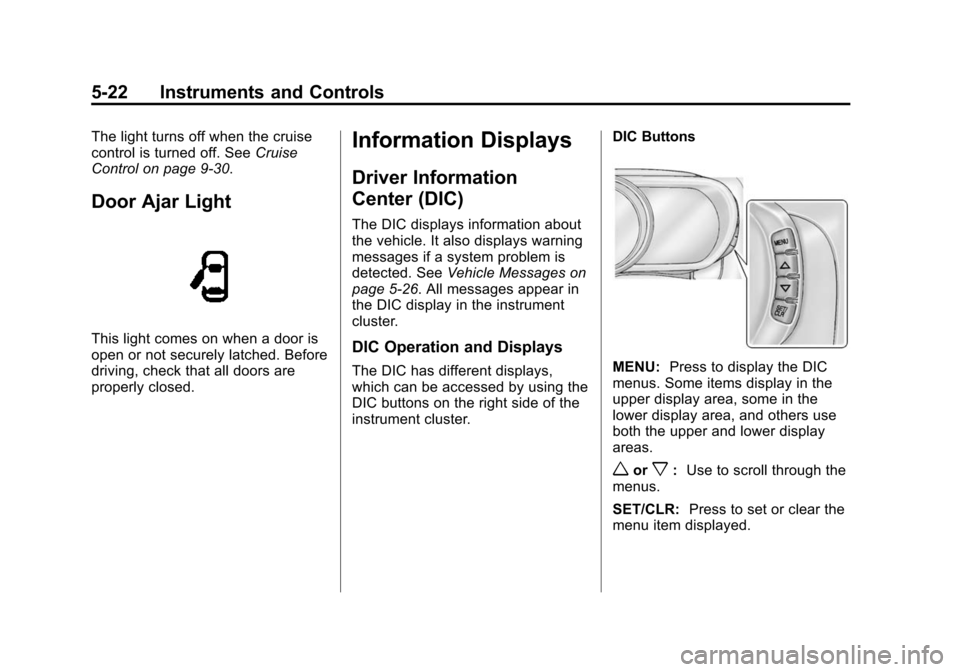
Door Ajar Light
This light comes on when a door is
open or not securely latched. Before
driving, check that all doors are
properly closed.
Information Displays
Driver Information
Center (DIC)
The DIC displays information about
the vehicle. It also displays warning
messages if a system problem is
detected. See Vehicle Messages on
page 5-26. All messages appear in
the DIC display in the instrument
cluster.
DIC Operation and Displays
The DIC has different displays,
which can be accessed by using the
DIC buttons on the right side of the
instrument cluster. DIC ButtonsMENU:
Press to display the DIC
menus. Some items display in the
upper display area, some in the
lower display area, and others use
both the upper and lower display
areas.
worx: Use to scroll through the
menus.
SET/CLR: Press to set or clear the
menu item displayed.
Page 139 of 363
Black plate (2,1)Chevrolet Spark Owner Manual (GMNA-Localizing-U.S./Canada-7707489) -
2015 - CRC - 11/19/14
7-2 Infotainment System
The infotainment system has built-in
features intended to help avoid
distraction by disabling some
functions when driving. These
functions may gray out when they
are unavailable. Many infotainment
features are also available through
the instrument cluster and steering
wheel controls.
Before driving:
.Become familiar with the
operation, faceplate buttons, and
screen buttons.
.Set up the audio by presetting
favorite stations, setting the
tone, and adjusting the
speakers.
.Set up phone numbers in
advance so they can be called
easily by pressing a single
button or by using a single voice
command if equipped with
Bluetooth phone capability.
See Defensive Driving on page 9-2
To play the infotainment system with
the ignition off, see Retained
Accessory Power (RAP) on
page 9-18.Theft-Deterrent Feature
The infotainment system has an
electronic security system installed
to prevent theft.
The infotainment system only works
in the vehicle in which it was first
installed, and cannot be used in
another vehicle.
Page 159 of 363
Black plate (22,1)Chevrolet Spark Owner Manual (GMNA-Localizing-U.S./Canada-7707489) -
2015 - CRC - 11/19/14
7-22 Infotainment System
according to the type of the phone.
In this case, proceed with the phone
book download on the phone.
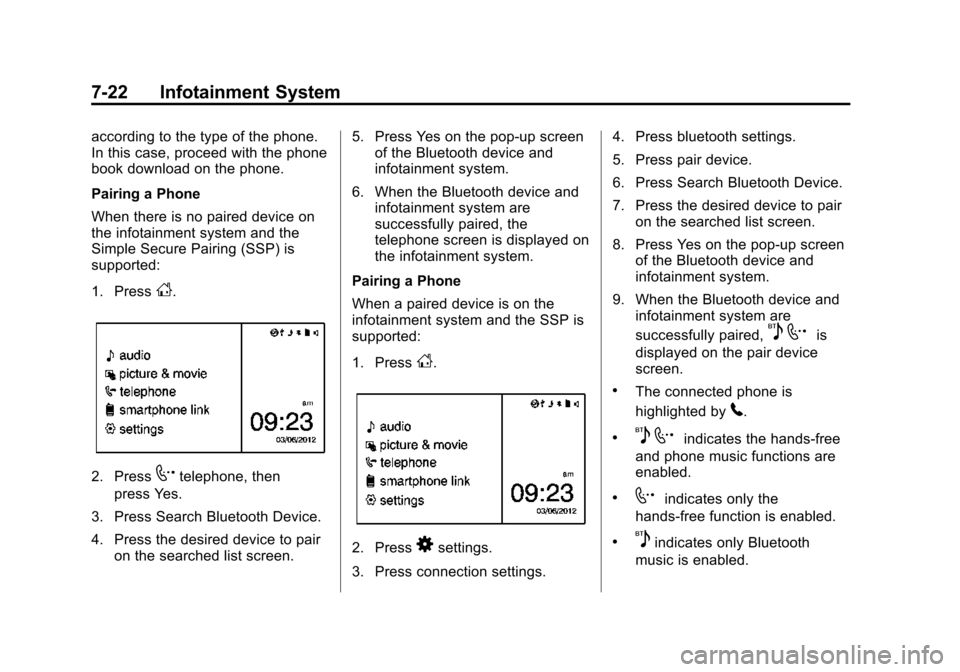
Pairing a Phone
When there is no paired device on
the infotainment system and the
Simple Secure Pairing (SSP) is
supported:
1. Press
D.
2. Press7telephone, then
press Yes.
3. Press Search Bluetooth Device.
4. Press the desired device to pair on the searched list screen. 5. Press Yes on the pop-up screen
of the Bluetooth device and
infotainment system.
6. When the Bluetooth device and infotainment system are
successfully paired, the
telephone screen is displayed on
the infotainment system.
Pairing a Phone
When a paired device is on the
infotainment system and the SSP is
supported:
1. Press
D.
2. Press8settings.
3. Press connection settings. 4. Press bluetooth settings.
5. Press pair device.
6. Press Search Bluetooth Device.
7. Press the desired device to pair
on the searched list screen.
8. Press Yes on the pop-up screen of the Bluetooth device and
infotainment system.
9. When the Bluetooth device and infotainment system are
successfully paired,
5 7is
displayed on the pair device
screen.
.The connected phone is
highlighted by
5.
.5 7indicates the hands-free
and phone music functions are
enabled.
.7indicates only the
hands-free function is enabled.
.5indicates only Bluetooth
music is enabled.
Page 160 of 363
Black plate (23,1)Chevrolet Spark Owner Manual (GMNA-Localizing-U.S./Canada-7707489) -
2015 - CRC - 11/19/14
Infotainment System 7-23
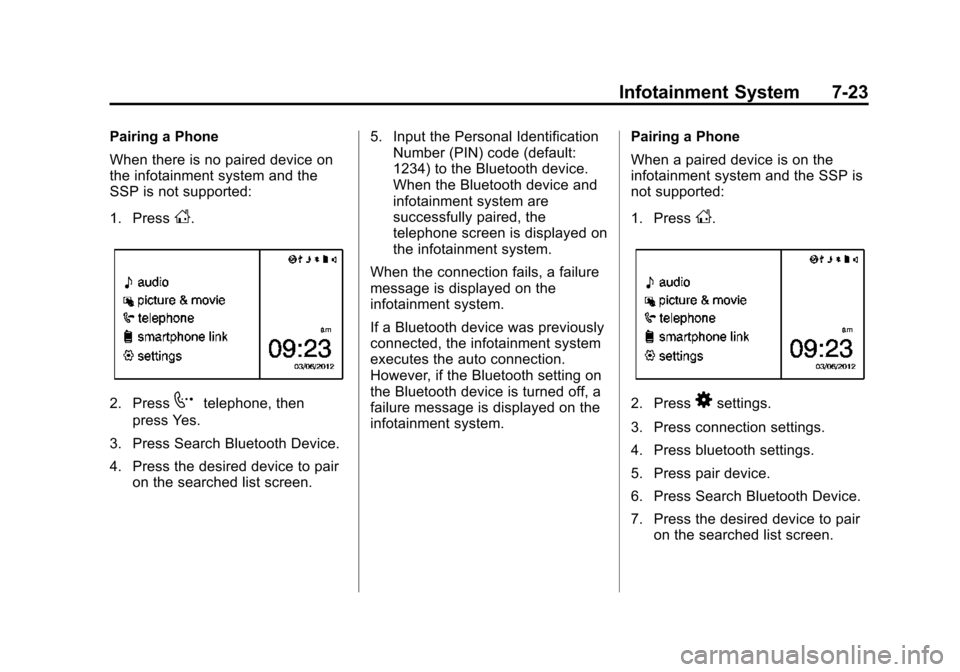
Pairing a Phone
When there is no paired device on
the infotainment system and the
SSP is not supported:
1. Press
D.
2. Press7telephone, then
press Yes.
3. Press Search Bluetooth Device.
4. Press the desired device to pair on the searched list screen. 5. Input the Personal Identification
Number (PIN) code (default:
1234) to the Bluetooth device.
When the Bluetooth device and
infotainment system are
successfully paired, the
telephone screen is displayed on
the infotainment system.
When the connection fails, a failure
message is displayed on the
infotainment system.
If a Bluetooth device was previously
connected, the infotainment system
executes the auto connection.
However, if the Bluetooth setting on
the Bluetooth device is turned off, a
failure message is displayed on the
infotainment system. Pairing a Phone
When a paired device is on the
infotainment system and the SSP is
not supported:
1. Press
D.
2. Press8settings.
3. Press connection settings.
4. Press bluetooth settings.
5. Press pair device.
6. Press Search Bluetooth Device.
7. Press the desired device to pair on the searched list screen.
Page 200 of 363
Black plate (13,1)Chevrolet Spark Owner Manual (GMNA-Localizing-U.S./Canada-7707489) -
2015 - CRC - 11/19/14
Driving and Operating 9-13
Warning (Continued)
.Never stack heavier
things, like suitcases,
inside the vehicle so that
some of them are above
the tops of the seats.
.Do not leave an
unsecured child restraint
in the vehicle.
.Secure loose items in the
vehicle.
.Do not leave a seat folded
down unless needed.
Starting and
Operating
New Vehicle Break-In
{Caution
The vehicle does not need an
elaborate break-in. But it will
perform better in the long run if
you follow these guidelines:
.Do not drive at any one
constant speed, fast or slow,
for the first 805 km (500 mi).
Do not make full-throttle
starts. Avoid downshifting to
brake or slow the vehicle.
.Avoid making hard stops for
the first 322 km (200 mi) or
so. During this time the new
brake linings are not yet
broken in. Hard stops with
new linings can mean
premature wear and earlier
replacement. Follow this(Continued)
Caution (Continued)
breaking-in guideline every
time you get new brake
linings.
Following break-in, engine speed
and load can be gradually
increased.
Ignition Positions
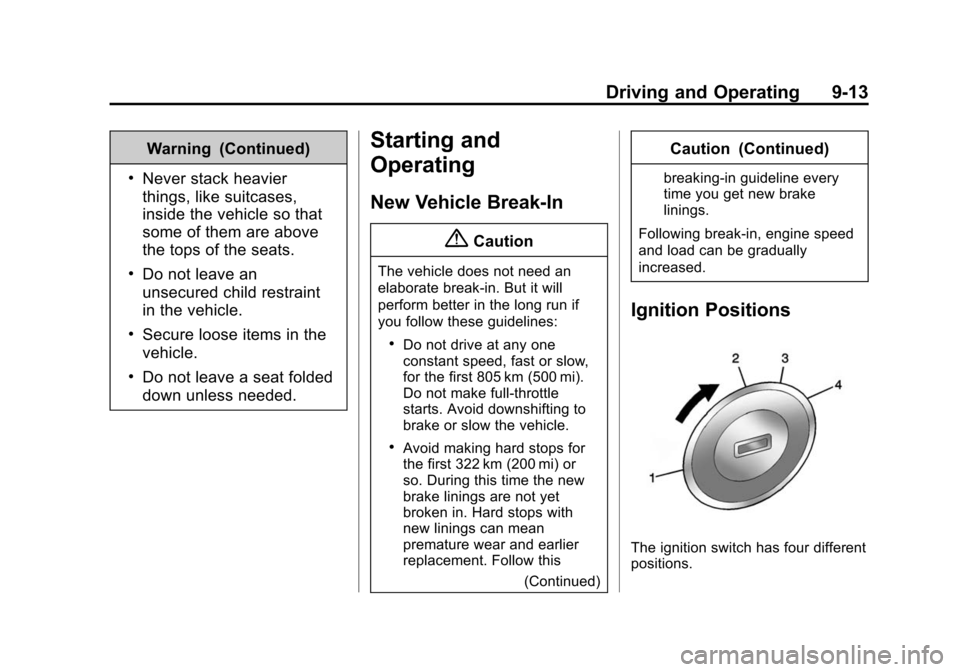
The ignition switch has four different
positions.
Page 204 of 363
Black plate (17,1)Chevrolet Spark Owner Manual (GMNA-Localizing-U.S./Canada-7707489) -
2015 - CRC - 11/19/14
Driving and Operating 9-17
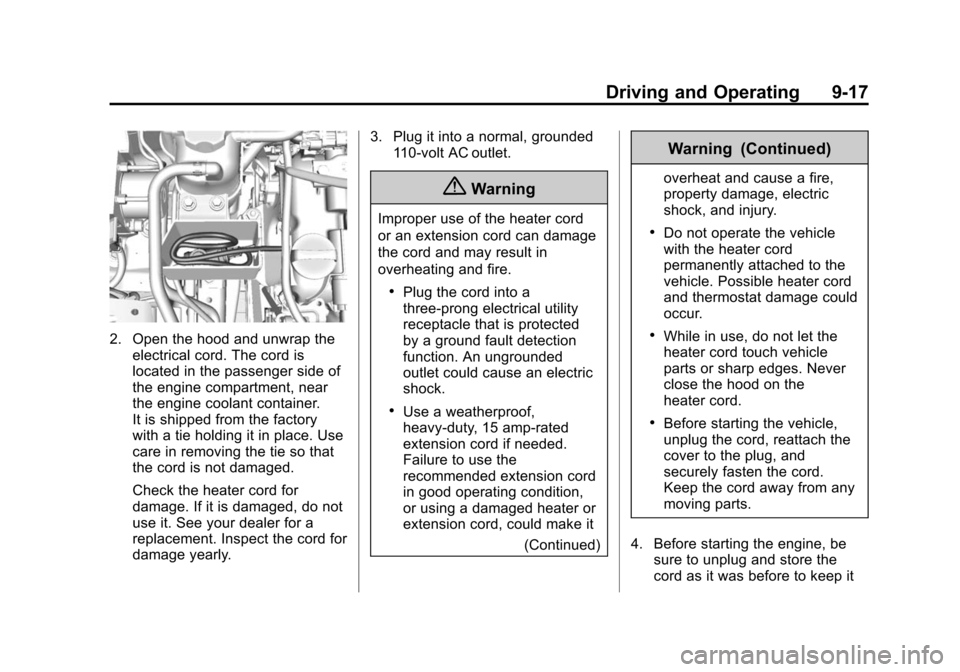
2. Open the hood and unwrap theelectrical cord. The cord is
located in the passenger side of
the engine compartment, near
the engine coolant container.
It is shipped from the factory
with a tie holding it in place. Use
care in removing the tie so that
the cord is not damaged.
Check the heater cord for
damage. If it is damaged, do not
use it. See your dealer for a
replacement. Inspect the cord for
damage yearly. 3. Plug it into a normal, grounded
110-volt AC outlet.
{Warning
Improper use of the heater cord
or an extension cord can damage
the cord and may result in
overheating and fire.
.Plug the cord into a
three-prong electrical utility
receptacle that is protected
by a ground fault detection
function. An ungrounded
outlet could cause an electric
shock.
.Use a weatherproof,
heavy-duty, 15 amp-rated
extension cord if needed.
Failure to use the
recommended extension cord
in good operating condition,
or using a damaged heater or
extension cord, could make it
(Continued)
Warning (Continued)
overheat and cause a fire,
property damage, electric
shock, and injury.
.Do not operate the vehicle
with the heater cord
permanently attached to the
vehicle. Possible heater cord
and thermostat damage could
occur.
.While in use, do not let the
heater cord touch vehicle
parts or sharp edges. Never
close the hood on the
heater cord.
.Before starting the vehicle,
unplug the cord, reattach the
cover to the plug, and
securely fasten the cord.
Keep the cord away from any
moving parts.
4. Before starting the engine, be sure to unplug and store the
cord as it was before to keep it