light CHEVROLET SPARK 2015 3.G Workshop Manual
[x] Cancel search | Manufacturer: CHEVROLET, Model Year: 2015, Model line: SPARK, Model: CHEVROLET SPARK 2015 3.GPages: 363, PDF Size: 5.05 MB
Page 137 of 363
Black plate (6,1)Chevrolet Spark Owner Manual (GMNA-Localizing-U.S./Canada-7707489) -
2015 - CRC - 11/19/14
6-6 Lighting
Lighting Features
Entry Lighting
The headlamps, parking lamps,
taillamps, and the interior lights turn
on briefly at night when the Remote
Keyless Entry (RKE) transmitter
K
is pressed. The lights turn off
immediately when the ignition is
turned on or automatically after a
brief period.
Exit Lighting
If the dome lamps are in the DOOR
position, they come on automatically
when the key is removed from the
ignition. The exterior lamps and
dome lamps remain on after the
door is closed for a set amount of
time, then automatically turn off.
The headlamps, parking lamps, and
back-up lamps will turn on for a set
amount of time when the vehicle is
turned off and the key is removed
from the ignition, then automatically
turn off.This feature can be changed. See
Vehicle Personalization on
page 5-27.
Battery Power Protection
The battery saver feature is
designed to protect the vehicle's
battery.
If some interior lamps and/or
headlamps are left on and the
ignition is turned off, the battery
rundown protection system
automatically turns the lamp off after
some time.
Page 140 of 363
Black plate (3,1)Chevrolet Spark Owner Manual (GMNA-Localizing-U.S./Canada-7707489) -
2015 - CRC - 11/19/14
Infotainment System 7-3
Overview
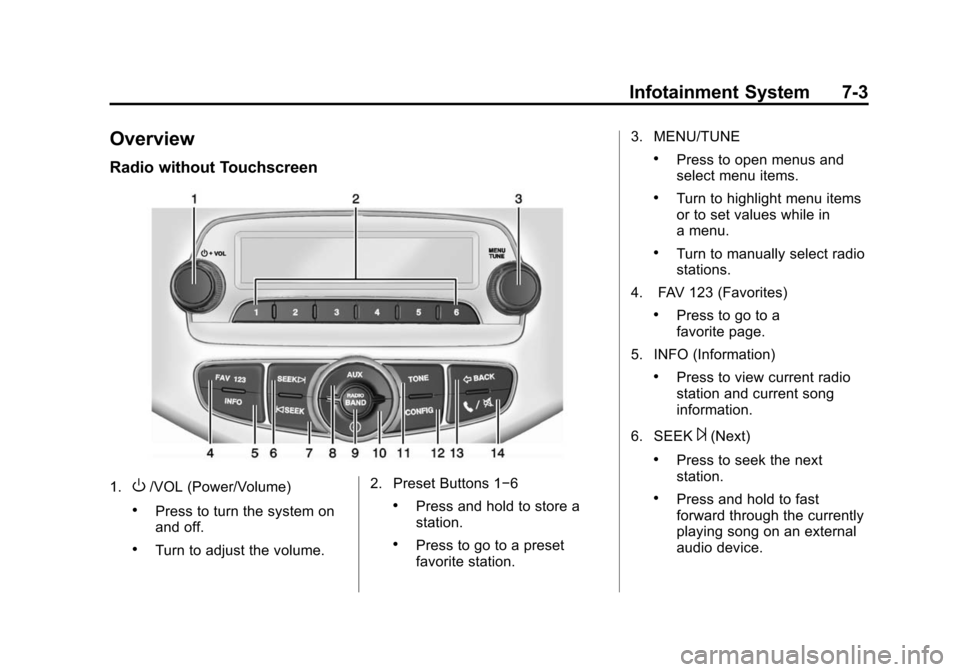
Radio without Touchscreen
1.O/VOL (Power/Volume)
.Press to turn the system on
and off.
.Turn to adjust the volume.2. Preset Buttons 1−6
.Press and hold to store a
station.
.Press to go to a preset
favorite station.3. MENU/TUNE
.Press to open menus and
select menu items.
.Turn to highlight menu items
or to set values while in
a menu.
.Turn to manually select radio
stations.
4. FAV 123 (Favorites)
.Press to go to a
favorite page.
5. INFO (Information)
.Press to view current radio
station and current song
information.
6. SEEK
¨(Next)
.Press to seek the next
station.
.Press and hold to fast
forward through the currently
playing song on an external
audio device.
Page 142 of 363
Black plate (5,1)Chevrolet Spark Owner Manual (GMNA-Localizing-U.S./Canada-7707489) -
2015 - CRC - 11/19/14
Infotainment System 7-5
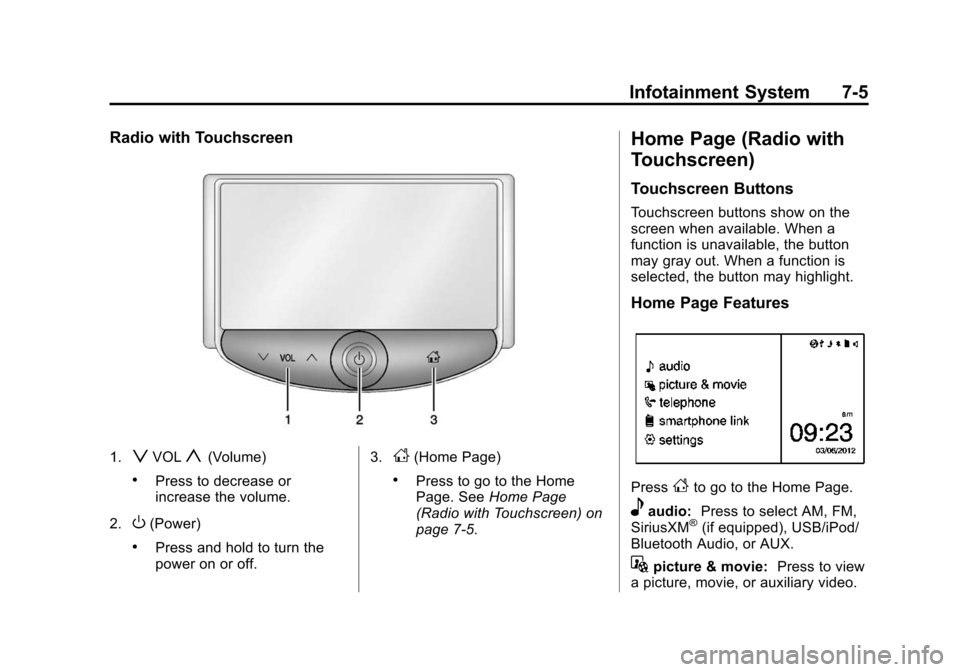
Radio with Touchscreen
1.zVOLy(Volume)
.Press to decrease or
increase the volume.
2.
O(Power)
.Press and hold to turn the
power on or off. 3.
D(Home Page)
.Press to go to the Home
Page. See
Home Page
(Radio with Touchscreen) on
page 7-5.
Home Page (Radio with
Touchscreen)
Touchscreen Buttons
Touchscreen buttons show on the
screen when available. When a
function is unavailable, the button
may gray out. When a function is
selected, the button may highlight.
Home Page Features
PressFto go to the Home Page.
eaudio: Press to select AM, FM,
SiriusXM®(if equipped), USB/iPod/
Bluetooth Audio, or AUX.
Gpicture & movie: Press to view
a picture, movie, or auxiliary video.
Page 143 of 363
Black plate (6,1)Chevrolet Spark Owner Manual (GMNA-Localizing-U.S./Canada-7707489) -
2015 - CRC - 11/19/14
7-6 Infotainment System
7telephone:Press to activate
the phone features (if equipped).
See Bluetooth (Overview) on
page 7-19 orBluetooth
(Infotainment Controls) on
page 7-21.
^smartphone link: Press to listen
to Pandora®(if equipped), Stitcher®,
or available application. See
Smartphone Link (Overview) on
page 7-29 orSmartphone Link
(Pandora) on page 7-31 or
Smartphone Link (Stitcher) on
page 7-33.
8settings: Press to access the
Personalization menu. See Vehicle
Personalization on page 5-27.
Operation
Radio Controls without
Touchscreen
The infotainment system is operated
by using the pushbuttons,
multifunction knobs, and menus
shown on the display.
Turning the System On or Off
O/VOL (Power/Volume): Press to
turn the radio on and off.
Automatic Switch-Off
If the infotainment system has been
turned on after the ignition is turned
off, the system will turn off
automatically after 10 minutes.
Volume Control
O/VOL (Power/Volume): Turn to
adjust the volume.
5/>(Phone/Mute): Press to
activate OnStar. See OnStar
Overview on page 14-1. Press and hold to mute the
infotainment system. Press again or
turn the
O/VOL knob to
cancel mute.
Menu System
Controls
The MENU/TUNE knob and
/
BACK button are used to navigate
the menu system.
MENU/TUNE Knob:
Turn to:
.Highlight a menu option.
.Select a value.
Press to:
.Enter the menu system.
.Select or activate the highlighted
menu option.
.Confirm a set value.
.Turn a system setting on or off.
Page 159 of 363
Black plate (22,1)Chevrolet Spark Owner Manual (GMNA-Localizing-U.S./Canada-7707489) -
2015 - CRC - 11/19/14
7-22 Infotainment System
according to the type of the phone.
In this case, proceed with the phone
book download on the phone.
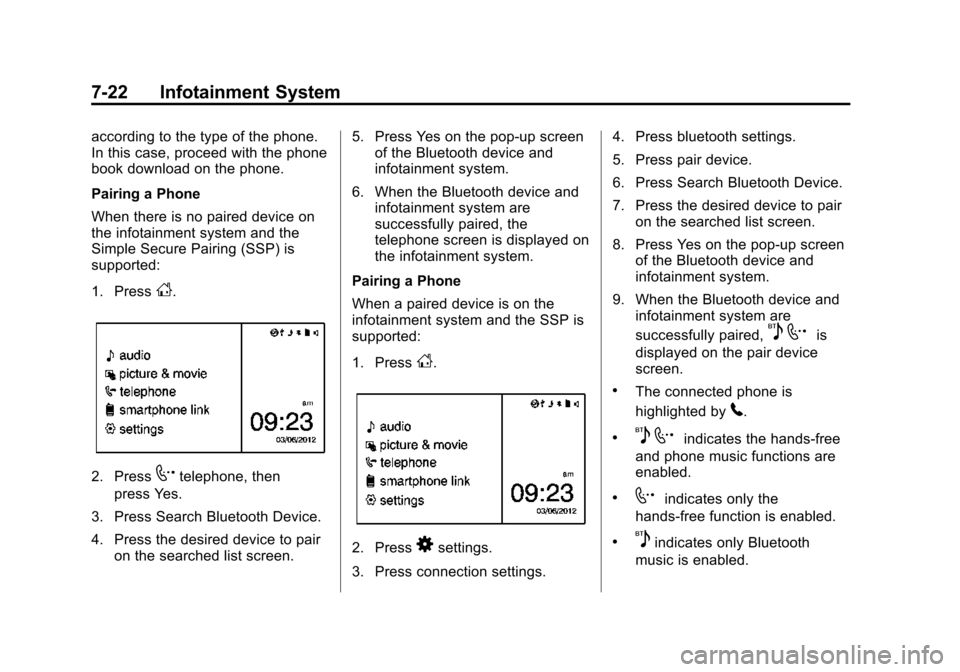
Pairing a Phone
When there is no paired device on
the infotainment system and the
Simple Secure Pairing (SSP) is
supported:
1. Press
D.
2. Press7telephone, then
press Yes.
3. Press Search Bluetooth Device.
4. Press the desired device to pair on the searched list screen. 5. Press Yes on the pop-up screen
of the Bluetooth device and
infotainment system.
6. When the Bluetooth device and infotainment system are
successfully paired, the
telephone screen is displayed on
the infotainment system.
Pairing a Phone
When a paired device is on the
infotainment system and the SSP is
supported:
1. Press
D.
2. Press8settings.
3. Press connection settings. 4. Press bluetooth settings.
5. Press pair device.
6. Press Search Bluetooth Device.
7. Press the desired device to pair
on the searched list screen.
8. Press Yes on the pop-up screen of the Bluetooth device and
infotainment system.
9. When the Bluetooth device and infotainment system are
successfully paired,
5 7is
displayed on the pair device
screen.
.The connected phone is
highlighted by
5.
.5 7indicates the hands-free
and phone music functions are
enabled.
.7indicates only the
hands-free function is enabled.
.5indicates only Bluetooth
music is enabled.
Page 161 of 363
Black plate (24,1)Chevrolet Spark Owner Manual (GMNA-Localizing-U.S./Canada-7707489) -
2015 - CRC - 11/19/14
7-24 Infotainment System
8. Input the Personal IdentificationNumber (PIN) code (default:
1234) to the Bluetooth device.
When the Bluetooth device and
infotainment system are
successfully paired,
5 7is
displayed on the pair device
screen.
.The connected phone is
highlighted by
5.
.5 7indicates the hands-free
and phone music functions are
enabled.
.7indicates only the
hands-free function is enabled.
.5indicates only Bluetooth
music is enabled.
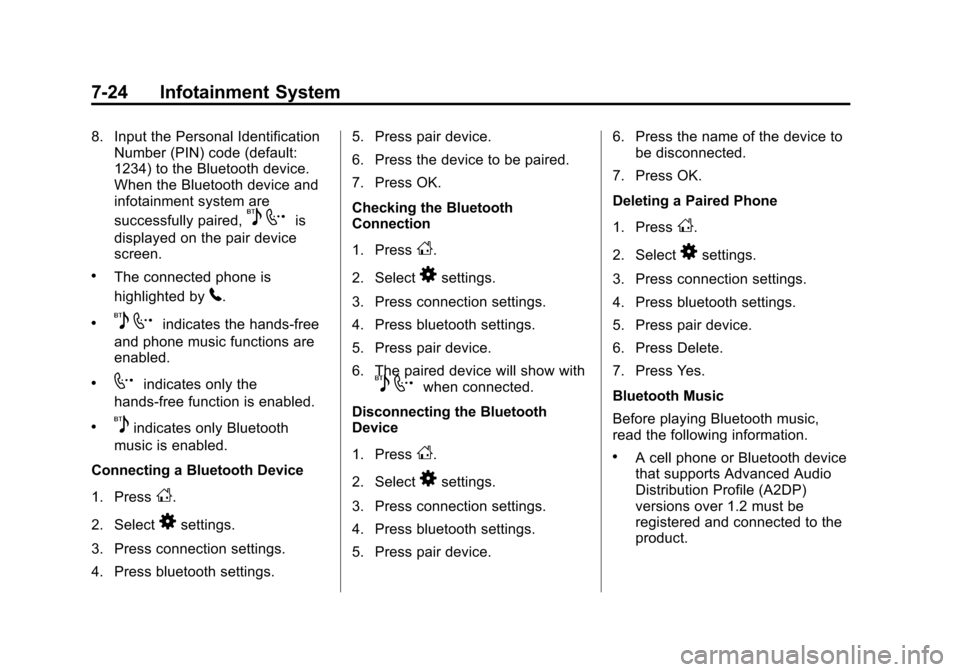
Connecting a Bluetooth Device
1. Press
D.
2. Select
8settings.
3. Press connection settings.
4. Press bluetooth settings. 5. Press pair device.
6. Press the device to be paired.
7. Press OK.
Checking the Bluetooth
Connection
1. Press
D.
2. Select
8settings.
3. Press connection settings.
4. Press bluetooth settings.
5. Press pair device.
6. The paired device will show with
5 7when connected.
Disconnecting the Bluetooth
Device
1. Press
D.
2. Select
8settings.
3. Press connection settings.
4. Press bluetooth settings.
5. Press pair device. 6. Press the name of the device to
be disconnected.
7. Press OK.
Deleting a Paired Phone
1. Press
D.
2. Select
8settings.
3. Press connection settings.
4. Press bluetooth settings.
5. Press pair device.
6. Press Delete.
7. Press Yes.
Bluetooth Music
Before playing Bluetooth music,
read the following information.
.A cell phone or Bluetooth device
that supports Advanced Audio
Distribution Profile (A2DP)
versions over 1.2 must be
registered and connected to the
product.
Page 183 of 363
Black plate (2,1)Chevrolet Spark Owner Manual (GMNA-Localizing-U.S./Canada-7707489) -
2015 - CRC - 11/19/14
8-2 Climate Controls
W(Defog):This mode clears the
windows of fog or moisture. Air is
directed to the floor, windshield, and
side window outlets.
0(Defrost): This mode clears the
windshield of fog or frost more
quickly. When the defrost mode is
selected, the recirculation mode is
set to outside air mode
automatically. Air is directed to the
windshield and side window outlets.
Do not drive the vehicle until all
windows are clear.
#(Air Conditioning): TurnAto
the desired speed. The air
conditioning does not operate when
the fan control knob is at 0. Press
#to turn the air conditioning on
and off. When
#is pressed, an
indicator light comes on to show
that the air conditioning is on. Using air conditioning and
recirculation together for long
periods of time may cause the air
inside the vehicle to become too
dry. To prevent this from happening,
after the air in the vehicle has
cooled, turn the recirculation
mode off.
M(Recirculation):
This mode
recirculates and helps to quickly
cool the air inside the vehicle. It can
be used to reduce the entry of
outside air and odors.
Press the button to turn the
recirculation mode on. An indicator
light comes on to show that the
recirculation is on. Press the button
again to return to outside air mode.
Using the recirculation mode for
extended periods may cause the
windows to fog. If this happens,
select the defrost mode.
Rear Window Defogger
1(Rear Window Defogger):
Press to turn the rear window
defogger on or off. An indicator light
comes on to show that the feature
is on.
The defogger turns off if the ignition
is turned to ACC/ACCESSORY or
LOCK/OFF.
{Caution
Using a razor blade or sharp
object on the inside rear window
can damage the antenna or
defogger. Repairs would not be
covered by the vehicle warranty.
Do not stick anything to the rear
window.
Page 192 of 363
Black plate (5,1)Chevrolet Spark Owner Manual (GMNA-Localizing-U.S./Canada-7707489) -
2015 - CRC - 11/19/14
Driving and Operating 9-5
.Steering or Cornering Skid—
too much speed or steering in a
curve causes tires to slip and
lose cornering force.
.Acceleration Skid —too much
throttle causes the driving
wheels to spin.
Defensive drivers avoid most skids
by taking reasonable care suited to
existing conditions, and by not
overdriving those conditions. But
skids are always possible.
If the vehicle starts to slide, follow
these suggestions:
.Ease your foot off the
accelerator pedal and steer the
way you want the vehicle to go.
The vehicle may straighten out.
Be ready for a second skid if it
occurs.
.Slow down and adjust your
driving according to weather
conditions. Stopping distance
can be longer and vehicle
control can be affected when
traction is reduced by water,
snow, ice, gravel, or other material on the road. Learn to
recognize warning clues
—such
as enough water, ice, or packed
snow on the road to make a
mirrored surface —and slow
down when you have any doubt.
.Try to avoid sudden steering,
acceleration, or braking,
including reducing vehicle speed
by shifting to a lower gear. Any
sudden changes could cause
the tires to slide.
Remember: Antilock brakes help
avoid only the braking skid.
Driving on Wet Roads
Rain and wet roads can reduce
vehicle traction and affect your
ability to stop and accelerate.
Always drive slower in these types
of driving conditions and avoid
driving through large puddles and
deep‐standing or flowing water.
{Warning
Wet brakes can cause crashes.
They might not work as well in a
quick stop and could cause
pulling to one side. You could
lose control of the vehicle.
After driving through a large
puddle of water or a car/vehicle
wash, lightly apply the brake
pedal until the brakes work
normally.
Flowing or rushing water creates
strong forces. Driving through
flowing water could cause the
vehicle to be carried away. If this
happens, you and other vehicle
occupants could drown. Do not
ignore police warnings and be
very cautious about trying to drive
through flowing water.
Page 195 of 363
Black plate (8,1)Chevrolet Spark Owner Manual (GMNA-Localizing-U.S./Canada-7707489) -
2015 - CRC - 11/19/14
9-8 Driving and Operating
Warning (Continued)
.Fully open the air outlets on
or under the instrument
panel.
.Adjust the climate control
system to a setting that
circulates the air inside the
vehicle and set the fan speed
to the highest setting. See
“Climate Control Systems.”
For more information about
carbon monoxide, see Engine
Exhaust on page 9-20.
To save fuel, run the engine for only
short periods as needed to warm
the vehicle and then shut the engine
off and close the window most of
the way to save heat. Repeat this
until help arrives but only when you
feel really uncomfortable from the
cold. Moving about to keep warm
also helps. If it takes some time for help to
arrive, now and then when you run
the engine, push the accelerator
pedal slightly so the engine runs
faster than the idle speed. This
keeps the battery charged to restart
the vehicle and to signal for help
with the headlamps. Do this as little
as possible to save fuel.
If the Vehicle Is Stuck
Slowly and cautiously spin the
wheels to free the vehicle when
stuck in sand, mud, ice, or snow.
If stuck too severely for the traction
system to free the vehicle, turn the
traction system off and use the
rocking method. See
Traction
Control/Electronic Stability Control
on page 9-27.
{Warning
If the vehicle's tires spin at high
speed, they can explode, and you
or others could be injured. The
(Continued)
Warning (Continued)
vehicle can overheat, causing an
engine compartment fire or other
damage. Spin the wheels as little
as possible and avoid going
above 56 km/h (35 mph).
Rocking the Vehicle to Get
it Out
Turn the steering wheel left and
right to clear the area around the
front wheels. Turn off any traction
system. Shift back and forth
between R (Reverse) and a low
forward gear, spinning the wheels
as little as possible. To prevent
transmission wear, wait until the
wheels stop spinning before shifting
gears. Release the accelerator
pedal while shifting, and press
lightly on the accelerator pedal
when the transmission is in gear.
Slowly spinning the wheels in the
forward and reverse directions
causes a rocking motion that could
free the vehicle. If that does not get
Page 202 of 363
Black plate (15,1)Chevrolet Spark Owner Manual (GMNA-Localizing-U.S./Canada-7707489) -
2015 - CRC - 11/19/14
Driving and Operating 9-15
2 (ACC/ACCESSORY):This is the
position in which you can operate
things like the radio and the
windshield wipers when the engine
is off.
3 (ON/RUN): This position can be
used to operate the electrical
accessories and to display some
instrument cluster warning and
indicator lights. This position can
also be used for service and
diagnostics, and to verify the proper
operation of the malfunction
indicator lamp as may be required
for emission inspection purposes.
The switch stays in this position
when the engine is running.
If you leave the key in the ACC/
ACCESSORY or ON/RUN position
with the engine off, the battery could
be drained. You may not be able to
start the vehicle if the battery is
allowed to drain for an extended
period of time. 4 (START):
This is the position that
starts the engine. When the engine
starts, release the key. The ignition
switch returns to ON/RUN for
driving.
A warning tone will sound when the
driver door is opened, the ignition is
in ACC/ACCESSORY or LOCK/
OFF, and the key is in the ignition.
If the ignition becomes difficult to
turn with the uplevel key, see Keys
on page 2-1.
Starting the Engine
Automatic Transmission
Move the shift lever to P (Park) or
N (Neutral). The engine will not start
in any other position. To restart the
engine when the vehicle is already
moving, use N (Neutral) only.
{Caution
Do not try to shift to P (Park) if the
vehicle is moving. If you do, you
could damage the transmission.
Shift to P (Park) only when the
vehicle is stopped.
Manual Transmission
The shift lever should be in Neutral
and the parking brake engaged.
Hold the clutch pedal to the floor
and start the engine. The vehicle
will not start if the clutch pedal is not
all the way down.
Starting Procedure
1. With your foot off the accelerator pedal, turn the ignition to START.
When the engine cranks, let go
of the key. The idle speed will go
down as the engine gets warm.
The vehicle has a
Computer-Controlled Cranking
System. It assists in starting the
engine and protects