instrument panel CHEVROLET SPARK 2017 4.G Owner's Manual
[x] Cancel search | Manufacturer: CHEVROLET, Model Year: 2017, Model line: SPARK, Model: CHEVROLET SPARK 2017 4.GPages: 331, PDF Size: 5.56 MB
Page 162 of 331
Chevrolet Spark Owner Manual (GMNA-Localizing-U.S./Canada-9956101) -
2017 - crc - 4/25/16
Climate Controls 161
fan control to 0 turns the fan off. The
fan must be turned on to run the air
conditioning compressor.
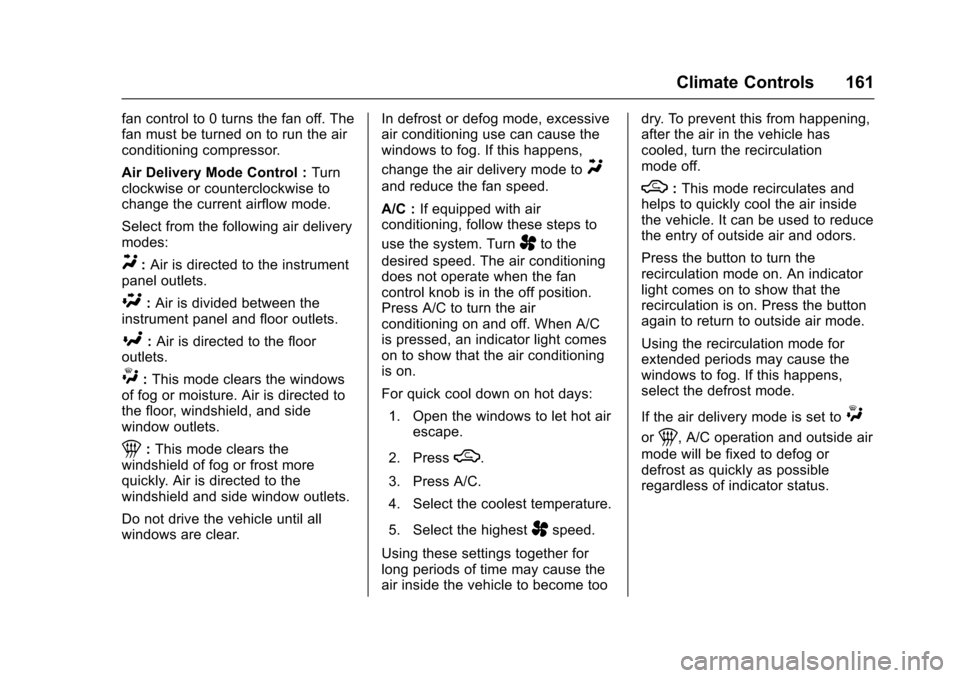
Air Delivery Mode Control :Turn
clockwise or counterclockwise to
change the current airflow mode.
Select from the following air delivery
modes:
Y: Air is directed to the instrument
panel outlets.
\: Air is divided between the
instrument panel and floor outlets.
[: Air is directed to the floor
outlets.
W: This mode clears the windows
of fog or moisture. Air is directed to
the floor, windshield, and side
window outlets.
1: This mode clears the
windshield of fog or frost more
quickly. Air is directed to the
windshield and side window outlets.
Do not drive the vehicle until all
windows are clear. In defrost or defog mode, excessive
air conditioning use can cause the
windows to fog. If this happens,
change the air delivery mode to
Y
and reduce the fan speed.
A/C :
If equipped with air
conditioning, follow these steps to
use the system. Turn
Ato the
desired speed. The air conditioning
does not operate when the fan
control knob is in the off position.
Press A/C to turn the air
conditioning on and off. When A/C
is pressed, an indicator light comes
on to show that the air conditioning
is on.
For quick cool down on hot days:
1. Open the windows to let hot air escape.
2. Press
M.
3. Press A/C.
4. Select the coolest temperature.
5. Select the highest
Aspeed.
Using these settings together for
long periods of time may cause the
air inside the vehicle to become too dry. To prevent this from happening,
after the air in the vehicle has
cooled, turn the recirculation
mode off.
M:
This mode recirculates and
helps to quickly cool the air inside
the vehicle. It can be used to reduce
the entry of outside air and odors.
Press the button to turn the
recirculation mode on. An indicator
light comes on to show that the
recirculation is on. Press the button
again to return to outside air mode.
Using the recirculation mode for
extended periods may cause the
windows to fog. If this happens,
select the defrost mode.
If the air delivery mode is set to
W
or1, A/C operation and outside air
mode will be fixed to defog or
defrost as quickly as possible
regardless of indicator status.
Page 163 of 331
Chevrolet Spark Owner Manual (GMNA-Localizing-U.S./Canada-9956101) -
2017 - crc - 4/25/16
162 Climate Controls
Rear Window and Outside
Mirror Defogger
1:Press to turn the rear window
and outside mirror defogger on or
off. An indicator light comes on to
show that the feature is on.
The rear window defogger can be
turned off by pressing
1again or
by turning the ignition to ACC/
ACCESSORY or LOCK/OFF.
If equipped with heated outside
rearview mirrors, they turn on with
the rear window defogger and help
to clear fog or frost from the surface
of the mirror. See Heated
Mirrors 041.
Caution
Using a razor blade or sharp
object to clear the inside rear
window can damage the rear
window defogger. Repairs would
not be covered by the vehicle
warranty. Do not clear the inside
rear window with sharp objects.
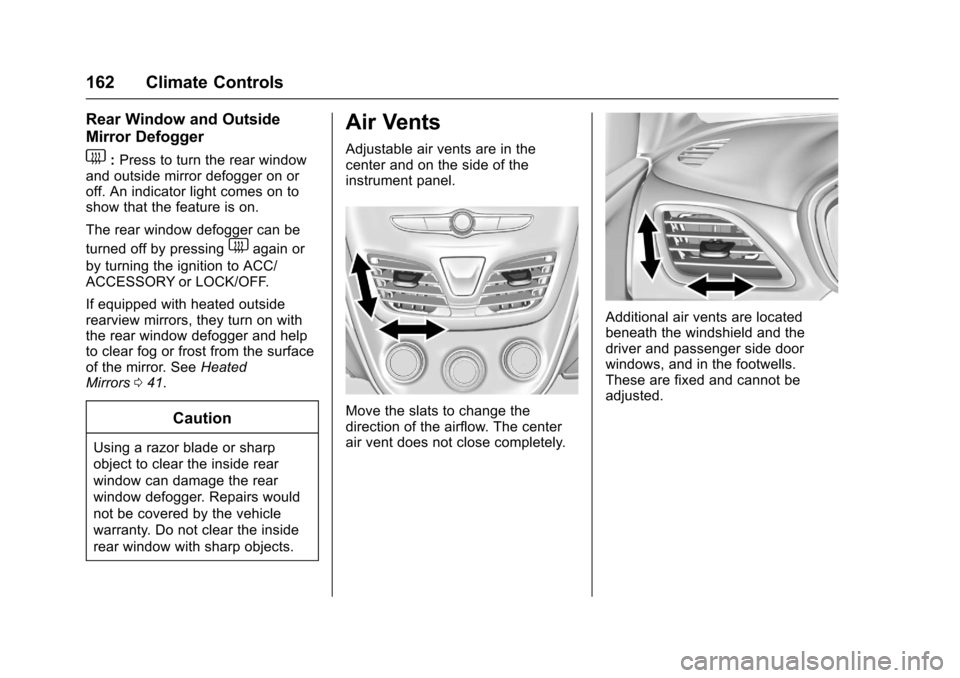
Air Vents
Adjustable air vents are in the
center and on the side of the
instrument panel.
Move the slats to change the
direction of the airflow. The center
air vent does not close completely.
Additional air vents are located
beneath the windshield and the
driver and passenger side door
windows, and in the footwells.
These are fixed and cannot be
adjusted.
Page 172 of 331

Chevrolet Spark Owner Manual (GMNA-Localizing-U.S./Canada-9956101) -
2017 - crc - 4/25/16
Driving and Operating 171
than when on dry pavement.
SeeAntilock Brake System
(ABS) 0189.
. Allow greater following distance
and watch for slippery spots. Icy
patches can occur on otherwise
clear roads in shaded areas.
The surface of a curve or an
overpass can remain icy when
the surrounding roads are clear.
Avoid sudden steering
maneuvers and braking while
on ice.
. Turn off cruise control.
Blizzard Conditions
Stop the vehicle in a safe place and
signal for help. Stay with the vehicle
unless there is help nearby.
If possible, use Roadside
Assistance. See Roadside
Assistance Program 0300. To get
help and keep everyone in the
vehicle safe:
. Turn on the hazard warning
flashers.
. Tie a red cloth to an outside
mirror.
{Warning
Snow can trap engine exhaust
under the vehicle. This may
cause exhaust gases to get
inside. Engine exhaust contains
carbon monoxide (CO), which
cannot be seen or smelled. It can
cause unconsciousness and even
death.
If the vehicle is stuck in snow:
. Clear snow from the base of
the vehicle, especially any
blocking the exhaust pipe.
. Open a window about 5 cm
(2 in) on the vehicle side
that is away from the wind,
to bring in fresh air.
. Fully open the air outlets on
or under the instrument
panel.
. Adjust the climate control
system to circulate the air
inside the vehicle and set
(Continued)
Warning (Continued)
the fan speed to the highest
setting. See“Climate
Control Systems.”
For more information about CO,
see Engine Exhaust 0184.
To save fuel, run the engine for
short periods to warm the vehicle
and then shut the engine off and
partially close the window. Moving
about to keep warm also helps.
If it takes time for help to arrive,
when running the engine, push the
accelerator pedal slightly so the
engine runs faster than the idle
speed. This keeps the battery
charged to restart the vehicle and to
signal for help with the headlamps.
Do this as little as possible, to
save fuel.
Page 193 of 331
Chevrolet Spark Owner Manual (GMNA-Localizing-U.S./Canada-9956101) -
2017 - crc - 4/25/16
192 Driving and Operating
2. Turn the engine off and wait15 seconds.
3. Start the engine.
Drive the vehicle. If
dcomes on
and stays on, the vehicle may need
more time to diagnose the problem.
If the condition persists, see your
dealer.
Turning the Systems Off
and On
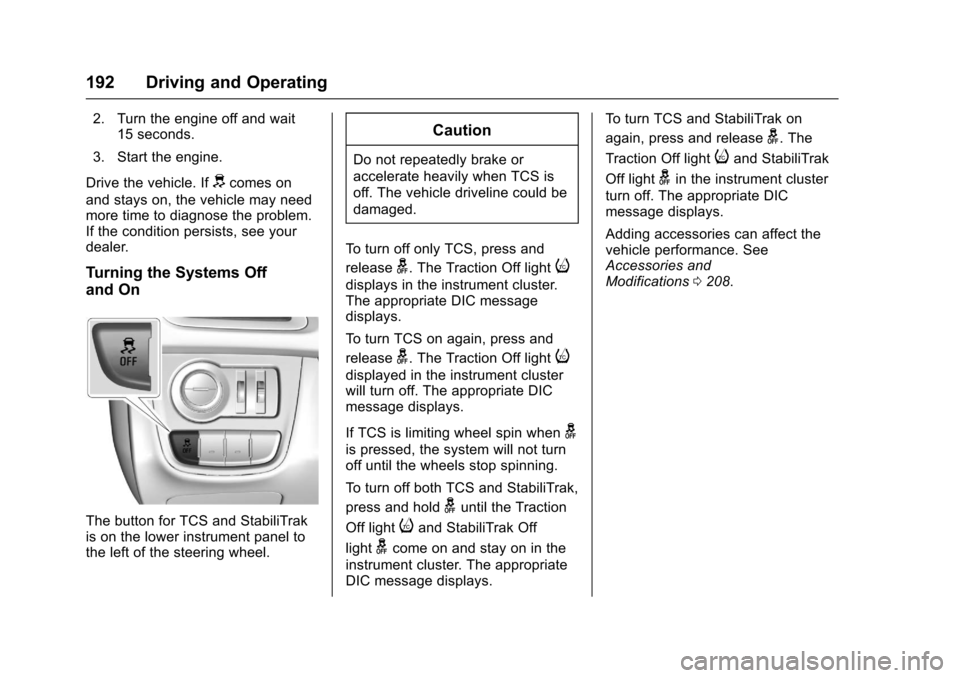
The button for TCS and StabiliTrak
is on the lower instrument panel to
the left of the steering wheel.
Caution
Do not repeatedly brake or
accelerate heavily when TCS is
off. The vehicle driveline could be
damaged.
To turn off only TCS, press and
release
g. The Traction Off lighti
displays in the instrument cluster.
The appropriate DIC message
displays.
To turn TCS on again, press and
release
g. The Traction Off lighti
displayed in the instrument cluster
will turn off. The appropriate DIC
message displays.
If TCS is limiting wheel spin when
g
is pressed, the system will not turn
off until the wheels stop spinning.
To turn off both TCS and StabiliTrak,
press and hold
guntil the Traction
Off light
iand StabiliTrak Off
light
gcome on and stay on in the
instrument cluster. The appropriate
DIC message displays. To turn TCS and StabiliTrak on
again, press and release
g. The
Traction Off light
iand StabiliTrak
Off light
gin the instrument cluster
turn off. The appropriate DIC
message displays.
Adding accessories can affect the
vehicle performance. See
Accessories and
Modifications 0208.
Page 202 of 331

Chevrolet Spark Owner Manual (GMNA-Localizing-U.S./Canada-9956101) -
2017 - crc - 4/25/16
Driving and Operating 201
How the System Works
The LDW camera sensor is on the
windshield ahead of the rearview
mirror.
To turn LDW on and off, press
@on
the instrument panel to the left of
the steering wheel. The control
indicator will light when LDW is on.
When LDW is on,@is green if
LDW is available to warn of a lane
departure. If the vehicle crosses a
detected lane marking without using
the turn signal in that direction,
@
changes to amber and flashes.
Additionally, there will be three
beeps on the right or left, depending
on the lane departure direction.
When the System Does Not
Seem To Work Properly
The system may not detect lanes as
well when there are:
. Close vehicles ahead.
. Sudden lighting changes, such
as when driving through tunnels.
. Banked roads.
If the LDW system is not functioning
properly when lane markings are
clearly visible, cleaning the
windshield may help.
LDW alerts may occur due to tar
marks, shadows, cracks in the road,
temporary or construction lane
markings, or other road
imperfections. This is normal system
operation; the vehicle does not need
service. Turn LDW off if these
conditions continue.
Fuel
GM recommends the use of TOP
TIER Detergent Gasoline to keep
the engine cleaner and reduce
engine deposits. See
www.toptiergas.com for a list of TOP
TIER Detergent Gasoline marketers
and applicable countries.
Do not use any fuel labeled E85 or
FlexFuel. Do not use gasoline with
ethanol levels greater than 15% by
volume.
Use regular unleaded gasoline
meeting ASTM specification D4814
with a posted octane rating of 87 or
higher. Do not use gasoline with a
Page 208 of 331
Chevrolet Spark Owner Manual (GMNA-Localizing-U.S./Canada-9956101) -
2017 - crc - 4/25/16
Vehicle Care 207
Vehicle Care
General Information
General Information . . . . . . . . . . 208
California Proposition65 Warning . . . . . . . . . . . . . . . . . 208
California Perchlorate Materials Requirements . . . . . 208
Accessories and Modifications . . . . . . . . . . . . . . . . 208
Vehicle Checks
Doing Your OwnService Work . . . . . . . . . . . . . . . 209
Hood . . . . . . . . . . . . . . . . . . . . . . . . . 210
Engine Compartment Overview . . . . . . . . . . . . . . . . . . . . 212
Engine Oil . . . . . . . . . . . . . . . . . . . . 213
Engine Oil Life System . . . . . . . 215
Automatic Transmission Fluid . . . . . . . . . . . . . . . . . . . . . . . . 217
Manual Transmission Fluid . . . 217
Hydraulic Clutch . . . . . . . . . . . . . . 217
Engine Air Cleaner/Filter . . . . . . 218
Cooling System . . . . . . . . . . . . . . 219
Engine Coolant . . . . . . . . . . . . . . . 219
Engine Overheating . . . . . . . . . . 223
Washer Fluid . . . . . . . . . . . . . . . . . 224
Brakes . . . . . . . . . . . . . . . . . . . . . . . 225
Brake Fluid . . . . . . . . . . . . . . . . . . . 225 Battery - North America . . . . . . 226
Starter Switch Check . . . . . . . . . 227
Automatic Transmission Shift
Lock Control Function
Check . . . . . . . . . . . . . . . . . . . . . . . 227
Ignition Transmission Lock Check . . . . . . . . . . . . . . . . . . . . . . . 228
Park Brake and P (Park) Mechanism Check . . . . . . . . . . 228
Wiper Blade Replacement . . . . 228
Headlamp Aiming
Headlamp Aiming . . . . . . . . . . . . 229
Bulb Replacement
Bulb Replacement . . . . . . . . . . . . 230
Halogen Bulbs . . . . . . . . . . . . . . . . 230
Headlamps, Front Turn Signal, Sidemarker, and Parking
Lamps . . . . . . . . . . . . . . . . . . . . . . 230
Fog Lamps . . . . . . . . . . . . . . . . . . . 232
Fog Lamps (Canada Only) . . . 232
Taillamps, Turn Signal, Stoplamps, and Back-Up
Lamps . . . . . . . . . . . . . . . . . . . . . . 233
License Plate Lamp . . . . . . . . . . 234
Replacement Bulbs . . . . . . . . . . . 234
Electrical System
Electrical System Overload . . . 235
Fuses and Circuit Breakers . . . 235 Engine Compartment Fuse
Block . . . . . . . . . . . . . . . . . . . . . . . . 236
Instrument Panel Fuse Block . . . . . . . . . . . . . . . . . . . . . . . . 238
Wheels and Tires
Tires . . . . . . . . . . . . . . . . . . . . . . . . . . 240
All-Season Tires . . . . . . . . . . . . . . 241
Winter Tires . . . . . . . . . . . . . . . . . . 241
Tire Sidewall Labeling . . . . . . . . 242
Tire Designations . . . . . . . . . . . . . 244
Tire Terminology andDefinitions . . . . . . . . . . . . . . . . . . 244
Tire Pressure . . . . . . . . . . . . . . . . . 247
Tire Pressure Monitor System . . . . . . . . . . . . . . . . . . . . . . 248
Tire Pressure Monitor
Operation . . . . . . . . . . . . . . . . . . . 249
Tire Inspection . . . . . . . . . . . . . . . . 252
Tire Rotation . . . . . . . . . . . . . . . . . 252
When It Is Time for New Tires . . . . . . . . . . . . . . . . . . . . . . . . 253
Buying New Tires . . . . . . . . . . . . . 254
Different Size Tires and Wheels . . . . . . . . . . . . . . . . . . . . . . 255
Wheel Covers . . . . . . . . . . . . . . . . 256
Uniform Tire Quality Grading . . . . . . . . . . . . . . . . . . . . . 256
Wheel Alignment and Tire Balance . . . . . . . . . . . . . . . . . . . . . 257
Wheel Replacement . . . . . . . . . . 258
Page 211 of 331
Chevrolet Spark Owner Manual (GMNA-Localizing-U.S./Canada-9956101) -
2017 - crc - 4/25/16
210 Vehicle Care
Keep a record with all parts receipts
and list the mileage and the date of
any service work performed. See
Maintenance Records0292.
Caution
Even small amounts of
contamination can cause damage
to vehicle systems. Do not allow
contaminants to contact the fluids,
reservoir caps, or dipsticks.
Hood
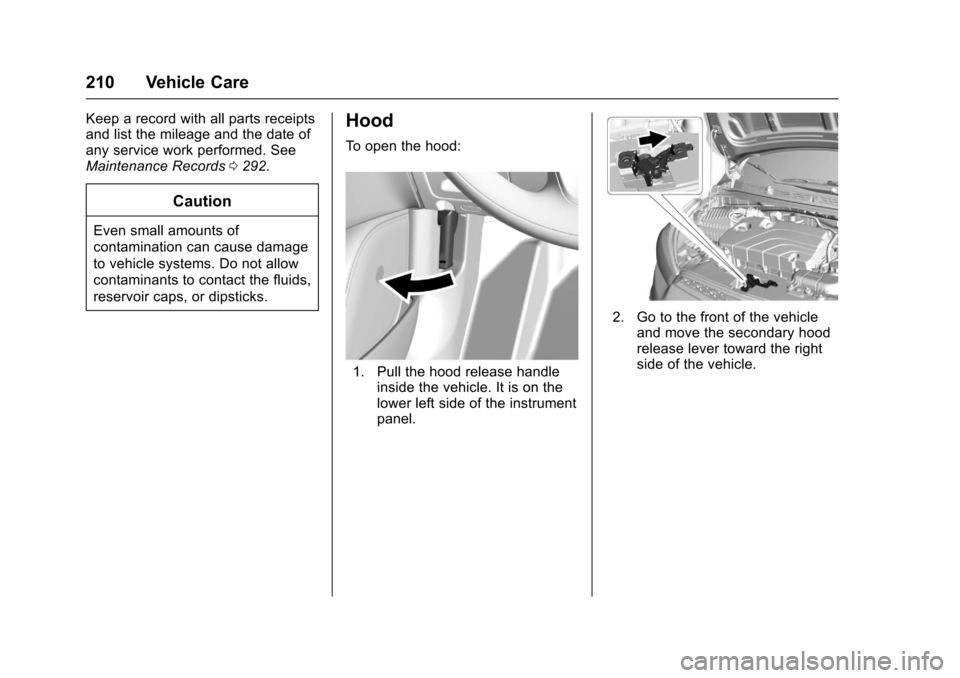
To open the hood:
1. Pull the hood release handle
inside the vehicle. It is on the
lower left side of the instrument
panel.
2. Go to the front of the vehicleand move the secondary hood
release lever toward the right
side of the vehicle.
Page 239 of 331

Chevrolet Spark Owner Manual (GMNA-Localizing-U.S./Canada-9956101) -
2017 - crc - 4/25/16
238 Vehicle Care
Number UsageRLY6 Auxiliary heater pump
RLY7 Cooling fan –low
RLY8 Run/Crank
RLY9 WR/TRN
RLY10 Starter 1 RLY11 Cooling fan –high
RLY12 Front fog lamps
Instrument Panel Fuse
Block
The instrument panel fuse block is
on the underside of the driver side
instrument panel.The vehicle may not be equipped
with all of the fuses, relays, and
features shown. Number Usage
ONSTAR OnStar HVAC
CNTR/ECC HVAC control
module/ECC
IPC Instrument panel cluster
TCM Transmission control module
RDO Radio
BCM1
(AT S&S) Body control
module 1 (CVT stop
and start)
SBSA/RPA SBSA/Rear parking assist
DLC Data link connector
ESCL Electric steering column lock
SDM Sensing and diagnostic module
TRANSD DC-DC converter – –
Page 240 of 331

Chevrolet Spark Owner Manual (GMNA-Localizing-U.S./Canada-9956101) -
2017 - crc - 4/25/16
Vehicle Care 239
Number UsageETCS Electronic toll collection system
LPM Linear power module
PEPS Passive entry/ Passive start
DLIS (Non AT S&S) Discrete logic
ignition switch
(non-CVT stop and
start)
FCA Forward collision alert
IPC Instrument panel cluster
RLAD Reflected LED alert display
HLLD SW Headlamp leveling switch
FRT
PWR WNDW Front power
window
REAR
PWR WNDW Rear power
window
– – Number Usage
MTA Automated manual transmission
module
APO Auxiliary power outlet
S/ROOF Sunroof – –
BCM8 Body control module 8
BCM7 Body control module 7
BCM6 Body control module 6
BCM5 Body control module 5
BCM4 Body control module 4
BCM3 Body control module 3
BCM2 (Non AT S&S) Body control
module 2 (non-CVT
stop and start) Number Usage
BCM1 (Non AT S&S) Body control
module 1 (non-CVT
stop and start)
DLIS
(AT S&S) Discrete logic
ignition switch
(CVT stop and
start)
SWC BKLT Steering wheel controls
backlighting
– –
TRANS (200/ 400W)/
LOGISTICS DC DC converter/
Logistics
EXP
PWR WNDW Driver express
power window
BLWR Blower motor
HTD/SEAT Front heated seats
HVAC CNTR HVAC module HTD/STR Heated steering wheel
BCM2
(AT S&S) Body control
module 2 (CVT stop
and start)
Page 279 of 331
Chevrolet Spark Owner Manual (GMNA-Localizing-U.S./Canada-9956101) -
2017 - crc - 4/25/16
278 Vehicle Care
Instrument Panel, Leather,
Vinyl, Other Plastic Surfaces,
Low Gloss Paint Surfaces, and
Natural Open Pore Wood
Surfaces
Use a soft microfiber cloth
dampened with water to remove
dust and loose dirt. For a more
thorough cleaning, use a soft
microfiber cloth dampened with a
mild soap solution.
Caution
Soaking or saturating leather,
especially perforated leather, as
well as other interior surfaces,
may cause permanent damage.
Wipe excess moisture from these
surfaces after cleaning and allow
them to dry naturally. Never use
heat, steam, or spot removers. Do
not use cleaners that contain
silicone or wax-based products.
Cleaners containing these
solvents can permanently change(Continued)
Caution (Continued)
the appearance and feel of
leather or soft trim, and are not
recommended.
Do not use cleaners that increase
gloss, especially on the instrument
panel. Reflected glare can decrease
visibility through the windshield
under certain conditions.
Caution
Use of air fresheners may cause
permanent damage to plastics
and painted surfaces. If an air
freshener comes in contact with
any plastic or painted surface in
the vehicle, blot immediately and
clean with a soft cloth dampened
with a mild soap solution.
Damage caused by air fresheners
would not be covered by the
vehicle warranty.
Cargo Cover and
Convenience Net
Wash with warm water and mild
detergent. Do not use chlorine
bleach. Rinse with cold water, and
then dry completely.
Care of Safety Belts
Keep belts clean and dry.
{Warning
Do not bleach or dye safety belt
webbing. It may severely weaken
the webbing. In a crash, they
might not be able to provide
adequate protection. Clean and
rinse safety belt webbing only
with mild soap and lukewarm
water. Allow the webbing to dry.